

Hardware Recommendations for Cinema 4D
It’s easy to run Cinebench and find which CPUs are the fastest for rendering, but there is a lot more to Cinema 4D that it does not cover. We’ve taken a holistic look at what hardware you need for C4D.
Cinema 4D System Requirements and Benchmarks
Quickly Jump To: Processor (CPU) • Video Card (GPU) • Memory (RAM) • Storage (Drives)
Like most software developers, Maxon maintains a list of system requirements for Cinema 4D that can be used to help ensure the hardware in your system will work with their software. However, this “system requirements” list only covers the very basics of what hardware is needed to run the software, not what hardware will actually give the best performance. Because of how inconsistent those lists can be, we’ve taken the time to perform testing to determine what hardware runs Cinema 4D the best. Based on this testing, we have come up with our own list of recommended hardware for Cinema 4D.
What do I need for the best modeling and animation performance in Cinema 4D?
Modeling and animation in Cinema 4D are primarily single-threaded, so you want a CPU with the highest possible clock speed – but core count is not particularly important. A good video card is also needed in order to smoothly display the 3D graphics you create.
Does rendering in Cinema 4D require different hardware?
Maxon has moved Cinema 4D’s default rendering engine to Redshift, which is primarily a GPU-based renderer. Redshift does support both NVIDIA and AMD GPUs on Windows – however, in our testing, NVIDIA is significantly faster. It also supports multiple video cards and scales well as more GPUs are added.
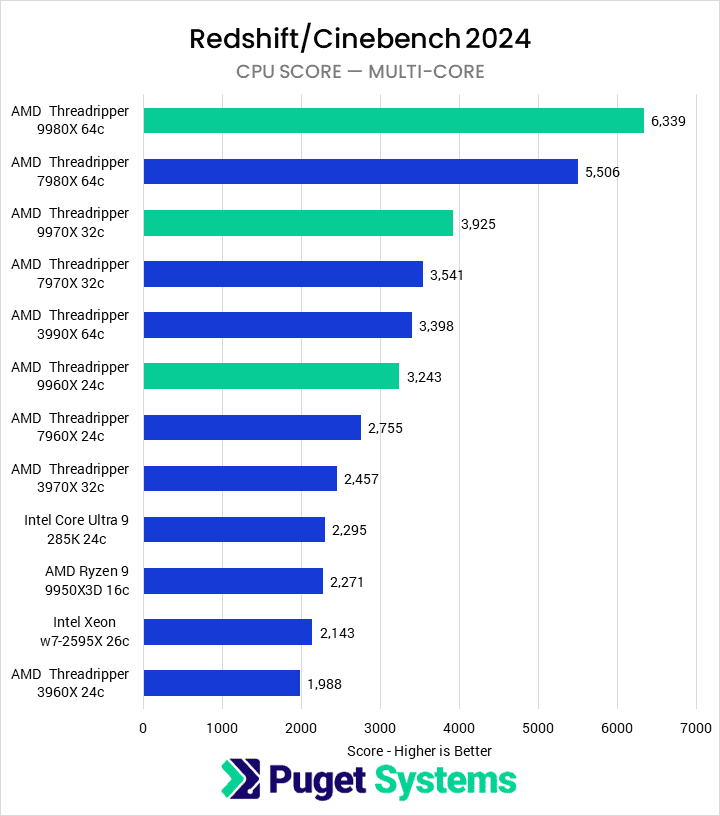
CPU rendering is an option for those who do not have a supported GPU, though it is not nearly as fast as rendering with a GPU. If a user does rely on CPU rendering in Redshift, it benefits greatly from having a high number of cores. That means a high-core-count CPU, like AMD’s Threadripper PRO, is excellent for CPU-based rendering in Cinema 4D.
Processor (CPU)
How does Cinema 4D utilize the CPU?
The majority of design tasks in Cinema 4D (including creating, modifying, and animating 3D models) are only able to utilize a single CPU core which makes a high-frequency CPU – regardless of the core count – an ideal choice for these tasks. Because of this, our Design & Animation workstation focuses on high clock speeds with a moderate core count.
The default rendering engine in Cinema 4D is now Redshift, which is GPU-based, so the CPU now has very little impact on performance in that area. However, if you prefer to use CPU-based rendering instead – either with the capabilities built into C4D or another engine like Arnold, Mental Ray, V-Ray Next CPU, or Keyshot – that workflow is very efficient at utilizing a high number of cores. In fact, most of these engines scale almost perfectly… which makes a CPU with twice the number of cores nearly twice as fast (assuming similar clock speeds). Dual processors can also be effective for pure CPU rendering, but they tend to have lower clock speeds and aren’t ideal for workstations where modeling is a core part of the workflow.
What are the best CPUs for Cinema 4D?
There are a lot of great processors for Cinema 4D, but here are some of our top recommendations:
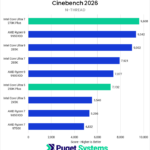
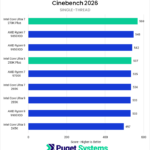
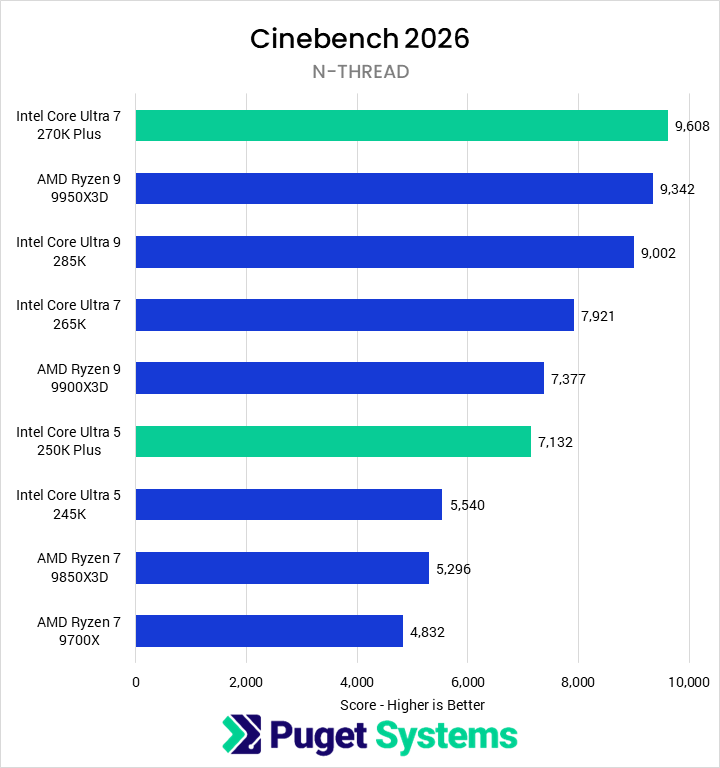
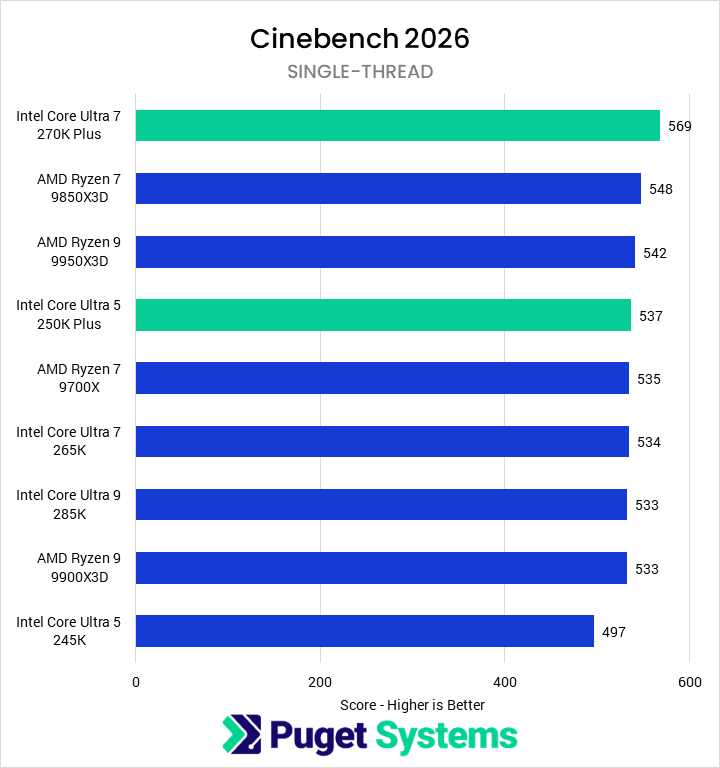
- Intel Core™ Ultra 7 270K Plus 24 Core – This is a great entry point for artists, with high clock speeds that put it at the top of the charts for single-core performance in Cinema 4D as well as enough cores to also grab the top multi-thread score among consumer CPUs. AMD’s Ryzen™ 9000 Series is a solid option, too.
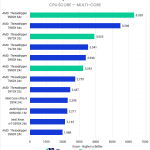
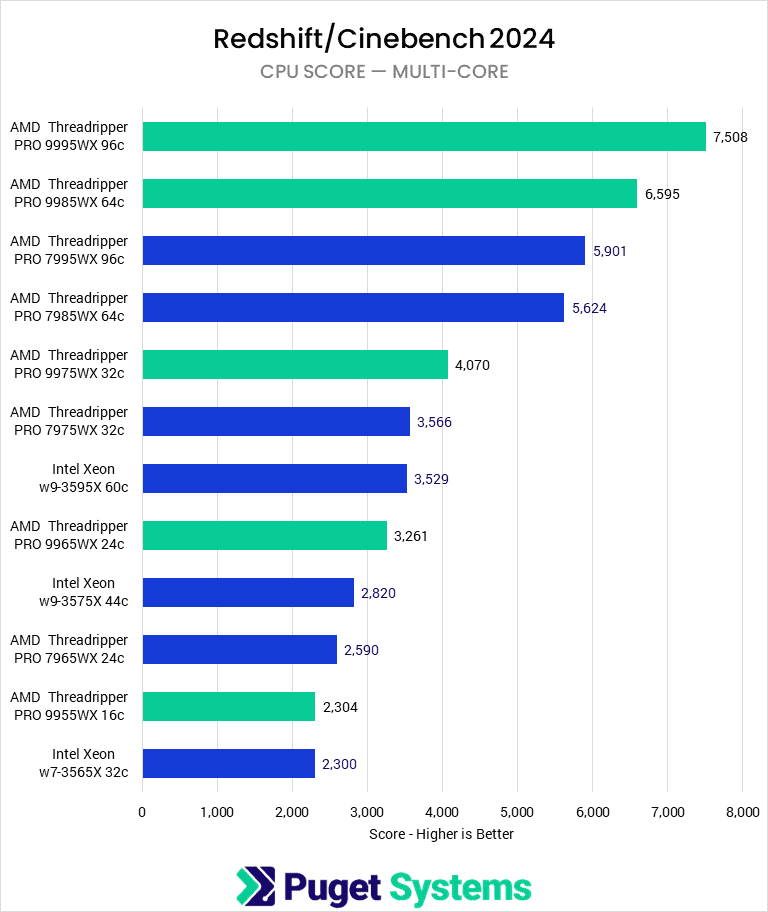
- AMD Threadripper™ 9980X 64 Core – AMD’s Threadripper line packs huge core counts and high memory capacity while maintaining good per-core performance, making it a fantastic choice for workstations that are focused on rendering performance. The decent single-threaded speed means these chips also do well with modeling and animation, though they do fall behind the Core line in that area and cost a lot more as well. Technically the 96-core Threadripper PRO 9995WX is slightly faster, but the ~18% increase in rendering is not worth the many thousands of dollars higher price tag for most users.

Can I use a laptop for Cinema 4D?
Yes, though even top-end mobile CPUs and GPUs will be a little slower than similar desktop hardware. Our new mobile workstation is ideal for this application, and you can read about trade-offs with a traditional tower PC in our comparison article.
Additional Resources:

Looking for a Cinema 4D Workstation?
We build computers tailor-made for your workflow.

Don’t know where to start?
We can help!
Get in touch with our technical consultants today.
Video Card (GPU)
How does Cinema 4D utilize video cards (GPUs)?
When creating, editing, and animating models in Cinema 4D, the video card is a large part of how many frames per second (FPS) the viewport is able to display the model at. A higher FPS will result in a smoother and overall better experience when rotating, zooming, or panning around the model you are working on. In general, 30 FPS is considered a minimum acceptable framerate, while 60 FPS is ideal.
Beyond pure 3D display, Cinema 4D has other ways to utilize your video card as well. Maxon recently moved the default renderer to Redshift, a dramatic change from the previous CPU-based render in C4D. Numerous other GPU rendering plug-ins exist as well, like OctaneRender. There is also a new feature in C4D called the Unified Simulation System which can use the video card alongside the CPU to accelerate certain types of physics simulations.
What type of video card (GPU) is best for Cinema 4D?
Rendering puts the most significant demand on the GPU. Spending more on a faster GPU can often have a great return on investment by decreasing the time spent rendering. While Redshift does support both NVIDIA and AMD video cards, in our testing NVIDIA is significantly faster in rendering. For most users, any mid-range GeForce card from the RTX™ 5070 Ti on up will be great, while the RTX™ 5090 will dramatically reduce render times and has substantially more VRAM for more complex scenes.
Do I need to use a professional video card for Cinema 4D or is GeForce okay?
Cinema 4D needs a powerful video card, unless you are exclusively doing CPU-based rendering, but either an NVIDIA RTX PRO™ (formerly Quadro) or a GeForce card should work just fine. However, there are certain times where you may want to use a pro-grade card. First, they are slightly more reliable long-term since they are designed to operate under heavy load for extended periods of time and tend to have more stable drivers – as well as offering more onboard VRAM. In addition, companies like Autodesk (Revit/3ds Max/Maya) and Dassault Systèmes (SOLIDWORKS) tend to heavily favor the use of professional cards. If you plan on running any of those applications on the same system then a pro card is a good idea.
Is there any use for multiple video cards in Cinema 4D?
Redshift scales well across multiple video cards, but the cooling systems on most GeForce models are not designed with multiple GPUs in mind. For the best overall performance, variants with a single fan that exhausts heat out the back (commonly called “blower” cards) are ideal – and most NVIDIA “professional” cards use such cooling systems. Stacking a few of those will give fantastic rendering performance, though it does require a larger chassis, strong power supply, and plenty of airflow from the case fans.
Memory (RAM)
How much system memory (RAM) does Cinema 4D need?
While the exact amount of RAM you need is going to depend on your particular projects, for Cinema 4D we generally recommend a minimum of 16GB. Very complex scenes may need up to 32GB of RAM, although it is rare for Cinema 4D to require more than 32GB.
In extreme cases, if you will be doing a large amount of complex, high-resolution rendering, you may need 64GB or even more RAM.
Storage (Drives)
What is the best type of drive to use for Cinema 4D?
Thanks to their speed and relatively affordable price, we strongly recommend solid-state drives (SSDs) for the primary drive that will host your OS and the installation of Cinema 4D itself. The high speed of SSDs allows your system to boot, launch applications, and load files many times faster than any traditional hard drive. In particular, the newer NVMe type of SSDs utilize the latest connections like M.2 and offer the fastest transfer rates.
If your budget allows, it is also a very good idea to have a second SSD that can be used to store your active projects to further decrease load and save times. We highly recommend using an OS drive with a capacity of at least 500GB to ensure you do not need to upgrade your primary drive (which is often a complicated process) in the near future.
Should I use a solid-state drive (SSD) for Cinema 4D?
Yes! SSDs are much faster than traditional hard drives and in many cases can give a noticeable decrease in the time it takes to open and save files – not to mention simply starting Windows and launching Cinema 4D itself.
What sort of drive is best for data storage and backup?
Since SSDs are still more expensive than platter drives per GB, for long-term storage and backup we recommend using a traditional hard drive or even an external drive array. Network-attached storage systems are a great way to go for that, as they can be shared between multiple workstations and usually offer features to provide some level of data redundancy (protection against losing files if one of the drives dies).

Looking for a Cinema 4D workstation?
We build computers that are tailor-made for your workflow.
Don’t know where to start? We can help!
Get in touch with one of our technical consultants today.