Table of Contents
Introduction
The conversations around artificial intelligence (AI) in media and entertainment can be conflicting because there are varying perspectives on how it fits into the narrative of creating and consuming content. Depending on who you talk to, their experiences or personal philosophies will shape how they interpret AI’s role in content creation pipelines.
At the heart of these discussions are generative AI models, trained on large datasets to generate specific types of content, such as images, videos, music, voice, and 3D assets. These models are improving rapidly, with new versions and updates released frequently, which can make it difficult to keep pace with the latest advancements.
However, no single model truly ‘works’ for all aspects of the content pipeline. Different applications, hardware, interfaces, and workflows can affect inference, which is the operation of a trained model using inputs such as prompts, images, or other control variables to predict and generate content as an output. In turn, inference impacts processing time, output quality, and computational requirements, meaning the most suitable model and platform may vary depending on your needs.
While there are many avenues for discussion around generative AI, it’s worth mentioning that this post is not an attempt to identify the ‘best’ model or tool for content creation. That question is inherently subjective, and I believe your own perspectives will help you determine whether a given model or tool’s output meets your standards. What this post will cover, at a high level, is the different types of generative AI models and where you can access them.
Generative AI Explained
Artificial intelligence is a broad term that refers to many different technologies. In content creation, it can describe various AI models, software, tools, and features – making it difficult to distinguish what each actually does or how they differ from one another.
To make sense of these differences, it can be helpful to categorize AI based on how they are offered and used:
- AI as Products – Artificial intelligence solutions offered commercially for access or deployment.
- AI as Tools – Products functioning within a creative pipeline or workflow to generate content.
- AI as Features – Capabilities embedded in software that support or enhance parts of the creative process.
As a product, generative AI can be commercially distributed through web-based platforms, APIs, downloadable models, or managed hosting solutions. For organizations deploying generative AI solutions, your infrastructure influences how effectively systems scale to meet demand, maintain responsiveness under variable workloads, and integrate with existing applications and workflows.
Within the content creation pipeline, generative AI tools enable creators to produce various types of content. These tools are powered by AI models, each trained to generate specific types of outputs, such as images, video, music, sound effects, or 3D assets. As a result, content creators have the opportunity to experiment, iterate, and explore alternative workflows that might have been difficult, time-consuming, or costly using traditional production. However, not all models within a given category produce the same type of content. Developers train models on datasets that shape the content they generate, and these datasets can influence stylistic outcomes, consistency, quality, and performance. There is no single model that works ‘best’ for every task, so it’s important to research and test models to find those that most align with your needs.
Aside from generative AI tools, some mainstream software applications include features that leverage other types of AI or machine learning (ML) to automate tedious or repetitive tasks that support the creative process. Classification AI labels or categorizes content and encompasses activities like analyzing and tagging media files, object detection, and masking. Other ML-assisted functions include enhancing audio, speech-to-text transcriptions, stabilizing footage, and motion tracking.
Different Types of Generative AI Models
As mentioned in the intro, the generative AI landscape is evolving rapidly, with new models and updates constantly emerging. To provide a clearer view of the current tools shaping the field, I have included four tables below that break down many of the popular generative AI base models available for different types of content.
It’s worth noting that some models may be missing, as my research was limited to what could be reasonably reviewed at the time of writing, and the total number of models available is too large to comprehensively cover for this type of post. The tables include only base models and exclude LoRAs or fine-tuned variants. Covering topics such as data security, copyright, and licensing for commercial or personal use is also outside the scope of this overview. Please note that these tables have multiple pages of entries and can be sorted or filtered if you want to narrow the list down.
Image Models
The table below highlights generative AI models for creating 2D images.
| wdt_ID | wdt_created_by | wdt_created_at | wdt_last_edited_by | wdt_last_edited_at | Model Family / Base Model | Developer / Organization | Developer Country | Access | Model Variants |
|---|---|---|---|---|---|---|---|---|---|
| 1 | Peter | Feb 2026 03:54 PM | Peter | Feb 2026 03:54 PM | Adobe Firefly | Adobe | United States | Cloud | Firefly Model 3, Firefly Model 4, Firefly Model 5 |
| 2 | Peter | Feb 2026 03:54 PM | Peter | Feb 2026 03:54 PM | Ovis | Alibaba | China | Local, Cloud | — |
| 3 | Peter | Feb 2026 03:54 PM | Peter | Feb 2026 03:54 PM | Qwen Image | Alibaba | China | Local, Cloud | Qwen Image, Qwen Image 2512, Qwen Image Edit 2511 |
| 4 | Peter | Feb 2026 03:54 PM | Peter | Feb 2026 03:54 PM | Z-Image | Alibaba | China | Local, Cloud | Z-Image Standard, Z-Image Turbo |
| 5 | Peter | Feb 2026 03:54 PM | Peter | Feb 2026 03:54 PM | Flux 1 Series | Black Forest Labs | Germany | Local, Cloud | Flux 1.0, Flux 1.1, Flux 1.1 Pro, Flux 1.1 Ultra, Flux 1.1 Kontext, Flux 1 Schnell |
| 6 | Peter | Feb 2026 03:54 PM | Peter | Feb 2026 03:54 PM | Flux 2 Series | Black Forest Labs | Germany | Local, Cloud | Klein 4B, Klein 4B Fast, Klein 9B, Kontext Max, Kontext Pro, Flex, Max, Pro |
| 7 | Peter | Feb 2026 03:54 PM | Peter | Feb 2026 03:54 PM | Bria | Bria AI | Israel / United States | Cloud | Bria 4.0 |
| 8 | Peter | Feb 2026 03:54 PM | Peter | Feb 2026 03:54 PM | Cosmos‑Predict2 | NVIDIA | United States | Local | Cosmos-Predict2-2B-Text2Image, Cosmos-Predict2-14B-Text2Image |
| 9 | Peter | Feb 2026 03:54 PM | Peter | Feb 2026 03:54 PM | DALL·E | OpenAI | United States | Cloud | DALL·E 2, DALL·E 3 |
| 10 | Peter | Feb 2026 03:54 PM | Peter | Feb 2026 03:54 PM | GPT Image | OpenAI | United States | Cloud | GPT Image 1, GPT Image 1.5 |
| Model Family / Base Model | Developer / Organization | Developer Country | Access | Model Variants |
Video Models
The table below highlights generative AI models designed for video generation.
| wdt_ID | wdt_created_by | wdt_created_at | wdt_last_edited_by | wdt_last_edited_at | Model Family / Base Model | Developer / Organization | Developer Country | Access | Model Variants |
|---|---|---|---|---|---|---|---|---|---|
| 1 | Peter | Feb 2026 03:58 PM | Peter | Feb 2026 03:58 PM | Adobe Firefly Video | Adobe | United States | Cloud | Firefly Video Model 1, Firefly Video Model 2 |
| 2 | Peter | Feb 2026 03:58 PM | Peter | Feb 2026 03:58 PM | Wan Video | Alibaba | China | Cloud | Wan 2.1 Standard, Wan 2.2 Standard, Wan 2.5 Standard, Wan 2.6 Standard, Wan 2.2 Fast, Wan 2.5 Fast, Wan 2.6 Fast |
| 3 | Peter | Feb 2026 03:58 PM | Peter | Feb 2026 03:58 PM | SwitchLight 3.0 | Beeble Labs | United States | Local & Cloud | — |
| 4 | Peter | Feb 2026 03:58 PM | Peter | Feb 2026 03:58 PM | SHARP | Apple | United States | Local | -- |
| 5 | Peter | Feb 2026 03:58 PM | Peter | Feb 2026 03:58 PM | Omni Human | Beijing Academy of Artificial Intelligence | China | Cloud | OmniHuman 1.5 |
| 6 | Peter | Feb 2026 03:58 PM | Peter | Feb 2026 03:58 PM | Seedance Video | ByteDance | China | Cloud | Seedance 1.5 Pro, Seedance Pro, Seedance Pro Fast, Seedance Lite, Seedance 2.0 |
| 7 | Peter | Feb 2026 03:58 PM | Peter | Feb 2026 03:58 PM | Veo Video | Google (DeepMind) | United States | Cloud | Veo 2, Veo 3.0, Veo 3.0 Fast, Veo 3.1, Veo 3.1 Fast |
| 8 | Peter | Feb 2026 03:58 PM | Peter | Feb 2026 03:58 PM | Higgsfield Video | Higgsfield AI | United States | Cloud | Higgsfield Lite, Higgsfield Standard, Higgsfield Turbo |
| 9 | Peter | Feb 2026 03:58 PM | Peter | Feb 2026 03:58 PM | Kandinsky 5.0 Video | KandinskyLab | Russia | Local, Cloud | Kandinsky 5.0 Lite, Kandinsky 5.0 Pro |
| 10 | Peter | Feb 2026 03:58 PM | Peter | Feb 2026 03:58 PM | Kling Video | Kuaishou Technology | China | Cloud | Kling 2.1, Kling 2.1 Master, Kling 2.5 Turbo, Kling 2.6, Kling 2.6 Motion Control, Kling 3.0, Kling Avatars 2.0, Kling O1 Video, Kling O1 Video Edit |
| Model Family / Base Model | Developer / Organization | Developer Country | Access | Model Variants |
Audio Models
The table below highlights generative AI models pertaining to music, voice, lip-sync, and sound effects.
| wdt_ID | wdt_created_by | wdt_created_at | wdt_last_edited_by | wdt_last_edited_at | Model Family / Base Model | Developer / Organization | Developer Country | Access | Model Variants | Content Type |
|---|---|---|---|---|---|---|---|---|---|---|
| 1 | Peter | Feb 2026 04:02 PM | Peter | Feb 2026 04:02 PM | Ace Step | ACE Studio | China | Local, Cloud | Ace Step 1.5 | Music |
| 2 | Peter | Feb 2026 04:02 PM | Peter | Feb 2026 04:02 PM | Adobe Podcast / Firefly Sound | Adobe | United States | Cloud | Enhance Speech, Firefly Sound Effects | Voice, SFX |
| 3 | Peter | Feb 2026 04:02 PM | Peter | Feb 2026 04:02 PM | Bark | Suno Labs | United States | Local, Cloud | Bark | Voice |
| 4 | Peter | Feb 2026 04:02 PM | Peter | Feb 2026 04:02 PM | Cartesia Voice | Cartesia | United States | Cloud | Cartesia Voice | Voice |
| 5 | Peter | Feb 2026 04:02 PM | Peter | Feb 2026 04:02 PM | Eleven Music | ElevenLabs | United States | Cloud | Eleven Music | Music |
| 6 | Peter | Feb 2026 04:02 PM | Peter | Feb 2026 04:02 PM | Eleven TTS (Text-to-Speech) | ElevenLabs | United States | Cloud | Eleven v3, Eleven Multilingual v2, Eleven Flash v2.5, Eleven Turbo v2.5 | Voice |
| 7 | Peter | Feb 2026 04:02 PM | Peter | Feb 2026 04:02 PM | Eleven TTV (Text-to-Voice) | ElevenLabs | United States | Cloud | Eleven TTV v3 | Voice |
| 8 | Peter | Feb 2026 04:02 PM | Peter | Feb 2026 04:02 PM | Scribe | ElevenLabs | United States | Cloud | Scribe v2, Scribe v2 Realtime | Voice |
| 9 | Peter | Feb 2026 04:02 PM | Peter | Feb 2026 04:02 PM | Higgsfield Voice | Higgsfield AI | United States | Cloud | Higgsfield Voice Standard, Higgsfield Voice Pro | Voice |
| 10 | Peter | Feb 2026 04:02 PM | Peter | Feb 2026 04:02 PM | AudioGen | Google Research | United States | Cloud | AudioGen 1, AudioGen 2 | SFX |
| Model Family / Base Model | Developer / Organization | Developer Country | Access | Model Variants | Content Type |
3D Models
The table below highlights generative AI models for various types of 3D content, including 2D→3D outputs, environments, meshes, textures, and point cloud generation.
| wdt_ID | wdt_created_by | wdt_created_at | wdt_last_edited_by | wdt_last_edited_at | Model Family / Base Model | Developer / Organization | Developer Country | Access | Model Variants | Content Type |
|---|---|---|---|---|---|---|---|---|---|---|
| 1 | Peter | Feb 2026 04:02 PM | Peter | Feb 2026 04:02 PM | Adobe Firefly (Substance 3D Integration) | Adobe | United States | Local & Cloud | -- | Materials, Textures |
| 2 | Peter | Feb 2026 04:02 PM | Peter | Feb 2026 04:02 PM | SHARP | Apple | United States | Local | -- | 2D → 3D Point Cloud (Gaussian splat) |
| 3 | Peter | Feb 2026 04:02 PM | Peter | Feb 2026 04:02 PM | Rodin 3D | AI3D Labs | United States | Cloud | Rodin Gen-1 | 2D→3D Mesh, Animation |
| 4 | Peter | Feb 2026 04:02 PM | Peter | Feb 2026 04:02 PM | Tripo AI | Alibaba | China | Cloud | Tripo 2.0 | 2D→3D Mesh, Textured Mesh |
| 5 | Peter | Feb 2026 04:02 PM | Peter | Feb 2026 04:02 PM | Hunyuan 3D | Tencent | China | Cloud | Hunyuan 3D 2.5, Hunyuan 3D 3.0 | 2D→3D Mesh, Textures |
| 6 | Peter | Feb 2026 04:02 PM | Peter | Feb 2026 04:02 PM | Meshy AI | Meshy LLC | United States | Cloud | Meshy 4 | 2D→3D Mesh, Textures |
| 7 | Peter | Feb 2026 04:02 PM | Peter | Feb 2026 04:02 PM | GET3D | NVIDIA | United States | Local | GET3D | 2D→3D Mesh, Textured Mesh |
| 8 | Peter | Feb 2026 04:02 PM | Peter | Feb 2026 04:02 PM | Point-E | OpenAI | United States | Local | Point-E | Point Cloud → Mesh |
| 9 | Peter | Feb 2026 04:02 PM | Peter | Feb 2026 04:02 PM | Sloyd | Sloyd | Norway | Cloud | Sloyd 2.0 | Text‑to‑3D, Image‑to‑3D, Parametric Templates, Export (STL/OBJ/GLB) |
| 10 | Peter | Feb 2026 04:02 PM | Peter | Feb 2026 04:02 PM | Spline AI 3D Generation | Spline | United States | Cloud | Spline AI 3D | 2D→3D Mesh, Scene Layout |
| Model Family / Base Model | Developer / Organization | Developer Country | Access | Model Variants | Content Type |
How to Access and Use Generative AI Models
Generative AI models can be accessed through software applications hosted locally on your system or through cloud and web-based platforms. This includes new tools explicitly built for generating content, as well as traditional applications integrating AI features into their software. That said, not all platforms offer the same models or features. For example, Adobe Photoshop runs inferences in their cloud servers from prompts and tools such as generative fill – but it only offers a limited set of models, whereas other applications or platforms may provide similar features with access to a larger number of models.
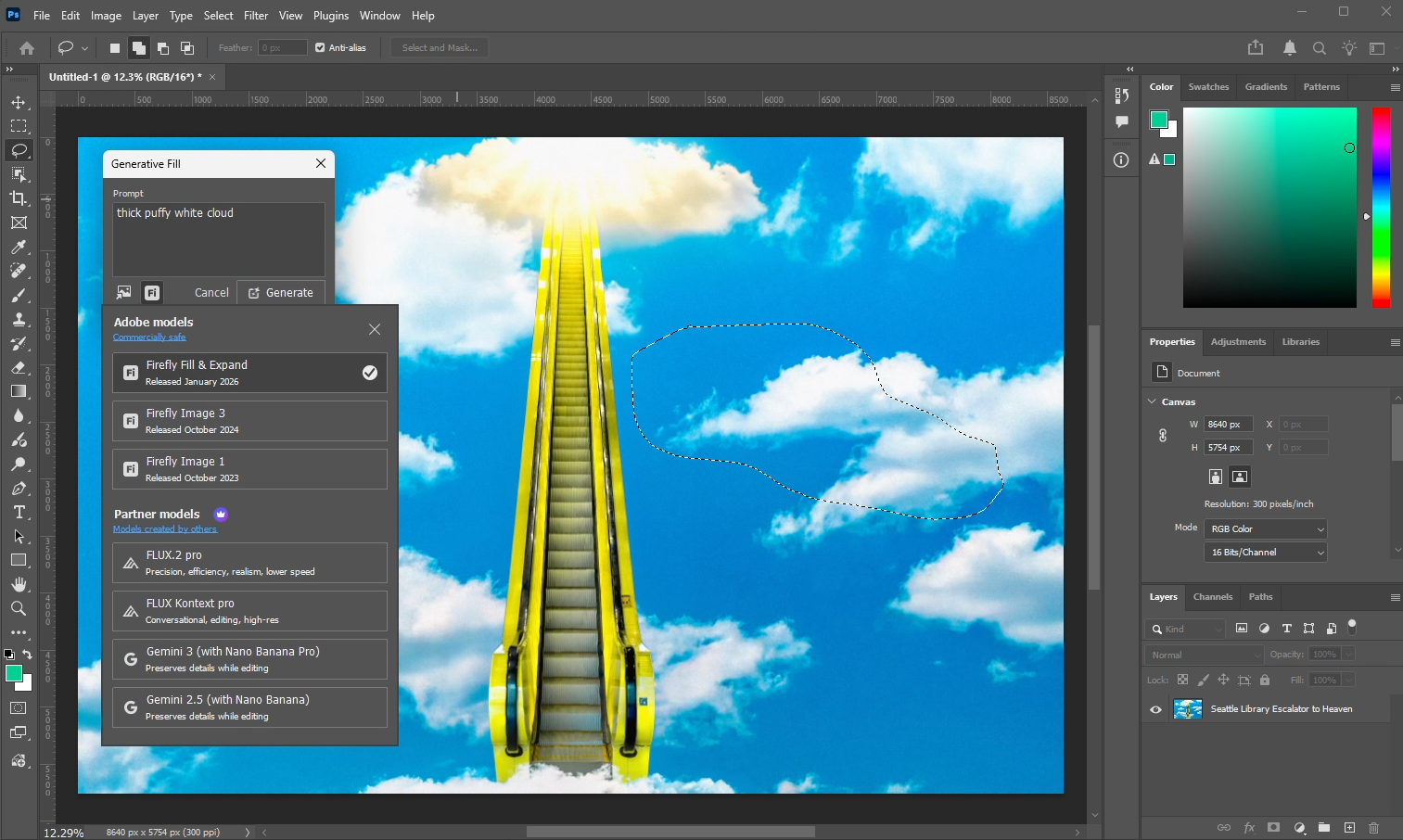
Generative Fill tool in Adobe Photoshop with generative AI model options
To perform inference on your own hardware, you can download AI models from repositories such as Huggingface or GitHub and use tools like Comfy UI or TouchDesigner for generating content locally. Running models on your own system allows you to work offline and maintain full control over your data, creating a self-contained workflow. However, not all models can run on local hardware, and larger or more complex models may only be accessible through cloud-based platforms or other hosted services.
Cloud- and web-based platforms such as Adobe Firefly, Artlist, Freepik, Higgsfield, Krea, and OpenArt provide access to multiple generative AI models. All processing is done on the platform’s servers, so content creators don’t need to invest in high-performance systems; they only need a web browser and an internet connection to run inferences. These platforms also differentiate themselves by offering tools and features that are exclusive to their subscribers. For example, MidJourney makes its models available only through its website and requires a subscription. Other web-based platforms like ComfyUI Cloud, Flora, SOTA, and Weavy offer a different type of interface, such as node-based workflows that allow users to combine models, adjust parameters, and manage outputs in a structured way, which can lead to more predictable and consistent results when generating content.
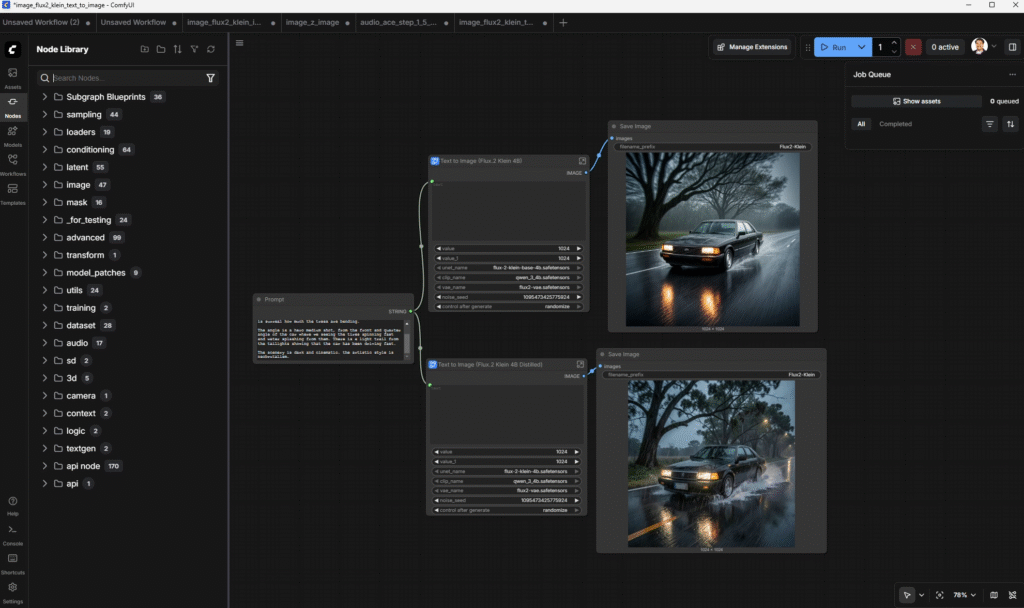
Node-based workflow in ComfyUI using Flux.2 Klein 4B model for image generation
Where Can Generative AI Models Be Useful in Content Creation?
There isn’t a single “right” way to use generative AI in content creation. Some models run locally on consumer or workstation-class hardware, giving more control over your workflow. Others are accessed through cloud- or web-based platforms, where computations are handled remotely, so creators don’t need a high-end workstation to generate content.
From my perspective, regardless of the models or applications used, generative AI should be considered as an alternative method or supplementary tool that bridges gaps across different stages of the content creation pipeline. Rather than replacing people, I hope that AI models can let artists and creators do more and avoid tedious, repetitive tasks. For example, within pre-production, they can help you generate mood boards, refine storyboards, or mock up placeholders for conceptual ideas. In production, they can be used as an alternative method to traditional practices for music, graphics, photography, or video productions. In post-production, generative AI tools can assist with tasks such as refining visual effects, completing or reconstructing missing frames, enhancing audio clarity, adjusting colors or lighting, removing unwanted elements, and preparing assets for final assembly.
For content creators, it’s important to understand both the capabilities of generative AI models and the resources required to select the right hardware and platform for your needs. It is equally important to understand how models are trained and the terms under which outputs can be used. Not all models produce content that is safe for commercial use, so reviewing licensing and copyright terms before generating or distributing outputs, and understanding which models are trained on “clean” data, will help protect your projects from legal risks and support ethical and responsible use of generative AI.
Nonetheless, whether you are looking to deploy, host, or generate content using AI models, hardware will be the core component that enables you to offer or produce great content. If you are a creator looking to experiment with AI or incorporate it into your workflow, we also have recommended systems for Generative AI to help you get started. For those looking to develop or deploy AI for a small team, you can check out this list of recommended systems as a starting point. Organizations and teams looking to host, train, and scale the development of their models will eventually need server-class solutions.
Whatever your workflow, if you are looking for a new computer, the Puget Systems workstations on our solutions page are tailored to excel in various software packages from content creation to engineering and scientific computing. If you prefer to take a more hands-on approach, our custom configuration page can help you to configure a system that matches your exact needs. Or, if you would like more guidance in configuring a workstation that aligns with your unique workflow, our knowledgeable technology consultants are here to lend their expertise.

Looking for a Content Creation workstation?
We build computers tailor-made for your workflow.

Don’t know where to start?
We can help!
Get in touch with one of our technical consultants today.