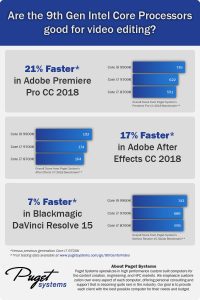
Are the 9th Gen Intel Core Processors good for video editing?
Intel’s new 9th Gen Core Processors include both a small frequency bump and an increase in core count. Due to these improvements, these CPUs fare extremely well in video editing applications, performing close to 20% faster than the i7 8700K in many Adobe applications.
DaVinci Resolve 15: Core i7 9700K & i9 9900K Performance
DaVinci Resolve is a very GPU-intensive program, but that doesn’t mean that the CPU doesn’t matter. Depending on the amount of GPU power you have, even a mid-range CPU could perform the same as a more expensive CPU which makes the new 9th Gen CPUs from Intel very interesting for Resolve workstations with only a few GPUs.
Premiere Pro CC 2018: Core i7 9700K & i9 9900K Performance
We tend to use either Intel’s X-series or AMD’s Threadripper CPUs for Premiere Pro due to their higher performance, but with Intel’s new 9th Gen CPUs sporting up to 8 cores, it will be very interesting to see how they fare in Premiere Pro.
After Effects CC 2018: Core i7 9700K & i9 9900K Performance
After Effects may not be quite as well threaded as it used to be, but there is still some performance gains to be had with higher core counts. Since the new 9th Gen CPUs from Intel include both a higher core count and a higher operating frequency, they should perform great in After Effects.
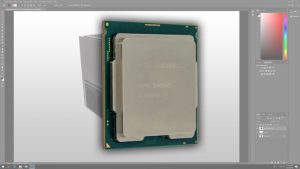
Photoshop CC 2018: Core i7 9700K & i9 9900K Performance
The new 9th Gen Intel Core Processors have a number of improvements including a small frequency bump and an increase in core count. Photoshop tends to primarily rely on just a handful of cores, so the question is whether these improvements are enough to make a significant difference in performance.
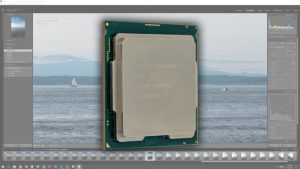
Lightroom Classic CC 2018: Core i7 9700K & i9 9900K Performance
Since Lightroom Classic is much better at utilizing multiple CPU cores than the older versions of Lightroom, the new 9th Gen Intel Core Processors are very interesting. Not only do they have a small frequency bump, but they also include an increase in core count.

Case Study with SubVRsive
SubVRsive, experts in VR, AR, and 360 video content, worked with Puget Systems to design workstations they help them create engaging content for customers that include Google, Walmart, Ford, AMD, and Showtime Sports.

NVIDIA GeForce RTX 2080 Ti PCI-Express Lane Scaling in OctaneRender and Redshift
GPU based renderers like OctaneRender and Redshift make use of the video cards in a computer to process ray tracing and other calculations in order to create photo-realistic images and videos. The performance of an individual video card, or GPU, is known to impact rendering speed – as is the number of video cards installed in a single computer. But what about the connection between each video card and the rest of the system? This interconnect is called PCI Express and comes in a variety of speeds. In this article, we will look at how benchmarks for these programs perform across PCI-E 3.0 and 2.0 with x1, x4, x8, and x16 lanes.
GeForce RTX 2080 Multi-GPU Scaling in OctaneRender and Redshift
We found previously that stacking multiple RTX 2080 video cards next to each other for multi-GPU rendering led to overheating and significant performance throttling, due to the dual-fan cooler NVIDIA has adopted as the standard on this generation of Founders Edition cards. Now that manufacturers like Asus are putting out single-fan, blower-style cards we can repeat our testing to see if the throttling issues are resolved and find out how well these video cards scale when using 1, 2, 3, or even 4 of them for GPU-based rendering in OctaneRender and Redshift.

Adobe Premiere Pro
Whether you are working with H.264, MP4, ProRes, CineForm, RED, or any other codec, our workstations have been optimized to give you the very best performance when editing and exporting video in Premiere Pro.