Table of Contents
Update 2/20/2026: This issue has been largely resolved with Lightroom Classic v15.2.
What is the issue?
In Lightroom Classic v15 (and 15.1), a significant performance bug exists that can cause exporting photos and generating previews to take up to three times longer than expected.
This issue occurs when doing multiple exports or preview generations within a single Lightroom Classic session. For example, if you export multiple 100-photo sets, the first export could take 16 seconds, but the subsequent exports could take 24 seconds – or 1.5 times longer. This issue occurs regardless of the photos selected and occurs even when exporting multiple sets of images (e.g., exporting photos 1-100, then photos 101-200, and so on).
This affects all AMD-, Intel-, and NVIDIA-based systems we have tested, although the severity changes based on the hardware. While most export formats and preview generation appear to be affected to a small degree, the two we found to be most affected are:
- Exporting to DNG
- Building Smart Previews
While this has obvious implications for all Lightroom Classic users, it also has a heavy impact on the performance results for our PugetBench for Lightroom Classic benchmark.
Update: Lightroom Classic 15.2 Performance Examples
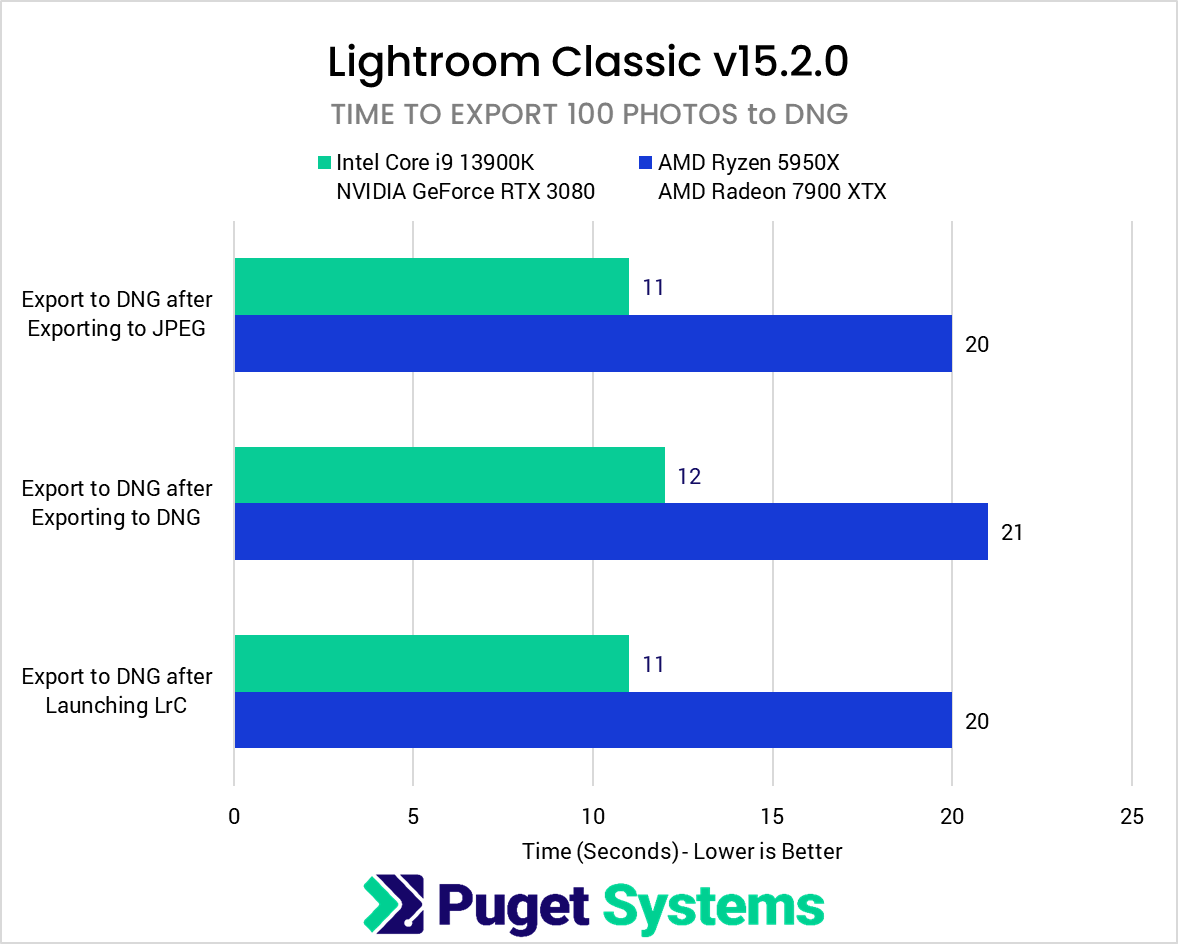
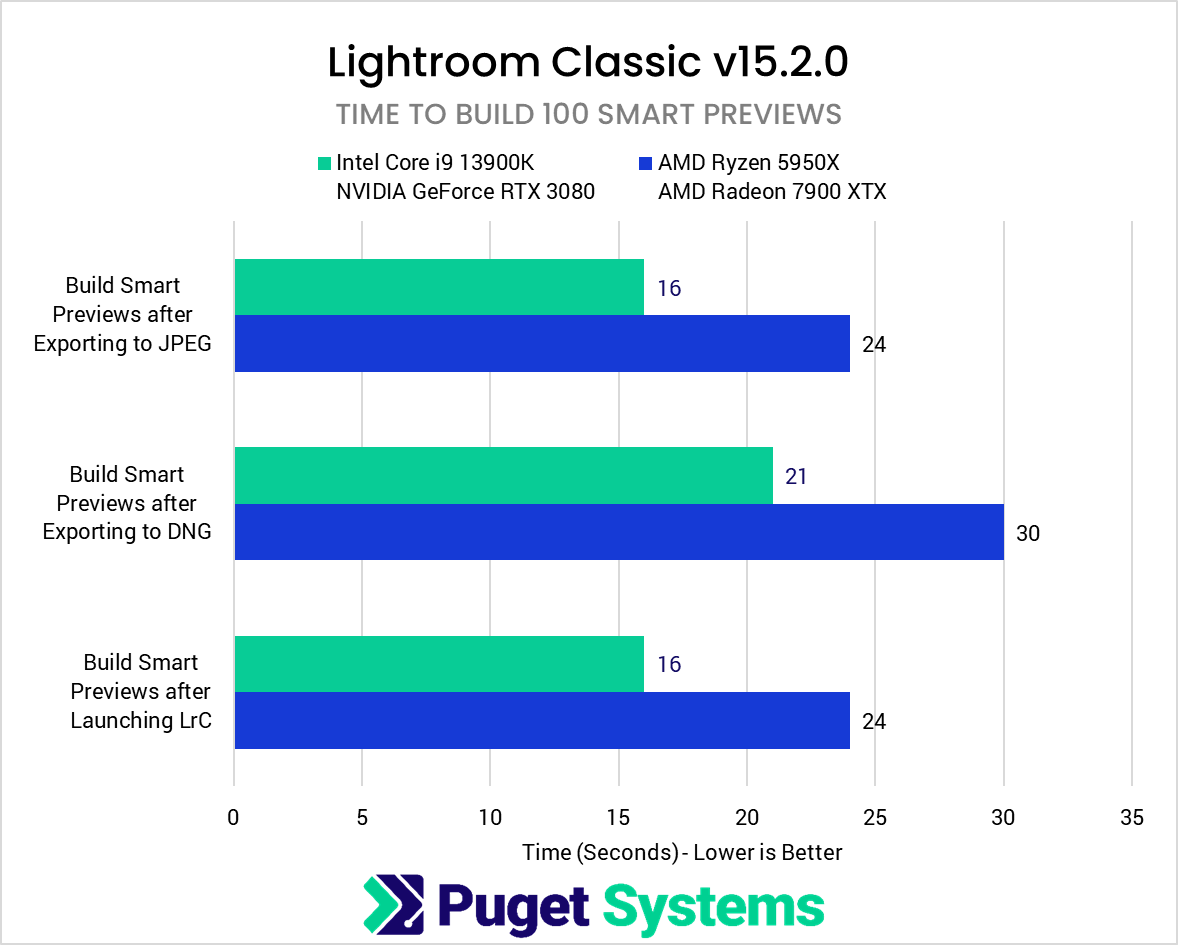
Added on 2/20/2026: The new version of Lightroom Classic (v15.2) released on 2/20/2026 has largely resolved the issue laid out in the previous section. There is still a small performance loss when generating Smart Previews after a DNG export, but all the other examples used in the original article no longer show performance degradation when performing multiple actions in series.
For reference, below are the results with Lightroom Classic 15.2 running the exact same tests that were performed previously with Lightroom Classic 15.0:


System Image
This performance consistency is a massive improvement over previous versions of Lightroom Classic (shown in the next section), and the Lightroom Classic dev team deserves praise for addressing this issue!
While this may seem like a bit of a niche situation to some, it has a massive impact on how different systems perform in our Puget Bench for Lightroom Classic benchmark, since the benchmark runs all tests in series without re-launching the application between tests. The exact performance uplift will vary based on the system configuration, but as an example, the Overall Score (Extended) for the two systems used in this post showed the following changes:
Intel Core i9 13900K w/ NVIDIA GeForce RTX 3080
7165 (LrC 15.0) -> 11510 (LrC 15.2)
1.6x performance improvement
AMD Ryzen 5950X w/ AMD Radeon 7900 XTX
4103 (LrC 15.0) -> 7578 (LrC 15.2)
1.85x performance improvement
That is a huge uplift in benchmark performance, and it should be reflected in typical user workflows as well! Unless you only ever do a single export (or preview generation) in a session, the changes Adobe made in Lightroom Classic 15.2 should have a noticeable impact on performance when working in Lightroom Classic.
While we are focusing on exporting and Smart Preview generation, we also note that performance for AI tasks (Select Subject, Reflection Removal, Denoise, etc.) improved by an average of 25-40% in version 15.2!
Performance Examples (Original)
While the exact performance loss you experience will depend on your system’s hardware, photos, and workflow, below are examples of performance when exporting to DNG and building Smart Previews. We have included results from tasks performed immediately after launching Lightroom Classic, as well as after completing a previous export action.
System Image
In the examples above, exporting to DNG (chart #1) can take 1.4-1.5x as long when doing multiple DNG exports, and in the case of the AMD-based system, doing a DNG export after a previous JPEG export can take 3x as long!
Building Smart Previews (chart #2) is similar, where if you build the previews after doing a DNG export, it can take 1.5-1.75x as long compared to building Smart Previews first. Doing so after a JPEG export is similar, but the Intel/NVIDIA-based system took 2x as long.
As we mentioned earlier, we have seen this issue to a much lesser degree when exporting to JPEG, TIFF, and building 1:1 previews. Those tend only to have a 5-10% impact on performance; however. So, while not ideal, they likely aren’t worth taking special measures to try to regain that small amount of lost time.
We will note that we paid special attention to ensuring that the exported photos were correctly formatted. At first, we thought the issue might be that Lightroom Classic was not following the export specifications (exporting to JPEG when it should have exported to DNG, for example), but that was not the case. The exported files on the first export were an exact match to the exported files that encountered the performance penalty.
How Can You Fix the Problem?
We have informed Adobe about the issue, and anticipate that a fix will be available in the near future. When an update to Lightroom Classic is released that resolves the problem, we will update this post accordingly.
However, at the moment, the only workaround we are aware of is to close and reopen Lightroom Classic between exports or preview generations. We encourage you to evaluate your own workflow to determine how it is affected by this issue, as the time savings you may see by reopening Lightroom Classic could be offset by the time it takes to restart the application.

Looking for a Lightroom Classic workstation?
We build computers tailor-made for your workflow.

Don’t know where to start?
We can help!
Get in touch with one of our technical consultants today.