Table of Contents
Introduction
Software updates can add new features, tools, and performance improvements that generally enhance the user experience, but in some cases, they can also introduce unexpected issues. That’s why we are constantly testing and reviewing hardware performance here in the Puget Systems Performance Lab when new software application updates are released. This allows us to identify any issues or improvements that may have gone unmentioned and share that information with our readers and the broader creative community.
When Adobe released version 15.0 of Lightroom Classic back in October of 2025, they announced several new updates intended to improve performance. The following month, we released version 1.0 of Puget Bench for Lightroom Classic and used it to see how the new Lightroom release measured up. However, we found that version 15.0 of Lightroom Classic included a bug that degraded performance on Windows-based PCs, particularly when building smart previews and exporting DNG files.
Last month (February 2026), Adobe released version 15.2 of Lightroom Classic, which addressed a variety of issues, and we can confirm that many of the bugs have been largely resolved. Thanks to these fixes, our testing showed a pretty substantial performance difference between versions 15.0 and 15.2, which prompted us to write a hardware performance analysis article for Lightroom Classic v15.2. While that article focused on hardware-specific performance in 15.2, we will now examine the boost users can expect between 15.0 and 15.2.
Test Setup (Expandable)
AMD Desktop
| CPU: AMD Ryzen™ 7 9850X3D |
| CPU Cooler: Noctua NH-U12A |
| Motherboard: ASUS ProArt X670E-Creator WiFi BIOS Version: 3513 |
| RAM: 2x DDR5-5600 32GB (64 GB total) |
| GPU: NVIDIA GeForce RTX™ 5090 Driver Version: 591.74 |
| PSU: EVGA SuperNOVA 1200W P2 |
| Storage: Kingston KC3000 2TB |
| OS: Windows 11 Pro 64-bit (26200) Power Profile: Balanced |
Intel Desktop 2
| CPU: Intel Core™ Ultra 7 265K |
| CPU Cooler: Noctua NH-U12A |
| Motherboard: ASUS ProArt Z890-Creator WiFi BIOS version: 3002 |
| RAM: 2x DDR5-6400 CUDIMM 32GB (64 GB total) |
| GPU: ASUS PRIME GeForce RTX™ 5070 Ti OC Driver Version: 591.74 |
| PSU: Super Flower LEADEX Platinum 1600W |
| Storage: Samsung 980 Pro 2TB |
| OS: Windows 11 Pro 64-bit (26200) Power Profile: Balanced |
Apple M3 Max MacBook Pro
| CPU: Apple M3 Max 16-core |
| RAM: 64 GB (Unified) Shared Bandwidth: 400 GB/s |
| GPU: M3 Max 40-core |
| Storage: 2 TB Integrated Storage |
| OS: MacOS Tahoe 26.2 |
Intel Desktop 1
| CPU: Intel Core™ Ultra 7 265K |
| CPU Cooler: Noctua NH-U12A |
| Motherboard: ASUS ProArt Z890-Creator WiFi BIOS version: 3002 |
| RAM: 2x DDR5-6400 CUDIMM 32GB (64 GB total) |
| GPU: NVIDIA GeForce RTX™ 5090 Driver Version: 591.74 |
| PSU: Super Flower LEADEX Platinum 1600W |
| Storage: Samsung 980 Pro 2TB |
| OS: Windows 11 Pro 64-bit (26200) Power Profile: Balanced |
Puget Mobile 16″
| CPU: Intel Core™ Ultra 9 275HX |
| RAM: 2x DDR5-5600 32GB SODIMM (64 GB Total) |
| GPU: NVIDIA GeForce RTX™ 5090 Mobile Driver Version: 591.74 |
| Storage: Kingston SFYR2S2T0 2TB |
| OS: Windows 11 Pro 64-bit (26200) |
Benchmark Software
| Lightroom Classic 15.0 — Puget Bench for Lightroom Classic 1.0 |
| Lightroom Classic 15.2 — Puget Bench for Lightroom Classic 1.0 |
The performance gains we saw in our benchmark stemmed from software improvements in Lightroom Classic, so we wanted to test a variety of system configurations to show photographers and photo editors what they could expect from versioning up. We tested 5 different systems – three workstation class configurations and two laptops – in both Lightroom Classic version 15.0 and version 15.2, using Puget Bench for Lightroom Classic v1.0 to compare results.
Raw Results
When possible, we try to include a spreadsheet of the data collected during our testing with minimal processing. Especially since Lightroom Classic performance can depend on the specific camera used for capture, this allows end-users to hone in on relevant areas of performance. Below are two tables with the raw data:
Lightroom Classic v15.0 Raw Data
| wdt_ID | wdt_created_by | wdt_created_at | wdt_last_edited_by | wdt_last_edited_at | Test | Intel Core Ultra 7 265K & NVIDIA GeForce RTX 5090 | Intel Core Ultra 7 265K & NVIDIA GeForce RTX 5070Ti | AMD Ryzen 7 9850X3D & NVIDIA GeForce RTX 5090 | Puget Mobile 16" Laptop | Apple Macbook M3 Max |
|---|---|---|---|---|---|---|---|---|---|---|
| 1 | Peter | Mar 2026 08:51 PM | Peter | Mar 2026 08:51 PM | Overall Score (Standard) | 10,746.00 | 9,960.00 | 7,808.00 | 8,871.00 | 13,115 |
| 2 | Peter | Mar 2026 08:51 PM | Peter | Mar 2026 08:51 PM | Overall Score (Extended) | 9,595.00 | 8,795.00 | 7,385.00 | 8,159.00 | 12,831 |
| 3 | Peter | Mar 2026 08:51 PM | Peter | Mar 2026 08:51 PM | Canon Score (Standard) | 140.00 | 122.00 | 99.10 | 106.00 | 148 |
| 4 | Peter | Mar 2026 08:51 PM | Peter | Mar 2026 08:51 PM | Panasonic Score (Standard) | 82.50 | 81.50 | 61.50 | 73.90 | 116 |
| 5 | Peter | Mar 2026 08:51 PM | Peter | Mar 2026 08:51 PM | Canon Score (Extended) | 140.00 | 122.00 | 99.10 | 106.00 | 148 |
| 6 | Peter | Mar 2026 08:51 PM | Peter | Mar 2026 08:51 PM | Panasonic Score (Extended) | 82.50 | 81.50 | 61.50 | 73.90 | 116 |
| 7 | Peter | Mar 2026 08:51 PM | Peter | Mar 2026 08:51 PM | Sony Score (Extended) | 71.70 | 66.00 | 54.10 | 69.90 | 165 |
| 8 | Peter | Mar 2026 08:51 PM | Peter | Mar 2026 08:51 PM | Nikon Score (Extended) | 72.70 | 62.40 | 51.40 | 58.90 | 94 |
| 9 | Peter | Mar 2026 08:51 PM | Peter | Mar 2026 08:51 PM | AI Score (Extended) | 135.00 | 129.00 | 130.00 | 112.00 | 130 |
| 10 | Peter | Mar 2026 08:51 PM | Peter | Mar 2026 08:51 PM | Import 250 Photos - Canon | 4.18 | 4.74 | 4.27 | 4.70 | 3 |
| Test | Intel Core Ultra 7 265K & NVIDIA GeForce RTX 5090 | Intel Core Ultra 7 265K & NVIDIA GeForce RTX 5070Ti | AMD Ryzen 7 9850X3D & NVIDIA GeForce RTX 5090 | Puget Mobile 16" Laptop | Apple Macbook M3 Max |
Lightroom Classic v15.2 Raw Data
| wdt_ID | wdt_created_by | wdt_created_at | wdt_last_edited_by | wdt_last_edited_at | Test | Intel Core Ultra 7 265K & NVIDIA GeForce RTX 5090 | Intel Core Ultra 7 265K & NVIDIA GeForce RTX 5070Ti | AMD Ryzen 7 9850X3D & NVIDIA GeForce RTX 5090 | Puget Mobile 16" Laptop | Apple Macbook M3 Max |
|---|---|---|---|---|---|---|---|---|---|---|
| 1 | Peter | Mar 2026 08:53 PM | Peter | Mar 2026 08:53 PM | Overall Score (Standard) | 14,527 | 13,680 | 10,544.00 | 10,743.00 | 13,636 |
| 2 | Peter | Mar 2026 08:53 PM | Peter | Mar 2026 08:53 PM | Overall Score (Extended) | 14,326 | 13,132 | 11,731.00 | 11,151.00 | 13,073 |
| 3 | Peter | Mar 2026 08:53 PM | Peter | Mar 2026 08:53 PM | Canon Score (Standard) | 166 | 152 | 116.00 | 121.00 | 147 |
| 4 | Peter | Mar 2026 08:53 PM | Peter | Mar 2026 08:53 PM | Panasonic Score (Standard) | 127 | 123 | 95.50 | 95.10 | 126 |
| 5 | Peter | Mar 2026 08:53 PM | Peter | Mar 2026 08:53 PM | Canon Score (Extended) | 166 | 152 | 116.00 | 121.00 | 147 |
| 6 | Peter | Mar 2026 08:53 PM | Peter | Mar 2026 08:53 PM | Panasonic Score (Extended) | 127 | 123 | 95.50 | 95.10 | 126 |
| 7 | Peter | Mar 2026 08:53 PM | Peter | Mar 2026 08:53 PM | Sony Score (Extended) | 158 | 142 | 120.00 | 128.00 | 157 |
| 8 | Peter | Mar 2026 08:53 PM | Peter | Mar 2026 08:53 PM | Nikon Score (Extended) | 122 | 107 | 98.60 | 96.40 | 92 |
| 9 | Peter | Mar 2026 08:53 PM | Peter | Mar 2026 08:53 PM | AI Score (Extended) | 149 | 138 | 169.00 | 121.00 | 142 |
| 10 | Peter | Mar 2026 08:53 PM | Peter | Mar 2026 08:53 PM | Import 250 Photos - Canon | 5 | 4 | 4.13 | 4.52 | 3 |
| Test | Intel Core Ultra 7 265K & NVIDIA GeForce RTX 5090 | Intel Core Ultra 7 265K & NVIDIA GeForce RTX 5070Ti | AMD Ryzen 7 9850X3D & NVIDIA GeForce RTX 5090 | Puget Mobile 16" Laptop | Apple Macbook M3 Max |
Analysis
The chart below shows relative performance between Lightroom Classic versions 15.0 and 15.2. It’s important to note that the chart does not compare the performance of these systems against each other; instead, it compares the 15.2 results for each system to its own baseline in version 15.0. The vertical axis shows the different configurations we tested, while the horizontal axis shows the relative performance, where version 15.0 is indexed to 100%. A score above 100% indicates a performance gain – for example, a score of 149% means a 49% performance increase. The blue colored bar represents the percentage increase based on the Overall Score (extended), while the green colored bar represents the AI Score (extended) as measured by Puget Bench for Lightroom Classic version 1.0.
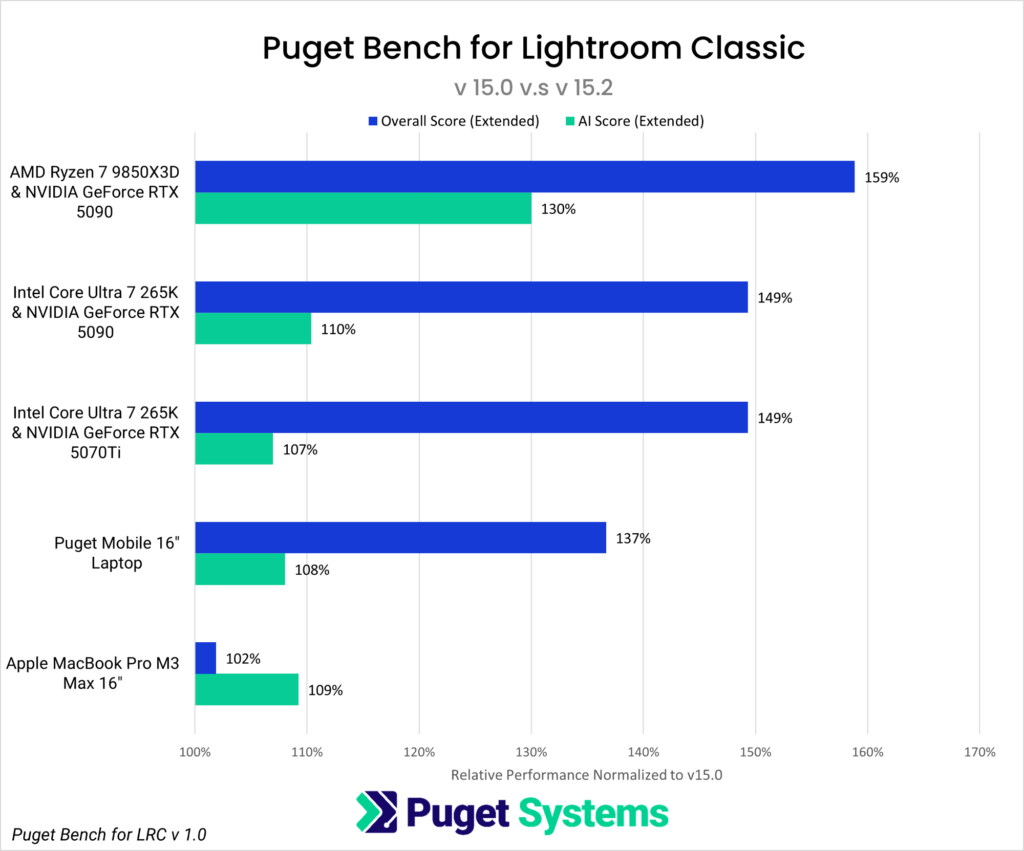
Based on the results of the Overall Score (extended), upgrading to Lightroom Classic version 15.2 provided a roughly 59% performance boost on the AMD Ryzen™ 7 9850X3D platform and a 49% improvement on the Intel Core™ Ultra 7 265K systems. Our Puget Mobile 16” laptop, configured with an Intel Core™ Ultra 9 275 HX and NVIDIA GeForce RTX™ 5090 Mobile GPU, saw a 37% increase in performance. In contrast, the Apple MacBook with a 16-core M3 Max processor saw a minimal 2% difference. Lightroom Classic’s AI features, which are primarily GPU-processed, also saw performance gains across all systems tested.
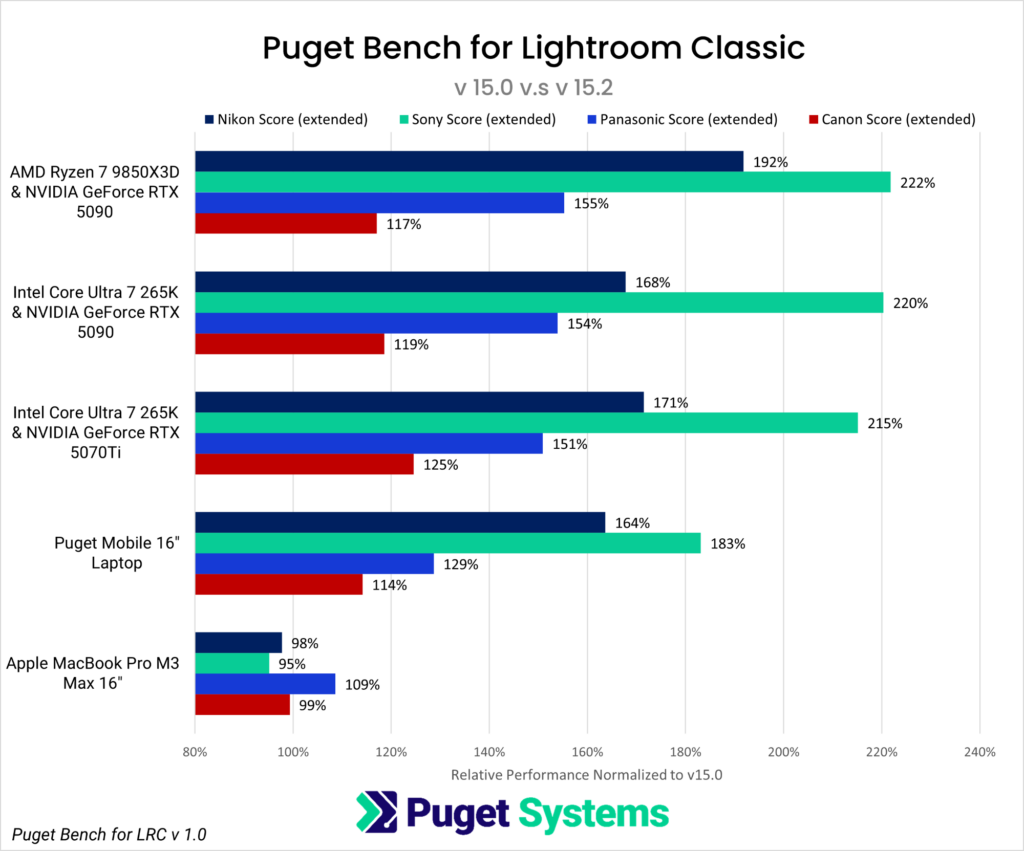
The next chart shows camera-specific scores. Again, these results are not intended to compare performance differences between camera manufacturers or the systems tested, but instead to show expected performance gains when upgrading from Lightroom Classic version 15.0 to 15.2. The colored bars represent the Extended Camera Scores for each camera tested in Puget Bench for Lightroom Classic v1.0, with navy for Nikon, green indicating Sony, blue referencing Panasonic, and red denoting Canon.
For photographers and editors working with Canon, Nikon, Panasonic, or Sony RAW files, Puget Bench for Lightroom Classic measures tasks such as importing images, generating Smart Previews, and exporting to common formats like JPG and DNG. These tasks typically occur before and after editing, but do take time to process if ingesting and exporting a substantial number of photos.
Windows PC users invested in the Sony ecosystem can expect to see the largest performance boost when upgrading to Lightroom Classic 15.2, with gains ranging from 83% to 122% depending on the system. Those within the Nikon ecosystem should see increases of 64% to 92%, while Panasonic users can expect a 29% to 55% improvement. Canon photographers will see the smallest – though still substantial – boosts, ranging from 14% to 25%.
The story is different for MacOS, though. On the Apple MacBook Pro M3 Max, the only camera to show an increase in performance was Panasonic, with a 9% improvement, while Canon and Nikon experienced a 1-2% drop in performance (likely within the margin of error) and Sony saw a 5% loss.
Conclusion
Photographers looking to boost performance in Lightroom Classic should upgrade to version 15.2 as soon as possible. Since version 15.0 launched in October, Adobe developers have spent significant effort addressing bugs, and our latest testing confirms that performance has greatly improved in 15.2.
It’s worth noting that the largest performance gains we measured were on Windows-based systems. While this article isn’t a head-to-head comparison of Lightroom Classic performance between platforms, the data does show that Windows-based users will see a much larger improvement than Apple users when upgrading from 15.0 to 15.2. This isn’t to say the MacBook Pro M3 Max performs poorly in Lightroom Classic 15.2, but rather that the upgrade from 15.0 to 15.2 had less of an impact on Apple systems. The M3 Max we tested saw minimal gains in the Overall and AI scores. In camera-specific tests, three out of four cameras even saw a small performance loss. For photo editors on Windows-based systems, the upgrade to Lightroom Classic 15.2 tells a different story, with substantial performance gains seen across all configurations tested.
If you need a powerful computer to tackle the applications we test, the Puget Systems workstations on our solutions page are tailored to excel in various software packages. If you prefer a more hands-on approach, our custom configuration page helps you configure a PC that matches your needs. Otherwise, if you would like more guidance in configuring a system that aligns with your unique workflow, our knowledgeable technology consultants are here to lend their expertise.

Looking for a Lightroom Classic workstation?
We build computers tailor-made for your workflow.

Don’t know where to start?
We can help!
Get in touch with one of our technical consultants today.