Table of Contents
Introduction
Houdini has become an essential tool for artists working in visual effects, animation, and game development. Its procedural approach makes it particularly well-suited for everything from complex simulations and destruction to modeling and rendering. With so many different features and workflows available, determining which hardware is best for Houdini isn’t always straightforward.
Some tasks, like fluid and particle simulations, can take advantage of CPUs with high core counts – while others may benefit more from fewer but faster cores. GPU acceleration is also becoming increasingly relevant, particularly with tools like Karma XPU and specific solvers. This means that a workstation which performs exceptionally well in one part of Houdini might not be the best choice for another.
To better understand how current hardware performs across these workloads, we’ve expanded our Houdini testing to include a wider range of simulations and rendering tasks. For this article, we’re comparing the latest AMD and Intel processors alongside NVIDIA’s GeForce RTX™ 50 Series GPUs, examining where additional CPU cores make a difference, which tasks benefit from faster GPUs, and where spending more on hardware might not yield meaningful time savings.
With the rapidly rising costs of PC hardware, it is more important than ever to ensure users get a system that is optimized for their workflows. Our goal is to help customers make a more informed decision when choosing or upgrading a workstation for Houdini, based on the types of projects they actually work on.
Testing Methodology
For this round of testing, we selected a range of current Intel Core™ Ultra, AMD Ryzen™, and AMD Threadripper™ processors, to see how Houdini performs across mainstream desktop and high-end workstation platforms. On the GPU side, we tested NVIDIA’s GeForce RTX 50 Series, from the RTX 5060 through the RTX 5090. This gives us a good look at how performance changes as one moves from more affordable hardware to higher-end configurations.
To keep the comparisons as consistent as possible, all CPU testing was performed with an NVIDIA GeForce RTX 5080 and similar amounts of RAM and storage. All GPU tests used the same AMD Threadripper 9970X platform, helping minimize differences unrelated to the processor or graphics card under test.
Test Setup (Expandable)
Test Platform
| Intel Core Ultra 5 245K Intel Core Ultra 7 270K Plus Intel Core Ultra 9 285K AMD Ryzen 7 9700X AMD Ryzen 7 9850X3D AMD Ryzen 9 9950X3D AMD Ryzen Threadripper 9970X AMD Ryzen Threadripper 9980X |
| RAM: 2x DDR5-5600 32GB (64 GB total) (Core and Ryzen) RAM: 4x DDR5-5600 32GB (64 GB total) (Threadripper) |
| PSU: EVGA SuperNOVA 1200W P2 |
| Storage: Kingston KC3000 2TB |
| OS: Windows 11 Pro 64-bit (26200) |
Benchmark Software
While this isn’t an exhaustive comparison of every available CPU and GPU, the hardware we’ve selected covers a wide range of price points and performance levels. Our goal is to identify general trends across different Houdini workflows, rather than test every possible hardware configuration.
CPU-Based Simulation Performance
POP Grains, FLIP, Vellum, and Sparse Pyro
For our POP Grains, Ocean Waves (FLIP), Vellum Cloth, and Explosion (Sparse Pyro) tests, we observed fairly consistent performance trends across processors. All four benefited from higher core counts, with AMD’s Threadripper processors finishing the simulations noticeably faster than the mainstream Intel Core Ultra and AMD Ryzen CPUs. However, we also saw diminishing returns as core counts increased, with the jump from the 32-core Threadripper 9970X to the 64-core 9980X providing relatively modest improvements.
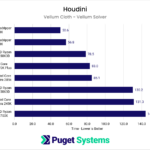
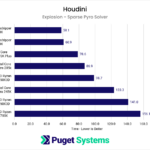
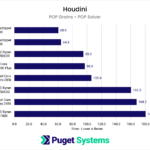
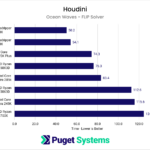
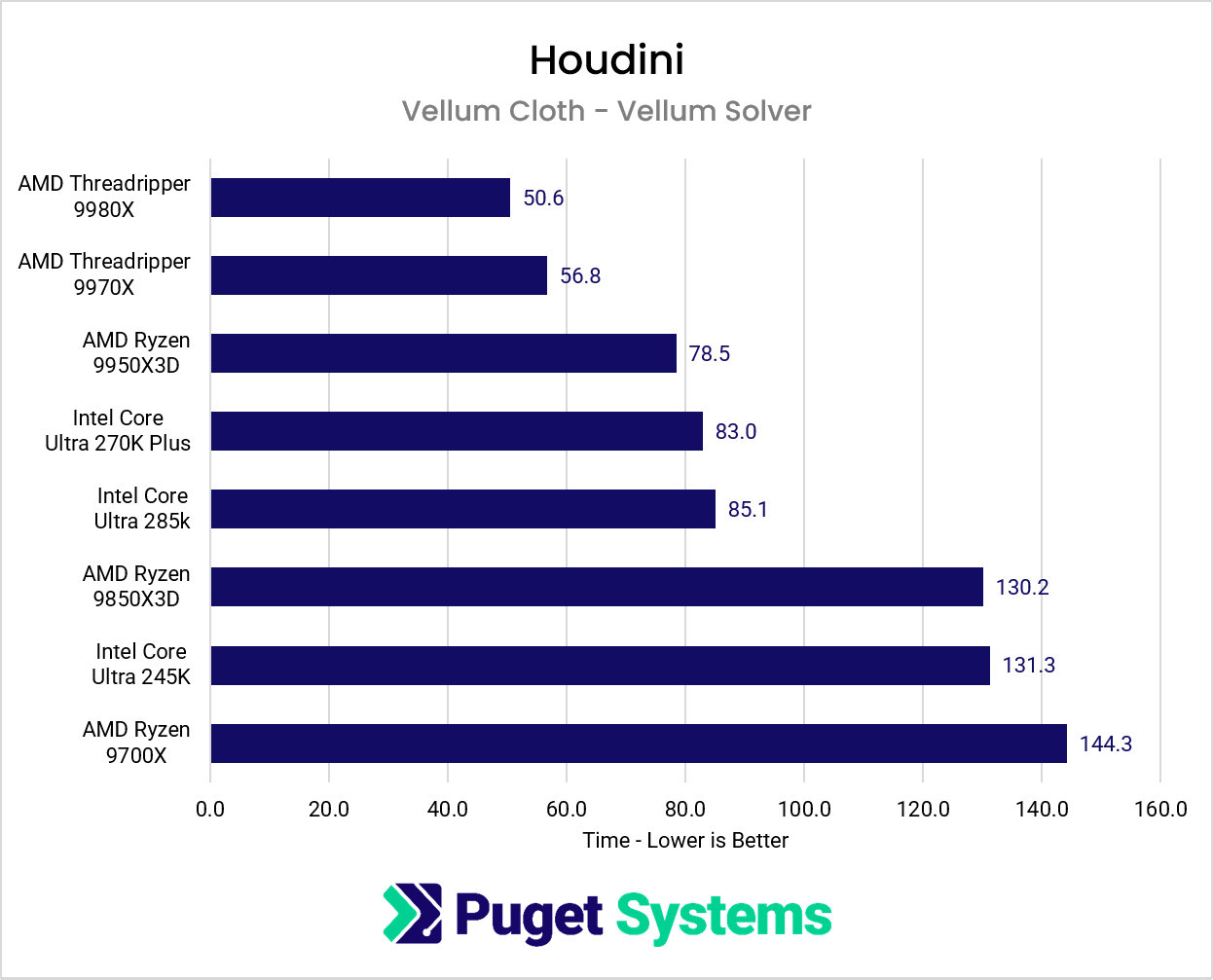
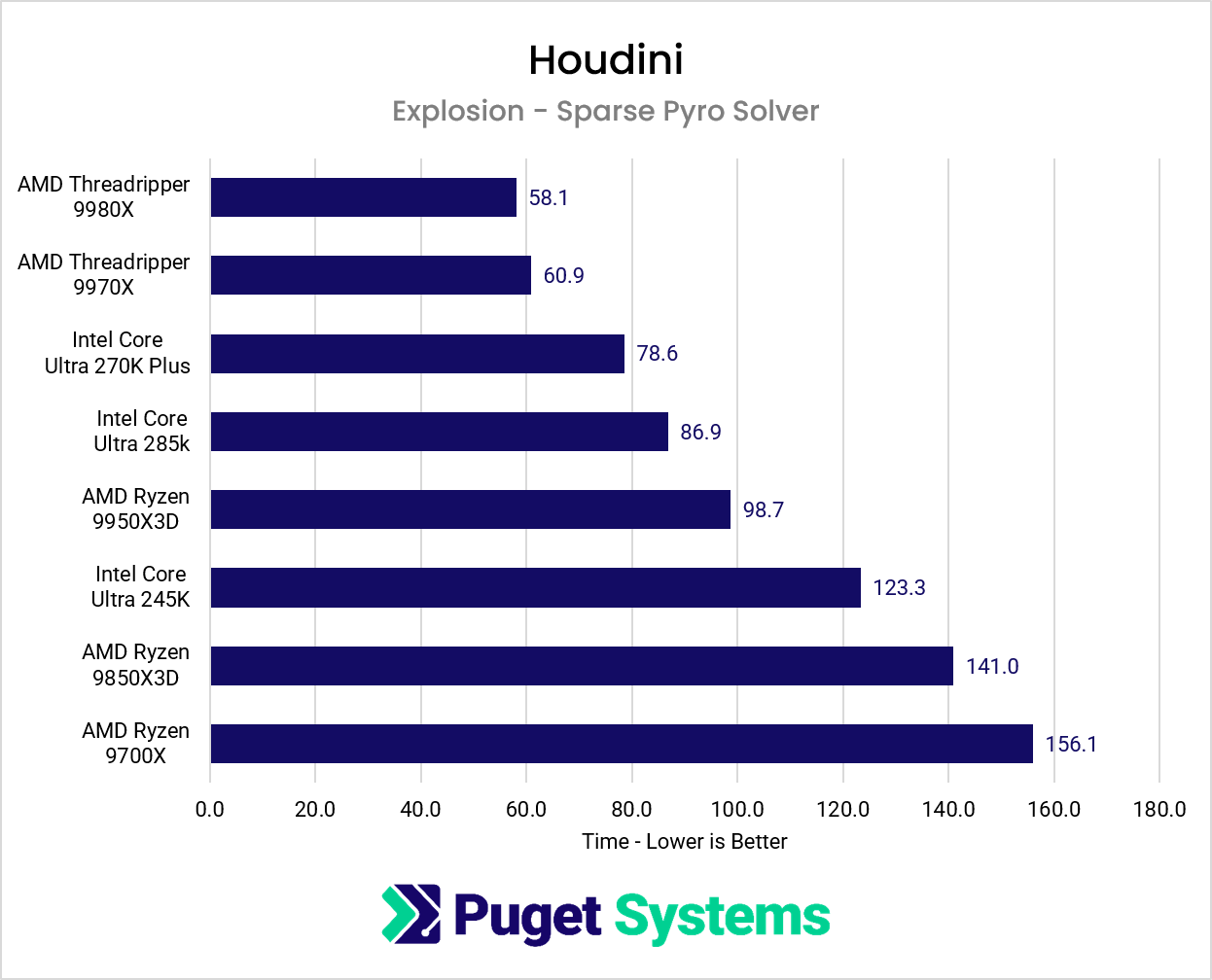
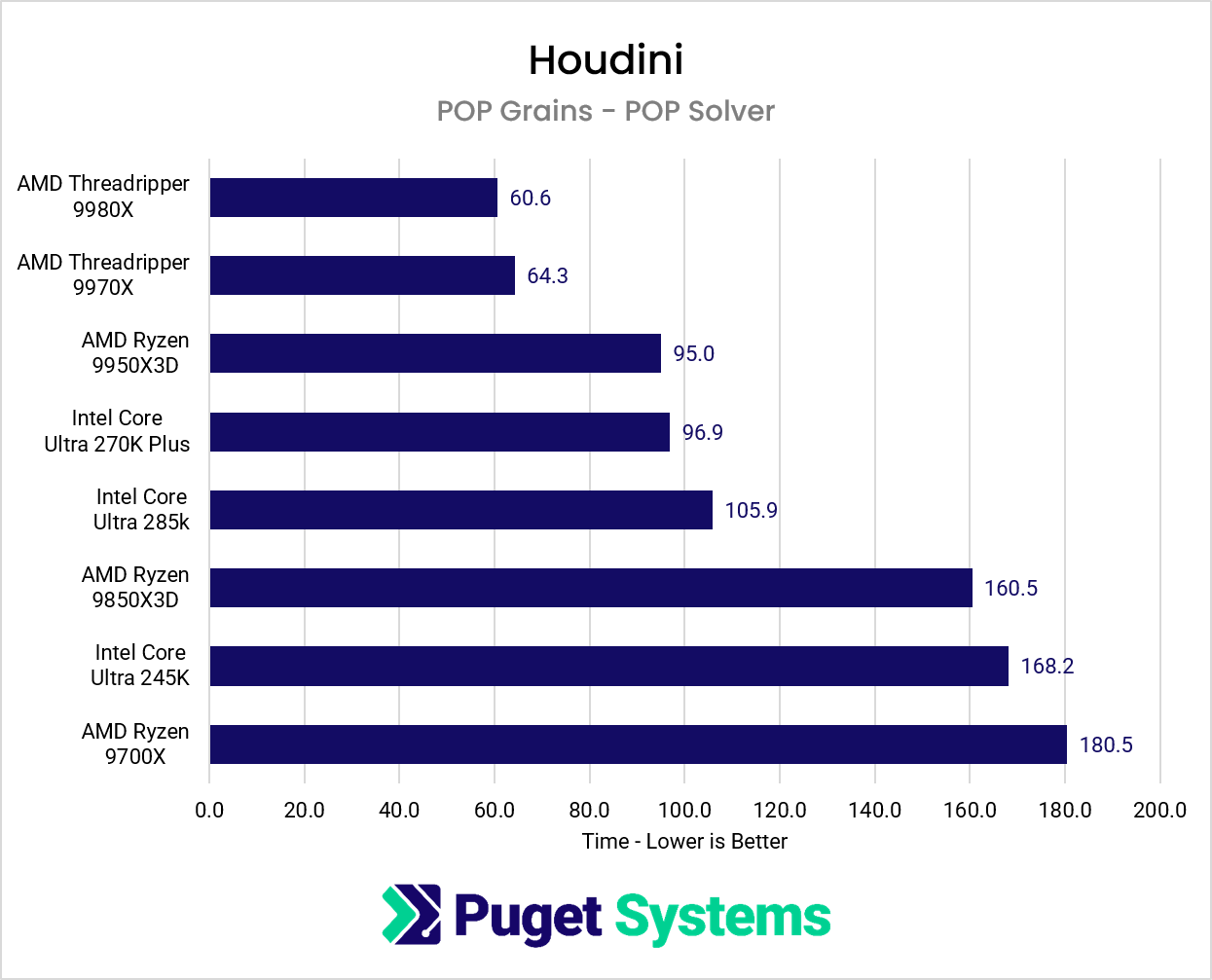
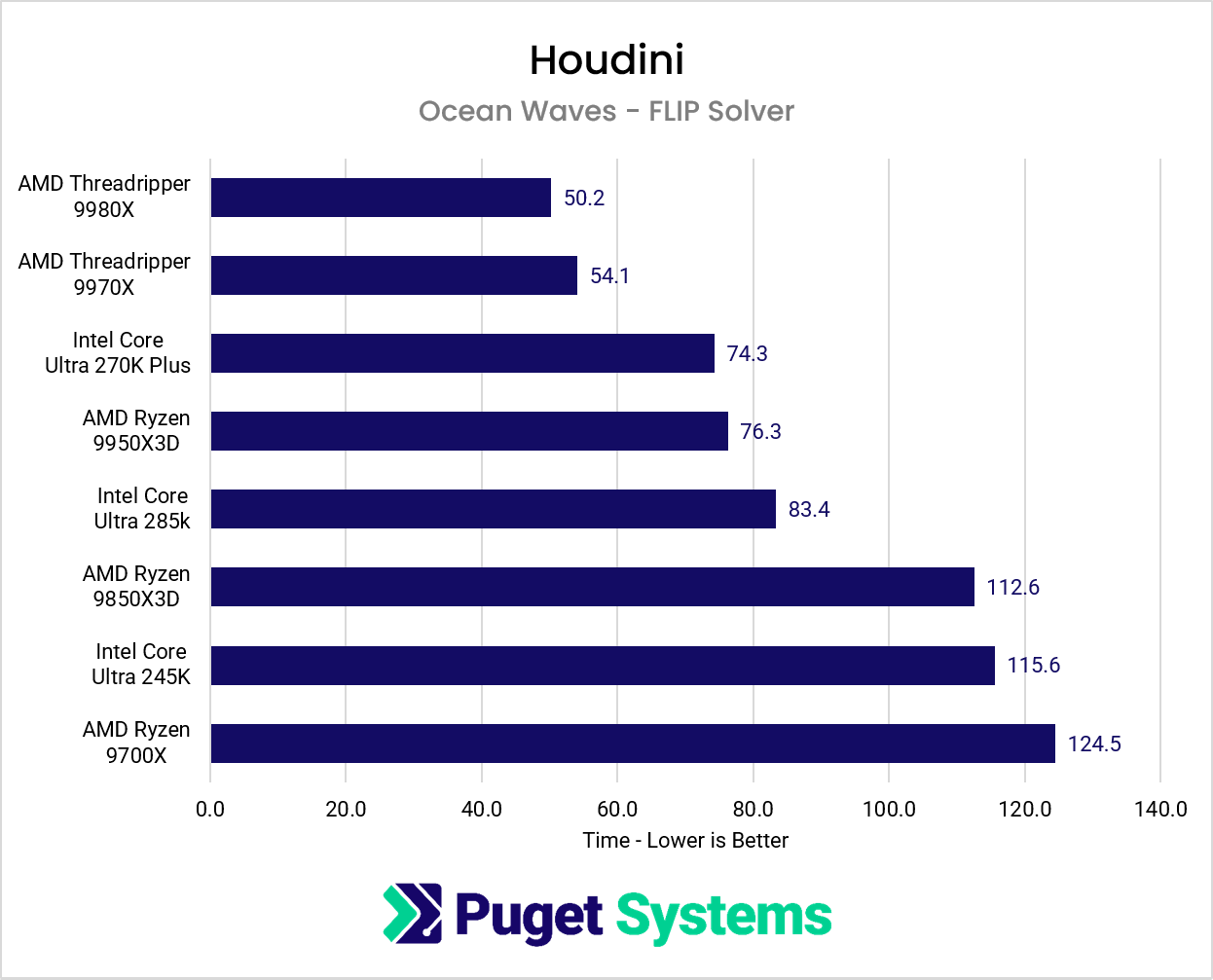
While Threadripper is clearly the faster option for these workloads, whether that performance is worth the additional cost depends on how much time is spent running simulations. If building a cache takes 10 minutes on a Core Ultra or Ryzen processor, shaving a minute or two off that process might not justify the cost of a high-end workstation. For those working with smaller simulations or running them less frequently, a mainstream desktop processor may offer a better balance of price and performance. Within the mainstream segment, the Core Ultra 7 270K Plus and Ryzen 9 9950X3D tended to perform the best, trading places depending on the solver being used.
On the other hand, for people regularly running simulations that take several hours, those time savings can add up quickly. This is especially true for artists who also rely heavily on CPU rendering, where the additional cores can provide benefits beyond simulation work (as we will see later in this article). For these users, investing in a Threadripper workstation may be well worth the cost. Within that segment, the 32-core 9970X was only about 10% slower than the 64-core 9980X, despite over a $2,000 price difference between those models.
RBD Bullet Simulation
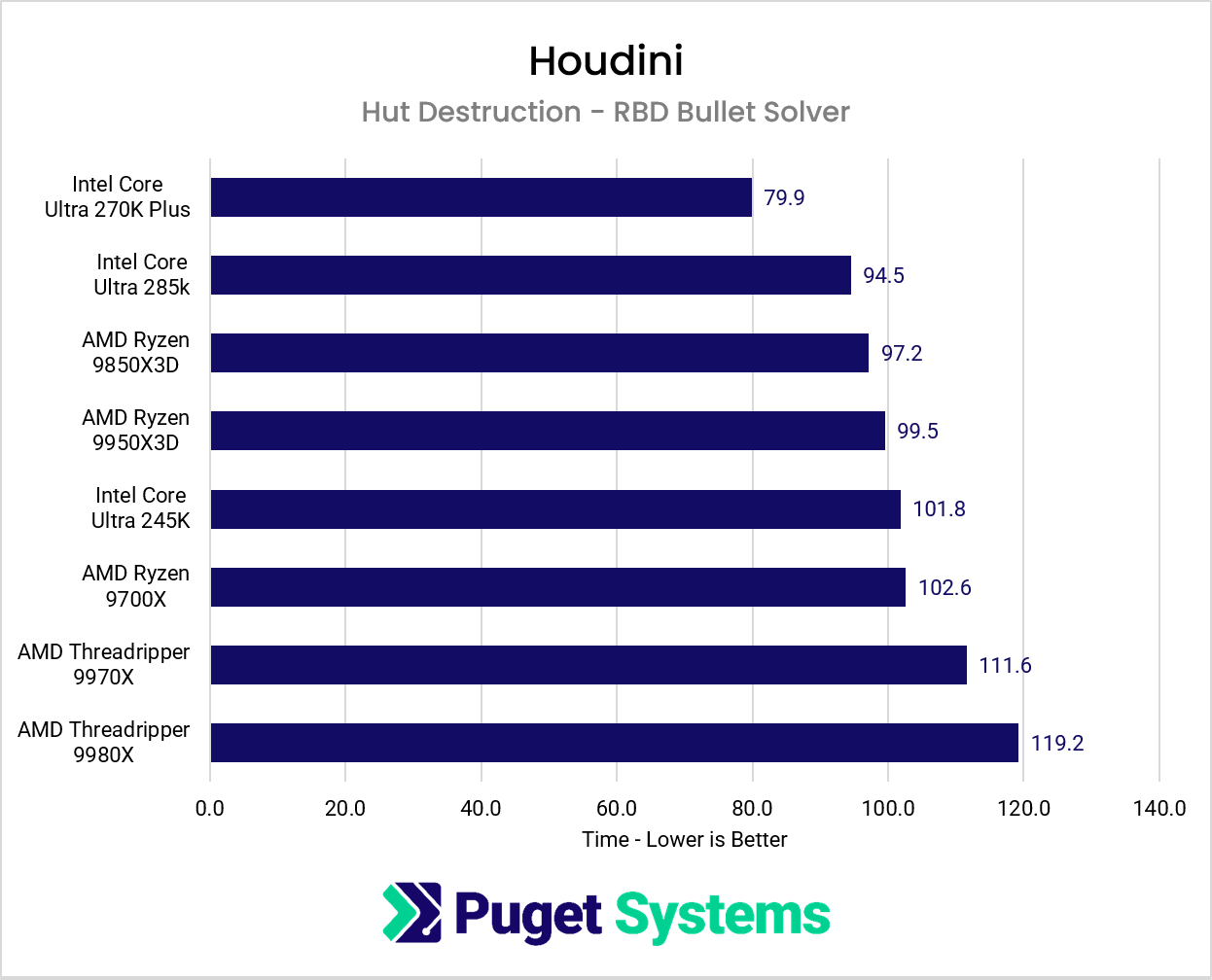
Unlike the previous simulations, our Hut Destruction test using the RBD Bullet Solver showed a very different performance trend. Rather than benefiting from higher core counts, the mainstream Intel Core Ultra and AMD Ryzen processors generally outperformed the Threadripper CPUs. In fact, the 64-core Threadripper 9980X was the slowest processor in this test!
Image
While monitoring CPU utilization during testing, we noticed the workload frequently switching between periods of heavy utilization across multiple cores and periods when only a single core appeared active. This may explain why the results slightly favor faster-clocked CPUs, but not as strongly as in a true single-core test like Cinebench.
For artists who primarily work with RBD simulations, a high-core-count workstation is likely not the best investment. Instead, a mainstream desktop processor can deliver similar performance on this particular workload while leaving more of the budget available for other components, such as a faster GPU or additional RAM, both of which are useful for rendering with the Karma XPU. Intel’s latest Core Ultra 7 270K Plus was especially performant: over 15% faster than both the older 285K and AMD’s Ryzen models.
GPU-Accelerated Simulation Performance
MPM Simulation
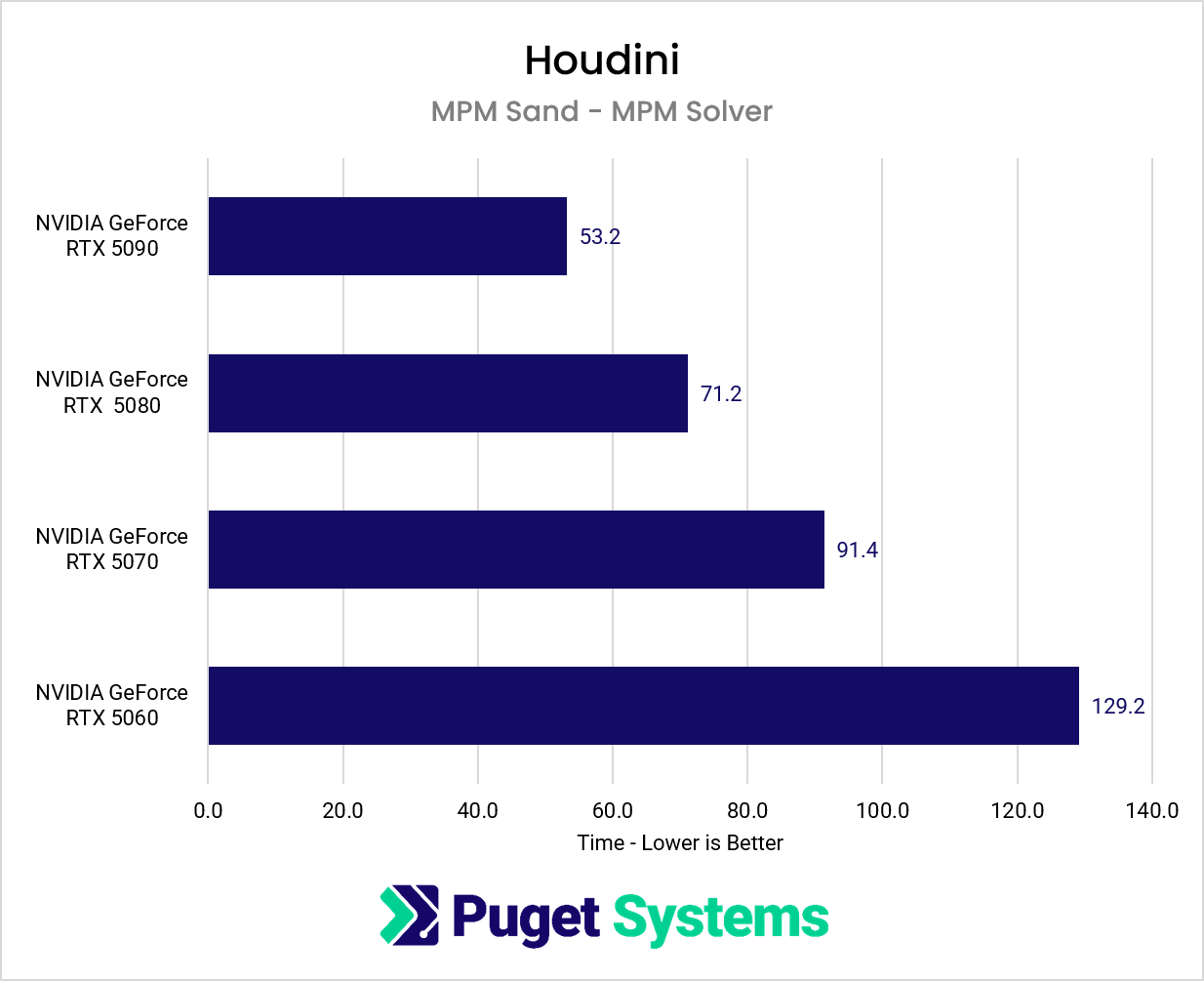
For our MPM Sand simulation, GPU performance made a substantial difference. Moving from the GeForce RTX 5060 to the RTX 5090 reduced simulation time by nearly 60%, with consistent improvements at each step up the GPU stack. In contrast, changing the CPU had relatively little impact on performance, even when moving from mainstream desktop processors to high-core-count Threadripper models.
Image
For artists who regularly work with the MPM solver, these results suggest that investing in a faster GPU is likely to provide a much greater benefit than spending the same budget on additional CPU cores. Of course, other parts of a Houdini workflow may still benefit from a faster processor, but for this particular simulation, the GPU is clearly the more important component.
Rendering Performance
Mantra CPU Rendering
While Karma is quickly becoming the preferred renderer for many Houdini artists, thanks in large part to the performance benefits of GPU acceleration with Karma XPU, Mantra is still widely used in existing production pipelines. Many of our customers continue to rely on Mantra for established workflows and render farms, so CPU rendering performance remains an important consideration when choosing a workstation.
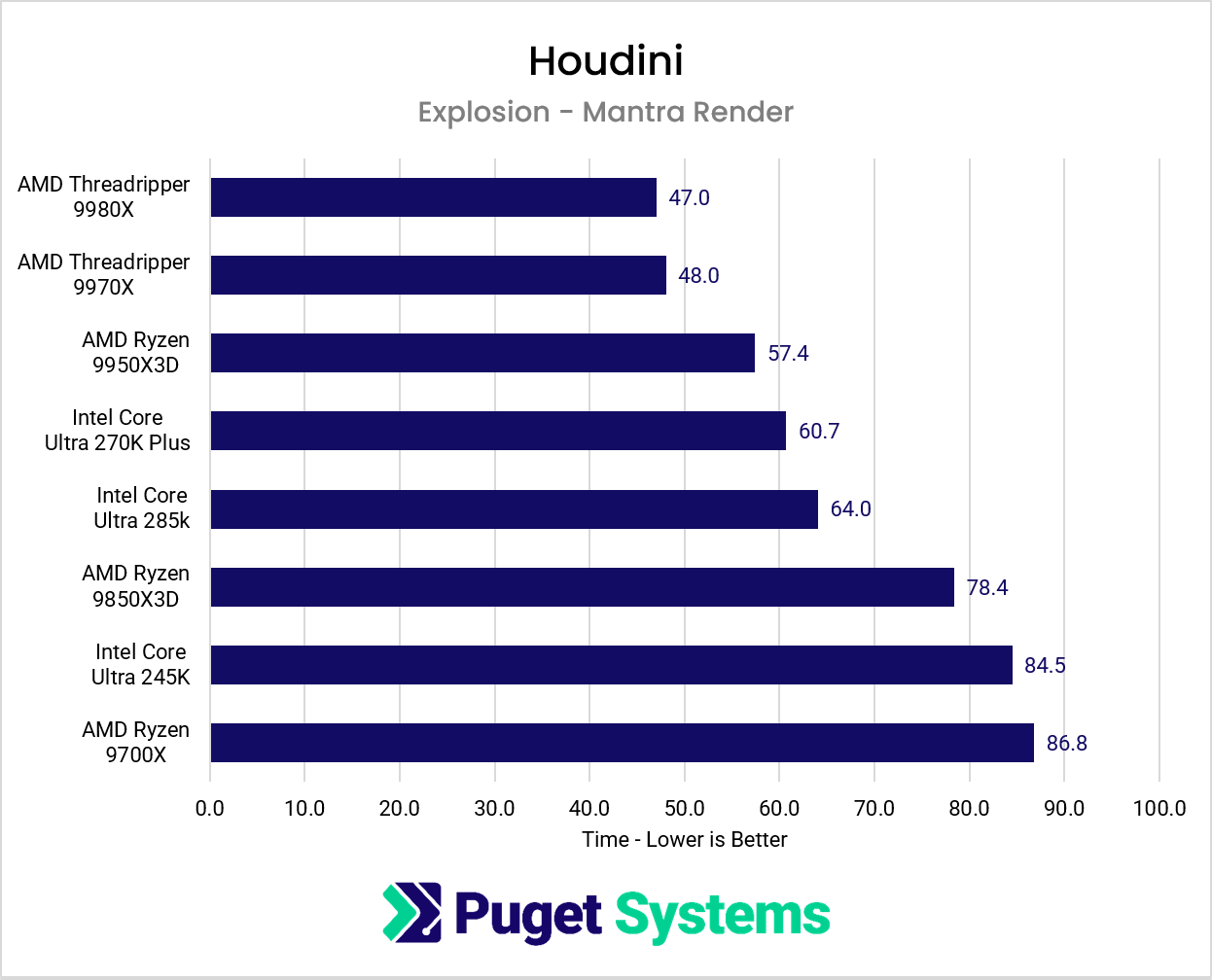
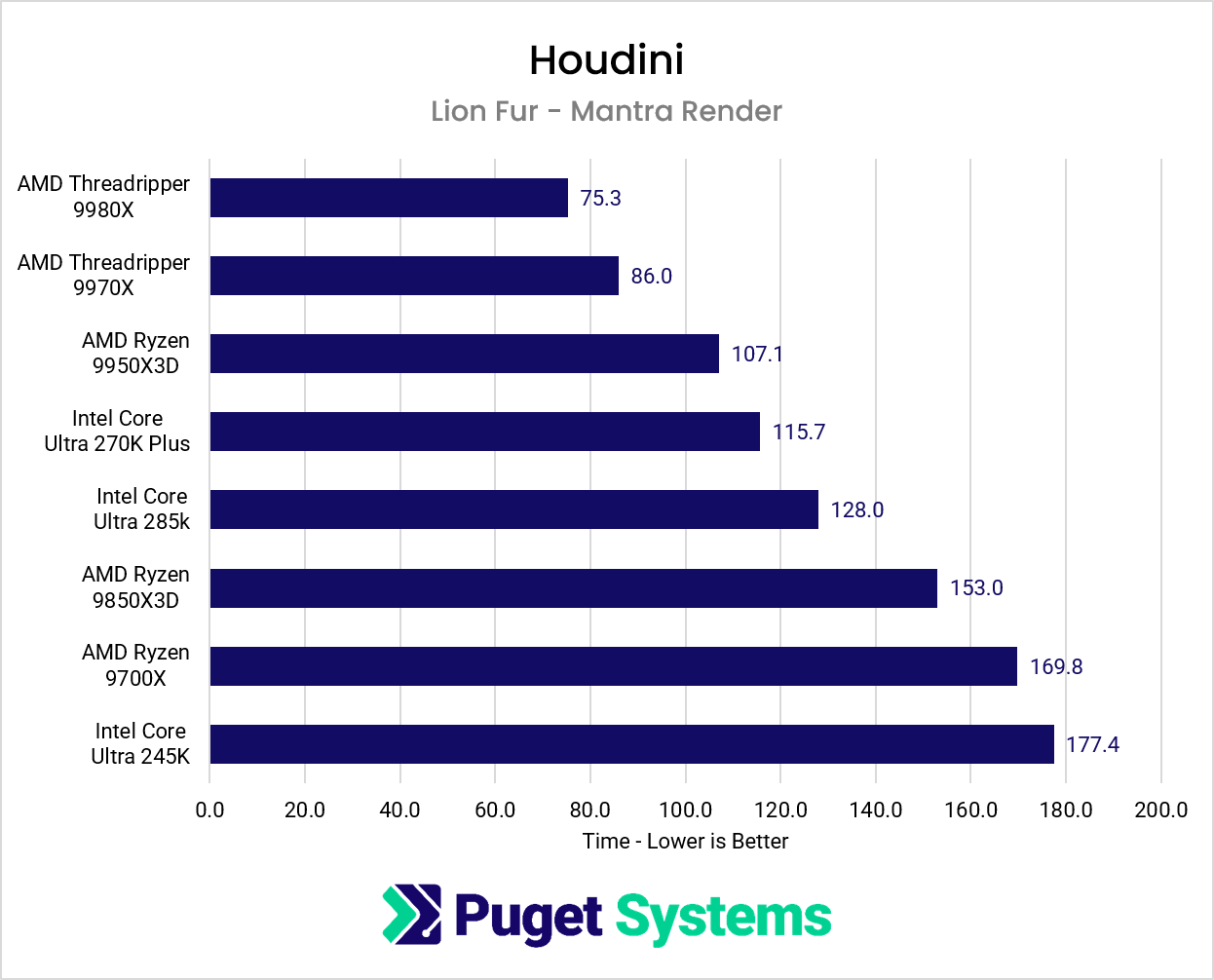
For our CPU rendering tests, we used two Mantra scenes: Explosion, which uses the Pyro solver, and Lion Fur, which naturally uses fur extensively. As expected, both benefited from higher core counts, with AMD’s Threadripper processors delivering the fastest render times. However, the amount of improvement varied between the two scenes, and we continued to see diminishing returns as core counts increased.
System Image
The Lion Fur scene showed a more substantial benefit from moving to a high-core-count processor, while the Explosion scene saw smaller gains. Even within the Threadripper lineup, doubling the core count from 32 to 64 resulted in only a minor improvement for Explosion (~2%), although Lion Fur benefited more noticeably (~14%).
As with simulations, the value of a higher-end CPU largely depends on how much time is spent rendering. For artists producing occasional previews or shorter renders, a mainstream desktop processor is likely sufficient. However, for those regularly rendering complex scenes or large numbers of frames, the time saved with Threadripper can quickly add up, especially when combined with the benefits we saw in CPU-heavy simulations.
Karma XPU Rendering
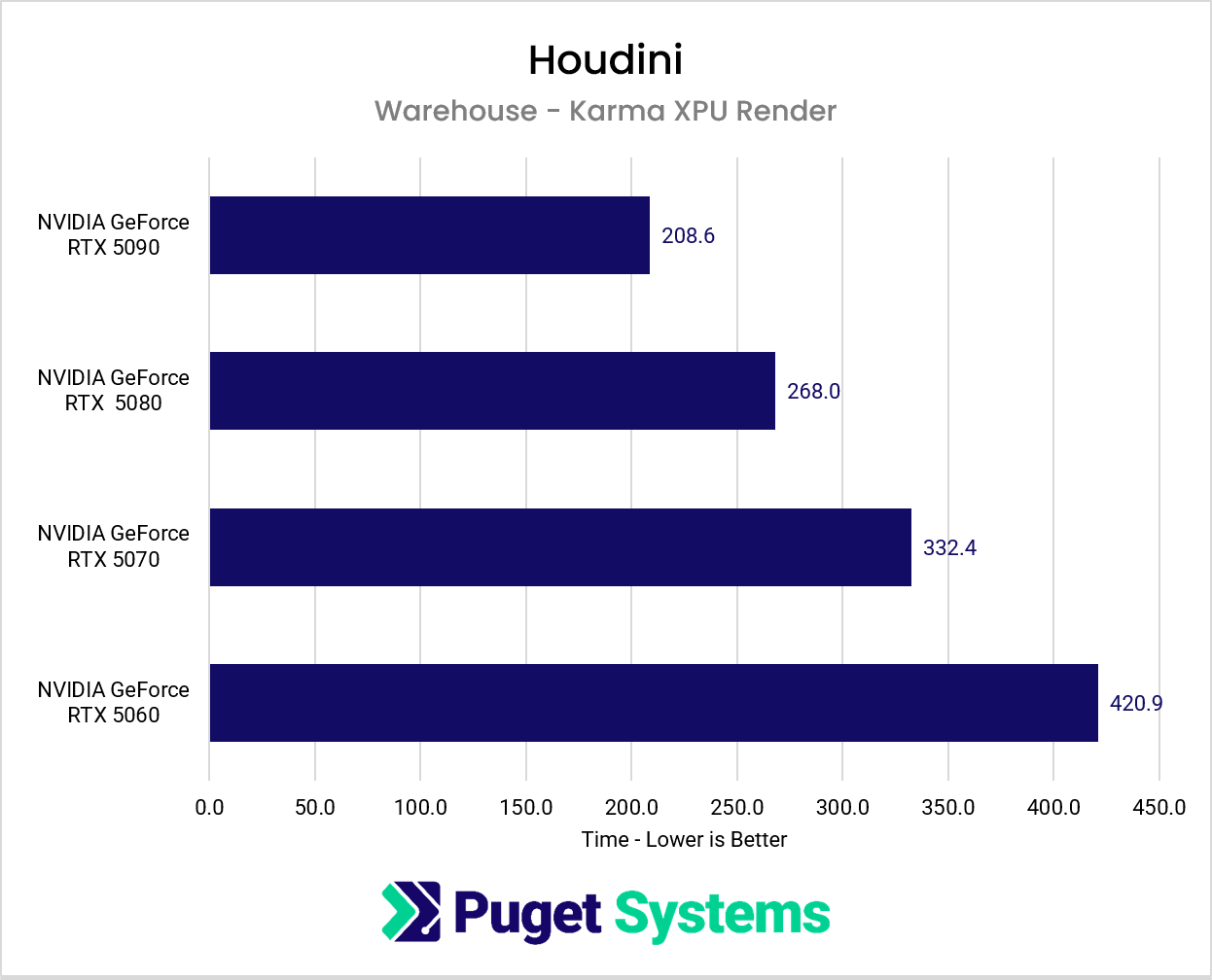
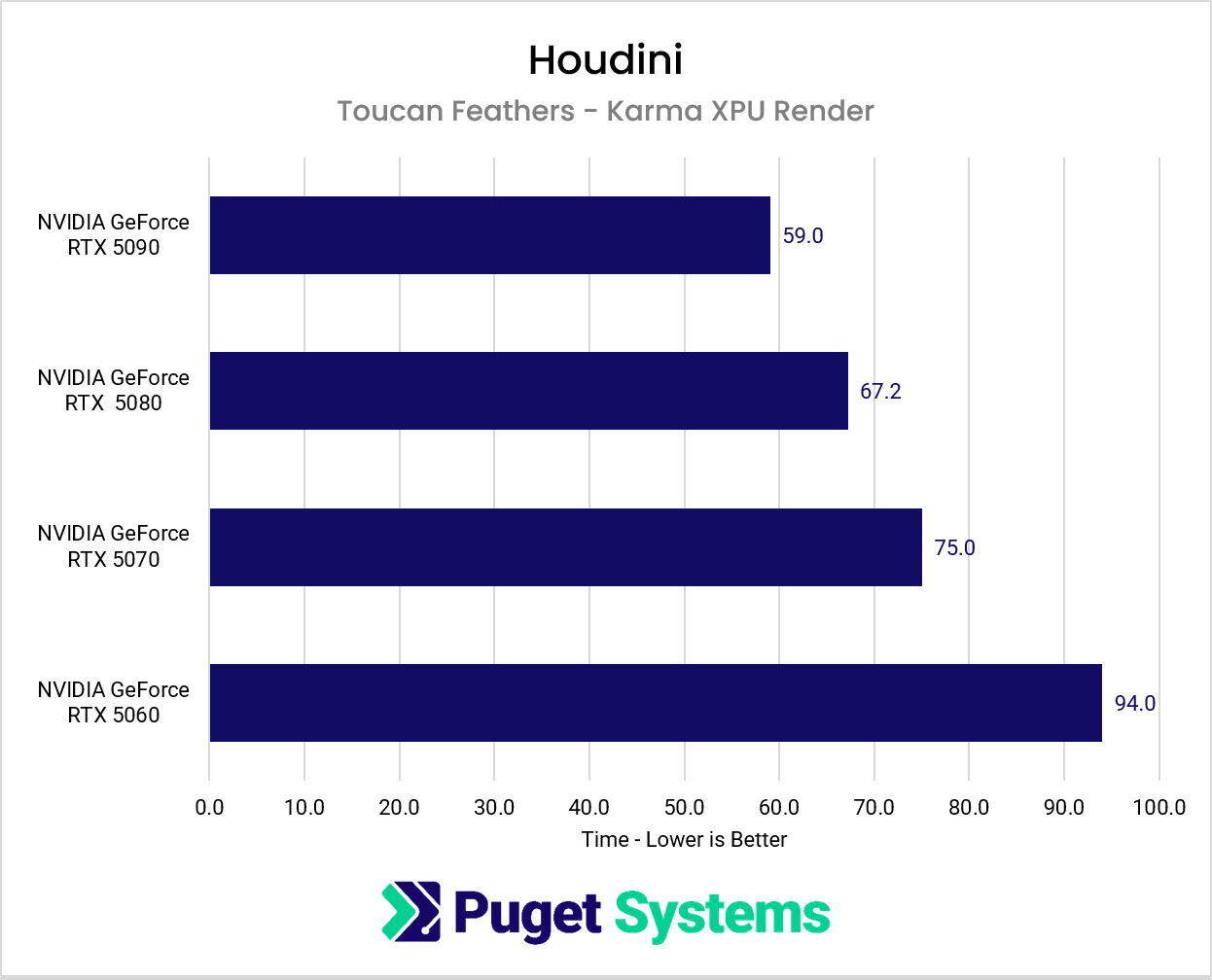
The newer Karma XPU engine supports GPU acceleration, and our rendering tests showed a similar trend to the MPM solver that utilizes GPUs. We tested two scenes, Toucan Feathers and Warehouse, both of which benefited from faster video cards.
The Warehouse scene showed particularly strong scaling, with the RTX 5090 completing the render in roughly half the time of the RTX 5060. Toucan Feathers also benefited from faster GPUs, although the differences between cards were less pronounced.
System Image
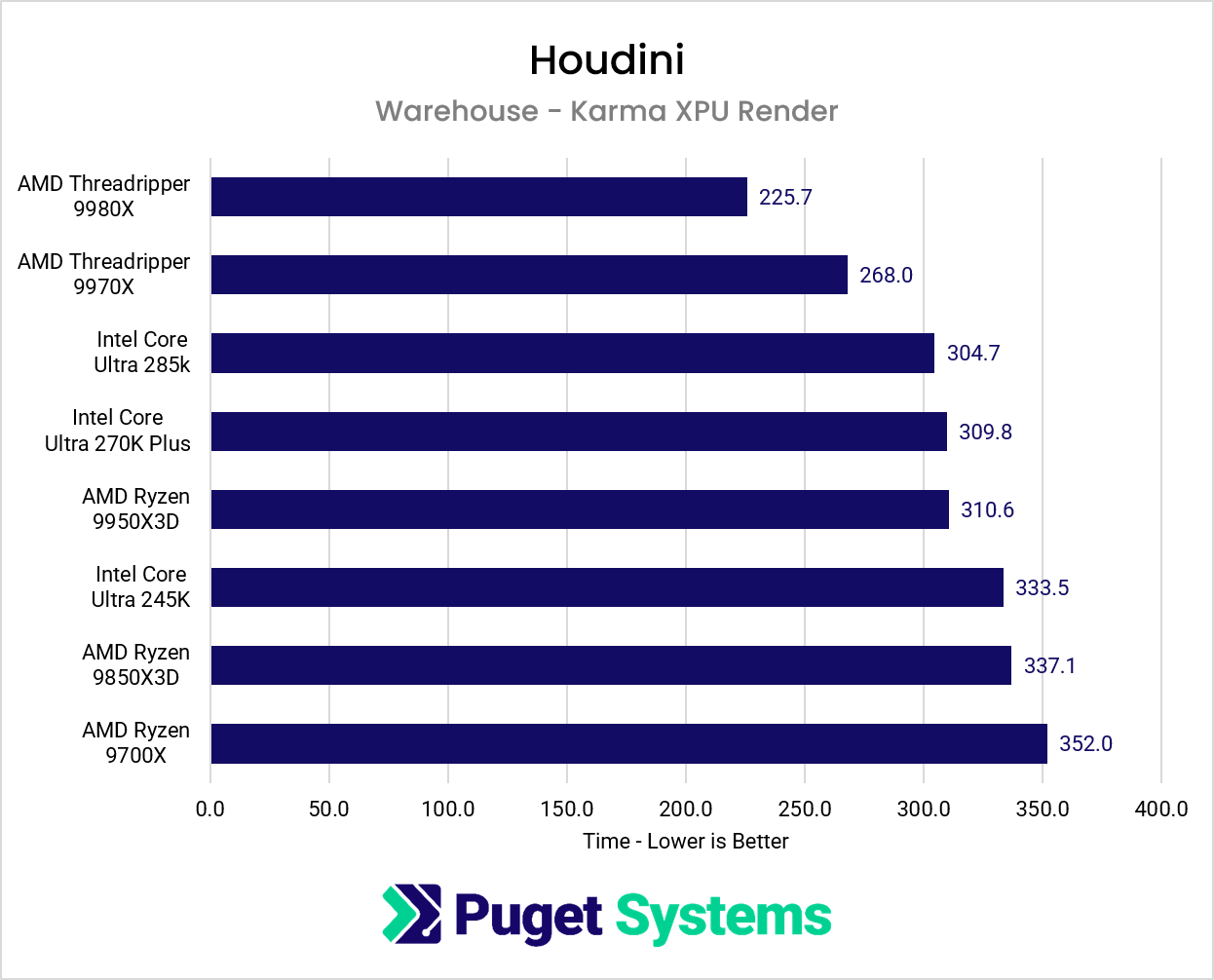
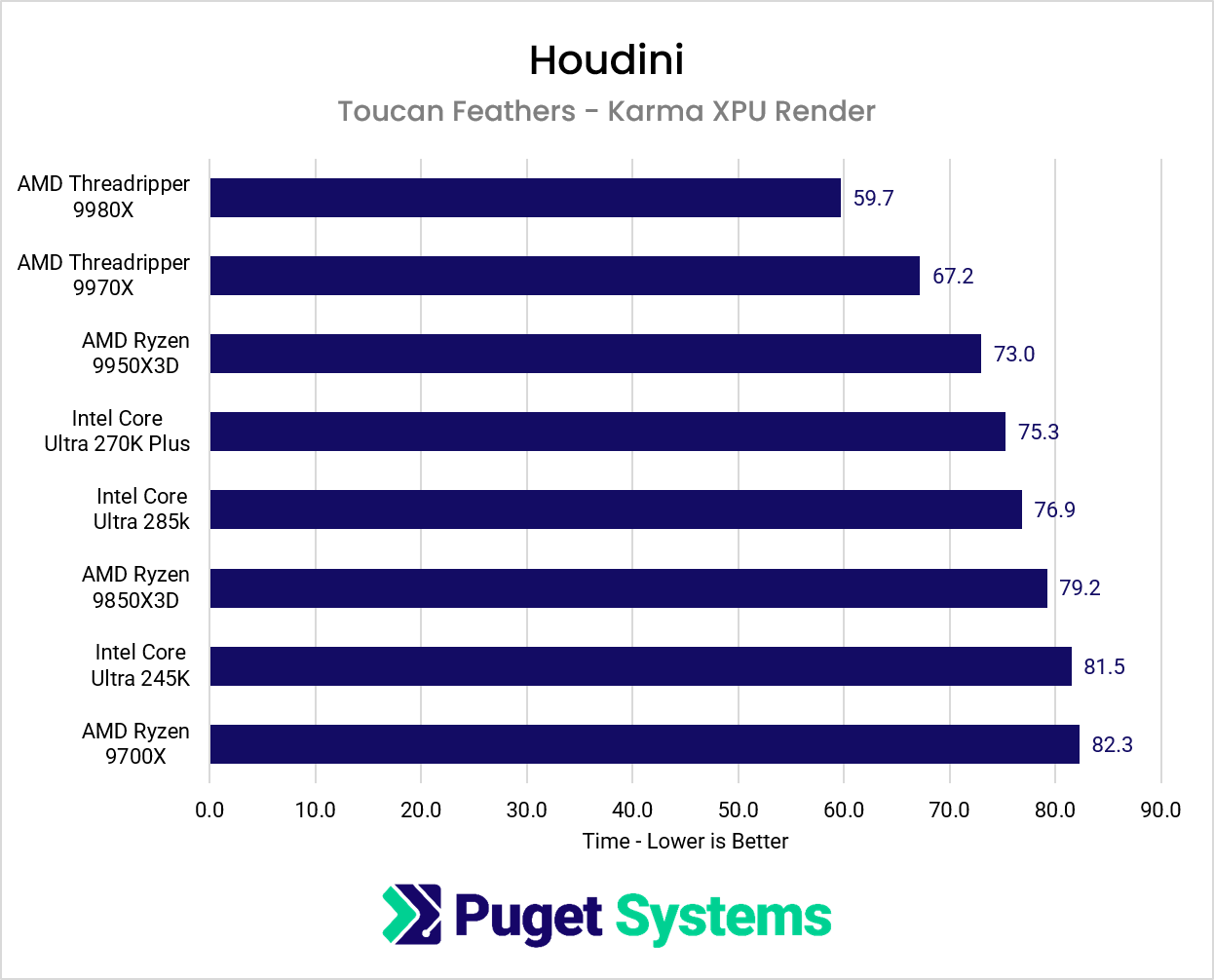
Karma XPU also showed meaningful improvements when moving to higher-core-count CPUs, particularly in the Warehouse scene. However, the GPU generally had a greater impact on rendering performance across the hardware we tested.
System Image
For artists primarily using Karma XPU, we’d recommend prioritizing a faster GPU before investing in a high-core-count CPU. A Threadripper workstation can still offer benefits, especially for CPU-heavy simulations or other multithreaded tasks, but a mainstream desktop processor paired with a powerful video card may offer better overall value for artists focused on GPU-accelerated rendering.
Conclusion
As we’ve seen throughout our testing, no single CPU or GPU is the best choice for every Houdini artist. The right hardware depends heavily on the types of simulations and rendering workflows most commonly used.
For artists working primarily with CPU-based simulations, AMD’s Threadripper processors offer a substantial performance advantage over mainstream desktop CPUs. However, those gains come with diminishing returns at higher core counts, and the additional cost may be difficult to justify for smaller projects or occasional simulations. We also saw that not every solver benefits from more cores; our RBD Bullet test actually favored mainstream desktop processors.
For GPU-accelerated workloads such as MPM simulations and Karma XPU rendering, investing in a faster graphics card generally yields the greatest performance benefit. Karma XPU can also take advantage of a higher-core-count CPU. For artists primarily focused on GPU rendering, we’d typically recommend prioritizing upgrading the video card before moving to a more expensive workstation platform.
Ultimately, we’d encourage artists to consider not just which hardware is fastest, but how much time they’re actually spending waiting on simulations and renders. A few minutes saved here and there may not justify a significant hardware investment, but those same performance improvements can make a substantial difference when running long simulations, rendering hundreds of frames, or working against tight production deadlines.

Looking for a Houdini workstation?
We build computers tailor-made for your workflow.

Don’t know where to start?
We can help!
Get in touch with our technical consultants today.