Webinar: How To Choose The Right Hardware For After Effects

In this 45 minute webinar, Matt Bach will go over all the individual parts that go into a workstation, explaining what each does and how After Effects uses them. We will help you separate fact from fiction and make you aware of “marketing buzzwords” that are either misleading or flat-out lies.
Premiere Pro Initial Troubleshooting Guide

Wondering where to start when you have a sudden crash, error, or issue while editing? It can be tricky to determine if your issues are hardware related, application caused, or project specific. This article covers where to start in your troubleshooting by testing controlled variables that affect your editing experience in Premiere Pro.

Puget Systems at Adobe MAX 2019

In 2019, our continued goal is to get out there where our customers are to learn more about them, learn more about their workflow, and what the cutting edge technologies are being used those workflows. What better place to do that than Adobe MAX?

How To Change Your Default Audio Device

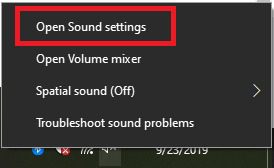
Windows 10 provides a few different ways to adjust the default audio device, configure system events and change input/output devices. We are now able to change the default audio device using the settings app as well as straight from the taskbar. No more digging through numerous screens just to switch from headphones to speakers or back. In this article we will guide you through the process and explain why you should use which path.

Webinar: The State of GPU Rendering in 2019

In this 40 minute webinar, William George will give an overview of where GPU-based rendering engines are at, where they are going, and what hardware will work best with them. OctaneRender, Redshift, and V-Ray Next will be used as primary examples, with some mention of other engines as well. There will be a brief Q&A time at the end.

Windows 10 Training Options

I spend a good portion of my time speaking with customers. Many times, they just recently took delivery of their new computer, and they are getting acquainted with it. For some, this is their first experience with Windows 10 because they came from the Mac or an older version of Windows.

One question I get asked often is: Where can I find good training on Windows 10?

Leave it ON!

To leave it on, to turn it off. That is the question. This discussion has bounced around tech enthusiasts, novices and tech professionals yet no one seems to be able to firmly agree. Well today Puget is taking a side!