Table of Contents
Introduction
With the release of the new Intel Core™ Ultra 200S Plus processors – the 270K Plus and 250K Plus – Intel has once again pushed the envelope on maximum officially supported memory speeds. With one-DIMM-per-channel configurations and CUDIMMs, Intel’s new Core Ultra Plus processors support memory speeds up to 7200 MT/s. That is 800 MT/s higher than the non-Plus 200S processors, at 6400 MT/s, and 1600 MT/s higher than AMD’s Ryzen™ 9000 series processors. However, do you need to use high-speed RAM for these new processors to be competitive?
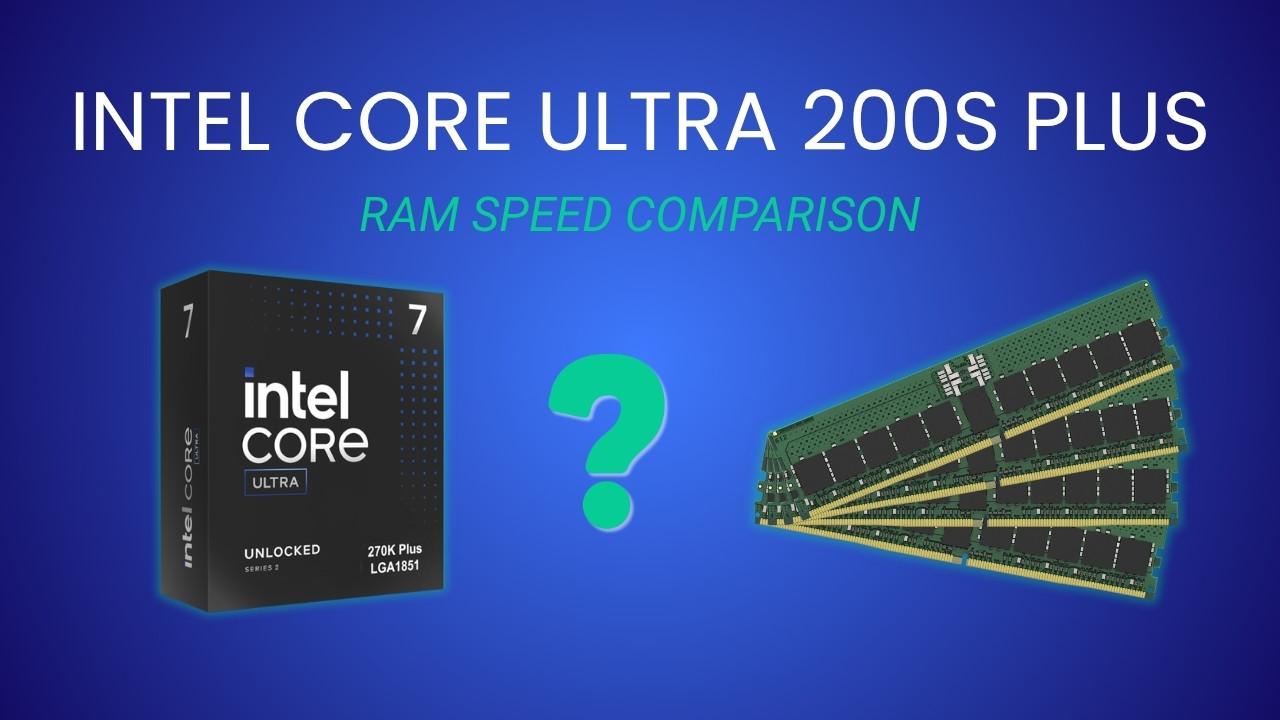
One strength Intel has long maintained is memory controller performance. Although this has often translated into strong overclocking potential, Intel has recently been leveraging it to also improve the official memory speed of its desktop processors. Many enthusiasts may only care about maximum potential speeds, we encourage most professionals to instead focus on the maximum in-spec potential. After all, better performance doesn’t matter if your computer is unstable during critical work. That is why we are very excited to see Intel officially validating high-speed memory: users can reap the benefits of better performance without sacrificing reliability.
However, when not overclocking, DIMMs must comply with JEDEC specifications. At present, for desktop memory modules, that means speeds of 6400 MT/s or higher must be enabled using CUDIMMS: otherwise typical desktop UDIMMs with an added clock driver (hence the leading C). While clocked modules capable of JEDEC 6400 have been available for a while, JEDEC 7200 CUDIMMs are only just emerging. Moreover, given the memory situation here in early 2026, acquiring RAM that is high-speed but not overclocked is becoming increasingly difficult. Therefore, we wanted to see whether the new 270K Plus and 250K Plus are still worth it when paired with slower memory. One thing we are not looking at in this article is downclocked memory, such as you would get when configuring one of these processors with more than two DIMMs – which reduces the maximum frequency from 6400 or 7200 MT/s to, at best, 4800 MT/s.
Test Setup (Expandable)
Intel Core Ultra Test Platform
| CPUs: Intel Core™ Ultra 7 270K Plus Intel Core™ Ultra 5 250K Plus Intel Core™ Ultra 9 285K Intel Core™ Ultra 7 265K Intel Core™ Ultra 5 245K |
| CPU Cooler: Noctua NH-U12A |
| Motherboard: ASUS ProArt Z890-Creator WiFi BIOS version: 3002 |
| RAM: 2x Kingston FURY Renegade 24GB (48 GB total) |
| GPUs: NVIDIA GeForce RTX™ 5080 Driver Version: 591.74 |
| PSU: EVGA SuperNOVA 1200W P2 |
| Storage: Samsung 980 Pro 2TB |
| OS: Windows 11 Pro 64-bit (26200) |
AMD Ryzen Test Platform
| CPUs: AMD Ryzen™ 9 9950X3D AMD Ryzen™ 7 9700X |
| CPU Cooler: Noctua NH-U12A |
| Motherboard: ASUS ProArt X670E-Creator WiFi BIOS Version: 3513 |
| RAM: 2x Kingston ValueRAM 5600 32GB (64 GB total) |
| GPUs: NVIDIA GeForce RTX™ 5080 Driver: 591.74 |
| PSU: EVGA SuperNOVA 1200W P2 |
| Storage: Kingston KC3000 2TB |
| OS: Windows 11 Pro 64-bit (26200) |
Benchmark Software
| Lightroom Classic 15.2 — Puget Bench for Lightroom Classic 1.0.0 |
| Photoshop 27.4 — Puget Bench for Photoshop 1.0.5 |
| Premiere 26.0.1 — PugetBench for Premiere Pro 2.0.1 |
| After Effects 26.0 — Puget Bench for After Effects 1.1.0 |
| DaVinci Resolve 20.3.2 — Puget Bench for DaVinci Resolve 2.0.0 |
| Unreal Engine 5.7 |
| Visual Studio 2022 |
| Cinebench 2026 |
| V-Ray 6.00.01 |
| Blender 5.0 |
| MLPerf Client v1.0 |
| Llama.cpp 5122 |
For those who have read our our Content Creation review for these processors, the setup here is nearly the same: Intel and AMD-based platforms featuring ASUS ProArt motherboards and NVIDIA GeForce RTX™ 5080 GPUs. Windows, BIOSes, and drivers were all up to date as of the start of the testing. In line with our focus on professional workflows, we kept the processors running at stock settings: overclocking features such as ASUS MCE and MLB were disabled, as was AMD’s PBO, and the Intel processors were run with the default “Performance” power plan. Additionally, we left Windows security settings like VBS in their default (enabled) state. Intel iBOT was not enabled. APO was, but we did not test any applications that should have had performance improvements from it.
For our initial round of testing, RAM was locked to the maximum CPU-supported frequency at JEDEC timings: 5600 for AMD and 6400 or 7200 for Intel, depending on the model. After that, we took each of the Intel processors and ran them at JEDEC 5600 – the maximum supported frequency when not using CUDIMMs, which also happens to match AMD’s Ryzen processors.
Media & Entertainment – Lightroom Classic, Photoshop, After Effects, Premiere, & DaVinci Resolve
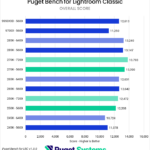
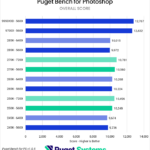

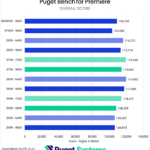
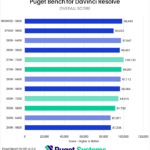
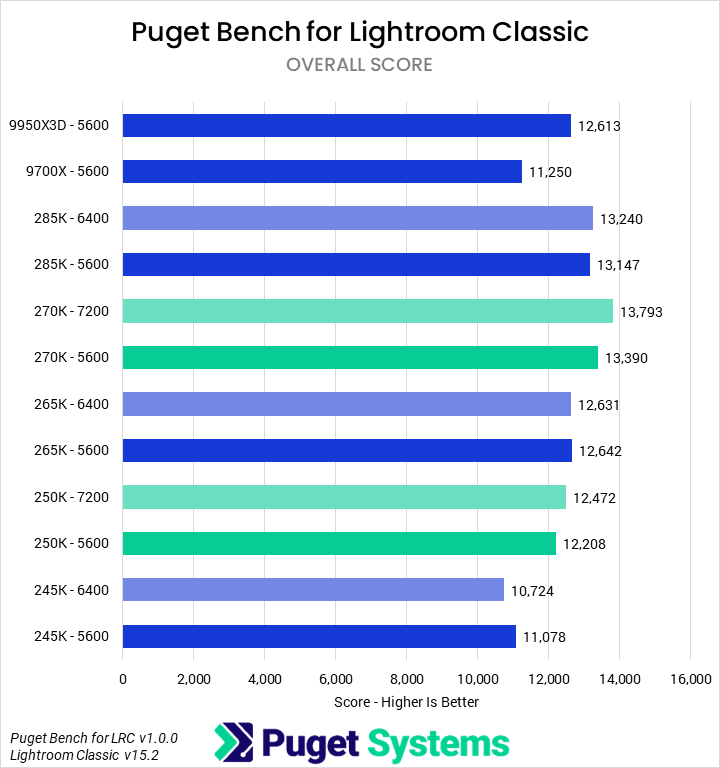
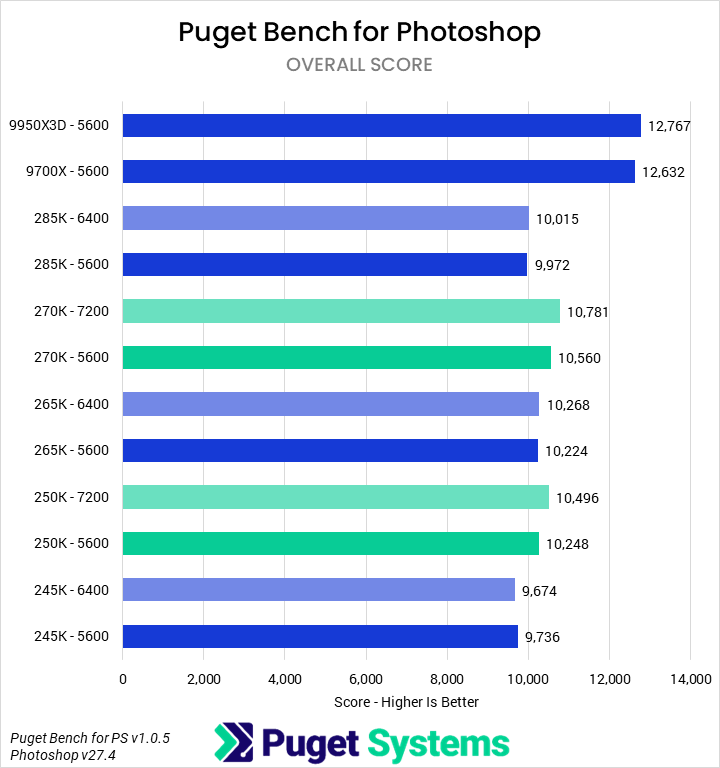
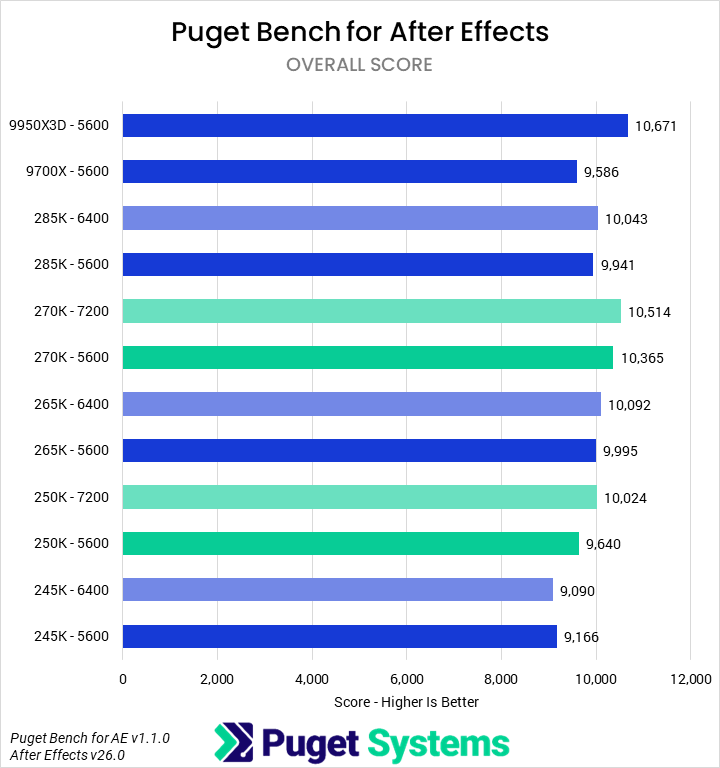
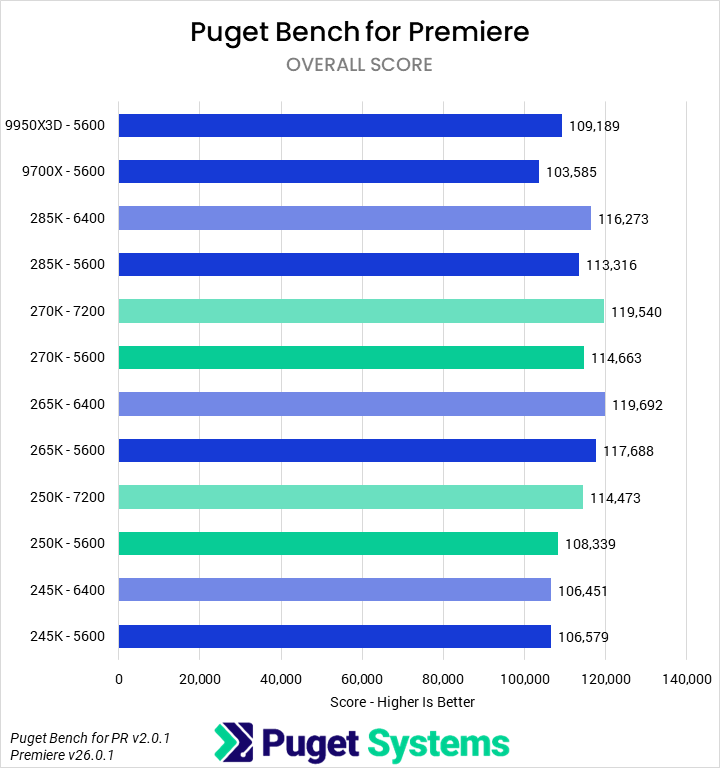
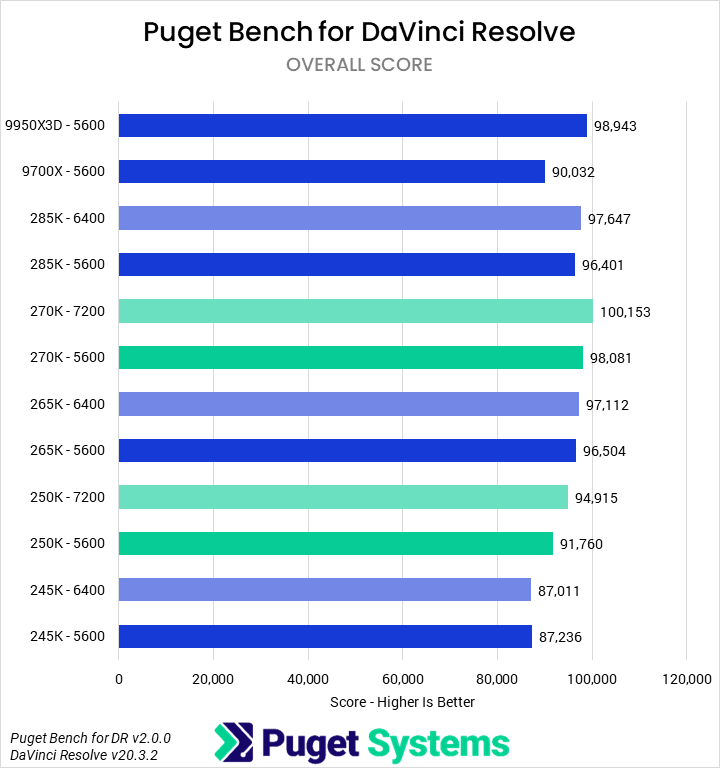
Beginning with media and entertainment applications, we looked at the impact of 7200 MT/s RAM on Lightroom Classic, Photoshop, After Effects, and DaVinci Resolve. The difference for the Core Ultra Plus processors between 5600 and 7200 MT/s was relatively small overall, about 3%. This gap is larger than what we measured for the non-Plus models, which only show a performance difference of about 1% between 5600 and 6400 MT/s. Even at the same 5600 MT/s, though, the Core Ultra Plus processors still maintain a lead over the non-Plus parts: the 270K Plus is about 2% faster than the 265K and 285K, while the 250K Plus is about 5% faster than the 245K. The comparison between the 285K and 270K Plus is the most important one, of course, as it shows the benefits of the changes in E-core and die-to-die frequencies.
Dropping from 7200 MT/s to 5600 MT/s on the 270K Plus changes the relative ranking of the 9950X3D and 270K on the overall score average, but there are no individual tests where this is the case. The margin between them narrows in every data point, but applications where the 270K Plus or 9950X3D is better remain consistent. As far as specific software goes, we found that Premiere Pro and parts of DaVinci Resolve tend to be the most impacted by memory frequency, while After Effects and Photoshop show little differentiation. We haven’t done this sort of testing on it in the past, but we were interested to find that Lightroom also tends to be a bit more sensitive to memory frequency. This likely means that, lacking 7200 MT/s memory, photographers are even more encouraged to go with a solid Ryzen processor over an Intel CPU.
Game Dev – Unreal Engine & Visual Studio
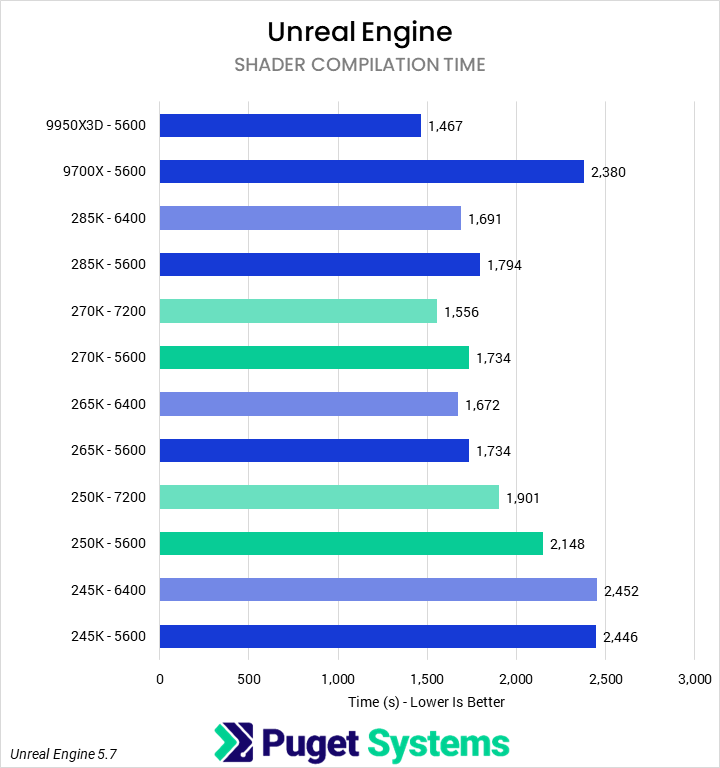
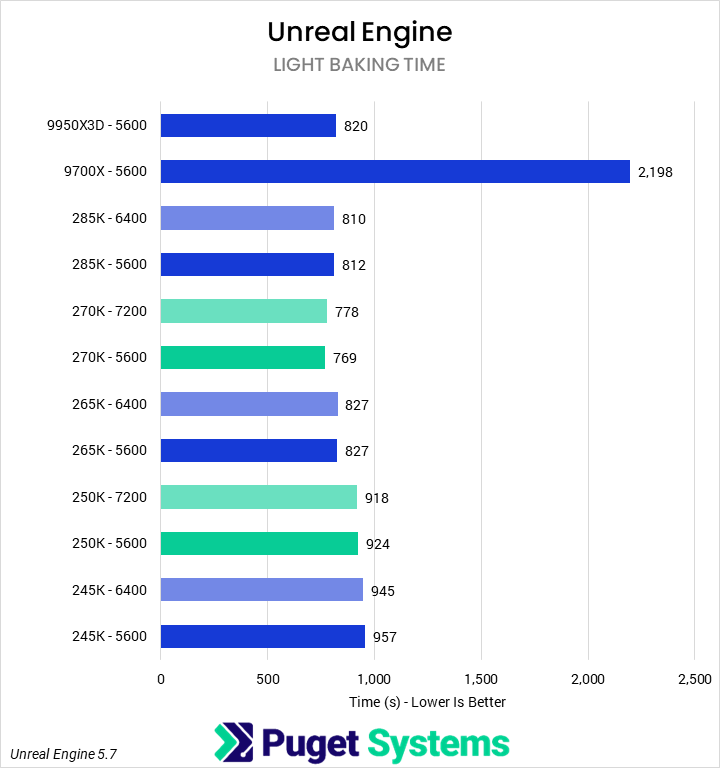
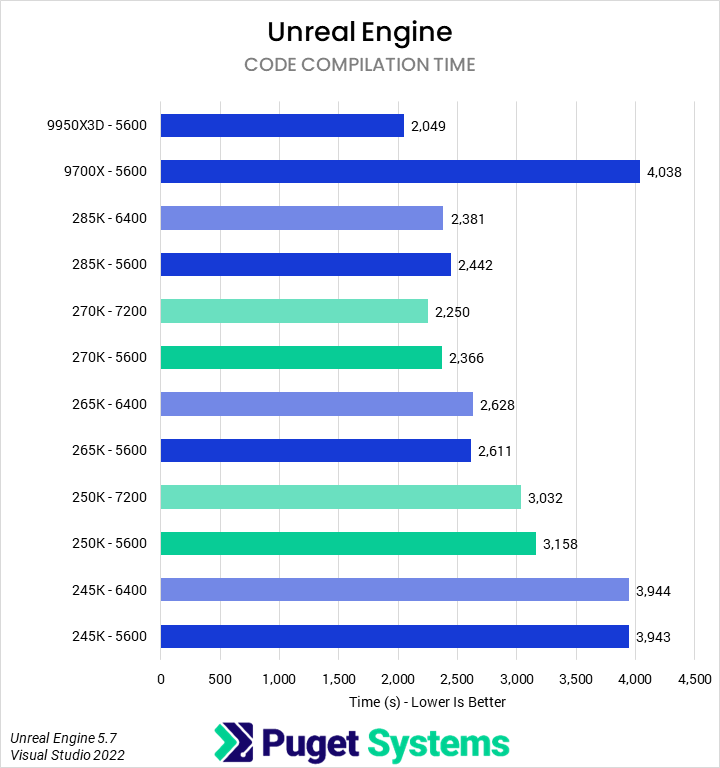
The next group of tests is centered around game development with Unreal Engine: examining the performance of compiling shaders and building lighting, as well as compiling the engine in Visual Studio. Historically, this workflow has been more sensitive to memory frequency and latency – which we saw being the case this time as well. Both Core Ultra 200S Plus processors saw an overall performance drop of 5% when moving from 7200 MT/s to 5600 MT/s RAM. Although the non-Plus models saw a smaller drop of 1-3% from 6400 to 5600 MT/s, as expected, the Plus processors still maintain a performance edge. At the lower memory speed, the 270K Plus was 4% faster than the 285K and 6% faster than the 265K; its comparisons to AMD’s CPUs are essentially unchanged. While the difference in performance between the 250K Plus and 245K narrowed slightly, it is still about 10% faster.
Looking at the specific subtests, we once again found that building lighting showed virtually no scaling with RAM speed. Code compilation was somewhat affected, shifting the 270K Plus’ advantage over the 9700X from 8% to 3% and its advantage over the 285K from 6% to 4%. Much like we saw with M&E applications, though, relative rankings of the CPUs remain the same. Compiling shaders shows the largest differences in performance between faster and slower RAM, but again, this is mostly academic. While the faster RAM can unlock up to 11% better performance, the 270K Plus is the best Intel CPU regardless – trouncing the 9700X but failing to truly compete with the 9950X3D.
CPU Rendering – Cinebench 2026, V-Ray, & Blender
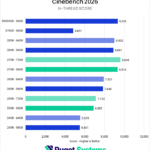
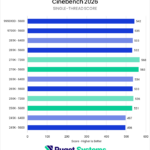
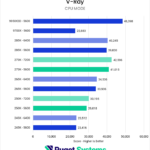
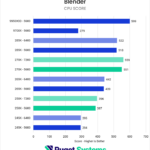
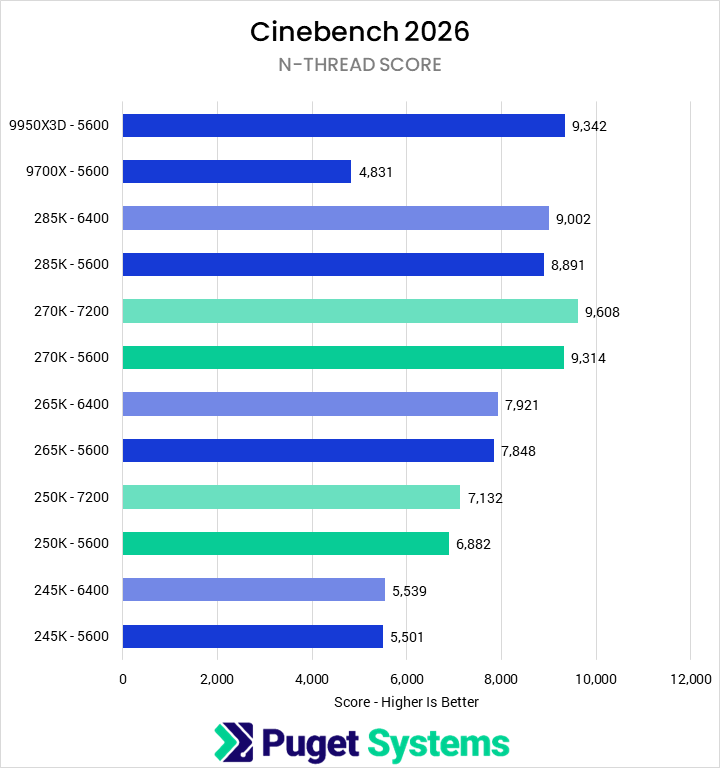
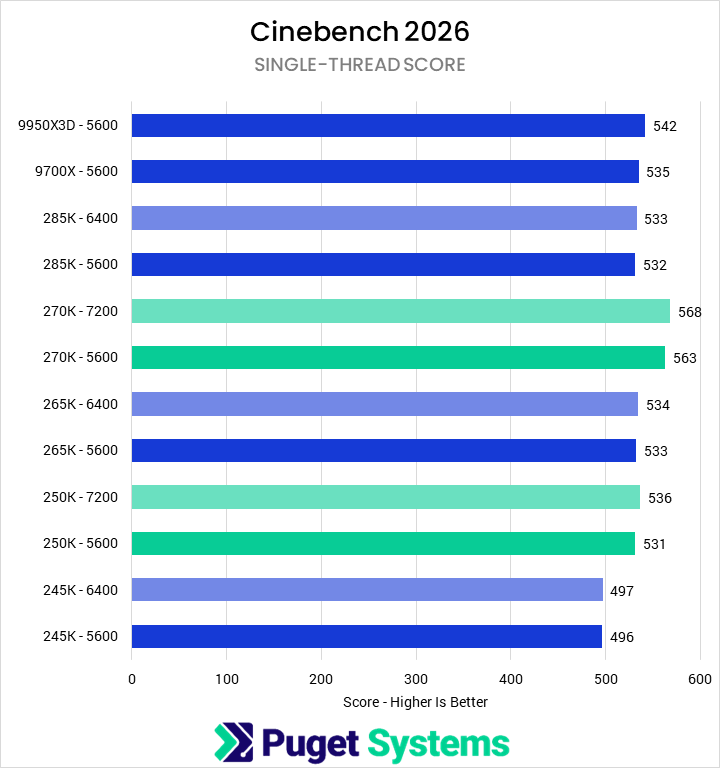
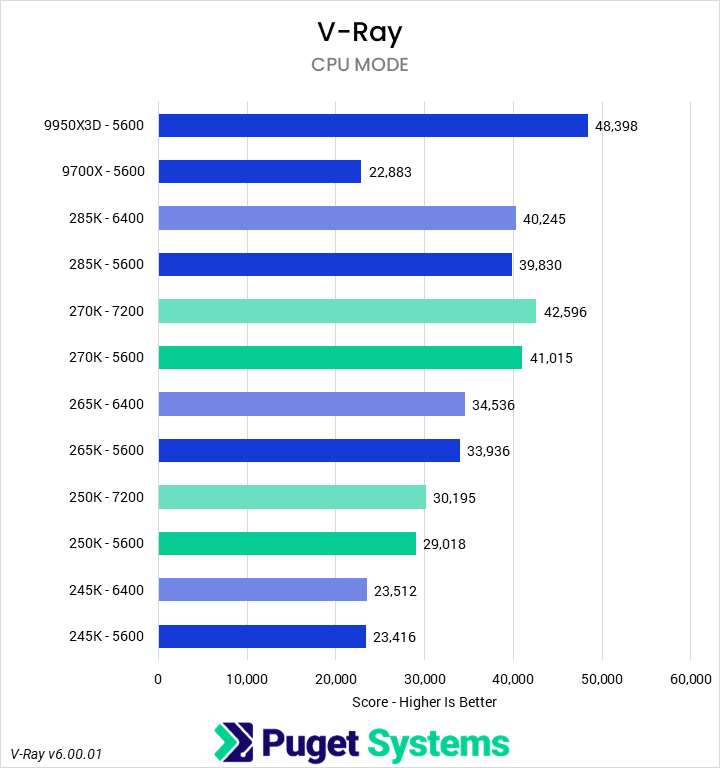
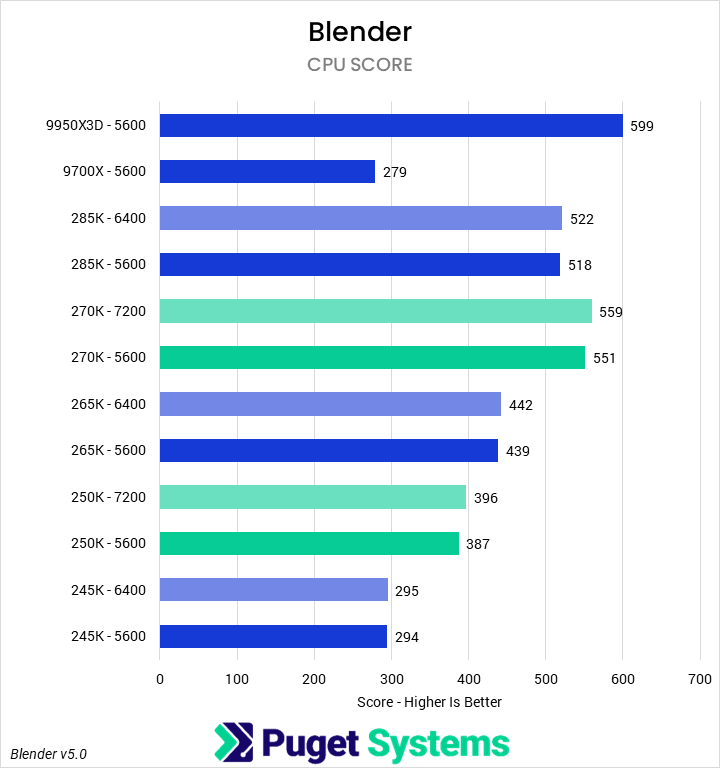
CPU-based renderers are typically less sensitive to memory overall, especially the relatively simple benchmarks that are considered industry standard. In our testing, we found that there was a small but noticeable performance drop for the Core Ultra 200S Plus processors when moving from 7200 MT/s to 5600 MT/s memory: the 270K lost an average of 3%, while the 250K Plus lost 2%. This is definitely larger than the non-Plus CPUs, which averaged a loss of less than 1%, but such a minor difference is fairly meaningless.
When looking at specific apps, though, we do see some nominal reordering when examining performance at a fixed 5600 MT/s memory speed. In Cinebench N-thread, the 9950X3D is technically a touch faster than the 270K Plus, eliminating the small 3% lead it was able to establish with faster RAM. The 270K Plus is still a far better value, in terms of price-to-performance, but this is interesting nonetheless. This memory speed fixing has a similar effect in the single-threaded test, where the 250K Plus loses its narrow performance advantage over the 265K – though all results are close enough to essentially not matter. In Blender and V-Ray the 270K Plus loses up to 4% performance, but this does not affect relative performance rankings.
AI – MLPerf & Llama.cpp
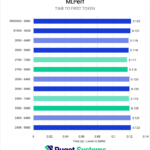
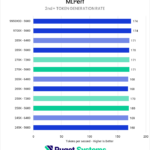
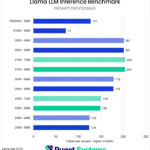
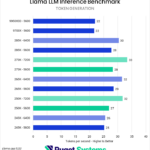
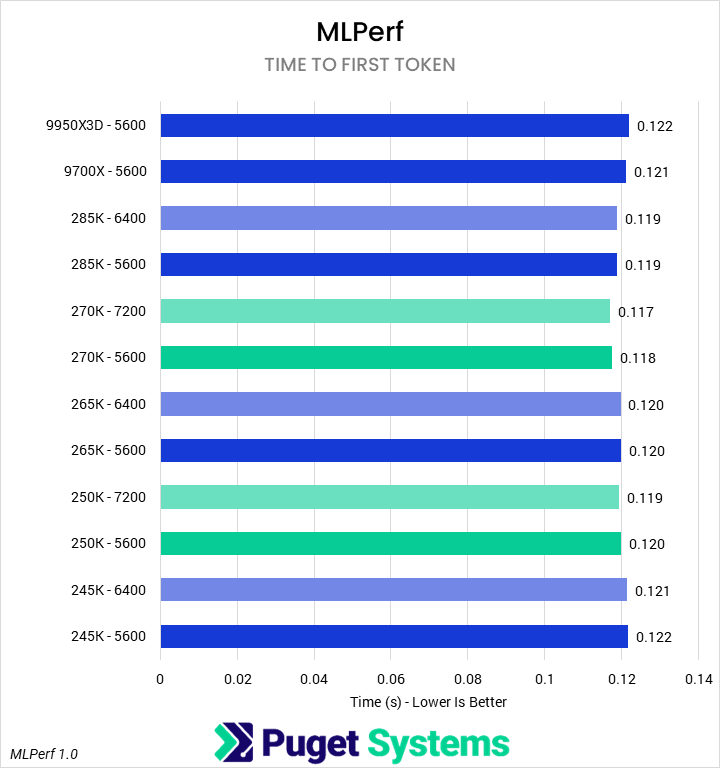
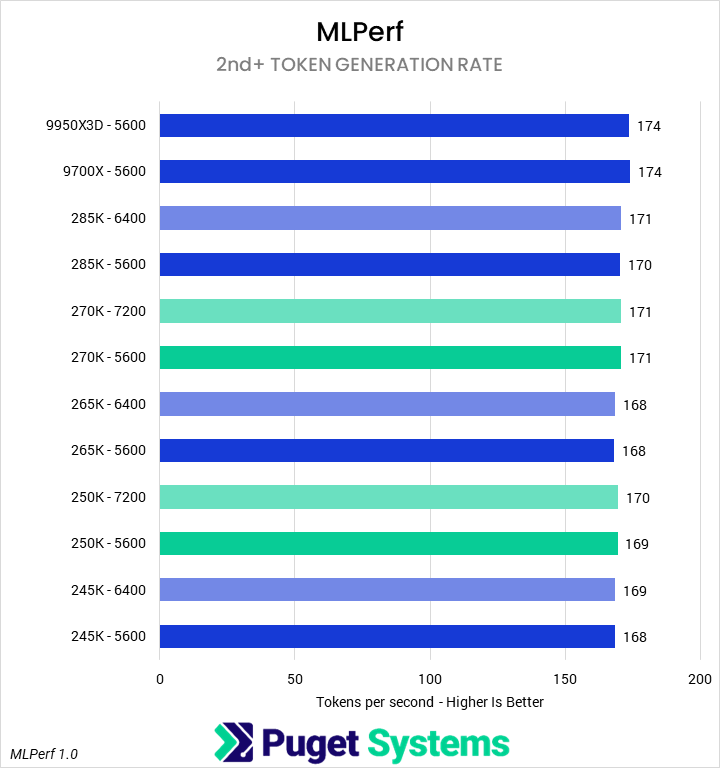
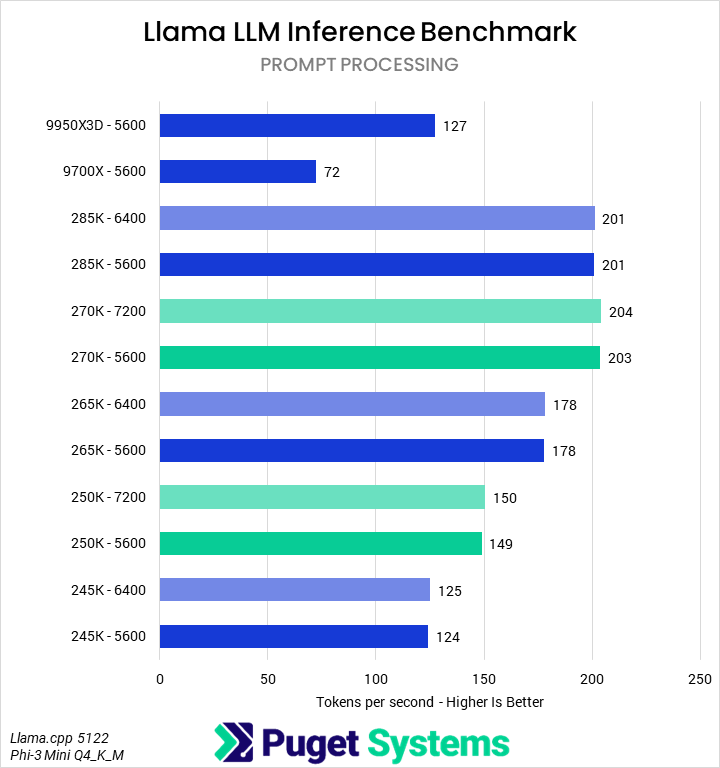
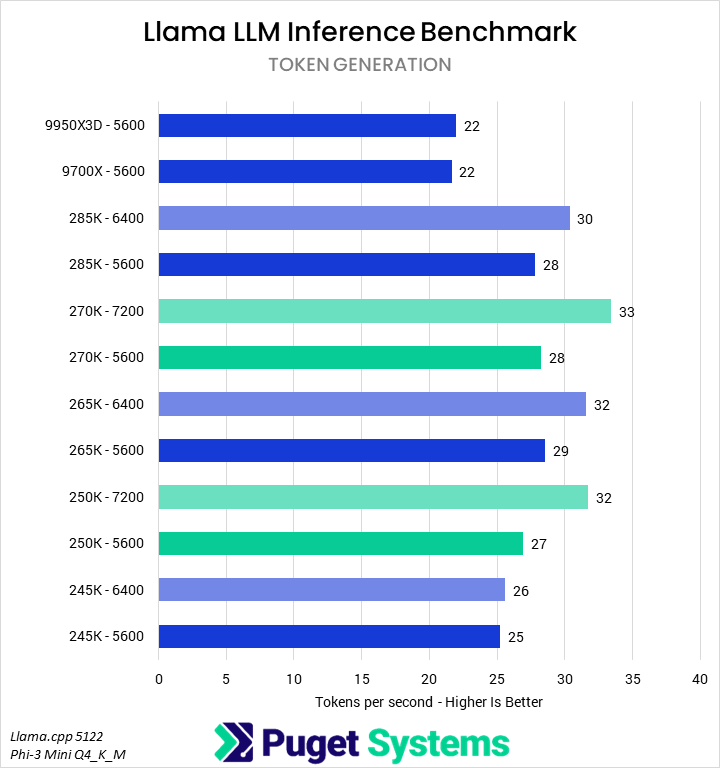
The final pair of benchmarks we looked at were MLPerf Client 1.0 and our in-house Llama LLM Inference benchmark. On average, reducing memory frequencies by 1600 MT/s on the Core Ultra 200S Plus processors dropped performance by about 4%, while the 800 MT/s drop on the non-Plus models showed a smaller 2% drop. As a whole, averaging across these tests, those differences do not offset the performance gains from the rest of the changes to these new CPUs.
However, the individual AI tests are not identically affected. Of the four subtests, only the Llama inference benchmark’s token generation rate showed a meaningful difference: the 270K Plus dropped 16%, the 250K Plus 15%, the 265K 10%, and the 285K 7%. In this case, that almost wholly erases the lead the 270K Plus was able to establish over the 285K and 265K – so while it may justify itself on price, it is not the best processor for this specific workload.
What Is the Impact of Using Slower RAM?
To examine the overall performance impact of running these new processors with slower memory, we normalized scores from each CPU with 5600 MT/s memory to the 270K Plus with full 7200 MT/s RAM – and then computed a weighted geometric mean of the normalized scores by and across categories. These can essentially be considered performance percentage ratios, and this analysis is summarized in the table below:
| Normalized Scores | 245K @ 5600 | 250K Plus @ 5600 | 265K @ 5600 | 270K Plus @ 5600 | 285K @ 5600 | 9700X @ 5600 | 9950X3D @ 5600 |
|---|---|---|---|---|---|---|---|
| M&E | 86.74% | 91.47% | 95.25% | 97.49% | 94.67% | 92.54% | 99.83% |
| Game Dev | 66.58% | 75.73% | 89.93% | 95.19% | 91.50% | 50.52% | 103.36% |
| Rendering | 61.64% | 74.96% | 83.16% | 97.70% | 93.05% | 59.67% | 103.06% |
| AI | 81.23% | 86.81% | 91.96% | 95.69% | 94.75% | 68.94% | 79.54% |
| Overall Score | 73.33% | 81.94% | 89.96% | 96.51% | 93.48% | 66.22% | 95.90% |
This just reinforces what we explored in the individual sections above. Although there is a performance drop when going from the maximum supported CUDIMM frequencies to the maximum supported non-CUDIMM frequencies, the relative rankings of the processors remain the same; where the 270K Plus was the best, it remains so. On average, we found that the slower RAM reduced performance for the Core Ultra 200S Plus processors by about 4% – or roughly the difference, on average, between a 265K and 285K in the blended results.
While this is not the most significant influence on performance, it does mean that higher speed memory is ideal – if available. Unfortunately, high-speed CUDIMMs rated for the full speed these new processors support are quite rare at launch. Moreover, the top speeds are only supports with a single rank of memory per channel. Dual-rank configurations have much lower maximum supported RAM speeds, making CUDIMMs completely unnecessary in such situations.
If you need a powerful workstation to tackle the applications we’ve tested, the Puget Systems workstations on our solutions page are tailored to excel in various software packages. If you prefer a more hands-on approach, our custom configuration page helps you configure a workstation that matches your needs. Otherwise, if you would like more guidance in configuring a workstation that aligns with your unique workflow, our knowledgeable technology consultants are here to lend their expertise.

Looking for a new desktop workstation?
We build computers tailor-made for your workflow.

Don’t know where to start?
We can help!
Get in touch with one of our technical consultants today.