Table of Contents
TL;DR: Should 3D Artists use AMD Threadripper 9000 processors?
Introduction
In the world of 3D, there’s always a new tool, workflow, or piece of hardware promising to speed things up. For most artists, it’s already difficult enough to keep up with software updates, let alone the constant stream of CPU and GPU launches. At Puget Systems, we aim to cut through the noise and explain what new technology means for your day-to-day work.
AMD’s new Threadripper™ 9000 series is one of those launches that grabs attention. With massive core counts and support for enormous amounts of memory, these processors are marketed as powerhouses for professionals. But does that mean they’re the right fit for 3D artists? The answer depends on what you do most: modeling, animating, rendering, or running simulations. In this article, we’ll explore where Threadripper 9000 shines, where it may be overkill, and how it stacks up against AMD’s Ryzen™ 9000 series and Intel’s Core™ Ultra processors.

Image
These new processors have several improvements over the previous generation. If you want a full breakdown of what is new with these CPUs, as well as a detailed performance analysis for a range of applications (including Premiere Pro, DaVinci Resolve, and After Effects), we have in-depth articles available:
- AMD Ryzen™ Threadripper™ 9000 Content Creation Review
- AMD Ryzen™ Threadripper™ PRO 9000WX Content Creation Review
- AMD Threadripper™ 9000 vs Threadripper™ PRO 9000WX
AMD Threadripper™ and Threadripper™ PRO WX processors differ from consumer-class processors like Intel’s Core™ Ultra 200 series and AMD’s Ryzen™ 9000 series in their core count, maximum clock speed, platform, memory support, and PCIe lane availability. Those consumer-class CPUs typically offer up to 16-24 cores with a focus on higher per-core clock speeds, while Threadripper and Threadripper PRO processors offer higher core counts (up to 96 cores) for sustained performance and multi-threaded throughput, though with lower per-core clock speeds. Additionally, the Threadripper platform offers additional PCIe lanes and larger memory capacities than more mainstream options.
A Note on Performance
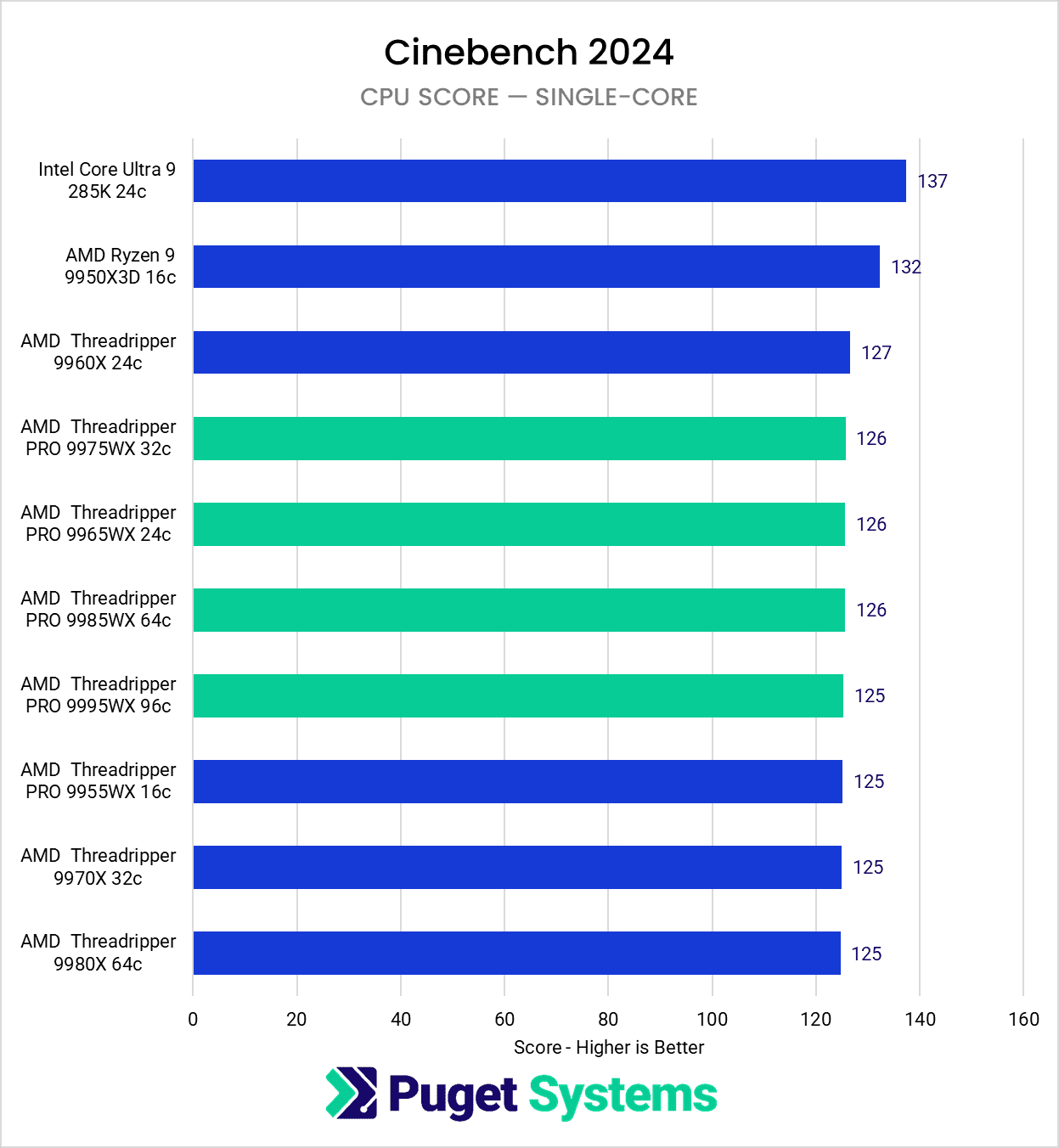
3D artists have a wide range of tools available for numerous different tasks. We do not have a dedicated modeling and animation benchmark yet, but we do have a stand-in benchmark in the form of Cinebench Single Core. Similarly, we do not have a physics simulation benchmark; however, we can use both the single-core and multi-core rendering results to make some solid assumptions about performance. The goal of this article is not to give exact recommendations, but instead to walk through various workflows and guide users to making informed decisions for their specific needs.
AMD Threadripper 9000 for Modeling & Animation
Most 3D artists spend the majority of their time modeling and animating. These tasks are generally lightly threaded, meaning they depend on the performance of a single CPU core rather than spreading work across dozens of them. For example, when animating a character rig in Maya, every bone and joint must be calculated sequentially, not all at once. Similarly, sculpting in ZBrush or working with high-poly assets in Blender relies on fast single-core speeds to feel smooth and responsive.
Image
Threadripper CPUs certainly aren’t slow per core, but they aren’t built to win the single-core race. AMD’s Ryzen and Intel’s Core Ultra processors often have higher clock speeds for less money, making them better suited to these lightly threaded workloads. The difference may not always be huge; the Threadripper 9000 Cinebench single-core results are not even 10% slower than the Core Ultra. However, for artists who live in their modeling or animation software day in and day out, even a slight increase in responsiveness can improve the creative flow.
This doesn’t mean Threadripper performs poorly in modeling and animation – far from it! It’s still very capable, and in many cases, the difference compared to a Ryzen or Core Ultra system won’t be night and day. In fact, one of the notable features of the whole TR 9000 series is how consistent they are with single-threaded performance, regardless of core count. But when considering cost, platform size, and energy consumption, it’s worth asking: if modeling and animation are your primary focus, will you see a return on investment with Threadripper? For most artists, the answer is no. AMD’s Ryzen 9000 and Intel’s Core Ultra 200 Series offer better speed, value, and responsiveness for this type of work.
AMD Threadripper 9000 for Rendering
Rendering is where Threadripper truly earns its reputation. Unlike modeling or animation, CPU rendering is heavily threaded – meaning it scales almost perfectly with the number of cores a CPU has. Here, Threadripper’s massive core counts put it in a league of its own compared to Ryzen or Core Ultra.
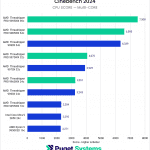
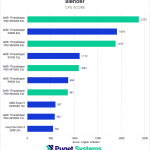
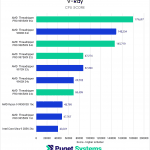
In our testing with Cinebench, V-Ray, and Blender’s CPU renderer, Threadripper 9000 systems consistently finished renders far faster than their desktop counterparts. For example, compared to a high-end Intel Core Ultra, a top-end Threadripper can complete the same render in less than a third of the time. In production, this kind of time savings adds up quickly, whether it’s an overnight animation job or a sequence of frames for a client deadline.
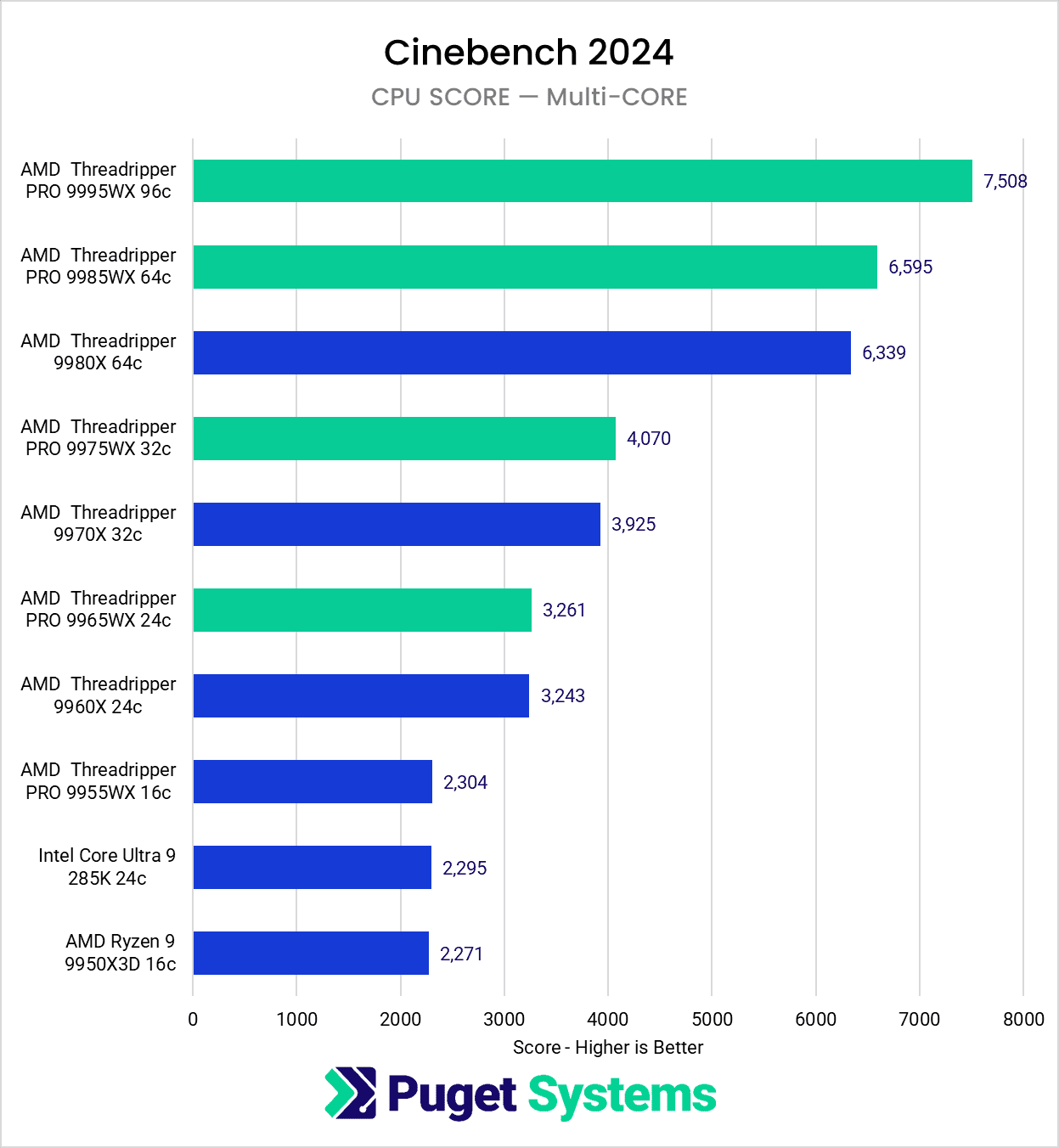
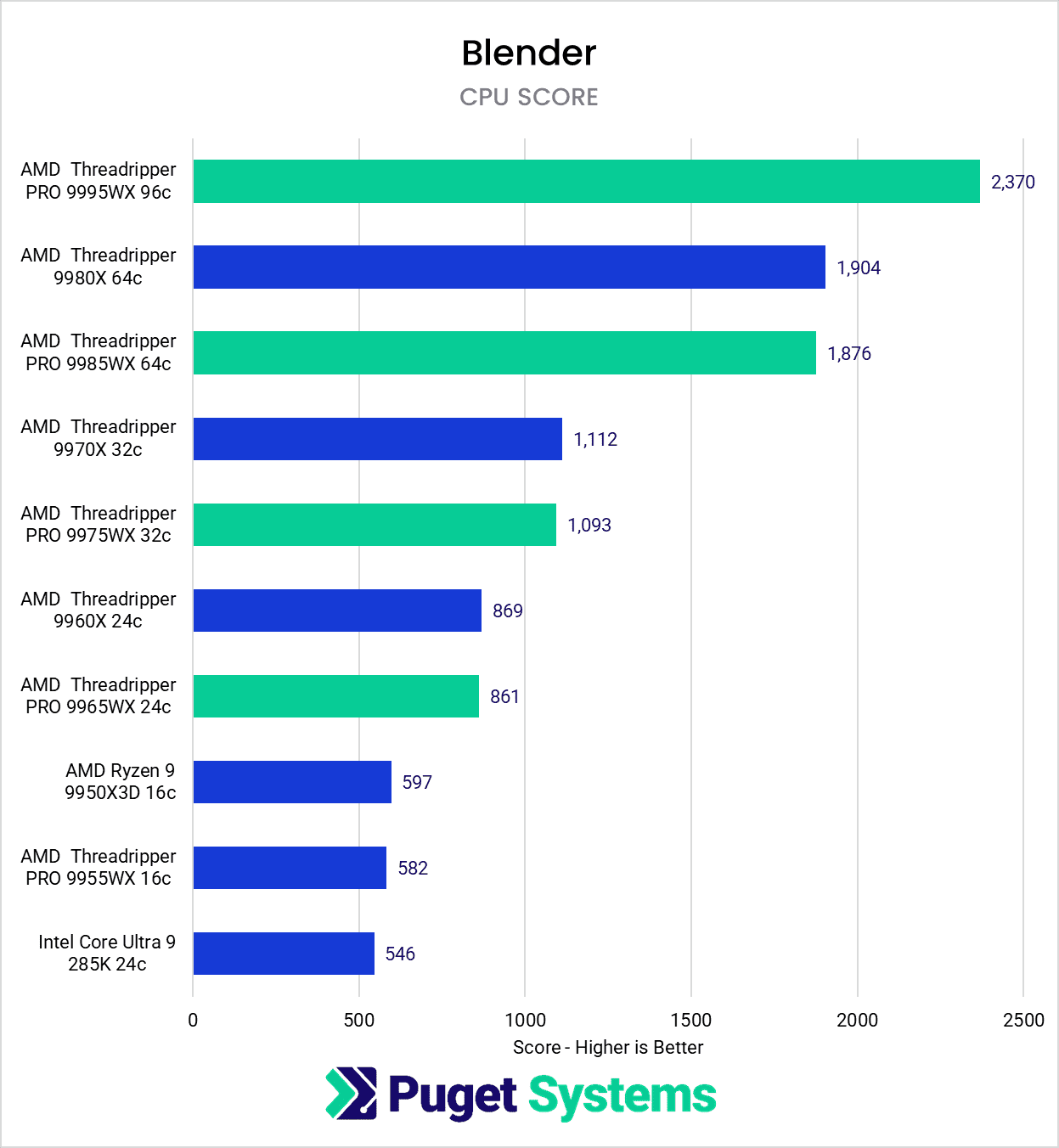
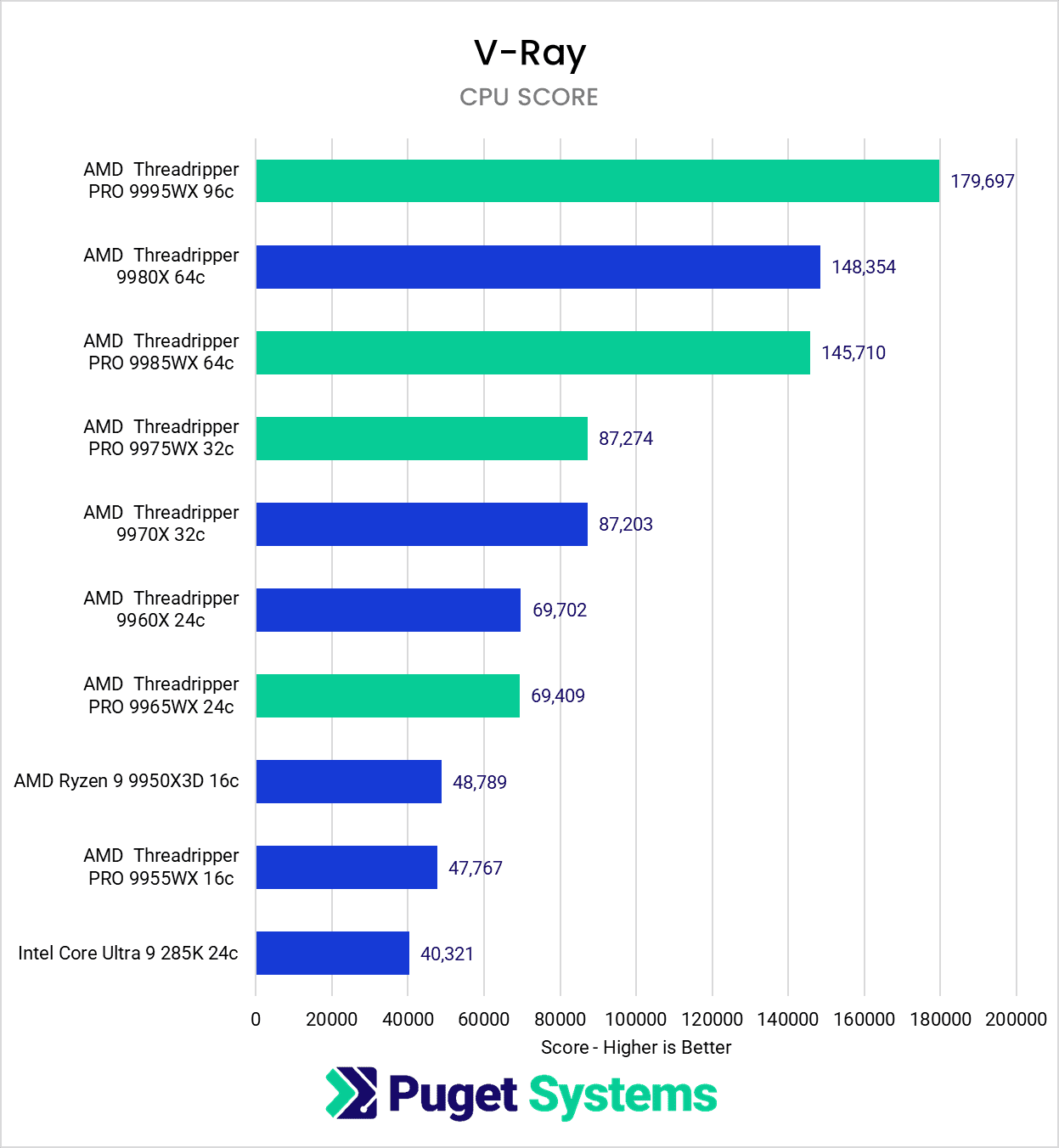
Another key factor is memory capacity. Ryzen 9000 and Intel Core Ultra platforms top out at around 192 to 256GB of RAM, which is often enough for individual artists but can become a limitation on larger projects. Threadripper PRO platforms, by contrast, can theoretically support up to 2TB of RAM! That’s not something every artist will use, but for complex projects with massive textures, particle counts, or scene complexity, it can be the difference between getting the job done or running into constant memory errors.
Where high core count CPUs really excel is as render cluster nodes. While an artist’s workstation may be a Ryzen or Core Ultra, having Threadripper PRO or its server-class cousin EPYC in dedicated rendering servers allows a studio to have the best of both worlds. Animators can have lower-cost systems better tailored to their work, then send renders to the server cluster while they continue working.
It’s worth noting that this section applies specifically to CPU rendering. Many modern pipelines have moved to GPU-based rendering engines like Octane, Redshift, and Blender Cycles GPU, where the CPU plays a smaller role. If your rendering is almost entirely GPU-driven, your money is better spent on more or faster GPUs. Threadripper won’t directly provide the same return, though it can potentially support multiple video cards, which is often a limitation of more desktop-oriented CPUs. But for those still relying on CPU renderers like Corona, Arnold, or V-Ray CPU, Threadripper 9000 is the clear performance leader.

Looking for a 3D Artists Workstation?
We build computers tailor-made for your workflow.

Don’t know where to start?
We can help!
Get in touch with our technical consultants today.
AMD Threadripper 9000 for Simulations
Simulations are often a gray area in 3D workflows. Some simulations, like cloth dynamics or certain physics interactions in Maya or Blender, are still mostly single-threaded and rely on clock speed rather than core count. In those cases, Ryzen or Core Ultra may actually feel faster.
However, other simulations – particularly complex Bifrost sims in Maya – can scale very well across multiple cores. Here, Threadripper’s core count advantage makes a tangible difference, often completing complex runs in a fraction of the time. For artists or studios that spend a lot of time waiting on simulations, this performance can quickly justify the higher upfront cost of a Threadripper system.
It’s also worth noting that some 3D applications have begun offloading more simulations to the GPU. Cinema4D, for instance, has moved many of its physics and simulation workloads away from the CPU. This means the benefit of a high-core-count CPU like Threadripper may depend heavily on your specific tools and workflow.
In short: simulations are a mixed story. If your work involves heavy, core-intensive simulations, Threadripper 9000 is an excellent choice. If you mainly use tools that rely on single-core performance or have shifted to GPU, then Ryzen or Core Ultra may be the smarter buy.
If you are unsure how your software handles simulations, we recommend running a test while Windows Task Manager is open. This will show if only a few cores are being engaged, or all of them are, or if the work is being sent to the GPU. From there, it will be easier to decide what hardware is best.
Who is the AMD Threadripper 9000 for?
AMD’s Threadripper 9000 is an impressive processor, but not every 3D artist needs one. If your day-to-day revolves around modeling and animation, you’re unlikely to see the benefit of all those extra cores. In fact, you may actually find AMD’s Ryzen or Intel’s Core Ultra to be a better fit, since they can offer faster single-core performance at a much lower price.
Where Threadripper really shines is in workloads that keep every core busy. CPU rendering is the clearest example, and in that space there’s simply nothing else that comes close for a workstation. If your livelihood depends on getting frames rendered quickly, or if your projects routinely push the limits of memory capacity, Threadripper 9000 delivers a level of performance and scalability that Ryzen and Core Ultra desktop chips just can’t match.
Simulations fall somewhere in between. Some tools still prefer fast individual cores, while others can fully utilize dozens of them at once. Maya artists using Bifrost, for example, will likely appreciate what Threadripper brings to the table, while those using Cinema4D’s newer GPU-based simulation tools may not see the same return.
Ultimately, Threadripper 9000 is best suited for professionals and studios where time is money, and where hours spent waiting on renders or simulations translate directly into lost productivity. For many 3D artists, especially those who lean heavily on GPU rendering or mostly work in animation and modeling, Ryzen or Core Ultra may be the smarter investment. But for those with the right workloads, Threadripper isn’t just a fast processor — it’s a tool that can pay for itself in a surprisingly short amount of time.
Finding the perfect workstation doesn’t have to be complicated. Explore our solutions page for a curated selection of recommended systems for a multitude of applications and workflows, or visit our custom configuration page if you already know the ideal hardware for your needs. If you need assistance with tailoring a system to a unique workflow or have any other questions, we encourage you to reach out to our dedicated technology consultants.
Looking for a 3D Artist workstation?
We build computers tailor-made for your workflow.
Don’t know where to start?
We can help!
Get in touch with one of our technical consultants today.