Table of Contents
Introduction
Regular readers will know that, despite releasing Puget Bench for Lightroom Classic 1.0 in early November, we have not published hardware articles for this application in a number of months. Unfortunately, with the release of Lightroom Classic 15.0, Adobe introduced a bug that caused large performance degradation, especially for DNG exports, which affected our benchmark’s results. Due to this, we held off on publishing any new Lightroom content until they could fix the issue. Thankfully, with their latest update, Adobe has mostly resolved the problem – so we are now able to resume testing! Since LrC results were absent from recent hardware roundups, we will use this article to examine how various modern CPUs and GPUs now perform in Lightroom Classic 15.2.
Those interested in the specifics of our Lightroom Classic benchmark can check out the links above, but we will briefly cover the workloads we test here. First, we import 250 photos from a singular camera source and measure the time taken to import, without generating previews. Then, we measure the time required to generate smart previews for those images. After that, we measure the time taken to export those images as JPGs and then DNGs. That process is repeated with photos from three other types of cameras. We then import a series of photosets and use Lightroom’s AI tools to perform tasks like select subject and super resolution, and measuring how long each task takes. Finally, those times are converted into scores.
For this article, we took the import, export as DNG, and export as JPG and performed a geometric mean of them, individually, across the four sets of images. This allowed us to examine performance across workload type independent of file format.
As a reminder, all of the Puget Bench for Creators benchmarks are freely available for personal use, so anyone can download and run them on their own system. We also offer free press licenses as well as a paid license for commercial use with access to advanced features, such as CLI, local logging, beta releases, and improved support.
Test Setup (Expandable)
AMD Ryzen Test Platform
| CPUs: AMD Ryzen™ 9 9950X3D AMD Ryzen™ 9 9900X3D AMD Ryzen™ 7 9850X3D AMD Ryzen™ 9 9950X |
| CPU Cooler: Noctua NH-U12A |
| Motherboard: ASUS ProArt X670E-Creator WiFi BIOS Version: 3513 |
| RAM: 2x DDR5-5600 32GB (64 GB total) |
| GPUs: NVIDIA GeForce RTX™ 5090 NVIDIA GeForce RTX™ 5080 ASUS PRIME GeForce RTX™ 5070 Ti OC NVIDIA GeForce RTX™ 5070 PNY GeForce RTX™ 5060 Ti (16 GB) MSI GeForce RTX™ 5060 8G Ventus 2X OC Driver Version: 591.74 Sapphire Nitro+ AMD Radeon™ RX 9070 XT OC Driver Version: 26.2.2 Intel® Arc™ B580 LE Driver Version: 101.8509 |
| PSU: EVGA SuperNOVA 1200W P2 |
| Storage: Kingston KC3000 2TB |
| OS: Windows 11 Pro 64-bit (26200) Power Profile: Balanced |
Intel Core Ultra Test Platform
| CPUs: Intel Core™ Ultra 9 285K Intel Core™ Ultra 7 265K Intel Core™ Ultra 5 245K |
| CPU Cooler: Noctua NH-U12A |
| Motherboard: ASUS ProArt Z890-Creator WiFi BIOS version: 3002 |
| RAM: 2x DDR5-6400 CUDIMM 32GB (64 GB total) |
| GPUs: NVIDIA GeForce RTX™ 5080 Driver Version: 591.74 |
| PSU: Super Flower LEADEX Platinum 1600W |
| Storage: Samsung 980 Pro 2TB |
| OS: Windows 11 Pro 64-bit (26200) Power Profile: Balanced |
AMD Ryzen Threadripper Test Platform
| CPUs: AMD Ryzen Threadripper™ 9970X |
| CPU Cooler: Asetek 836S-M1A 360mm |
| Motherboard: ASUS Pro WS TRX50-SAGE BIOS version: 1317 |
| RAM: 2x 4x DDR5-6400 ECC Reg. 32GB (128 GB total) |
| GPUs: NVIDIA GeForce RTX 5080 Driver Version: 591.74 |
| PSU: EVGA SuperNOVA 1200W P2 |
| Storage: Samsung 980 Pro 2TB |
| OS: Windows 11 Pro 64-bit (26200) Power Profile: Balanced |
Benchmark Software
| Lightroom Classic 15.2 — Puget Bench for Lightroom Classic 1.0 |
We wanted to characterize how various hardware performed with these changes to the benchmarks, so we used a variety of platforms and GPUs – but with some things in common. First, all of our platforms had up-to-date Windows installations, drivers, and BIOSes. Second, all of them featured JEDEC RAM modules running at their maximum supported frequencies, overclocking features were disabled, and VBS and ReBar were enabled. Finally, all of our GPU testing was performed on AMD Ryzen™ 9950X3D-based platforms.
Raw Results
When possible, we try to include a spreadsheet of the data we collected during our testing with minimal processing. Lightroom Classic performance can depend on the specific model of camera photos are taken with, so this allows end-users to hone in on specific data points, where relevant. In this case, we simply cleaned up outliers and averaged multiple benchmark runs to produce the results below.
| wdt_ID | wdt_created_by | wdt_created_at | wdt_last_edited_by | wdt_last_edited_at | Test | Category | Camera | 285K & 5080 | 265K & 5080 | 245K & 5080 | 9970X & 5080 | 9950X3D & 5080 | 9900X3D & 5080 | 9850X3D & 5080 | 9950X & 5080 | 9950X3D & 5090 | 9950X3D & 5070 Ti | 9950X3D & 5070 | 9950X3D & 5060 Ti | 9950X3D & 5060 | 9950X3D & 9070 XT | 9950X3D & B580 |
|---|---|---|---|---|---|---|---|---|---|---|---|---|---|---|---|---|---|---|---|---|---|---|
| 1 | Evan | Mar 2026 12:51 PM | Evan | Mar 2026 12:51 PM | Overall Score (Standard) | Score | 13,180.17 | 13,805.00 | 10,553.33 | 14,371.40 | 12,362.50 | 11,669.00 | 10,919.50 | 11,662.50 | 12,377.20 | 12,134.80 | 12,035.80 | 12,371.00 | 11,018.00 | 12,043.80 | 11,843.20 | |
| 2 | Evan | Mar 2026 12:51 PM | Evan | Mar 2026 12:51 PM | Overall Score (Extended) | Score | 13,078.00 | 13,320.75 | 11,016.33 | 12,834.40 | 12,820.50 | 12,293.67 | 11,877.67 | 12,242.00 | 13,012.00 | 12,544.20 | 12,579.80 | 12,356.60 | 10,423.00 | 12,280.60 | 11,285.40 | |
| 3 | Evan | Mar 2026 12:51 PM | Evan | Mar 2026 12:51 PM | Canon Score (Standard) | Score | Canon | 144.00 | 150.00 | 114.83 | 161.20 | 137.67 | 129.50 | 119.67 | 130.13 | 137.00 | 133.40 | 133.60 | 135.60 | 124.17 | 133.20 | 130.40 |
| 4 | Evan | Mar 2026 12:51 PM | Evan | Mar 2026 12:51 PM | Panasonic Score (Standard) | Score | Panasonic | 120.50 | 127.00 | 97.12 | 128.00 | 111.17 | 105.33 | 99.80 | 104.76 | 112.00 | 110.60 | 108.60 | 113.00 | 97.78 | 108.80 | 107.80 |
| 5 | Evan | Mar 2026 12:51 PM | Evan | Mar 2026 12:51 PM | Canon Score (Extended) | Score | Canon | 144.00 | 150.00 | 114.83 | 161.20 | 137.67 | 129.50 | 119.67 | 130.13 | 137.00 | 133.40 | 133.60 | 135.60 | 124.17 | 133.20 | 130.40 |
| 6 | Evan | Mar 2026 12:51 PM | Evan | Mar 2026 12:51 PM | Panasonic Score (Extended) | Score | Panasonic | 120.50 | 127.00 | 97.12 | 128.00 | 111.17 | 105.33 | 99.80 | 104.76 | 112.00 | 110.60 | 108.60 | 113.00 | 97.78 | 108.80 | 107.80 |
| 7 | Evan | Mar 2026 12:51 PM | Evan | Mar 2026 12:51 PM | Sony Score (Extended) | Score | Sony | 136.17 | 142.50 | 128.67 | 109.80 | 125.33 | 122.50 | 123.33 | 117.25 | 116.40 | 120.40 | 128.20 | 122.40 | 107.83 | 119.24 | 113.12 |
| 8 | Evan | Mar 2026 12:51 PM | Evan | Mar 2026 12:51 PM | Nikon Score (Extended) | Score | Nikon | 119.33 | 109.50 | 87.63 | 108.00 | 121.17 | 112.33 | 99.72 | 115.13 | 126.40 | 116.00 | 123.80 | 122.40 | 106.33 | 116.38 | 115.80 |
| 9 | Evan | Mar 2026 12:51 PM | Evan | Mar 2026 12:51 PM | AI Score (Extended) | AI | 135.83 | 141.25 | 129.50 | 143.00 | 149.50 | 150.00 | 161.50 | 149.75 | 165.80 | 150.60 | 137.20 | 126.00 | 88.55 | 139.40 | 100.24 |
CPU Performance
Historically, performance in Lightroom Classic was primarily CPU-bound, with tasks such as importing, exporting, and generic “active tasks” being unaccelerated. Although this is still the case for some aspects of Lightroom, Adobe has worked to increase the amount of hardware acceleration used in the application. Additionally, we have added a new subset AI tests to our benchmark, which are locally processed and primarily GPU-based.




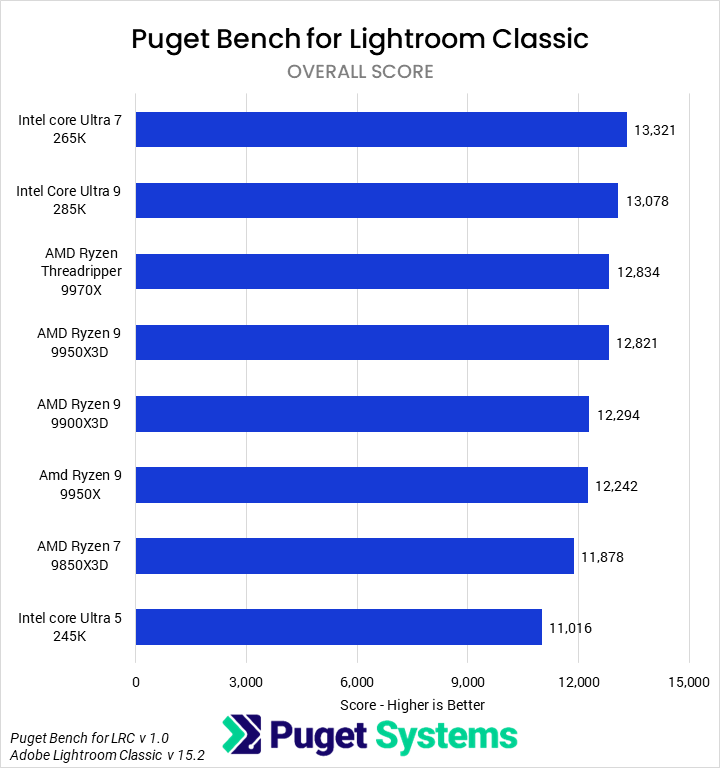
Starting with the Overall score (Chart #1), we found that the fastest CPU was Intel’s Core™ Ultra 265K, followed by the 285K. The 265K was 4% faster than AMD’s Threadripper™ 9970X and Ryzen™ 9950X3D, and 8% faster than the 9900X3D. Although this application likes the 3D V-Cache found on some Ryzen models, that is not enough to make up for the per-core advantages Intel offers in Lightroom Classic. Additionally, most of Lightroom appears to be relatively lightly threaded, making the utility of high core-count processors smaller than in many other applications.
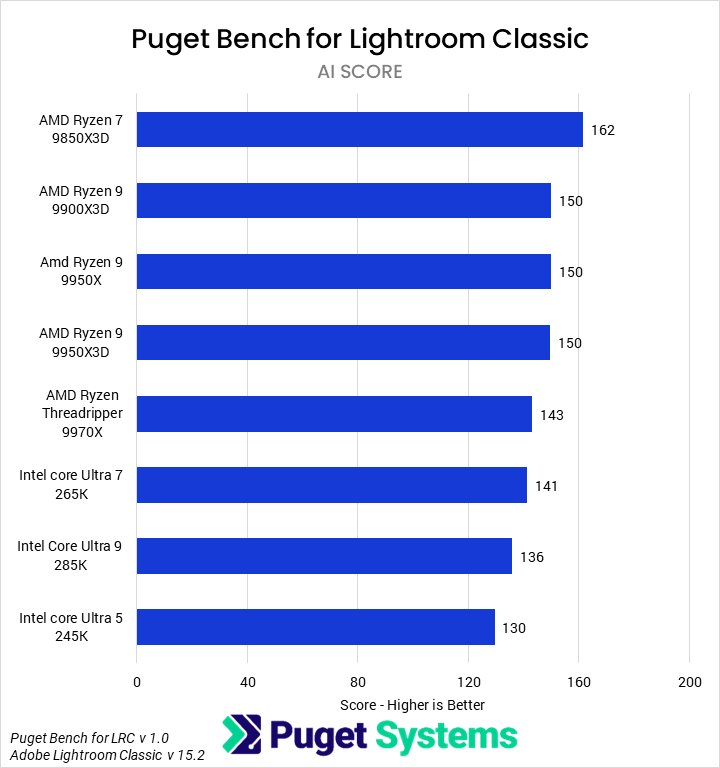
In the new AI tests (Chart #2), we found that the 9850X3D was the fastest CPU, by a healthy margin. The 9850X3D was 8% faster than other Ryzen desktop parts and 15% faster than Intel’s fastest processor, which was again the 265K. AI tasks, though not a part of every workflow, compose a lot of the potential “active tasks” that an end-user will experience day-to-day while sitting at their computer.
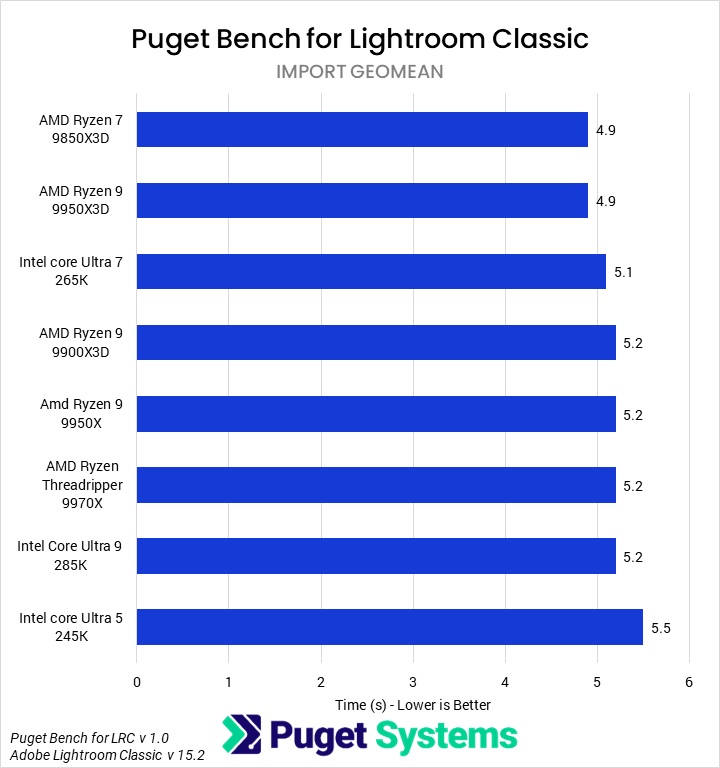
The next category we looked at was importing photos (Chart #3). All of the processors we tested completed the 250-image import relatively quickly, at around 5 seconds. The differences weren’t large, with the 9850X3D and 9950X3D leading the chart, 4% faster than the 265K and 5% faster than most other CPUs (save the slowest, the 245K). These are all right on the typical margin of error for this benchmark, though, so it is hard to draw strong conclusions.
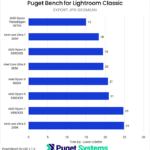
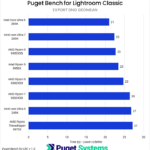
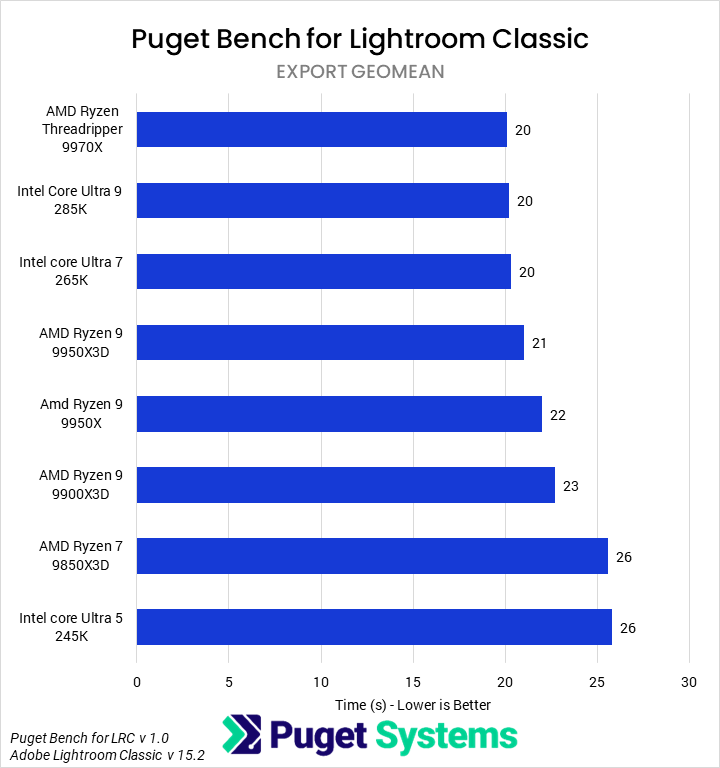
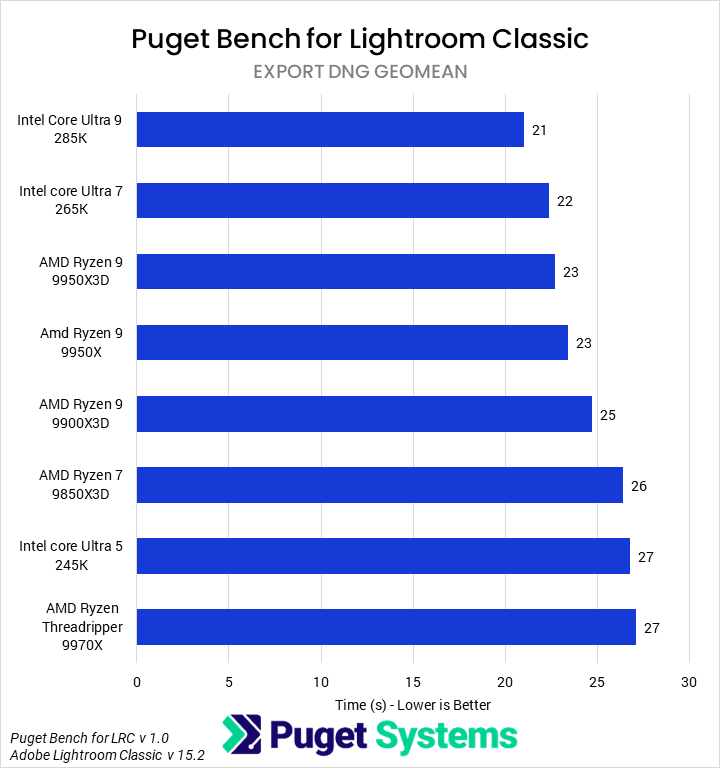
Our final score category was exporting photos (Chart #4). The 9970X, 285K, and 265K all tied at the top of the chart, with an export time of about 20 seconds. Ryzen 9950X3D was next, ~5% slower than the leaders, followed by the 9950X and 9900X which were ~5% further behind. However, as we noted in the introduction, DNG exporting is one of the primary bugged areas in Lightroom Classic 15.2, so we broke apart this overall export score into two more charts.
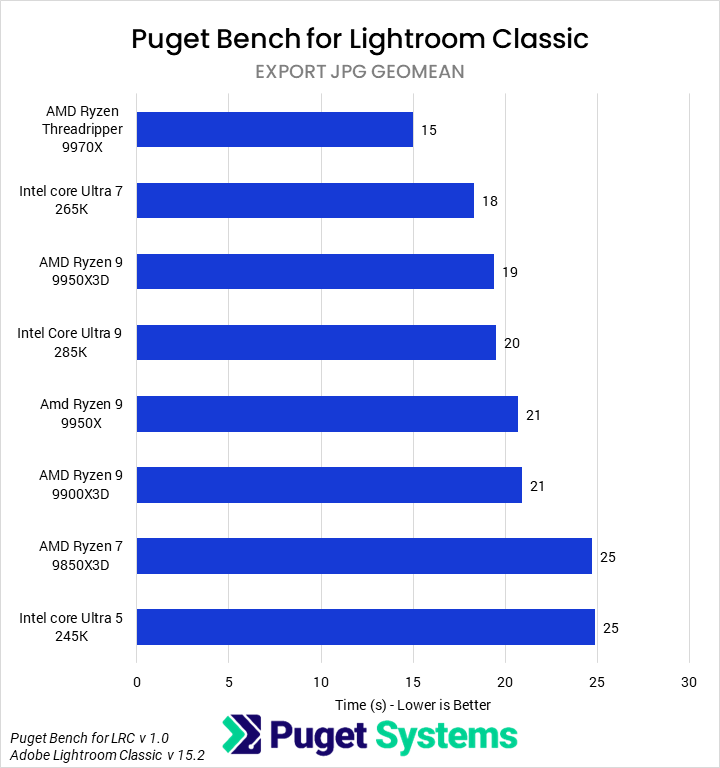
Exporting to JPG (Chart #5) showed a similar picture, but with more differentiation between components. The 9970X was again the fastest, but this time led the 265K by 16%. The 265K, in turn, was 5% faster than the 9950X3D and 10% faster than the 285K. We’re unsure why the 265K was faster than the 285K here, despite having fewer cores, but it appears to be a real result. In contrast, exporting to DNG (Chart #6) shows very little discrimination between components – and moreover, the export times were fairly inconsistent from run to run.
Making CPU recommendations based on this data is a bit tricky, but we think it can be best broken down into a few buckets. Intel’s Core Ultra 265K gives great performance for its price across the entirety of Lightroom Classic, and we would recommend it for most workstations. Users who are okay with investing might consider AMD’s Threadripper 9970X, but we think that is overkill for most photographers. Another option is the Ryzen 9850X3D, which offered the best performance in AI tasks and is also the fastest Photoshop CPU we have tested – though we recommend that those seeking AI performance upgrade their GPU first, as the next set of results will demonstrate.
GPU Performance
As mentioned in the introduction, Lightroom Classic has become increasingly able to take advantage of a powerful GPU, with tasks like exporting, creating smart previews, and AI tools now being hardware-accelerated. All of our GPU testing was performed on the AMD Ryzen 9950X3D. Although this wasn’t the fastest CPU we tested for this article, it was consistently near the top, and we believe it eliminates most CPU bottlenecks sufficiently to evaluate GPU performance.






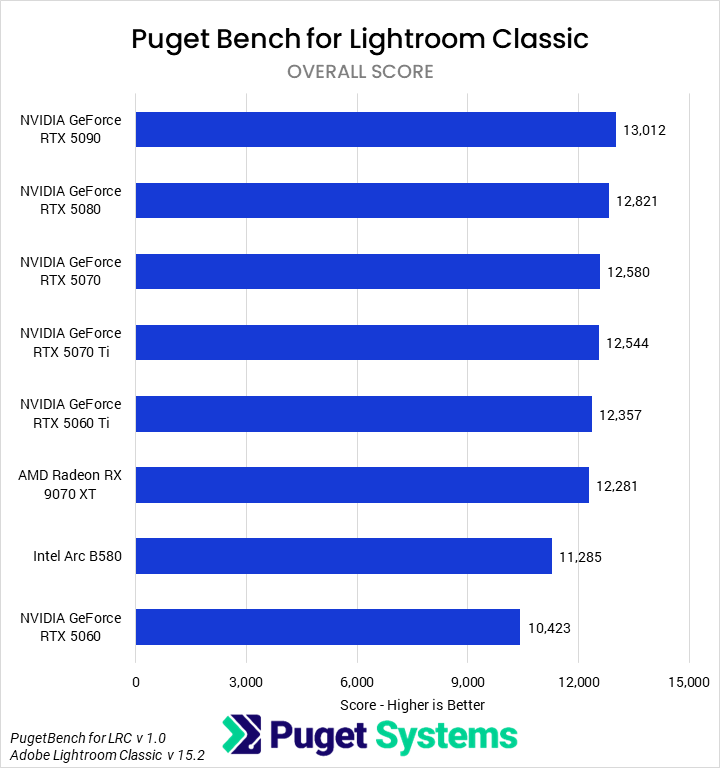
The Overall score (Chart #1) shows slightly less variability than we saw with the CPU comparisons, though there is still a healthy spread of scores. Unsurprisingly, NVIDIA’s GeForce RTX™ 5090 was the fastest GPU tested, though with only a small lead over the 5080. The 5080, in turn, was a mere 2% faster than the 5070 and 5070 Ti, which performed identically. Even the Radeon™ RX 9070 XT, which was toward the bottom of the chart, was only 6% slower than the 5090 – so most midrange, modern GPUs are fairly similar in this application, on average. However, the RTX 5060 and Intel Arc B580 both performed noticeably worse than the other GPUs, although the B580 does offer a relatively good price to performance given it’s low price tag.
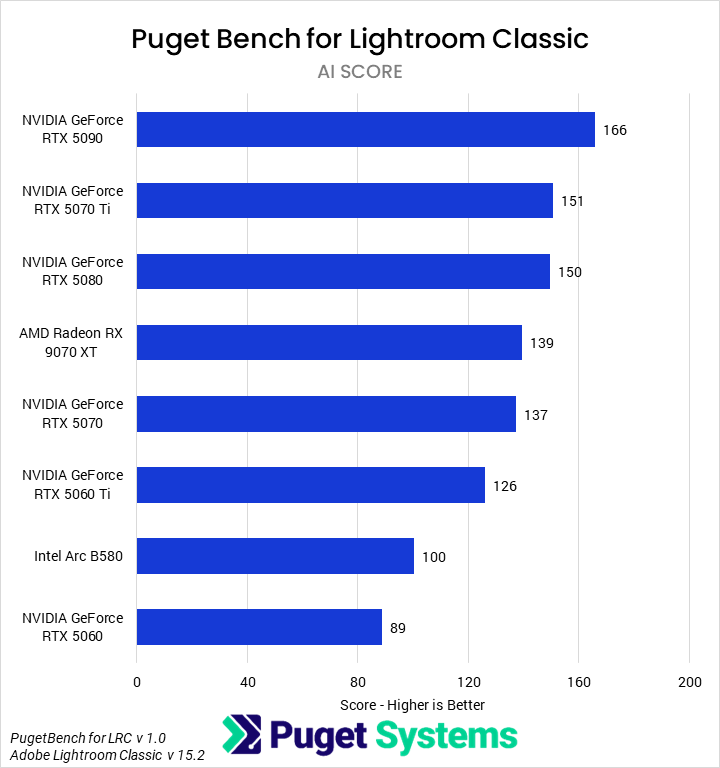
It is the AI tests (Chart #2), where we see a huge difference between GPUs. Here, the RTX 5090 is able to stretch its legs and establish a 10% lead over the 5080 and 5070 Ti. The 9070 XT performs well, only 7% slower than the 5080 and matching the 5070. Past this, scores drop precipitously, with the 5060 Ti 9% slower than the 5070, the B580 21% slower than that, and the vanilla 5060 12% slower than the B580. Based on this data, the 5070 Ti sits in a price-to-performance sweet spot for AI workflows in Lightroom Classic.
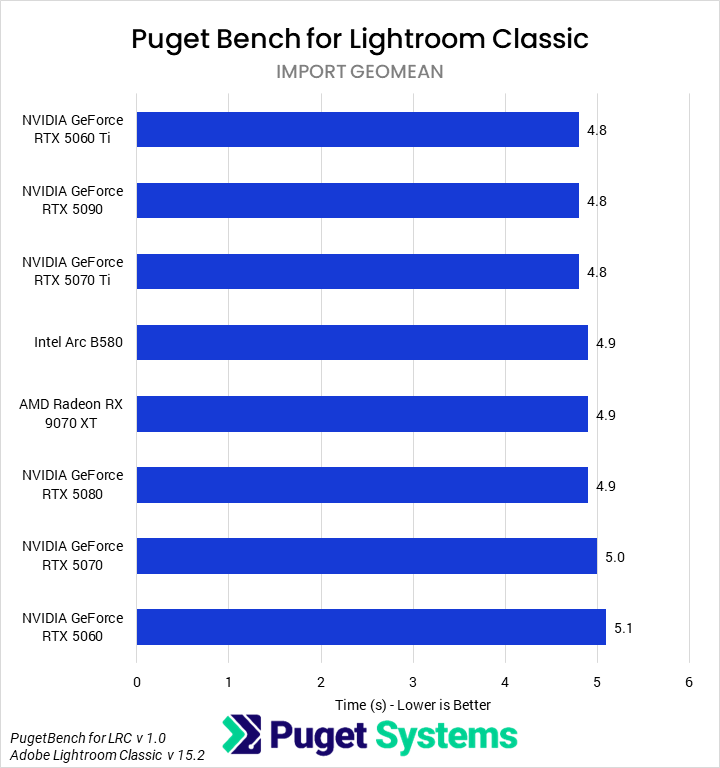
Importing (Chart #3) is not GPU-accelerated, so we saw no difference between video cards.
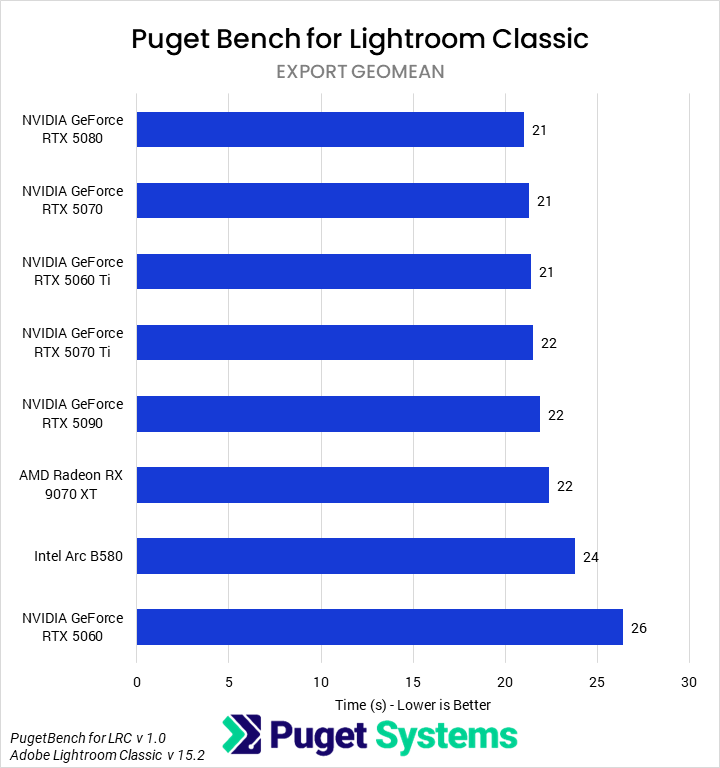
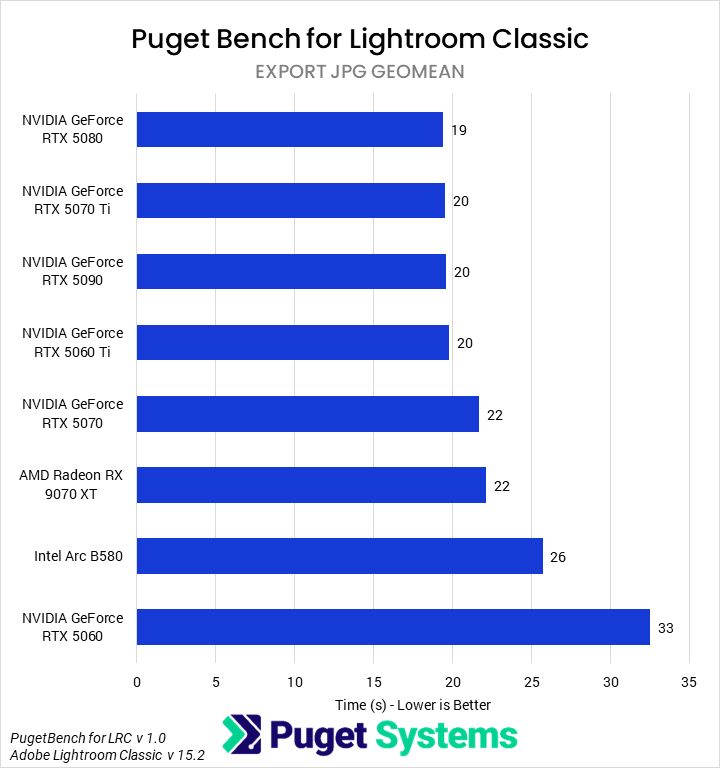
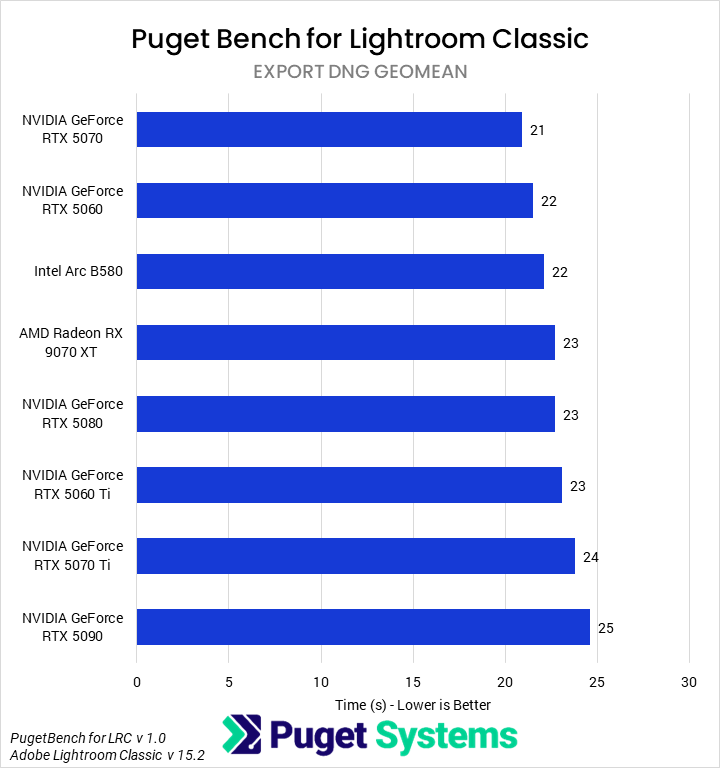
Just as we split the exporting time geomean (Chart #4) into JPG and DNG charts for CPUs, we did that here, due to issues with DNG exports (Chart #6). For exporting to JPGs (Chart #5), we saw a large difference between the fastest and slowest GPUs, though most of them performed very similarly and likely ran up against a minor CPU bottleneck, based on prior testing. All of the NVIDIA GPUs, save the RTX 5060, took about 20 seconds on average to export the image sets to JPGs. The AMD 9070 XT was slightly slower, taking about 22 seconds, just a touch behind the NVIDIA cards. Intel’s B580 was 18% slower, taking 26 seconds on average. However, the slowest by far was the 5060, which took 36 seconds (58% longer than the 5080) for the same task.
Our data shows NVIDIA’s GeForce RTX 5070 Ti offering the best blend of price to performance, though the RTX 5090 may be worth it for heavy users of AI tasks. On a budget, Intel’s B580 offers a good value without sacrificing performance nearly as much as the RTX 5060.
Conclusion
Overall, we found that Lightroom Classic scales relatively well with across CPUs and GPUs, both in traditional and AI workflows. The video card matters most for the latter, while the processor tends to be more important for importing, exporting, and generating previews – and will also have the largest impact on responsiveness. Unfortunately, we are still left with some questions due to inconsistent results in exporting DNGs.
We think that, in Lightroom Classic, the Core Ultra 265K and GeForce RTX 5070 Ti each offer a great blend of price to performance, while upgrades such as the Threadripper 9970X and RTX 5090 can unlock more performance but at a steep cost. Intel’s B580 looks like a great budget option, especially for those making less use of AI tools. In that area, AMD’s Ryzen 9850X3D also offers the best Lightroom AI and Photoshop performance for photographers who use both pieces of software.
One area we didn’t examine in-depth this time around is camera-specific performance. Our benchmark covers photos from four cameras (Canon, Panasonic, Sony, and Nikon) and reports individual scores for each of them. In some cases, our overall hardware recommendations don’t match the best results for a given camera, so we recommend users who shoot exclusively with one of those brands check out the raw results section to see how these CPUs and GPUs compare in their preferred format.
If you need a powerful computer to tackle the applications we test, the Puget Systems workstations on our solutions page are tailored to excel in various software packages. If you prefer a more hands-on approach, our custom configuration page helps you configure a PC that matches your needs. Otherwise, if you would like more guidance in configuring a system that aligns with your unique workflow, our knowledgeable technology consultants are here to lend their expertise.

Looking for a Lightroom Classic workstation?
We build computers tailor-made for your workflow.

Don’t know where to start?
We can help!
Get in touch with one of our technical consultants today.