Table of Contents
How I used “Vibe Coding” and 25 years of experience to tame a liquid-cooled supercomputer in two weeks.
The Challenge
Two weeks before Supercomputing 2025, the marketing team came to me with a challenge: “We’re headed to Supercomputing for the first time. Can we run a multi-GPU AI simulation on the Comino Grando?”
The timeline was tight. The hardware was complex. My goal was to prove that we don’t just build hardware – I wanted to show that we deeply understand the workloads that run on them.
The Hardware: Comino Grando Server
- Processors: Dual AMD EPYC™ 9000 Series (Liquid Cooled)
- Accelerators: 8x NVIDIA L40S GPUs (Liquid Cooled)
- Cooling: Full system direct-to-chip liquid cooling
- OS: Ubuntu Desktop (initially), migrated to Server/Headless for production
Methodology: Vibe Coding and Rapid Prototypes
I don’t love the term “vibe coding”… but I understand why it exists. It describes a workflow where I focus on intent and architecture while an AI handles the implementation details. It’s not about letting the AI think for me – it’s about how I prompt the LLM to generate exactly what I need.
I’ve spent 25 years in the trenches of software development, from reverse engineering Assembly code to launching SaaS products that have run for decades. In that time, I’ve learned that true speed comes from clarity.
My Toolkit:
- AI Acceleration: Robust prompting strategies (RooCode/Gemini)
- Architecture: Containerized microservices (Docker)
- Orchestration: Python-based control layers
- Timeframe: Initial POC ready in about 1 week (~12 hours of actual coding)
Phase 1: Baseline Validation on Standardized Hardware
Our target machine, a Comino Grando, was still being provisioned. I couldn’t wait.
Coincidentally, an NVIDIA DGX Spark had just arrived in our lab. I jumped on it immediately to start the proof of concept.
I chose NVIDIA PhysicsNeMo to simulate aerodynamic airflow over an object (the “Ahmed body”). This was the perfect test case: it leverages established libraries and allows us to visually compare AI-predicted results against traditional software simulations.
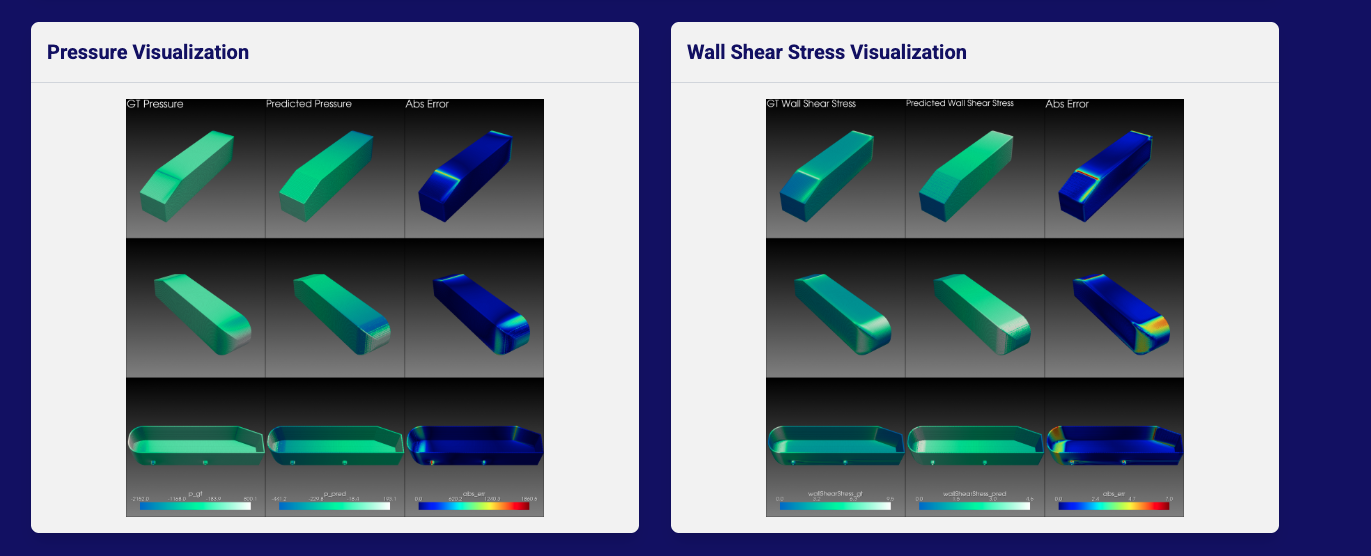
The goal: Real-time visualization of pressure and shear stress on the Ahmed body, rendered via PyVista.
The DGX Spark Developer Experience:
- Seamless Setup: Graphical Ubuntu and CUDA worked out of the box.
- Easy Tooling: NVIDIA container tools installed without errors.
- Speed: With AI assistance, I reviewed demos and had a training notebook running in less than 2 hours.
- Result: The entire project, from unboxing to live demo, took less than 30 hours of active work spread over a two-week sprint.
Phase 2: Integration Challenges in High-Density Environments
The Spark was fantastic, but it was a single-GPU environment. My recent focus had been on marketing data modeling, so I hadn’t spent time researching distributed training requirements.
When I migrated the code to the Comino Grando, a liquid-cooled server with multi-GPU architecture, the initial deployment failed to function correctly.
I hit the wall that separates coding from systems engineering:
The Silent GPUs (CPU Fallback): The containerized environment deployed successfully, but nvidia-smi revealed the truth: 0% GPU utilization. The application had silently fallen back to CPU inference because the container runtime couldn’t access the GPU interconnects.
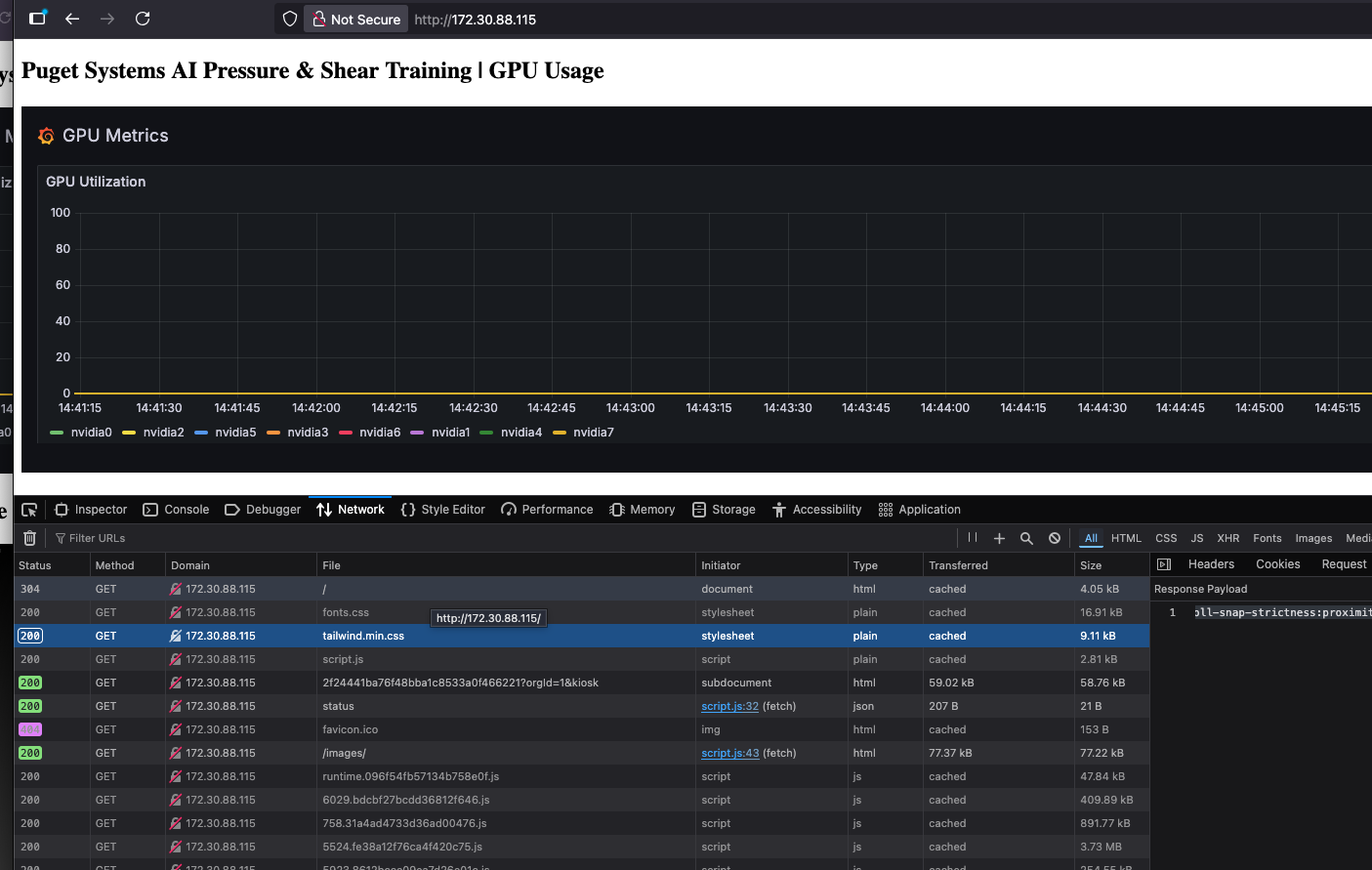
The initial deployment on the Comino server. Docker containers were running, but we were seeing 0% GPU use in our Grafana dashboards.
Desktop vs. Docker: I hit a hard stop with the Operating System. The Ubuntu Desktop OS simply would not share the GPUs with our Docker containers. The graphical interface layers were monopolizing resources or permissions in a way that prevented the container runtime from accessing the cards.
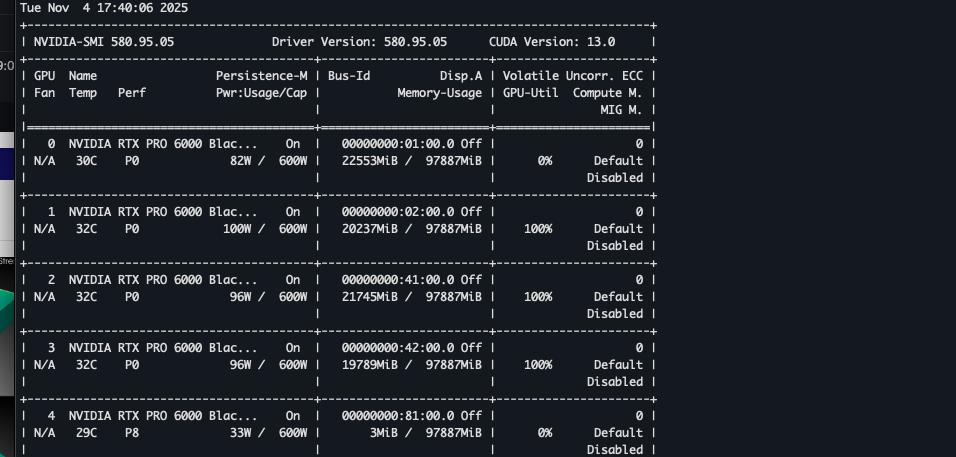
The Desktop OS conflict in action. While we requested all resources, the OS held onto specific cards (GPU 0 was held by the OS) for display output, preventing the training loop from accessing the full cluster.
- Refactoring for Scale (Torchrun): Our initial single-GPU script used a simple execution flow. To leverage all 8 GPUs, I had to refactor the codebase to use
torchrun. Standard Python execution lacks the distributed communication backend (NCCL) required to synchronize gradients across multiple cards in real-time. - Physics Shift: I pivoted the simulation target from simple airflow to Shear and Pressure (based on an existing NVIDIA demo). While this model was better suited for
torchrun, the original code wasn’t set up for our specific distributed environment.
Engineering Resolutions
Speed doesn’t mean skipping steps – it means iterating faster.
- The Headless Pivot: Using the server’s onboard iKVM for triage, I discovered that the Ubuntu Desktop environment was aggressively claiming the NVIDIA cards for display output instead of defaulting to the onboard VGA. By switching to headless Ubuntu (removing the GUI entirely), I stopped the OS from monopolizing the GPUs, instantly freeing them for our Dockerized simulation.
- Distributed Training Implementation: I rewrote the entry points to support
torchrun, enabling the model to parallelize the “Shear and Pressure” calculations across the entire 8-GPU cluster. - Visualization Pipeline: I modified the
visualizer.pyscripts to ingest our custom.vtp3D files, mapping the inference outputs to Puget Systems’ brand color palette for the live display.
The Architecture: More Than Just a Script
To be clear, I didn’t just run a Python script in a terminal. I needed a robust, trade-show-ready “kiosk” that could run autonomously on the show floor.
I built a full-stack application to wrap the training loop:
- The Backend (FastAPI): A custom API that orchestrates the
torchrundistributed training jobs and manages the simulation state. - The Visualization (PyVista): A dedicated pipeline that ingests the raw
.vtuinference files and renders 3D streamlines in real-time. - The Frontend (HTML/JS/Tailwind): A web-based dashboard that allows users to start, stop, and loop simulations with a click, while displaying live inference results side-by-side with system metrics.
- The Infrastructure (Docker Compose): The entire stack – training, API, frontend, and a Prometheus/Grafana monitoring suite – is containerized. This allowed me to develop on a single workstation and deploy to the supercomputer with a single
docker compose upcommand.
This architecture turned a research experiment into a product demonstration.
Conclusion
In less than two weeks, I went from a marketing question to a live, multi-GPU AI simulation running on one of the most powerful liquid-cooled servers on the market.
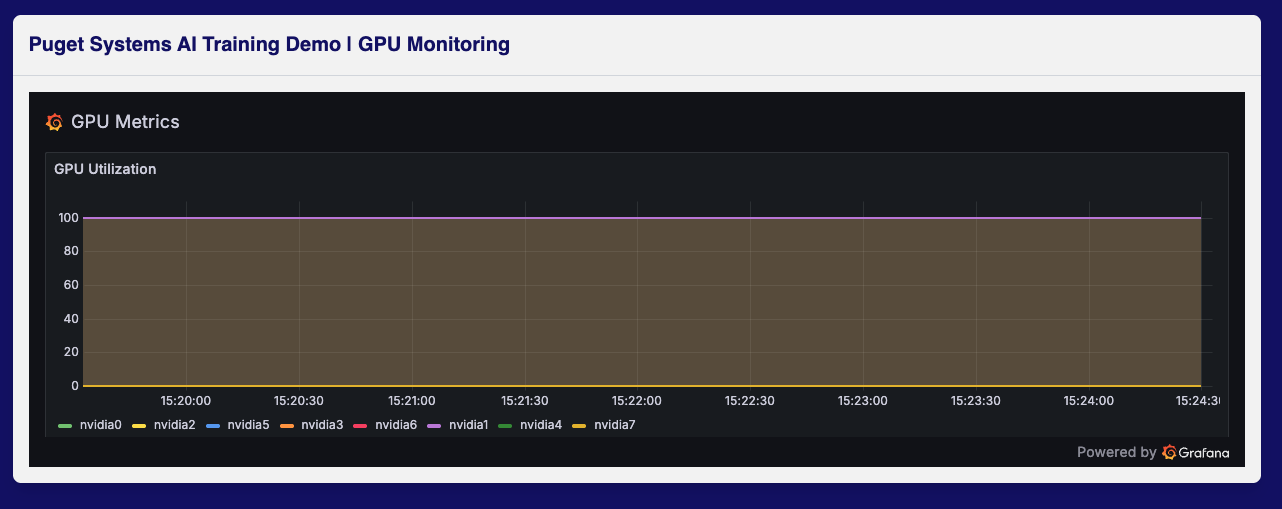
Success. After switching to Headless Ubuntu and implementing torchrun, we achieved full, sustained saturation across the entire GPU cluster.
More importantly, I hit these walls – specifically driver conflicts, distributed training backends, and OS resource contention – so you don’t have to. (And for the admins who love a GUI: we are actively working on a configuration that supports both Ubuntu Desktop and full-scale training on the Comino.)
Technical Resources: For those interested in the code, I’ve made the project public on GitHub.

Looking for an AI workstation or server?
We build computers tailor-made for your workflow.

Don’t know where to start?
We can help!
Get in touch with one of our technical consultants today.