Table of Contents
Introduction
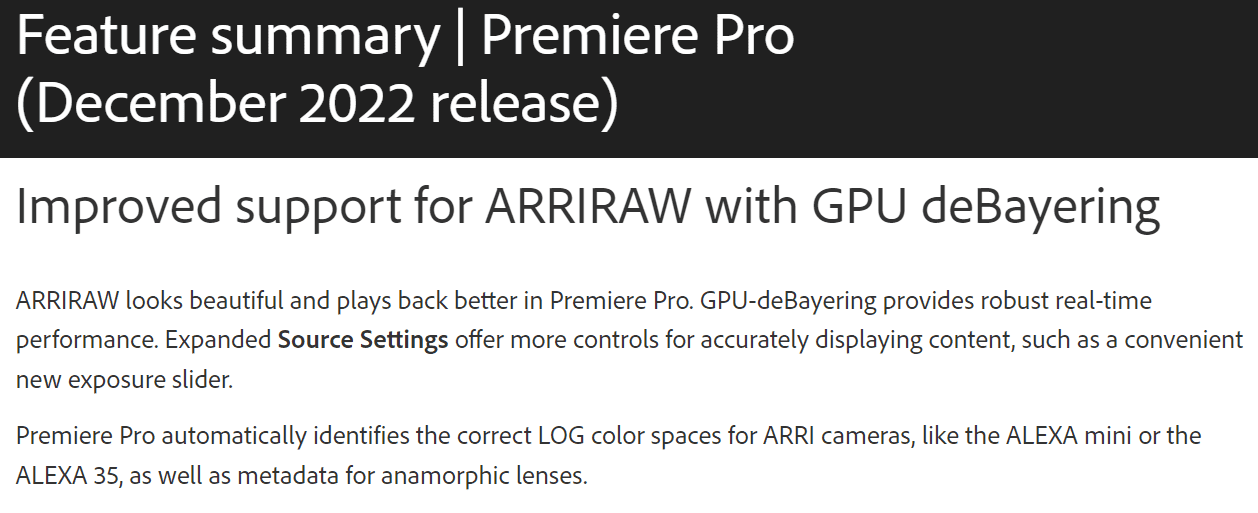
Within the update notes for Premiere Pro 23.1, Adobe included a section titled “Improved support for ARRIRAW with GPU deBayering“. Beyond the fact that they are implementing debayering (turning the raw sensor data into a usable video) using the GPU, there is very little information about how much of a performance gain this new feature may give end users working with ARRIRAW.
Image
ARRIRAW is one of the more difficult codecs to work with in Premiere Pro – almost exclusively requiring either a transcode or proxy-based workflow. At the very least, we expect this update to provide a performance boost for these workflows, but we don’t know exactly how big of a bump it will be.
In addition, we also want to take a look at live playback performance. There were a number of instances where live playback was measured in single-digit FPS with previous versions of Premiere Pro, so we want to see if there is any chance that performance has improved enough to make editing ARRIRAW files directly a possibility.
Testing Methodology
Our PugetBench for Premiere Pro benchmark does not currently test ARRIRAW, and even if it did, this kind of update really requires additional testing on top of what we would typically include in a public benchmark. So, to see how this update performs, we went to Arri’s Camera Sample Footage and got a handful of clips to test. After going through a lot of what they have available for download, we settled on the following clips:
| Camera | File | Clip Information |
|---|---|---|
| Alexa Mini LF | F004C001_190925_MN99.mxf | ARRIRAW – 3840×2160 – 24 FPS |
| Alexa LF | B003C001_180327_R1ZA.zip | ARRIRAW – 3840×2160 – 24 FPS |
| Alexa 65 | A003C025_150830_R0D0.zip | ARRIRAW – 6560×3100 – 23.976 FPS |
If you want full details on these clips, you can find them in the ARRI Sample Footage Technical Information document.
With these clips, we focused on two areas of performance: Exporting and Live Playback. For live playback, we simply played each clip (without any additional effects or layers) in the preview window at 1/2 and full preview resolution. From there, we used the number of reported dropped frames to calculate the average playback FPS across the entire playback process.
For export, we exported the clip to a range of H.264/HEVC, DNxHR, and ProRes codecs. These included:
- H.264 50Mbps 8bit UHD
- HEVC 50Mbps 8bit UHD
- HEVC 60Mbps 10bit UHD
- DNxHR LB UHD
- DNxHR HQX UHD
- DNxHR SQ UHD
- ProRes 422 Proxy UHD
- ProRes 422HQ UHD
- ProRes 4444 UHD
We will share the raw results of our testing in the next section, but to help get an overall feel for how much performance has improved, we will also calculate the overall export performance for each clip in both Premiere Pro 22.6.3 and 23.1 by taking the geometric mean of the results per clip.
Test Setup
Since anyone working with ARRIRAW is likely to have a pretty beefy workstation, we decided to focus on one of the best possible configurations for Premiere Pro:
AMD TR PRO 5000 Platform
| CPU: AMD Threadripper PRO 5975WX 32-Core |
| CPU Cooler: Noctua NH-U14S TR4-SP3 (AMD TR4) |
| Motherboard: Asus Pro WX WRX80E-SAGE SE WIFI |
| RAM: 8x Micron DDR4-3200 16GB ECC Reg. (128GB total) |
| GPU: NVIDIA GeForce RTX 4080 16GB |
| Storage: Samsung 980 Pro 2TB |
| OS: Windows 11 Pro 64-bit (22621) |
Software
| Premiere Pro 22.6.3 |
| Premiere Pro 23.1 |
We often like to look at at least two hardware configurations, but in this case, we are more interested in getting a rough idea of how much of an improvement this update brings for ARRIRAW users, rather than determining what the best hardware is for this workflow.
Raw Benchmark Data
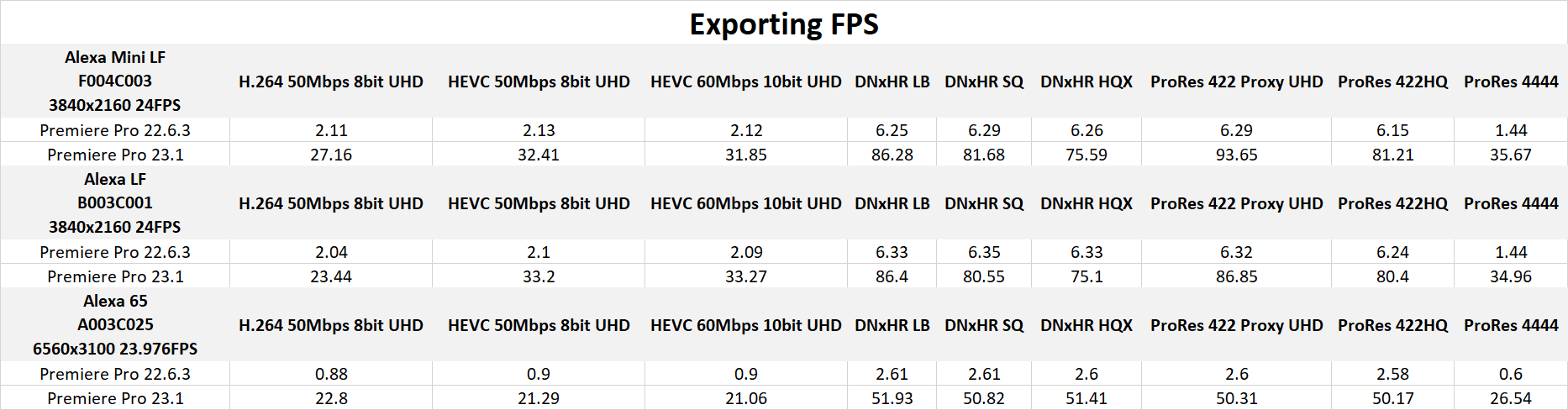
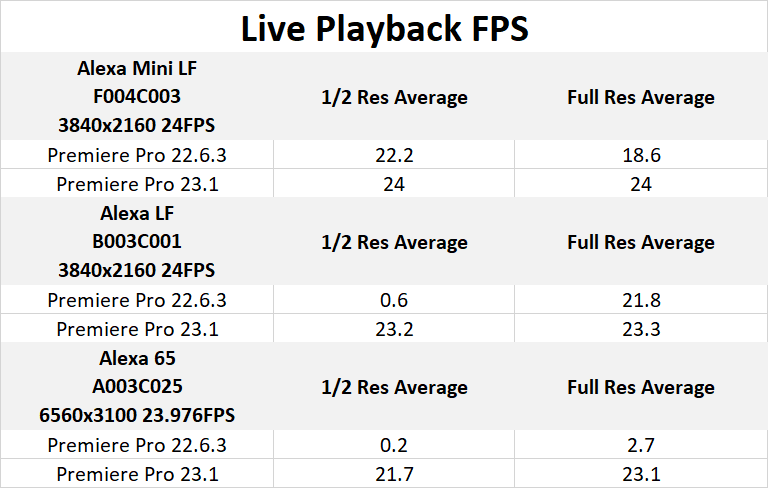
Before diving into the analysis of our results, we wanted to include the raw data from our testing. Especially as this is non-standard testing for us, we wanted to be as transparent as possible about what we tested, and the results of those tests.
System Image

Looking for a Premiere Pro Workstation?
We build computers tailor-made for your workflow.

Don’t know where to start?
We can help!
Get in touch with our technical consultants today.
ARRIRAW Live Playback Benchmark Results
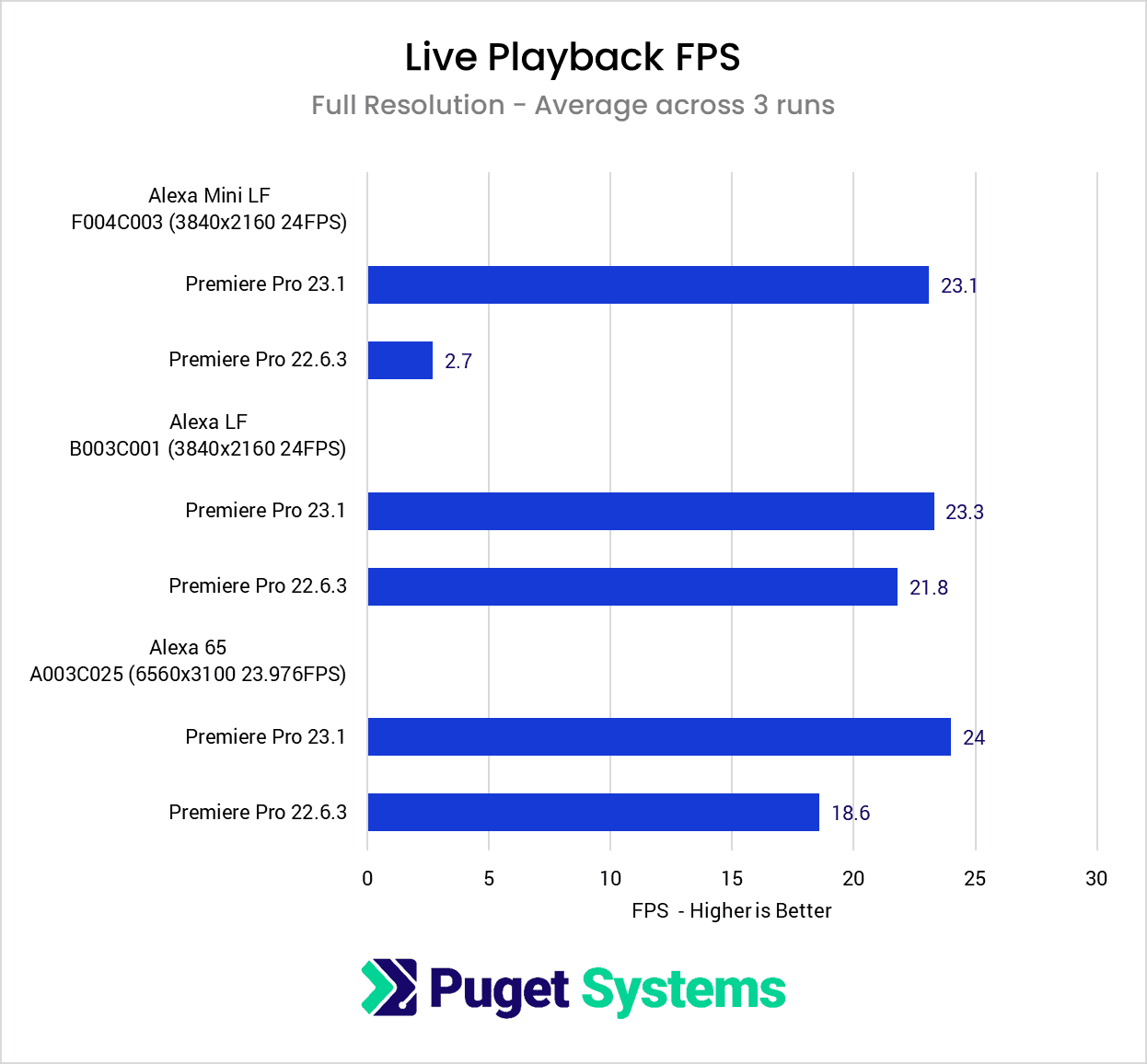
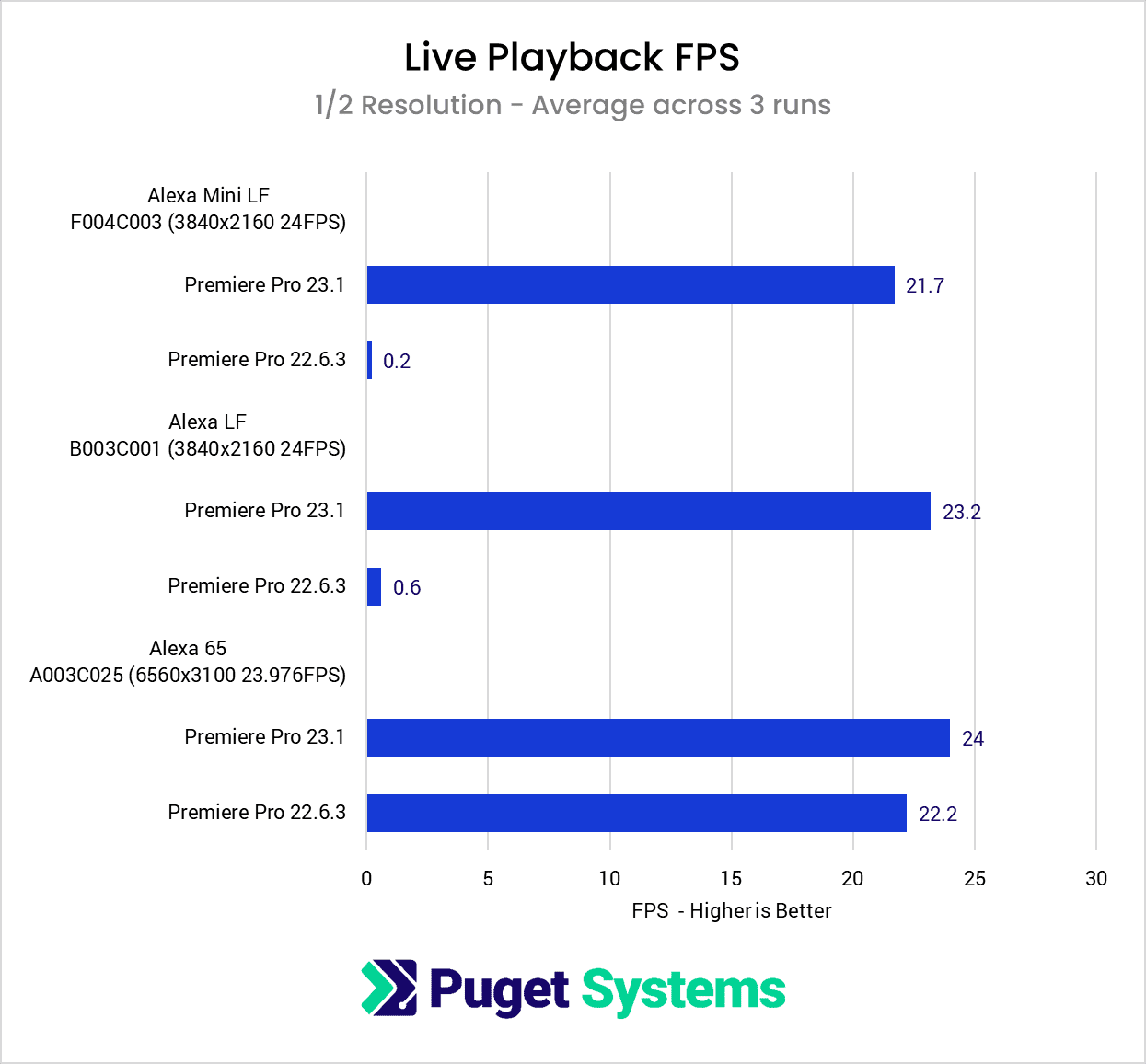
To start off the analysis of our testing, we are going to look at the live playback results for each clip in Premiere Pro 22.6.3, and the new 23.1 version. We are going to primarily focus on the full preview resolution results because playing ARRIRAW at half res was at times essentially broken in previous versions of Premiere Pro. In addition, even in 23.1, full resolution is often as fast (or faster) than half res.
System Image
Immediately, you can see just how much of an improvement the 23.1 update to Premiere Pro made for live playback. Starting with the footage from the Alexa Mini LF, we went from just 2.7 FPS to only dropping a handful of frames and ending up with an average of 23.1 FPS. That is over an 8x improvement in playback FPS!
The footage from the Alexa LF and Alexa 65 didn’t see as much of a performance leap but still saw solid performance gains at full resolution. Interestingly, performance in 23.1 was virtually identical at full and half resolution, but the clips from the Alexa LF and Mini LF went from completely unusable at half res (<1 FPS), to playing in near real-time.
ARRIRAW Export Benchmark Results
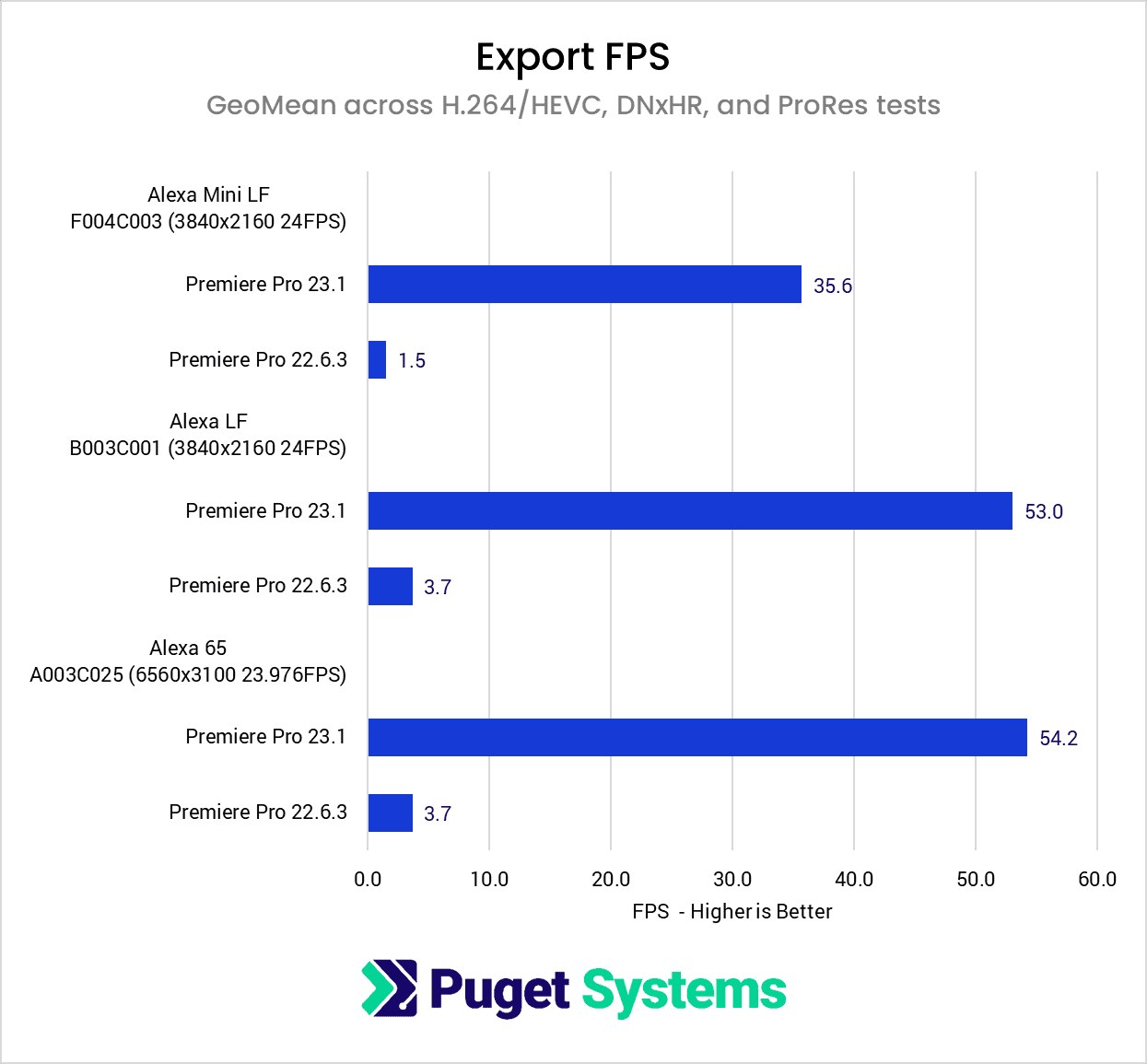
Moving on to the export portion of our testing, we looked at a wide range of codecs, but the performance gains were fairly consistent across each test. Some, like ProRes 4444 saw larger gains, but in the interest of keeping this easy to digest, we are going to focus on the geometric mean of each export result for our three test clips. If you want to look at the individual results, we have them all in the RAW Benchmark Data section.
Image
Even more than for live playback, exporting really shows just how much of a massive improvement this update is. Especially since the majority of users are still going to want to transcode or generate proxies, this kind of performance uplift will make that process much faster.
Across all our tests, the Premiere Pro 23.1 update works out providing over a 15x increase in export performance! In fact, the absolutely smallest improvement we saw was still nearly a 12x increase in performance, so this isn’t the case of a single test or two throwing off the average. It really is this massive of a performance shift across the board.
Another way to look at it is that we went from exporting at ~2-6 FPS depending on the clip and export setting in Premiere Pro 22.6.3, to anywhere from 21 to 94 FPS!
How good is the Premiere Pro 23.1 update for ARRIRAW?
We try to avoid hyperbole and “click bait” types of statements, but in this case, we are very comfortable saying that if you work with ARRIRAW footage, the 23.1 update for Premiere Pro is going to completely change your workflow. Not only is editing directly with the RAW footage now within the realm of possibility due to up to an 8x increase in live playback performance (depending on your workstation specs of course), but the 15x faster export performance also means you can transcode and generate proxies in a fraction of the time.
In fact, the improvement is so large that we decided to record a quick video showing the difference between the new version of Premiere Pro and the older 2022 version. While watching this video, take particular note of how much lower the CPU usage is (often going from 100% to ~6%), and how much more the GPU is used.
While it isn’t documented in the 23.1 updated notes for Adobe Media Encoder, we also verified that these performance improvements have been implemented in AME 23.1 as well. Since proxy generation is primarily done via Media Encoder, this is great to see that the built-in proxy workflow for Premiere Pro should be able to take advantage of these updates immediately when you update both Premiere Pro and Media Encoder to the new version.
We rarely encourage people to update to the latest version of any application unless they have a specific need, but in this case, we highly recommend that anyone working with ARRIRAW give the new 23.1 version of Premiere Pro a try. Especially if you are still using the 22.x or older versions, you can install Premiere Pro 23.1 alongside your current install, and use both at the same time. You cannot downgrade a project from 23.x to an older version of Premiere Pro, but this is a great way to try a new version without risking any of your in-process projects.

Looking for a Premiere Pro workstation?
We build computers tailor-made for your workflow.
Don’t know where to start?
We can help!
Get in touch with one of our technical consultants today.