Table of Contents
Introduction
Enhancing video footage can be a hardware-intensive process, with some applications offering both cloud-based processing on remote servers and local processing on a system’s GPU. Whether it’s for restoring and repurposing archival media or interpolating cinematic footage into a different frame rate for an editorial project, the time required to process these tasks, especially those that utilize AI models, depends heavily on the hardware.
One popular tool used in video post-production workflows is Topaz Video, an AI-powered video enhancement application that uses its own proprietary set of models for restoration, upscaling, and interpolation. Each model is trained to specialize in a specific task. Depending on the footage, that might mean denoising to remove grain and artifacts from low-light or compressed sources, stabilizing shaky footage, converting SDR video to HDR, or creating smooth slow-motion effects. Some models are available for local processing on a GPU, and like many AI solutions, performance can vary depending on the video card and the specific model used for export.

Topaz has changed significantly since our last consumer GPU round-up was published in September 2025. That article tested the benchmarks included in Topaz Video AI, which is a perpetual-license version that has since become a legacy product. Topaz Video is the current subscription-based service, now in version 1.6.1, and we wanted to see if there were any performance differences since our last publication, as both new models were added to the benchmark and the software itself has since received ongoing performance optimizations.
Test Setup (Expandable)
Test Platform
| CPU: AMD Ryzen™ Threadripper™ PRO 9965WX |
| CPU Cooler: Asetek 836S-M1A 360mm |
| Motherboard: ASUS Pro WS WRX90E-SAGE SE BIOS Version: 1317 |
| RAM: 2x DDR5-6400 ECC Reg. 16GB (128 GB total) |
| PSU: EVGA SuperNOVA 1600W P2 |
| Storage: Samsung 980 Pro 2TB |
| OS: Windows 11 Pro 64-bit (26200) |
AMD GPU
| Sapphire Nitro+ AMD Radeon™ RX 9070 XT OC Driver: 26.6.4 |
NVIDIA GPUs
| NVIDIA GeForce RTX™ 5090 NVIDIA GeForce RTX™ 5080 ASUS PRIME GeForce RTX™ 5070 Ti OC NVIDIA GeForce RTX™ 5070 PNY GeForce RTX™ 5060 Ti (16 GB) Driver: 610.62 |
Intel GPU
| Intel® Arc™ B580 LE Driver: 101.8861 |
Benchmark Software
| Topaz Video 1.6.1 |
Our test was conducted on an AMD Ryzen™ Threadripper™ PRO 9965WX-based platform. Before we chose the 9965WX, we tested a small set of CPUs to determine which platform would be best suited for this testing. We found that AMD’s Threadripper processor performed 10% faster than consumer-class processors such as the Intel Core™ Ultra 7 270K Plus and AMD Ryzen 9 9950X3D2 Dual Edition. A consumer-class CPU is still suitable for Topaz Video, however, as it’s mainly a GPU-intensive application. Still, those looking to get the most out of it should consider a Threadripper-based workstation for both its performance and the additional PCIe bandwidth it provides.
We chose the workstation-class Threadripper Pro over the standard Threadripper because the motherboard’s additional PCIe bandwidth allows us to test performance scaling from one to four GPUs, depending on the card (which we’re testing separately for an upcoming article).
For this article, we limited testing to current-generation GPUs from AMD, Intel, and NVIDIA. We used the latest available drivers when we started testing, but new versions and software updates have since been released, so what’s reflected in our results may no longer be completely current.
RAW Benchmark Results
Most models in Topaz’s internal benchmark handle tasks such as denoising, upscaling, and interpolation, while preserving and enhancing pixel information from the source footage. We’ve included the RAW results from our testing below, measured in frames per second (FPS), covering each model’s performance at both 1080p and 4K, for those who want to isolate individual models and see how they perform with each GPU. Those unfamiliar with these models, or who want more context on what each is specialized for, can refer to Topaz Labs’ documentation to see which models are recommended for a given task.
| wdt_ID | wdt_created_by | wdt_created_at | wdt_last_edited_by | wdt_last_edited_at | Resolution | Model | NVIDIA GeForce RTX 5090 | NVIDIA GeForce RTX 5080 | NVIDIA GeForce RTX 5070Ti | NVIDIA GeForce RTX 5070 | NVIDIA GeForce RTX 5060Ti | AMD Radeon RX 9070 XT | Intel Arc B580 |
|---|---|---|---|---|---|---|---|---|---|---|---|---|---|
| 1 | Peter | Jul 2026 10:08 AM | Peter | Jul 2026 10:08 AM | 1920x1080 | Artemis 1X | 56.15 | 35.07 | 30.38 | 25.96 | 16.70 | 33.55 | 18.13 |
| 2 | Peter | Jul 2026 10:08 AM | Peter | Jul 2026 10:08 AM | 1920x1080 | Artemis 2X | 26.16 | 25.59 | 22.34 | 18.95 | 12.48 | 22.96 | 11.16 |
| 3 | Peter | Jul 2026 10:08 AM | Peter | Jul 2026 10:08 AM | 1920x1080 | Artemis 4X | 7.34 | 6.88 | 6.94 | 6.58 | 4.49 | 6.42 | 3.64 |
| 4 | Peter | Jul 2026 10:08 AM | Peter | Jul 2026 10:08 AM | 1920x1080 | Iris 1X | 63.65 | 41.41 | 35.35 | 29.35 | 20.38 | 37.14 | 13.14 |
| 5 | Peter | Jul 2026 10:08 AM | Peter | Jul 2026 10:08 AM | 1920x1080 | Iris 2X | 27.26 | 25.02 | 21.29 | 17.69 | 11.98 | 24.20 | 7.13 |
| 6 | Peter | Jul 2026 10:08 AM | Peter | Jul 2026 10:08 AM | 1920x1080 | Iris 4X | 7.53 | 7.37 | 6.90 | 5.22 | 3.68 | 6.84 | 2.30 |
| 7 | Peter | Jul 2026 10:08 AM | Peter | Jul 2026 10:08 AM | 1920x1080 | Proteus 1X | 59.78 | 36.54 | 31.60 | 26.73 | 17.31 | 35.50 | 18.04 |
| 8 | Peter | Jul 2026 10:08 AM | Peter | Jul 2026 10:08 AM | 1920x1080 | Proteus 2X | 27.49 | 27.02 | 23.79 | 19.66 | 13.38 | 25.58 | 12.08 |
| 9 | Peter | Jul 2026 10:08 AM | Peter | Jul 2026 10:08 AM | 1920x1080 | Proteus 4X | 7.59 | 7.34 | 7.43 | 7.00 | 4.90 | 7.07 | 4.11 |
| 10 | Peter | Jul 2026 10:08 AM | Peter | Jul 2026 10:08 AM | 1920x1080 | Proteus Natural 2X | 19.17 | 10.99 | 8.79 | 6.80 | 4.96 | 1.37 | 0.74 |
| Resolution | Model | NVIDIA GeForce RTX 5090 | NVIDIA GeForce RTX 5080 | NVIDIA GeForce RTX 5070Ti | NVIDIA GeForce RTX 5070 | NVIDIA GeForce RTX 5060Ti | AMD Radeon RX 9070 XT | Intel Arc B580 |
Topaz Video GPU Performance Analysis
Our methodology for scoring Topaz’s internal benchmark involves breaking the tests into two categories – enhancement and slow motion – and calculating a geometric mean of each model’s results at 1080p and 4K to generate an Overall score. Behind that Overall score is the performance of each individual model (included in the RAW results section above for those who want to see how each model performed at each resolution). The models included in the Enhancement score are Artemis, Iris, Proteus, Proteus Natural, Gaia, Gaia Animation, Nyx, Nyx Fast, Nyx XL, Rhea, Rhea XL, and Hyperion HDR. The models included in the Slowmo Score are Apollo, Apollo Fast, Chronos, Chronos Fast, and Aion. In the chart below, each bar is color-coded by GPU brand: red for AMD, blue for Intel, and green for NVIDIA.
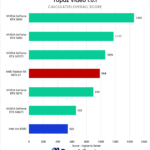

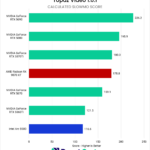
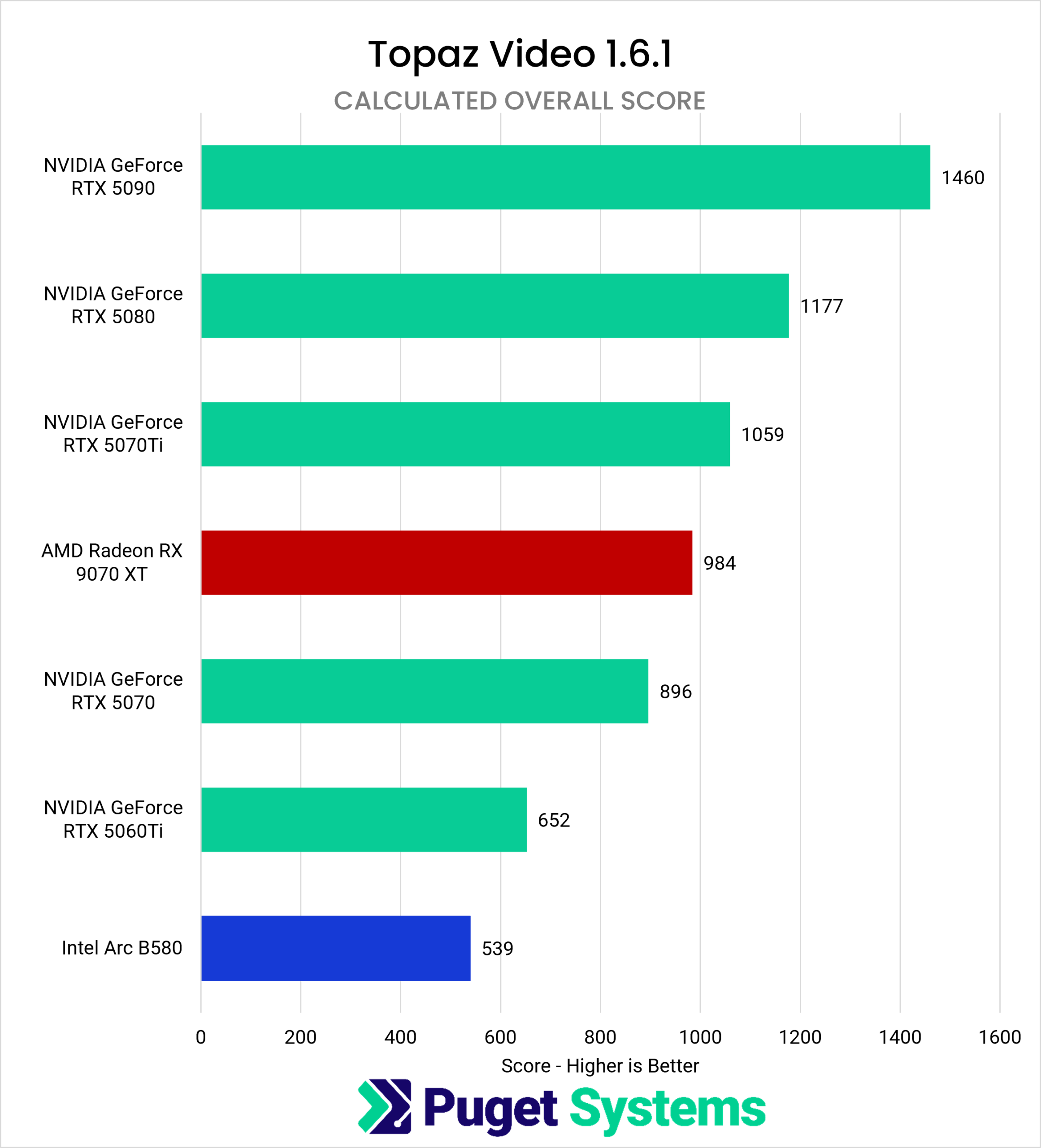
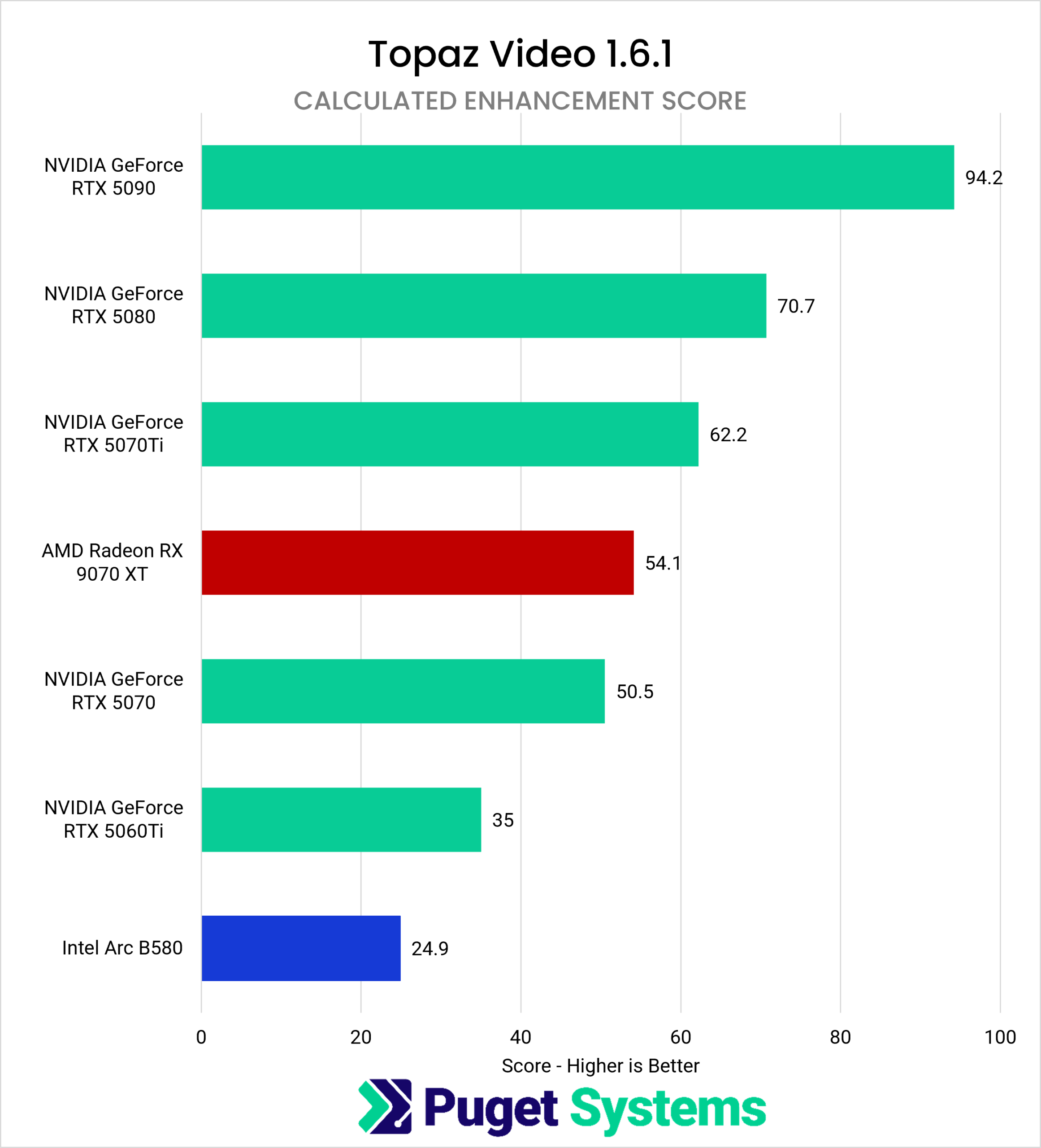
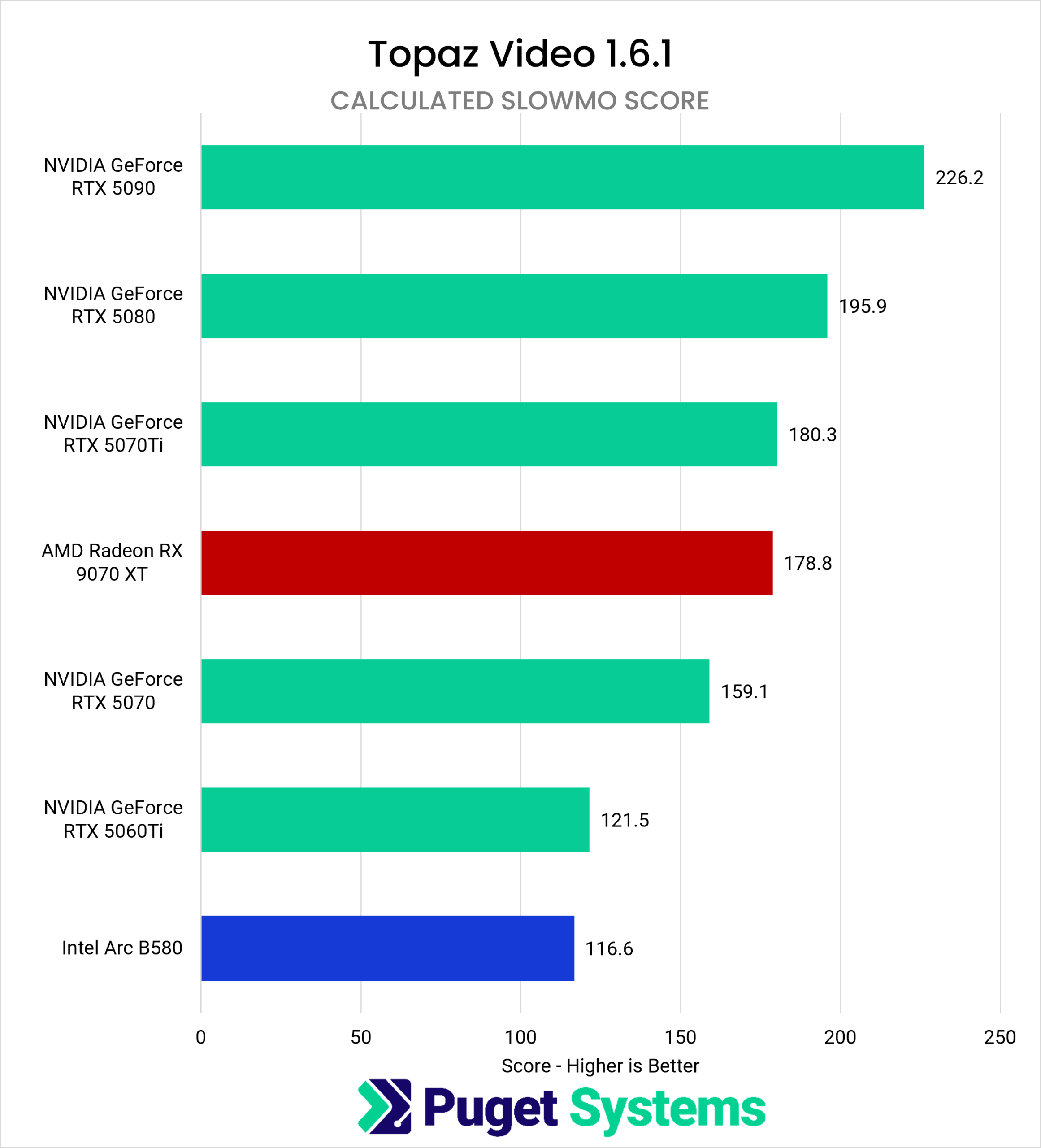
Those who reviewed the scores from our last roundup will see different results this time. This benchmark includes more models, and performance has generally improved across all supported GPU brands since our last publication. To help parse the results above, we’ve categorized the GPUs into three categories: high-tier, mid-tier, and entry-level. Unsurprisingly, the only high-tier GPU in this test was also the highest performer: based on the Overall score, NVIDIA’s GeForce RTX 5090 was 21% faster than the second-ranked GeForce RTX 5080.
Among the mid-tier cards, results stayed within a moderate range based on the Overall score. For those looking purely at performance, NVIDIA’s GeForce RTX 5080 is the top performer in this class of GPUs, followed by the GeForce RTX 5070 Ti, and lastly by AMD’s Radeon RX 9070 XT. The performance difference between the 5080 and 5070 Ti is 11%, and 18% between the 5080 and 9070 XT, while the 5070 Ti is 7% faster than the 9070 XT. All of these cards have 16GB of VRAM, which is enough to run every model in this benchmark. However, the Starlight series of models — with the exception of Starlight Mini — is not included in the Topaz Video benchmark, so those who plan to use the Starlight models should be aware of GPU compatibility and system requirements: NVIDIA’s cards support local processing across the entire Starlight series, while the Radeon RX 9070 XT is compatible only with Starlight Precise 2.5.
Comparing entry-level graphics cards, NVIDIA’s GeForce RTX 5070 is the top performer in this class, running nearly 50% faster than Intel’s Arc B580 and 32% quicker than the 5060 Ti. Rounding out the comparison, the B580 is 19% slower than the 5060 Ti. Aside from performance, it’s also worth considering whether these cards support other models available in Topaz Video. The B580 doesn’t work with any Starlight series models, and the 5070 doesn’t meet the system requirements for Starlight Fast 2 or Starlight Sharp. The 5060 Ti, by contrast, is compatible with all Starlight models.
While there was no difference in GPU rankings across the Overall, Enhancement, and Slow Motion scores, it’s worth mentioning that there was a wider variation in performance between GPUs in the Enhancement score, while the Slow Motion score showed similar performance with specific GPUs like the GeForce RTX 5070 Ti and the Radeon RX 9070 XT, as well as the GeForce RTX 5060 Ti and Arc B580.
Which GPU Is Best for Topaz Video?
Topaz Video’s core set of models can produce great results, but with local processing, some models can take several seconds to process a single frame, depending on the hardware used – and any second-pass enhancements included with an export can quickly add further to the overall processing time. Older or slower hardware is fine for occasional use, but for time-sensitive projects, even a modest upgrade can meaningfully cut down processing time.
For those using Topaz Video as their primary application, looking at which models are used most can help determine whether higher-tier hardware is worth the investment. If it’s used more as a secondary tool, it makes more sense to first choose a GPU based on the primary application’s needs, then weigh Topaz Video’s performance against those requirements.
NVIDIA’s GeForce RTX 5090 is the clear choice for anyone limited to a single GPU who wants high-tier, maximum performance. Aside from the 5090, the right card comes down to budget and where Topaz Video fits within your post-production pipeline. The GeForce RTX 5080 was both the top performer in the mid-tier GPU class tested and the second-highest-scoring card overall, making it a strong option for those who want performance closer to the 5090 without the significant price jump. The RTX 5070 Ti and Radeon RX 9070 XT are close enough in performance that price and Starlight compatibility may matter more than performance when choosing between these two video cards.
Among entry-level cards, the GeForce RTX 5070 is the top performer in this class. However, there’s more to consider when deciding which GPU is the right fit. The 5070 and Arc B580 have 12GB of VRAM, while the 5060 Ti has 16GB, and is the only card in this class compatible with every Starlight model. While the 5070 leads in performance, its lower VRAM capacity and lack of compatibility with all Starlight models are worth considering when comparing GPUs in this tier.
As mentioned earlier in this article, we have a few related publications coming up. For those considering professional-grade graphics cards, we published a separate article that uses the same benchmark as here. That same testing setup, built around our workstation-class Threadripper platform, also lets us test multi-GPU configurations, and it’s in our testing queue. Finally, we touched on the Starlight series of models throughout this article; since they require a different testing and scoring approach, we’ll cover their performance separately, for both consumer and pro-class cards.

Looking for a Content Creation workstation?
We build computers tailor-made for your workflow.

Don’t know where to start?
We can help!
Get in touch with one of our technical consultants today.