Table of Contents
Introduction
Last year, we restarted photogrammetry testing with PIX4Dmatic. At that point in time, we were testing with a few image sets, examining the overall performance implications of a variety of hardware types and post-processing outputs. However, earlier this year, PIX4D completed work on an exciting new processing method: Gaussian splatting. It is available with a Pro license on PIX4Dmatic versions 2.5 onward, and we wanted to see how to best optimize systems for this workflow.

First, we should take a moment to explain what Gaussian splatting means. It is the process of creating a 3D scene comprised of Gaussian splats, which are 3D objects with a variety of variable characteristics, including size, shape, color, transparency, and position. Their shape takes the form of an ellipsoid, or smooshed sphere, although the exact shape can vary. One property of these splats is that, typically, their opacity diminishes as the distance from their center increases. This means that the information they contain is more strongly represented at their center and less so as you move outward. When multiple splats are placed next to each other they can overlap, providing information about the space between them that is a blend of their values. This overlap creates an image not just in 2D space but in three dimensions — like a 3D equivalent of how color printers make a picture from overlapping dots.
There are a number of benefits of splats for photogrammetry. They create a more complete and continuously distributed point cloud, with less noise or artifacts, than traditional SfM (structure from motion) methods. This allows for an improved orthomosaic that can be more complete and detailed. PIX4D has a deeper dive (or two!) on all the improvements, but fundamentally, they come down to the fact that splats offer a more detailed and accurate representation than was previously possible.
Test Setup
For this round of testing, we used two new datasets that should be more representative of modern photogrammetry projects and allow for ideal Gaussian splat creation. PIX4D provided both image sets to us for this testing. Although these projects are similar in terms of raw image count, photos for the second dataset are of much higher resolution and thus will represent a much heavier workload.
The first dataset, Pumphouse, is a capture of a pumphouse in Colorado. It consists of 1,095 images at 12 megapixels for a total size of about 2.92 GB. It was shot on an iPhone with an Emlid Reach RX, using PIX4Dcatch to produce those images, along with 2190 TIFFs for depth maps and confidence, bringing the entire project to about 3.13 GB.
The second dataset, Cathedral, consists of images from three different sources: 588 20-megapixel photos from a DJI Phantom 4 Pro, 744 20-megapixel photos from a DJI Mavic 2 Pro, and 125 21-megapixel photos from a Parrot Anafi. In total, the project is 12.3 GB in size, comprising 1,457 images. It is a capture of the Lausanne Cathedral in Switzerland.
We didn’t adjust any options in PIX4Dmatic for this test, so all images were processed using the default settings. This provides a solid baseline for performance, but there are a variety of preferences and content settings that could affect system performance. GPU acceleration is enabled by default.
Since we have already looked at PIX4Dmatic more broadly, and the new feature of Gaussian splatting is GPU-intensive, we only tested GPUs for this investigation. Our platform used an AMD Threadripper™ PRO 9975WX equipped with 1024 GB of RAM. During that testing, we found that 32 cores was the sweet spot for maximum PIX4Dmatic performance, and the WRX90 platform ensured that the memory bandwidth was maximized; but we will touch on memory towards the end of the article.
We tested with every generation of NVIDIA GeForce GPU that should theoretically be supported based on the minimum CUDA version (7.5) required for Gaussian splatting in PIX4Dmatic. GPU drivers were up to date as of the time we started testing. We followed our general testing methodology, so Windows, the BIOS, and other drivers were all on the latest versions, and overclocking features were disabled.
System Specifications (Expandable)
AMD WRX90 Test Platforms
| CPUs: AMD Ryzen™ Threadripper™ PRO 9975WX (32 core) |
| RAM: Micron DDR5-5600 ECC Reg. 128GB (1024 GB total) |
| CPU Cooler: Asetek 836S-M1A 360mm |
| Motherboard: ASUS Pro WS WRX90E-SAGE SE BIOS version: 1317 |
| Storage: Kingston KC3000 2TB |
| PSU: EVGA SuperNOVA 1200W P2 |
| OS: Windows 11 Pro 64-bit (26200) |
Benchmark Software
| PIX4Dmatic 2.5 |
Pumphouse
As discussed in the test setup section, the Pumphouse project was the smaller of the two we tested with. Our configurations took about an hour and a half to complete the project, give or take ten minutes.
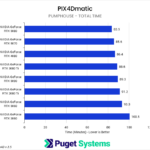
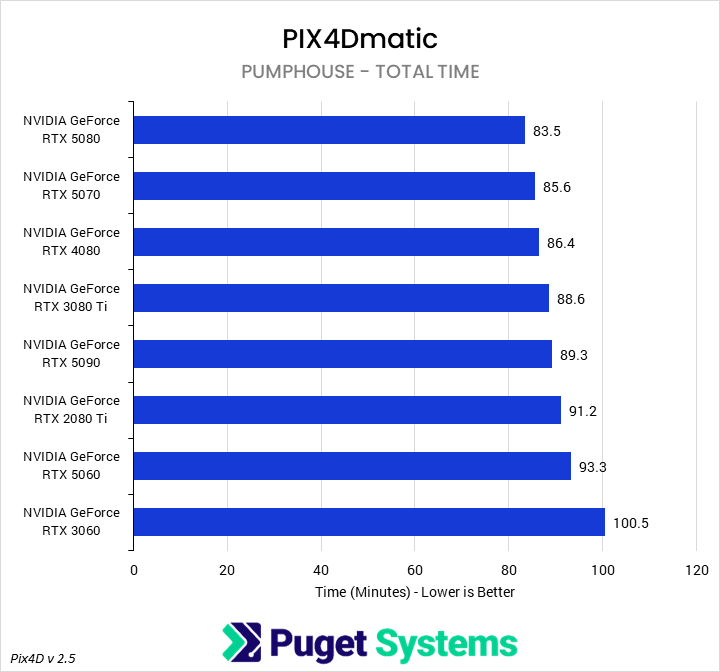
Overall (Chart #1), we found relatively little difference between GPUs when running this project, with the slowest card (3060) taking about 17 minutes, or 20%, longer to finish than the fastest (5080). The second-slowest card (5060) was even 7 minutes faster than the 3060, putting the difference between the 5060 and the 5080 down to 12%.
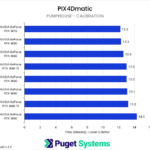
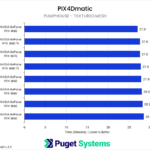
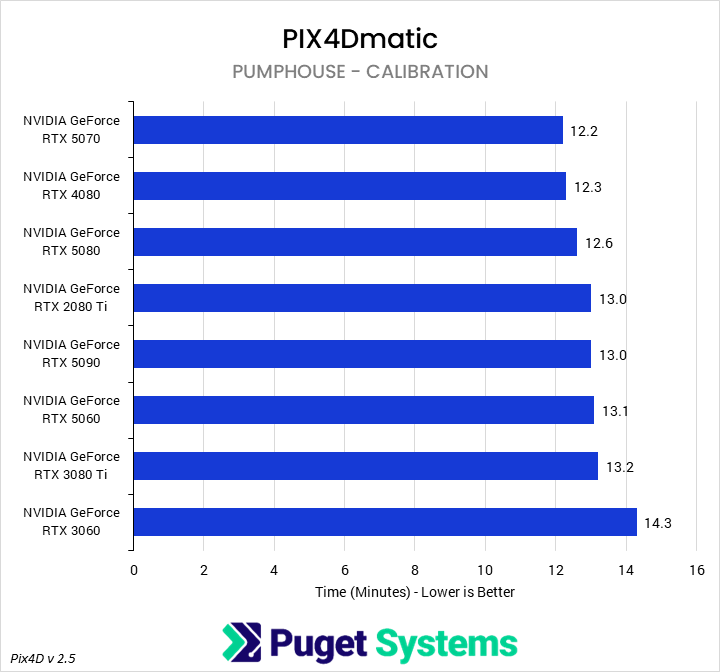
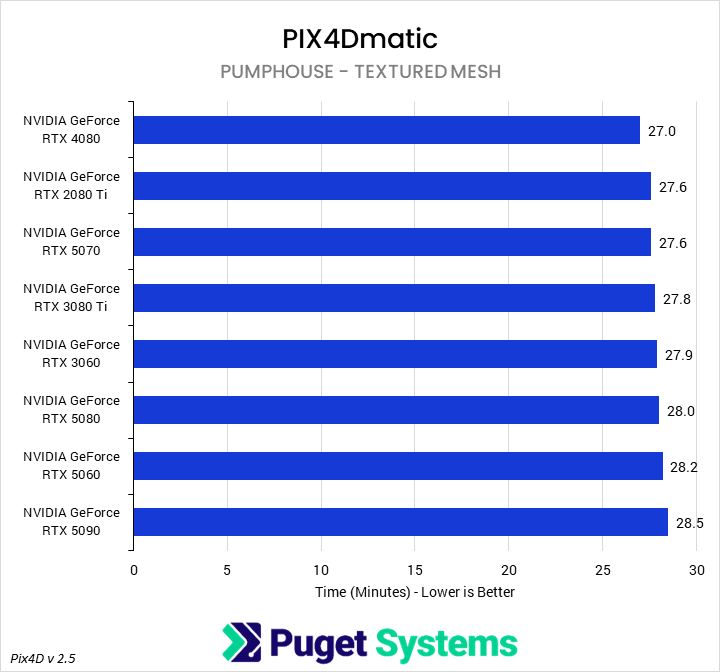
We have also provided time breakdowns for a few of the sub-steps: calibration, Gaussian splatting (our primary interest), and generating the textured mesh, as these three steps represent the bulk of the time taken between beginning a project and receiving the final exports as deliverables. However, in the Pumphouse project, we found virtually no performance difference between GPUs for either calibration (Chart #2) or generating the mesh (Chart #4), with the slowest GPU only adding three minutes to total processing time between them–fairly irrelevant on the scale of 90 minutes.
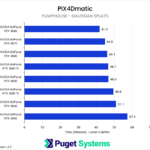
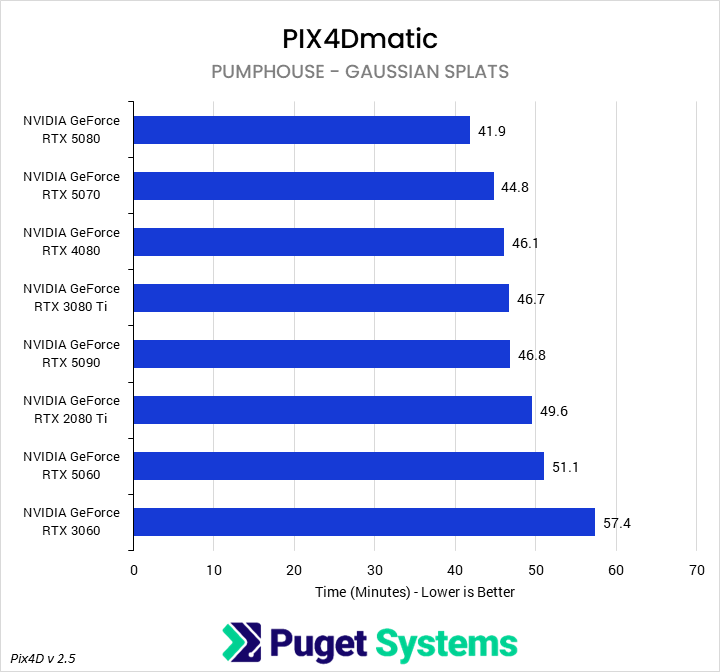
Generating the Gaussian splats (Chart #3) took the majority of the time in this project. We found that the 5080 was the fastest card in this project, finishing that step in 41.9 minutes. This made it 10% faster than the 4080, 11% faster than the 3080 Ti, and 15% faster than the 2080 Ti. Compared to other 50-series cards, it was 19% faster than the 5060 and, curiously, 11% faster than the 5090. Though we are unsure why, we have also seen the RTX 5090 underperform in some of our other PIX4Dmatic testing, particularly with smaller projects. Finally, compared to the slowest card – the 3060 – the 5080 was 28% faster, finishing the splatting in 15 minutes less time.
Cathedral
The Cathedral project was much larger in terms of total pixels than the Pumphouse project, and took and average of 5.5 hours to complete.
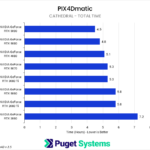
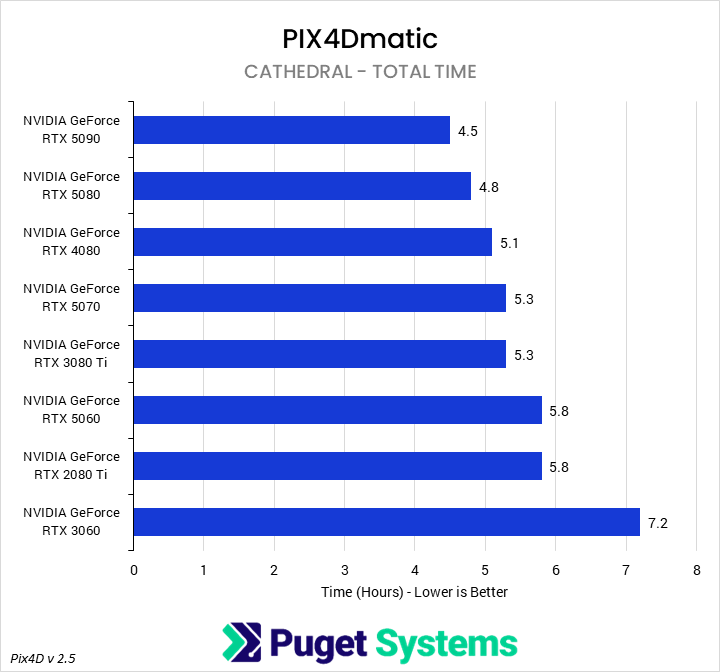
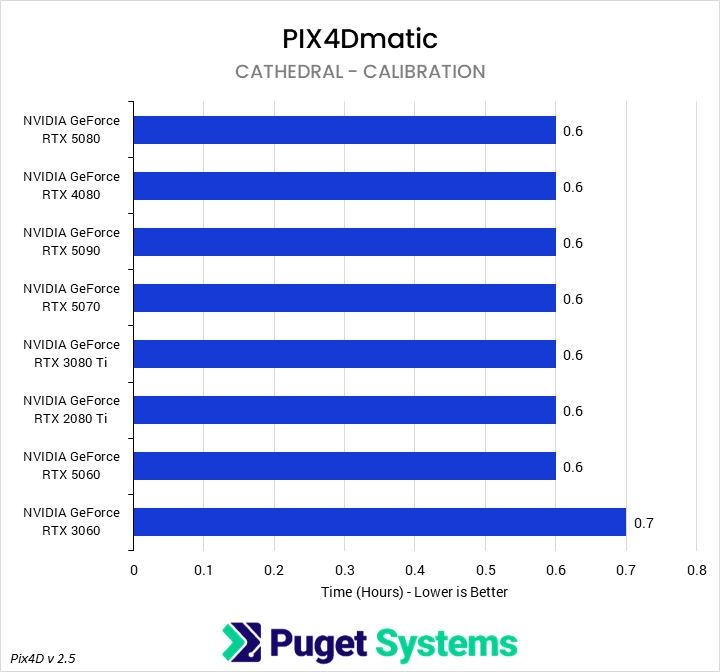
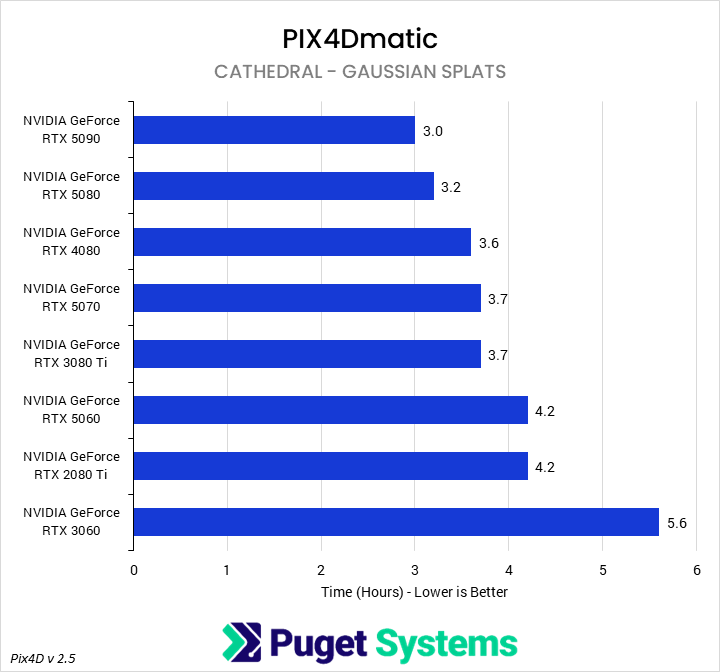
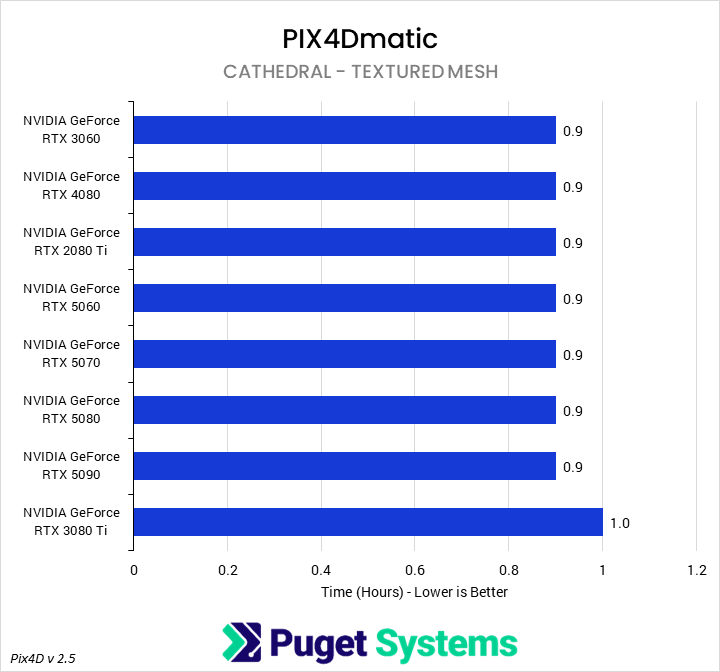
Like with our Pumphouse analysis, we pulled a few of the longest substeps out to examine on their own. However, in terms of the total time to execute the project (Chart #1), we found that the overall difference was nearly 3 hours, with the 5090 finishing in 4.5 hours and the 3060 finishing in 7.2 hours. The next slowest cards were the 5060 and 2080 Ti, which both took ~5.8 hours.
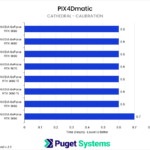
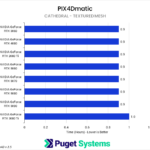
As expected, the calibration (Chart #2) and textured mesh generation (Chart #4) steps were both largely unaffected by GPU selection, though the 3060 did slow those processes down by a small amount. Interestingly, scaling does not seem to be linear with project size, as both these steps took about twice as long for the Cathedral dataset as compared to the Pumphouse dataset – while the Gaussian splatting process took much longer, relative to the total time.
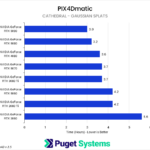
Speaking of splatting (Chart #3), we found much more differentiation between GPUs in this project. The RTX 5090 was the fastest card, completing the task in about 3 hours. This put it 7% ahead of the 5080, 20% ahead of the 5070, and 30% ahead of the 5060. Compared to older GPUs, it was 17% faster than the 4080, 20% faster than the 3080 Ti, and 30% faster than the 2080 Ti. Finally, compared to a midrange older-gen GPU (the 3060), the 5090 was much faster, finishing the splat process in 2.6 hours, or 47% less time.
Conclusion
Gaussian splatting offers a powerful new option for photogrammetry applications, providing the ability to use advanced machine learning to create more detailed and accurate representations of the physical world. Although many modern systems will be capable of processing with Gaussian splats, computers older than 2018 (GeForce RTX 20 Series) likely will not be. Additionally, the process is computationally expensive and, for larger datasets comprised of thousands of 20+ megapixel photographs, an older GPU – even a high-end one – will be a substantial bottleneck.
With the modern generation of graphics cards, on a larger dataset, the differences in splat processing time can be large: up to 30% based on our testing. We would recommend that those interested in using Gaussian splatting in PIX4Dmatic start with a GeForce RTX 5080 as a baseline, with the RTX 5090 an option for higher budgets. Lower-end GPUs will work, and probably be fine for amateurs, but given that splats are currently locked behind a Pro license, we don’t expect that to be relevant at this point in time.
For those on older platforms, a new high-end GPU can represent a huge improvement in processing times. The 5090 was about 20% faster than the 4080 and 3080 Ti and 30% faster than the 2080 Ti. While this means these older cards are still comparable to lower-end current-gen cards, it is also worth bearing in mind that these were top-end GPUs in their families. Older midrange cards, represented by the 3060 in our testing, can be substantially slower yet – potentially taking up to twice as long to complete a project. Those working with cards from 2020 (RTX 30 Series) or earlier will likely want to look into an upgrade if they plan to use Gaussian splatting regularly.
If you need a powerful workstation to tackle the applications we test, the Puget Systems workstations on our solutions page are tailored to excel in various software packages. If you prefer a more hands-on approach, our custom configuration page helps you configure a workstation that matches your needs. Otherwise, if you would like more guidance in configuring a workstation that aligns with your unique workflow, our knowledgeable technology consultants are here to lend their expertise.

Looking for a
PIX4Dmatic workstation?
We build computers tailor-made for your workflow.

Don’t know where to start?
We can help!
Get in touch with one of our technical consultants today.