Table of Contents
Introduction
On June 1st, 2026, AMD released the Radeon™ RX 9070 GRE for the worldwide market. Previously a China-exclusive video card, the 9070 GRE promises to fill a gap in the market between the 9060 XT and the 9070. Based on the same GPU die as the 9070 and 9070 XT, the 9070 GRE is a cut-down model that should offer a more mid-range price and experience. AMD is primarily marketing this card as a 1440p gaming card, but we will be looking at it through the lens of professional content creation: asking whether it makes sense for that purpose — or is best left to gamers.
AMD’s RDNA 4 architecture isn’t new, having been released with the 9070 XT in March of 2025, so we won’t cover its details too closely here. Alongside some expected improvements such as next-generation compute, ray tracing, and matrix processors, AMD also reworked the memory subsystem and scheduler to improve overall throughput. Most exciting for us, though, were the upgrades to the media engine, adding support for more variants of H.264 and H.265/HEVC, in addition to further AV1 support. We have generally found AMD to be very competitive for non-linear editors, and hope to see the 9070 GRE continue that trend.
Many other publications have tested and reported on the Radeon RX 9070 GRE. If you’re looking for additional perspectives that tackle different use cases than we analyze, here are our recommendations: On the written side, Phoronix has a great Linux-based review of the card, and StorageReview looks at AI performance. For video-based, video-game focused insights, we also found the reviews from DigitalFoundry and Hardware Unboxed to be informative.
Since the 9070 GRE is being slotted in between the 9070 XT and 9060 XT, the exact differences in specifications matter a lot. In the table below, we have listed the most relevant specs for the 9070 GRE and other comparable Intel, AMD, and NVIDIA GPUs:
| wdt_ID | wdt_created_by | wdt_created_at | wdt_last_edited_by | wdt_last_edited_at | GPU Model | MSRP | VRAM | Shader Units | Boost Clock | VRAM Bandwidth | TDP |
|---|---|---|---|---|---|---|---|---|---|---|---|
| 1 | Evan | Jun 2026 11:27 AM | Evan | Jun 2026 11:27 AM | NVIDIA GeForce RTX 5070 Ti | 750 | 16 | 8,960 | 2.45 | 896 | 300 |
| 2 | Evan | Jun 2026 11:27 AM | Evan | Jun 2026 11:32 AM | NVIDIA GeForce RTX 5070 | 550 | 12 | 6,144 | 2.51 | 682 | 250 |
| 3 | Evan | Jun 2026 11:27 AM | Evan | Jun 2026 11:27 AM | NVIDIA GeForce RTX 5060 Ti | 430 | 16 | 4,608 | 2.57 | 448 | 180 |
| 4 | Evan | Jun 2026 11:27 AM | Evan | Jun 2026 11:27 AM | NVIDIA GeForce RTX 5060 | 300 | 8 | 3,840 | 2.50 | 448 | 145 |
| 5 | Evan | Jun 2026 11:27 AM | Evan | Jun 2026 11:27 AM | AMD Radeon RX 9070 XT | 600 | 16 | 4,096 | 2.97 | 645 | 304 |
| 6 | Evan | Jun 2026 11:27 AM | Evan | Jun 2026 11:27 AM | AMD Radeon RX 9070 GRE | 550 | 12 | 3,072 | 2.79 | 432 | 220 |
| 7 | Evan | Jun 2026 11:27 AM | Evan | Jun 2026 11:27 AM | AMD Radeon RX 9060 XT | 350 | 16 | 2,048 | 3.13 | 322 | 160 |
| 8 | Evan | Jun 2026 11:27 AM | Evan | Jun 2026 11:27 AM | Intel Arc B580 | 250 | 12 | 2,560 | 2.67 | 456 | 190 |
In terms of specifications, the 9070 GRE is a bit odd. As expected, it slots fairly nicely between the 9070 XT and 9060 XT — in most areas. Compared to the 9060 XT, it has 50% more shading units and a 50% larger memory bus, and it costs $200 more at MSRP. Compared to the 9070 XT, it has 33% fewer shading units and a 33% smaller memory bus, while costing $50 less at MSRP. However, there are two areas where the 9070 GRE is worse than both the 9060 XT and 9070 XT. First, it has lower clock speeds across the board: base, boost, and memory. Second, it has less VRAM, with only 12 GB, versus the 16 GB of the other cards. Still, on paper, the 9070 GRE looks as if it should perform solidly in-between the two.
Given the MSRP of the cards, the two most direct competitors for the 9070 GRE are AMD’s own 9070 XT and the NVIDIA GeForce RTX™ 5070. The 5070 seems to be the target competitor, as it and the GRE both cost $550 MSRP and both have 12 GB of VRAM. The 5070 has nominal advantages in memory bandwidth and shader units, but only the former is really comparable across manufacturers.
Unfortunately, at the moment, many GPUs are not being sold for their launch MSRP. GPU pricing is often volatile, and there is currently a shortage of a key component (memory chips). This means that MSRP isn’t always the best point of comparison. At the time of writing, we found that the 9070 XT was typically going for around $700-$750, the 9060 XT for $450, the 5070 for $600-$650, and the 5060 Ti for $550-$650. These prices are worth bearing in mind, given that the 9070 GRE does, for the time being, appear to be holding at its listed MSRP of $550. So when considering the actual price a consumer is likely to pay (at least right now), the 5060 Ti is actually the 9070 GRE’s primary market-price competitor.
Test Setup (Expandable)
Test Platform
| CPUs: AMD Ryzen™ 9 9950X3D2 Dual Edition |
| CPU Cooler: Noctua NH-U12A |
| Motherboard: ASUS ProArt X670E-Creator WiFi BIOS Version: 3702 |
| RAM: 2x DDR5-5600 32GB (64 GB total) |
| PSU: EVGA SuperNOVA 1200W P2 |
| Storage: Kingston KC3000 2TB |
| OS: Windows 11 Pro 64-bit (26200) |
AMD GPU
| ASUS PRIME Radeon™ RX 9070 GRE Sapphire Nitro+ AMD Radeon™ RX 9070 XT OC ASUS PRIME Radeon™ RX 9060 XT (16 GB) Driver: 26.10 |
NVIDIA GPU
| ASUS PRIME GeForce RTX™ 5070 Ti OC NVIDIA GeForce RTX™ 5070 PNY GeForce RTX™ 5060 Ti (16 GB) MSI GeForce RTX™ 5060 8G Ventus 2X OC Driver: 610.47 |
Intel GPUs
| Intel® Arc™ B580 LE Driver: 101.8826 |
Benchmark Software
| Adobe Lightroom Classic 15.3 — Puget Bench for Lightroom Classic 1.0.0 |
| Adobe Photoshop 27.7 — Puget Bench for Photoshop 1.0.6 |
| Adobe Premiere 26.2 — Puget Bench for Premiere Pro 2.0.1 |
| Adobe After Effects 26.2 — Puget Bench for After Effects 1.1.0 |
| DaVinci Resolve 20.3 — Puget Bench for DaVinci Resolve 2.1.0 |
| Blender 5.0.0 |
| Unreal Engine 5.7 |
| Unigine Superposition 1.0 |
| MLPerf Client v1.0 |
For this review, we decided to look at the current-gen GPUs nearest to the 9070 GRE in terms of price and specifications. From AMD, this means the 9060 XT and 9070 XT, representing the GPUs just above and below it on the product stack. From NVIDIA, the two most proximate were the 5060 Ti and 5070, but we also included the 5060 and 5070 Ti to act as outer bounds. Finally, we included the Intel Arc B580 to see how Intel compares to this new AMD offering.
As is typical with our GPU reviews, we used a test bed with the ASUS X670-E Creator platform with an AMD Ryzen™ 9 9950X3D2 Dual Edition processor. Past testing of ours found that the 9950X3D2 Dual Edition offers the best all-around performance for the applications we test with, minimizing potential CPU-side bottlenecks. We followed our usual methodology: using the most up-to-date drivers and application versions, disabling overclocking features, and enabling features such as Windows VBS, hardware-accelerated GPU scheduling, and Resizable BAR. We tested using a standard set of professional productivity benchmarks for this review, including the Puget Bench suite, offline and real-time renderers, and MLPerf Client.
Lightroom Classic
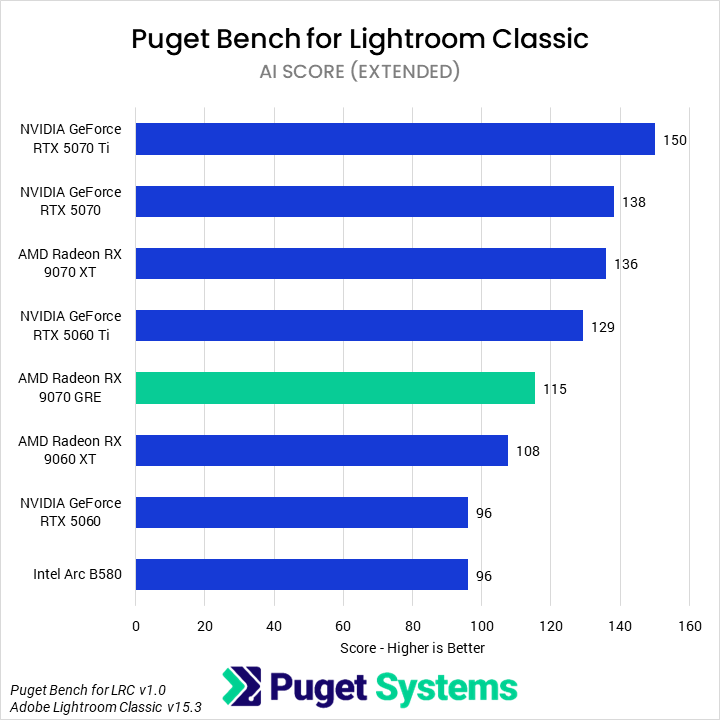
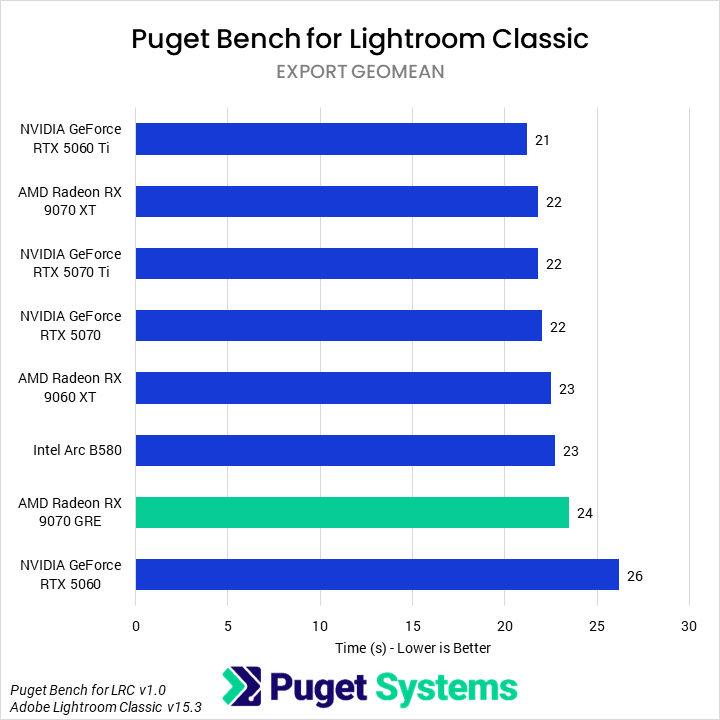
The first application we benchmarked with was Lightroom Classic. Traditionally associated with sensitivity to single-threaded performance, Lightroom Classic has undergone a large change over the last few years, substantially improving the ability of the application to utilize multi-core CPUs and powerful GPUs. Although our benchmarks look primarily at camera-specific results, for GPU articles like these, we instead focus on just a handful of relevant results: the Overall score, representing application-wide performance; the AI score, looking at the performance of AI effects (those most likely to use the GPU); and the export score, a geometric mean of the export times for batches of images from each camera manufacturer we test with, as these are often GPU-accelerated.
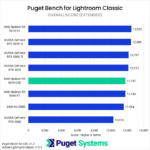
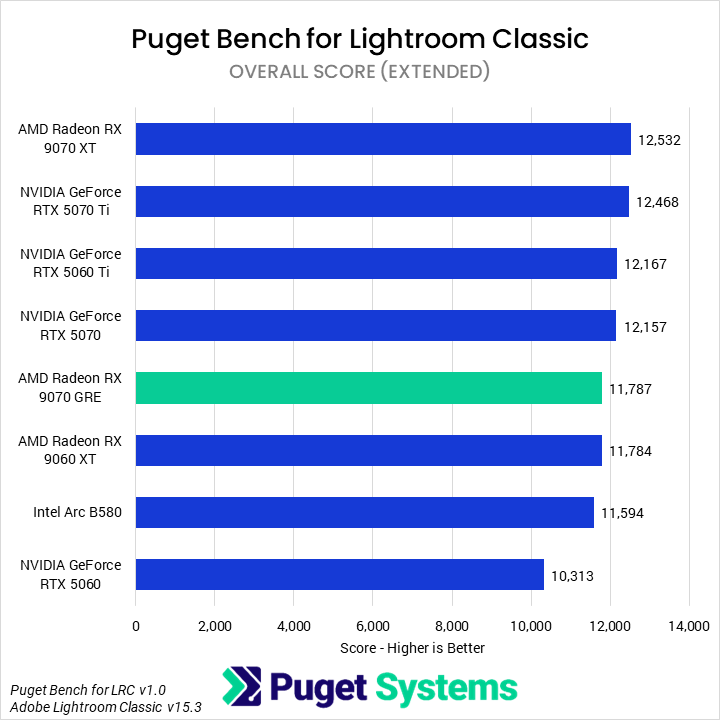
Starting with the Overall score (Chart #1), we found that the 9070 GRE was effectively just as fast as the 9060 XT, putting it 3% behind the 5070 (within the margin of error of these tests). We also found that the 5060 Ti was only marginally ahead of the 5070, while the B580 was a mere 1% slower than the 9070 GRE. Not a promising start.
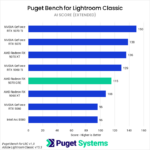
As would be expected, the AI score (Chart #2) is somewhat more favorable for the 9070 GRE compared to the 9060 XT, with the new card seeing a 6% uplift over the lower-end model. However, this is also an area where NVIDIA is far more performant than AMD, making it unsurprising that the 5070 extended its lead here to 20%. The 5060 Ti was less impressive, but still 12% faster than the 9070 GRE.
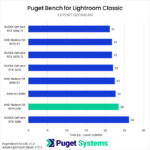
Finally, although smaller in terms of overall differences, the Export Geomean time (Chart #3) is similarly unkind towards the 9070 GRE. We found that the GRE was only faster than the 5060, trailing just behind the 9060 XT and B580. For most users, the overall differences in performance in the Export tasks are not large enough to make a huge difference in workflow. Nevertheless, if a card isn’t providing more performance, it isn’t worth more money — especially when it has less VRAM.
Overall, we would not recommend the 9070 GRE for Lightroom Classic, unless real-world prices for its direct competitors are far above MSRP. Given the current prices we noted above, the 9070 GRE may make sense compared to a 9070 XT or 5070, but comes up short compared to the similarly-priced 5060 Ti. Additionally, our manual testing has found that 12 GB cards often experience noticeable lag during heavy edits, so we strongly recommend 16 GB or higher VRAM cards for Lightroom Classic power users.
Premiere
Next up in our testing suite was Puget Bench for Adobe Premiere. Earlier this year, we released an updated 2.0 version, which overhauled much of the test suite. Although we have looked at it a few times since then, we had yet to do so in a GPU-specific review. Premiere is more GPU-accelerated than ever, so we were interested to see if AMD could take better advantage of it. That being said, we still expected that this would be an area of relative strength for NVIDIA, given its more mature media engines.
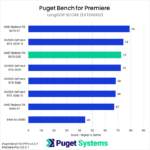
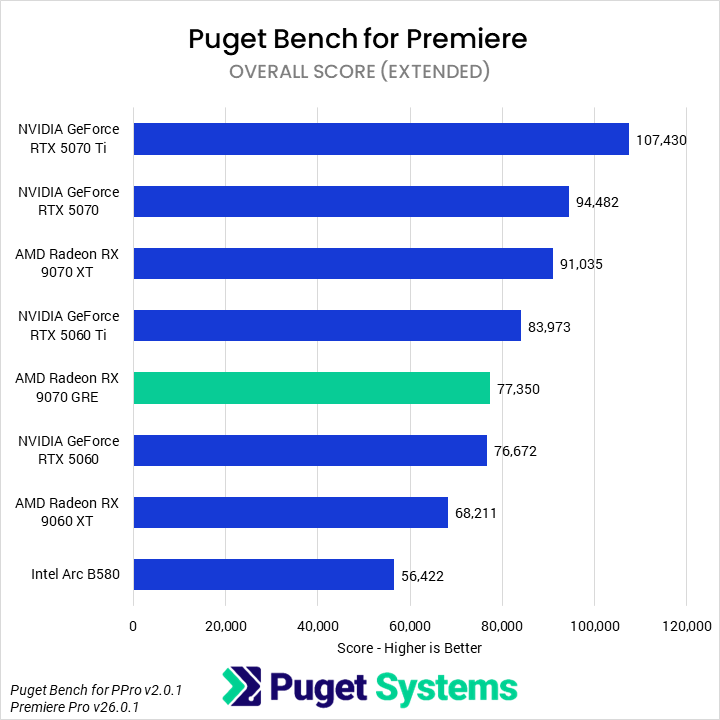
In the Overall score (Chart #1), we found that the 9070 GRE performed identically to the cheaper GeForce RTX 5060, making it 20% slower than the 5070 and 15% slower than the 9070 XT. This isn’t a great showing, but as we’ll see, AMD, Intel, and NVIDIA cards perform very differently across the application, so the 9070 GRE isn’t necessarily a bad value for all use cases.
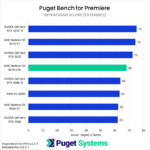
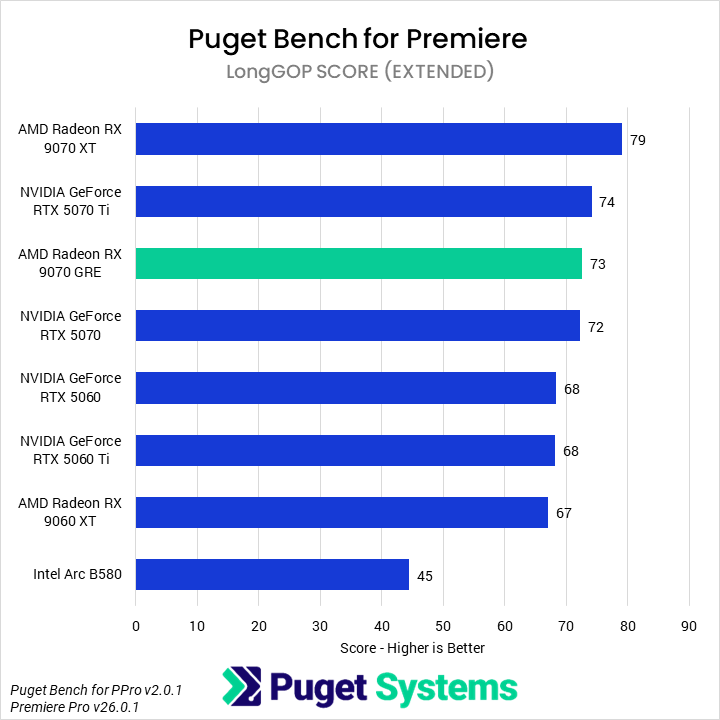
Moving on to the codec-specific scores, we found that the 9070 GRE performed very well in the LongGOP/Interframe tests (Chart #2). The GRE was marginally faster than the 5070, placing it towards the top of the chart. We did find that the 5070 and 5070 Ti both performed worse than is typical in the multi-stream tests, and were not able to discover why — but even with their slightly-lower-than-normal performance, the 9070 GRE’s performance is solid; it does manage to lead the 5060 Ti by 7%.
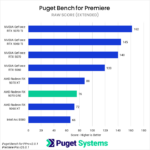
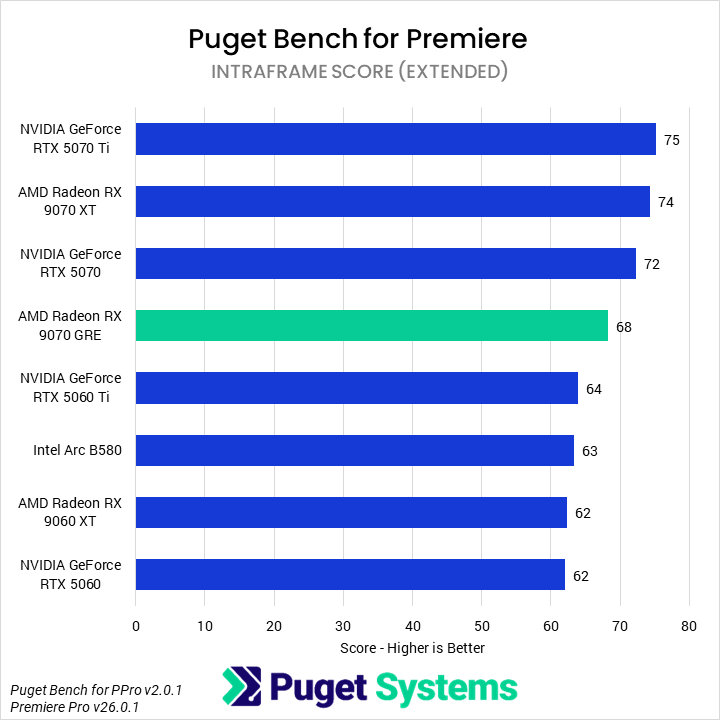
In the Intraframe tests (Chart #3), the 9070 GRE performed slightly worse, trailing the 5070 by 6% and beating the 5060 Ti by a similar margin. Most of the Intraframe test suite is unaccelerated, so GPUs don’t have too much of an impact on performance, and even the lowest-end GPU, the Arc B580, will provide an acceptable level of performance in these codecs — the best way to improve performance is via a CPU upgrade or, if working with ProRes, moving to Mac for hardware acceleration.
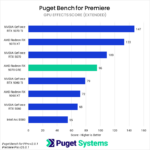
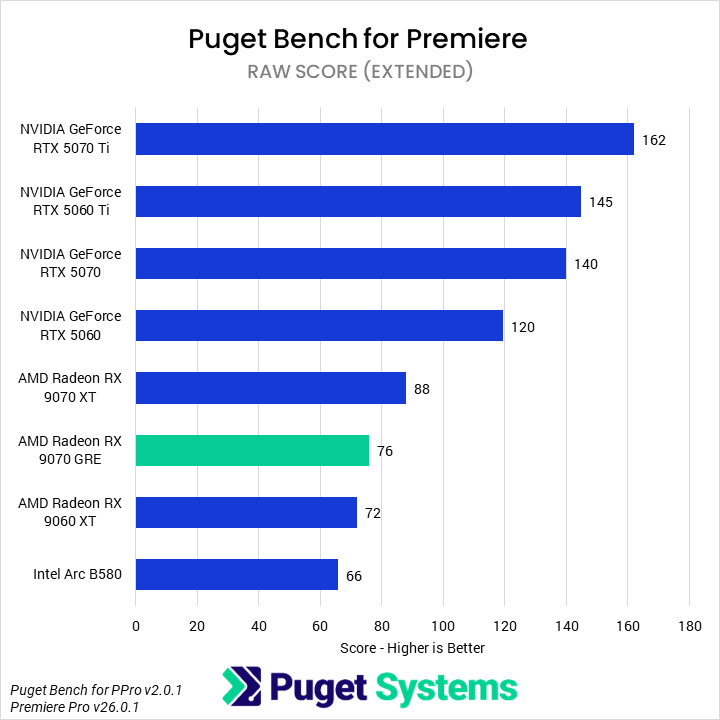
RAW codecs (Chart #4) are traditionally heavier and use the GPU primarily for debayering. We typically find that NVIDIA outperforms the competition by a large margin in these codecs, and that trend continued for the 9070 GRE. The GRE was 6% faster than the 9060 XT and 14% slower than the 9070 XT, neither of which are great given their relative MSRPs. However, compared to NVIDIA, the 9070 GRE cannot even match the 5060 (which is 58% faster than the AMD card), let alone the 5070, which is nearly twice as fast.
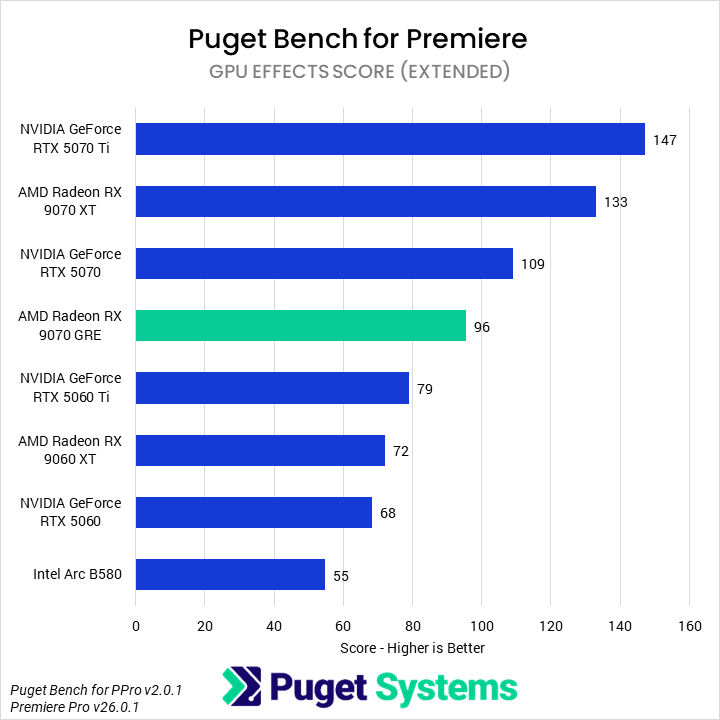
To its credit, AMD has become more capable at GPU Effects (Chart #5) than it was in the past. Much like RAW codecs, GPU Effects in Premiere used to be dominated by NVIDIA. However, we found that the 9070 GRE offered acceptable performance, coming in 12% slower than the 5070 and 21% ahead of the 5060 Ti. Additionally, it was 33% faster than the 9060 XT and 28% slower than the 9070 XT.
All this being said, we would not recommend the 9070 GRE for Premiere. Where it is good, it fails to offer a compelling value above the 9070 XT, and where it is bad, the 5060 Ti offers a far better value. It is possible that the 9070 XT could continue to see price increases, making the 9070 GRE a more competitive option — but it is also possible that we see a return to MSRP, at which point the 9070 GRE would be rather overpriced.
After Effects
As we have discussed extensively in other articles, After Effects currently has two primary workflows: traditional 2D motion graphics work and emerging 3D workloads. Our benchmark covers both of these. After Effects has also recently seen improvements for AMD GPUs in 3D workflows (post version 26.2) though they generally remained slower than NVIDIA. Yet we were still interested in seeing how the 9070 GRE performed.
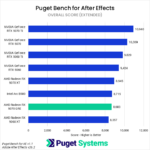
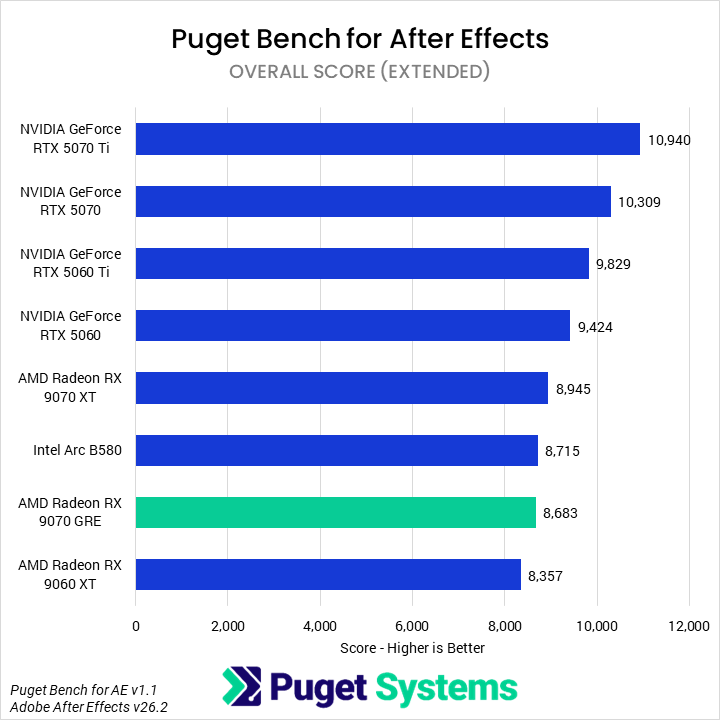
Beginning with the Overall score (Chart #1), we found that the 9070 GRE tied in performance with the Intel Arc B580 — not a good sign for this GPU. The B580 is, of course, a much cheaper card than the 9070 GRE, while still featuring the same 12 GB of VRAM. The 9070 GRE does manage to beat the 9060 XT, but not by enough to offset the price difference. Compared to the NVIDIA 5060 Ti (not to mention the 5070), the 9070 GRE is much slower, trailing by 12%.
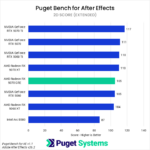
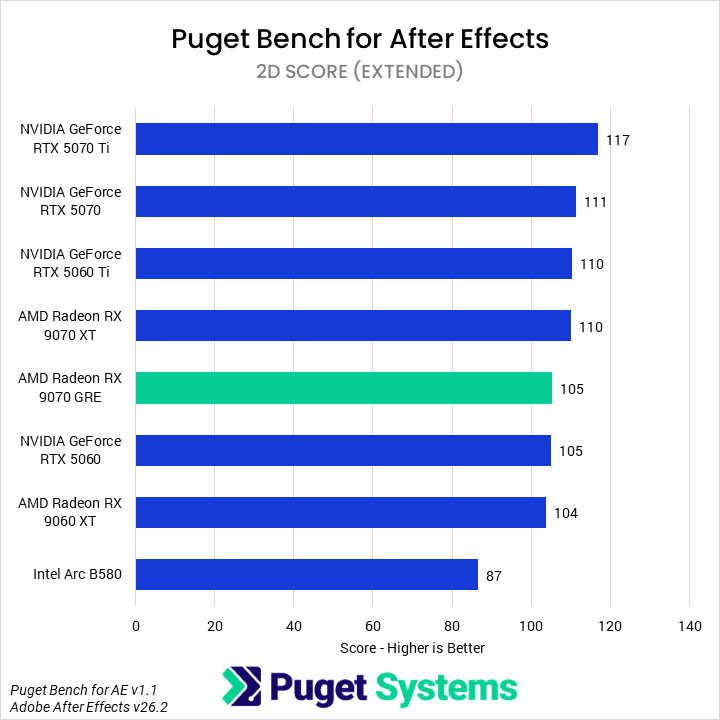
In After Effects, 2D workflows (Chart #2) are almost wholly CPU-bound, so we don’t see much differentiation between many of these products. The B580 does slip well behind in this area, so it isn’t always a better option than the 9070 GRE, but it is closer than their prices would suggest. However, overall, the 9070 GRE is fine for 2D work, though a cheaper 5060 or 9060 XT would perform the same.
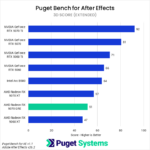
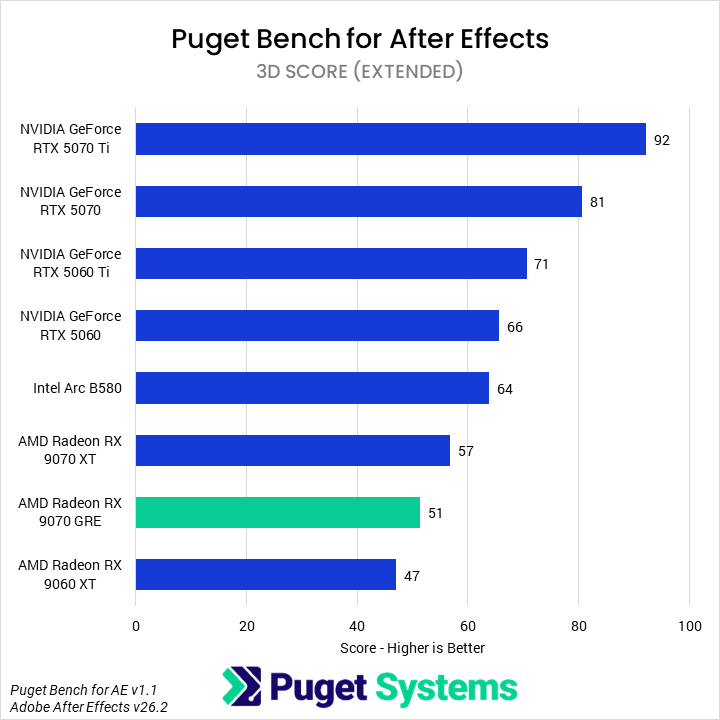
Finally, Advanced 3D renderer workflows (Chart #3) are almost wholly GPU-bound. As mentioned above, this workload heavily favors NVIDIA’s GPUs, and so the 9070 GRE is far slower than even a 5060. Compared to a 5060 Ti, the 9070 GRE falls behind by 28%; it is only 60% as performant as a 5070, and it even manages to be outperformed by the B580 — by 20%.
The 9070 GRE performs fine in 2D work in After Effects, but so do all GPUs. It performs very poorly in 3D workflows, as do all AMD GPUs we have tested, but it’s even slower than Intel’s budget B580, and well behind NVIDIA’s 5060. It fails to offer either compelling performance or value for this application.
DaVinci Resolve
DaVinci Resolve is a complex application that combines the capabilities of a non-linear video editor, motion graphics application, and image editor in one. Our benchmark examines the performance of the first two features, with most of its attention focused on the video editing portions, and an additional score for Fusion, the motion graphics page of Resolve. DaVinci Resolve makes great use of hardware acceleration, meaning GPUs are especially important when working with it.
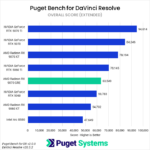
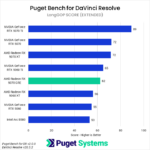
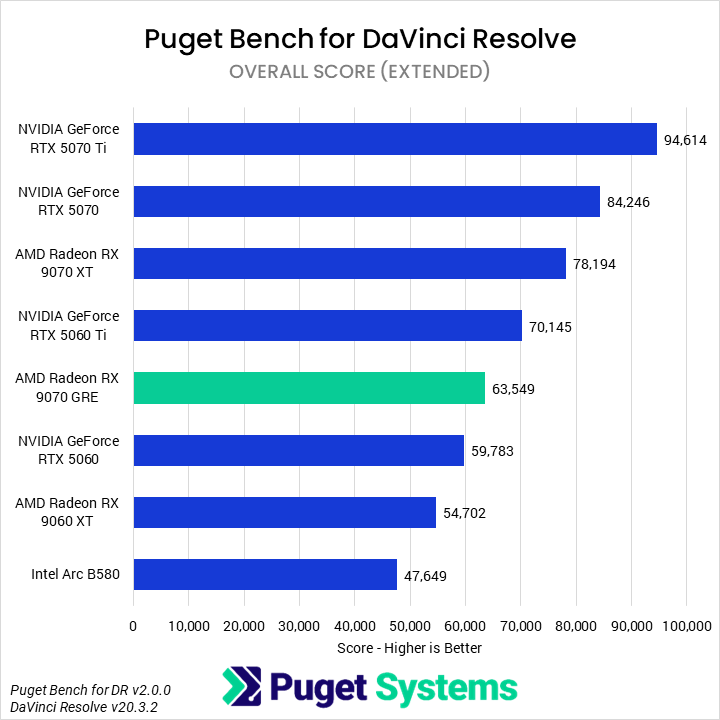
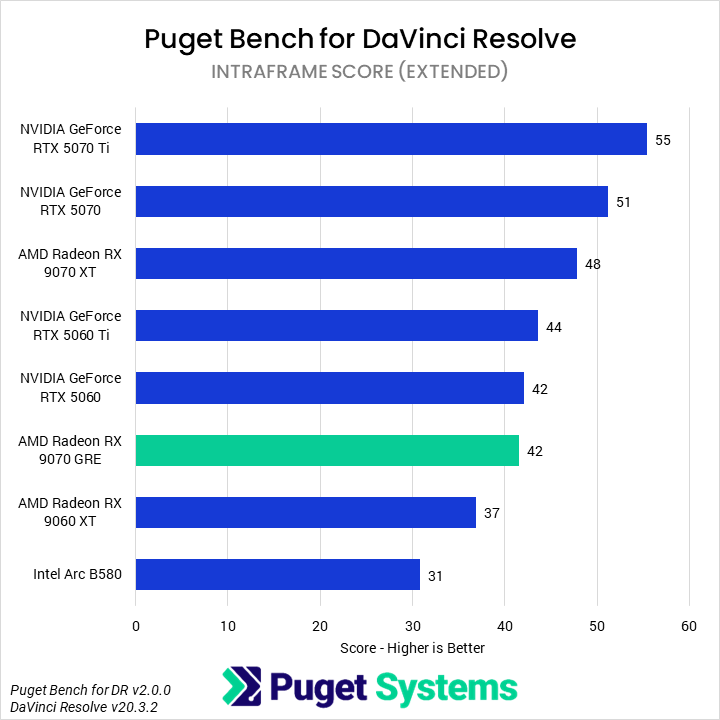
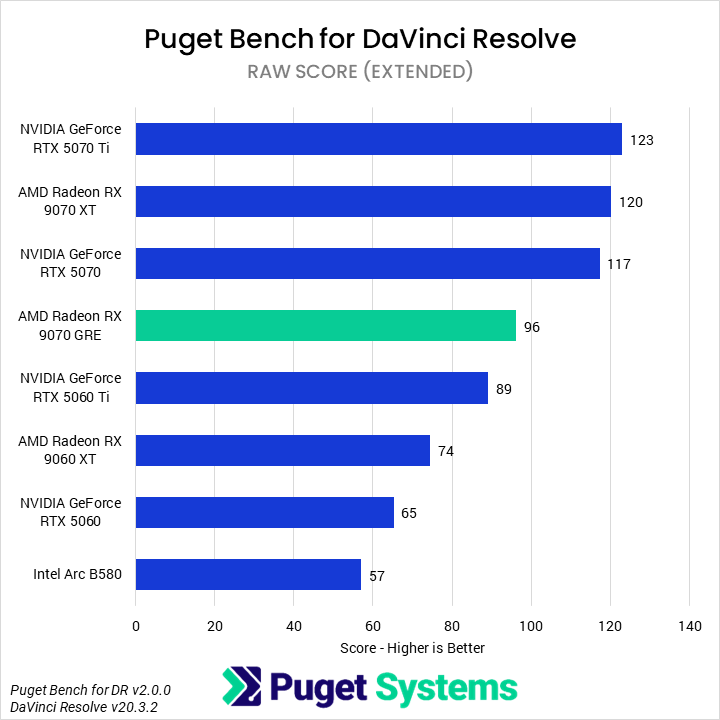
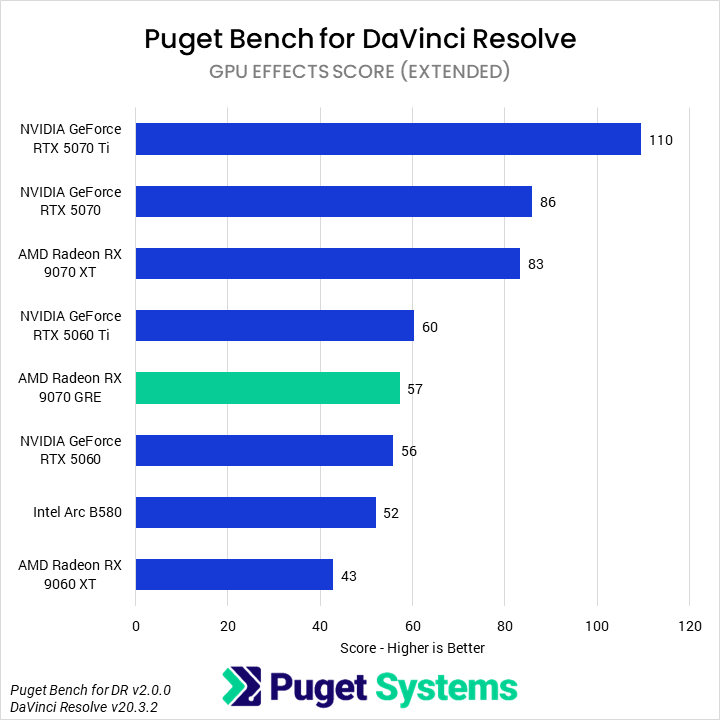
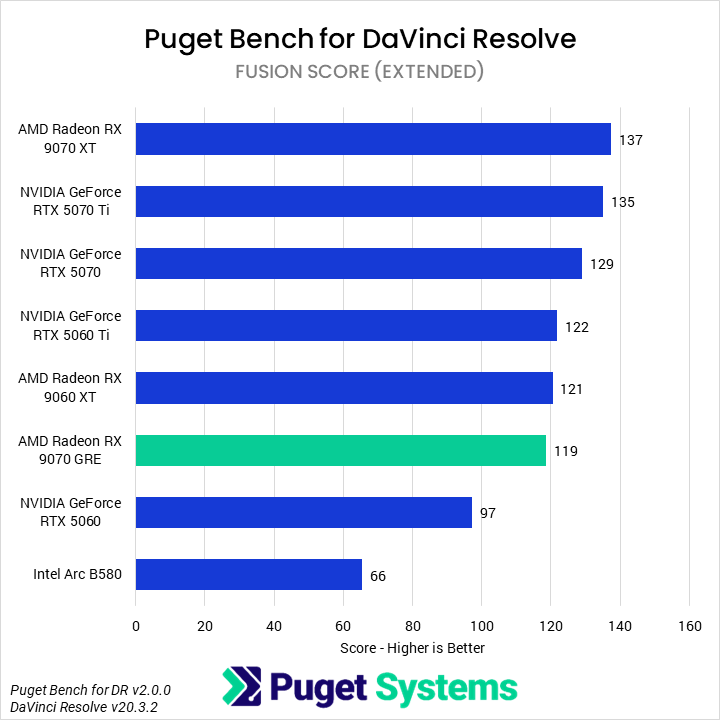
Beginning with the Overall score (Chart #1), we found that the 9070 GRE struggled to compete with the most comparable GPUs, falling 9% behind the 5060 Ti and 25% behind the 5070. It is noticeably faster than the 9060 XT (16%), but unfortunately, it is closer to that than to the 9070 XT — which outperforms it by 23%.
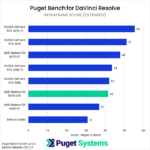
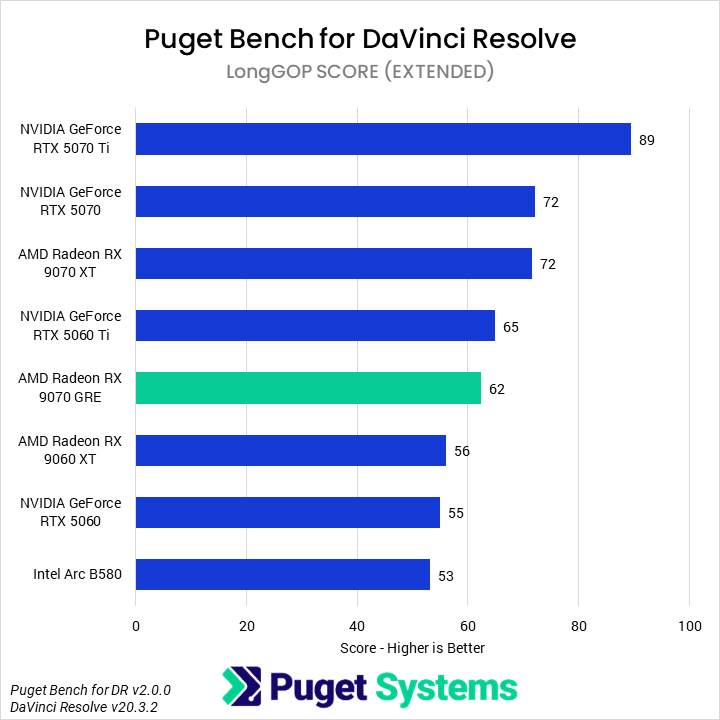
When working with LongGOP codecs (Chart #2), the 9070 GRE was just about as fast as the 5060 Ti and 14% slower than the 9070 XT and 5070. AMD’s media engine is less capable overall than NVIDIA’s, as is made apparent here. However, NVIDIA is not superior in every area. When we examined individual test results, we saw that the 9070 GRE offered great performance in HEVC encoding (50 Mbps 8-bit and 10-bit). However, when it came to processing, especially 422 10-bit, it was far slower than NVIDIA.
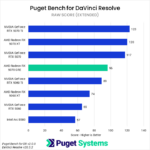
Intraframe codecs (Chart #3) are not generally GPU-accelerated. However, some portions of the test, especially the multi-stream processing, do seem to be impacted by GPU selection. So in this, the 9070 GRE merely matched the 5060, falling slightly behind the 5060 Ti and 20% behind the 5070. Most of the GPUs we tested will provide enough power to make working with Intraframe codecs pleasant, but the 9070 GRE doesn’t offer an outstanding value or performance.
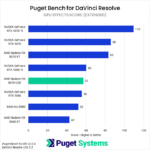
Conversely, RAW codecs (Chart #4) make heavy use of the GPU. In these tests, the 9070 GRE performed acceptably, beating the 5060 Ti by 8%, though it still fell short of the 5070 by 18%. It did offer a good performance improvement over the 9060 XT, however, which it was 30% faster than.
GPU Effects (Chart #5) are another area where the 9070 GRE slightly underperformed. The GRE was 32% faster than the 9060 XT, making it 5% slower than the 5060 Ti, 32% slower than the 9070 XT, and 34% slower than the 5070.
In the Fusion (Chart #6) portion of the application, which is mostly CPU-bound, the RX 9070 GRE performed poorly. It merely matched the 9060 XT and 5060 Ti, and was outperformed by the 5070 by 8%. These are small margins overall, but it does mean that a cheaper GPU would offer better value for this use case.
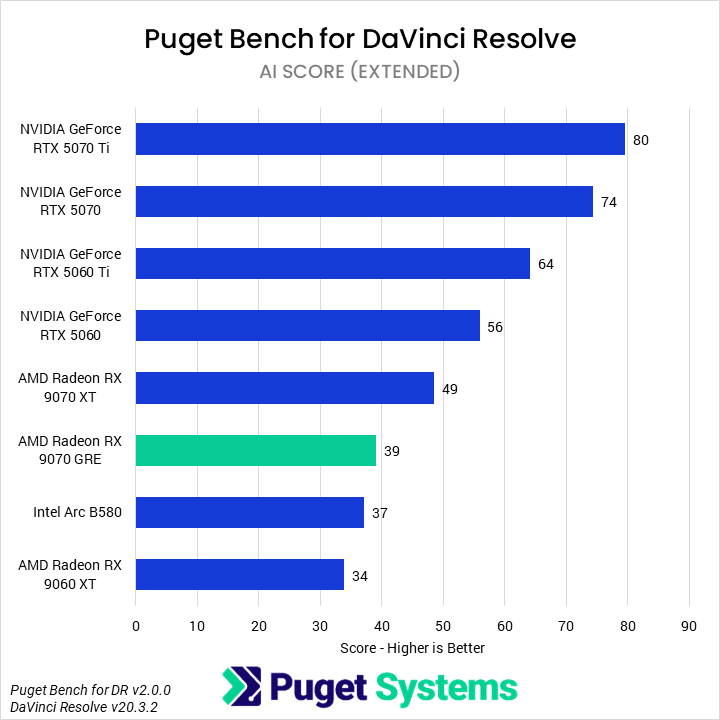
Finally, we have a variety of AI-based workflows within Resolve (Chart #6). We found that the 9070 GRE did not offer great performance in this area, which is heavily optimized for NVIDIA. The 9070 GRE was 14% faster than the 9060 XT, 20% slower than the 9070 XT, and 30% slower than the 5060. The more direct competitors to the 9070 GRE from NVIDIA absolutely crushed it, with the 5060 Ti performing 64% faster, and the 5070 90% faster.
Overall, we would recommend against the 9070 GRE for most DaVinci Resolve users. When working with LongGOP codecs other than 4:2:2 10-bit, it can offer decent value at current market prices, but not at MSRP. Outside of that area, it was generally trading blows with the less-expensive 5060, rather than matching the 5060 Ti or 5070.
Blender
Blender is a widely used offline renderer that we include in many of our reviews. Like many other reviewers, we use the Blender Benchmark and report the combined score for all three included scenes, as would be reported on the Blender Benchmark Open Database.
Due to some limitations, Blender was the only offline renderer we were able to test for this review. However, we did recently look at the 9070 XT and 9060 XT in Blender, V-Ray, Redshift, and Cinebench, for those interested in seeing how AMD’s architecture performs for rendering more broadly.
Image
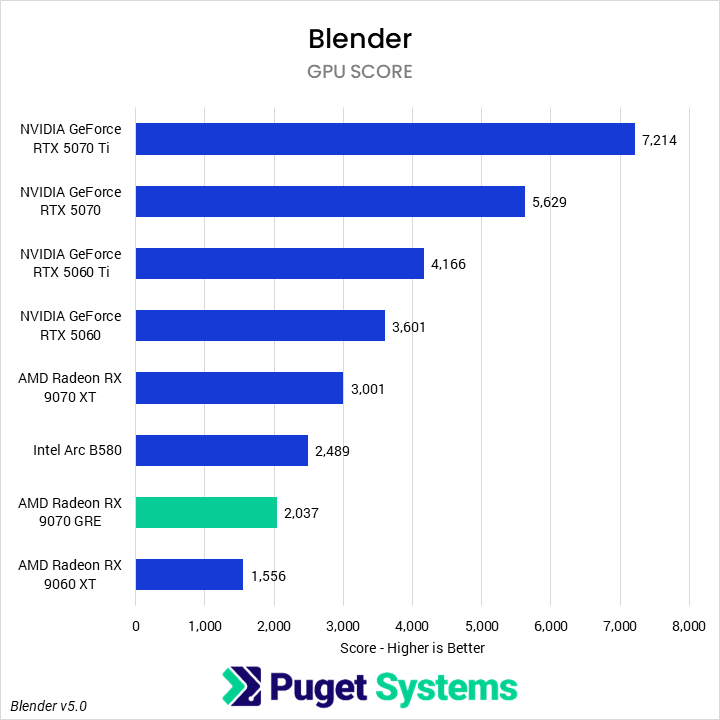
In Blender, the 9070 GRE continues to struggle to offer compelling value. Even the 9070 XT, the top-end current-gen GPU, failed to match NVIDIA’s 5060. The 9070 GRE showed half the performance of a 5060 Ti and nearly one-third the performance of the 5070. Worse, the 9070 GRE was even beaten by Intel’s B580, by 22%. If Blender is a regular part of a workflow, AMD GPUs are best avoided.
Unreal Engine
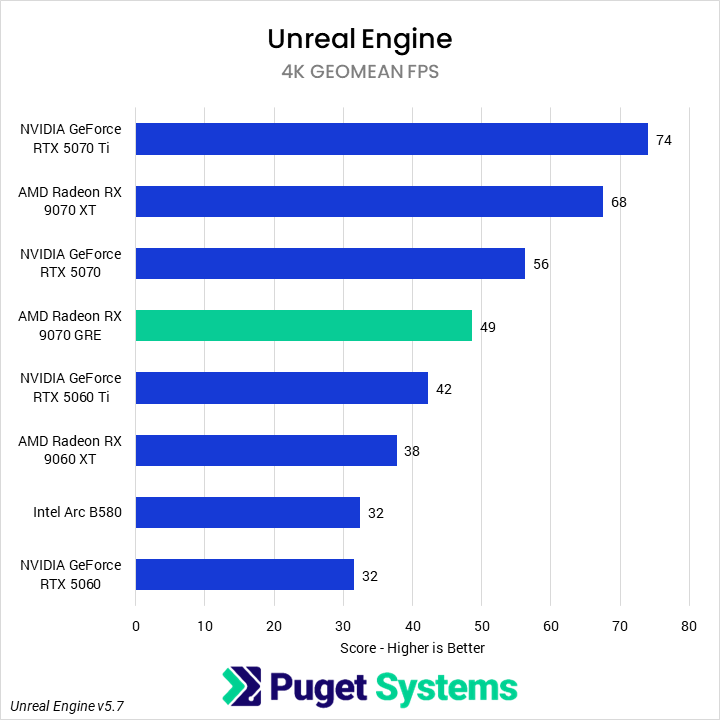
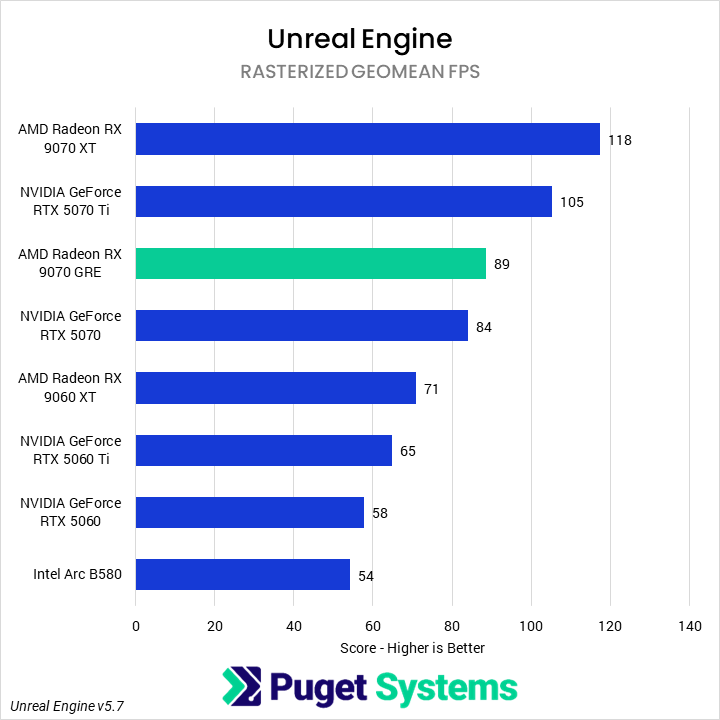
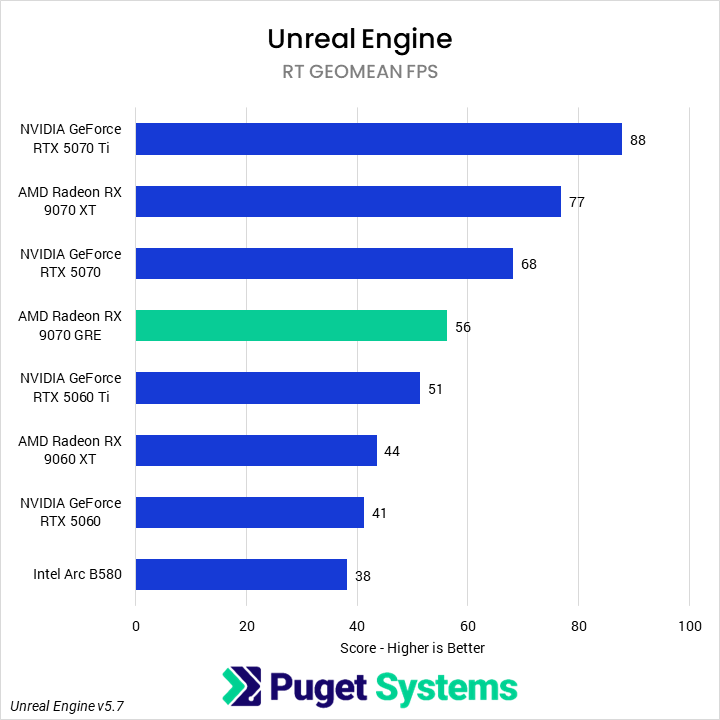
So far, the 9070 GRE’s performance has been underwhelming. But it is worth remembering that AMD primarily markets this GPU as a gaming card — and we’ve been testing it in professional content creation applications. For a test closer to its marketed purpose, we wanted to see it in a real-time rendering application — in this case, our in-house Unreal Engine benchmark.This benchmark renders three scenes, each representing a different use case: Game Engine, Virtual Production, and Architecture Visualization. Each scene is rendered at three different resolutions. We then use those nine results to calculate scenario-specific results, such as 1080p performance or ray tracing performance.
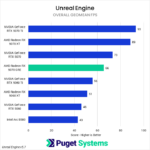
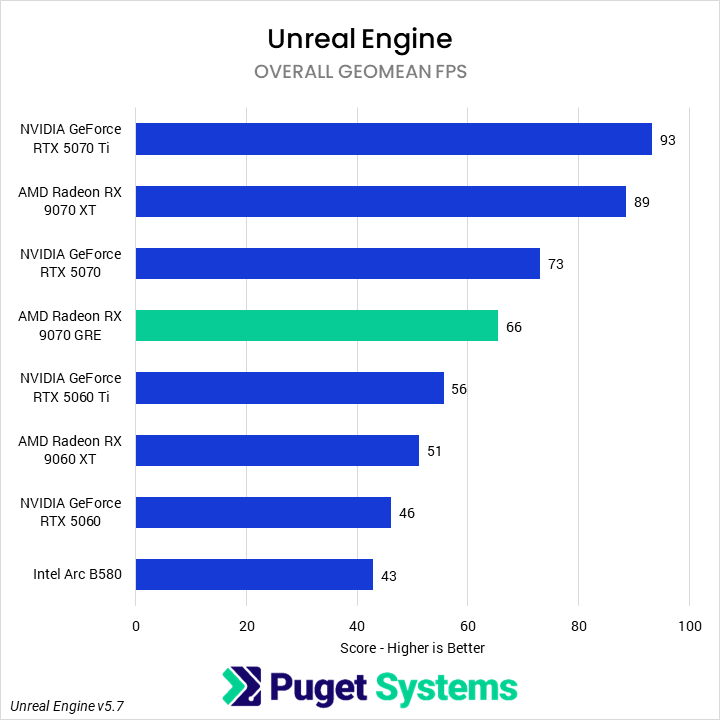
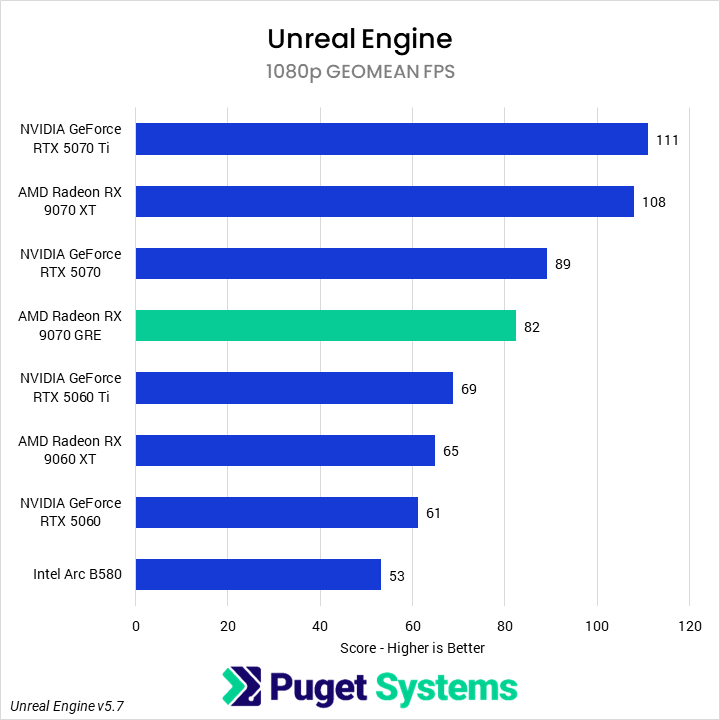
The Overall score (geometric mean FPS, Chart #1) shows the average performance across all 9 combinations of scenes and resolutions. We found that the 9070 GRE performed fairly well overall, beating the 5060 Ti by 18% and trailing the 5070 by 10%. It was substantially behind the 9070 XT (25%) but well ahead of the 9060 XT (29%).
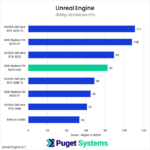
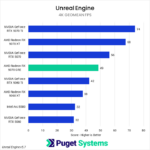
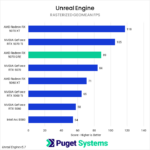
At 1080p (Chart #2), across all three scenes, we found that the ranking of the GPUs did not change from the overall score. However, the AMD RDNA architecture performs relatively better than NVIDIA at this resolution, closing many of the gaps where NVIDIA led: the 5070 was only 8% faster than the 9070 GRE, and the 9070 GRE managed to extend its lead over the 5060 Ti by 2%. The inverse, then, is true at 4K (chart #3), where the 5070 was 14% faster than the 9070 GRE and the 5060 Ti was only 15% slower.
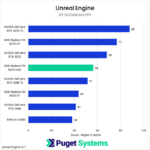
Whether or not hardware ray tracing was enabled is in many ways more interesting. With rasterized rendering (Chart #4), the 9070 GRE, and AMD overall, was much more performant as compared to NVIDIA. The 9070 GRE outperformed the 5070, beating it by 6% and the 5060 Ti by 37%. Since AMD seems to architecturally prefer rasterized rendering, the GRE is still well behind the 9070 XT, though, which is 33% faster. Of course, much like with the resolutions, this means AMD is relatively worse at hardware ray tracing (Chart #5). We observed the 9070 GRE fall behind the 5070 by 18%, while its lead over the 5060 Ti shrank to 10%.
The 9070 GRE is a solid card in our Unreal Engine benchmark. At MSRP, it struggles to offer any value, but at current market prices, it slots in nicely between the 9060 XT and 9070 XT, acting as a real competitor to both the 5070 and 5060 Ti, depending on the specific scene. Though we are hesitant to expand this benchmark’s conclusions to actual gaming performance, this does suggest that the 9070 GRE offers decent value for that purpose in rasterized titles at 1440p — though the 12 GB of VRAM is less than ideal.
Unigine
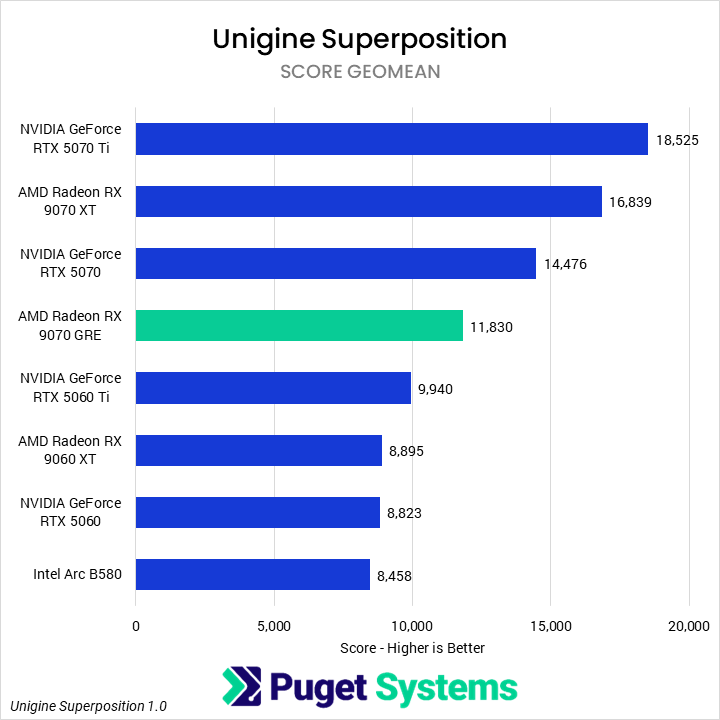
Unigine Superposition is an industry-standard real-time rendering benchmark, useful as a neutral and consistent reference for comparing GPUs across architectures. That being said, it does not represent any content creation application, and so we put minimal stock in its results when evaluating graphics cards for professional use. For our results, we run the benchmark at 1080p extreme, 1080p high, 4K optimized, and 8K optimized, and compute a geomean of the scores from each.
Image
In Unigine Superposition, the Radeon RX 9070 GRE performed fairly well, beating the 5060 Ti by 19% and the 9060 XT by 32%. It could not catch the 5070, which was 22% faster, and was well behind the 9070 XT, which had a 42% performance advantage. At MSRP, these results are disappointing, but with current market prices, the 9070 GRE appears to offer solid value.
MLPerf
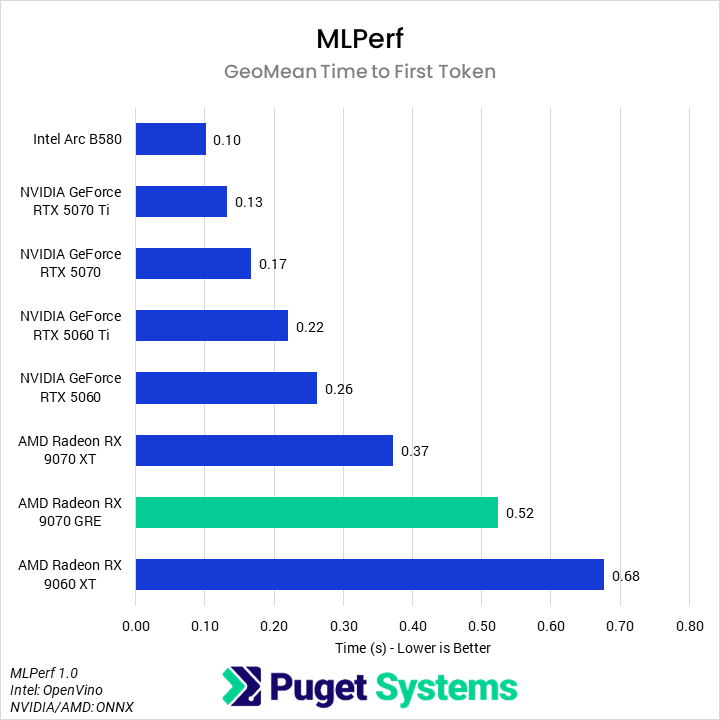
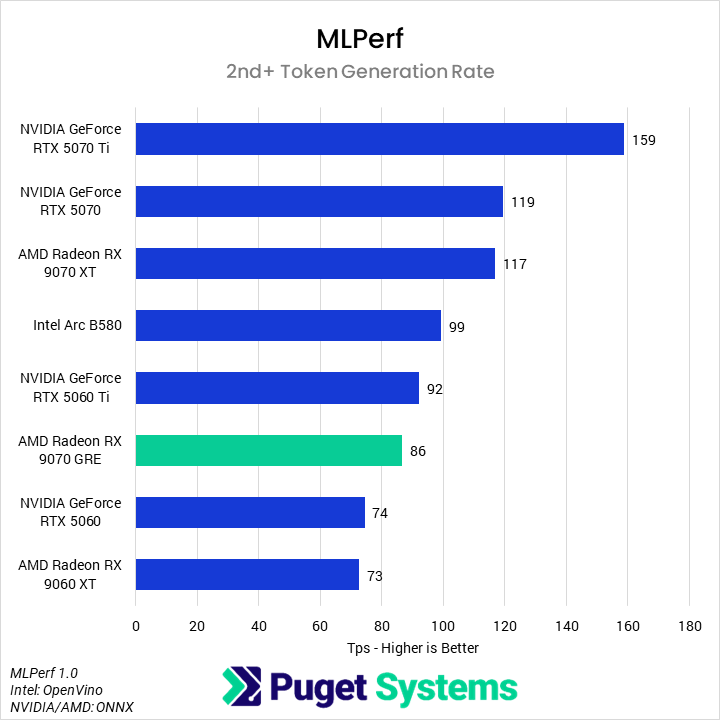
MLPerf Client is an industry-standard benchmark looking at LLM performance across a variety of models and sizes. While not the most cutting-edge, it offers a repeatable indication of AI performance and is compatible across manufacturers. We examine two metrics: geomean time to first token (the duration a user would have to wait after entering a prompt before a response begins), and 2nd+ token generation rate (how many tokens are generated per second once the response has begun). The first is less relevant, but affects perceived responsiveness, while the second has more of an impact on the overall usability of a model.
System Image
The first result we look at with MLPerf is the geomean time to first token (Chart #1). AMD performs relatively poorly here, with the 9070 XT, 9070 GRE, and 9060 XT taking the bottom three spots. Still, at 0.52 seconds for the 9070 GRE, this is a usable experience. Comparatively, the 5060 Ti returns a response in half the time, while the 5070 returns a response in one-third. Once the models have begun returning a response (Chart #2), though, the 9070 GRE does better. The 5060 Ti is 7% faster than the 9070 GRE, while the 5070 is 38% faster. Unfortunately for AMD, the much less expensive B580 is also 15% faster than the 9070 GRE.
Based on this, we would generally hesitate to recommend the 9070 GRE for LLM-specific workstations, especially considering it only has 12 GB of VRAM. For most developers, an NVIDIA GPU would make more sense. However, this is an area where specific hardware support, software support, and model architecture can make a huge difference in performance, so we recommend looking at more reviews for the specific AI use case being targeted.
How Does the AMD Radeon RX 9070 GRE Perform in Professional Applications?
AMD’s Radeon RX 9070 GRE is a GPU positioned for the current market, not the market when it was originally launched in China. This makes it a difficult card to review, because its MSRP does not align with the MSRPs of other relevant cards. Instead, we have to take AMD at their word that, despite all other 90-series GPUs trending away from MSRP, the 9070 GRE will hew close to it. Throughout this review, we have examined the 9070 GRE against both its direct competitors at MSRP, the 9070 XT and 5070, and its nearest competitor at current market prices, the 16 GB variant of the 5060 Ti.
In Lightroom Classic, we found that the 9070 GRE did not meaningfully outperform the 9060 XT and was slower than the 5060 Ti and 5070. This means it fails to offer a good value in this application at MSRP and market prices. The 9070 GRE did slightly better in Premiere, typically leading the 5060 Ti in performance by about 7%, but it was noticeably slower than the 5070 and 9070 XT. At MSRP, it is dead on arrival, but even with current market conditions, we think the 5060 Ti offers better value. Rounding out the Adobe applications, After Effects continued to be an area where AMD GPUs just don’t make sense: the 9070 GRE was 28% slower than the 5060 Ti in the 3D portions of the application, putting it behind even the B580.
DaVinci Resolve was a bit more of a mixed bag than any of the previous applications. Although overall slower than the 5060 Ti and 5070, the 9070 GRE does offer a good value, specifically when working with H.264 and H.265 codecs other than 4:2:2 10-bit. However, if that is not the majority of a user’s workflow, the 9070 GRE does not make sense to buy for DaVinci Resolve.
Although we like to see the ongoing progress of AMD working with software vendors to improve rendering support and optimization, it is still far behind NVIDIA. In Blender, the 9070 GRE is barely functional, offering worse performance than an Intel B580, and far behind an NVIDIA 5060 Ti or 5070.
For real-time rendering, though, AMD is very competitive. In our in-house Unreal Engine benchmark, the 9070 GRE outperformed the 5060 Ti by 18%, with this margin increasing at lower resolutions or in purely rasterized scenes. It was still slower than the 5070 by about 10%, so whether or not it makes sense as a purchase depends on the current price of the 5070. Right now, we would recommend the 9070 GRE over either of those NVIDIA cards, but a return to MSRP would change that. This analysis also holds for Unigine Superposition.
As a dual-use card for midrange gaming and hobbyist content creation, the 9070 GRE seems like it could be a solid GPU, but it does not make sense for professional use. The industry is currently dominated by NVIDIA, and so most applications are heavily optimized for those architectures, or only support CUDA. Though AMD has been working to increase support, its GPUs often need to be far more aggressively priced for content creation than for gaming, and AMD was not able to thread that needle with this release.

Looking for a professional workstation?
We build computers tailor-made for your workflow.

Don’t know where to start?
We can help!
Get in touch with one of our technical consultants today.