Table of Contents
Introduction
Software updates can provide new features, tools, and performance boosts that generally improve the user experience. In some cases, however, they can also introduce unexpected issues. For this reason, we continually test and review hardware performance to identify any changes – good or bad – and share them with our readers and the broader creative community.
Last month, Adobe released version 26.2 of After Effects with a short list of new features and typical bug fixes, but there were no notes mentioning performance improvements. However, our routine testing showed a performance uplift when comparing versions 26.0 and 26.2 for 3D compositions that used the Advanced 3D Renderer.
It’s worth noting that the performance improvements in 26.2 vary by GPU brand, with the largest gain coming from Apple (Metal), followed by AMD and Intel (OpenCL), while NVIDIA (CUDA) showed the smallest improvement. This doesn’t mean that Apple outperforms NVIDIA with the Advanced 3D Renderer. Rather, it indicates that those invested in Apple systems will see better performance on their current workstations after upgrading to version 26.2.
For After Effects users looking to optimize performance, as well as those considering a GPU or system upgrade, this article provides metrics showing how much performance boost they can expect with different video cards when updating to the latest version.
Test Setup (Expandable)
AMD Platform
| CPU: AMD Ryzen™ 9 9950X |
| CPU Cooler: Noctua NH-U12A |
| Motherboard: ASUS ProArt X670E-Creator WiFi BIOS Version: 3513 |
| RAM: 2x DDR5-5600 32GB (64 GB total) |
| GPUs: NVIDIA GeForce RTX™ 5090 NVIDIA GeForce RTX™ 5080 Driver Version: 595.79 Sapphire Nitro+ AMD Radeon™ RX 9070 XT OC Driver Version: 26.3.1 Intel® Arc™ B580 LE Driver Version: 101.8735 |
| PSU: EVGA SuperNOVA 850W P2 |
| Storage: Kingston KC3000 2TB |
| OS: Windows 11 Pro 64-bit (26200) Power Profile: Balanced |
Intel Platform
| CPU: Intel Core™ Ultra 7 270K Plus |
| CPU Cooler: Noctua NH-U12A |
| Motherboard: ASUS ProArt Z890-Creator WiFi BIOS version: 3002 |
| RAM: 2x DDR5-7200 32GB (64 GB total) |
| GPUs: NVIDIA GeForce RTX™ 5090 NVIDIA GeForce RTX™ 5080 Driver Version: 595.79 Sapphire Nitro+ AMD Radeon™ RX 9070 XT OC Driver Version: 26.3.1 Intel® Arc™ B580 LE Driver Version: 101.8735 |
| PSU: EVGA SuperNOVA 1200W P2 |
| Storage: Kingston KC3000 2TB |
| OS: Windows 11 Pro 64-bit (26200) Power Profile: Balanced |
Apple M5 Max MacBook Pro
| CPU: Apple M5 Max 18-core |
| RAM: 128 GB (Unified) Shared Bandwidth: 614 GB/s |
| GPU: M5 Max 40-core |
| Storage: 2 TB Integrated Storage |
| OS: MacOS Tahoe 26.4 |
Puget Mobile 16″
| CPU: Intel Core™ Ultra 9 275HX |
| RAM: 2x DDR5-5600 32GB SODIMM (64 GB Total) |
| GPU: NVIDIA GeForce RTX™ 5090 Mobile Driver Version: 595.79 |
| Storage: Kingston SFYR2S2T0 2TB |
| OS: Windows 11 Pro 64-bit (26200) |
Benchmark Software
| After Effect 26.0 — Puget Bench for After Effects 1.1 |
| After Effects 26.2.1 — Puget Bench for After Effects 1.1 |
Our goal here is to expand on the initial testing we did when when 26.2 released, and the brief blog post about it, with a focus on modern hardware. As such, we tested a variety of current-generation system configurations to demonstrate the performance differences users can expect when updating to 26.2. We ran Puget Bench for After Effects v1.1 on ten different hardware combinations – four video cards across two desktop workstations, as well as two laptops – in both After Effects 26.0 and 26.2.
For the desktop systems, we tested AMD Radeon™ RX 9070 XT, Intel Arc™ B580, NVIDIA GeForce RTX™ 5080, and GeForce RTX™ 5090 video cards. Each card was run on two workstations: one with an Intel Core™ Ultra 7 270K Plus processor and another with AMD’s Ryzen™ 9950X CPU.
Results
Here are the Puget Bench 3D Scores for each set of hardware we tested, with the new After Effects 26.2 update:
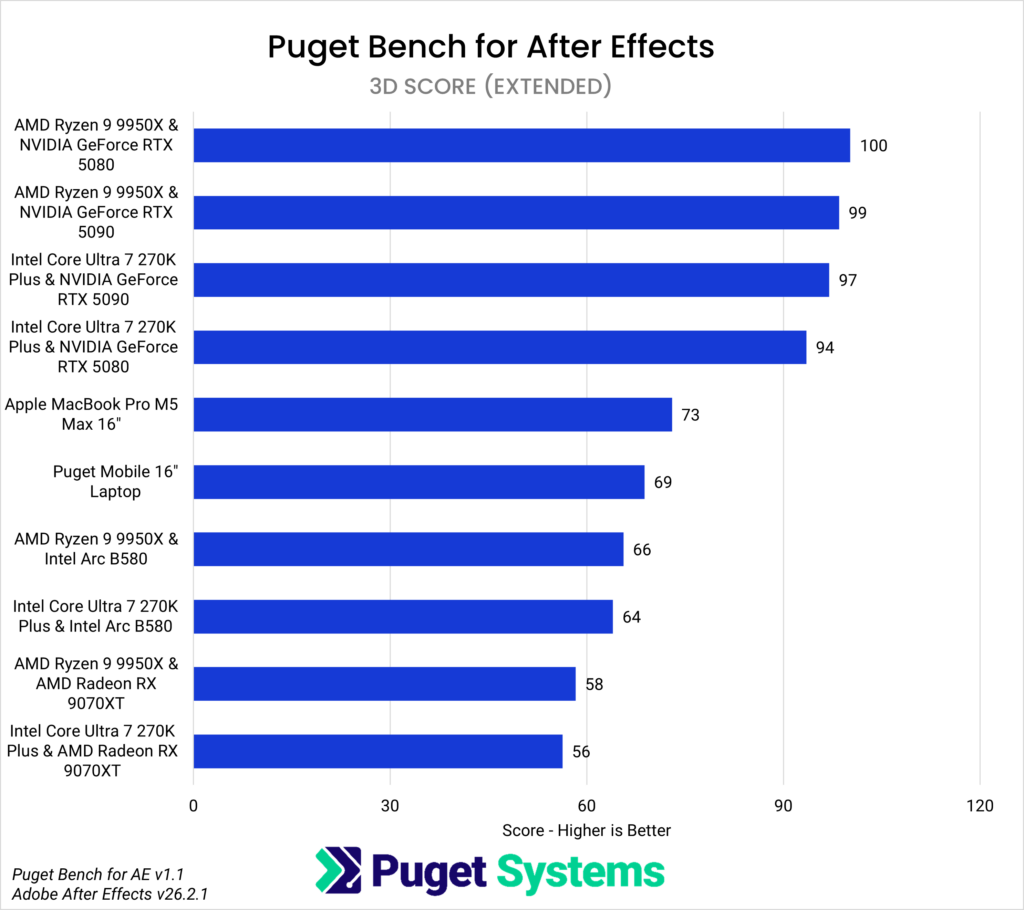
It is clear that NVIDIA’s GeForce cards still top the charts for 3D performance within After Effects, but if you’ve seen similar charts from previous articles, you will notice how much higher the Apple M5, Intel Arc B580, and AMD Radeon RX 9070XT are showing up than before.
Analysis
To really dig into the improvements each brand of hardware saw, the next chart shows the relative 3D performance of each system between After Effects versions 26.0 and 26.2. It’s important to note that this chart does not compare the performance of each system against each other, like the one above – instead, it compares the performance of each system in version 26.2 to its own baseline in 26.0. The vertical axis shows the different configurations we tested, while the horizontal axis shows the relative performance, with version 26.0 indexed to 100%. A score above 100% indicates a performance gain; for example, a score of 262% equates to a 162% performance increase.
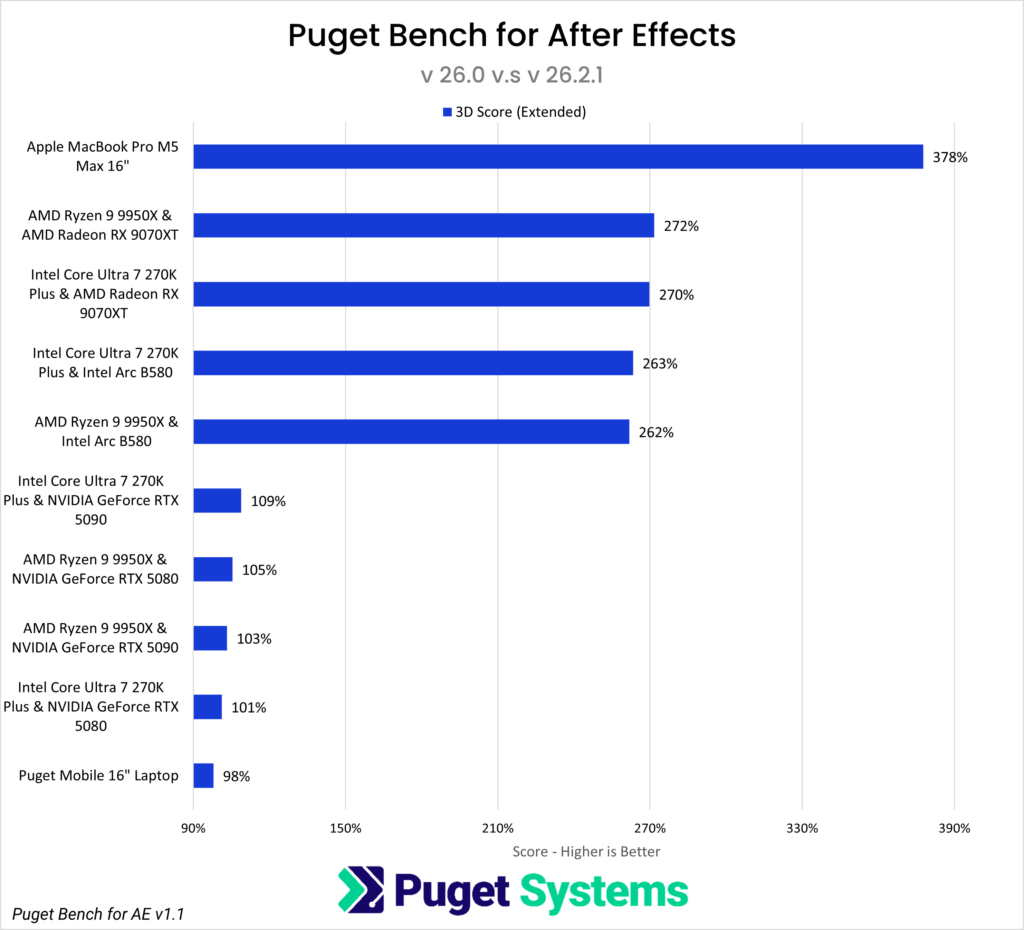
Based on these Puget Bench 3D Score (Extended) results, upgrading to version 26.2 provided a substantial 278% performance boost on the Apple MacBook Pro M5 Max system. An AMD Radeon RX 9070XT showed a 170% improvement, while Intel’s Arc B580 saw a 162% increase. NVIDIA’s GeForce RTX video cards showed minimal gains, with the RTX 5090 showing a boost of 5-10% while the RTX 5080 showed no changes – but the results from those configurations fall within the margin of error. Lastly, the Puget Mobile 16” laptop, configured with an Intel Core™ Ultra 9 275 HX and NVIDIA GeForce RTX™ 5090 Mobile GPU, saw a 2% performance drop, which also falls within the margin of error.
Conclusion
These results are meant to provide Adobe After Effects users with additional context when figuring out how to get the best performance from their system, whether that means optimizing their current setup or investing in new hardware. While Apple, AMD, and Intel video cards showed the largest performance improvements in Adobe After Effects 3D workloads in version 26.2, NVIDIA GPUs still remain the top choice for workloads that utilize the Advanced 3D Renderer. However, improvements seen on AMD and Intel graphics cards may make them worth considering as cost-effective alternatives to Apple or NVIDIA graphics.
For those looking to upgrade their video card or invest in an entirely new After Effects system, it’s worth trying Puget Bench for After Effects on your current computer to see how much of a boost you could get. We also have hardware reviews and articles to help find the best GPU for your needs.

Looking for an After Effects workstation?
We build computers tailor-made for your workflow.

Don’t know where to start?
We can help!
Get in touch with one of our technical consultants today.