Table of Contents
Introduction
Using AI tools to enhance video footage is very demanding on computer hardware. Some models are so intensive that they are only available through cloud-based services, but thankfully some developers are optimizing these complex AI models to run on local workstations – provided they are equipped with fairly powerful hardware.
Topaz Video is one such program, available both in the cloud via its web-based interface as well as on desktops, and offering a wide array of proprietary AI models to enhance footage. Their models are classified as either “precise”, meaning they improve specific aspects of the footage without altering the original content (pixels) in each frame, or “creative” – meaning generative AI models. The latter include diffusion-based processes, such as Topaz’s Starlight models, which reconstruct each frame while maintaining temporal consistency across a video.
Not all Starlight models are available for local processing, unfortunately. Cloud-only models can be utilized through Topaz’s web-based platform, which is also an option for local-capable models if your system can’t handle them, but of course comes with a recurring cost. There are also some limitations in terms of which models are available and what formats they can be exported in.

Topaz For Web User Video Enhancement Interface
Users with access to powerful workstations can run models on their own hardware instead, avoiding the processing costs associated with Topaz for Web. Topaz Video, which runs through NeuroServer, allows many of their models to be run locally. Each Starlight model is designed for a specific type of enhancement, though, and they have varying requirements in terms of GPU compatibility and VRAM.
There are two types of GPUs that Topaz Video users can use to process the Starlight models locally: consumer and professional. Consumer-grade GPUs are typically more affordable and widely available, while professional-grade cards often have larger VRAM capacities and are more expensive for similar levels of compute performance. While most users will opt for a consumer GPU for Topaz Video, there can be advantages to using a professional GPU – particularly when it is required for another part of a user’s workflow.
Because the Starlight model and subsequent variants are so new, we have not found any benchmark or database that shows performance differences among current-generation pro-grade GPUs when processing these models locally. This prompted us to conduct our own tests to better understand which professional-grade video cards from AMD, Intel, and NVIDIA are compatible with each Starlight variant and how they compare in performance.
Testing Methodology
Since we have not published any performance data with professional GPUs on Starlight before, we wanted to provide details on our testing and scoring methodologies. This methodology is identical to the one used in our recent article testing Starlight with consumer-grade GPUs, so the results from both can be compared directly to see how current-generation consumer and professional GPUs perform relative to each other.
All testing in this article was performed manually in Topaz Video version 1.6.1, as we have yet to develop an automated script or a formal benchmark for testing the Starlight model variants. Our scope included Starlight Mini, Starlight Sharp, Starlight Fast 2, and Starlight Precise 2.5. It’s worth noting that Starlight Precise 2.6 was not yet available when we conducted our testing, so while it is now in Topaz Video version 1.7, it will not be included in the results below.

Source Video Clip of Tacoma, Washington Used in Starlight Testing
Here are the specifications of the video clip we used across each test: 1920×1080 resolution, H.264 8-bit 4:2:0 AVC codec, wrapped in an .mp4 container at 23.976 FPS, with a runtime of 10 seconds. We picked it because it is a common video format that users might want to enhance with Starlight, whether to restore archival media, repurpose highly compressed footage for a new project, or refine the pixels of already-high-quality footage.
For each Starlight variant, we processed 60 frames (approximately 2.5 seconds) from the source video clip rather than the full 10-second clip. This kept overall testing time manageable, as these models can take a while to process. We also upscaled all clips by 2x during testing, since the maximum output resolution for Starlight models is 4K (3840×2160).

Screenshot of Topaz Video UI with Starlight Model Variants
We ran five back-to-back exports to capture any variance in processing time. From there, we used Topaz Video’s log file to extract the Total Processing Time (TPT), as it’s the only metric that appears consistently across all Starlight variants. We that number across the five export runs, then divided it by 60 frames (2.5 seconds of ~24fps video) to obtain a time in seconds per frame (SPF). We chose SPF over frames per second (FPS) because it provides a more understandable metric for comparing performance across GPU models.
It’s worth mentioning that Total Processing Time reflects only the actual processing work performed on the source clip. This time does not include model loading, NeuroServer (a.k.a. NeuroStream) optimization for the system’s hardware, or exporting the final video clip. As such, real-world usage of these models will take somewhat longer than the results shown here. Even though our data only reflects one of the four steps involved, it is the most time-consuming – especially if you are processing longer clips.
To illustrate our process, the table below shows the presets used for testing each Starlight variant:
| Source Video Format | Frames Processed | Upscale Settings | Starlight Variant | # of Processing Runs | Seconds Per Frame (SPF) Calculation |
| 1920×1080 8bit 4:2:0 23.976 FPS | 60 Frames (2.5 seconds) | 2x | Mini Fast 2 (Local) Sharp Precise 2.5 | 5 | Average TPT of Runs 1-5 ÷ 60 frames |
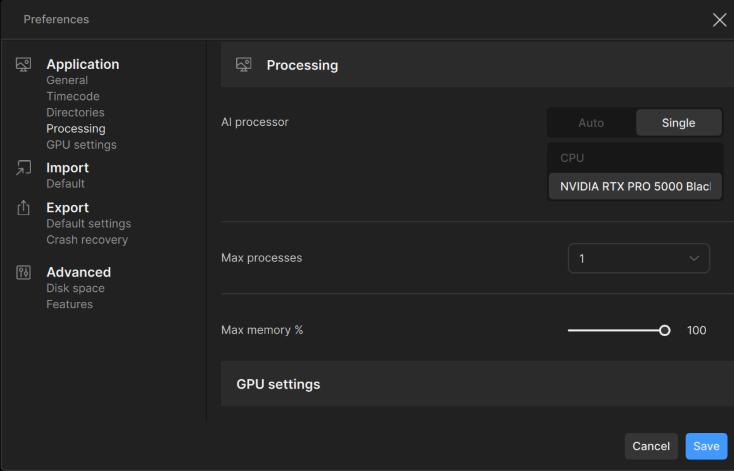
For those who wish to replicate our testing, the Processing settings in Preferences were set to a max process of 1, max memory of 100%, and a single GPU. GPU settings were optimized for single-video processing, and the default image sequence frame rate was set to match the clip (23.976 FPS). Because the purpose of this test was to evaluate processing performance rather than encoding performance, we used ProRes 422 LT as the encoding codec for all exports. It’s also worth noting that we did not test any other codecs, input resolutions, or output settings – so processing times may differ for footage with specs different from those used in our testing. We also did not test longer clip durations, though the time involved should scale directly with the number of frames queued for processing.




Screenshots of Topaz Video Settings
Our articles typically include an ‘Overall Score’ based on the geometric mean of results gathered across the tested applications or workloads, to make GPUs easier to compare. However, the AMD and Intel cards we tested were not compatible with all of the Starlight variants and thus would have been excluded from such a score. For that reason, we are not including an Overall Score this time. Instead, we are simply comparing the performance of professional video cards that are compatible with each model. If a GPU is not listed on the chart for a specific Starlight variant, that means it was incompatible.
Test Setup (Expandable)
Test Platform
| CPU: AMD Ryzen™ Threadripper™ PRO 9965WX |
| CPU Cooler: Asetek 836S-M1A 360mm |
| Motherboard: ASUS Pro WS WRX90E-SAGE SE BIOS Version: 1317 |
| RAM: 2x DDR5-6400 ECC Reg. 16GB (128 GB total) |
| PSU: EVGA SuperNOVA 1600W P2 |
| Storage: Samsung 980 Pro 2TB |
| OS: Windows 11 Pro 64-bit (26200) |
AMD GPU
| AMD Radeon™ AI PRO R9700 Driver: 26.7.1 |
NVIDIA GPUs
Intel GPU
| Intel® Arc™ Pro B70 Driver: 101.8805 |
Software
| Topaz Video 1.6.1 |
Our test was conducted on an AMD Ryzen™ Threadripper™ PRO 9965WX-based platform. Before we chose the 9965WX, we tested a handful of CPUs to determine which would be best suited for this testing. We found that AMD’s Threadripper processor performed 10% faster than consumer-class models such as the Intel Core™ Ultra 7 270K Plus and AMD Ryzen™ 9 9950X3D2 Dual Edition. A consumer-class CPU is certainly acceptable for Topaz Video, as it’s mainly a GPU-intensive application, but we wanted to minimize potential bottlenecks as much as possible. Those looking to get the most out of Topaz should consider a Threadripper-based workstation for both its performance and the additional PCIe bandwidth it provides.
Furthermore, we chose the workstation-class Threadripper PRO over the standard Threadripper because the additional PCIe bandwidth allows us to test performance scaling from one to four GPUs. We will be looking at multi-GPU scaling in Topaz in an upcoming article.
To better understand how current-gen professional GPUs perform when running different Starlight models locally, we tested several models from AMD, Intel, and NVIDIA. We used the latest available drivers at the time we started testing. Newer driver versions and software updates have been released since then, and of course that will continue into the future, so over time these results may become outdated.
Starlight Pro GPU Performance Analysis
All Starlight models are designed to enhance video footage, but each variant is optimized for a specific purpose. Some are built for the fastest processing speed, while others focus on detail recovery to produce higher-quality results. Depending on their workflow, some users may work with a single Starlight variant, while others might utilize a combination to achieve the best results.
With that in mind, the charts below show which of the GPUs we tested were compatible with each Starlight variant and how they performed relative to each other.
Starlight Mini
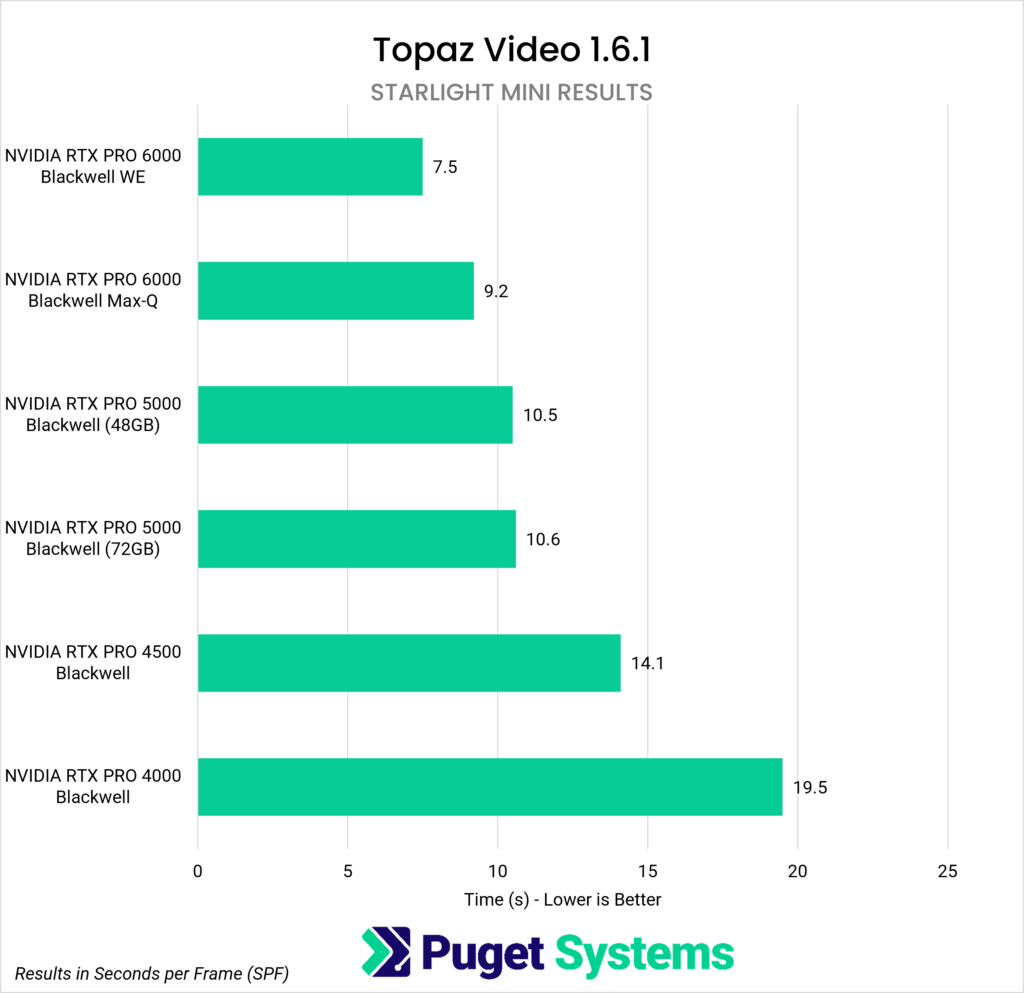
Our first results are from Starlight Mini. This model is designed to restore heavily degraded footage, such as archival film, and only works with NVIDIA graphics cards.
Within the cards we tested, the RTX PRO 6000 Blackwell Workstation Edition was the top performer, averaging less than 8 seconds to process a single frame. The RTX PRO 6000 Blackwell Max-Q, placed second, taking just over 9 seconds per frame. While it is 17% slower than its Workstation Edition counterpart, the Max-Q draws substantially less power and better supports multi-GPU configurations. However, Starlight Mini itself isn’t compatible with multi-GPU setups, so the RTX PRO 6000 BW Workstation Edition is the top choice for this variant, unless other parts of a user’s workflow require additional GPUs or VRAM capacity.
Third place was effectively a tie between the two RTX PRO 5000 Blackwell variants, whose VRAM capacity is their sole differentiator (48 GB and 72 GB). They both took under 11 seconds to process a single frame, and scored less than 1% apart, showing that VRAM capacities this size did not affect performance in our testing.
Continuing down the chart, the RTX PRO 4500 Blackwell took about 14 seconds to process a single frame, which was 25% slower than both PRO 5000 Blackwell variants but 28% faster than the slowest card in our testing. That was the RTX PRO 4000 Blackwell, which took over 19 seconds to process one frame – more than twice as long as either of the RTX PRO 6000s.
Starlight Mini is the most processing-intensive model that we tested. Those working on projects without strict time constraints can opt for a more budget-friendly card, such as the RTX PRO 4500 Blackwell. For anyone working with longer clips or larger volumes of footage, where those extra seconds per frame will add up over time, a faster card like the RTX PRO 5000 Blackwell (48 GB variant) is worth considering, especially for those who can’t afford the more expensive RTX PRO 6000 series cards.
Starlight Sharp and Starlight Fast 2 (Local)
System Image
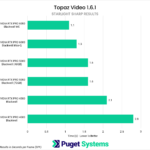
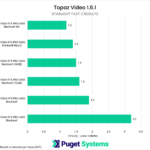
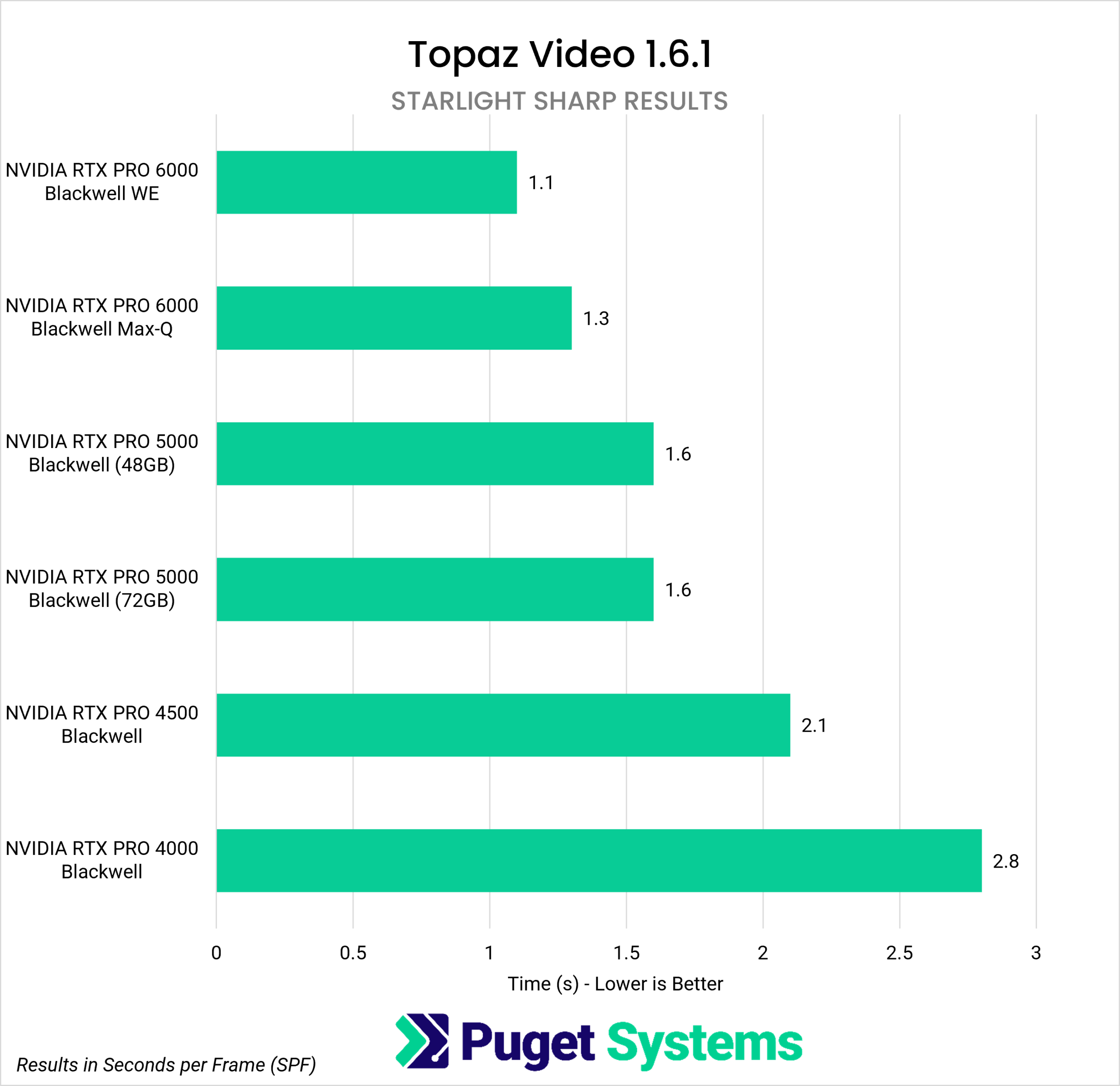
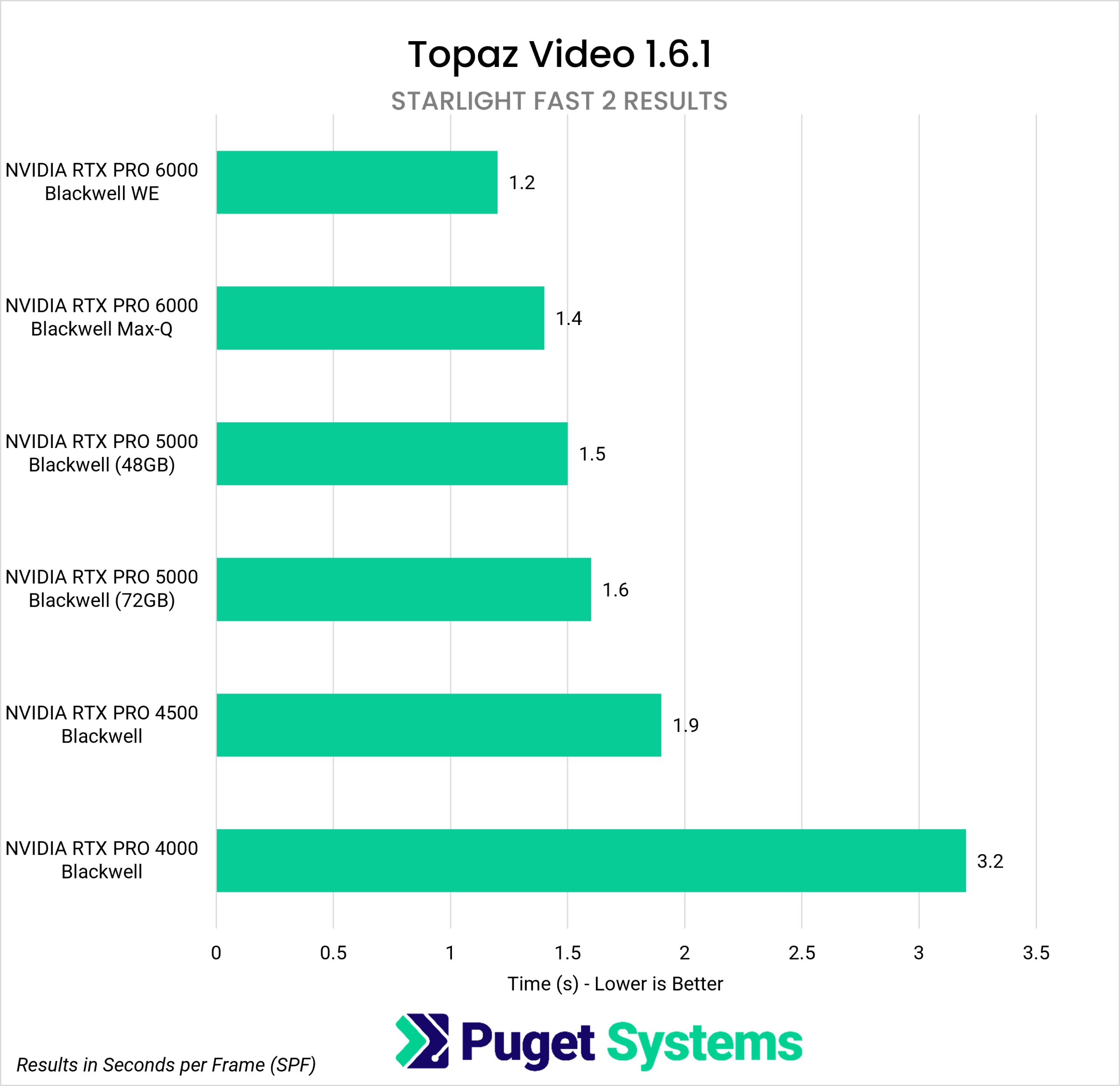
Next up are Starlight Sharp and Starlight Fast 2, which we’ll cover together since our results showed very similar GPU performance across both models. Starlight Sharp is designed to enhance low-resolution footage, with a specialty in recovering features and details in small, distant faces within the frame. Starlight Fast 2, on the other hand, is designed to work with higher-quality footage and is optimized for better processing speeds. As with Starlight Mini, only NVIDIA graphics cards were compatible with these models.
The RTX PRO 6000 Workstation Edition was the top performer with both Starlight Sharp and Fast 2, but on a per-frame basis the difference in time was quite small compared to the RTX PRO 6000 Max-Q and both RTX PRO 5000 variants. All of these cards took under two seconds to process a single frame, so for those dealing with short clips (just a few seconds of footage) it would be hard to perceive that difference.
The RTX PRO 4500 offers the best cost-to-performance ratio when compared to the higher-tier cards, and processed a frame in approximately two seconds with both models. Last was the RTX PRO 4000, the slowest card these tests, which averaged about 3 seconds per frame in both variants.
For those who plan to use either Starlight Sharp and/or Fast 2 as their preferred models for enhancing, the RTX PRO 4000 offers good speed for the price, even with its slightly longer per-frame processing time. Moreover, its 24GB of VRAM helps it avoid a performance bottleneck we identified with Fast 2 on consumer GPUs with 16 GB of VRAM. Those cards saw average processing times of 15 seconds per frame, far slower than the RTX PRO 4000 here. The extra VRAM capacity removes that limitation seen on 16 GB cards, making this an instance where a professional-grade card would be worth the investment.
One other point worth noting is that Starlight Sharp is the only model in this family that supports multi-GPU processing. We will be looking at performance scaling for this model in an upcoming post.
Starlight Precise 2.5
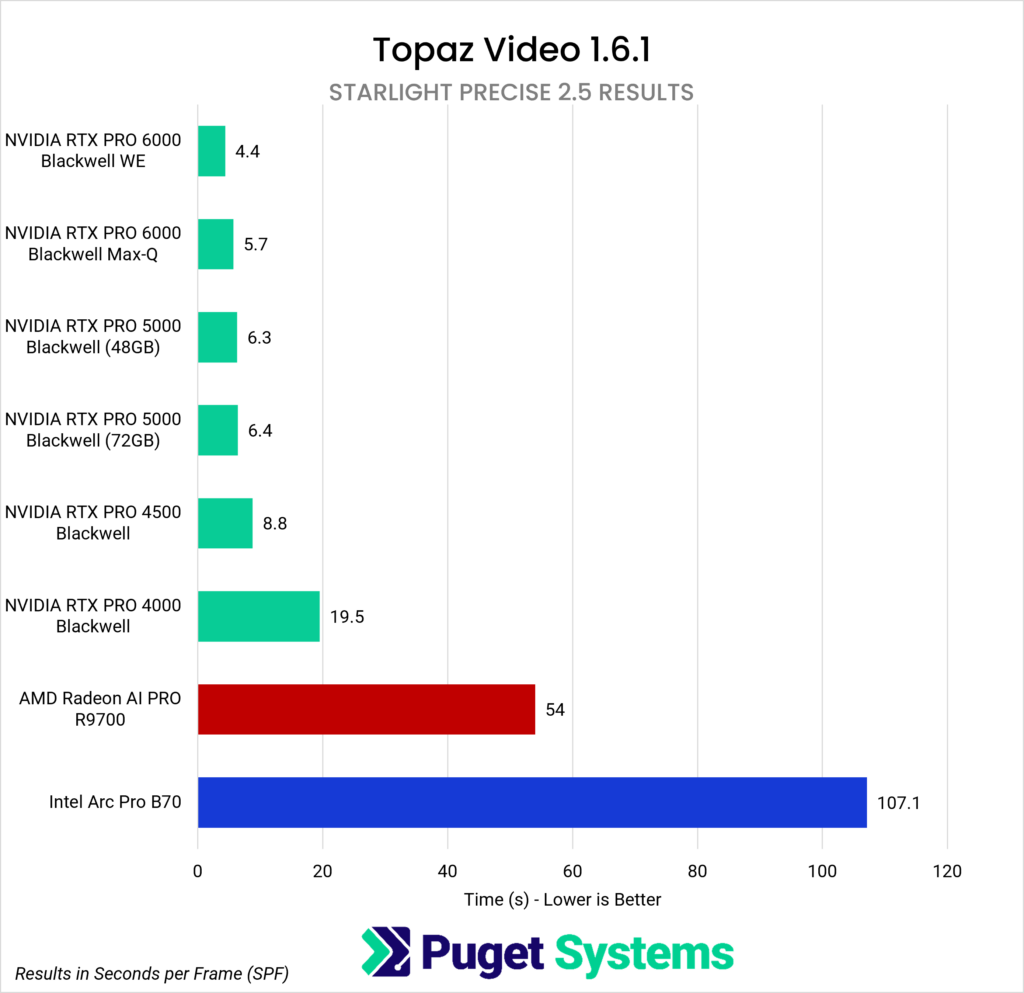
The final variant we tested was Starlight Precise 2.5, which works best with high-quality video and is not well-suited for heavily degraded footage. It is designed to improve AI-generated content that may have a soft, plastic, or slightly artificial look. Additionally, it is the only model in this group that supports AMD and Intel Pro graphics cards.
Our results show that the RTX PRO 6000 Workstation Edition was once again the top performer, and processed each frame in under 5 seconds. Second-best was its counterpart, the RTX PRO 6000 Max-Q Workstation Edition, which was 23% slower. Both RTX PRO 5000 variants followed, and took just over 6 seconds to process a single frame. That, in turn, was about 40% faster than the RTX PRO 4500’s ~9 seconds. The last remaining NVIDIA GPU, the RTX PRO 4000, was quite a bit slower, taking nearly 20 seconds to process a single frame.
As mentioned, Starlight Precise 2.5 is also compatible with AMD’s Radeon AI PRO R9700 and Intel’s Arc Pro B70 graphics cards. However, based on the results above, performance was underwhelming on both. The R9700 took just over 54 seconds to process a single frame, while the B70 took a lengthy 107 seconds — nearly double that of the R9700 and over four times as long as the RTX PRO 4000. As such, we wouldn’t recommend AMD or Intel Pro GPUs for Starlight, regardless of price; NVIDIA GPUs deliver much better performance, are compatible with all model variants, and are a better investment for Topaz Video.
Which Pro GPU Is Best for Topaz’s Starlight?
Topaz Video’s Starlight models can produce great results, but they’re processing-intensive and, depending on the variant used, can take multiple seconds to process each frame. That time may be further amplified if a workflow combines different models to achieve the best results. Determining which graphics card is best for local processing with Starlight ultimately depends on factors such as which variants are used, the number of frames to be processed, and how much time can reasonably be spent waiting for Topaz Video to process them. Each user will also approach this question differently depending on their perspective.
That said, we do want to point out that for professional GPUs, price-to-performance is not the primary reason to use these cards. If pure performance is the main concern, a consumer-grade GPU will, in most cases, be a better fit. However, for those who need higher VRAM capacity, multi-GPU configurations for other parts of their workflow, or greater reliability from drivers and hardware, professional graphics cards are designed to better meet these needs.
For those who simply want the best performance with Topaz’s Starlight models, NVIDIA’s RTX PRO 6000 Blackwell Workstation Edition GPU is the clear choice. However, this card is not cheap, and if a user doesn’t need the VRAM capacity it offers, they may be better off investing in a high-end consumer-grade card such as the GeForce RTX 5090, which offers comparable performance.
On the other end of the spectrum, those who simply need to ensure their workstation can process these models – preferring to keep the price low rather than max-out performance – will be well served by the RTX PRO 4000. Its 24GB of VRAM help avoid bottlenecks in some Starlight models that can occur with lower memory capacities, and while it is slower than the other RTX PRO cards it is far faster than AMD and Intel offerings at the moment.
In the middle, those who want to balance performance and price should consider the RTX PRO 4500 or 5000 48GB version. There is no practical benefit in these Starlight models to having a ton of extra VRAM, and these cards are far less expensive than the 6000 Blackwell variants. There are also consumer cards to consider in this price range, of course.
Many users will want to run Starlight alongside Topaz’s classical models, so our recommendations here can be used in tandem with our previous posts that cover consumer-grade GPU performance with Starlight, as well as Topaz Video’s internal benchmark. We published one covering consumer-grade cards and another looking at professional-grade cards. Up next, we’ll test multi-GPU with a smaller set of Topaz’s proprietary models across both consumer- and professional-grade cards.

Looking for a Content Creation workstation?
We build computers tailor-made for your workflow.

Don’t know where to start?
We can help!
Get in touch with one of our technical consultants today.