Table of Contents
Introduction
In March, AMD announced the long-awaited Ryzen™ 9 9950X3D2 Dual Edition: the world’s first desktop processor to feature stacked 3D V-Cache™ on two CCDs. The 9950X3D2 is the new AMD flagship, with 16 cores, 208 MB of cache, and an increased power limit of 200 W. Much like the 9950X3D before it, the 9950X3D2 promises to offer the best performance in both gaming and professional workloads, offering an uncompromising experience for creatives and gamers; a processor that can bridge the gap between mainstream desktop and HEDT.
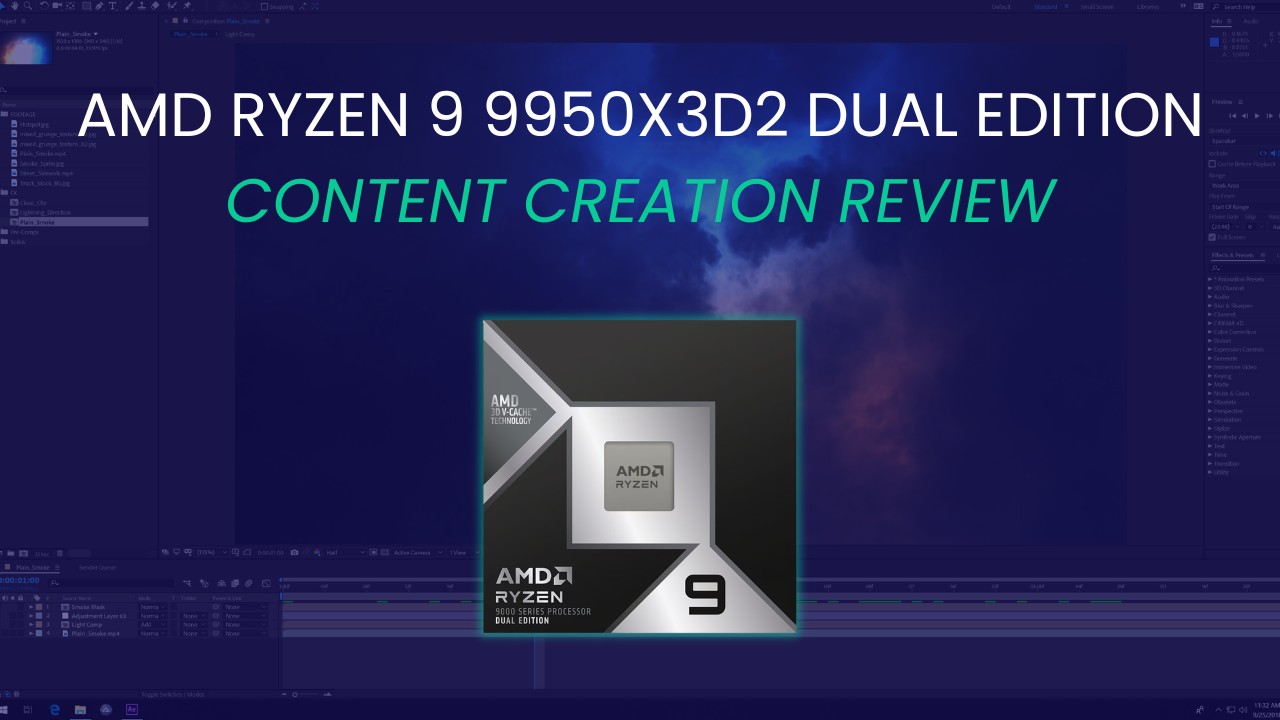
At this point, AMD’s 3D V-Cache technology likely needs no introduction. A staple of AMD’s product line since its first release in the 5800X3D, it fuses additional cache directly to the CPU die, allowing for far more local cache than would otherwise be possible. AMD uses this as level 3 cache, which is typically the slowest cache on a CPU and shared by all cores. This increased cache allows for better data locality, reducing data access latency due to needing to access data from system memory. The innovation from AMD for 3D V-Cache on Ryzen 9000 processors is “flipping” the location of the cache from the top of the CPU cores to the bottom, allowing the CPU cores to make direct contact with the processor’s heat spreader. This allows AMD to push more power into the CPU cores and maintain higher boost states for longer.
A previous difficulty for multi-CCD 3D V-Cache processors like the 9950X3D and 9900X3D was that only one CCD had 3D V-Cache. In theory, this allowed AMD to have the best of both worlds: one CCD being latency optimized and the other being frequency optimized. That is, one CCD had more cache but lower boost clocks, while the other had less cache but higher boost clocks. However, this lopsided design was susceptible to improper scheduling of tasks, such that latency-sensitive tasks would be put on the 3D V-Cache-less CCD or vice versa. Although the improved scheduler shipped with the dual-CCD Ryzen 9000X3D parts largely alleviated this, it was still something of an issue.
Thus, having stacked cache on each CCD should both reduce scheduling mishaps and also improve performance in heavy workloads where more data locality is desirable. In past testing, we have found that to include tasks like compiling code, compiling shaders, and 3D rendering. AMD claims these, as well as AI and general content creation workloads, should all see improved performance from the 9950X3D2. Additionally, though not something we test, AMD does claim the 9950X3D2 should offer great gaming performance – though they did not claim it would be better than a 9850X3D.
Specifications
The primary difference between the Ryzen 9 9950X3D2 Dual Edition and the 9950X3D is cache. The 9950X3D2 features 192 MB of L3 Cache, up by 64 MB from the 9950X3Ds’ 128 MB (which was itself doubled from the 9950X’s 64 MB). Adding in the 16 MB of L2 cache, this brings the 9950X3D2 to 208 MB of on-die cache. For reference, AMD’s 32-core Threadripper™ 9970X has only 160 MB on-die cache. Just as important as the amount of additional cache is the location, though, with the Dual Edition sporting 3D V-Cache on both CCDs as discussed above.
Of course, this isn’t the only change. The 9950X3D2 is slightly slower than the 9950X3D, as the maximum boost clock has been reduced from 5.7 to 5.6 GHz. This is likely due to thermal considerations, but we don’t think this 100 MHz loss will really be noticeable.
A bigger change is the power limits, with the 9950X3D2’s TDP rising to 200 W – up 30 W from the 9950X & X3D. Maximum socket power (PPT) increases even more, to 270 W: a full 70 W, or 35%, more than the 9950X3D’s 200W. It isn’t clear from the specifications what that extra headroom is for. Cache certainly does need power, but we don’t expect it to draw 70 or even 30 W. Instead, it seems as if AMD is pushing for more aggressive boost behavior under all-core loads, with increased power limits to accommodate this. Cooling the 9950X3D2 may prove to be a challenge.
Unfortunately, AMD isn’t following in Intel’s footsteps (from the Core Ultra 200 Plus launch) and giving us a free upgrade here. That makes sense, as there is a large cost to putting more high-speed cache into a CPU. In the past, adding V-Cache to a CCD has typically raised the price of an AMD processor by about $150 – but the 9950X3D2 comes in a cool $200 more than the 9950X3D, making it a true halo product with an MSRP of ~$900. This is a hefty chunk of change, and must be kept in mind when evaluating its performance. For reference, key comparisons are AMD’s previous 9950X3D at $700 and 9950X at $550, along with Intel’s latest Core™ Ultra 7 270K Plus at a mere $300.
Test Setup (Expandable)
AMD Ryzen Test Platform
| CPUs: AMD Ryzen™ 9 9950X3D2 Dual Edition AMD Ryzen™ 9 9950X3D AMD Ryzen™ 9 9950X |
| CPU Cooler: Noctua NH-U12A |
| Motherboard: ASUS ProArt X670E-Creator WiFi BIOS Version: 3513 |
| RAM: 2x DDR5-5600 32GB (64 GB total) |
| GPUs: NVIDIA GeForce RTX™ 5080 Driver Version: 595.79 |
| PSU: EVGA SuperNOVA 1200W P2 |
| Storage: Kingston KC3000 2TB |
| OS: Windows 11 Pro 64-bit (26200) Power Profile: Balanced |
Intel Core Ultra Test Platform
| CPUs: Intel Core™ Ultra 7 270K Plus |
| CPU Cooler: Noctua NH-U12A |
| Motherboard: ASUS ProArt Z890-Creator WiFi BIOS version: 3002 |
| RAM: 2x Kingston FURY Renegade 24GB (48 GB total) Frequency: JEDEC 7200 “B” Spec |
| GPUs: NVIDIA GeForce RTX™ 5080 Driver Version: 595.79 |
| PSU: EVGA SuperNOVA 1200W P2 |
| Storage: Samsung 980 Pro 2TB |
| OS: Windows 11 Pro 64-bit (26200) Power Profile: Balanced |
Benchmark Software
| Lightroom Classic 15.2 — Puget Bench for Lightroom Classic 1.0.0 |
| Photoshop 27.5 — Puget Bench for Photoshop 1.0.6 |
| Premiere 26.2 — PugetBench for Premiere Pro 2.0.1 |
| After Effects 26.2 — Puget Bench for After Effects 1.1.0 |
| DaVinci Resolve 20.3.2 — Puget Bench for DaVinci Resolve 2.0.0 |
| Unreal Engine 5.7 |
| Visual Studio 2022 |
| Cinebench 2026 |
| V-Ray 6.00.01 |
| Blender 5.0 |
| KeyShot Benchmark 14.1.1.5 |
| Corona 10 Benchmark 10.0.0.20034 |
| Houdini 21.0.671 |
| Llama.cpp 5122 |
| Unigine Superposition 1.0 |
We followed our standard methodology for this review, with both Intel and AMD-based platforms featuring ASUS ProArt motherboards and NVIDIA GeForce RTX™ 5080 GPUs. Windows, BIOSes, and drivers were all up to date as of the start of the testing. In line with our focus on professional workflows, we kept the processors running stock: overclocking features such as ASUS MCE and MLB were disabled, as was AMD’s PBO, and the Intel processors were run with the default “Performance” power plan. RAM was locked to the maximum CPU-supported frequency at JEDEC timings: 5600 MT/s for AMD and 7200 MT/s for Intel. Additionally, we left Windows security settings like VBS in their default (enabled) state.
To cover a wide range of possible workflows, we tested with nearly every content creation-focused benchmark we have access to. This includes most of the Puget Bench for Creators suite, five offline CPU-based renderers, our in-development Unreal Engine benchmarks (both in-engine and engine compilation), the beginnings of our Houdini benchmarking efforts, and Llama.cpp to check AI performance.
Photography: Lightroom Classic
The first application we looked at was Adobe’s Lightroom Classic. Although in the past Lightroom only depended on single-threaded CPU performance, ongoing updates have greatly improved the utilization of multiple cores and GPUs, allowing users to get far better performance from their hardware than in times past.
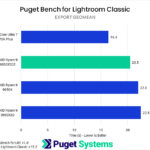
For our benchmark, we report several subscores, including AI effects/processing and camera-specific results. However, for our reviews, we also often calculate a few additional metrics, such as average import and export times. We won’t go over every subscore in depth, but they are all available below.
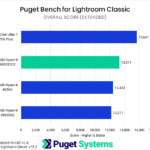
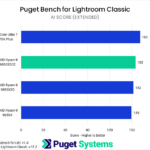

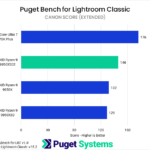

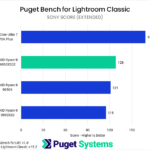

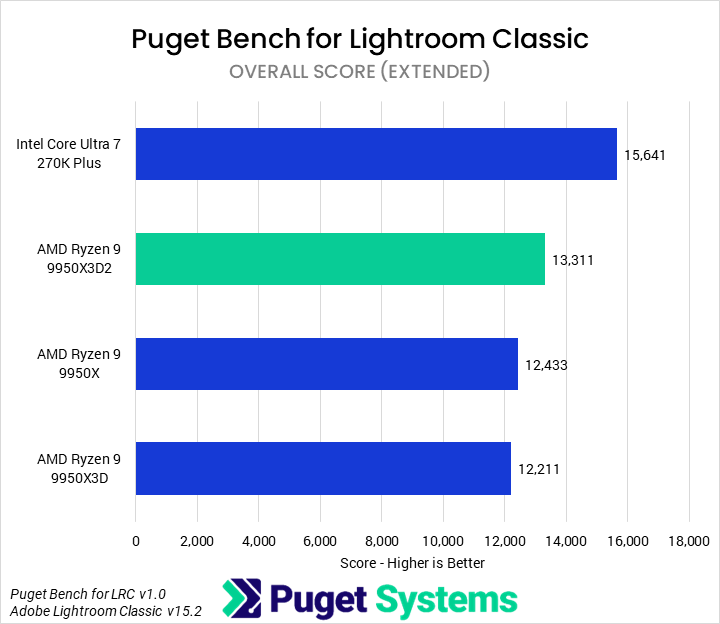
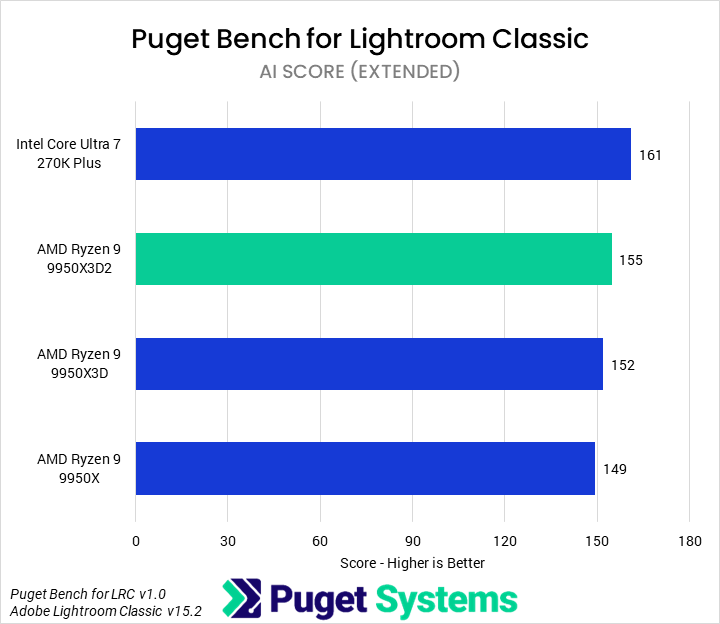
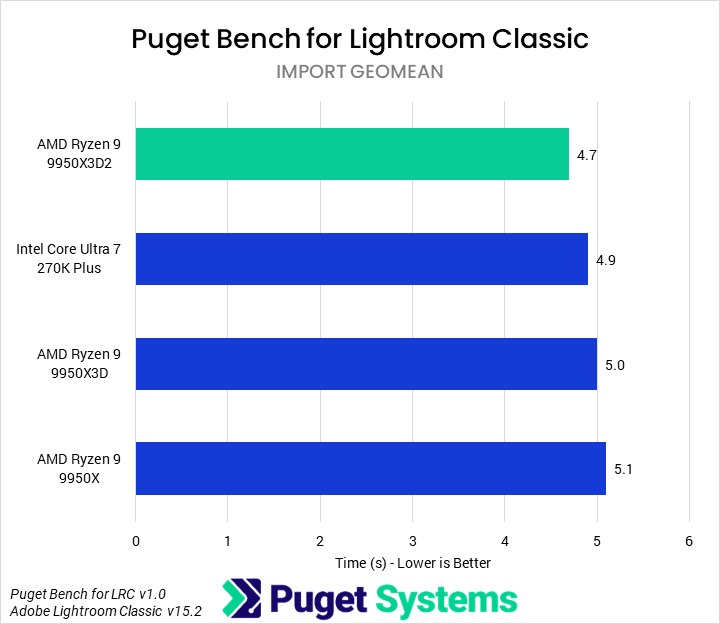
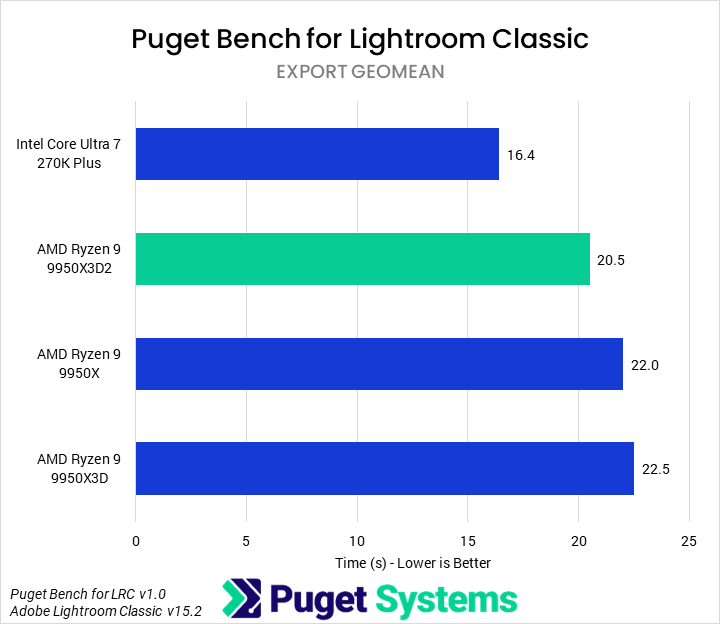
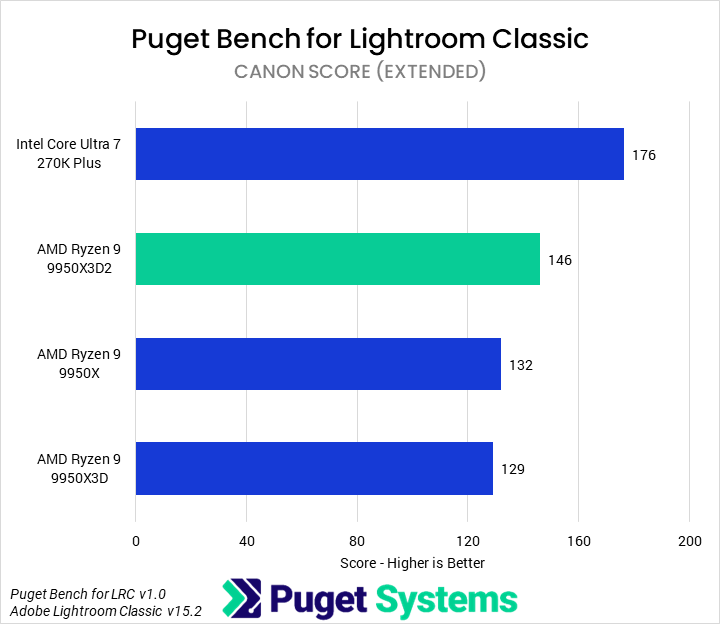
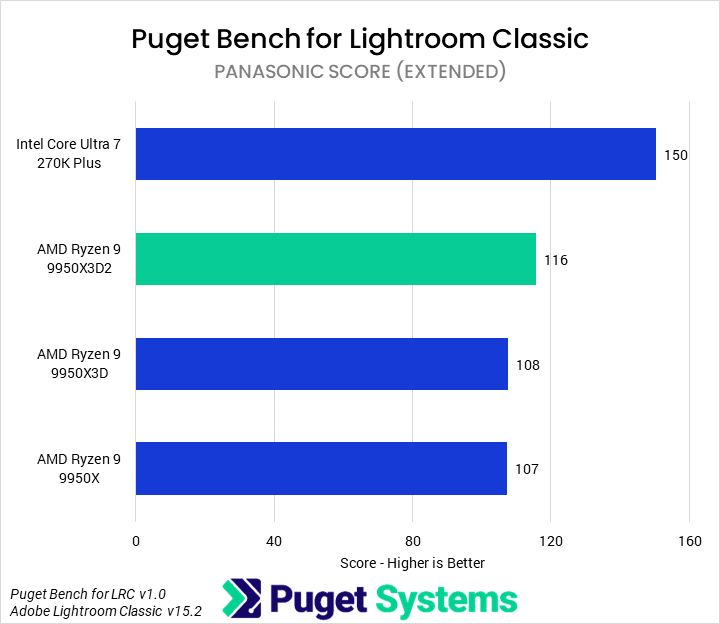
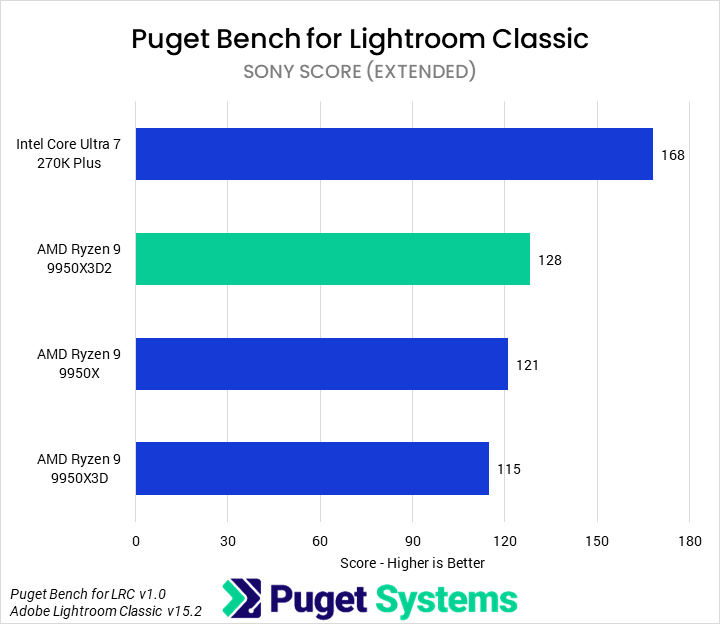
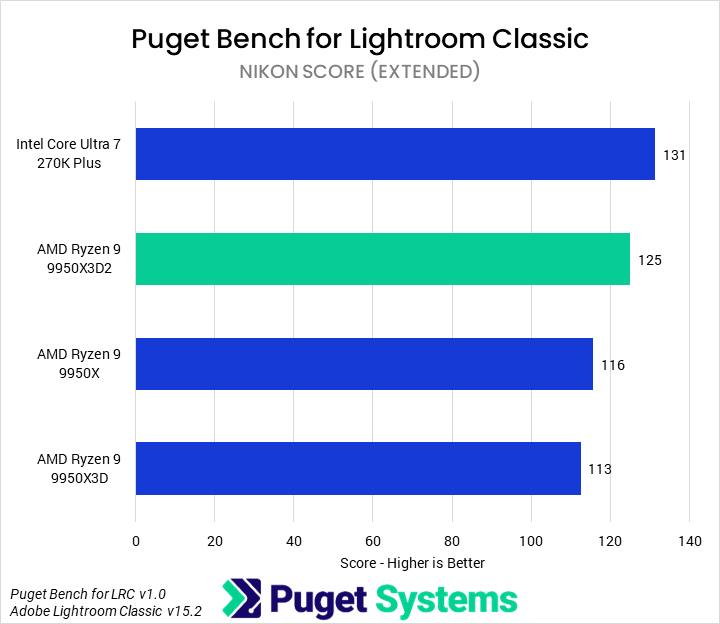
The Overall score (Chart #1) is our top-level indicator for application performance. We found that the 9950X3D2 saw modest improvements over the 9950X3D and 9950X of 9% and 7%, respectively. It was still substantially (17%) slower than the 270K Plus, but the processor is evidently making use of the increased power limit and cache to boost performance.
In fact, the 9950X3D2 Dual Edition performs remarkably consistently across all of the test results, trailing the 270K Plus and beating the 9950X3D, with one exception: in our Import geomean (Chart #3), the 9950X3D2 was slightly faster than the 270K Plus.
Graphic Design: Adobe Photoshop
Photoshop is primarily CPU-bound, favoring per-core performance and low latency in CPU design. Since the release of AMD’s Ryzen 9000 Series, it has tended to favor those processors – and especially the X3D variants. Although we didn’t include any of the lower core-count models that have traditionally led the chart, we are interested to see how much improvement over the other 16-core parts the 9950X3D2 can provide.
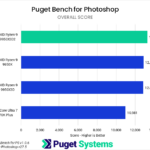
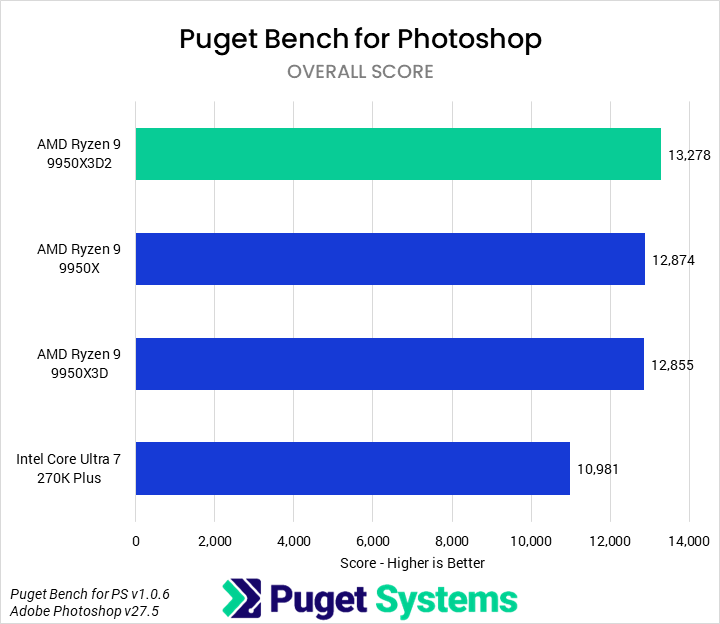
In the Overall score (Chart #1), we found that the 9950X3D2 offered the best performance of any of the processors we tested. It was 4% faster than the 9950X and 9950X3D, and 21% faster than the 270K Plus. The score of 13,278 would also put it ahead of the previously fastest-tested processor, the 9850X3D, based on our review from last month.
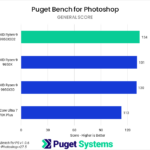
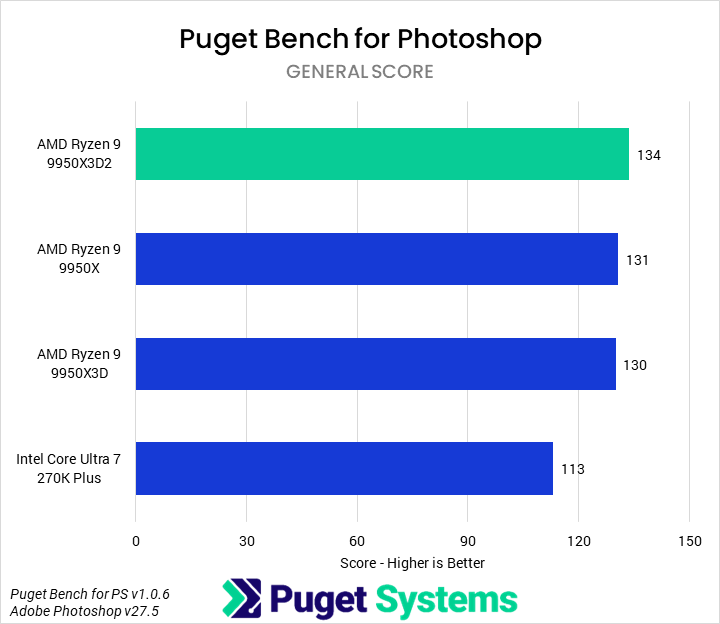
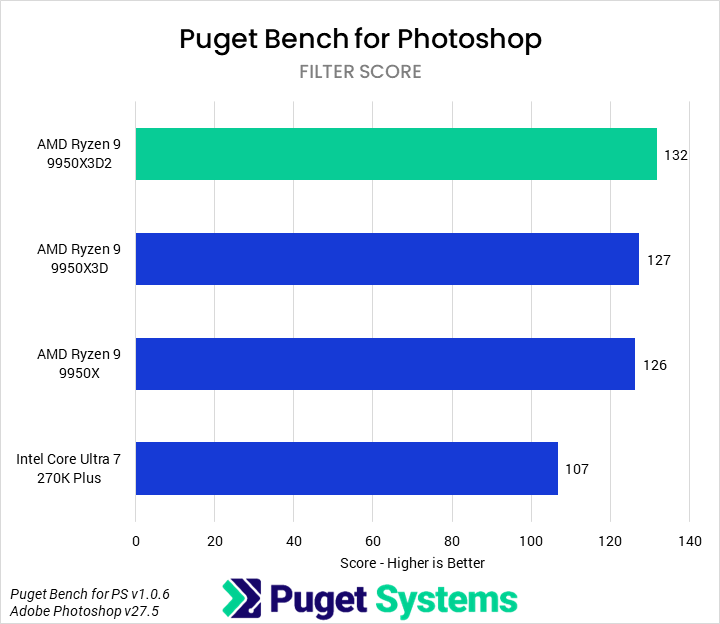
As we have observed in most of our recent Photoshop testing, both the General (Chart #2) and Filter (Chart #3) categories scale almost identically. The 9950X3D2 is 18% faster than the 270K Plus in the former and 23% in the latter, while its performance advantages over the other Ryzen CPUs range from 2% to 4%. Due to this, it’s not worth examining all of the individual differences independently.
While the 9950X3D2 Dual Edition does offer the best Photoshop performance of any desktop processor, it does so at a large price tag; the increase in cost is likely not worth the small performance gains when compared to a cheaper Ryzen 9 or Ryzen 7.
Video Editing: Adobe Premiere
The next application we tested was Premiere, once again using our Puget Bench suite. Earlier this year, we examined changes in the benchmark and application that came along with the 2.0 version of this benchmark and Premiere 26.0; the application is now even more GPU-accelerated, generally diminishing the relative importance of CPUs – although a fast CPU is still important.




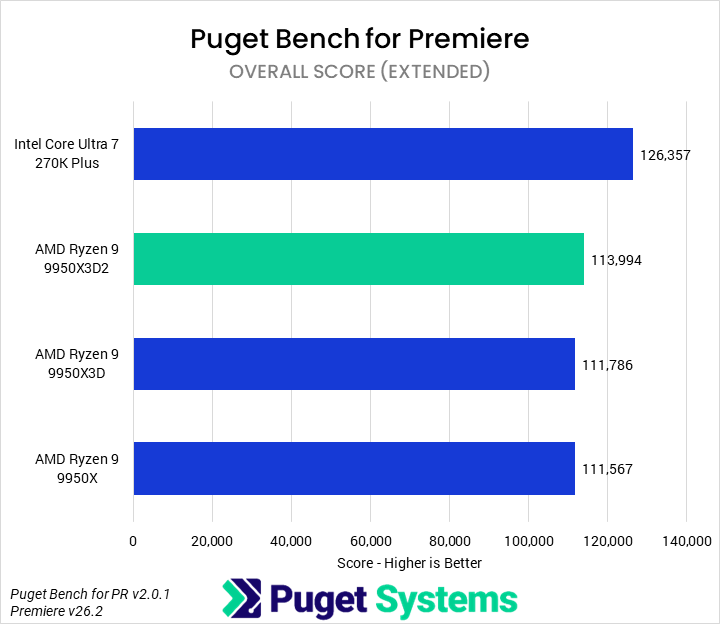
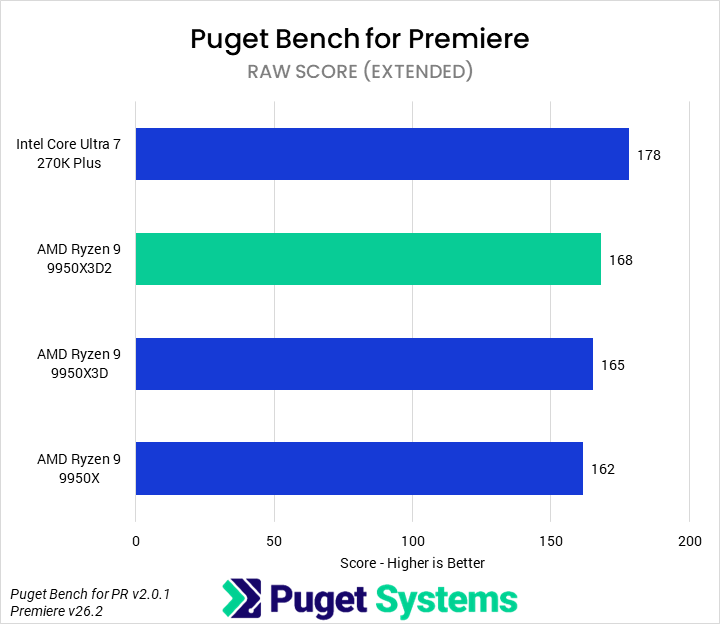
Starting with the Overall score (Chart #1), we found that the 9950X3D2 was nominally faster than both the 9950X3D and 9950X, but by only a few percent, well within the margin of error of this test. Unfortunately, this meant that it was unable to catch the 270K Plus, which still led by 11%. We will get into why this is when we examine the subscores, but overall, the 9950X3D2 doesn’t make for a compelling value in Premiere.
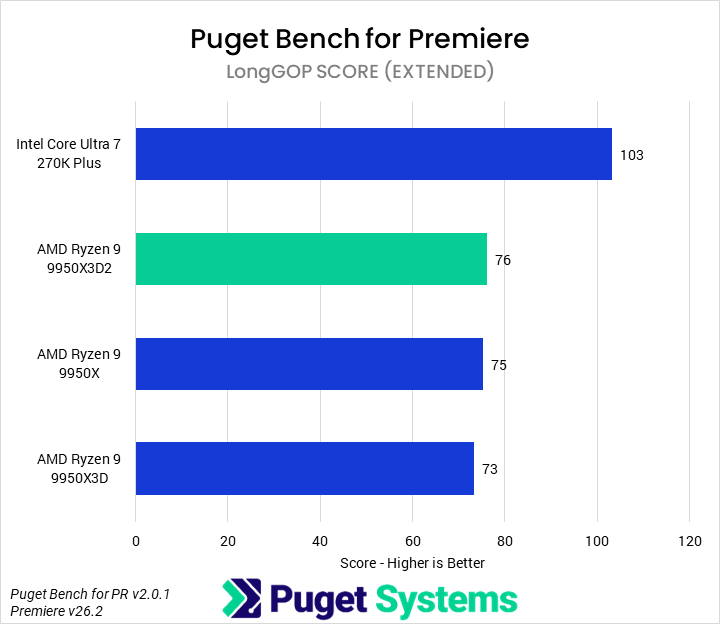
In LongGOP tests (Chart #2), Intel’s QuickSync acceleration allows the 270K Plus to significantly outperform AMD’s Ryzen processors, even when paired with the performant NVIDIA GeForce RTX 50 Series’ media engines. The 9950X3D2 was functionally identical to the other Ryzen 9 processors, making it 27% slower than the 270K Plus.
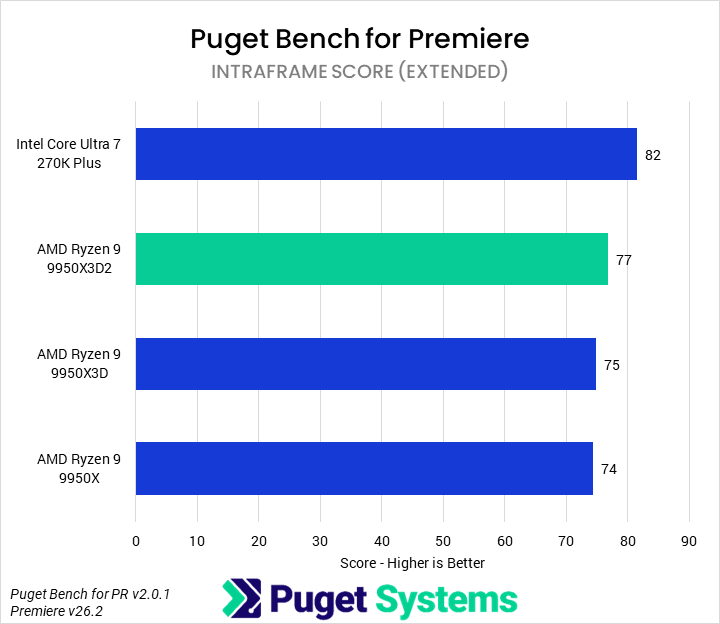
In contrast to LongGOP codecs, Intraframe codecs (Chart #3) are almost wholly unaccelerated. Due to this, the Ryzen processors perform much better relative to the Core Ultra 7, though still somewhat behind. The new 9950X3D2 Dual Edition was 6% slower than the 270K Plus, 3% faster than the 9950X3D, and 4% faster than the 9950X.
RAW codecs (Chart #4) tend to split the difference on acceleration between LongGOP and Intraframe, with most of the processing being performed on the CPU, but the GPU being used for heavy debayering work. We found that the 270K Plus was still the fastest desktop processor for working with RAW codecs, outperforming the 9950X3D2 by 6%. The latter did manage to pull ahead of the other Ryzen 9s, though, with a 2% lead over the 9950X3D and 4% lead over the 9950X.
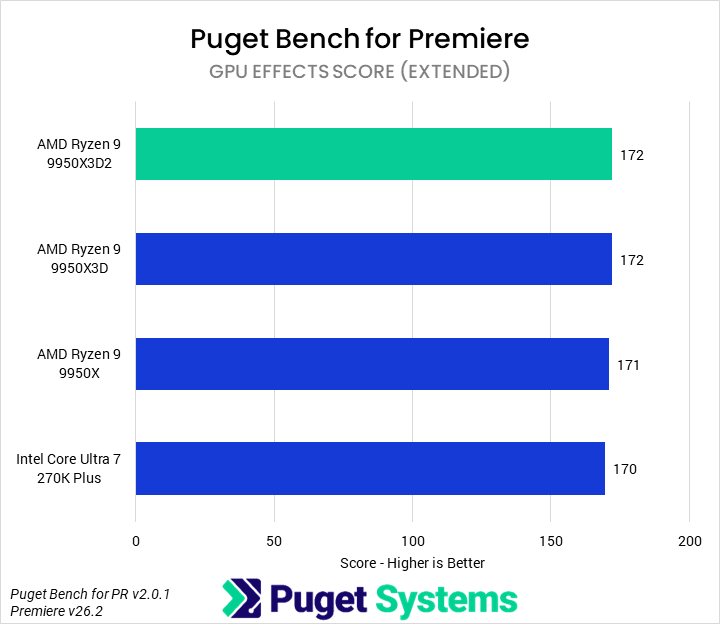
Finally, in GPU Effects (Chart #5), we did find that the 9950X3D2 was the fastest processor. However, only a very slow CPU meaningfully impacts this score, so all of the processors tested performed within 1% of each other. That is well within the margin of error, and thus they are effectively equivalent.
Overall, while the 9950X3D2 does manage to eke out gains in Premiere, it was almost always slower than 270K Plus, while costing three times as much. Additionally, it just did not offer good performance improvements given its price over the other Ryzen 9 processors, cratering its performance per dollar. We would recommend most users choose an Intel processor for Premiere or, at the very least, a less expensive Ryzen processor – and remember that an Intel CPU is even more important if lacking a 50 Series NVIDIA GPU.
Motion Graphics: Adobe After Effects
Moving on to Adobe After Effects, we are now testing with version 26.2. Although the update notes didn’t mention anything about performance changes, we did find that the change from 26.0 to 26.2 brought large improvements in 3D workflows. This isn’t a huge deal for CPUs, and we plan to look into it more in the future, but it does explain why the results here are generally higher than in previous articles.



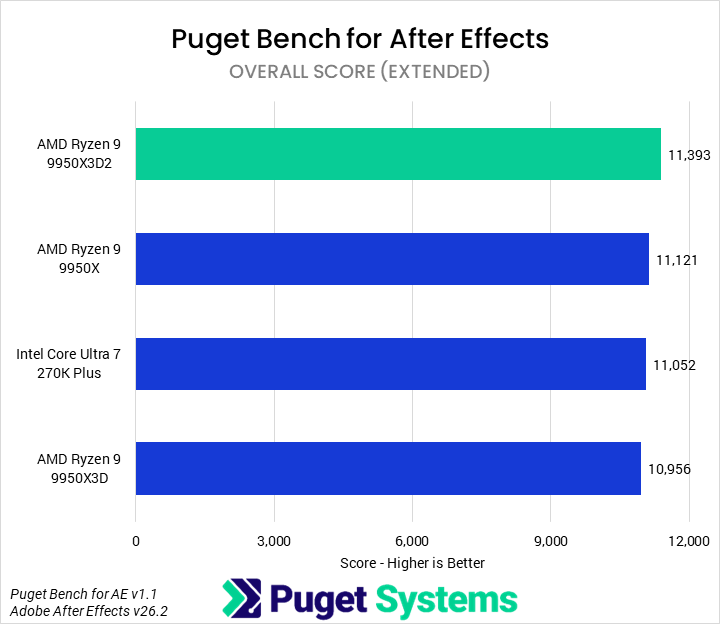
Overall (Chart #1), we found the 9950X3D2 to be the fastest CPU tested in After Effects. It was 2% faster than the 9950X, 3% faster than the 270K Plus, and 4% faster than the 9950X3D. However, all of these do fall within the normal margin of error for this benchmark. We perform multiple runs and compute averages, so we are fairly confident there is a real performance difference, but it is small nonetheless.
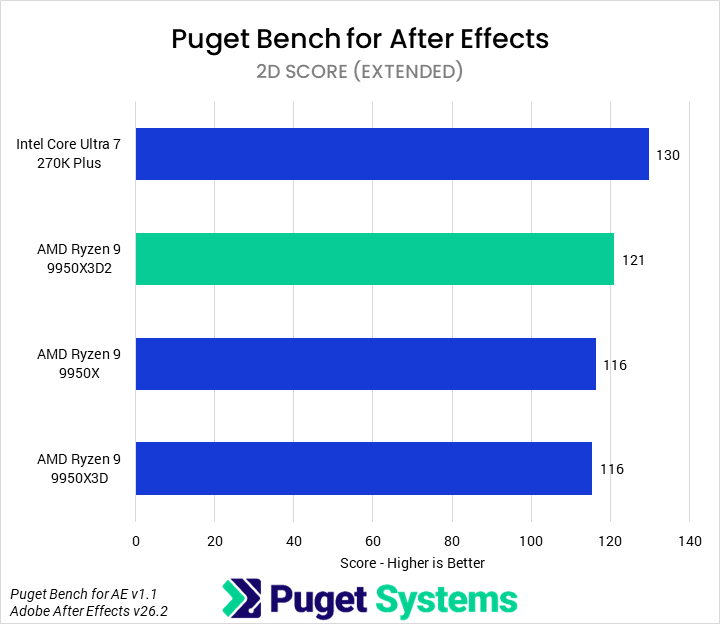
Interestingly, the 9950X3D2 is not the fastest processor for 2D workflows (Chart #2) – that would be the 270K Plus. In our 2D tests, the 9950X3D2 was 7% slower than the 270K Plus, but 4% faster than the 9950X and 9950X3D.
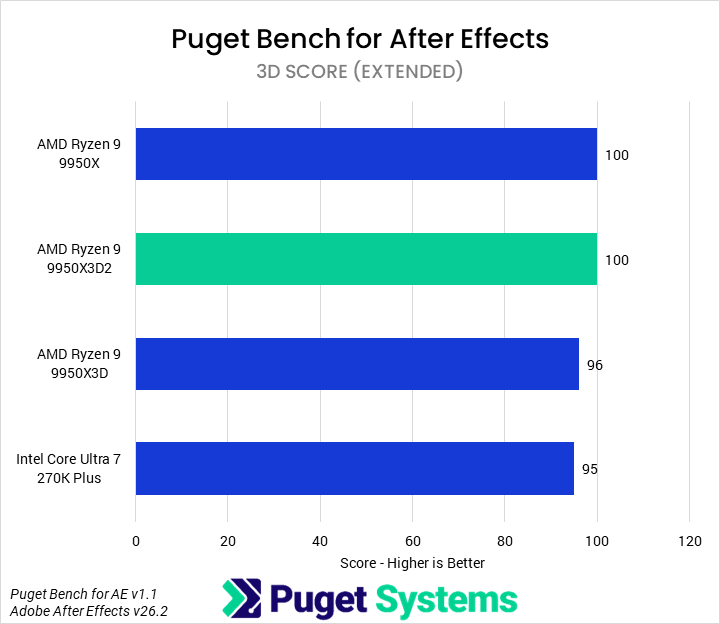
As we mentioned earlier, the new version of After Effects saw improved performance in 3D workloads (Chart #3), but we don’t think it had any significant impact on the relative performance of CPUs. Our testing showed that the 9950X and 9950X3D2 tied in performance for the top spot, 4% faster than the 9950X3D and 5% faster than the 270K Plus.
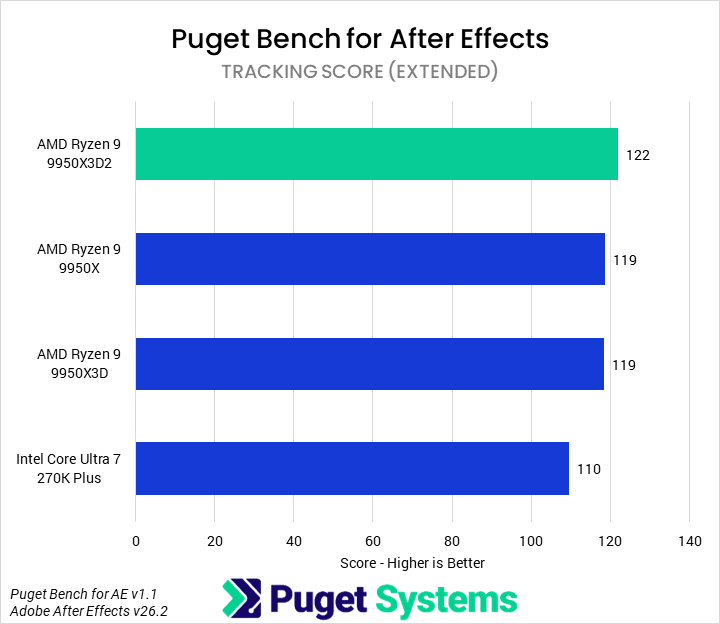
The last category of performance we look at in After Effects is Tracking (Chart #4). In tracking tests, we found that the 9950X3D2 Dual Edition was the fastest CPU, with a 3% performance advantage over the 9950X and 9950X3D and 11% over the 270K Plus.
Those looking for the absolute best After Effects performance need to examine their workflows to determine whether their primary bottleneck is traditional 2D work or newer 3D work; for the former, the 270K Plus is not only the fastest but also offers a great value. For the latter, the 9950X3D2 does provide the best overall performance, but at a steep cost. We think most users will be better off saving money on a slightly cheaper CPU, possibly even just a 9950X, and investing the difference in better components elsewhere in a system.
Video Editing/Motion Graphics: DaVinci Resolve Studio
Moving on from Premiere and After Effects, we have DaVinci Resolve, which offers the capabilities of both in one application thanks to the inclusion of Fusion. Compared to Premiere, DaVinci Resolve has traditionally made better use of hardware, particularly the GPU. As with Premiere, we recently updated to Puget Bench 2.0 and published an article examining the performance differences we saw with the revamped tests.





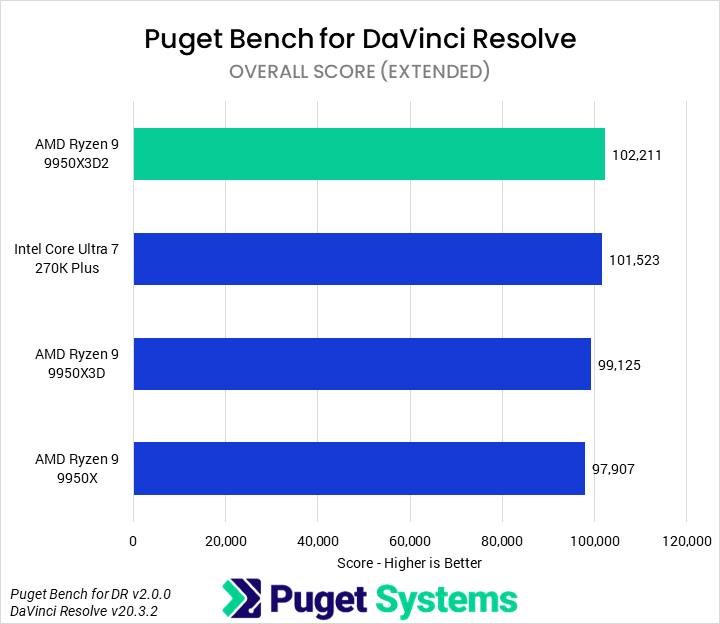
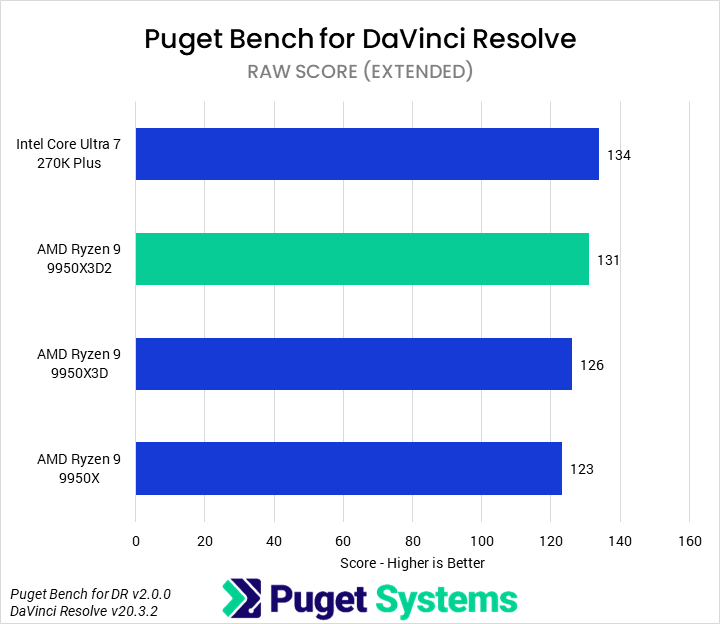
Starting with the Overall score (Chart #1), the 9950X3D2 Dual Edition leads the pack, with a negligible <1% lead over the 270K Plus and modest 3% and 4% leads over the 9950X3D and 9950X, respectively. These aren’t huge differences, but as DaVinci Resolve has become increasingly GPU-centric, it still represents solid ongoing improvements in this application.
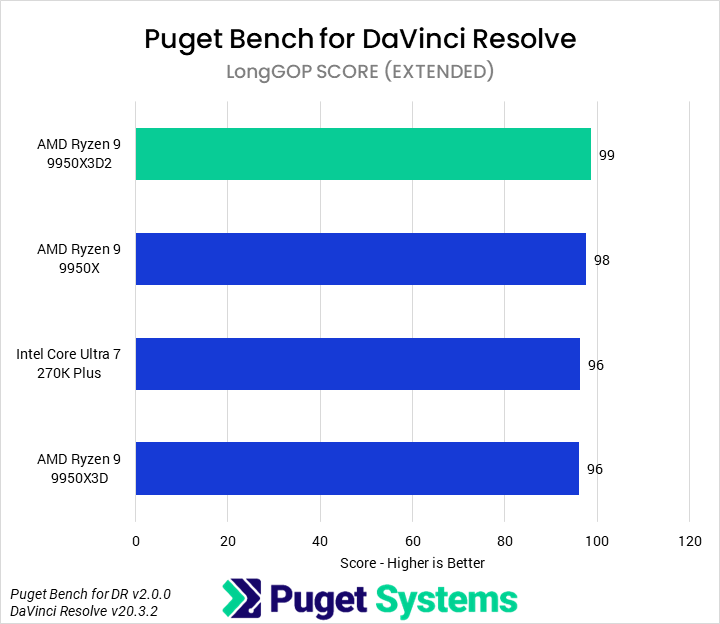
Unlike in Premiere, LongGOP codecs (Chart #2) are preferentially accelerated using the NVENC/NVDEC media engines on Blackwell video cards. This means we don’t see any advantage from the media engines on the Intel CPU, although this can be manually adjusted in application settings. We therefore found that the 9950X3D2 was the fastest processor for LongGOP codecs, though all of the results are functionally identical. Without a 50 Series NVIDIA GPU, though, the 270K Plus would be the fastest by a good margin.
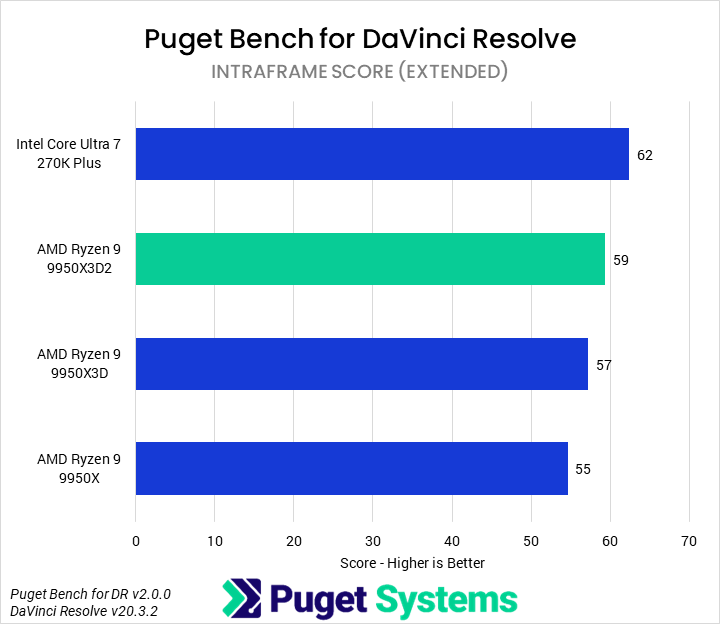
Intraframe codecs (Chart #3) are still largely unaccelerated, and we found that the 270K Plus was the fastest processor tested, beating the 9950X3D2 by 5%. The new AMD part was still faster than the other Ryzen 9s, though, outperforming the 9950X3D by 4% and the 9950X by 7%. Regardless, Intraframe codecs tend to be relatively lightweight, and all of these processors would offer a good editing experience.
In our RAW codec tests (Chart #4), we saw very similar behavior, with the 270K Plus narrowly outperforming the 9950X3D2. Here, the 9950X3D2 was 3% slower than the 270K Plus, but 4% faster than the 9950X3D and 7% faster than the 9950X.
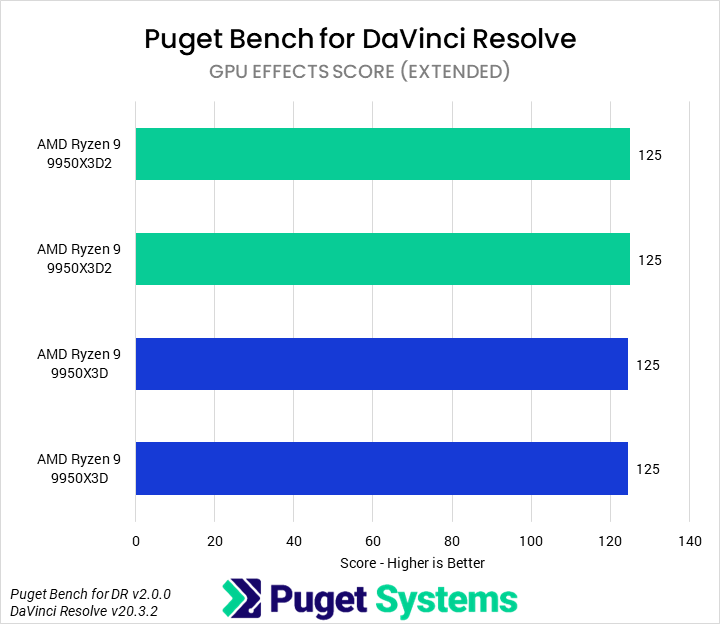
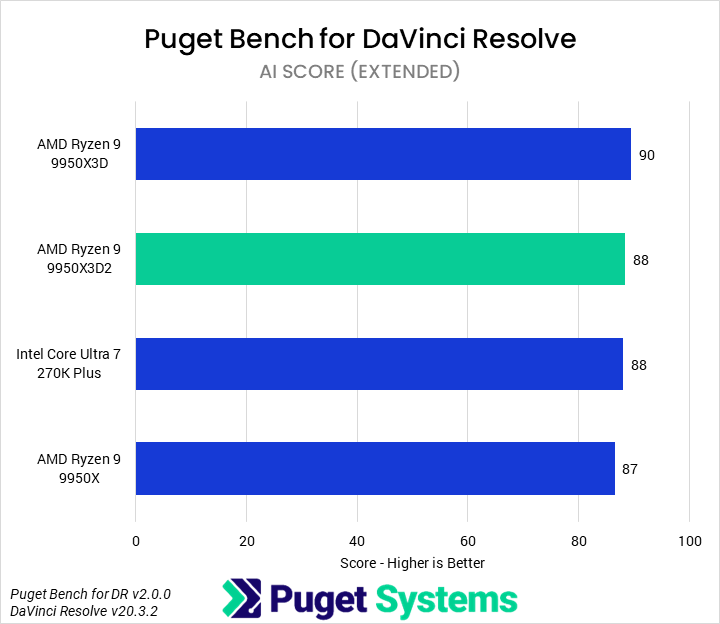
GPU Effects (Chart #5) are not affected by CPU performance unless using a very slow or old processor. Similarly, AI tasks (Chart #6) are effectively unaffected by the CPU.
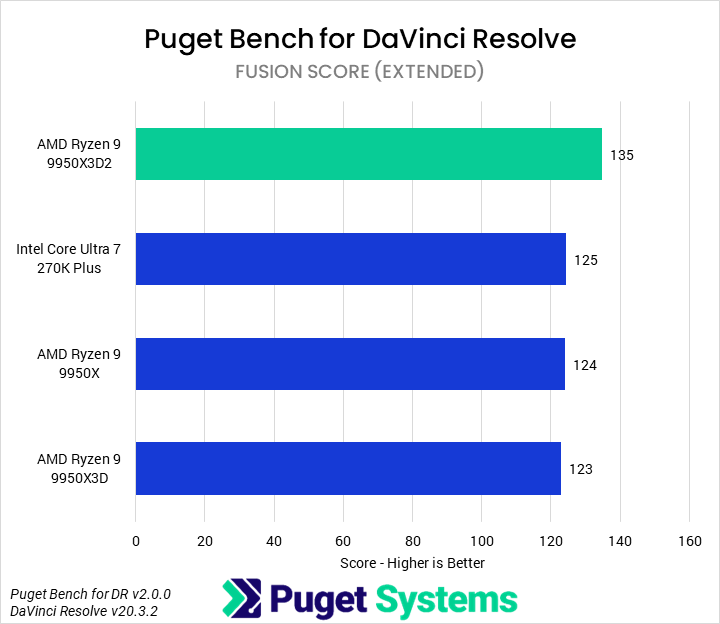
Finally, we tested the motion graphics capabilities of Resolve with Fusion (Chart #7). We found that the 9950X3D2 was not only the fastest processor we tested in this article for Fusion, but possibly the fastest yet made. The 9950X3D2 Dual Edition was 8% faster than the 270K Plus, with 9% performance gains over the 9950X3D and 9950X.
Overall, the 9950X3D2 offers great performance in DaVinci Resolve, with average improvements of about 5% over the other Ryzen 9 processors. However, much of DaVinci Resolve is GPU dependent and, in areas where the CPU is particularly determinative, we saw up to 10% improvements. For users who want the ultimate Resolve workstation, the 9950X3D2 is likely the way to go.
Game Dev/Coding: Unreal Engine & Visual Studio
One area where AMD has been putting pressure on Intel is the game development space. Our in-house Unreal Engine game-dev benchmarks examine compiling shaders and building lighting in-engine, as well as engine compile time in Visual Studio. Although many studios will want dedicated servers for these tasks, independent developers often have to multi-purpose one machine. The latter task is also an indication of broader code compilation performance.
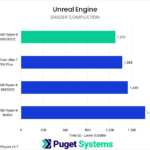
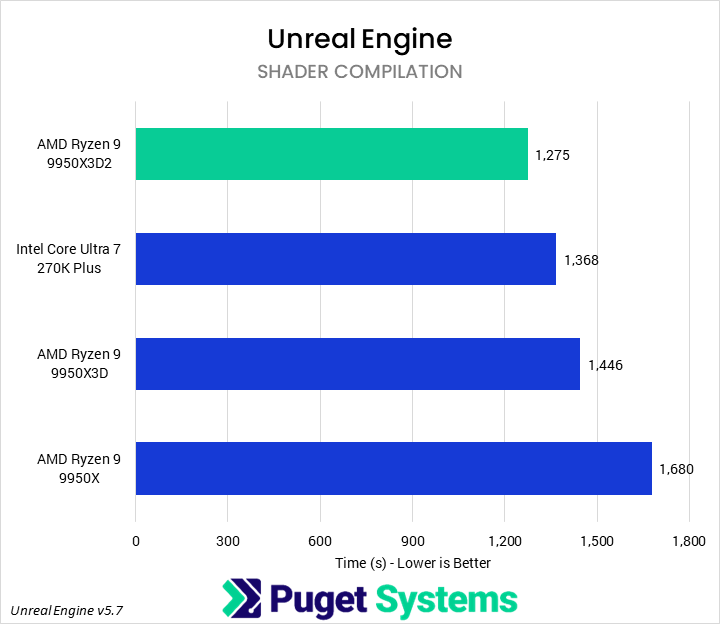
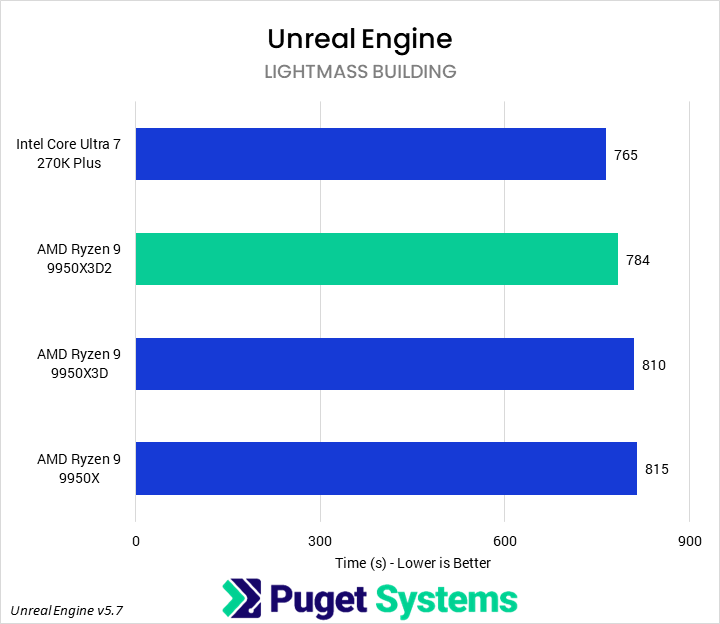
In Unreal Engine shader compilation (Chart #1), AMD’s Ryzen 9 9950X3D2 Dual Edition is the fastest desktop CPU we have ever tested. Interestingly, we did find that in this round of testing the 270K Plus outperformed the 9950X3D, and our past results for the 270K Plus itself, by a substantial amount – despite no notable changes to the test bed. Nonetheless, the 9950X3D2 was still faster, completing the shader compilation in just 93% of the time it took the 270K Plus, 88% of the time taken by the 9950X3D, and 76% of the time of the 9950X.
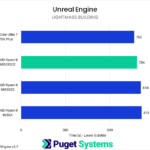
We have typically found that building lightmasses (Chart #2) is less sensitive to raw CPU horsepower than other tasks in our Unreal Engine benchmarks. Our testing showed that the 270K Plus was the fastest of the CPUs tested here, though in the past it had trailed behind the 9900X3D, with a 3% performance advantage over the 9950X3D2. The new AMD model was still faster than the other processors, leading the 9950X3D by 3% and the 9950X by 4%.
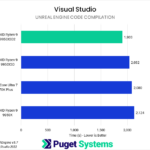
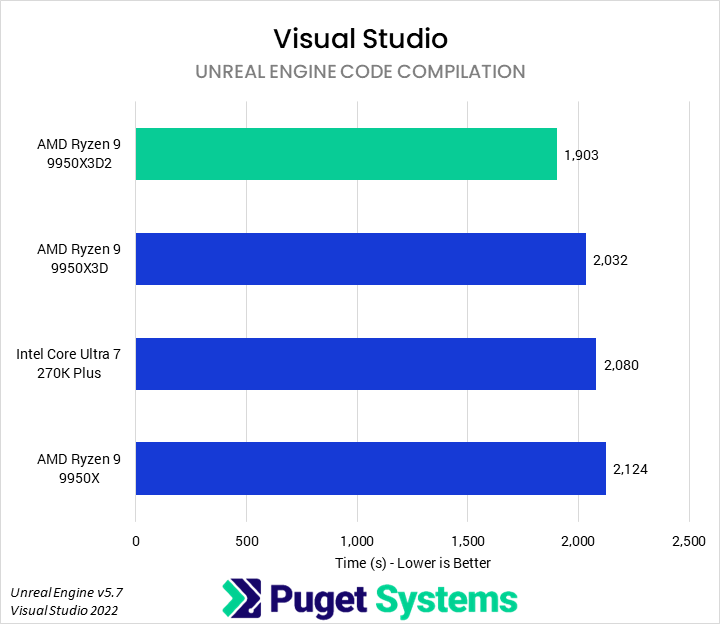
Also included in our Game Dev testing is compiling the Unreal Engine in Visual Studio, which can act as a proxy for other code compilation tasks as well. The 9950X3D2 was the best processor we tested for this workload, finishing the compilation 7% faster than the 9950X3D, 9% faster than the 270K Plus, and 11% faster than the 9950X.
These represent some of the largest gains for the new 9950X3D2 Dual Edition in any of the applications we tested. A 13% performance improvement over the 9950X3D is substantial and may make the 9950X3D2 a good option for studios that need their developer machines to be able to handle the gamut of game developer tasks from coding to art to in-engine testing. For more targeted workstations, though, lower-cost processors like the 9850X3D, 270K Plus, or 9950X may make more sense.
CPU Rendering: Cinebench, V-Ray, Blender, Corona, & Keyshot
For our offline, CPU-based renderers, we traditionally test with Cinebench, V-Ray, and Blender. This time, we have also expanded our testing to include Corona (a common renderer used for architectural visualizations) and Keyshot (often used for product visualization). We generally encourage users at this tier of performance to use GPU rendering instead, but that’s not always possible.

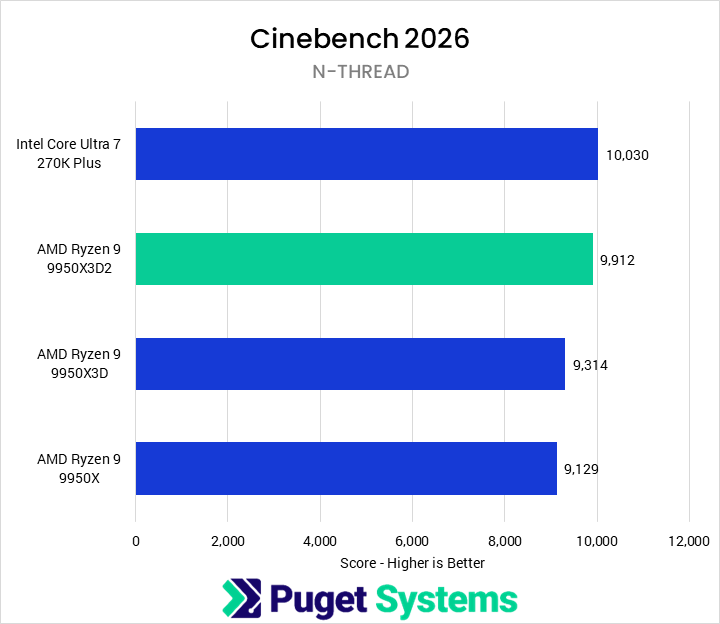
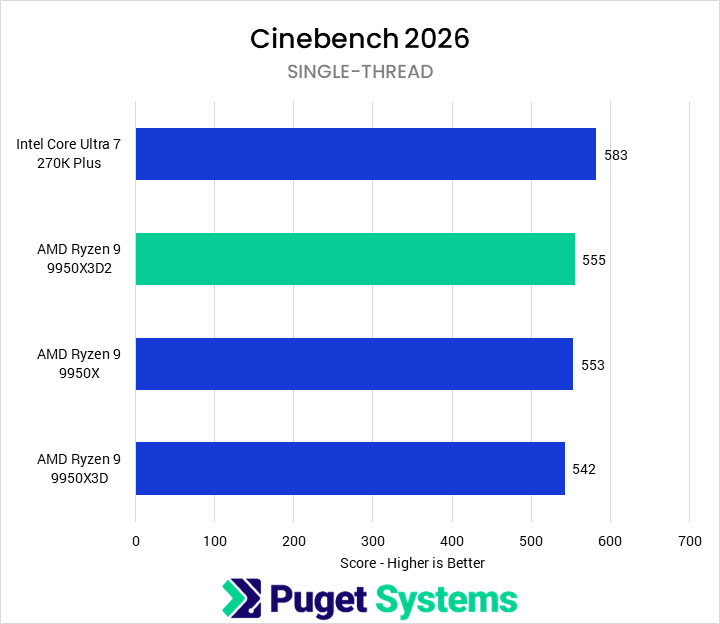
Starting off with Cinebench 2026, we found that the 9950X3D2 Dual Edition offered great performance compared to the 9950X3D and 9950X in the multi-score benchmark (Chart #1). It led the former by 6% and the latter by 9%. However, it did still fall short of the (much cheaper) 270K Plus, which had a slight 1% lead over the 9950X3D2.
Intel’s lead was even more significant in the single-threaded benchmarks (Chart #2), with the 270K Plus scoring 5% higher than the 9950X3D2. AMD was still able to push more performance out of its new processor, though, and the 9950X3D2 was 2% faster than the 9950X3D, tying the 9950X.
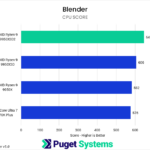
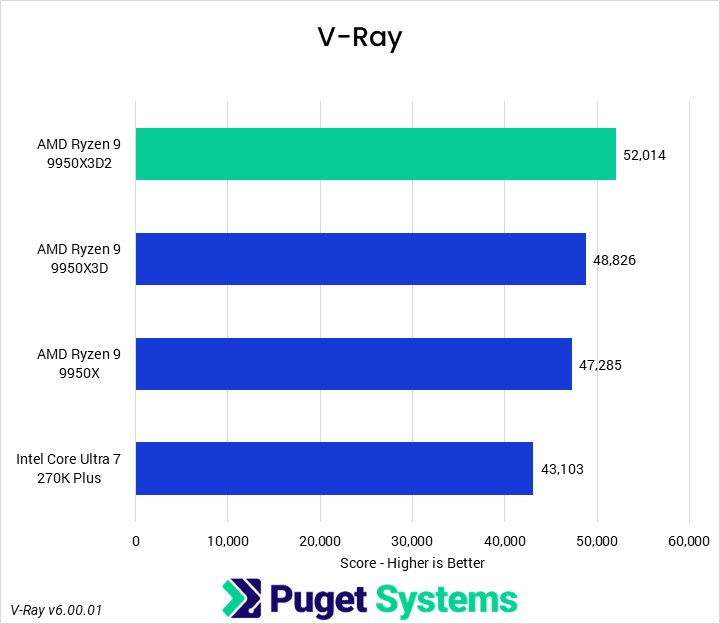
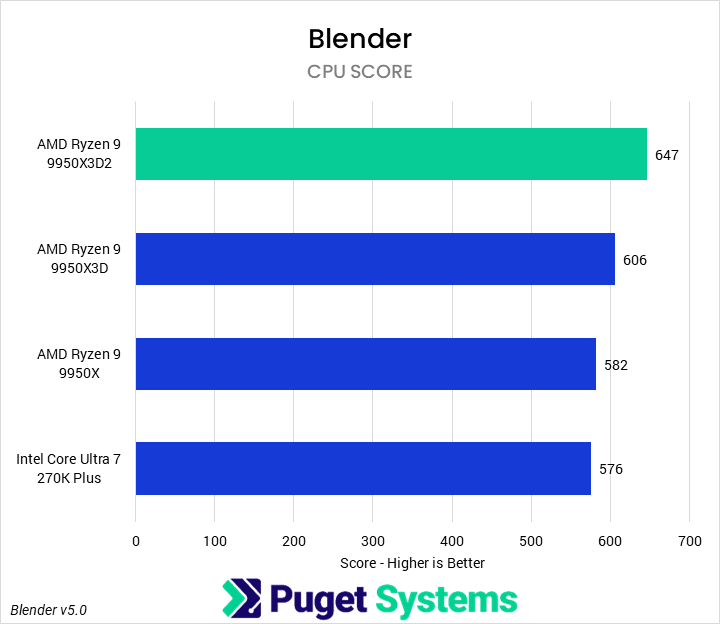
V-Ray (Chart #3) performance has, in recent years, been one of AMD’s areas of strength. The 9950X3D2 was the fastest desktop processor we tested, beating the 9950X3D by 7%, the 9950x by 10%, and the 270K Plus by 21%. Similarly, in Blender (Chart #4), the 9950X3D2 Dual Edition is 7% faster than the 9950X3D, 11% faster than the 9950X, and 12% faster than the 270K Plus.
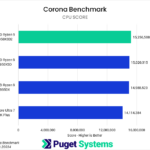
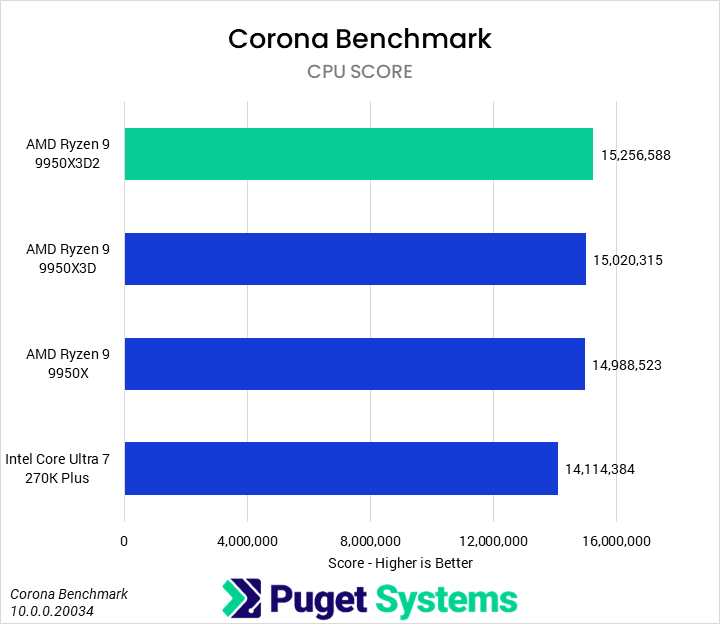
As we mentioned above, Corona (Chart #5) is a new benchmark we have added to our testing suite, so we do not have historical data for it. In Corona, we found that the 9950X3D2 was not only the fastest, but also achieved what was possibly the highest numerical score in any benchmark we have ever run: nearly 15.2 million… points? Anyway, the 9950X3D2 was 2% faster than the 9950X3D and 9950X in Corona, and 8% faster than the 270K Plus.
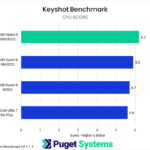
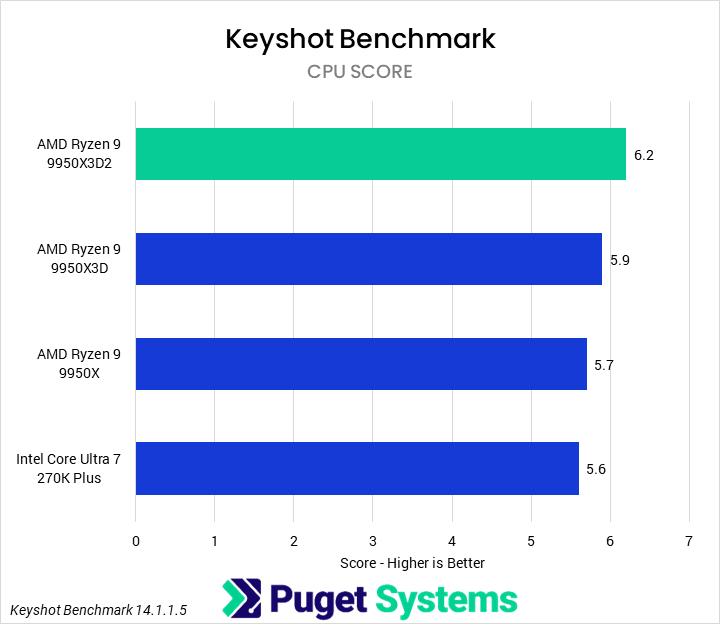
Keyshot (Chart #6) is also a new benchmark for us, and is yet another application where the 9950X3D2 dominates, this time with a score of 6.2 (not million). It was 5% faster than the 9950X3D, 9% faster than the 9950X, and 11% faster than the 270K Plus.
Other than Cinebench, the 9950X3D2 Dual Edition not only leads the charts, but also achieved notable improvements over all the other tested processors, often beating the 9950X by 7% and the 270K Plus by about 10%. For large renders, that could represent a significant time savings, but potential buyers will have to weigh that against the increased price.
VFX: Houdini
Next up is Houdini, a new application in our testing suite. Houdini is a very popular procedural simulation software that is used more and more in both VFX and game development. Our testing covers a few of the most common solvers, specifically Pyro, POP, FLIP, and RBD Bullet Solvers.




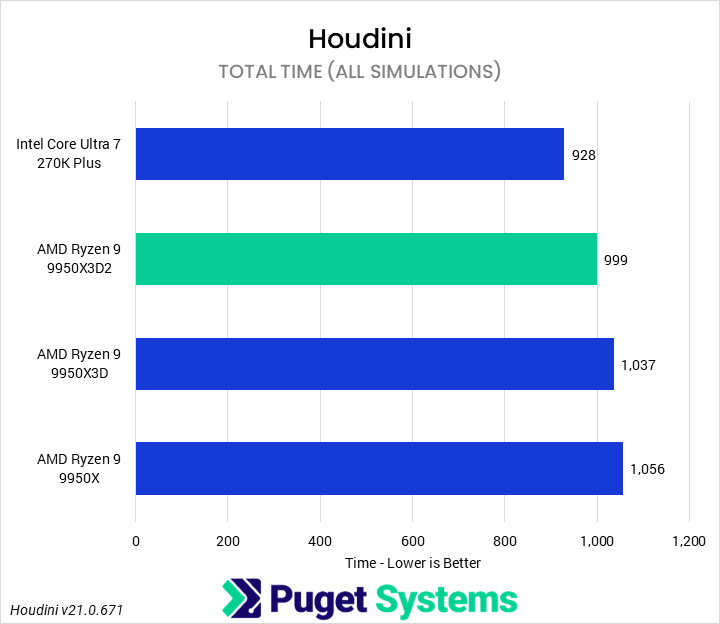
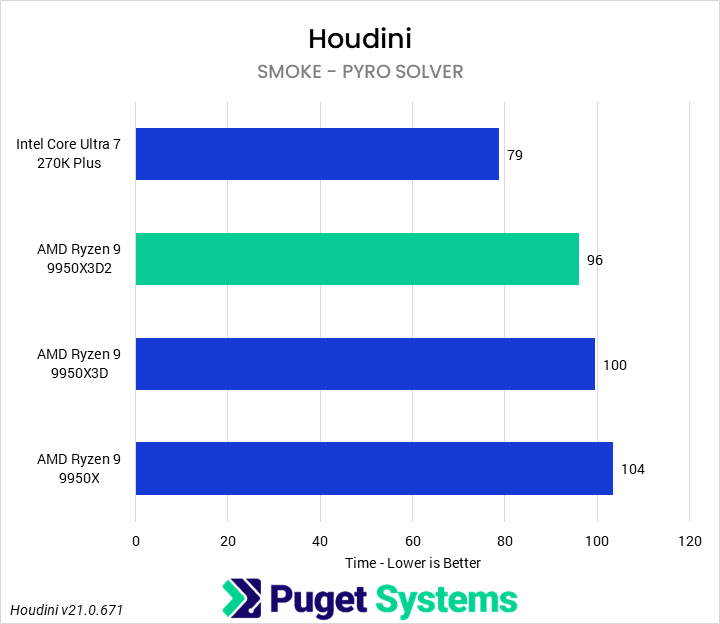
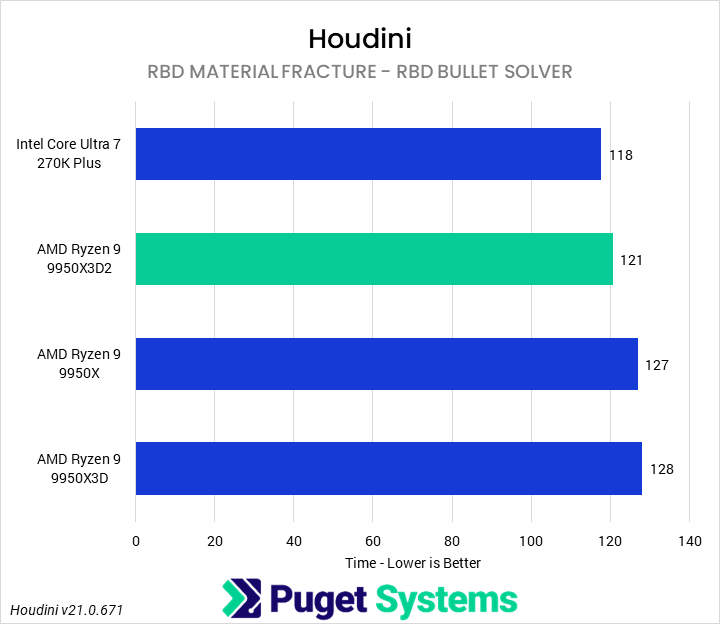
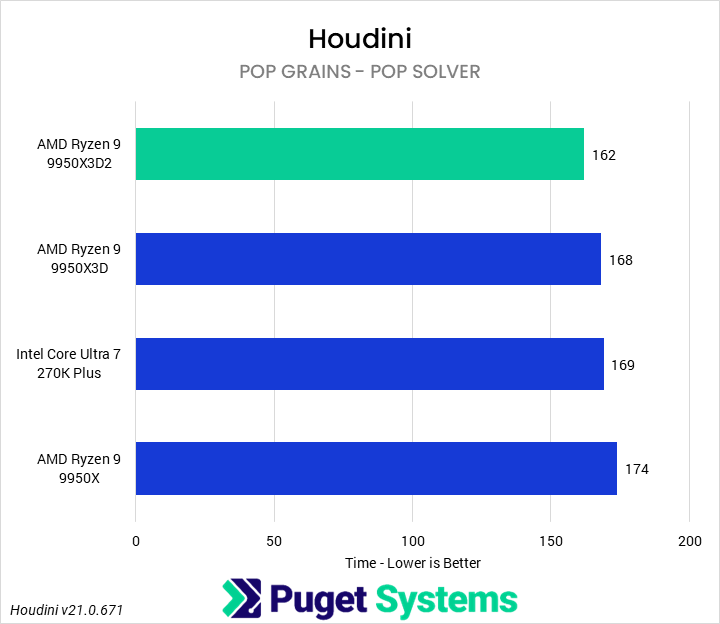
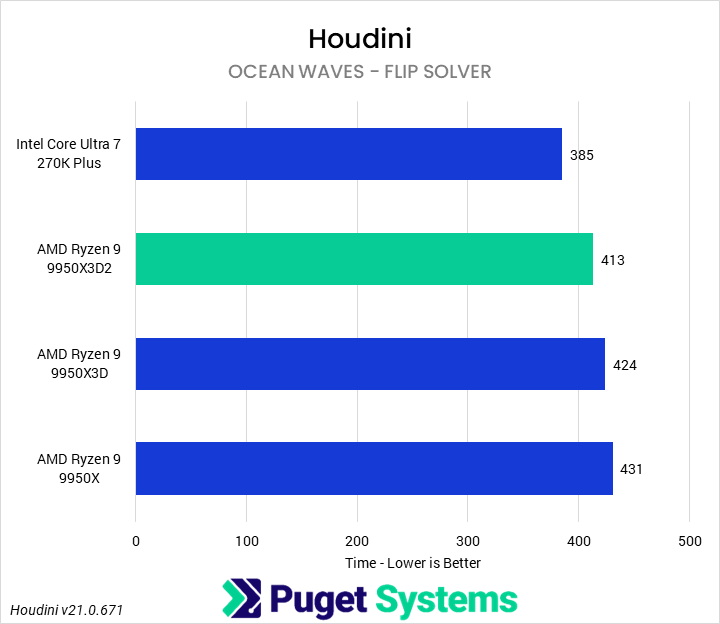
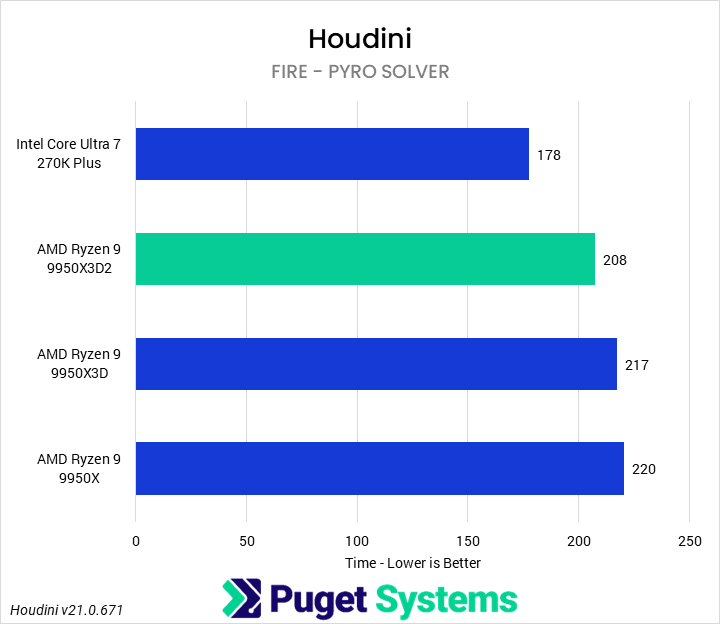
The Ryzen 9950X3D2 Dual Edition shows a small but consistent improvement over the 9950X3D across all of the simulation workloads we currently include in this benchmark. While the differences are not large enough to justify an upgrade from a system already equipped with the X3D, the gains are steady. Across the full suite, the 9950X3D2 completes the combined workload in 998.9 seconds versus 1037.1 seconds on the 9950X3D, putting it ahead by about 3-4%.
Looking at individual simulations, the pattern is fairly consistent. All solvers tested show modest improvements with the 9950X3D2, typically in the 2-6% range, depending on the workload. The largest gains appear in the more heavily multi-frame simulations, such as Fracture and Fire, while Grain and Fluid show smaller but still measurable improvements. Overall, this suggests a broad, balanced uplift rather than a change that benefits only a specific type of solver.
Compared to the Intel Core Ultra 7 270K Plus, the results are more mixed and largely workload-dependent. The 270K Plus maintains a strong position in several simulations, particularly Smoke, Fluid, and Fire, where it leads by noticeable margins. However, the 9950X3D2 pulls ahead in Grain. When viewed as a whole, the 270K Plus completes the full suite in 927.99 seconds versus 998.91 seconds for the 9950X3D2, giving Intel an overall lead in this specific test mix.
It is also worth emphasizing that this is an early look at Houdini performance using a benchmark that is still under active development. These results are based on a limited but representative set of simulation types – smoke, fire, fluids, grains, and rigid body fracture – and do not yet cover the full breadth of Houdini workflows. As we expand this testing in future updates, including additional solvers and more complex production-style scenes, these relative positions may shift. We will have a follow-up article further detailing these tests soon.
AI: Llama Inference
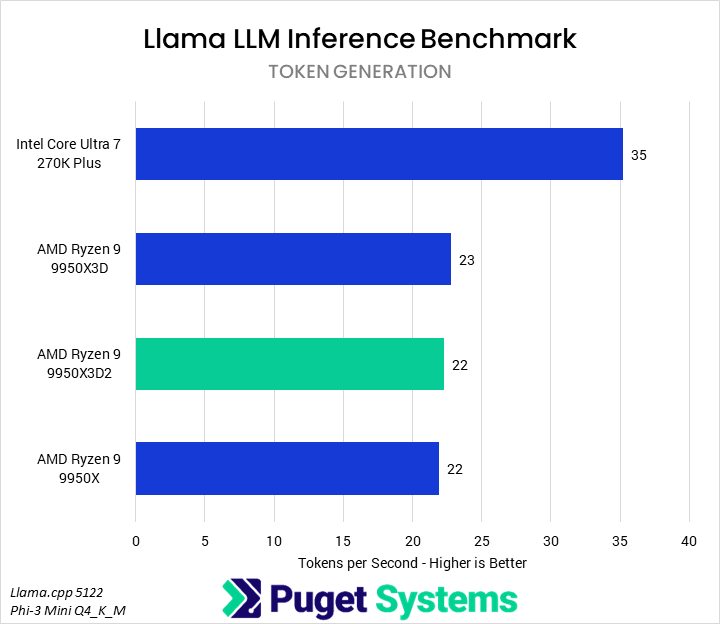
As with rendering, most users won’t want to run an LLM on a CPU. However, we do have an in-house Llama.cpp benchmark that runs a small LLM directly on the CPU for those for whom that may be relevant. Past testing has found basically no impact on MLPerf Client performance with any modern processors, so we have skipped that benchmark for this review.
System Image
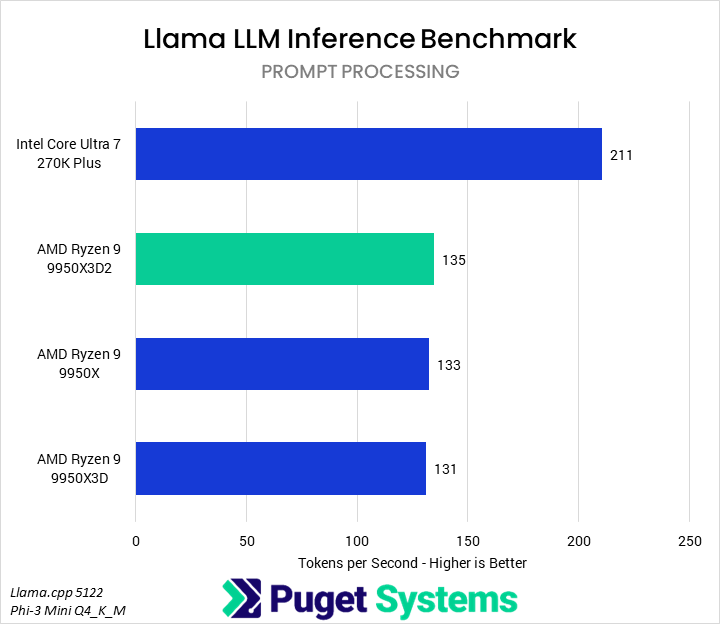
The first result we examine in our benchmark is prompt processing (Chart #1). We found that the 9950X3D2 offered very little performance improvement over the 9950X and 9950X3D, and was substantially slower than the 270K Plus. Similarly, in token generation (Chart #2), the AMD processors were all functionally identical and about 35% slower than the 270K Plus.
Realtime Rendering: Unreal Engine & Unigine
Unlike most reviewers, we don’t typically examine CPU performance in real-time renderers or game engines. This is for two reasons. First, we don’t test games, and looking at pure engine performance only paints half the picture of game performance anyway due to other tasks, such as simulation, that occur alongside serving frames to the GPU. Second, for most game dev tasks, in-engine performance is fairly irrelevant – it may be nice to move around at 60 fps, but 30 is sufficient for placing assets and checking lighting, and the lack of optimizations means that the CPU is rarely the bottleneck.
Nonetheless, it is good to occasionally check in on the current performance deltas between various CPUs, especially when they are marketed for gaming and game development, so we have included both our in-house Unreal Engine GPU benchmark and the industry-standard Unigine Superposition benchmark.

System Image
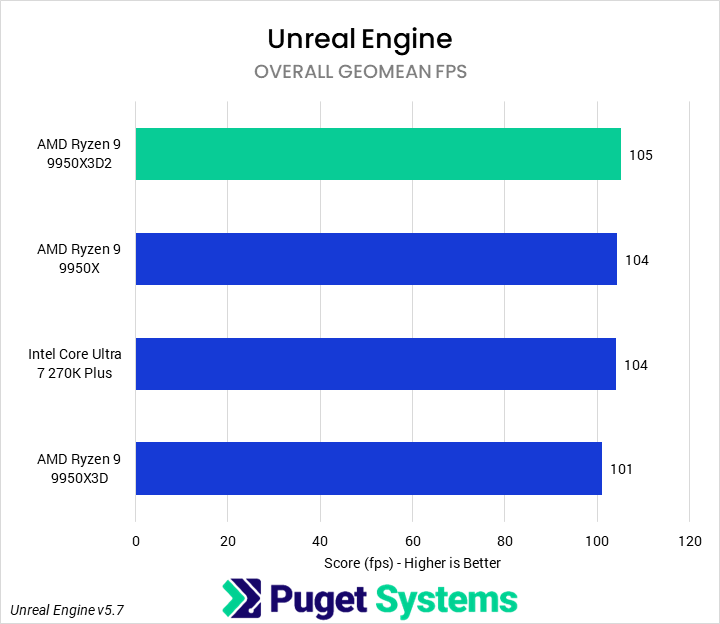
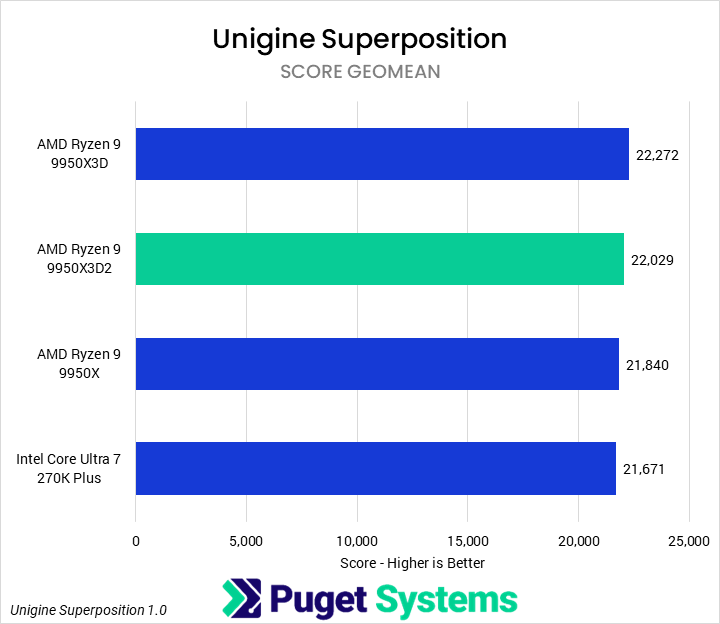
Starting with our Unreal Engine FPS test (Chart #1), we saw essentially no difference between any of the tested CPUs. This is a blended score of 9 different scene/resolution combinations, but even at the nominally least-GPU-bound settings (1080p without raytracing), we still saw functionally no difference. Similarly, in Unigine (Chart #2), there was no noticeable performance difference between any of the CPUs. Again, this is a blended score of 4 different resolution/quality settings, but the results were very similar when just examining the 1080p High results.
At this tier of processor, the GPU is the primary bottleneck in these real-time benchmarks. Game reviews likely will see differentiation between the 9950X3D2 Dual Edition and other processors, but as noted above, that will be due to myriad other factors influencing game performance rather than just the raw ability to feed a GPU frames. Additionally, a large difference maker for CPUs in games tends to also be frame consistency, which is not captured in these benchmarks and is not relevant for game developers.
Is The 9950X3D2 Dual Edition the Ultimate Processor for Creative Professionals?
Yes, AMD’s new Ryzen 9 9950X3D2 Dual Edition is indeed the ultimate processor for a wide range of creative professionals – offering unmatched performance across a large portion (though not all) of our benchmark suite. The increased cache and power draw allowed it to continue to claw performance in a variety of both single-and multi-threaded workflows, and continue to extend AMD’s lead in workloads such as rendering and game development. And, while we didn’t test it here, we have no doubt that it is also a gaming powerhouse, allowing uncompromising performance both on and off the clock – if you can stomach the price.
In Lightroom Classic, Premiere, Cinebench, and Houdini, the 9950X3D2 was not the fastest processor; that was the Intel Core Ultra 7 270K Plus, though often by a small but non-negligible margin. We were somewhat surprised by the Houdini result, but otherwise, these are applications where Intel has traditionally held an advantage. However, the 9950X3D2 was still always faster than the 9950X3D, often outperforming it by 5-10%.
Photoshop, After Effects, and DaVinci Resolve all favored the 9950X3D2, though. Across these applications, it was typically about 4% faster than the 9950X3D. Compared to the 270K Plus, it varied more, with a huge 21% lead in Photoshop, but small 3% leads in Resolve and After Effects. After Effects was particularly odd, though, as the 270K Plus was noticeably faster for traditional 2D workflows, while the 9950X3D2 offered better all-around and 3D performance.
Heavy CPU workloads are where we truly expected the 9950X3D2 to shine, and it did not disappoint. In our Unreal Engine benchmarks, we found that the 9950X3D2 was generally the fastest CPU, with performance improvements over the 9950X3D of up to 13%. Similarly, in most of our rendering benchmarks, it managed an average of 7% better performance than the 9950X3D and 10% better than the 270K Plus.
Our only hang-up is the price. The Ryzen 9 9950X3D2 Dual Edition is a CPU designed for people who use their computer to make money, so any time saved means additional projects you can take on, or more free time not chained to your desk. So on the one hand, price is largely irrelevant as long as it is faster, which it is. Nonetheless, when the 9950X3D is $200 less, the 9850X3D is 45% cheaper, and the 270K Plus is one-third the price, potential purchasers must consider what the budget savings on a slightly slower processor could buy instead – perhaps a better GPU, or more RAM?
That being said, with the Ryzen 9 9950X3D2 Dual Edition, AMD has released a true monster of a flagship processor, delivering the best overall processor in the world for both gaming and content creation; a true successor to the 9950X3D.
If you need a powerful computer to tackle the applications we’ve tested, the Puget Systems workstations on our solutions page are tailored to excel in various software packages. If you prefer a more hands-on approach, our custom configuration page helps you configure a system that matches your specific needs. Or, if you would like guidance to select hardware for your unique workflow, our knowledgeable technology consultants are here to lend their expertise.

Looking for a new desktop workstation?
We build computers tailor-made for your workflow.

Don’t know where to start?
We can help!
Get in touch with one of our technical consultants today.