Skip to content
Main Navigation Puget Systems Logo
  • Solutions
    • Media & Entertainment
      • Photo Editing
        • Recommended Systems For:
        • Adobe Lightroom Classic
        • Adobe Photoshop
        • Stable Diffusion
      • Video Editing & Motion Graphics
        • Recommended Systems For:
        • Adobe After Effects
        • Adobe Premiere Pro
        • DaVinci Resolve
        • Foundry Nuke
      • 3D Design & Animation
        • Recommended Systems For:
        • Autodesk 3ds Max
        • Autodesk Maya
        • Blender
        • Cinema 4D
        • Houdini
        • ZBrush
      • Live Video Production
        • Recommended Systems For:
        • vMix
        • Live Streaming
      • Real-Time Engines
        • Recommended Systems For:
        • Game Development
        • Unity
        • Unreal Engine
        • Virtual Production
      • Rendering
        • Recommended Systems For:
        • Keyshot
        • OctaneRender
        • Redshift
        • V-Ray
      • Digital Audio
        • Recommended Systems For:
        • Ableton Live
        • FL Studio
        • Pro Tools
    • Engineering
      • Architecture & CAD
        • Recommended Systems For:
        • Autodesk AutoCAD
        • Autodesk Inventor
        • Autodesk Revit
        • SOLIDWORKS
      • Visualization
        • Recommended Systems For:
        • Enscape
        • Keyshot
        • Lumion
        • Twinmotion
      • Photogrammetry & GIS
        • Recommended Systems For:
        • ArcGIS Pro
        • Agisoft Metashape
        • Pix4D
        • RealityScan
    • AI & HPC
      • AI Development & Deployment
        • Recommended Systems For:
        • AI Development
        • AI Deployment & Inference
        • Servers for Scaling AI & LLMs
      • High Performance Computing
        • Recommended Systems For:
        • Data Science
        • Scientific Computing
    • More
      • Recommended Systems For:
      • Compact Size
      • NVIDIA RTX Studio
      • Quiet Operation
      • Virtual Reality
    • Business & Enterprise
      We can empower your company
    • Government & Education
      Services tailored for your organization
  • Products
    • Puget Mobile
      Powerful laptop workstations
      • Puget Mobile 16″
        Intel Core Ultra + NVIDIA GeForce
    • Puget Workstations
      High-performance Desktop PCs
      • AMD Ryzen
        Powerful CPUs with up to 16 cores
      • AMD Threadripper
        High core counts and lots of PCIe lanes
      • AMD EPYC
        Server-class CPUs in a workstation
      • Intel Core Ultra
        Balanced single- and multi-core performance
      • Intel Xeon
        Workstation CPUs with AVX512
      • Configure a Custom PC Workstation
        Configure a PC for your workflow
    • Puget Rackstations
      Workstations in rackmount chassis
      • AMD
        Ryzen, Threadripper, and EPYC CPUs
      • Intel
        Core Ultra and Xeon Processors
      • Configure a Custom Rackmount Workstation
        Tailored 4U, 5U, and 6U rack systems
    • Puget Servers
      Enterprise-class rackmount servers
      • 1U Rackmount
        Dense CPU compute servers
      • 2U Rackmount
        Mixed CPU and GPU solutions
      • 4U Rackmount
        High-density GPU computing
      • Comino Grando GPU Servers
        Liquid-cooled GPU rackmount systems
      • Custom Servers
        Engineered to meet your unique needs
    • Puget Storage
      Solutions from desktop to datacenter
      • Network-Attached Storage
        Synology desktop and rackmount NAS
      • Software-Defined Storage
        Datacenter solutions with QuantaStor
    • Recommended Third Party Peripherals
      Curated list of accessories for your workstation
    • Puget Bench for Creators
      Professional benchmarking tools
  • Publications
    • Articles
    • Blog Posts
    • Case Studies
    • HPC Blog
    • Podcasts
    • Press
  • Support
    • Contact Support
    • Onsite Services
    • Support Articles
    • Unboxing
    • Warranty Details
  • About Us
    • About Us
    • Careers
    • Contact Us
    • Enterprise
    • Gov & Edu
    • Our Customers
    • Press Kit
    • Puget Gear
    • Testimonials
  • Talk to an Expert
  • My Account
  1. Home
  2. /
  3. Hardware Articles
  4. /
  5. Impact of RAM Speed on AMD Threadripper PRO Content Creation Performance

Impact of RAM Speed on AMD Threadripper PRO Content Creation Performance

Posted on September 2, 2025 (September 2, 2025) by Evan Lagergren | Last updated: September 2, 2025
LinkedIn

Table of Contents

  • Introduction
  • Test Setup
  • Media and Entertainment
  • Rendering
  • Unreal Engine & AI
  • What Impact Does Memory Speed Have On Threadripper PRO 9000?

Introduction

AMD’s newest Threadripper™ processors—the Threadripper™ PRO 9000 WX-series and Threadripper™ 9000 series—support registered DDR5 memory at up to 6400 MT/s (megatransfers per second). This is an improvement from the last-generation 7000 parts, which only supported up to 5200 MT/s. While it is impressive that AMD and motherboard partners were able to support this on existing TRX50 and WRX90 motherboards, it does throw a curveball for those looking to upgrade their Threadripper™ 7000-based computer: do you need to also upgrade your RAM to get the best results? Additionally, the supply of 6400 MT/s RDIMMs has been shaky so far, and a little more expensive, so some users may be inclined to go with a cheaper 5600 MT/s kit.
The article title on a blue field.
Image
Open Full Resolution

In this article, we will examine the impact of RAM speeds on the new Threadripper PRO 9000WX processors in content creation applications. To do so, we selected two of these processors, the 9955WX and 9995WX, and tested them with 5200, 5600, and 6400 MT/s registered memory modules running at standard JEDEC settings. At 6400 MT/s, we also tested with both four- and eight-channel memory configurations.

In the future, we would like to investigate this further by looking at more processors, higher-clocked modules, and a wider range of memory channels. However, this investigation should cover the most common scenarios for the Threadripper PRO parts and be illustrative for the Threadripper 9000 CPUs as well.

Test Setup

AMD WRX90 Test Platforms

CPUs:
AMD Ryzen™ Threadripper™ PRO 9995WX
AMD Ryzen™ Threadripper™ PRO 9955WX
RAM:
Micron DDR5-6400 ECC Reg. 64GB (512 GB total)
Kingston DDR5-5600 ECC Reg. 32GB (128 GB total)
Kingston DDR5-5200 ECC Reg. 32GB (128 GB total)
CPU Cooler: Asetek 836S-M1A 360mm
Motherboard: ASUS Pro WS WRX90E-SAGE SE
BIOS version: 1203
GPU: NVIDIA GeForce RTX™ 5080
Driver 576.80
Storage: Samsung 980 Pro 2TB
PSU: Super Flower LEADEX Platinum 1600W
OS: Windows 11 Pro 64-bit (26100)

Benchmark Software

Adobe Photoshop 26.8 – Puget Bench for Photoshop 1.0.5
Adobe Premiere Pro 25.2.3 – Puget Bench for Premiere Pro 1.1.1
Adobe After Effects 25.3.1 – Puget Bench for After Effects 1.0
DaVinci Resolve 20.0.1.6– Puget Bench for DaVinci Resolve 1.2.0
Blender 4.4.0
V-Ray 6.00.01
Cinebench 2024
Unreal Engine 5.5
Visual Studio 2022
Llama.cpp 5122
Phi-3 Mini Q4

Our overall test configuration was relatively simple this time. All the configurations were tested on the same ASUS WRX90E-SAGE SE motherboard with an NVIDIA GeForce RTX™ 5080. In the BIOS, we disabled overclocking features (though they are much more limited to begin with on workstation boards than consumer desktop platforms) and ensured the RAM was running at its JEDEC specifications. We also verified that we were following the recommended module installation order for the reduced-channel testing, though we haven’t seen this make a large difference in the past. One issue we ran into was an incompatibility between the initial release BIOS (version 1106) and the Micron 6400 MT/s RAM we were testing with; updating to the latest 1203 BIOS fixed this.

On the software side, we are using many of our Puget Bench benchmarks, some of which were also used by AMD as part of their official AMD Ryzen Threadripper PRO 9000 WX-Series unveiling. We supplemented them with several other real-world benchmarks, primarily rendering packages like Blender and V-Ray.

Tower Computer Icon in Puget Systems Colors

Looking for a Content Creation Workstation?

We build computers tailor-made for your workflow. 

Configure a System!
Talking Head Icon in Puget Systems Colors

Don’t know where to start?
We can help!

Get in touch with our technical consultants today.

Talk to an Expert

Media and Entertainment

Bar chart of Overall score in Photoshop.
Bar chart of Overall score in Premiere Pro.
Bar chart of Overall score in After Effects.
Bar chart of Overall score in DaVinci Resolve.
Bar chart of Overall score in Photoshop.
Bar chart of Overall score in Premiere Pro.
Bar chart of Overall score in After Effects.
Bar chart of Overall score in DaVinci Resolve.
Previous Next
System Image
Bar chart of Overall score in Photoshop.
Open Full Resolution
Bar chart of Overall score in Premiere Pro.
Open Full Resolution
Bar chart of Overall score in After Effects.
Open Full Resolution
Bar chart of Overall score in DaVinci Resolve.
Open Full Resolution
Previous Next

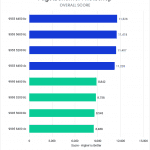
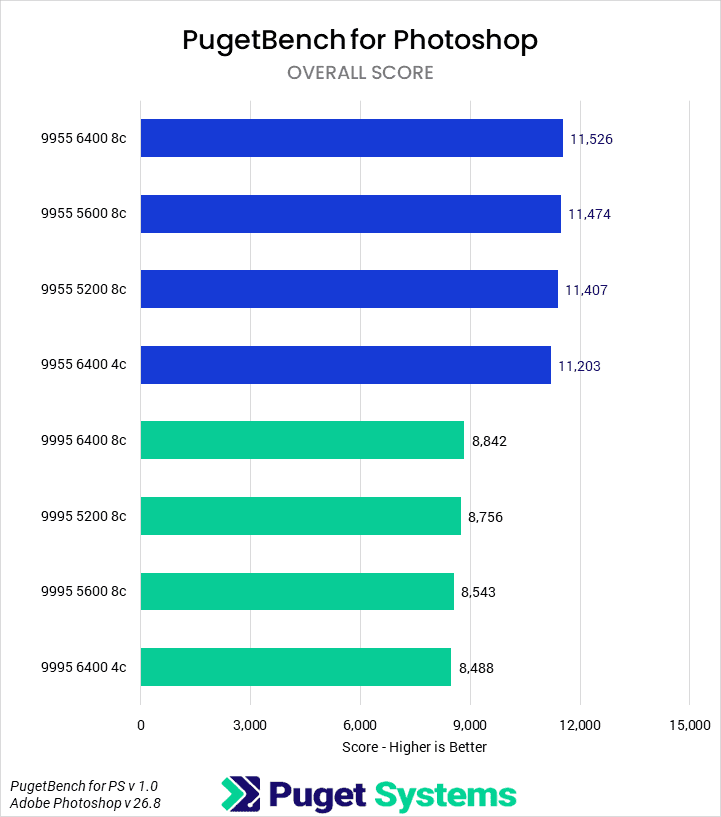
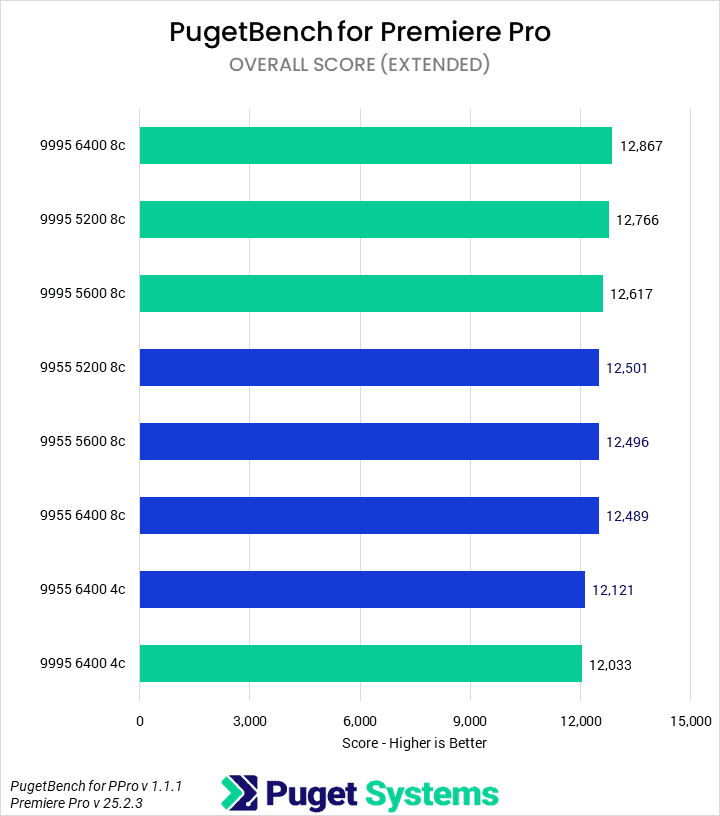
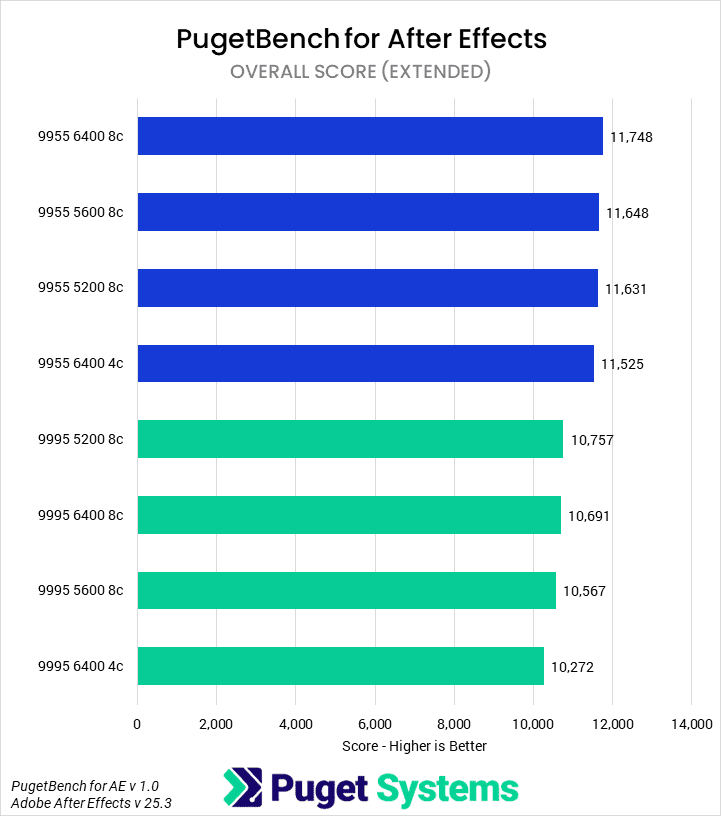
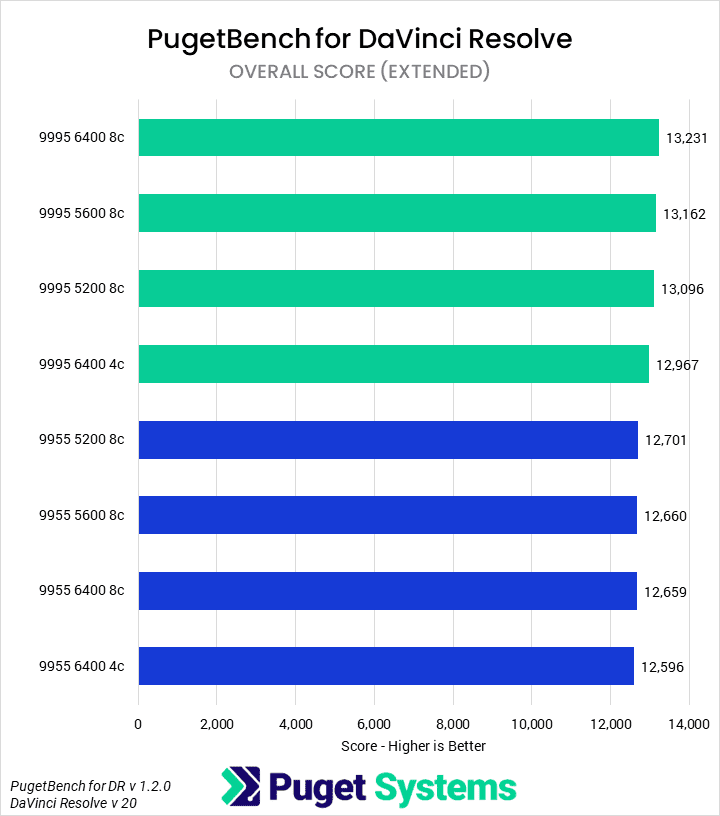
In media and entertainment workflows—applications like Adobe Photoshop and Premiere Pro—we have historically seen little performance improvement from RAM speed. This trend continued. In Photoshop, the overall spread was about 3%. We saw more difference when dropping memory channels, but it was still minor enough not to make a real difference. Premiere Pro was essentially the same, although the memory channel reduction was even more apparent here, with the 4-channel configuration on the Threadripper PRO 9995WX 8% slower than with the full 8 channels. These results held true in After Effects and DaVinci Resolve as well.

If you primarily work with standard media and entertainment workflows, the performance gains from higher-clocked RAM are minor. With overclocked memory, where frequencies would be even higher and timings tighter, there may be more of a benefit—but we don’t expect it to be huge, and it could come at the cost of reduced stability. However, we would caution against leaving memory channels unpopulated.

Rendering
Bar chart of CPU score in Blender.
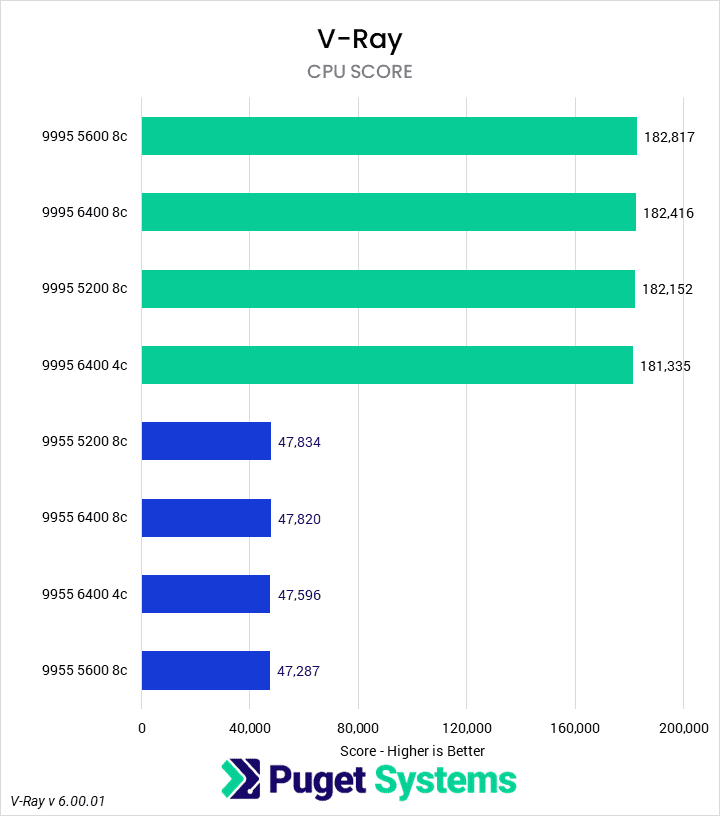
Bar chart of CPU score in V-Ray.
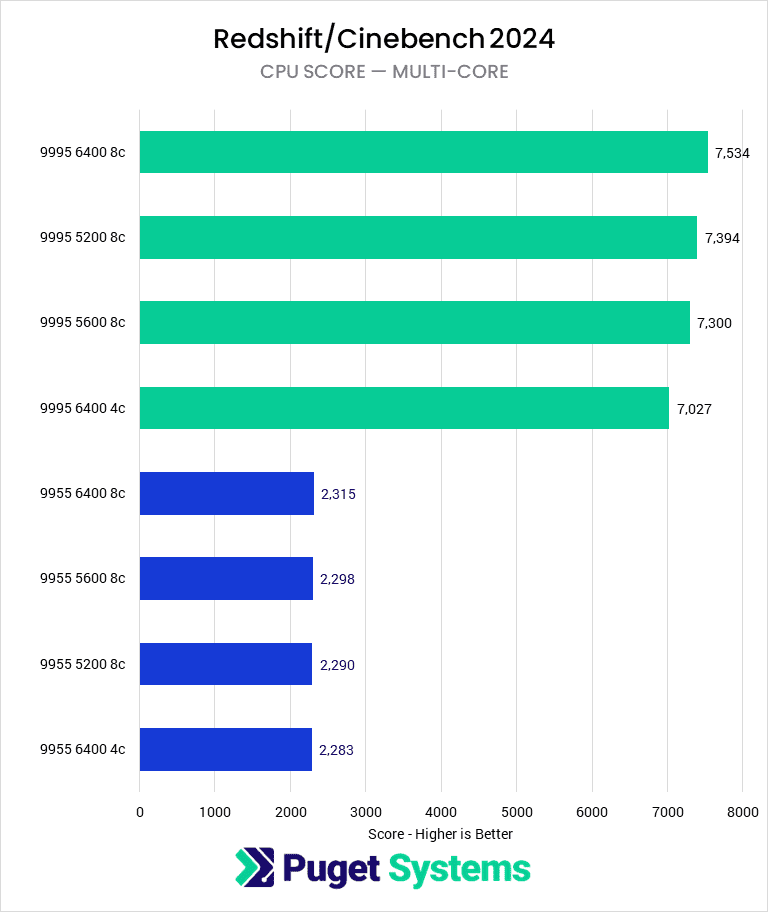
Bar chart of multi-core score in Cinebench 2024.
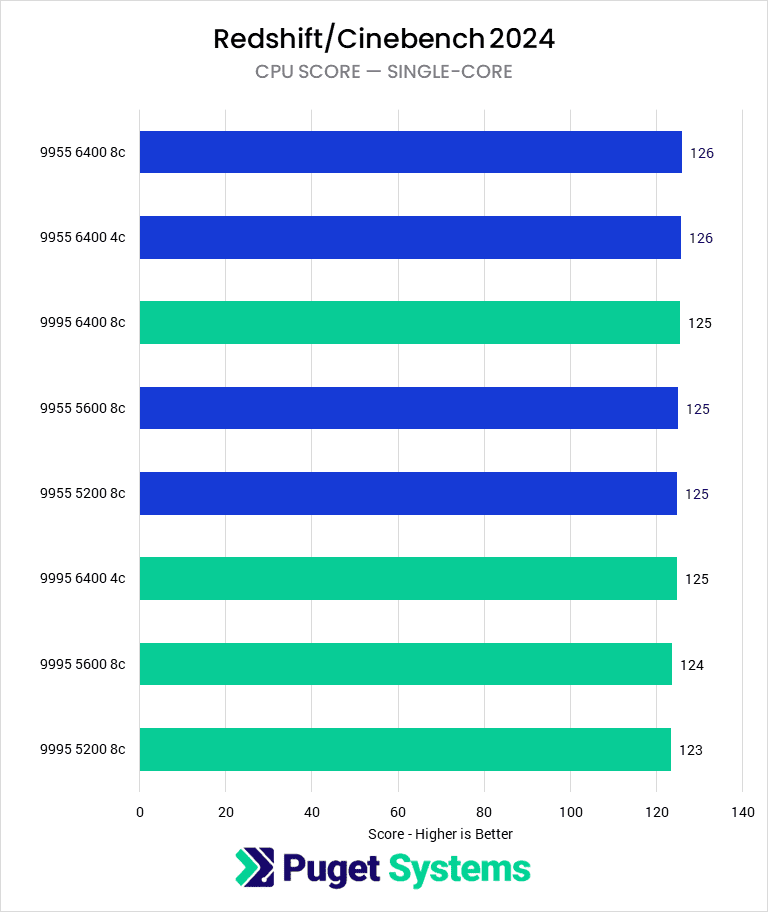
Bar chart of single-core score in Cinebench 2024.
Bar chart of CPU score in Blender.
Bar chart of CPU score in V-Ray.
Bar chart of multi-core score in Cinebench 2024.
Bar chart of single-core score in Cinebench 2024.
Previous Next
System Image
Bar chart of CPU score in Blender.
Open Full Resolution
Bar chart of CPU score in V-Ray.
Open Full Resolution
Bar chart of multi-core score in Cinebench 2024.
Open Full Resolution
Bar chart of single-core score in Cinebench 2024.
Open Full Resolution
Previous Next

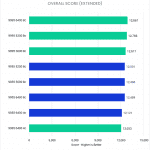
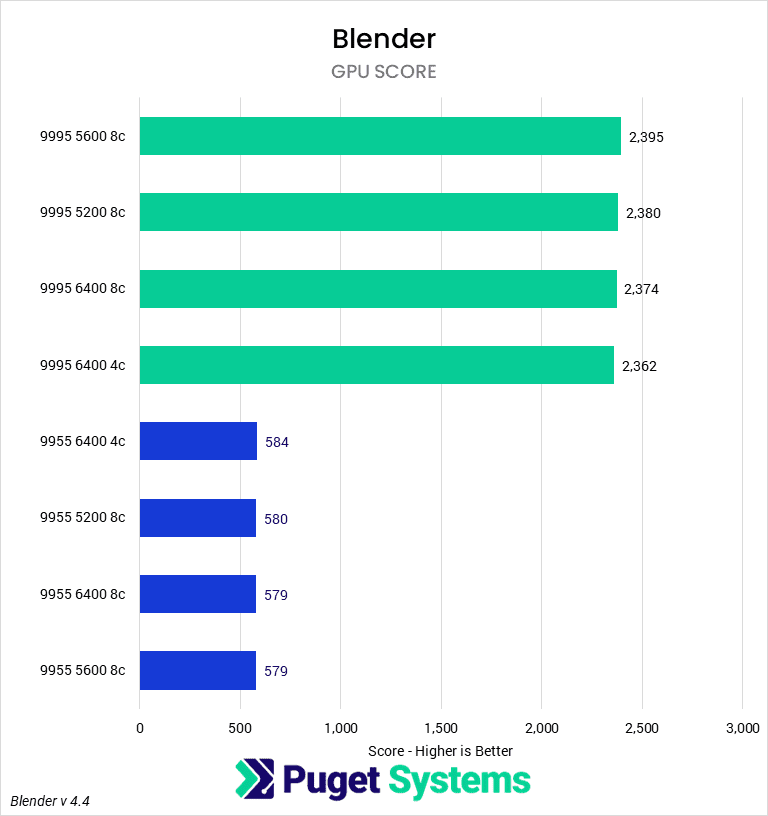
In V-Ray and Blender, performance impacts from memory (both frequency and channels) were less than 1%. Cinebench was more sensitive, but the spread was still only about 3%—save for the 9995WX 4-channel configuration, which was slightly lower. We wouldn’t normally expect much impact from memory speed on rendering, and didn’t see any here.

Unreal Engine & AI
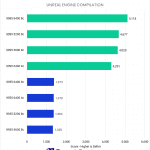
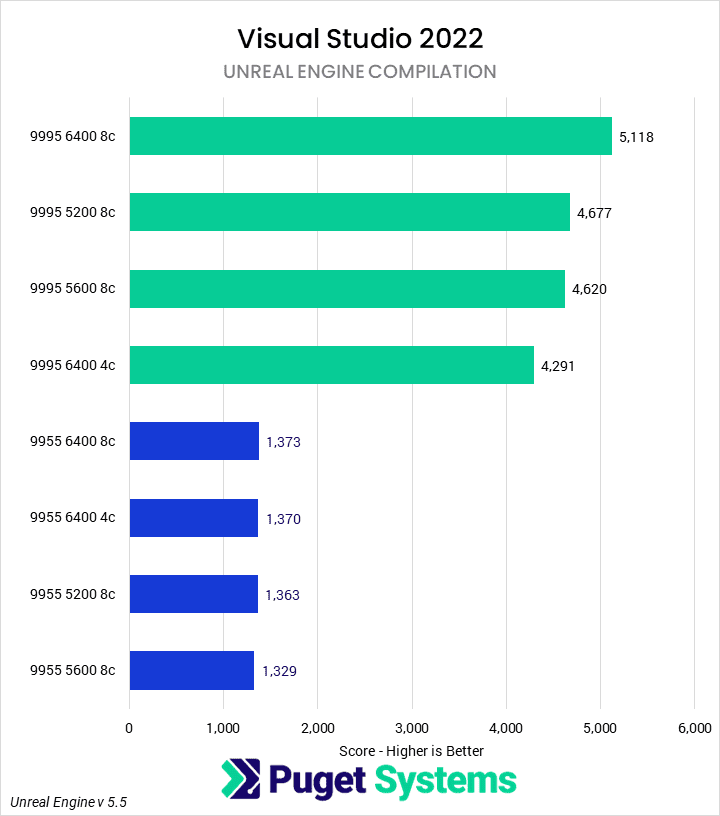
Bar chart of Unreal Engine compile time in Visual Studio 2022.
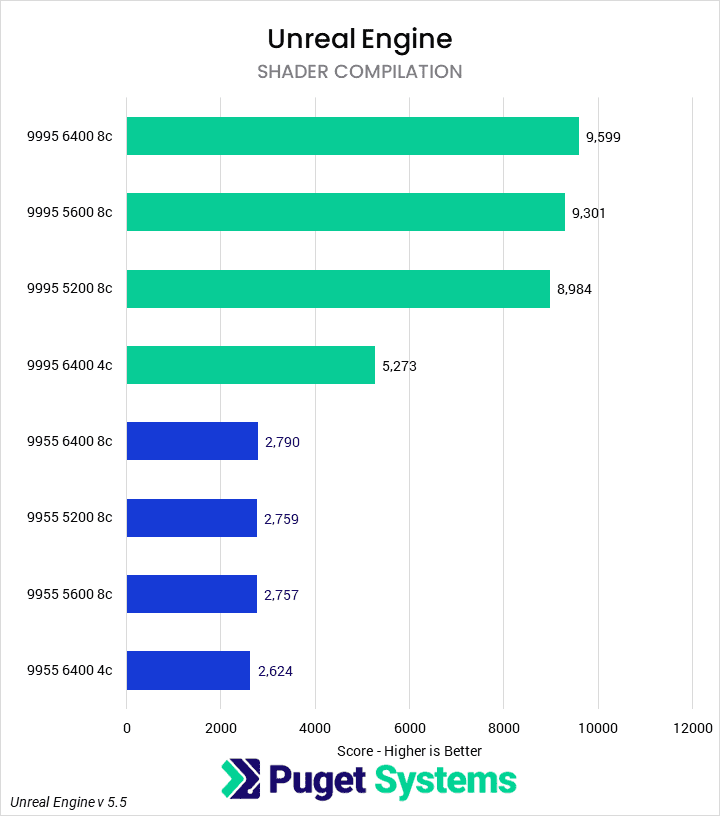
Bar chart of Shader Compilation time in Unreal Engine.
Bar chart of Light Building time in Unreal Engine.
Bar chart of Geomena tokens per second in LLM inference benchmark.
Bar chart of Unreal Engine compile time in Visual Studio 2022.
Bar chart of Shader Compilation time in Unreal Engine.
Bar chart of Light Building time in Unreal Engine.
Bar chart of Geomena tokens per second in LLM inference benchmark.
Previous Next
System Image
Bar chart of Unreal Engine compile time in Visual Studio 2022.
Open Full Resolution
Bar chart of Shader Compilation time in Unreal Engine.
Open Full Resolution
Bar chart of Light Building time in Unreal Engine.
Open Full Resolution
Bar chart of Geomena tokens per second in LLM inference benchmark.
Open Full Resolution
Previous Next

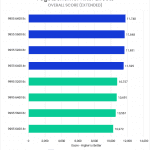
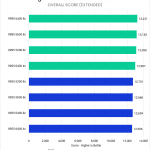
Unlike our previous categories, our various Unreal Engine tests have often shown scaling with memory bandwidth and frequency. In this round of testing, the Unreal Engine compilation test using Visual Studio found that the 6400 MT/s 8-channel memory for the Threadripper PRO 9995WX was 10% faster than the 5200 and 5600 MT/s configurations. Additionally, it was 20% faster than the 4-channel configuration. Interestingly, though, we didn’t see this same performance impact on the 9955WX. We suspect that the 9955WX does not have sufficient cores to make use of the additional memory bandwidth in this workload.

Shader compilation performance was similar. The 9995WX was 3% faster with 6400MT/s than with 5600 MT/s, and 7% than with 5200 MT/s. Reducing the number of channels was also punishing, with the 8-channel configuration being 82% faster than the 4-channel configuration. However, much like in the UE compilation test, the 9955WX saw little difference in time to completion based on memory. All the 8-channel configurations were essentially identical, although reducing to 4-channel did reduce performance by about 6%.

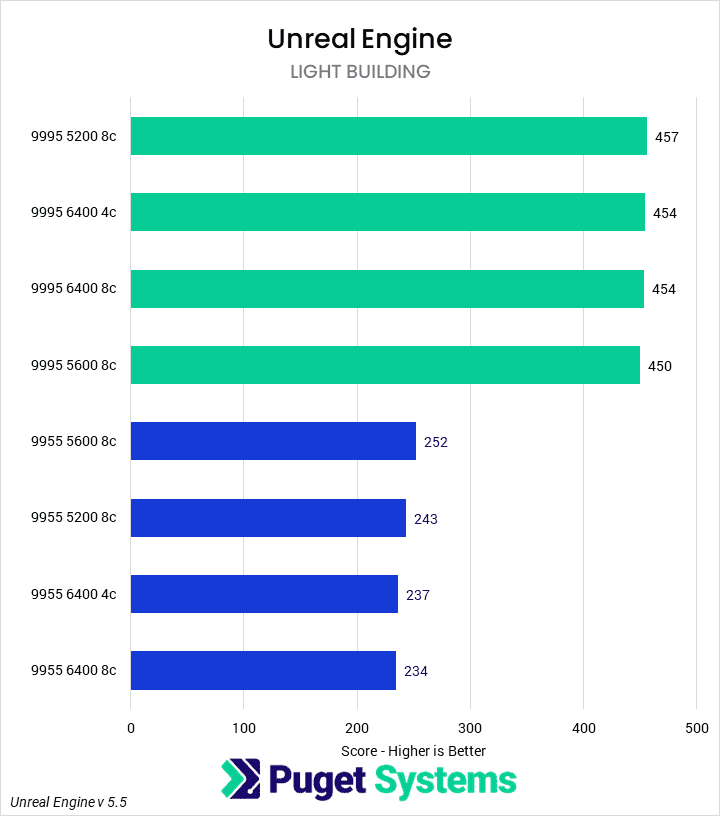
Our Light Baking benchmarks showed no difference in time to completion based on the memory configuration in these tests.

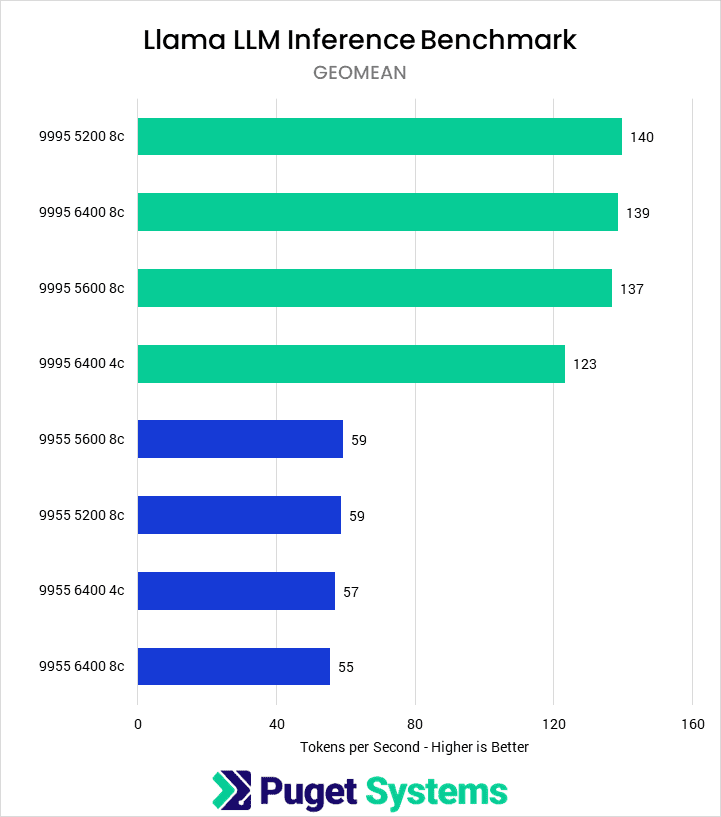
Lastly, we did see some differentiation in the Llama LLM benchmark using Phi Mini Q4. Memory speed made little difference, but for the 96-core part, reducing from eight to four channels dropped performance by about 14%.

What Impact Does Memory Speed Have On Threadripper PRO 9000?

We found that in most applications, increasing memory speed had little performance improvement for either the Threadripper PRO 9995WX or 9955WX. This was surprising given that we saw some scaling with frequency on desktop CPUs the last time we investigated this. The more complex memory subsystem of the Threadripper PRO likely reduces the overall impact. However, we did find that even in applications where memory frequency didn’t have much effect, the number of channels sometimes did. Specifically, for the 96-core 9995WX, we saw a consistent reduction in performance for 4-channel memory vs 8-channel memory at the same frequency.

There were some exceptions as well. In our Unreal Engine code and shader compilation benchmarks, performance scaled with memory frequency on the higher core-count part. This processor appears to be memory-constrained on these workloads. Other memory-intensive workloads in coding, HPC, and AI will likely see similar uplifts. However, this appeared to be irrelevant on the 16-core part, which seemed saturated even at four channels. Although we would have to investigate to be sure, we suspect that the 32-core and 64-core parts will see some, but more minor, improvements with RAM bandwidth in these workflows.


If you need a powerful workstation to tackle the applications we’ve tested, the Puget Systems workstations on our solutions page are tailored to excel in various software packages. If you prefer to take a more hands-on approach, our custom configuration page helps you to configure a workstation that matches your exact needs. Otherwise, if you would like more guidance in configuring a workstation that aligns with your unique workflow, our knowledgeable technology consultants are here to lend their expertise.

Tower Computer Icon in Puget Systems Colors

Looking for a content creation workstation?

We build computers tailor-made for your workflow. 

Configure a System
Talking Head Icon in Puget Systems Colors

Don’t know where to start?
We can help!

Get in touch with one of our technical consultants today.

Talk to an Expert

Related Content

  • A Quick Look at Rendering Performance in Windows vs Linux
  • Rendering Benchmarks vs Reality
  • Exploring PIX4Dmatic Hardware Performance
  • Intel Xeon 6: P-cores vs E-cores for CPU Rendering
View All Related Content

Latest Content

  • 2025 Professional GPU Engineering Roundup
  • 2025 Professional GPU Content Creation Roundup
  • A Quick Look at Rendering Performance in Windows vs Linux
  • Standing Up AI Development Quickly for Supercomputing 2025
View All
Tags: 9955WX, 9995WX, After Effects, AMD, AMD Ryzen Threadripper PRO 9000WX-series, Blender, Cinebench, DaVinci Resolve, DDR5-5200, DDR5-5600, DDR5-6400, Intel, llama.cpp, LLM, Photoshop, Premiere Pro, RAM, Unreal Engine, V-Ray, Visual Studio

Who is Puget Systems?

Puget Systems builds custom workstations, servers and storage solutions tailored for your work.

We provide:

Extensive performance testing
making you more productive and giving better value for your money

Reliable computers
with fewer crashes means more time working & less time waiting

Support that understands
your complex workflows and can get you back up & running ASAP

A proven track record
as shown by our case studies and customer testimonials

Get Started

Browse Systems

Puget Systems Mobile Laptop Workstation Icon

Mobile

Puget Systems Tower Workstation Icon

Workstations

Puget Systems Rackmount Workstation Icon

Rackstations

Puget Systems Rackmount Server Icon

Servers

Puget Systems Rackmount Storage Icon

Storage

Latest Articles

  • 2025 Professional GPU Engineering Roundup
  • 2025 Professional GPU Content Creation Roundup
  • A Quick Look at Rendering Performance in Windows vs Linux
  • Standing Up AI Development Quickly for Supercomputing 2025
  • Rendering Benchmarks vs Reality
View All

Post navigation

 Are AMD Threadripper 9000 CPUs Good for 3D Artists?Intel Arc Pro B50 Review 
Puget Systems Logo
Build Your Own PC Site Map FAQ
facebook instagram linkedin rss twitter youtube

Optimized Solutions

  • Adobe Premiere
  • Adobe Photoshop
  • Solidworks
  • Autodesk AutoCAD
  • Machine Learning

Workstations

  • Media & Entertainment
  • Engineering
  • Scientific PCs
  • More

Support

  • Online Guides
  • Request Support
  • Remote Help

Publications

  • All News
  • Puget Blog
  • HPC Blog
  • Hardware Articles
  • Case Studies

Policies

  • Warranty & Return
  • Terms and Conditions
  • Privacy Policy
  • Delivery Times
  • Accessibility

About Us

  • Testimonials
  • Careers
  • About Us
  • Contact Us
  • Newsletter

© Copyright 2025 - Puget Systems, All Rights Reserved.