Skip to content
Main Navigation Puget Systems Logo
  • Solutions
    • Media & Entertainment
      • Photo Editing
        • Recommended Systems For:
        • Adobe Lightroom Classic
        • Adobe Photoshop
        • Stable Diffusion
      • Video Editing & Motion Graphics
        • Recommended Systems For:
        • Adobe After Effects
        • Adobe Premiere Pro
        • DaVinci Resolve
        • Foundry Nuke
      • 3D Design & Animation
        • Recommended Systems For:
        • Autodesk 3ds Max
        • Autodesk Maya
        • Blender
        • Cinema 4D
        • Houdini
        • ZBrush
      • Live Video Production
        • Recommended Systems For:
        • vMix
        • Live Streaming
      • Real-Time Engines
        • Recommended Systems For:
        • Game Development
        • Unity
        • Unreal Engine
        • Virtual Production
      • Rendering
        • Recommended Systems For:
        • Keyshot
        • OctaneRender
        • Redshift
        • V-Ray
      • Digital Audio
        • Recommended Systems For:
        • Ableton Live
        • FL Studio
        • Pro Tools
    • Engineering
      • Architecture & CAD
        • Recommended Systems For:
        • Autodesk AutoCAD
        • Autodesk Inventor
        • Autodesk Revit
        • SOLIDWORKS
      • Visualization
        • Recommended Systems For:
        • Enscape
        • Keyshot
        • Lumion
        • Twinmotion
      • Photogrammetry & GIS
        • Recommended Systems For:
        • ArcGIS Pro
        • Agisoft Metashape
        • Pix4D
        • RealityScan
    • AI & HPC
      • AI Development & Deployment
        • Recommended Systems For:
        • AI Development
        • AI Deployment & Inference
        • Servers for Scaling AI & LLMs
      • High Performance Computing
        • Recommended Systems For:
        • Data Science
        • Scientific Computing
    • More
      • Recommended Systems For:
      • Compact Size
      • NVIDIA RTX Studio
      • Quiet Operation
      • Virtual Reality
    • Business & Enterprise
      We can empower your company
    • Government & Education
      Services tailored for your organization
  • Products
    • Puget Mobile
      Powerful laptop workstations
      • Puget Mobile 16″
        Intel Core Ultra + NVIDIA GeForce
    • Puget Workstations
      High-performance Desktop PCs
      • AMD Ryzen
        Powerful CPUs with up to 16 cores
      • AMD Threadripper
        High core counts and lots of PCIe lanes
      • AMD EPYC
        Server-class CPUs in a workstation
      • Intel Core Ultra
        Balanced single- and multi-core performance
      • Intel Xeon
        Workstation CPUs with AVX512
      • Configure a Custom PC Workstation
        Configure a PC for your workflow
    • Puget Rackstations
      Workstations in rackmount chassis
      • AMD
        Ryzen, Threadripper, and EPYC CPUs
      • Intel
        Core Ultra and Xeon Processors
      • Configure a Custom Rackmount Workstation
        Tailored 4U, 5U, and 6U rack systems
    • Puget Servers
      Enterprise-class rackmount servers
      • 1U Rackmount
        Dense CPU compute servers
      • 2U Rackmount
        Mixed CPU and GPU solutions
      • 4U Rackmount
        High-density GPU computing
      • Comino Grando GPU Servers
        Liquid-cooled GPU rackmount systems
      • Custom Servers
        Engineered to meet your unique needs
    • Puget Storage
      Solutions from desktop to datacenter
      • Network-Attached Storage
        Synology desktop and rackmount NAS
      • Software-Defined Storage
        Datacenter solutions with QuantaStor
    • Recommended Third Party Peripherals
      Curated list of accessories for your workstation
    • Puget Bench for Creators
      Professional benchmarking tools
  • Publications
    • Articles
    • Blog Posts
    • Case Studies
    • HPC Blog
    • Podcasts
    • Press
  • Support
    • Contact Support
    • Onsite Services
    • Support Articles
    • Unboxing
    • Warranty Details
  • About Us
    • About Us
    • Careers
    • Contact Us
    • Enterprise
    • Gov & Edu
    • Our Customers
    • Press Kit
    • Puget Gear
    • Testimonials
  • Talk to an Expert
  • My Account
  1. Home
  2. /
  3. Hardware Articles
  4. /
  5. 2025 Professional GPU Engineering Roundup

2025 Professional GPU Engineering Roundup

Posted on December 18, 2025 (December 18, 2025) by Evan Lagergren | Last updated: December 18, 2025
LinkedIn

Table of Contents

  • Introduction
  • Test Setup
  • Revit
  • Inventor
  • SOLIDWORKS
  • PIX4Dmatic
  • Conclusion

Introduction

So far in 2025, we have seen the launch of over twenty new desktop GPUs. Although we covered most of them in dedicated reviews, one major area we have been missing is NVIDIA’s new RTX PRO™ Blackwell series—apart from our initial 6000 Blackwell Workstation Edition review. These cards have been in high demand, making it difficult to obtain enough of the lineup to justify a full article. However, we now have nearly every variant of RTX PRO Blackwell in hand! Armed with them, we feel the best approach is to test as many GPUs as possible in as many workflows as possible.

An NVIDIA RTX PRO 6000 Blackwell Workstation video card and article title text overlaid on a blue-tinted screenshot of an engineering application.
Image
Open Full Resolution

For this article, we tested every RTX PRO Blackwell GPU we had, as well as nearly the entire stack of Ada Generation cards. We also included some older or non-NVIDIA cards like the NVIDIA RTX™ A6000, the AMD Radeon™ AI PRO R9700, most of the Radeon™ PRO W7000 series, and even the Intel® Arc™ Pro B50. Our primary focus is on comparing NVIDIA’s current and last-gen cards, but we’re also interested in seeing where other brands can compete.

This article will only cover our recently added architecture, engineering, and construction (AEC) benchmarks, which include CAD, BIM, and photogrammetry software. We also have a companion article looking at the performance of the same GPUs in content creation workflows. Unfortunately, we will not be examining multi-GPU setups in this article.

There aren’t many other reviews available for professional GPUs, especially the more recently released NVIDIA models. However, we do recommend StorageReview’s coverage of the 6000 Blackwell Workstation, especially if you are interested in more in-depth AI performance data. igor’sLAB also released an AMD Radeon AI R9700 review, which includes data for some previous-gen NVIDIA cards.

Below, we have listed specifications for several current and recent professional GPUs, including a few that we were not able to include in this round of testing. For more information, visit the workstation pages for NVIDIA, AMD, or Intel.

wdt_ID wdt_created_by wdt_created_at wdt_last_edited_by wdt_last_edited_at GPU Model Approximate Launch Price VRAM VRAM Bandwidth FP 32 Performance RT Core Performance Matrix Performance TDP Release Date
1 Evan Jun 2025 01:53 PM Evan Jun 2025 01:53 PM NVIDIA RTX PRO 6000 Blackwell Workstation Edition 8,500 96 1,792 125 380 4,000 600 Mar 2025
2 Evan Jun 2025 01:53 PM Evan Jun 2025 01:53 PM NVIDIA RTX PRO 6000 Blackwell Max-Q Workstation Edition 8,500 96 1,792 110 333 3,511 300 Mar 2025
3 Evan Jun 2025 01:53 PM Evan Jun 2025 01:53 PM NVIDIA RTX PRO 5000 Blackwell 4,500 48 1,344 65 196 2,064 300 Mar 2025
4 Evan Jun 2025 01:53 PM Evan Jun 2025 01:53 PM NVIDIA RTX PRO 4500 Blackwell 2,500 32 896 55 166 1,744 200 Mar 2025
5 Evan Jun 2025 01:53 PM Evan Jun 2025 01:53 PM NVIDIA RTX PRO 4000 Blackwell 1,500 24 672 37 112 1,178 145 Mar 2025
6 Evan Jun 2025 01:53 PM Evan Jun 2025 01:53 PM NVIDIA RTX 6000 Ada Generation 6,800 48 960 91 211 1,457 300 Dec 2022
7 Evan Jun 2025 01:53 PM Evan Jun 2025 01:53 PM NVIDIA RTX 5000 Ada Generation 4,000 32 576 65 151 1,044 250 Aug 2023
8 Evan Jun 2025 01:53 PM Evan Jun 2025 01:53 PM NVIDIA RTX 4500 Ada Generation 2,250 24 432 40 92 634 210 Aug 2023
9 Evan Jun 2025 01:53 PM Evan Jun 2025 01:53 PM NVIDIA RTX 4000 Ada Generation 1,250 20 360 27 62 328 130 Aug 2023
10 Evan Jun 2025 01:53 PM Evan Jun 2025 01:53 PM NVIDIA RTX 4000 SFF Ada Generation 1,250 20 280 19 44 307 70 Mar 2023
GPU Model Approximate Launch Price VRAM VRAM Bandwidth FP 32 Performance RT Core Performance Matrix Performance TDP Release Date

Test Setup

Test Platform

CPUs:
AMD Ryzen 9 9950X3D
CPU Cooler: Noctua NH-U12A
Motherboard: ASUS ProArt X670E-Creator WiFi
BIOS Version: 3402
RAM: 2x DDR5-5600 32GB (64 GB total)
PSU: EVGA SuperNOVA 850W P2
Storage: Samsung 980 Pro 2TB
OS: Windows 11 Pro 64-bit (26200)
Power Plan/Mode: Balanced/Best Performance

Intel GPUs

Intel Arc Pro B50
Driver: 101.6979

NVIDIA GPUs

NVIDIA RTX PRO 6000 Blackwell Workstation Edition
NVIDIA RTX PRO 6000 Blackwell Max-Q Workstation Edition
NVIDIA RTX PRO 5000 Blackwell
NVIDIA RTX PRO 4500 Blackwell
NVIDIA RTX PRO 4000 Blackwell
NVIDIA RTX PRO 2000 Blackwell

NVIDIA RTX 6000 Ada Generation
NVIDIA RTX 5000 Ada Generation
NVIDIA RTX 4500 Ada Generation
NVIDIA RTX 4000 Ada Generation
NVIDIA RTX 2000 Ada Generation

NVIDIA RTX A6000
Driver: 573.92

AMD GPUs

AMD Radeon AI PRO R9700

AMD Radeon PRO W7900
AMD Radeon PRO W7800
AMD Radeon PRO W7600
AMD Radeon PRO W7500
Driver: Adrenalin 25.11.1 / PRO 25.Q3.1

Benchmark Software

Autodesk Revit 25.3 — RFO Benchmark 3.4
Autodesk Inventor 29.0 — InvMark 2025.0.15
SOLIDWORKS 2024 5.0 — SPECapc for SOLIDWORKS 2024.1.13
PIX4Dmatic 1.81.1 — 100 image dataset (methodology)

In line with most of our other recent GPU reviews, we performed all the testing for this article on an AMD Ryzen™ 9 9950X3D-based system. The 9950X3D is one of the all-around fastest CPUs available, ensuring that we minimize processor bottlenecks as much as possible. However, we do have a somewhat unique methodology that is worth mentioning. As part of our philosophy of focusing on professional workflows, we limited as many stability-affecting system tweaks as possible. This means PBO and ASUS’s MCE were disabled in the BIOS, the RAM was run at the maximum officially supported JEDEC speeds, and settings like VBS were enabled in Windows.

As far as possible, all the apps, drivers, BIOSs, and benchmarks were on their latest versions. We didn’t reuse past results, and we updated our testing platform prior to this round of tests. The applications we tested with were RFO for Revit, InvMark for Inventor, SPECapc for SOLIDWORKS, and our in-house PIX4Dmatic benchmark. Links with more information about those are available in the expandable section above.

Revit

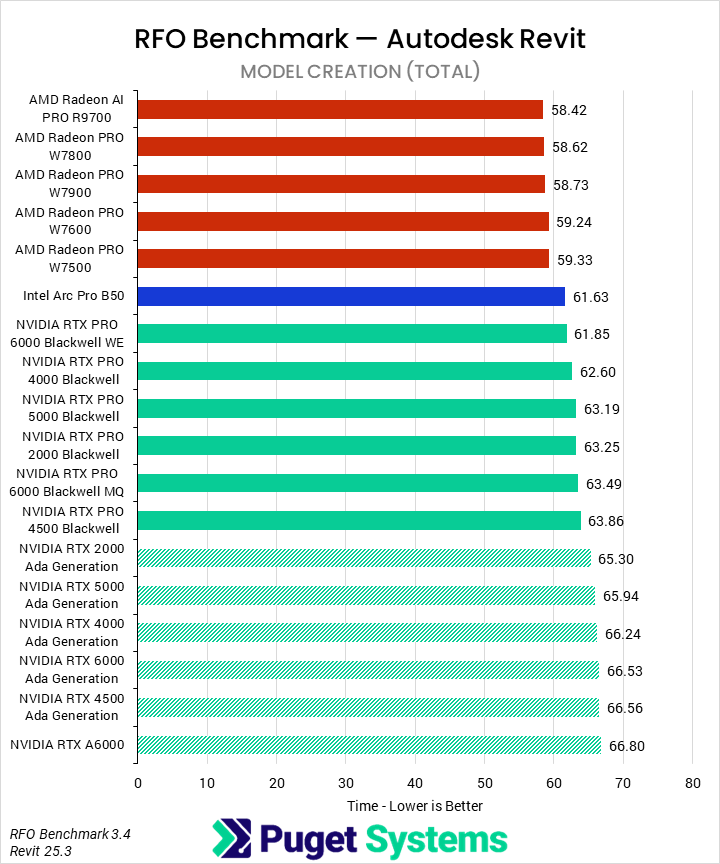
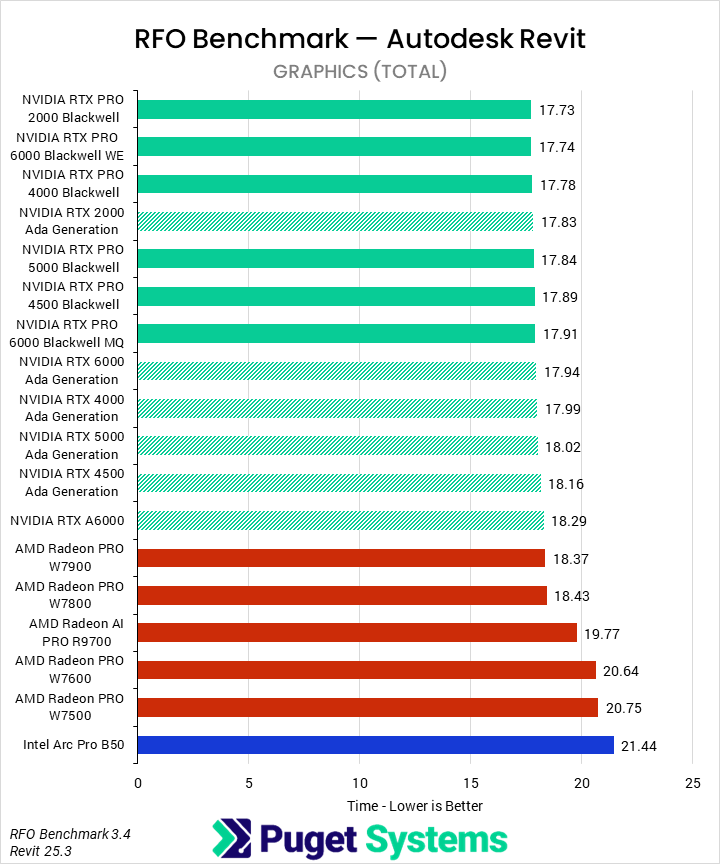
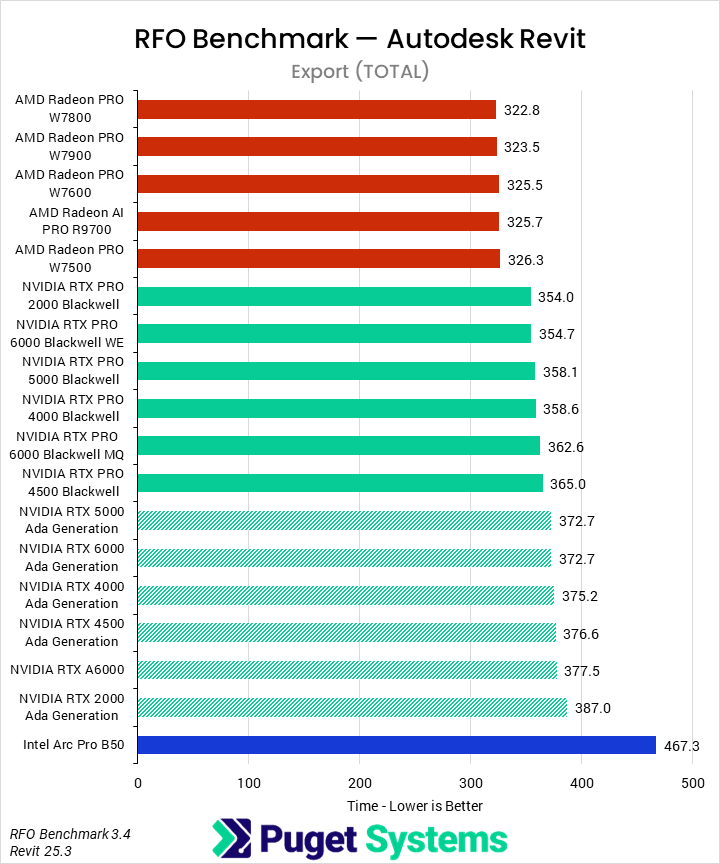
As an application, Revit is primarily CPU-dependent. The RFO benchmark produces a variety of scores, and we have pulled out three of them that are impacted by the GPU: total model creation time, total graphics time, and a composite total export time. Model creation is the most important of these for the majority of Revit users; however, the graphics and export times can significantly impact the user experience. We have not included the rendering time, as we don’t believe it is relevant to most users and it scales poorly. We’ve also only used the “Standard” preset here, although we are exploring using the “Graphics_Expanded” preset for future GPU reviews.
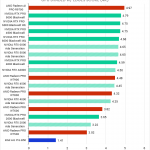
Horizontal bar chart comparing professional GPUs in the RFO Benchmark for Autodesk Revit model creation tasks (total time), where lower is better; AMD GPUs lead, but the overall differences are small.
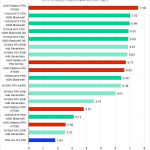
Horizontal bar chart comparing professional GPUs in the RFO Benchmark for Autodesk Revit graphics tasks (total time), where lower is better; NVIDIA GPUs cluster closely, while AMD and Intel GPUs take longer overall.
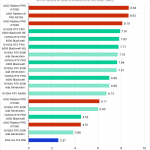
Horizontal bar chart comparing professional GPUs in the RFO Benchmark for Autodesk Revit export tasks (total time), where lower is better; AMD GPUs generally complete exports faster than NVIDIA and Intel models.
Horizontal bar chart comparing professional GPUs in the RFO Benchmark for Autodesk Revit model creation tasks (total time), where lower is better; AMD GPUs lead, but the overall differences are small.
Horizontal bar chart comparing professional GPUs in the RFO Benchmark for Autodesk Revit graphics tasks (total time), where lower is better; NVIDIA GPUs cluster closely, while AMD and Intel GPUs take longer overall.
Horizontal bar chart comparing professional GPUs in the RFO Benchmark for Autodesk Revit export tasks (total time), where lower is better; AMD GPUs generally complete exports faster than NVIDIA and Intel models.
Previous Next
System Image
Horizontal bar chart comparing professional GPUs in the RFO Benchmark for Autodesk Revit model creation tasks (total time), where lower is better; AMD GPUs lead, but the overall differences are small.
Open Full Resolution
Horizontal bar chart comparing professional GPUs in the RFO Benchmark for Autodesk Revit graphics tasks (total time), where lower is better; NVIDIA GPUs cluster closely, while AMD and Intel GPUs take longer overall.
Open Full Resolution
Horizontal bar chart comparing professional GPUs in the RFO Benchmark for Autodesk Revit export tasks (total time), where lower is better; AMD GPUs generally complete exports faster than NVIDIA and Intel models.
Open Full Resolution
Previous Next

In model creation (Chart #1), we found that different GPU families affected performance, but there was minimal difference between models within a given family. We understand model creation to be entirely CPU-based, so this makes sense. The family-dependent performance is interesting and may represent additional overhead, depending on the driver and GPU being used, or pipelines that are GPU-dependent. RFO showed the best performance with AMD GPUs, followed by Intel’s B50. NVIDIA’s Blackwell family was just behind the B50, with another small performance drop-off for the older Ada and Ampere GPUs. None of those differences were huge, but it was interesting to see the W7500 outperform a 6000 Blackwell.

Moving on to the graphics tests (Chart #2), you can see why we are interested in exploring the “Graphics_Extended” benchmark preset. There was almost no discrimination between GPUs until the very bottom of the performance stack. All of NVIDIA’s cards were within the margin of error, as were the W7900 and W7800. AMD’s R9700, W7600, and W7500 were slower, but probably not by enough to outweigh potential cost savings or performance in other domains. Intel’s B50 did fall to the bottom of the pack, although it is also the cheapest.

We weren’t going to include export time (Chart #3) until we saw that there appeared to be an interesting architecture-based story to tell, much like with model creation. We found that AMD’s RDNA3 and 4 GPUs were nearly 10% faster than NVIDIA’s Blackwell-based cards. Ada and Ampere cards from NVIDIA were slightly slower yet, while Intel’s B50 was far behind all of them. We’re not sure this makes a massive difference to most Revit users, but it is an interesting finding, likely related to what we observed with model creation.

Inventor

We continued to encounter issues with drawing scores in InvMark, as was the case with our last two articles, making the overall score largely unusable. Although we haven’t been able to pin down the cause of the issue, one commenter on a previous article suggested that there may be a performance bug in Windows 11 affecting this application, and specifically, drawing performance. We hope to look into that in the near future. As it stands now, though, we only have one score for this review: the graphics score.
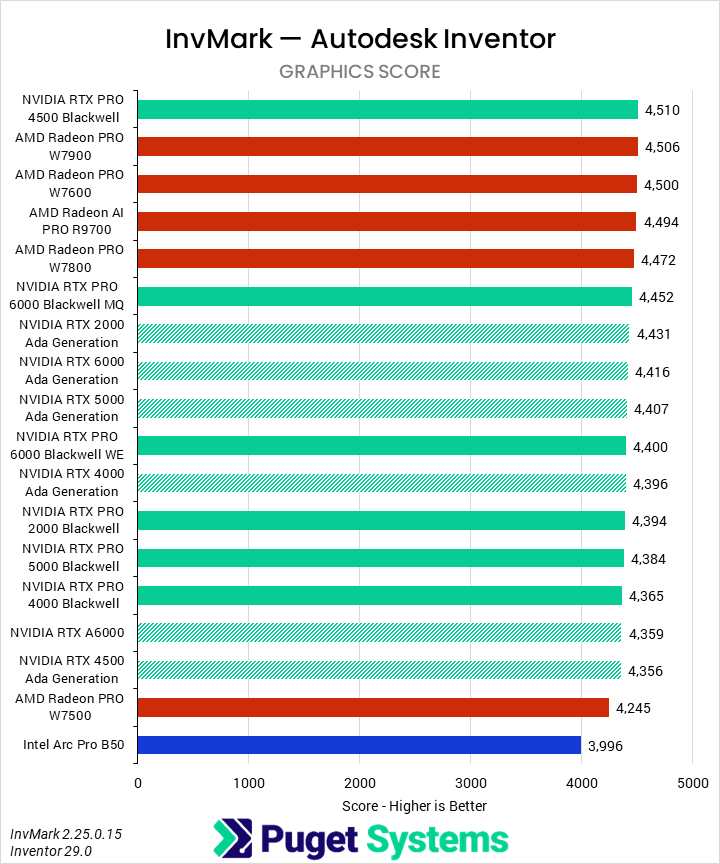
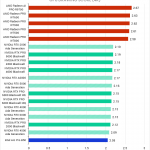
Horizontal bar chart comparing professional GPUs in InvMark for Autodesk Inventor (Graphics Score), where higher scores indicate better performance; results are tightly clustered with minimal differences between GPUs.
Image
Open Full Resolution

We found that even the graphics tests in Inventor are relatively insensitive to GPUs once a certain threshold is reached. Although our B50 review saw good differentiation, that was only with entry-level GPUs. Here, once above the AMD Radeon PRO W7500, all of the GPUs perform basically the same.

We did still gather some interesting takeaways, though. First, AMD’s GPUs perform generally well. Although we would typically consider most of these results to be within the margin of error – about 5% – the clustering of the averages for all the non-W7500 AMD GPUs around the same score at the top of the chart does suggest they may have a minor performance advantage against NVIDIA. Regardless, there were no bad GPUs among those we tested for Inventor, so the GPU that is the best value or otherwise facilitates workflows is the one that should be used.

SOLIDWORKS

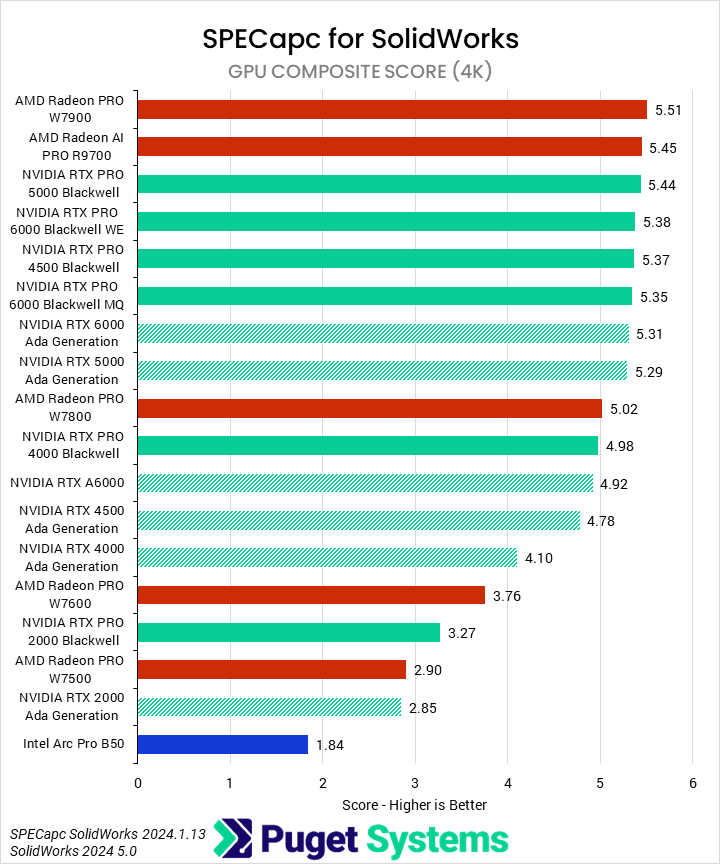
SPECapc for SOLIDWORKS reports more GPU scores than most of the other engineering benchmarks, but we can use the “composite” score as an overall indicator of performance. Although this tool also tests specific CPU-based workflows, we have only reported the GPU scores here. We also want to quickly note that our testing was at 4K with 150% scaling, which is not aligned with SPEC’s “official” results nor that of many other reviewers, but all of our testing is performed at this resolution.
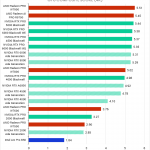
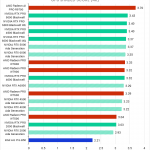
Horizontal bar chart comparing professional GPUs in the SPECapc benchmark for Solidwork GPU composite score, where higher is better; GPUs scale with tier, although AMD overperforms relative to NVIDIA.
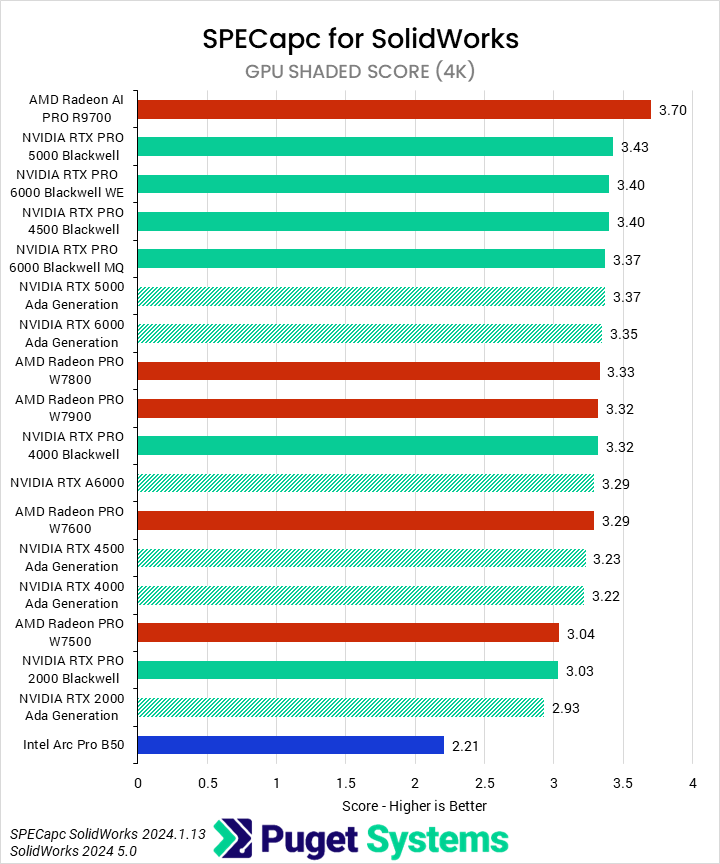
Horizontal bar chart comparing professional GPUs in the SPECapc benchmark for Solidwork GPU shaded score, where higher is better; NVIDIA occupies the top half, save for one AMD GPU.
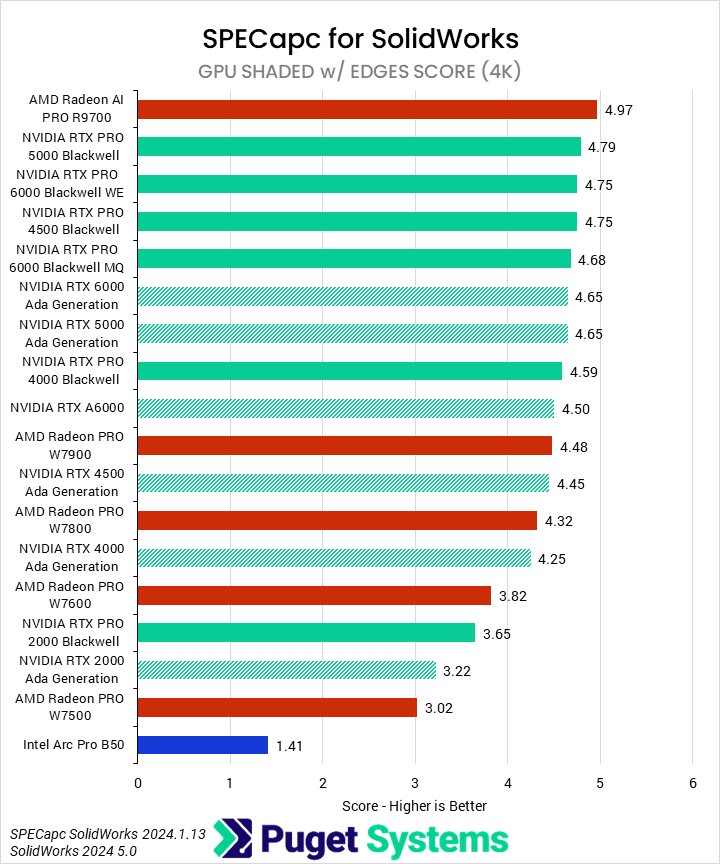
Horizontal bar chart comparing professional GPUs in the SPECapc benchmark for Solidwork GPU shaded w/ edges score, where higher is better; NVIDIA is relatively dominant, with one AMD exception.
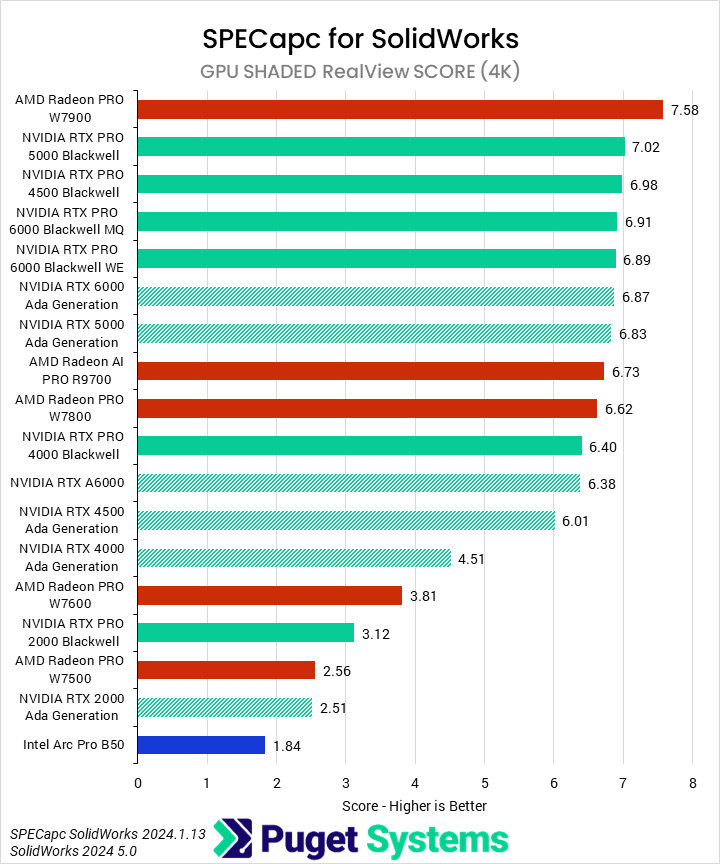
Horizontal bar chart comparing professional GPUs in the SPECapc benchmark for Solidwork GPU shaded realivew score, where higher is better; Except for the W7900, NVIDIA leads the chart.
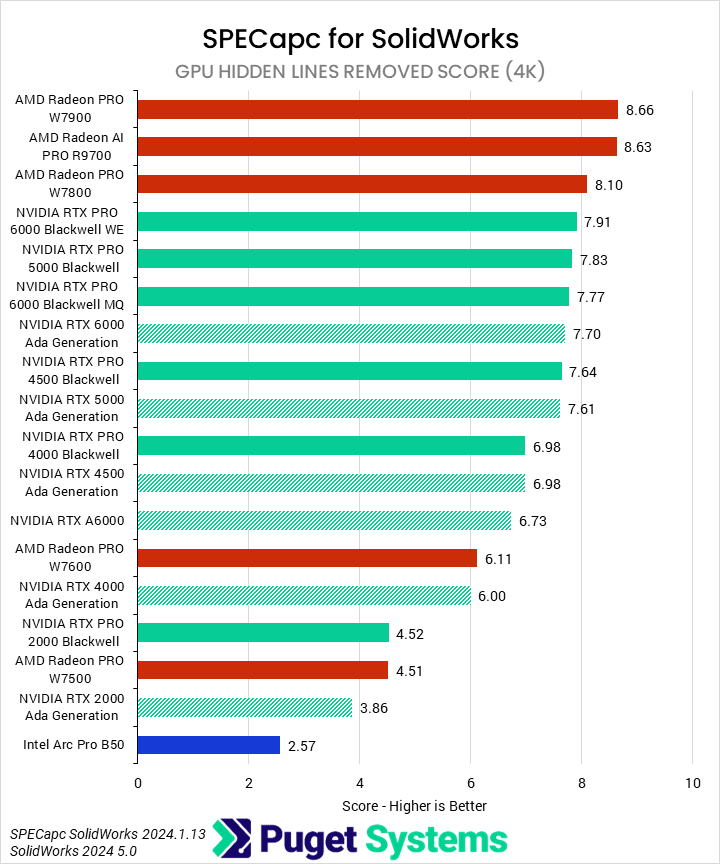
Horizontal bar chart comparing professional GPUs in the SPECapc benchmark for Solidwork GPU hidden lines removed score, where higher is better; AMD is generally superior to NVIDIA at the high end, with most NVIDIA GPUs being roughly the same.
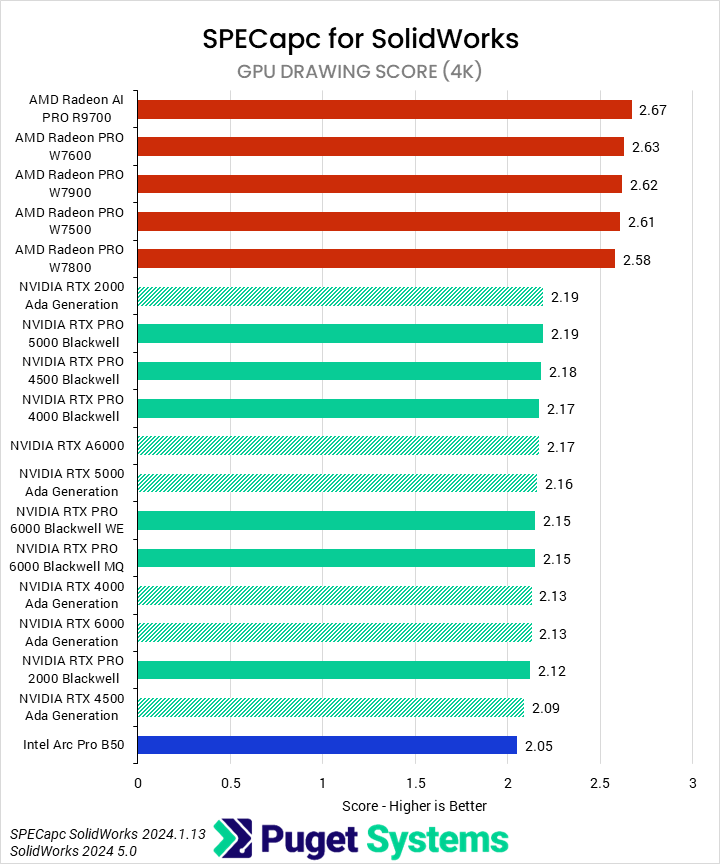
Horizontal bar chart comparing professional GPUs in the SPECapc benchmark for Solidwork GPU drawing score, where higher is better; AMD competely dominates the chart.
Horizontal bar chart comparing professional GPUs in the SPECapc benchmark for Solidwork GPU composite score, where higher is better; GPUs scale with tier, although AMD overperforms relative to NVIDIA.
Horizontal bar chart comparing professional GPUs in the SPECapc benchmark for Solidwork GPU shaded score, where higher is better; NVIDIA occupies the top half, save for one AMD GPU.
Horizontal bar chart comparing professional GPUs in the SPECapc benchmark for Solidwork GPU shaded w/ edges score, where higher is better; NVIDIA is relatively dominant, with one AMD exception.
Horizontal bar chart comparing professional GPUs in the SPECapc benchmark for Solidwork GPU shaded realivew score, where higher is better; Except for the W7900, NVIDIA leads the chart.
Horizontal bar chart comparing professional GPUs in the SPECapc benchmark for Solidwork GPU hidden lines removed score, where higher is better; AMD is generally superior to NVIDIA at the high end, with most NVIDIA GPUs being roughly the same.
Horizontal bar chart comparing professional GPUs in the SPECapc benchmark for Solidwork GPU drawing score, where higher is better; AMD competely dominates the chart.
Previous Next
System Image
Horizontal bar chart comparing professional GPUs in the SPECapc benchmark for Solidwork GPU composite score, where higher is better; GPUs scale with tier, although AMD overperforms relative to NVIDIA.
Open Full Resolution
Horizontal bar chart comparing professional GPUs in the SPECapc benchmark for Solidwork GPU shaded score, where higher is better; NVIDIA occupies the top half, save for one AMD GPU.
Open Full Resolution
Horizontal bar chart comparing professional GPUs in the SPECapc benchmark for Solidwork GPU shaded w/ edges score, where higher is better; NVIDIA is relatively dominant, with one AMD exception.
Open Full Resolution
Horizontal bar chart comparing professional GPUs in the SPECapc benchmark for Solidwork GPU shaded realivew score, where higher is better; Except for the W7900, NVIDIA leads the chart.
Open Full Resolution
Horizontal bar chart comparing professional GPUs in the SPECapc benchmark for Solidwork GPU hidden lines removed score, where higher is better; AMD is generally superior to NVIDIA at the high end, with most NVIDIA GPUs being roughly the same.
Open Full Resolution
Horizontal bar chart comparing professional GPUs in the SPECapc benchmark for Solidwork GPU drawing score, where higher is better; AMD competely dominates the chart.
Open Full Resolution
Previous Next

Starting with the composite score (Chart #1), we found that AMD leads the pack again, with the W7900 and R9700 occupying the top two slots. They are only marginally faster than most of the Blackwell family, and the top Ada cards, but this is an excellent showing from a much cheaper set of GPUs! We saw only minor generational improvements for the NVIDIA cards at the high end, but more “midrange” cards like the 2000, 4000, and 4500 saw performance uplifts of 12-21% when moving from Ada to Blackwell. Despite its great performance compared to other entry-level professional GPUs, the B50 struggles to keep up with the mid-range and high-end models we tested here.

Moving on to the Shaded scores (Charts #2 and #3), we saw very similar patterns. AMD’s Radeon AI PRO R9700 topped the charts this time, with a notable lead of around 7% over the 5000 and 6000 Blackwell. While not a huge difference, the R9700 is substantially cheaper than those. The last-gen W7000 series cards are less competitive, but given NVIDIA made only very small improvements gen-on-gen, this doesn’t matter too much.

In the RealView test (Chart #4), it was instead the Radeon PRO W7900 which offered the best performance, 8% faster than the 5000 Blackwell and 10% faster than the 6000 Ada. The AI PRO R9700 sits between the 6000 Blackwell and the 4000 Blackwell.

Finally, in the drawing tests (Chart #6), AMD completely outperformed NVIDIA, with every tested AMD GPU beating the fastest NVIDIA model by at least 18%. For both AMD and NVIDIA, we see essentially no differentiation between GPUs within their respective lineups. Intel’s B50 also put up a surprisingly good showing, only slightly behind NVIDIA.

Overall, these results make it a bit difficult to recommend any particular GPU. AMD seems to be generally dominant, but whether a W7000 or AI PRO GPU is better depends on the workflow. However, it is clear that NVIDIA – even with their new Blackwell cards – doesn’t offer the best value in SOLIDWORKS.

PIX4Dmatic

PIX4Dmatic is an application we only started testing last month. At that time, we promised future and ongoing testing to try and fill out a performance picture. Although there is still more to be done, we are excited to have it as part of our AEC benchmarking suite. However, one caveat for this article is that, due to time constraints, we were only able to test with our smaller dataset. We previously found scaling to be relatively consistent between the small and medium sets, but it’s still worth noting. Additionally, PIX4Dmatic only supports NVIDIA GPUs.
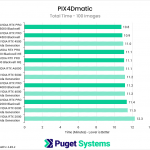
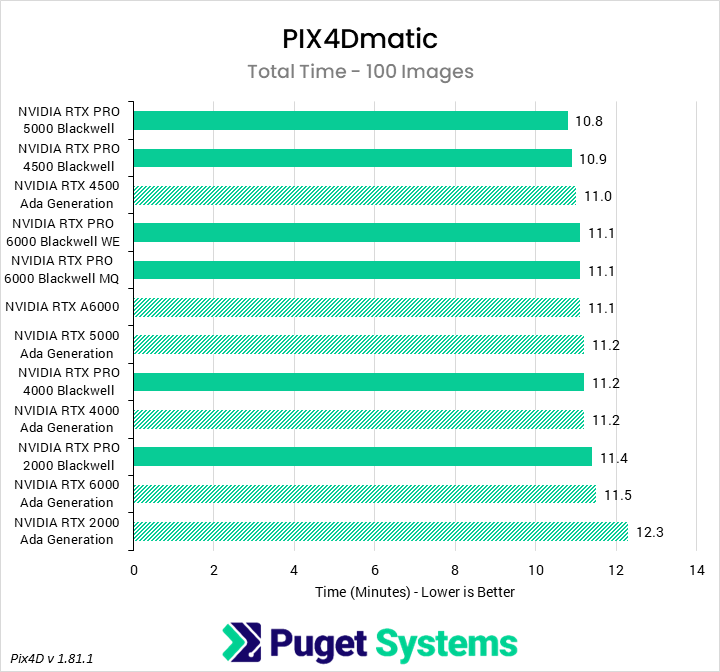
Horizontal bar chart comparing professional GPUs in PIX4Dmatic total processing time for 100 images, measured in minutes where lower is better; newer and higher-tier GPUs complete the workload marginally faster.
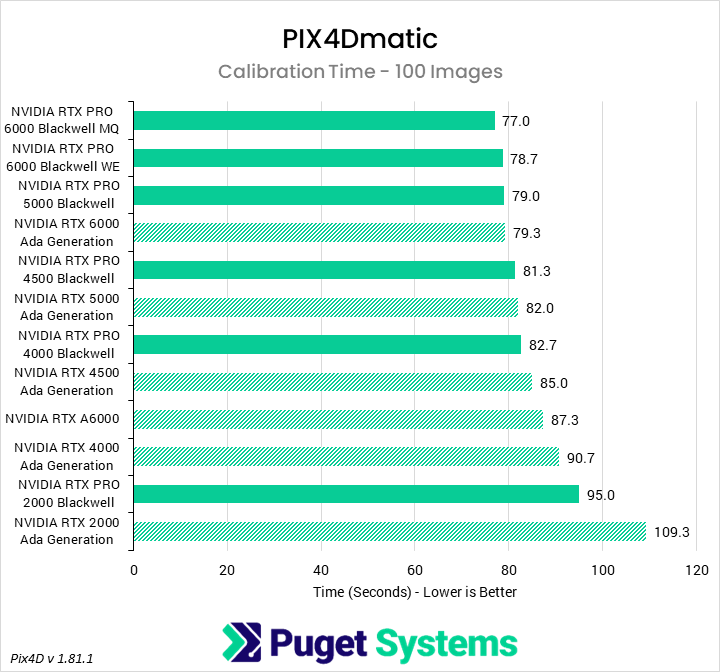
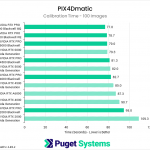
Horizontal bar chart comparing professional GPUs in PIX4Dmatic calibration for 100 images, showing time in seconds where lower is better; higher-end GPUs complete calibration slightly faster overall.
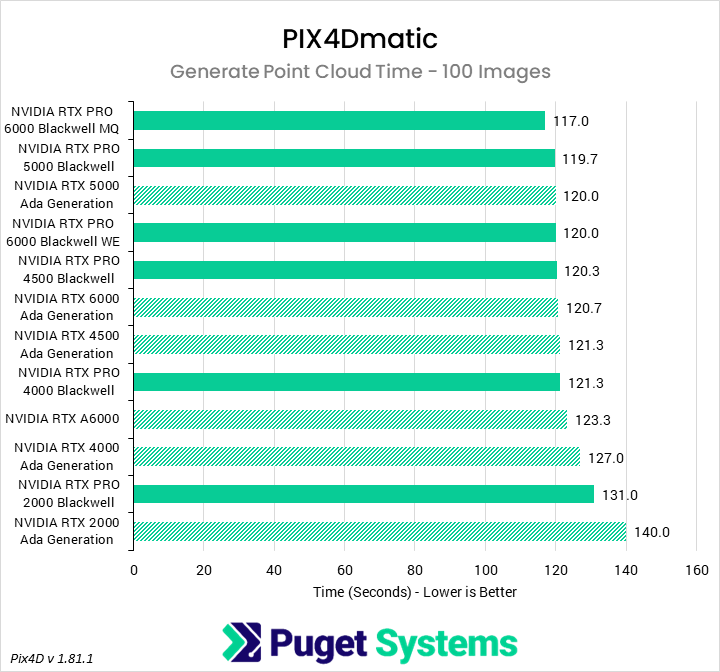
Horizontal bar chart comparing professional GPUs in PIX4Dmatic point cloud generation for 100 images, showing time in seconds where lower is better; performance differences are modest across most GPUs.
Horizontal bar chart comparing professional GPUs in PIX4Dmatic total processing time for 100 images, measured in minutes where lower is better; newer and higher-tier GPUs complete the workload marginally faster.
Horizontal bar chart comparing professional GPUs in PIX4Dmatic calibration for 100 images, showing time in seconds where lower is better; higher-end GPUs complete calibration slightly faster overall.
Horizontal bar chart comparing professional GPUs in PIX4Dmatic point cloud generation for 100 images, showing time in seconds where lower is better; performance differences are modest across most GPUs.
Previous Next
System Image
Horizontal bar chart comparing professional GPUs in PIX4Dmatic total processing time for 100 images, measured in minutes where lower is better; newer and higher-tier GPUs complete the workload marginally faster.
Open Full Resolution
Horizontal bar chart comparing professional GPUs in PIX4Dmatic calibration for 100 images, showing time in seconds where lower is better; higher-end GPUs complete calibration slightly faster overall.
Open Full Resolution
Horizontal bar chart comparing professional GPUs in PIX4Dmatic point cloud generation for 100 images, showing time in seconds where lower is better; performance differences are modest across most GPUs.
Open Full Resolution
Previous Next

The first chart looks at the overall processing time for the small image set. We found that, in terms of a complete pipeline, the impact of processing time from GPUs is relatively minor. Blackwell cards were generally faster than their last-gen counterparts, but only by a few percent, with one exception: the 2000 Blackwell was noticeably faster than the 2000 Ada. However, while useful, the overall score is influenced by a variety of sections that are not, or only weakly, influenced by GPU performance.

Moving on to one of the more GPU-sensitive portions, in calibration (Chart #2) we see much more scaling with theoretical GPU performance. The 6000 Blackwell models lead the chart – though interestingly, we found the Max-Q variant slightly faster than the 600 W Workstation card – followed by the 5000 Blackwell. Almost any of the adjacent bars are interchangeable, as they fall within each other’s confidence intervals. However, an overall trend is present: generational improvements average about 5%, though they fall off at the higher end, and the 2000 Blackwell an outlier at 13% faster than the 2000 Ada.

Our third chart looks at the time taken to generate a dense point cloud, and shows very similar trends. The Blackwell cards are faster than their Ada counterparts by a small margin, and higher-end cards are faster than lower-end cards, but the overall difference isn’t huge. Additionally, since all the cards tested (being professional models) have large VRAM buffers, the memory capacity is likely not a differentiator.

Conclusion

As we continue to flesh out our engineering tests, it is fascinating to see how support, relative performance, and value propositions for professional workstation GPUs differ from the consumer side. While there are still some applications which only work with NVIDIA GPUs, the guarantees of software support, ISV certification, and driver validation help ensure that more applications work well across the whole range of GPU architectures. We think, much like the consumer space, the professional workstation market is becoming increasingly competitive.

Overall, we were surprised to find that AMD’s professional GPUs offer the best performance in AEC workflows, outside of programs which require NVIDIA cards. Whether the Radeon PRO W7900 or Radeon AI PRO R9700 was the top GPU depended on the exact workflow within an application, but both offered outstanding performance in the applications we tested. NVIDIA’s Blackwell GPUs were solid, but struggled to differentiate themselves from their last-gen, Ada-based counterparts. On the low end, Intel lagged, but possibly not by enough to offset the B50’s low price tag for value-conscious users.

Tower Computer Icon in Puget Systems Colors

Looking for an engineering workstation?

We build computers tailor-made for your workflow. 

Configure a System
Talking Head Icon in Puget Systems Colors

Don’t know where to start?
We can help!

Get in touch with one of our technical consultants today.

Talk to an Expert

Related Content

  • 2025 Professional GPU Engineering Roundup
  • 2025 Professional GPU Content Creation Roundup
  • A Quick Look at Rendering Performance in Windows vs Linux
  • Rendering Benchmarks vs Reality
View All Related Content

Latest Content

  • The State of Puget Bench (Q1 2026)
  • 2025 Professional GPU Engineering Roundup
  • 2025 Professional GPU Content Creation Roundup
  • A Quick Look at Rendering Performance in Windows vs Linux
View All

Who is Puget Systems?

Puget Systems builds custom workstations, servers and storage solutions tailored for your work.

We provide:

Extensive performance testing
making you more productive and giving better value for your money

Reliable computers
with fewer crashes means more time working & less time waiting

Support that understands
your complex workflows and can get you back up & running ASAP

A proven track record
as shown by our case studies and customer testimonials

Get Started

Browse Systems

Puget Systems Mobile Laptop Workstation Icon

Mobile

Puget Systems Tower Workstation Icon

Workstations

Puget Systems Rackmount Workstation Icon

Rackstations

Puget Systems Rackmount Server Icon

Servers

Puget Systems Rackmount Storage Icon

Storage

Latest Articles

  • The State of Puget Bench (Q1 2026)
  • 2025 Professional GPU Engineering Roundup
  • 2025 Professional GPU Content Creation Roundup
  • A Quick Look at Rendering Performance in Windows vs Linux
  • Standing Up AI Development Quickly for Supercomputing 2025
View All

Post navigation

 2025 Professional GPU Content Creation Roundup
Puget Systems Logo
Build Your Own PC Site Map FAQ
facebook instagram linkedin rss twitter youtube

Optimized Solutions

  • Adobe Premiere
  • Adobe Photoshop
  • Solidworks
  • Autodesk AutoCAD
  • Machine Learning

Workstations

  • Media & Entertainment
  • Engineering
  • Scientific PCs
  • More

Support

  • Online Guides
  • Request Support
  • Remote Help

Publications

  • All News
  • Puget Blog
  • HPC Blog
  • Hardware Articles
  • Case Studies

Policies

  • Warranty & Return
  • Terms and Conditions
  • Privacy Policy
  • Delivery Times
  • Accessibility

About Us

  • Testimonials
  • Careers
  • About Us
  • Contact Us
  • Newsletter

© Copyright 2026 - Puget Systems, All Rights Reserved.

Dynamic title for modals

Are you sure?

Please confirm deletion. There is no undo!