Table of Contents
Introduction
When new technology is announced, marketing language often highlights a product’s potential, but it might not fully cover the breadth of details that matter most to users. For example, when NVIDIA introduced the GeForce RTX™ 50 Series, they made several announcements regarding new capabilities, features, and performance improvements surrounding their latest generation video cards that would benefit content creation workflows. For content creators, understanding how these features translate into real-world workflows is essential for making informed decisions about their next hardware investment.
To better understand what the RTX 50 Series offers, we compiled a list of features sourced from NVIDIA’s marketing channels and technical blogs that are explicitly related to video editing and other post-production workflows:
Decoding Capabilities
Many features of the RTX 50 Series are impressive, and in some cases, such as H.264 10-bit 4:2:2 decoding support, they are the first GPUs to offer these capabilities. However, for certain performance-based features, the descriptions are very high-level, and NVIDIA’s publicly available sources do not include the specific testing parameters or methodologies behind these results. Without this information, it can be challenging to understand which specific RTX 50 Series GPU delivers the level of performance that would be most beneficial for an individual user.
Keeping in mind that results can vary based on applications, footage, hardware, and project settings, we conducted our own independent testing to better understand where the RTX 50 Series GPUs deliver on performance. Our goal was to assess these features in practical scenarios and, to the best of our ability, reproduce NVIDIA’s results.
It’s worth noting that we don’t expect any of these reported capabilities to be true 100% of the time, as NVIDIA can make technology function on the hardware side, but it is up to software developers to properly take advantage of it. In addition, we understand that marketing and product descriptions often need to be concise, and it simply isn’t practical to list all the exceptions. What we are looking for in our testing is broad verification that most end users would likely experience in their workflows, based on specific 50 Series features, rather than proving it will be true in every possible situation.

Looking for a Post-Production Workstation?
We build computers tailor-made for your workflow.

Don’t know where to start?
We can help!
Get in touch with our technical consultants today.
Test Setup
Some of these decoding and encoding features are relatively easy to verify, such as decoding support for H.264 8/10-bit 4:2:2 and HEVC 8/10/12-bit 4:2:2. We quickly tested this after the GeForce RTX™ 5090 launched and validated that these flavors of codecs are supported at both the hardware and software level, which we have documented in our Premiere Pro and DaVinci Resolve Studio Hardware Decoding Support tables.
The other features listed above are much harder to test, so we decided to focus our efforts on four specific decoding and encoding performance-related capabilities. Decoding and encoding are two of the most critical aspects in video editing and post-production workflows, as they determine how efficiently footage can be processed, exported, and delivered.
Here is what we tested:
- Test #1: Decode up to x8 4K 60fps multicam
- Test #2: Decode 2x speed for H.264 video
- Test #3: Decoding support up to 8192×8192
- Test #4: Encode 60% faster than the GeForce RTX™ 4090 and at 4x speed compared to the GeForce RTX™ 3090
Hardware & Software
Test Platform
| CPUs: AMD Ryzen™ Threadripper™ 9970X |
| CPU Cooler: Asetek 836S 360mm AIO Cooler |
| Motherboard: ASUS Pro WS TRX50-SAGE BIOS Version: 1203 |
| RAM: 4x DDR5-6400 32GB (128 GB total) |
| PSU: EVGA SuperNOVA 1200W P2 |
| Storage: Samsung 980 Pro 2TB |
| OS: Windows 11 Pro 64-bit (26100) Power Profile: Balanced |
GPUs
| NVIDIA GeForce RTX™ 5090 ASUS PRIME GeForce RTX™ 5070 Ti OC NVIDIA GeForce RTX™ 4090 PNY GeForce RTX™ 4070 Ti SUPER Verto OC NVIDIA GeForce RTX™ 3090 Driver: 581.29 |
Software
| Premiere Pro 25.5 |
| DaVinci Resolve 20.2 |
All tests were conducted on a single system featuring an AMD Ryzen™ Threadripper™ 9970X 32-core processor and an ASUS Pro WS TRX50-SAGE motherboard. We chose this platform because the Threadripper processor lacks an integrated GPU, which allows applications like DaVinci Resolve and Premiere Pro to exclusively utilize the NVDEC and NVENC media engines from the GeForce RTX series video cards for hardware-accelerated processing of Long GOP media, such as H.264 (AVC) and H.265 (HEVC). For each test, we selected specific GPUs based on the objective.
Methodology
In Test #1, we compared the GeForce RTX 5090 and RTX 5070 Ti to determine if differences in decoder quantity affected the total number of video sources that could be processed in multicam setups. Test #2 measured decoding performance across NVDEC generations by comparing the 6th Gen decoder on the RTX 5070 Ti against the 5th Gen on the RTX 4070 Ti SUPER to evaluate whether a 2x performance boost exists for H.264 formats. Test #3 utilized the RTX 5090 to confirm hardware-accelerated support for 8192×8192 resolution in both Premiere Pro and DaVinci Resolve. Test #4 evaluated encoding performance across flagship GPUs from three GeForce RTX generations: the RTX 5090, 4090, and 3090.
For software, we used Premiere Pro version 25.5 and DaVinci Resolve 20.2. Both of these versions support NVIDIA’s Blackwell architecture on the RTX 50 Series, providing hardware-accelerated support for 10-bit, 4:2:2 formatted Long GOP media. We also used the latest NVIDIA driver, version 581.29, for all GPUs.
Our media library consisted of 4K 60fps ProRes 422 HQ footage from a Panasonic S1R II, along with footage transcoded from a Canon R5 Mark II into various flavors of H.264 and H.265 Long GOP formats, all in a 4K UHD (3840 x 2160) 60fps format.
Test #1 – Decode up to x8 4K 60fps Multicam
The first performance-based capability we tested was based on “GeForce RTX 50 Series GPUs include 4:2:2 hardware support that can decode up to eight times the 4K 60 frames per second (fps) video sources per decoder, enabling smooth multi-camera video editing”.
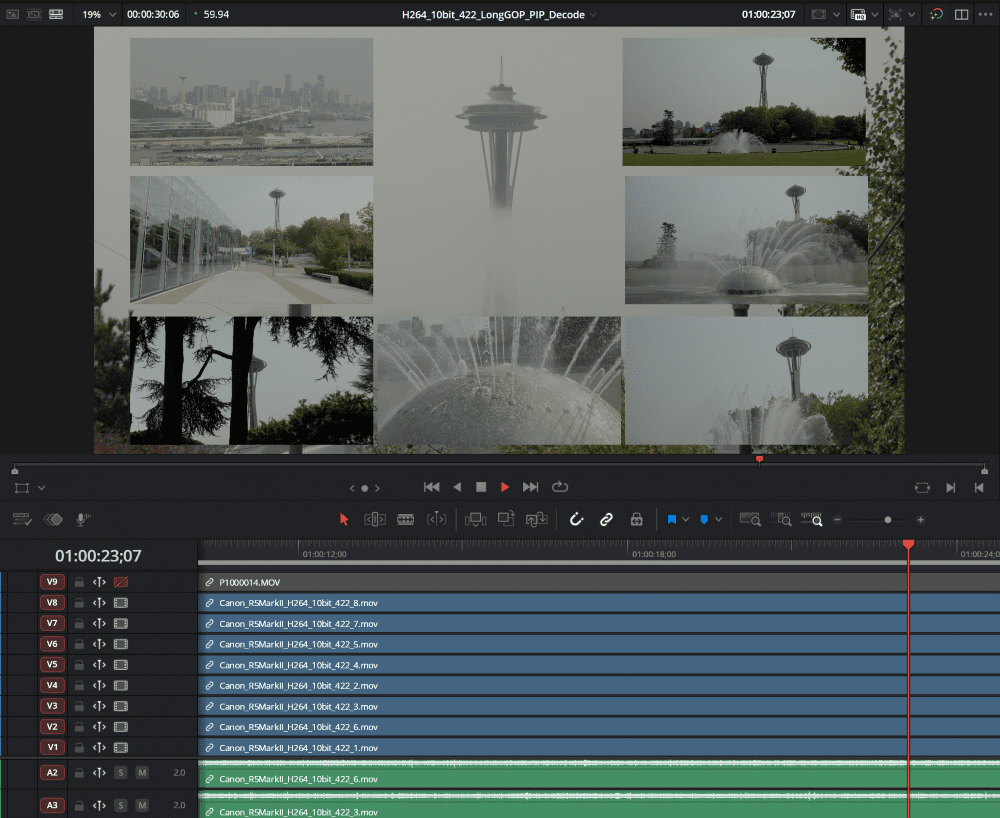
Before testing, we needed to interpret what NVIDIA meant by ‘smooth multi-camera video editing,’ as the task could refer to working either in a dedicated multicam sequence or a picture-in-picture (PiP) layout within the timeline. Both approaches decode and play back footage differently: a multicam sequence involves live switching between sources and often has optimizations by the software to reduce load on the system by turning down the preview quality, while a PiP setup requires Resolve and Premiere Pro to process all video sources simultaneously within the frame.
We selected the PiP setup for this test because individual users can easily replicate it. This method also allows us to observe performance by incrementally adding video sources during playback. Eight video sources were placed in the timeline and displayed simultaneously in the program monitor. The Drop-Frame indicator and Task Manager were monitored to track decoder load and determine if dropped frames coincided with any decoder reaching 100% utilization.
Image
From our media library, we used eight Long GOP H.264 and H.265 10-bit 4:2:2 video sources transcoded from the Canon R5 Mark II. We excluded intraframe codecs, such as ProRes or RAW footage, because this feature specifically referenced per decoder, indicating it applies to Long GOP media. Intraframe and RAW codecs do not use the NVDEC media engines for decoding.

* Verified only for some models in the RTX 50 Series
When testing H.264 and H.265 10-bit 4:2:2 media in DaVinci Resolve, the RTX 5090 handled all eight video sources without playback issues. In Premiere Pro, eight H.265 10-bit 4:2:2 video sources also played back smoothly, but we did start to see a small number of dropped frames with eight H.264 10-bit 4:2:2 streams. We still classify this as a pass because repeated runs showed only 1–5 dropped frames out of 1,800 total, demonstrating that while the decoders were operating near full processing capacity, playback remained smooth enough for practical use.
Conversely, the RTX 5070 Ti, which features only a single 6th Gen NVDEC decoding engine, cannot handle eight 4K 60FPS video sources in either Resolve or Premiere Pro. We observed dropped frames once the video source count reached five for H.264 10-bit 4:2:2 and six for H.265 10-bit 4:2:2. Based on our testing, we cannot fully verify that all GeForce RTX 50 Series video cards can handle eight 4K 60FPS video sources. While this capability can be achieved with a 5090, it does not apply to the entire product line. We hope that NVIDIA can specify which GPUs were tested and include detailed technical specifications, such as codec, bit depth, and chroma subsampling formats, to provide additional context about the maximum number of video sources each GPU can process in multicam workflows.
Test #2 – Decode 2x Speed for H.264 Video
The second performance-based feature we tested was focused on the NVDEC media engine, since NVIDIA says the RTX 50 Series GPUs “include the sixth-generation NVIDIA decoder, with 2x the decode speed for H.264 video”.
As in our first test, we needed to interpret what was stated in NVIDIA’s marketing, because there are two possibilities. This feature references a 2x (100%) performance improvement, which could stem from differences between GPU generations—such as the 50 Series versus the 40 or 30 Series—or from differences between NVDEC media engine generations within those GPUs. Again, information regarding specific GPUs, test parameters, or the H.264 formats used, including Long GOP versus All-I, bit depths, and chroma subsampling, was not provided.
For this test, we focused on comparing NVDEC media engine generations, evaluating their 6th Gen decoder against the 5th Gen, as the decoder was specifically referenced. We selected the RTX 5070 Ti and 4070 Ti SUPER because the 5070 Ti is the generational upgrade to that model. They also share similar technical specifications, including the same number of NVDEC engines, making this one of the closer pairings for assessing generational improvements – though not an exact one-to-one comparison.
To isolate the decoders, we utilized the PugetBench for Creators processing test to measure decode speeds in DaVinci Resolve and Premiere Pro, since neither application provides built-in reporting to track decoder performance. The test exports the timeline to DNxHR LB, a format that does not use hardware-accelerated decoding or encoding. This forces the decoder to fully process the H.264 footage, allowing us to evaluate decoding performance based on the export results.
We tested three variations of H.264 Long GOP formats: 8-bit 4:2:0, 10-bit 4:2:0, and 10-bit 4:2:2 4K UHD (3840 × 2160) at 60p. These files were transcoded from 8K 60p C-RAW Light footage recorded on a Canon R5 Mark II. We also ran a test using 4K 60p footage recorded in 10-bit 4:2:2 All-Intra from the same camera. Our goal was to test two different real-world use case scenarios with these H.264 formats to confirm that the 6th Gen NVDEC decoder provides a 2x performance increase over the 5th Gen.






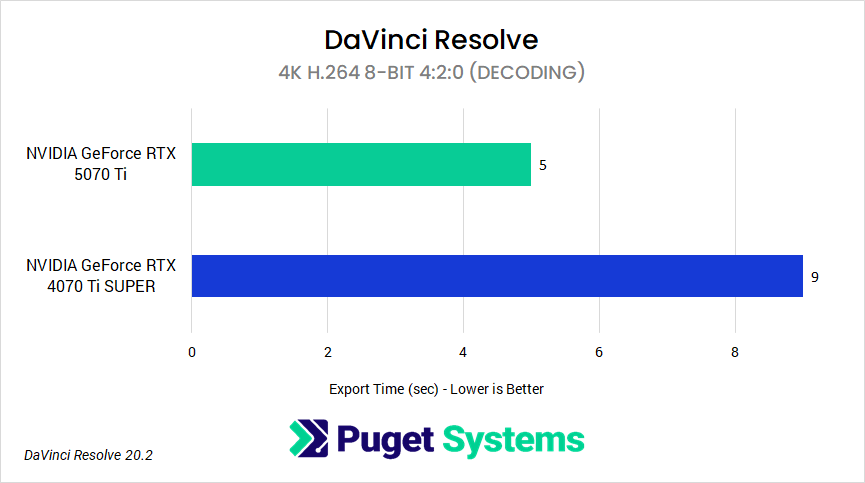
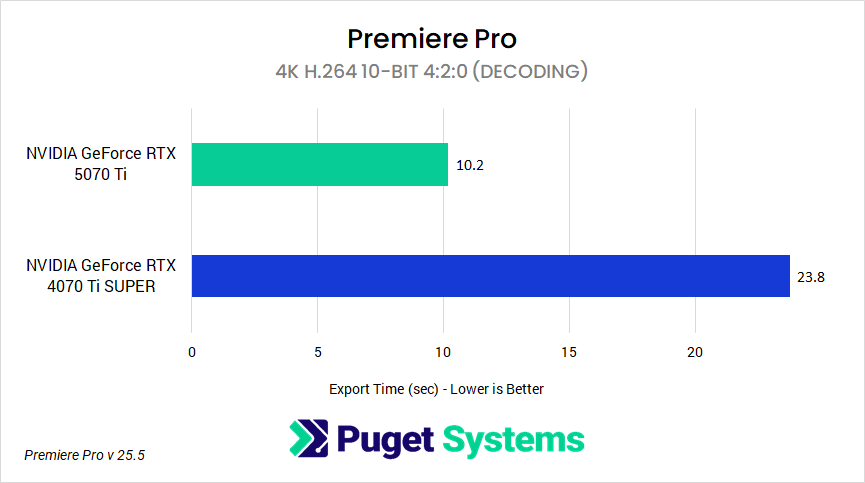
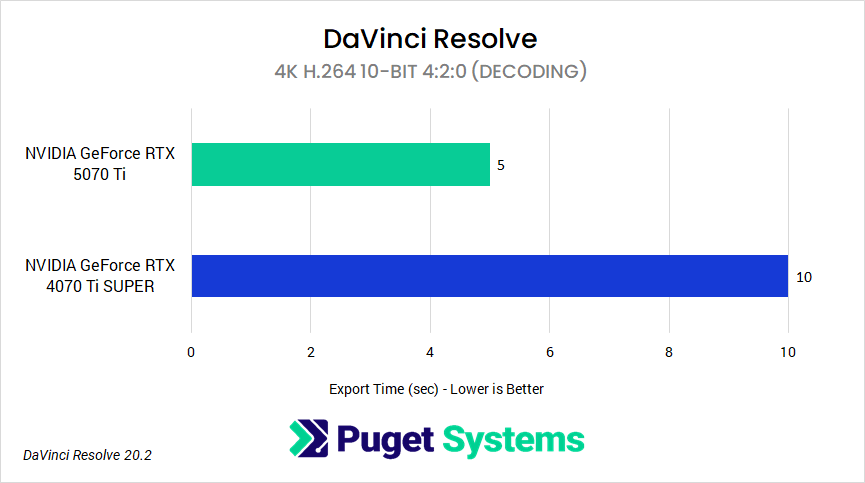
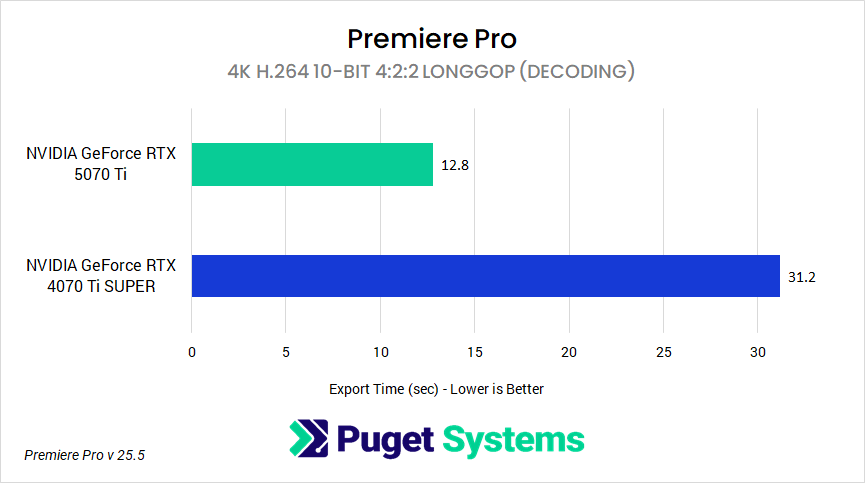
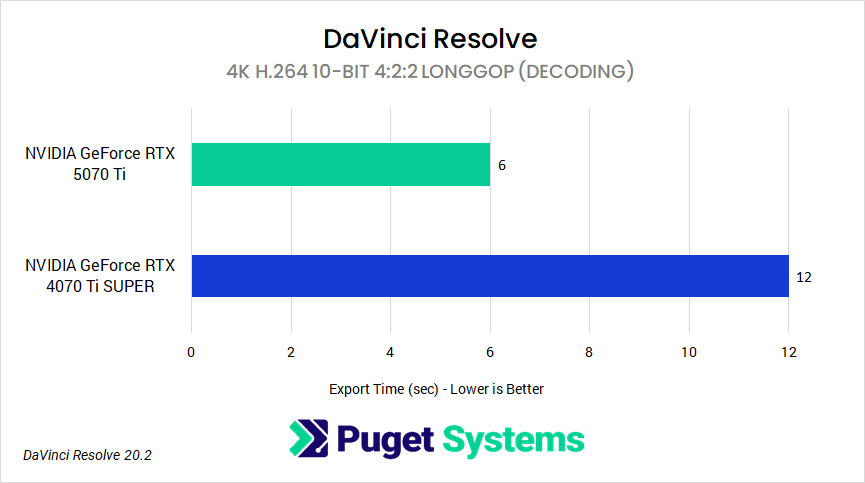
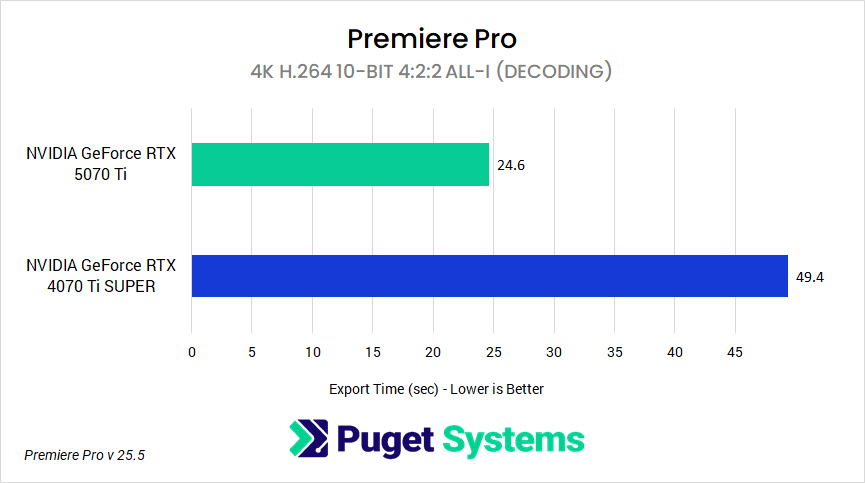
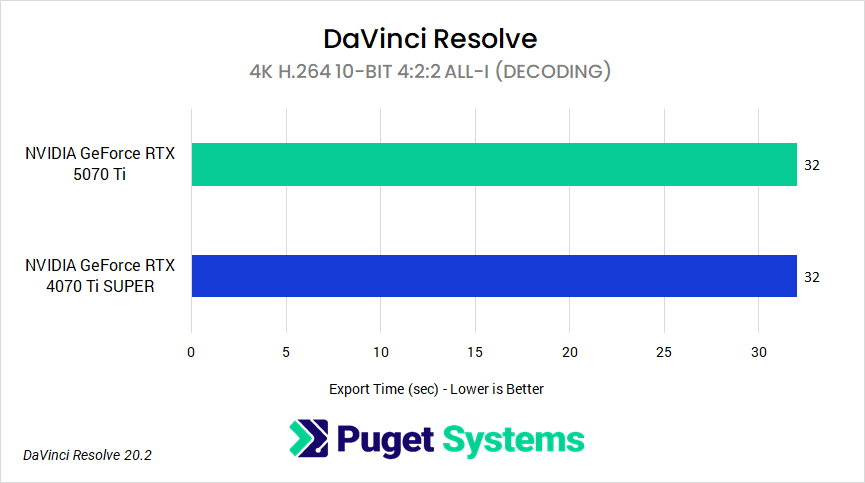
The charts above compare the export times of different flavors of H.264 video source files in both Premiere Pro and DaVinci Resolve. Testing showed a 2x performance increase between the RTX 5070 Ti and 4070 Ti SUPER for H.264 10-bit 4:2:0 and 4:2:2 Long GOP formats. For H.264 10-bit 4:2:2 All-Intra, performance nearly doubled in Premiere Pro but did not improve in Resolve. The only format that did not achieve a 2x increase was H.264 8-bit 4:2:0, which showed a 27% improvement in Premiere Pro and 80% in Resolve.
Although both Premiere Pro and DaVinci Resolve, as well as the 5th and 6th Gen NVDEC decoders, support H.264 8-bit 4:2:0 with hardware-accelerated decoding, the performance increase was not twice as much. This is likely because each application leverages hardware acceleration in its own way. Since both GPUs already provide hardware-level support for this format, improvements depend less on the generational change of the decoder and more on how effectively the software can implement and benefit from that support, which may explain why our results did not reach the 2x threshold.
A similar hardware-software interaction is evident with H.264 10-bit 4:2:2 All-Intra footage. Premiere Pro shows a 2x performance increase, reflecting that the 6th Gen NVDEC decoder provides hardware-accelerated support. In contrast, performance in Resolve remains unchanged, indicating that hardware-accelerated decoding for this format is not yet implemented.
For Long GOP H.264 10-bit 4:2:0 and 10-bit 4:2:2, we observed a 100% performance increase. Unlike H.264 8-bit 4:2:0, these formats were not previously supported by hardware-acceleration on RTX 40 Series GPUs. The new 6th Gen NVDEC decoders in RTX 50 Series GPUs provide full hardware-accelerated decoding for these formats, and both Premiere Pro and Resolve can leverage this support. However, performance varies slightly between the applications.
Across these tests, the performance differences indicate that the 2x improvement isn’t related just to generational upgrades. Instead, it depends on the combination of hardware- and software-level support for GPU-accelerated decoding, as well as the specific H.264 formats used. Software-level factors, such as how Premiere Pro versus Resolve leverage the NVDEC engine for All-Intra playback, influence decoding efficiency and playback performance. At the same time, hardware-level improvements determine which formats can be accelerated, including previously unsupported formats such as Long GOP 10-bit 4:2:0 and 10-bit 4:2:2.
Overall, while there are caveats, we saw enough instances where the performance was 2x faster that we consider this feature verified!
Test #3 – Decoding Support up to 8192×8192
We wanted to verify that GeForce RTX 50 Series GPUs support H.264 decoding for “resolutions up to 8192×8192” in our third test.
Since no cameras we are aware of can natively record H.264 at this resolution, we reformatted and exported 17K Blackmagic RAW footage using Adobe Media Encoder into 8192×8192 H.264 8-bit 4:2:0 and 10-bit 4:2:0 formats.
This was one of the simpler tests to perform. For Premiere Pro, we used the debug monitor to confirm whether our transcoded media was being processed through software or hardware acceleration. In DaVinci Resolve, we verified this in two ways: first by reviewing the log files to confirm that the GPU’s NVDEC and NVENC media engines were active with these formats, and then by running export tests with hardware acceleration enabled and disabled, to observe any differences in export time.
While it’s impressive that we were able to verify the RTX 50 Series supports hardware-accelerated decoding at resolutions up to 8192×8192, this format is rarely used in real-world production or post-production workflows. The formats that cameras from manufacturers like Canon, Nikon, and Sony typically record in are RAW or HEVC with non-square aspect ratios. For example, the Sony Venice 2 shoots 8.6K open-gate (3:2) at 8640×5760, while the Canon R5 Mark II we tested records 8K DCI (17:9) CRAW at 8192×4320. Although these formats reach the 8192-pixel resolution horizontally, they fall short of that dimension vertically.
As far as we are aware, no cameras record in 8K H.264, though some, like the Canon R5 Mark II, can capture 8K in an HEVC format 10-bit 4:2:2 All-I format. In these cases, the NVDEC media engines can process the footage directly (software dependent). In practice, an editor could transcode RAW media into H.264 or HEVC at these 8K resolutions to shift processing from the CPU and GPU to the NVDEC media engines. Although there may be some loss in color fidelity, this approach can serve as an alternative proxy workflow for maintaining resolution and image quality while reducing CPU load compared to traditional formats, such as ProRes Proxy.
Test #4 – Encode 60% Faster than GeForce RTX 4090 and 4x Speed Compared to RTX 3090
Our final test differs from the first three as it focuses on encoding performance between specific GPUs. More specifically, if the GeForce RTX 5090 can export video “60% faster than the GeForce RTX 4090 and at 4x speed compared to the GeForce RTX 3090”.
Before testing, we needed to reconcile the statistics used in NVIDIA’s marketing for this feature, as two different metrics were stated: a 60% increase over the 4090 corresponds to the 5090 being 1.6x faster, while describing it as “4x faster” than the 3090 implies a 300% improvement relative to that GPU. To provide a consistent basis for comparison, our tests used percentage-based metrics to determine whether the 5090 exported 60% faster than the 4090 and 300% faster than the 3090. It’s also important to understand the difference between encoding and exporting. Encoding refers to compressing video into a specific codec, while exporting encompasses not only encoding but also additional steps such as decoding, processing, wrapping the file, and writing it to the drive.
We performed multiple export tests to see where different codecs and video formats affect export results. The first test used 4K UHD 60fps ProRes 422 HQ (intraframe) footage recorded on a Panasonic S1R II, which does not rely on hardware decoding during encoding. The second test followed a similar setup but used various H.264 and H.265 Long GOP formats to evaluate performance when both the NVDEC decoder and NVENC encoder were active during export. For all tests, the sequence consisted of a total of 1,800 frames, with a resolution of 4K UHD and a frame rate of 60fps. The only variable in testing was the Long GOP video source format used in each timeline for exporting.
Here are the formats we tested:
- H.264 8-bit 4:2:0
- H.264 10-bit 4:2:0
- H.264 10-bit 4:2:2
- H.265 8-bit 4:2:0
- H.265 10-bit 4:2:0
Lastly, we exported into formats that supported hardware encoding in both DaVinci Resolve and Premiere Pro across all three GPUs. The export specifications include:
- H.264 8-bit 4:2:0
- H.265 8-bit 4:2:0
- H.265 10-bit 4:2:0

While testing with 4K 60fps ProRes 422 HQ footage, Premiere Pro showed no difference in export times between the RTX 5090, 4090, and 3090. In DaVinci Resolve, the 5090 was between 7% and 33% faster than the 4090, with exports to H.265 8-bit 4:2:0 landing at the upper end of that range. Against the 3090, improvements ranged from 38% to 200%, with exports to H.265 8-bit 4:2:0 reaching the 200% mark.
In our second set of tests, H.264 and H.265 video sources were exported differently, depending on whether the specific codec and format were supported for hardware-accelerated decoding. When hardware decoding was available, both NVDEC and NVENC were used during export. For formats without hardware decoding support, only NVENC was used. This allowed us to observe how hardware-accelerated decoding affected encoding and export performance.
In Premiere Pro, the RTX 5090 exported at least 60% faster than the 4090 and the 3090. Exporting H.264 10-bit 4:2:0 and 10-bit 4:2:2 sources showed improvements of 75% to 109%, exceeding the 60% threshold. For context, exporting H.264 10-bit 4:2:0 to H.264 8-bit 4:2:0 resulted in the largest increase. However, it’s worth noting that the export results with the 5090 are based on the 6th Gen NVDEC decoder working in tandem with NVENC during export, since H.264 10-bit formats were not previously supported for hardware-accelerated decoding on RTX 40 or 30 Series GPUs. This suggests that the increase in performance is not solely due to the new 9th Gen NVENC encoder, but also the decoder working alongside it.
For other codecs that also leverage NVDEC, such as H.264 8-bit 4:2:0 and H.265 8- and 10-bit 4:2:0, the 5090 saw more modest improvements compared to the 4090, ranging from 10% to 20%. Exporting H.264 8-bit 4:2:0 into the same format reached the upper end of that range.
Comparing the 5090 to the 3090, improvements ranged from 20% to 113% – more substantial than the 5090 to 4090 comparison, but still far from a 300% increase. For context, the 113% increase occurred when exporting an H.264 10-bit 4:2:0 source into an H.264 8-bit 4:2:0 format.
In DaVinci Resolve, export results were more consistent across H.264 and H.265 source codecs and formats, although overall performance trends differed from those in Premiere Pro.
Comparing the RTX 5090 to the 4090, exporting H.264 10-bit 4:2:0 and 10-bit 4:2:2 video sources resulted in faster exports, with improvements ranging from 10% to 33%. The 33% increase occurred when exporting the 10-bit 4:2:0 format to H.265 8-bit 4:2:0. For the remaining codecs, exports showed improvements ranging from 11% to 66%, with the export from H.264 8-bit 4:2:0 to H.265 8-bit 4:2:0 being the only one to surpass the 60% threshold.
When comparing the 5090 to the 3090, performance gains were wider and more codec-dependent, ranging from 34% to 200%. Exporting H.264 8-bit 4:2:0, 10-bit 4:2:0, 10-bit 4:2:2 as well as H.265 8-bit 4:2:0, and 10-bit 4:2:0 to H.265 8-bit 4:2:0 resulted in the biggest improvement, but still fell short of the 300% (4x) target.
Ultimately, we were unable to reproduce the 4x (300%) performance improvement reported for the RTX 5090 compared to the 3090, leaving this result unverified and requiring additional context from NVIDIA. However, in specific tests comparing the RTX 5090 to the 4090, we were able to verify that H.264 10-bit 4:2:0 and 10-bit 4:2:2 exports exceeded the 60% threshold, with gains ranging from 75% to 109% in both applications. These results likely reflect a combination of software optimizations, hardware improvements in the NVENC and NVDEC media engines, and driver support that enhances their efficiency.
While we tested a handful of specific exporting scenarios, we were only able to yield results that proved a portion of this encoding feature. For this reason, we cannot validate the entirety of this marketing claim and will need additional context from NVIDIA to better understand their results.
Does the GeForce RTX 50 Series Meet Expected Performance?
Testing some of the performance-based features of the GeForce RTX 50 Series GPUs proved challenging without detailed information on NVIDIA’s testing methods and parameters, as we relied solely on their marketing to guide our own testing. The end results produced some interesting findings:
- ⚠️ Test #1: Decode up to x8 4K 60fps multicam
- ✅ Test #2: Decode 2x speed for h264 video
- ✅ Test #3: Decoding support up to 8192×8192
- ⛔ Test #4: Encode 60% faster than GeForce RTX™ 4090 and at 4x speed compared to GeForce RTX™ 3090
In Test #1, we found that not every GPU in the 50 Series product stack could process eight 4K 60fps video sources in a multicam workflow. While the RTX 5090 could handle all 8 sources, the RTX 5070 Ti could not, indicating that the expected performance described in NVIDIA’s marketing does not apply across the entire 50 Series lineup. In Test #2, we observed enough instances where the decode speed between 6th and 5th Gen NVDEC media engines was 2x, with the main caveat being that this was based on hardware- and software-level support for specific flavors of H.264 Long GOP codecs. In Test #3, we found that 50 Series GPUs can support resolutions up to 8192×8192. However, this format is not commonly used as a recording option in cameras, so the practical relevance of this capability is limited to very specific workflows that actually generate or require such large source files. Lastly, in Test #4, we found that NVIDIA needs to provide additional context for its encoding results, as we were not able to verify the full extent of the encoding performance feature. In very specific export scenarios, we reproduced a 60% improvement comparing the RTX 5090 to the RTX 4090, but we could not replicate the 300% performance gain over the RTX 3090 reported by NVIDIA.
Overall, based on our testing, the GeForce RTX 50 Series delivers the advertised level of performance in many scenarios – but for certain video editing and post-production workflows, users may experience different results.
While we were able to reproduce most of the results from our decoding tests, the encoding tests proved more challenging to replicate. This is likely because the level of performance NVIDIA cites depends on several factors, such as codecs, sequence settings, software, and other variables that weren’t explicitly mentioned. These factors may help explain why our tests did not yield the same results and highlight the need for further information from NVIDIA to clarify their methods and findings.
However, if we worked this hard to verify some of these performance-based features and couldn’t fully replicate them, it’s highly suggestive that many end users would also not see the full benefit implied by NVIDIA’s marketing. In this case, we believe NVIDIA needs to provide a clearer explanation of the purpose behind these marketing claims. Are they simply emphasizing the peak performance of a new technology, or trying to represent what a ‘typical’ end user would encounter if they purchased the product?
For those who want to delve deeper into GeForce RTX 50 Series performance, we have published several articles examining these GPUs in professional workflows across a wide range of content creation applications:
- 2025 Consumer GPU Content Creation Roundup
- NVIDIA GeForce RTX™ 5090 Content Creation Review
- NVIDIA GeForce RTX™ 5080 Content Creation Review
- NVIDIA GeForce RTX™ 5070 Ti Content Creation Review
- NVIDIA GeForce RTX™ 5070 Content Creation Review
- NVIDIA GeForce RTX™ 5060 Ti vs. AMD 9060 XT for Content Creation
Looking for a Post-Production workstation?
We build computers tailor-made for your workflow.
Don’t know where to start?
We can help!
Get in touch with one of our technical consultants today.