Table of Contents
Introduction
Over the last few months, both NVIDIA and AMD have introduced professional-grade video cards intended for use in multi-GPU configurations. On one side, we have the NVIDIA RTX PRO™ 6000 Blackwell Max-Q Workstation Edition 96GB, and on the other, AMD’s Radeon™ AI PRO R9700 32GB. These two cards are not direct competitors, as the Max-Q has an MSRP of $8,500, while the AI PRO R9700 is $1,299, but they provide a great look at peak performance vs bang-for-the-buck.
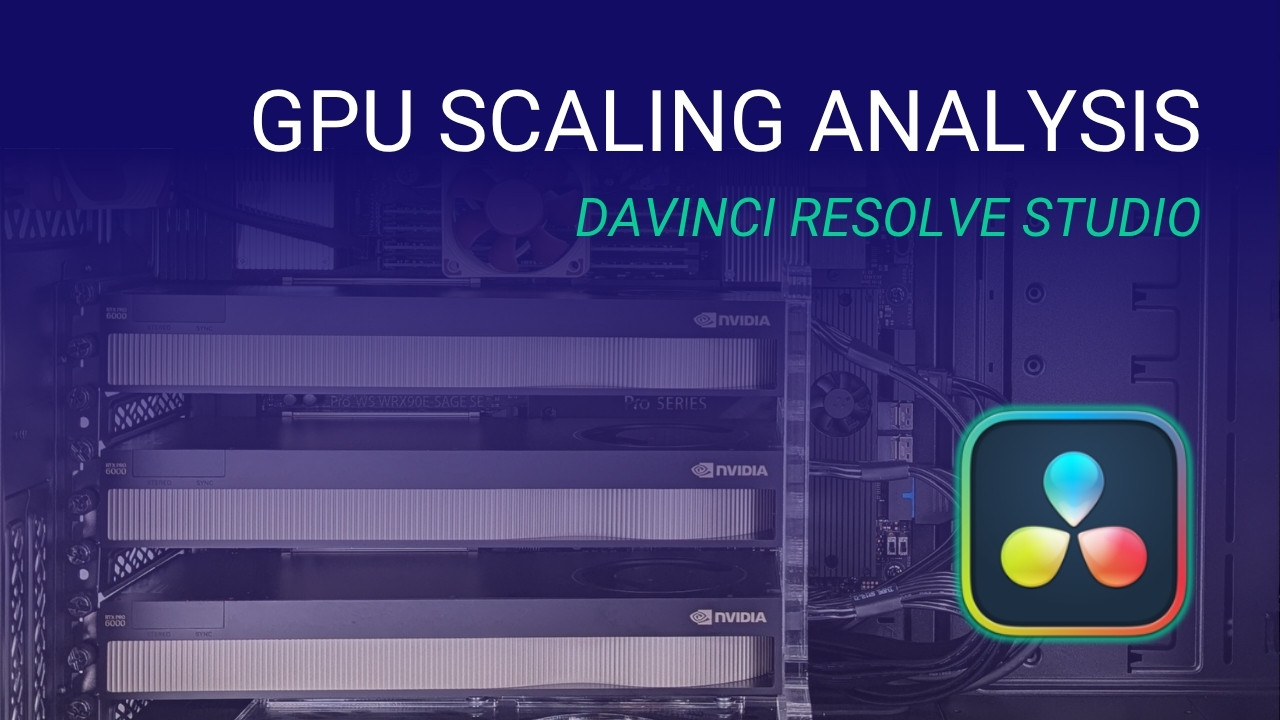
Regardless of the price mismatch, we are fortunate to have a number of both cards on hand and thought it was the perfect opportunity to examine how DaVinci Resolve Studio scales with multiple GPUs. It has been about a year since we last examined multi-GPU configurations in Resolve, and the new Blackwell GPUs from NVIDIA, as well as updates to DaVinci Resolve itself, may have changed things.
Both the AMD and NVIDIA models are rated for 300W per card, which means that a workstation with a standard 120V power supply – which typically maxes out at 1600 watts – should be able to handle three cards with little issue. In theory, four cards could be possible depending on the power draw of the CPU and other components in the system, but generally the platforms that can support this many GPUs draw enough power to make four 300W cards untenable. Moreover, we have found that using four cards of this class to be problematic to cool in certain workloads, so we have opted to limit our desktop workstations to triple-GPU configurations that allow a slot between each card for increased airflow.
Test Setup
For this round of testing, we are using DaVinci Resolve Studio 20.0.1 paired with the 1.2.0 version of our PugetBench for DaVinci Resolve benchmark. This tool lets us examine a wide range of tasks in Resolve: from codec processing to GPU effects, as well as a range of the new AI-based features.
We want to emphasize the “Studio” aspect of the version of DaVinci Resolve we are testing. Most of Resolve’s heavy GPU features require the paid Studio version, which is also needed to enable support for multiple GPUs. The free version is limited to a single GPU and lacks several advanced options, including most of their AI-powered tools. It is unlikely that anyone spending the money on this kind of setup would not have the Studio version, but we have seen confusion around this before so we want to call it out specifically.
Hardware Configuration
Test Platform
| CPUs: AMD Ryzen™ Threadripper™ PRO 9975WX |
| CPU Cooler: Asetek 836S-M1A 360mm AIO |
| Motherboard: ASUS Pro WS WRX90E SAGE SE BIOS Version: 1106 |
| RAM: 8x DDR5-4800 32GB RDIMMs (256 GB total) |
| PSU: Super Flower LEADEX Platinum 1600W |
| Storage: Samsung 980 Pro 2TB |
| OS: Windows 11 Pro 64-bit (26100) Power Profile: Balanced |
GPUs
| 1-3x NVIDIA RTX PRO™ 6000 Blackwell Max-Q Workstation Edition Driver: 576.52 1-3x AMD Radeon™ AI PRO R9700 Driver: 25.6.1 |
We are using a platform based around the AMD Ryzen™ Threadripper™ PRO 9975WX. This platform gives us all the PCIe lanes we could possibly want, and the 9975WX is among the top-performing CPUs currently available for Resolve – thus bottlenecking the GPUs as little as possible.
Overall Multi-GPU Performance
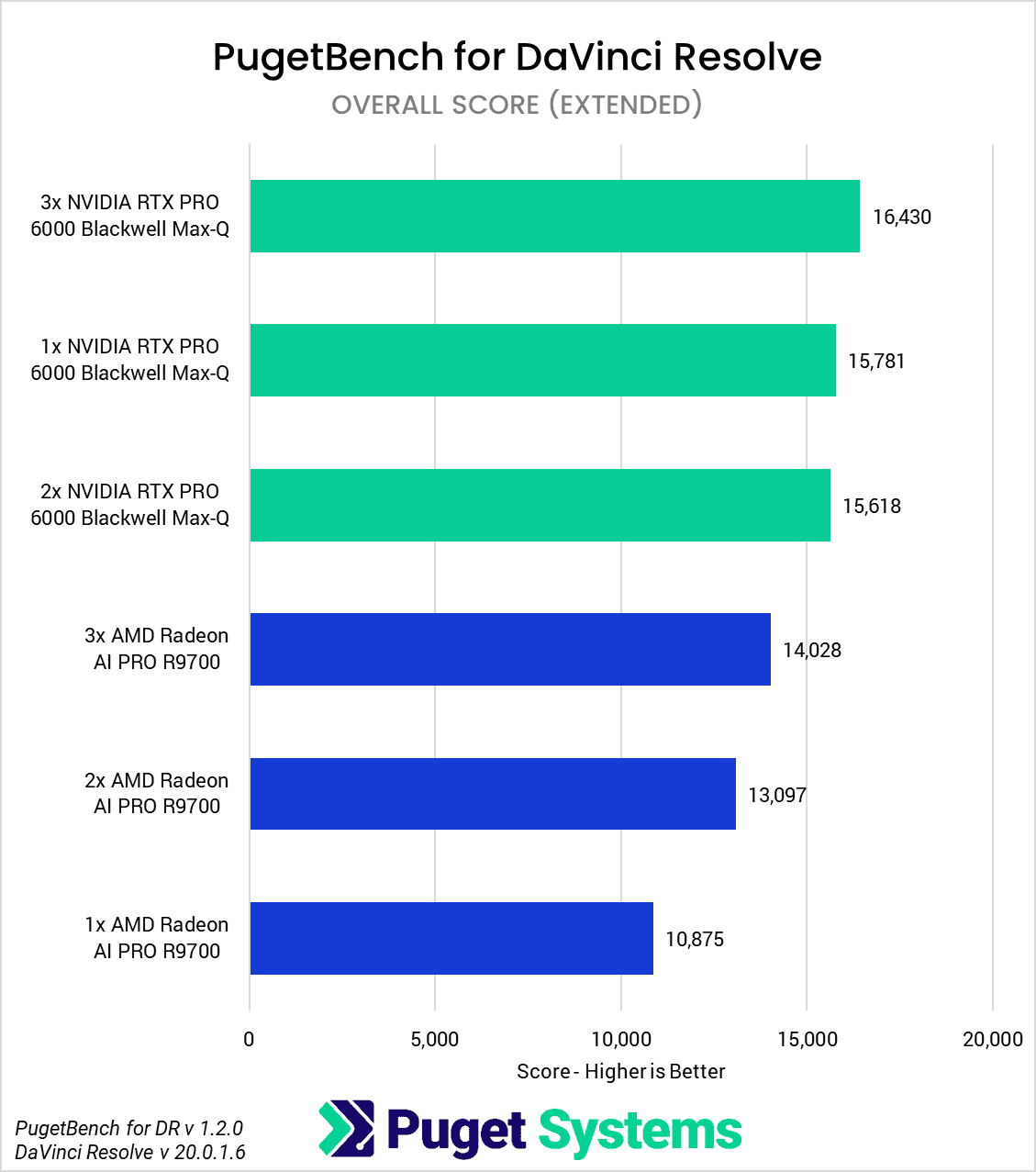
Because PugetBench tests so many different aspects of DaVinci Resolve Studio, we will break down our GPU scaling analysis based on specific workloads and tests. However, to start, we want to look at the Overall Score from our benchmark. This combines everything into a single number to give the best high-level view of performance. It includes several CPU-bound tests and some that don’t scale with multiple GPUs, so it isn’t great for “best-case” GPU scaling. What it does instead is give a more holistic view of the performance you can expect from multiple GPUs.
Image
As we mentioned, the Overall Score is not a measurement of pure GPU performance and includes a lot of CPU-heavy workloads. Still, it is interesting to see that in this zoomed-out view, using multiple NVIDIA RTX PRO 6000 Blackwell Max-Q GPUs may not net as much of an advantage as you might expect. One, two, and three of these GPUs all scored within about 6% of each other. The AMD Radeon AI PRO 9700 saw better scaling, with two cards giving about 20% more performance than just one card, and three cards bringing that up to ~30%.
This does not mean that multiple NVIDIA cards are never worth it or that multiple AMD cards will only give you a small benefit, but it does mean that you need to have a good understanding of your workflows and where your bottlenecks are coming from to determine if using multiple GPUs will be beneficial. We will demonstrate that by breaking things down further in the following sections.
RAW Codec Processing
Image
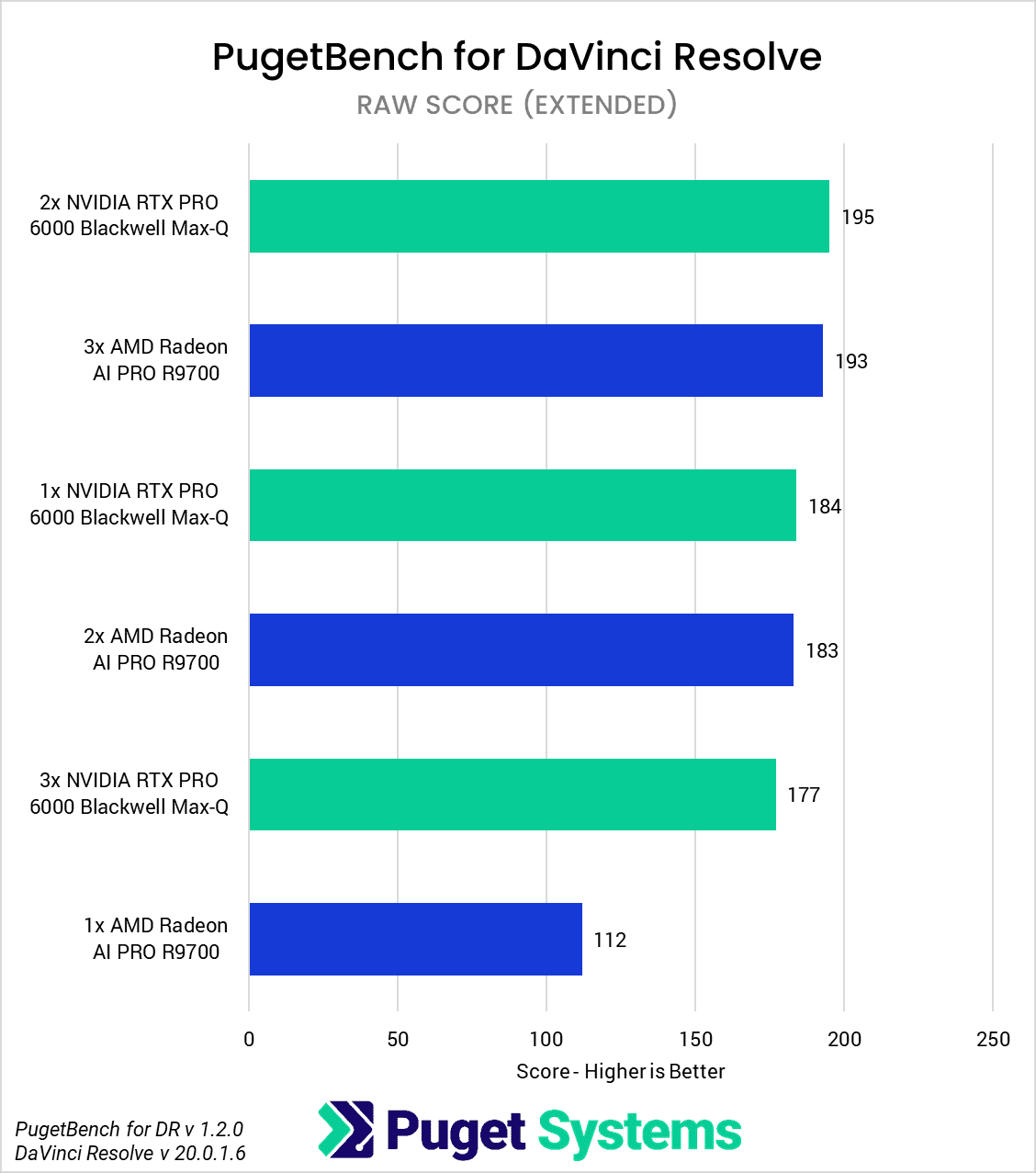
The first area we want to examine is processing a range of RAW codecs. Our benchmark looks at Cinema RAW, ARRIRAW, X-OCN, BRAW, and RED at various resolutions.
Interestingly, we saw very different behavior from NVIDIA and AMD. With the 6000 Blackwell Max-Q, the only codec that saw any amount of scaling was BRAW when going from one card to two, netting a 40% performance improvement. However, we saw no benefit to having a third card. In addition, REDRAW saw a performance regression of 20-30% with triple GPUs. We aren’t sure why this is the case, but it serves as a warning against assuming that more GPUs are always beneficial, a point we will explore further later in this article.
We saw much better scaling from AMD’s AI PRO 9700. Across the board, there was a performance benefit with a second card, with an average performance gain of 64%. Triple cards only averaged 10% above that, at 74% faster than a single GPU. BRAW scaled particularly well, though, with triple GPUs coming in at almost twice the performance of a single GPU.
Part of this is likely because even though most of these codecs are GPU-accelerated to some degree, the CPU is also used for portions of the processing. Due to the 6000 Blackwell Max-Q’s higher base performance compared to the AI PRO 9700, we believe that we are simply hitting the point where the CPU is holding back the cards. The Threadripper PRO 9975WX is the fastest CPU we have tested for DaVinci Resolve, however, so if the CPU is the limiting factor, there isn’t anything that can be done about it with currently available processors.
Fusion
Image
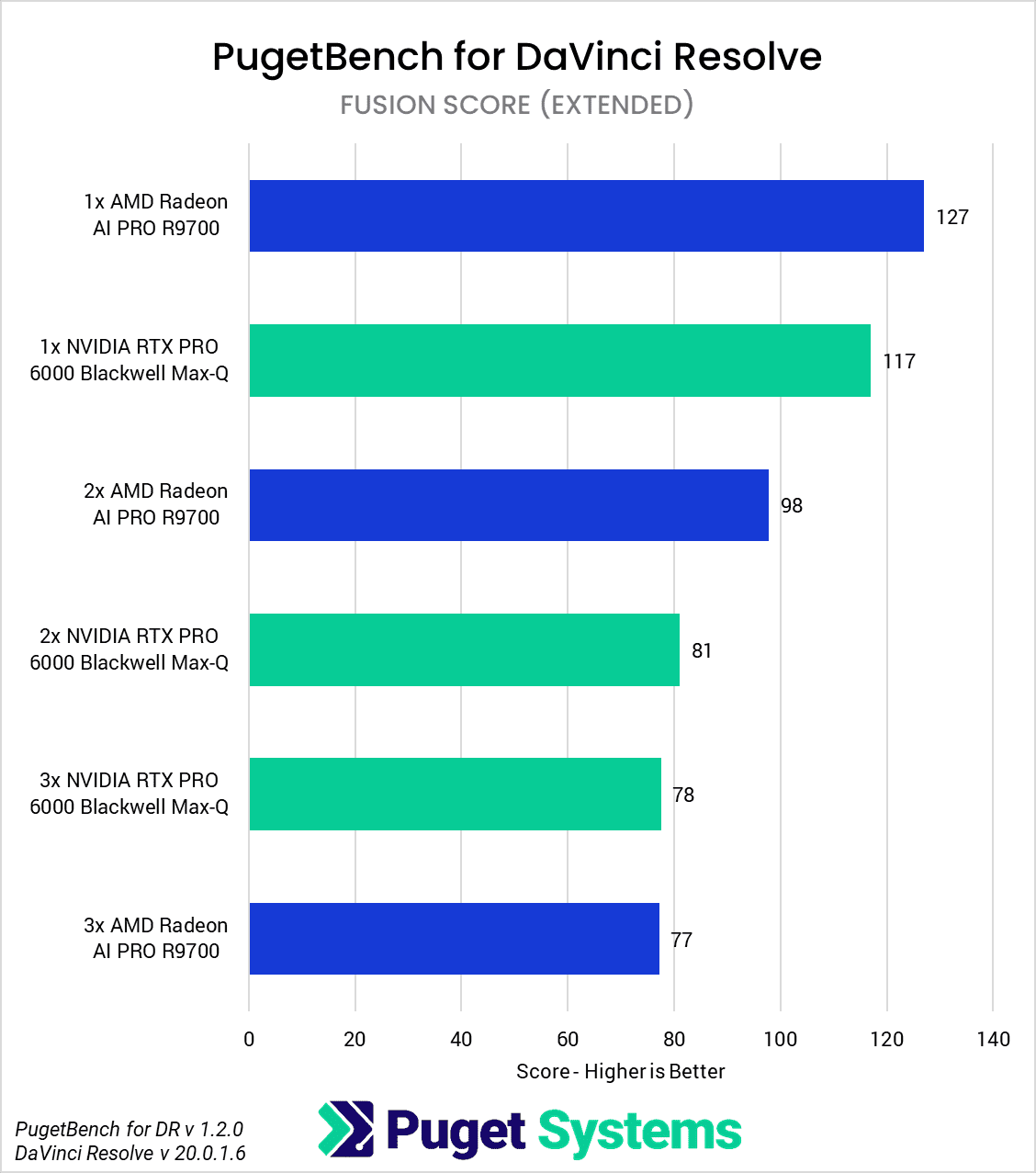
Next, we want to examine Fusion. This is easily the worst aspect of DaVinci Resolve for multi-GPU configurations, as we have long seen performance issues with multiple cards.
Unfortunately, it doesn’t appear that anything has changed with these new GPUs or DaVinci Resolve Studio 20. Single-GPU configurations are the way to go, with a single 6000 Blackwell Max-Q performing 45-50% faster than dual- or triple-GPU configurations. The story is similar for AMD, with a single AI PRO 9700 being 30% faster than two cards and 65% faster than three.
We do want to call out here that Fusion is one of the areas in Resolve where AMD has a performance advantage over NVIDIA, despite the higher MSRP of the RTX PRO 6000 Blackwell card. Most of Fusion is CPU-bound, but for whatever reason, AMD GPUs do very well in this workload. This issue isn’t limited to the Radeon AI PRO 9700 or AMD’s workstation cards in general; we also observed this behavior in our recent article covering the AMD Radeon 9070 XT.
GPU Effects
Image
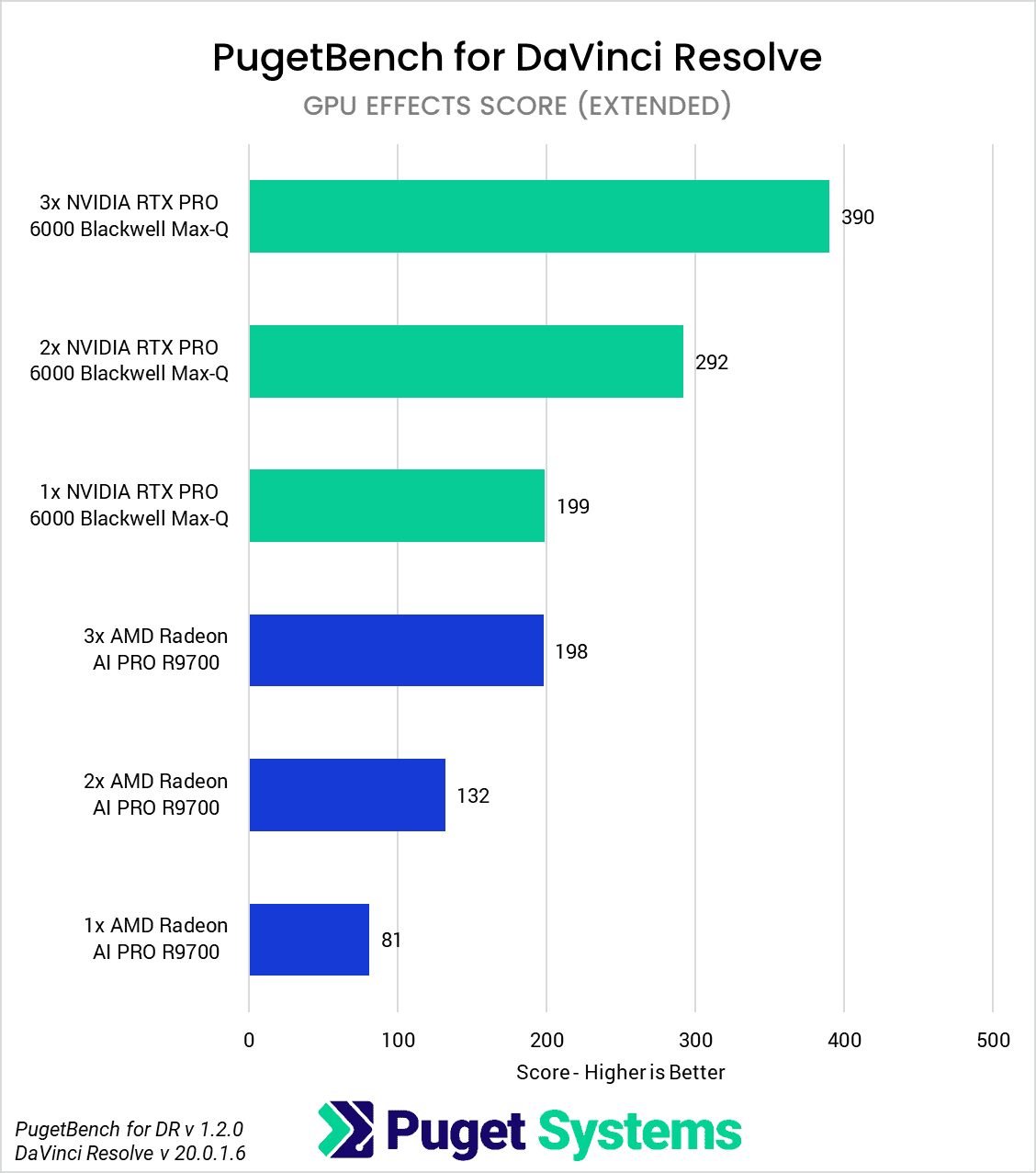
In a complete 180 from Fusion, GPU Effects like OpenFX and noise reduction are the quintessential workload in DaVinci Resolve for utilizing more powerful and multiple GPUs. Since these effects rely on the GPU so heavily, the 6000 Blackwell Max-Q has higher performance per card than the AI PRO 9700 – but both scale very well with multiple cards.
From NVIDIA, we saw about a 50% increase in performance when going from one 6000 Blackwell Max-Q to two, and a similar margin again with three cards, resulting in just under twice the performance of a single card. AMD’s scaling is even better, with the AI PRO 9700 experiencing a 60% performance boost with two cards and a remarkable 2.5x increase in performance with three cards compared to a single card.
There is an interesting story here since three AMD Radeon AI PRO 9700 cards perform almost identically to a single NVIDIA RTX PRO 6000 Blackwell Max-Q. One Max-Q has the advantage of being a much simpler configuration, having 3x the VRAM (you can’t “pool” VRAM across cards in Resolve), needing only a third of the power (300W vs 900W), and doesn’t have to deal with any of the weird performance issues with multiple cards in Fusion. On the other hand, three AI PRO 9700 cards altogether are less than half the cost of a single 6000 Blackwell Max-Q! We will note that if you are considering a single NVIDIA GPU, we found that the “Workstation” edition of the RTX PRO 6000 Blackwell is even faster and quieter – albeit with a higher power draw – in DaVinci Resolve.
AI Features
Image
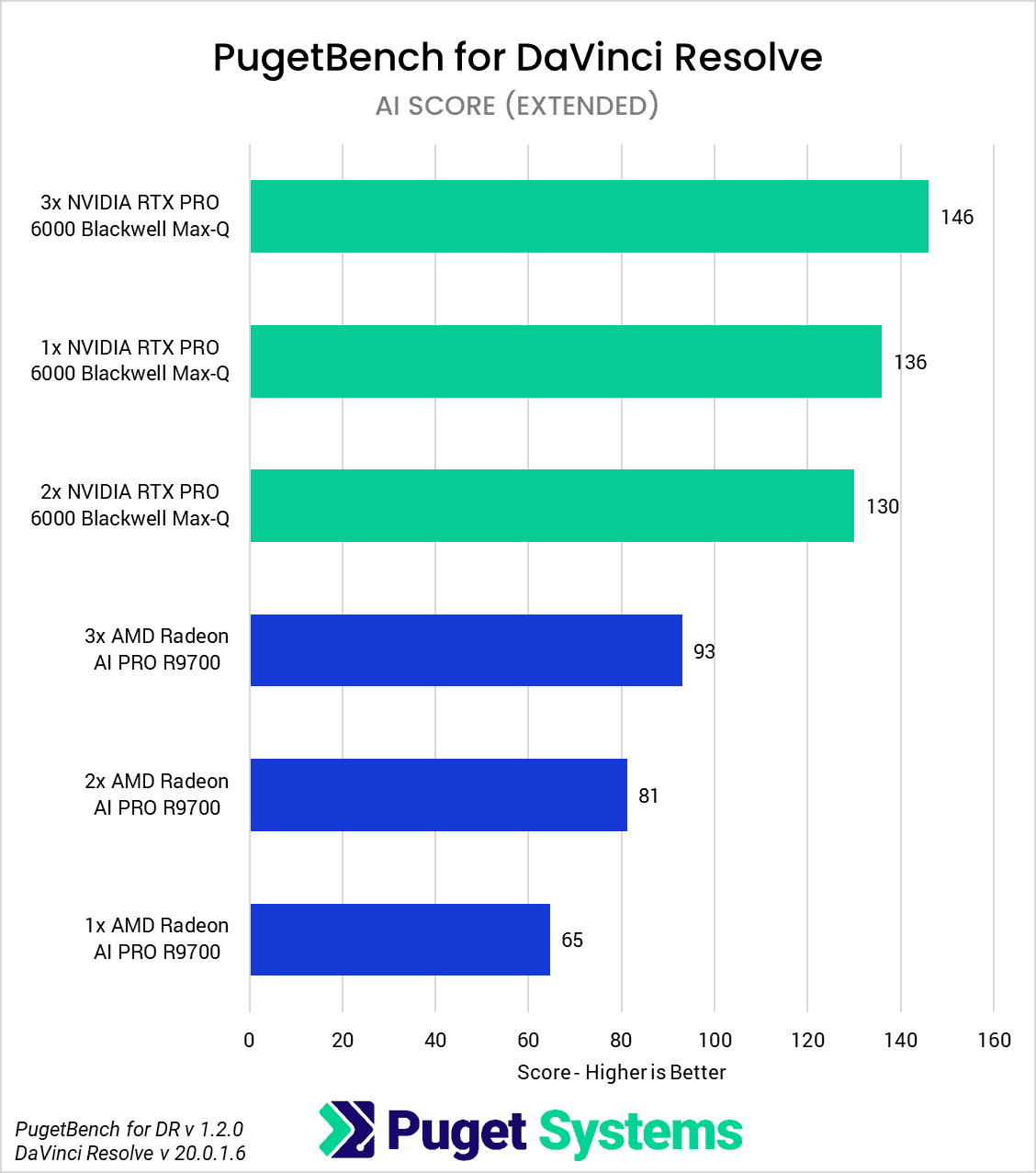
Last up, we have the relatively new AI Features in Resolve. Our benchmark looks at 15 different effects and features, including super scale, face refinement, magic mask, relight, video stabilization, smart reframe, subtitle creation, and more.
Similar to the RAW Codec Processing section, we didn’t see much scaling with multiple cards on the NVIDIA side. We believe this is due to a somewhat similar issue, where the GPUs are powerful enough that we are being CPU-bottlenecked. There were, however, a few specific tests like face refinement, person mask, depth map, and optical flow (speed warp) that did show some decent scaling of +60% with two cards, and around +100% with three.
The AMD AI PRO 9700, on the other hand, is less performant than the 6000 Blackwell Max-Q – so there is more room for scaling with multiple cards. On average, we saw a 25% performance gain with two AI PRO 9700 cards compared to a single GPU, and a 44% gain with three cards. Like NVIDIA, specific tests showed larger gains in areas such as super scale, face refinement, person mask, depth map, optical flow (speed warp), and smart reframe.
How well does DaVinci Resolve Studio Scale with Multiple GPUs?
DaVinci Resolve Studio is a fairly wide-ranging application, with aspects covering video editing, motion graphics, VFX, and audio – as well as a wide range of AI-based features. Many of these (for example, Fusion and Fairlight) were acquired by Blackmagic over the years and integrated into DaVinci Resolve. Partially because of that, the exact way that they utilize the hardware in your system – and especially things like multi-GPU configurations – can vary widely depending on what you are doing.
In general, the three aspects of DaVinci Resolve Studio that can benefit from having more than one GPU are: Raw Codec Processing, GPU Effects, and the newer AI Features.
For RAW codec processing, both the CPU and GPU are used in tandem, and whether multiple GPUs are worth it depends quite a bit on exactly what CPU and GPU(s) you are using. If you have an underpowered CPU compared to your GPU, you might see no benefit to having multiple cards. However, that doesn’t mean having the fastest CPU possible will always make multiple GPUs worth it. We saw the perfect example of that in our testing, where the AMD Threadripper PRO 9975WX (the fastest CPU we have tested for Resolve) wasn’t able to keep up with even a single NVIDIA RTX PRO 6000 Blackwell Max-Q, so there was no performance to be had by adding multiple cards. On the other hand, the AMD Radeon AI PRO 9700 isn’t as fast as the Max-Q, so it was able to see a 60-70% increase in performance with multiple cards when paired with the same 9975WX processor.
GPU Effects like OpenFX and noise reduction are where multi-GPU configurations shine in DaVinci Resolve Studio. These are heavily GPU-accelerated and can see great scaling with multiple cards. Somewhat similar to RAW codec processing, however, there are diminishing returns depending on how well your CPU and other aspects of the system can keep up. In our testing, we observed a 47% increase in performance when switching from one 6000 Blackwell Max-Q card to two, or nearly twice the speed with three cards compared to one. The AI PRO 9700 scaled a bit better, likely due to its lower performance per card compared to the Max-Q, and was 63% faster with two cards, or 140% faster with three.
Last up are the newer AI Features, including super scale, magic mask, video stabilization, audio transcription, and more. Many people associate “AI” with a heavy GPU load, and while that is true to an extent, many AI tasks in Resolve (and similar applications like Premiere Pro) actually utilize the CPU to a considerable degree. As a result, we observed almost no benefit to having multiple 6000 Blackwell Max-Q cards for these tasks. AMD did see some scaling of 26% and 44% with two and three AI PRO 9700s compared to a single card, but even with that, they could not match the performance of a single Max-Q in this area.
Overall, utilizing multiple GPUs can be highly beneficial for several workflows in DaVinci Resolve Studio; however, it is not universally applicable. The scaling is not perfect, and estimating the performance gain can be challenging since it depends not only on the specific task but also on the relative performance breakdown between the CPU and GPU. However, if you are often slowed down by waiting for OpenFX or noise reduction, adding more GPUs to your system could be an easy (though not inexpensive) way to achieve a decent performance boost.
Due to the complexity of handling the power draw and heat output of multiple cards, as well as the physical space required, it is essential to be cautious when configuring multi-GPU systems. We allow for dual GPU configurations on our “High Performance” DaVinci Resolve system, or triple GPU configurations on our custom Threadripper PRO workstations. You can also speak to one of our knowledgeable technology consultants, who can help you get a system configured for your exact needs.

Looking for a content creation workstation?
We build computers tailor-made for your workflow.

Don’t know where to start?
We can help!
Get in touch with one of our technical consultants today.