Table of Contents
Introduction
Over the last few weeks, AMD has announced and launched its latest updates to two of its highly-acclaimed product families: the High-End Desktop (HEDT)-focused AMD Ryzen™ Threadripper™ 9000 Series and workstation-focused AMD Ryzen™ Threadripper™ PRO 9000 WX-Series. These new processors are based on AMD’s Zen 5 microarchitecture, like the Ryzen™ 9000 desktop parts. They also now officially support RAM up to 6400 Mbps, while maintaining compatibility with existing TRX50 and WRX90 boards.

Image
We have already published full reviews of both the Threadripper 9000 and Threadripper PRO 9000WX families in professional content creation applications. However, those reviews focus much more on generational uplifts and comparisons against Intel’s Xeon® W models. Although you can compare results directly between those two articles, pure performance is not the only factor in determining which processor family is best for your needs. For more data and insights, on the Threadripper 9000 side, we also recommend ServeTheHome‘s and Techspot‘s written reviews; the video-inclined may be interested in Level1Tech’s Windows and Linux reviews or TechNotice’s 9970X review.
In this article, we will look at the differences between the Threadripper and Threadripper PRO product families in terms of three primary factors:
Processor Specifications
Here are the most relevant CPU specifications from AMD. For more information, visit AMD’s Threadripper page:
Besides price, little distinguishes the Threadripper and Threadripper PRO processors in terms of top-level specifications. On a per-core basis, they have the same amount of cache, base and boost clocks, memory speed support, and maximum PPT (power usage). The Threadripper PRO processor family does have more varieties of core counts and costs significantly more per-core. Connectivity is also somewhat different: Threadripper PRO supports up to eight memory channels and 128 PCI Express lanes, while Threadripper only supports four channels and 80 lanes.
Platform Capability
Aside from availability of the huge 96-core 9995WX, the primary reason for choosing Threadripper PRO over Threadripper is the overall platform support. When we talk about a platform, we mean the combination of the motherboard features, the chipset, and the processor. We typically shorthand this into just the chipset names: TRX50 and WRX90. TRX50 is the HEDT chipset designed for Threadripper 9000, while WRX90 is the workstation chipset designed for Threadripper PRO 9000WX. Below, we’ve highlighted the major platform differences, but for more information, you can look at our TRX50 vs. WRX90 article:
| Feature | TRX50 | WRX90 |
|---|---|---|
| CPU Support | Threadripper 9000/7000 & Threadripper PRO 9000WX/7000WX | Threadripper PRO 9000WX/7000WX |
| Usable PCIe Lanes | 88 | 144 |
| Maximum PCIe 5.0 lanes | 80 | 128 |
| Supported Memory | 4-channel DDR5 Reg. ECC | 8-channel DDR5 Reg. ECC |
| Maximum Supported RAM | 1 TB | 2 TB |
| AMD PRO Features | No | Yes |
| Overclocking | Yes | Yes |
As you can see, WRX90 is a more capable platform than TRX50 – but it only supports Threadripper PRO processors. TRX50 is designed for Threadripper but does also support Threadripper PRO processors, though using that combination will limit the CPU somewhat. Specifically, TRX50 boards officially only support up to 4-channel memory (although Gigabyte offers an 8-channel board in their TRX50 AI Top), 88 PCIe lanes, and lack many of the AMD PRO features.
Beyond the pure PCIe lane count differences, the slot layout on motherboards also varies. We have found that most TRX50 boards only offer 3-4 PCIe slots, eschewing the necessary chips to enable bifurcation across a full bank of seven slots. While this is fine for many users, it makes it more challenging to configure multi-GPU setups—especially alongside additional add-in cards. WRX90, on the other hand, usually has all seven PCIe slots populated with full x16 connections.
The 8-channel memory available on WRX90 platforms enables twice the maximum memory capacity as TRX50. For workflows that require more than 1 TB of memory, a WRX90 motherboard is a must. This can also, sometimes, enable 1 TB configurations for cheaper. We’ll offer an example using some memory found on ServerSupply. At the time of writing, 128 GB Samsung DDR5 6400 Mbps ECC RDIMMs cost $1,080, while the 256 GB versions cost $2,720. Thus, configuring 1 TB of RAM on a WRX90 platform saves $2,200 in RAM. This may offset the more expensive motherboards and CPUs at some core counts.
An increased number of memory channels also translates to more bandwidth. Assuming no other bottlenecks, memory bandwidth scales directly with both frequency and channel count. Doubling the number of channels doubles the maximum theoretical bandwidth. This is important for some coding, HPC, and machine learning tasks and may be relevant for other niche applications.
We’re not going to dive too deep into AMD PRO Technologies, but they are only fully supported on the WRX90 platform. These hardware and software features principally deal with management and security. WRX90 platforms also frequently have remote management features like IPMI/BMC and onboard graphics.
Price
Although we’ve briefly looked at the cost of the new Threadripper 9000 and Threadripper PRO 9000WX processors, as well as an example of RAM configuration pricing, these don’t paint the full picture of total system cost. Most users investing in a PRO part will want to pair it with WRX90, and since that chipset has more features, the motherboards built with it tend to be more expensive than comparable TRX50 boards. Additionally, as WRX90 boards support twice the memory channels, they should be paired with twice as much memory—or at least twice the number of modules.
There are a few quirks we’re not going to look at here. Specifically, the aforementioned Gigabyte AI Top TRX50 motherboard ($900) with 8-channel memory support. Additionally, there may be niche workloads where dropping a 9995WX into a more traditional TRX50 board for access to the extra cores makes sense, but extra memory bandwidth is not needed. The math for those scenarios is left as an exercise for the interested reader.
To demonstrate how the differences in these platforms impact prices, we will build out a configuration for each CPU here on our website. We will use the two primary motherboards we carry for these processor families: the ASUS Pro WS WRX90-SAGE SE and the ASUS Pro WS TRX50-SAGE WiFi. Each system will be paired with 256 GB of the fastest memory we have available, which, in line with our ethos as a stability-focused workstation company, is non-overclocked JEDEC 6400. We will also use the same video card (RTX 5080), CPU cooler, drive (2 TB Gen5 NVMe), power supply, and chassis to keep the comparison as fair as possible. It is worth noting that DIY builders could reduce these total system prices, but that the overall relative costs would be essentially the same.
| Puget Workstation | AMD CPU | ASUS Motherboard | RAM Configuration | Price |
|---|---|---|---|---|
| T140-XL | 9995WX | WRX90 | DDR5-6400 8 x 32 GB | $21,526 |
| T140-XL | 9985WX | WRX90 | DDR5-6400 8 x 32 GB | $17,501 |
| T120-XL | 9980X | TRX50 | DDR5-6400 4 x 64 GB | $13,665 |
| T140-XL | 9975WX | WRX90 | DDR5-6400 8 x 32 GB | $13,304 |
| T140-XL | 9965WX | WRX90 | DDR5-6400 8 x 32 GB | $11,981 |
| T120-XL | 9970X | TRX50 | DDR5-6400 4 x 64 GB | $10,962 |
| T140-XL | 9955WX | WRX90 | DDR5-6400 8 x 32 GB | $10,636 |
| T120-XL | 9960X | TRX50 | DDR5-6400 4 x 64 GB | $9,870 |
Using the configuration tools on our website, one thing that stands out with these platforms is how much high-capacity memory modules can cost. On a Threadripper PRO system, maxing out the memory with 8×128 GB modules costs almost as much as upgrading from the 16-core 9955WX to the top-end 96-core 9995WX! We don’t currently offer 256 GB modules, but when those are available, they will almost certainly push the price of maxed-out RAM above that of the 9995WX.
Another notable standout is that the 9980X system comes in only ~$360 more than the 9975WX configuration. This means that, if the PRO features and PCIe lanes aren’t needed, the closest price competitor for the 32-core Threadripper PRO is actually the 64-core Threadripper! Similarly, the 32-core 9970X is only ~$330 more than the 16-core Threadripper PRO 9955WX—again, twice the cores for a similar amount of money.
That brings us back to the question about whether extra memory channels can earn back enough performance to offset the additional cores available at the same overall price. Luckily, that’s exactly what we want to cover in the rest of this article: for content creation workflows, where is it worth investing in Threadripper PRO 9000WX, and where can Threadripper 9000 get you more bang for your buck?
Performance
For a given core count, most of the major specifications are the same between Threadripper 9000 and Threadripper PRO 9000WX; similarly, all of them are built on the same microarchitecture. The biggest distinctions come from the platform capabilities, many of which don’t traditionally have huge impacts on performance, except for memory bandwidth. However, CPUs are complicated pieces of engineering, so we still wanted to put the processors head-to-head to see if there are any significant performance differences.
The big things we are looking out for here are whether the broader core-count range of the PRO processors makes them particularly well-suited for some tasks, and whether the increased memory bandwidth they offer makes a difference. As to the former, this really just means seeing if the 96-core or 16-core Threadripper PRO CPUs are particularly performant (or not). For the latter, this will most likely show as performance differences between models of the same core count. We also plan to publish an article looking at memory scaling on Threadripper 9000 (and PRO) in the near future.
Test Setup
AMD WRX90 Test Platform
| CPUs: AMD Ryzen™ Threadripper™ PRO 9995WX AMD Ryzen™ Threadripper™ PRO 9985WX AMD Ryzen™ Threadripper™ PRO 9975WX AMD Ryzen™ Threadripper™ PRO 9965WX AMD Ryzen™ Threadripper™ PRO 9955WX |
| RAM: 8x DDR5-6400 ECC Reg. 64GB (512 GB total) |
| CPU Cooler: Asetek 836S-M1A 360mm |
| Motherboard: ASUS Pro WS WRX90E-SAGE SE BIOS version: 1106 |
| GPU: NVIDIA GeForce RTX™ 5080 Driver 576.80 |
| Storage: Samsung 980 Pro 2TB |
| PSU: Super Flower LEADEX Platinum 1600W |
| OS: Windows 11 Pro 64-bit (26100) |
AMD TRX50 Test Platforms
| CPUs: AMD Ryzen™ Threadripper™ 9980X AMD Ryzen™ Threadripper™ 9970X AMD Ryzen™ Threadripper™ 9960X |
| RAM: 4x DDR5-6400 ECC Reg. 32GB (128 GB total) |
| CPU Cooler: Asetek 836S-M1A 360mm |
| Motherboard: ASUS Pro WS TRX50-SAGE BIOS version: 1106 |
| GPU: NVIDIA GeForce RTX™ 5080 Driver 576.80 |
| Storage: Samsung 980 Pro 2TB |
| PSU: EVGA SuperNOVA 1200W P2 |
| OS: Windows 11 Pro 64-bit (26100) |
Benchmark Software
| Adobe Photoshop 26.8 – PugetBench for Photoshop 1.0.5 |
| Adobe Premiere Pro 25.2.3 – PugetBench for Premiere Pro 1.1.1 |
| Adobe After Effects 25.3.1 – PugetBench for After Effects 1.0 |
| DaVinci Resolve 20.0.1.6– PugetBench for DaVinci Resolve 1.2.0 |
| Blender 4.4.0 |
| V-Ray 6.00.01 |
| Cinebench 2024 |
| Unreal Engine 5.5 |
| Visual Studio 2022 |
| Llama.cpp 5122 Phi-3 Mini Q4 |
To keep our results as comparable as possible, we standardize on a base setup for all of our testbeds that closely aligns with the content creation workstation specs we recommend. To ensure maximum stability, we keep our memory running at the officially supported JEDEC RAM speeds, disable overclocking features, and enforce power limits.
Media and Entertainment
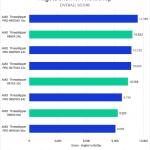
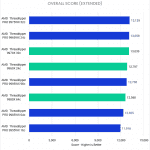
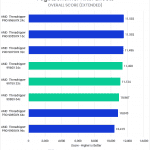
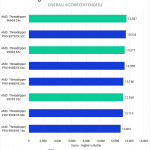
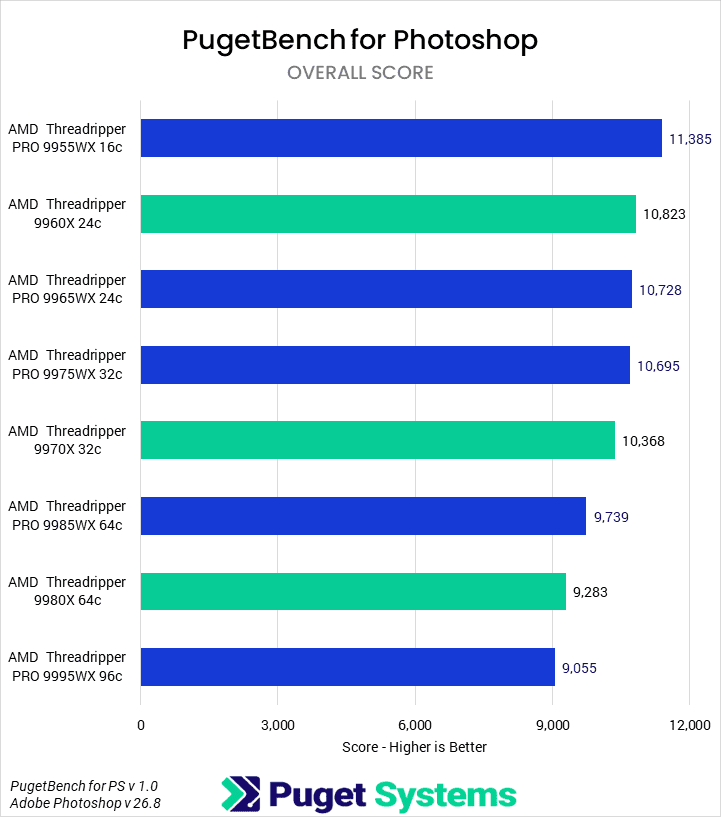
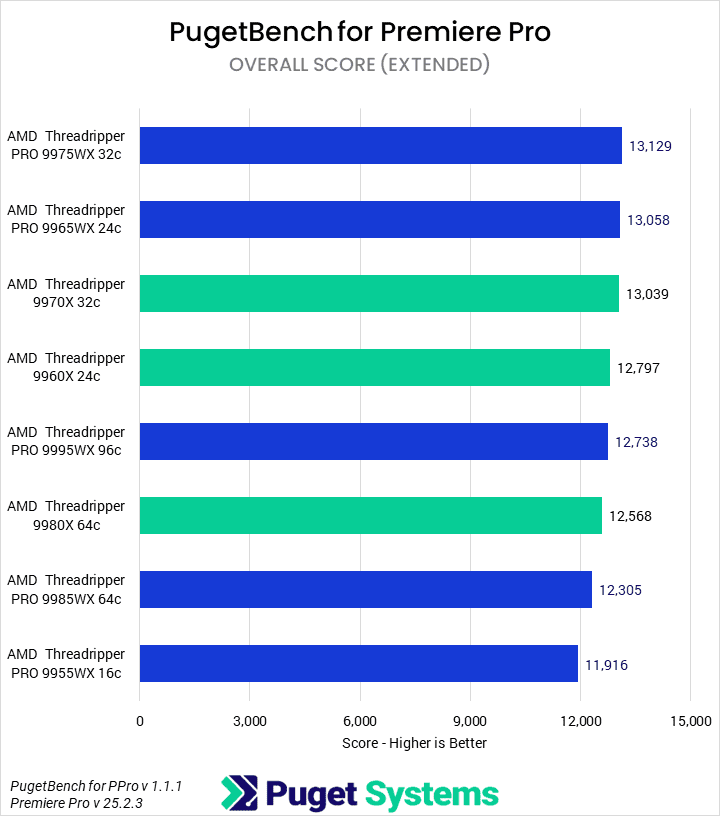
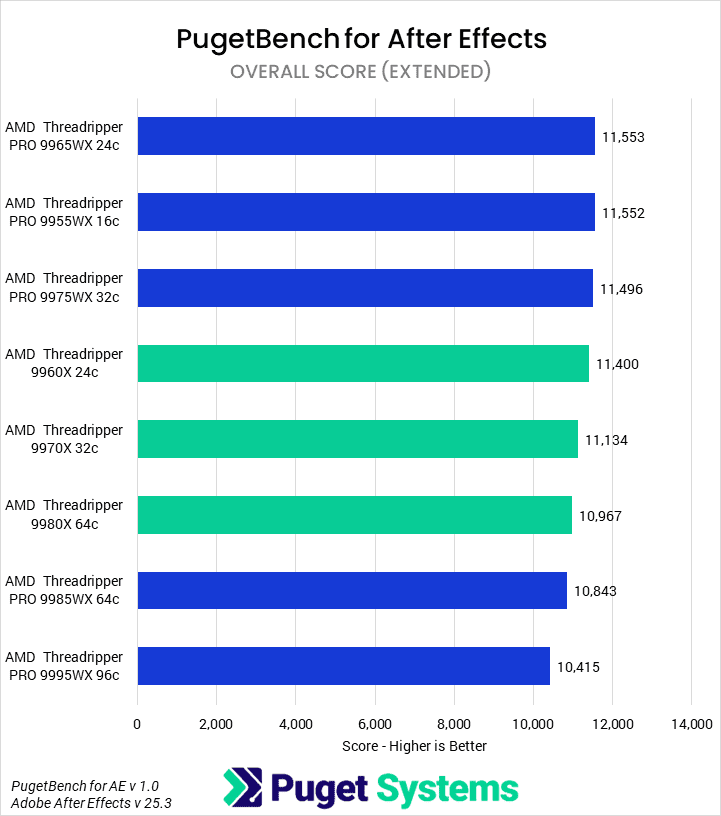
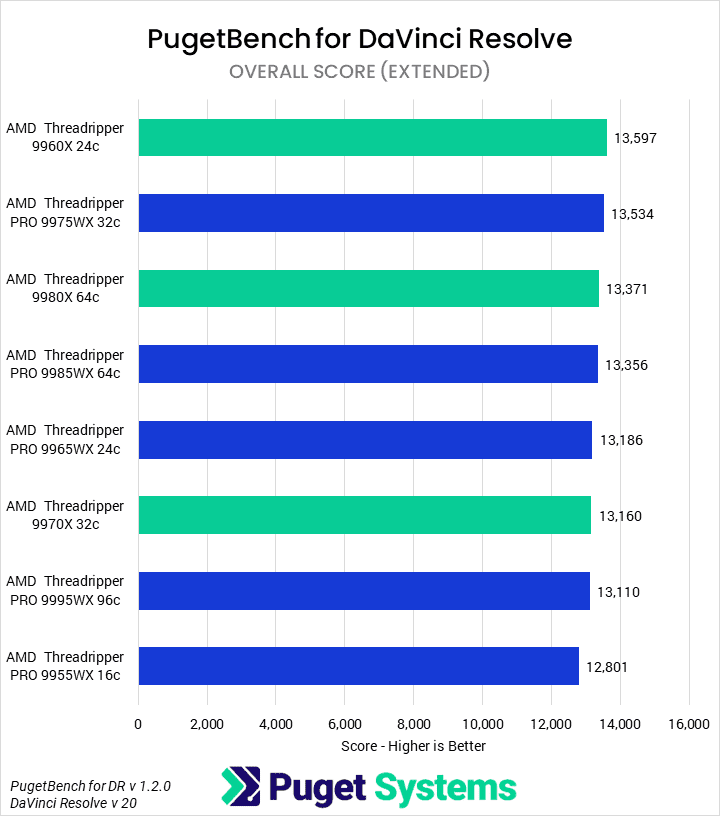
Starting off with media and entertainment workflows in applications like Photoshop and DaVinci Resolve, we see that there is not a lot of difference between the Threadripper PRO 9000WX and Threadripper 9000 processors. Most of the applications have a preference for either single-core or multi-core performance, but at a given core count, performance is nearly identical. None of these applications tends to be particularly memory bandwidth sensitive, so the additional memory channels add very little. Additionally, we didn’t observe that any of the applications were able to properly take advantage of the 96-core 9995WX, even for specific subtasks. Programming for that many threads is difficult, and this sort of software doesn’t typically need the boost it could give to some workflows. Overall, we think the 9960X will probably be the best CPU among them in terms of price-to-performance for most media and entertainment workflows.
Rendering and Unreal Engine
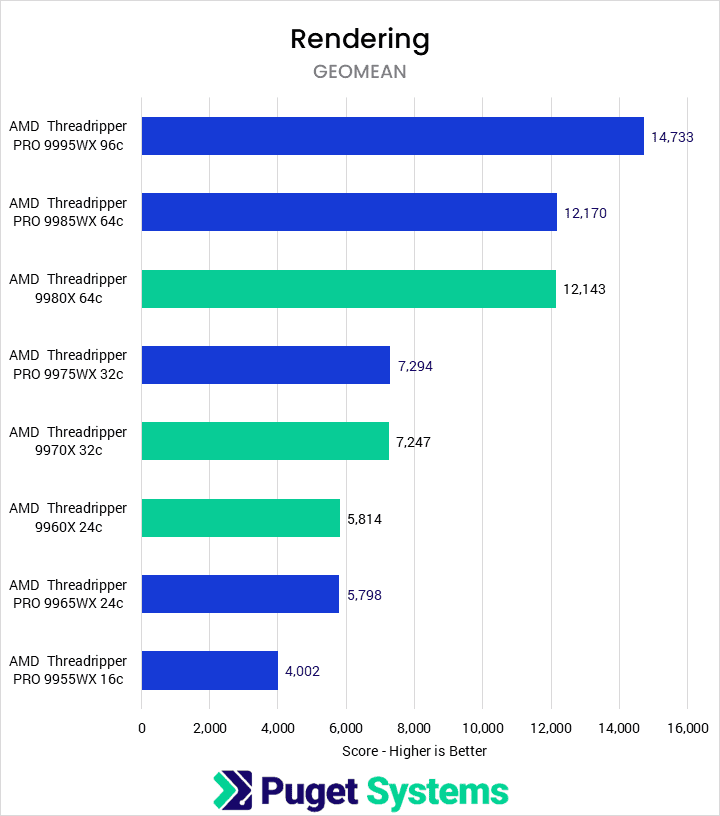
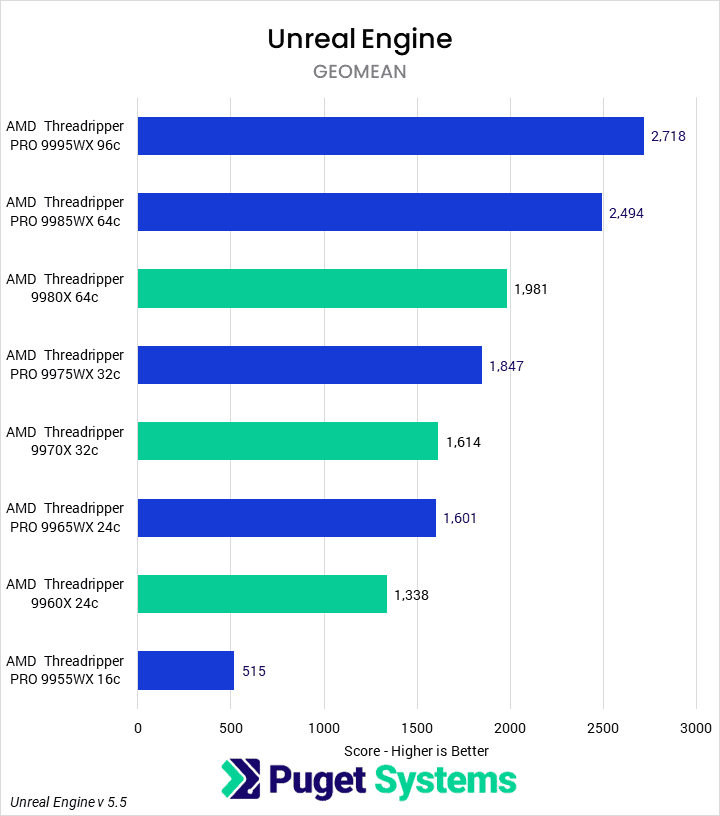
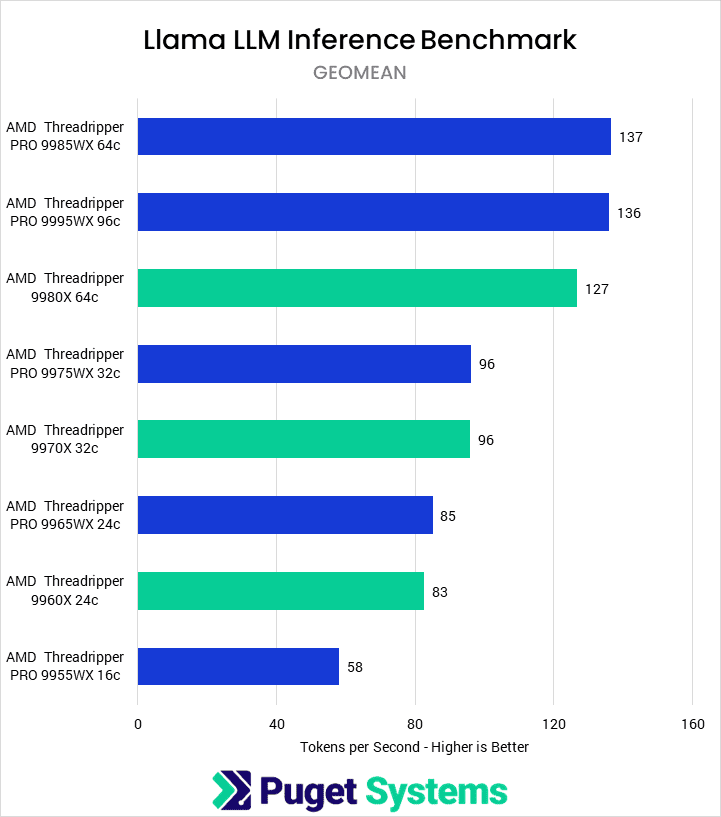
Moving on to heavily parallelized CPU tasks, however, we see a more interesting story. For these charts, we took the results from our recent Threadripper 9000 and Threadripper PRO 9000WX reviews and computed geomeans across each category of tests. For example, the rendering numbers are a geometric mean of the scores from V-Ray CPU, Blender CPU, and Cinebench multi-core. The Unreal Engine numbers used the same approach with the code compile, shader compilation, and light baking benchmarks (after we first extrapolated those from raw results into scores in a similar manner to how we compute our PugetBench scores). Finally, the Llama LLM performance is a pure geometric mean of the prompt processing and token generation portions of our benchmarking.
In CPU rendering, we found that memory bandwidth has little impact on overall performance. Instead, these tests are wholly reliant on the number of CPU cores available. Scaling isn’t perfect, but at a given core count, performance is the same between the Threadripper PRO and non-PRO parts. One quirk here is that, in some extreme scenarios, a scene could require more RAM than the Threadripper 9000-based configurations can provide. In that case, the PRO CPUs would be the only viable option, though other product lines like AMD’s EPYC server-class CPUs can also support high amounts of memory. Outside of that, Threadripper 9000 models will be the best value while the TR PRO 9995WX offers the highest performance.
Next, in our Unreal Engine tests, we found more utility from the increased memory bandwidth that the Threadripper PRO 9000WX and the WRX90 platform offer. At the 64-core tier, the 9985WX was 26% faster than the non-PRO 9980X. However, as we noted in our price section, this isn’t really the best comparison. Comparing the 64-core 9980X to the 32-core 9975WX, which have similar full-system prices, we see the higher core-count part is actually 7% faster. This trend of increased performance at core-parity but decreased at cost-parity holds true across the whole lineup. Because of that, we would generally recommend that, at a given budget, users stick with the Threadripper 9000 processors. However, if budget is no concern, the 9995WX is once more the fastest CPU among those tested.
Finally, our large language model (LLM) benchmark behaved more closely to rendering than Unreal Engine. Generally speaking, there was no performance difference between Threadripper 9000 and Threadripper PRO 9000WX processors at the same core count. Additionally, we found little difference between the 64-core and 96-core parts. This is in part due to the way we averaged the scores, as we saw acceptable scaling up to 96 cores in prompt processing, but a regression in token generation. However, we are working with small models in these tests, and believe that for particularly large models, the memory bandwidth and capacity could make a large difference.
Is AMD Threadripper 9000 or Threadripper PRO 9000WX Better for Content Creation?
While we are excited that AMD continues to innovate in the workstation and HEDT market, releasing two very similar product lines can make it difficult to know which processor will work best for an end user’s needs. Typically, spending more money results in getting a better product. However, when looking at Threadripper 9000 and Threadripper PRO 9000WX, that isn’t always the case.
Generally speaking, we found that the Threadripper 9000 processors were just as fast as the Threadripper PRO 9000WX processors at a given core count. The exception to this is when the workload was particularly memory-bound. In these areas, the 8-channel memory enabled by the PRO processors could improve performance by 26% or more.
The difficulty with the per-core comparison is cost. AMD’s Threadripper PRO parts are much more expensive than the non-PRO, plus the added cost of WRX90 motherboards, which results in similar full system prices between a PRO processor and the non-PRO one tier up. For scenarios where the memory bandwidth does not factor in, and the other PRO features are not needed, this makes the Threadripper 9000 CPUs a better value. In workloads that are memory-bound, the best choice will depend on budget and other specifics of the configuration.
Of course, this is assuming that price is a limiting factor. For workflows where multi-core performance is the most important (e.g., code compilation, CPU rendering, or simulation) and budget is not a concern, the Threadripper PRO 9995WX offers the best performance possible in these product lines. The Threadripper PRO line, while more expensive, also offers more CPU variants and various management and security features that some users may require.
If you need a powerful workstation to tackle the applications we’ve tested, the recommendations on our solutions page are tailored to excel in various software packages. If you prefer to take a more hands-on approach, our custom configuration page helps you configure a workstation that matches the exact specifications you want. Otherwise, if you would like more guidance in configuring a workstation that aligns with your unique workflow, our knowledgeable technology consultants are here to lend their expertise.

Looking for a content creation workstation?
We build computers tailor-made for your workflow.

Don’t know where to start?
We can help!
Get in touch with one of our technical consultants today.