Table of Contents
Introduction
Choosing the right system for graphic design and motion graphics workflows is complex because each project’s style and execution can vary dramatically. Creative roles in today’s industry blend disciplines, allowing an artist’s expertise in 2D illustrations, 2.5D animations, or 3D compositions to contribute to a broader range of tasks within a creative pipeline. However, the applications they use within that pipeline will differ across tasks, and the performance of their machine can dictate the efficiency, intricacy, and stylistic genre of the work they are producing. In other words, an artist’s skill drives their work, and the computer is an essential tool for realizing their creative vision.
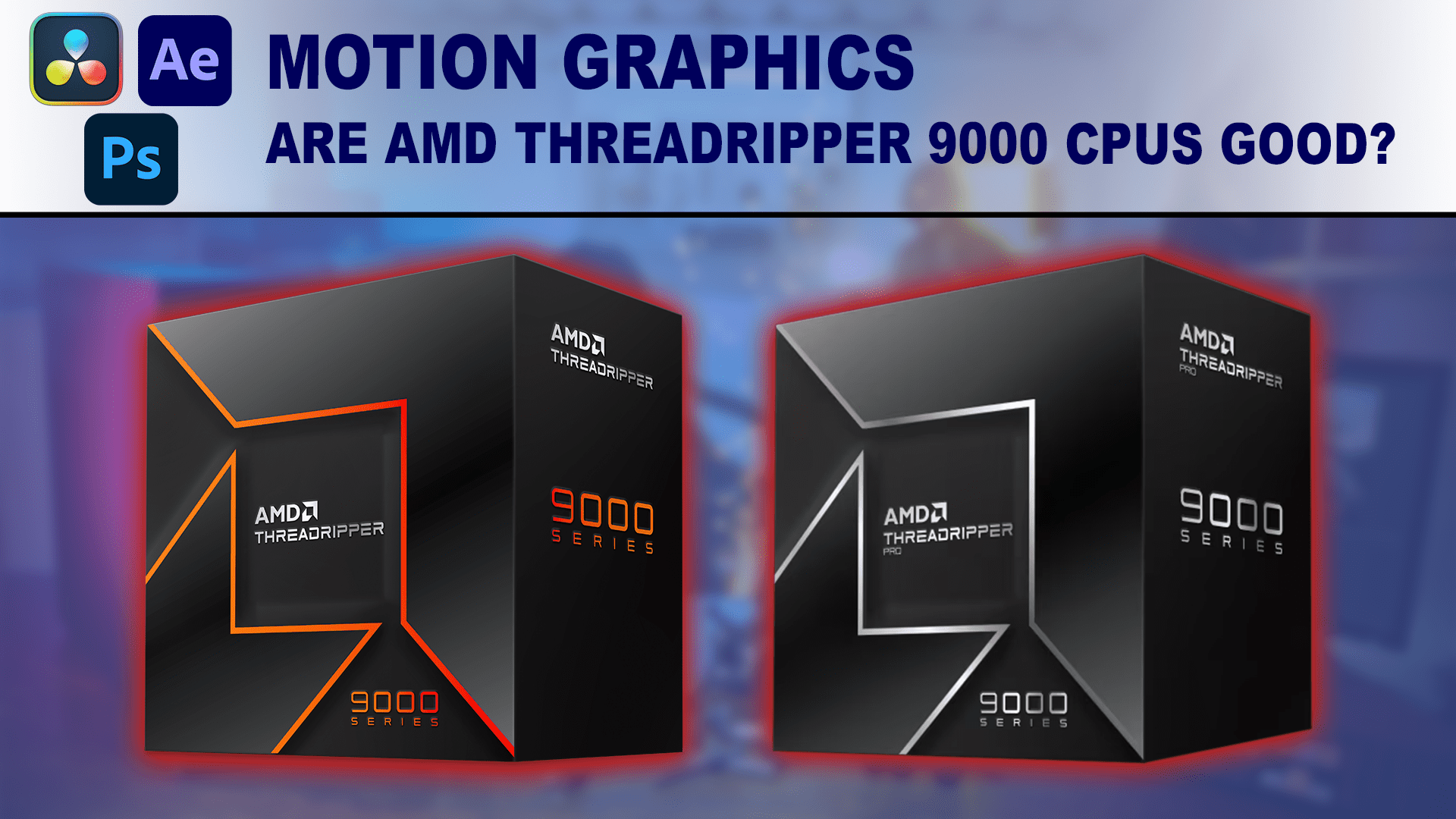
Here at Puget Systems, one of our goals is to distill complex advancements in computer technology and show how new products affect various industries. However, understanding how these advancements apply to your workflow can be complex, so we highly recommend speaking with one of our consultants to ensure your new computer is tailored to your needs. With that in mind, this article focuses on AMD’s new Ryzen™ Threadripper™ 9000 and Ryzen™ Threadripper™ PRO 9000 WX processors, examining whether they are good for graphic design and motion graphics workflows.
Image
AMD Threadripper processors differ in many ways from consumer-class CPUs like Intel Core™ Ultra 200 series and AMD Ryzen™ 9000 series, which typically offer around 16-24 cores and focus on maximizing per-core clock speeds. Threadripper models feature much higher core count options, but at slightly lower clock speeds. They provide sustained performance and multi-threaded throughput on a platform that offers more PCIe lanes and larger memory capacities.
Threadripper 9000 also features several improvements over previous-gen models like the Threadripper 7000. We have in-depth articles available that break down what is new with these chips and provide detailed performance analyses for a range of creative applications for both the non-PRO and PRO WX models:
- Threadripper 9000 Content Creation Review
- Threadripper PRO 9000WX Content Creation Review
- AMD Threadripper 9000 vs Threadripper PRO 9000WX
Our testing in the articles above showed that the Threadripper PRO 9000 WX platform isn’t worth the significant increase in cost for most graphic design and motion graphics workflows. While the PRO platform offers 128 PCIe 5.0 lanes and support for 2TB of memory in 8-channel DDR5 configurations, the non-PRO Threadripper 9000 platform provides a more affordable solution with 80 PCIe 5.0 lanes and 1TB of memory in a 4-channel DDR5 configuration. For these projects, graphic designers and motion graphics artists would pay a premium for features they rarely need. Therefore, we will focus on the non-PRO Threadripper 9000 series for this article, as it offers a better balance of price and performance.
Choosing a Processor for Graphic Design and Motion Graphics
The CPU is a key component that affects system performance, and its design and features can benefit some applications more than others. While the video card (GPU) is agnostic to the processor, RAM is not, as the CPU’s memory controller dictates its type, speed, and capacity. For this article, we’ll focus on the processor and will only mention at a high level where these other components influence performance in creative workflows.
A processor with high per-core speeds will perform best for graphic design applications like Adobe Illustrator and Photoshop, which are often single- or lightly-threaded. Applications for animating, compositing, motion design, or 3D work have different processing needs. For instance, Blackmagic Fusion, a motion graphics and VFX tool embedded in DaVinci Resolve, relies on fast single-core performance to process its node-based workflow. Similarly, Foundry Nuke, a node-based compositing program, relies heavily on single-core performance but can leverage parallel processing with specific tools. Adobe After Effects, which caters to a wide range of animation, compositing, motion graphics, and 3D workflows, is also lightly threaded but includes separate functions to process multiple frames simultaneously, utilizing additional cores to speed up processing. In contrast, SideFX Houdini is a multi-purpose procedural simulation, animation, and VFX tool that can fully utilize multi-threaded processing from the CPU. This applies to all simulation-based tasks and can be used to render scenes with Houdini’s native Karma CPU and Karma XPU engines.
Picking the best processor can be relatively easy for a single application. However, graphic designers and motion graphics artists aren’t limited to just one application or a specific type of workflow, and have many tools available at their disposal. So, when choosing a processor and platform for a new computer, it’s best to identify the primary application(s) and the most critical tasks used within them, then determine if they rely more on high per-core performance or multi-threaded processing. With that in mind, we’ll examine whether the Threadripper 9000 series processors are a good fit for the applications listed above or if there are alternative solutions that would be more appealing.

Looking for a Motion Graphics Workstation?
We build computers tailor-made for your workflow.

Don’t know where to start?
We can help!
Get in touch with our technical consultants today.
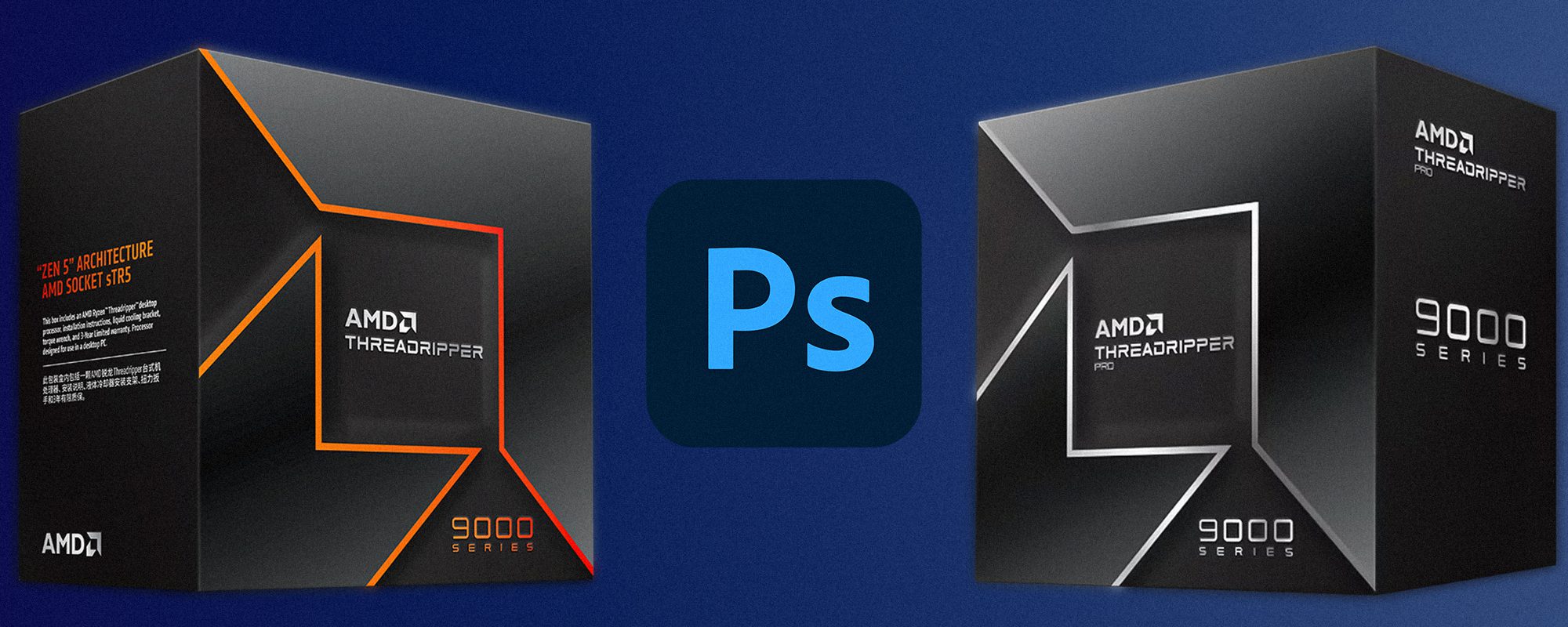
Are Threadripper 9000 Processors Good for Photoshop?
Image
A computer explicitly built for Photoshop has different hardware requirements than a system where it is one tool within a larger suite of applications in an artist’s workflow. The CPU significantly impacts overall performance for Photoshop, but a more expensive model isn’t always better. Since it relies on single- and lightly-threaded functions, it can’t effectively take advantage of more than a few cores. Instead, a processor with high clock speeds and a well-optimized architecture will provide the best performance.
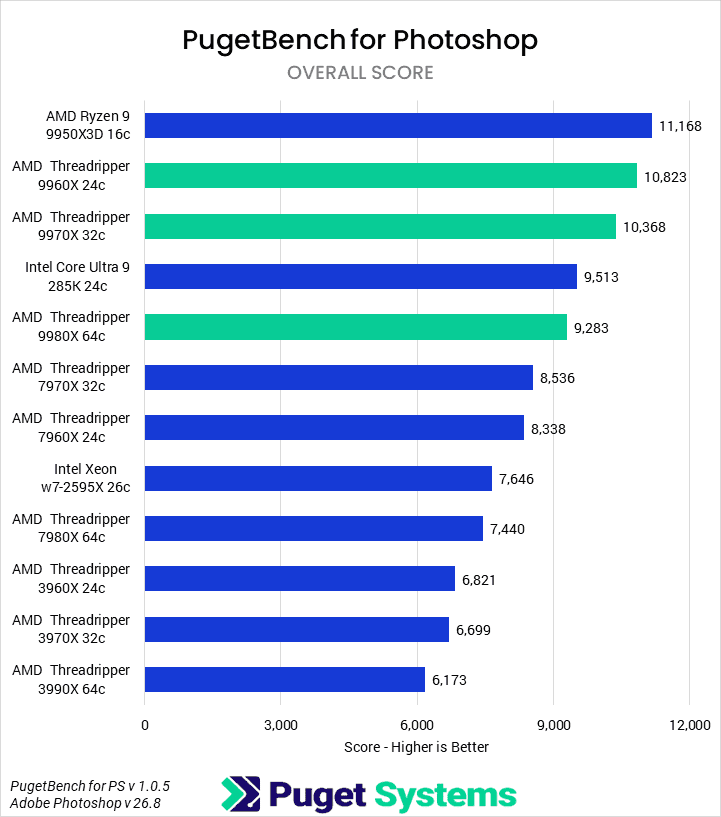
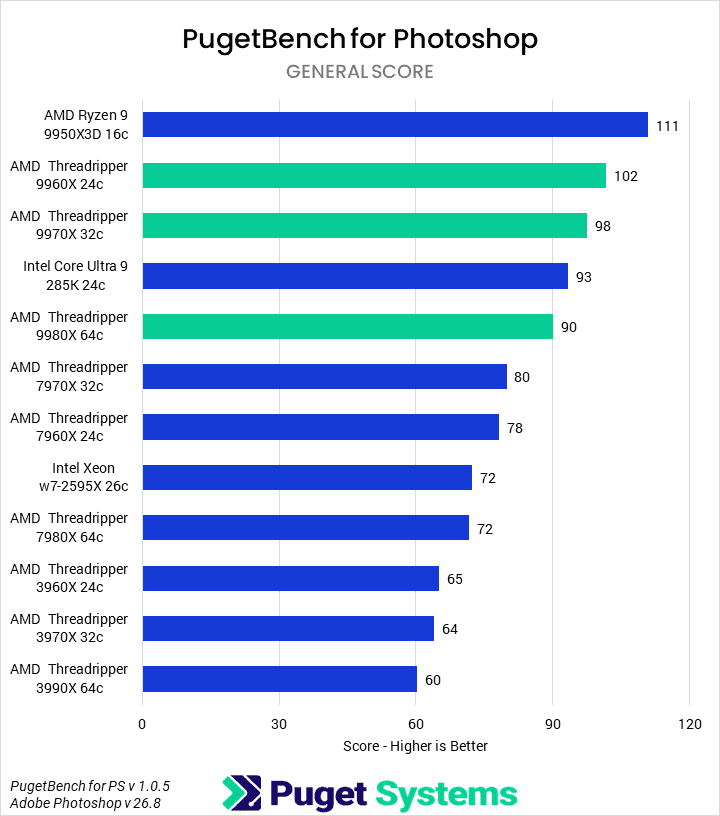
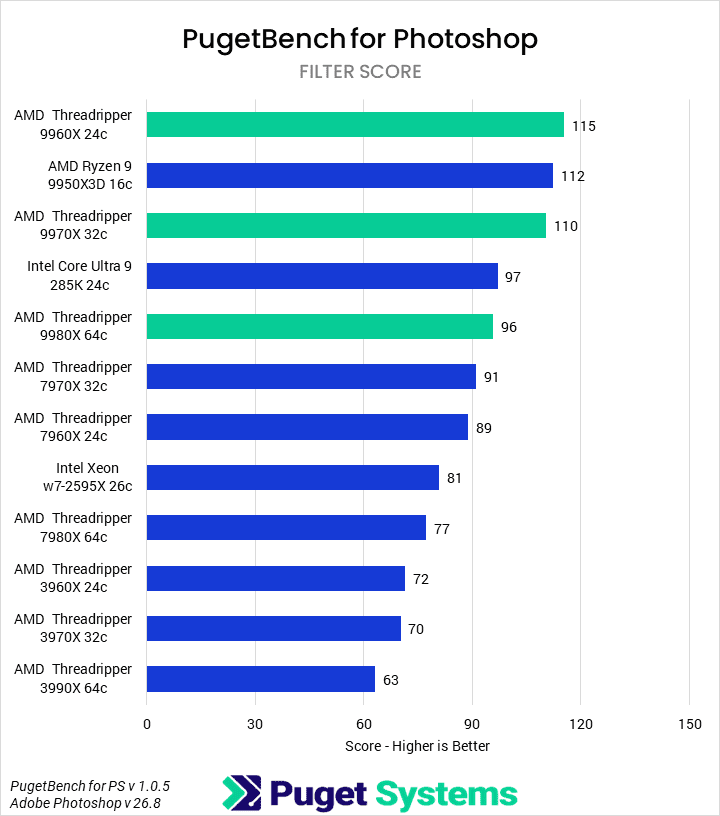
We don’t recommend a Threadripper 9000 or Threadripper PRO 9000 WX processor for a Photoshop-specific system, as the performance difference doesn’t justify the cost. Based on the Puget Bench overall score, the AMD Ryzen™ 9 9950X3D offers better performance than the Ryzen™ Threadripper 9960X, whose score is only 3% lower but costs 73% more, making it an expensive investment for minimal returns. This recommendation, however, depends entirely on the artist’s workflow and their suite of applications. Those who need a Threadripper for other software will still find it to perform well in Photoshop. This is evidenced by the 9960X, which shows a 26% performance uplift over the previous-generation Threadripper 7960X.
Instead, we recommend the AMD Ryzen™ 9 9950X3D or the more budget-friendly AMD Ryzen™ 7 9700X for a Photoshop-specific system. These processors offer a more compelling price-to-performance ratio and better Photoshop performance than a Threadripper, but at a much more reasonable price point.
Are Threadripper 9000 Processors Good for After Effects?
Image
After Effects is a versatile tool for 2D/2.5D and 3D workflows. While the application is generally lightly threaded, the Multi-Frame Rendering (MFR) feature enables the CPU to process several frames simultaneously using multiple cores. After Effects also has a built-in Cinema 4D renderer that uses the CPU to process 3D compositions. However, this is being superseded by the newer Advanced 3D renderer, which leverages the GPU for accelerating 3D tools, layers, and compositions.
Historically, After Effects needed a lot of RAM to play back rendered frames from a composition in the Preview window. This is why we previously recommended high-RAM configurations with platforms like Threadripper, as their total memory capacity exceeded what was available from a consumer-grade CPU. This changed when Adobe implemented High-Performance Preview Playback (HPPP) in After Effects version 25.2, which allows the application to stream rendered frames from disk cache to RAM for Preview playback. With this update, artists working in version 25.2 or later no longer need excessive amounts of system memory for Preview playback, which was the primary reason we previously recommended the Threadripper platform.
Given that large amounts of RAM are no longer necessary for many projects, do the latest Threadripper 9000 series processors still make sense for After Effects?
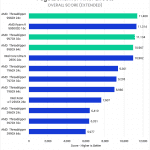
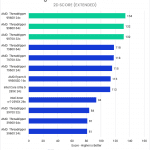
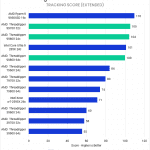
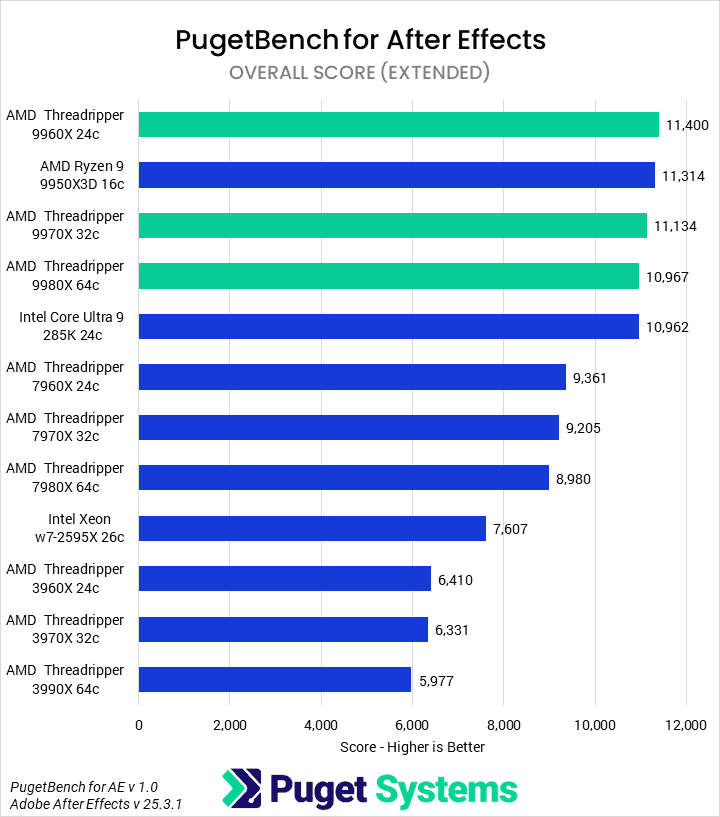
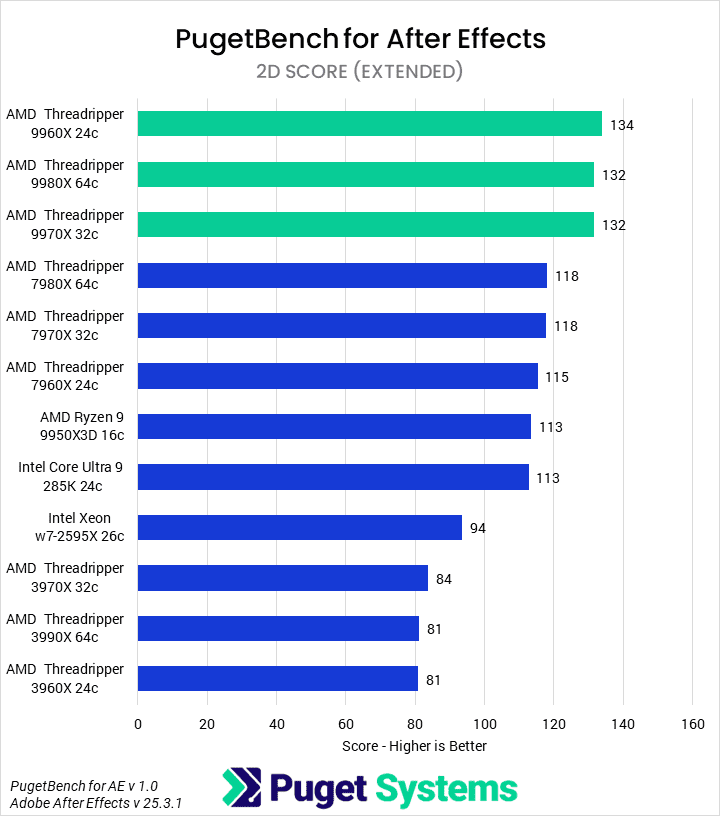
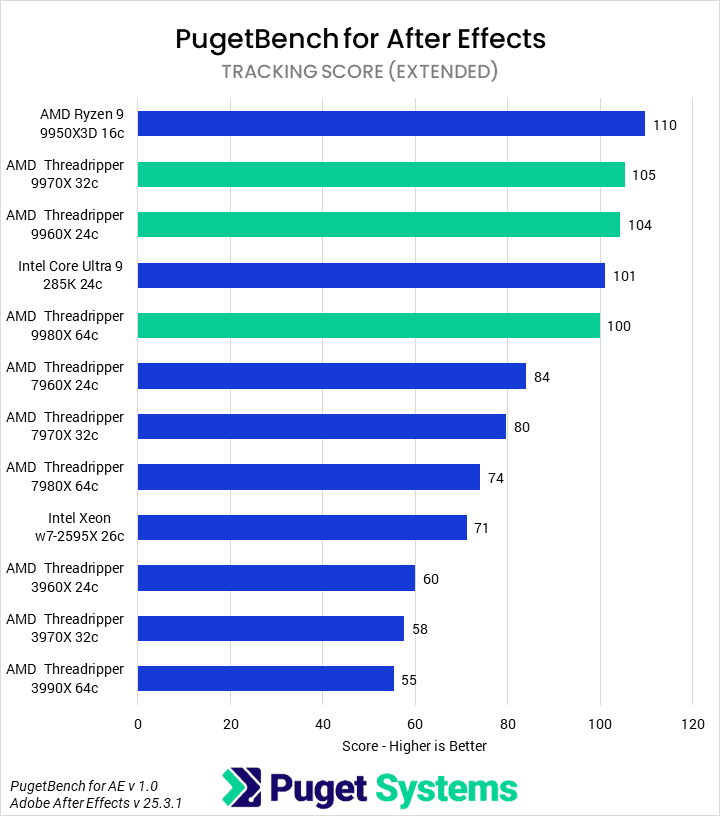
The quick and easy answer is that Threadripper 9000 processors are a good option for After Effects. Still, they aren’t necessary for every workflow, as the scores above show that Threadripper isn’t the top-performing processor in all of our testing.
Based on our 2D scores, which measure a mix of CPU-based single- and multi-threaded tasks – including those that leverage Multi-Frame Rendering, the Threadripper 9960X (24-core) performs identically to the 9970X (32-core) and 9980X (64-core), disproving the notion that more cores will always result in better performance. The 9960X is also 15% faster than the previous-generation 7960X and shows a 49% improvement over the older 3960X. Compared to consumer CPUs, it is 17% faster than the AMD Ryzen 9 9950X3D and the Intel Core Ultra 9 285K.
Our Tracking scores are most useful for compositors, motion designers, and video editors who work with live-action footage, as these tasks are single-threaded and benefit from higher clock speeds. AMD’s Ryzen 9 9950X3D is the top performer here, with an average uplift of 5% over the Threadripper 9960X and 9970X. While clock speed is a key factor, it is not the only one. For example, the Core Ultra 9 285K has a higher turbo boost clock speed (5.7 GHz) than the Threadripper series (5.4 GHz), yet it scored roughly 3% lower. This highlights that a CPU’s architectural design can influence performance beyond clock speed.
While Threadripper 9000 series processors are an excellent option for After Effects, a consumer-class CPU offers a more reasonable choice in price and performance for workflows that include Illustrator and Photoshop. The same principle applies to single-threaded tasks (like those measured in our tracking scores) or GPU-dependent 3D workflows, where the GPU is the most valuable component for accelerating performance. An exception is when an artist uses the CPU-intensive Classic 3D or Cinema 4D renderers instead of the Advanced 3D renderer.
Even though the Threadripper 9000 processors showed a 17% performance uplift in 2D scores over AMD Ryzen 9 9950X3D and Intel Core Ultra 285K, we don’t consider that to be enough of a benefit to justify the added cost for the majority of users. For these reasons, we recommend that most graphic designers and motion graphics artists choose a consumer-class processor such as Core Ultra or Ryzen.
Are Threadripper 9000 Processors Good for Fusion?
Image
Blackmagic Fusion is a motion graphics and VFX tool offered as a stand-alone application and embedded in DaVinci Resolve. It provides a growing toolset for tasks like 2D motion graphics, rotoscoping, and 3D visual effects. For Resolve users, it is important to note that Fusion utilizes the CPU differently. While Resolve can leverage many CPU cores for multi-threaded processing, Fusion is largely single-threaded, with its performance relying more on the clock speed of a single CPU core.
Given this information, a key question arises for those looking to optimize their performance or find a computer that works well for both applications: are Threadripper 9000 processors a good investment for Fusion?
Image
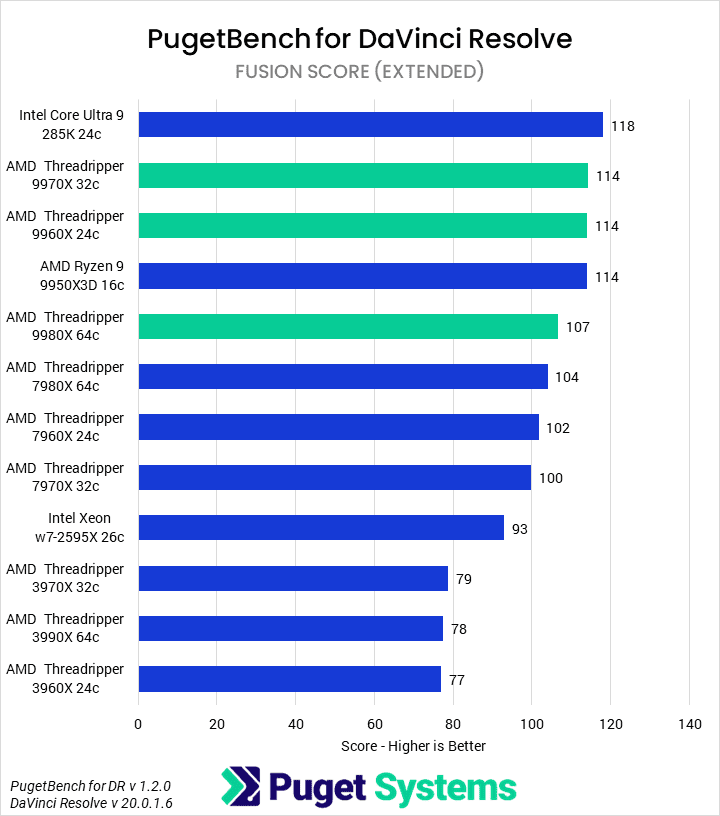
Based on the Fusion score in DaVinci Resolve, Threadripper 9000 processors are not the ideal choice for maximizing performance. This is because Fusion is primarily single-threaded and doesn’t utilize the high core counts of Threadripper to the same degree as DaVinci Resolve. AMD’s own Ryzen 9 9950X3D scored the same as the Threadripper 9960X and 9970X, while Intel’s Core Ultra 9 285K was 3% higher, and both cost a lot less. As such, we recommend a consumer-class CPU for users who work in Fusion as a stand-alone application.
However, the choice is more nuanced for those who use Fusion embedded within Resolve, as their work most likely includes video editing or color grading tasks in tandem with motion graphics and VFX. Depending on the workload, either processor type could be the best fit.
For instance, a Threadripper is good for those working on complex, high-resolution video editing projects. At the same time, a consumer-class CPU can still handle most modern video editing workflows and is less expensive. This provides an artist with the flexibility to invest in other components, like a high-end NVIDIA GeForce RTX™ 5080 video card. For those considering the Threadripper platform for Resolve and Fusion because video editing is their main priority, we have a separate article about whether Threadripper 9000 is good for video editing in DaVinci Resolve.
Choosing a CPU for Nuke and Houdini
While we don’t currently have a Puget Bench testing suite for Foundry Nuke or SideFX Houdini, we wanted to include advice for these applications because they are widely used by artists who require high-performance systems for 3D motion graphics, compositing, and VFX workflows. Our goal is to provide artists, from new users to experienced professionals, with workflow-based insights to help them optimize their computers for better performance in these applications. We offer recommended systems for both Nuke and Houdini, giving artists the information they need to select a computer that can help them achieve their creative aspirations.
Are Threadripper 9000 Processors Good for Nuke?
Image
Nuke is a node-based compositing application used in many high-end VFX and virtual production pipelines to combine live-action footage with computer-generated imagery. How it utilizes the CPU is a nuanced topic that depends on the structure of an artist’s workflow, whether they are using 2D or 3D tools, and the linear/sequential nature of its node graph.
The architecture of Nuke is based on scanline processing, a linear method for processing 2D images by calculating one line of pixels at a time. This results in a linear/sequential node graph where each node is processed one after the other. Since only one node can be processed at a time, a CPU with a high clock speed is more important than having many cores, as it can calculate each node faster.
Certain computationally intensive tasks, such as rendering the final output, utilize multi-threaded processing, and other specialized sub-systems also benefit from a high number of CPU cores. When producing the final image, the output node runs multiple threads simultaneously to fetch data rows, allowing it to render and display the image in the Viewer. Similarly, other sub-systems, such as Particle, Deep Image Compositing, and 3D systems, operate separately from the 2D scanline image system. Then their output is converted back into a 2D image to be processed within the node graph.
Choosing a CPU for Nuke involves a trade-off between a workstation and a consumer platform. For example, Intel Core Ultra 9 285K and AMD Ryzen 9 9950X are ideal for maximizing clock speed, and thus a great selection for Nuke’s single-threaded operations. However, these processors are typically limited to 192 or 256GB of RAM. In contrast, the Threadripper platform can support more than twice that much memory. Nuke uses RAM to cache rendered frames, and having more of it reduces latency by eliminating the need to constantly re-render nodes. Artists working on complex projects with many effects that produce a large amount of cache may find Threadripper the better choice.
Ultimately, the best processor for Nuke will depend on each user’s unique workflow and budget. Those with more complex projects and larger budgets will benefit from a Threadripper. In comparison, artists with smaller projects or a more limited budget will still find strong performance from an affordable consumer platform like Core Ultra or Ryzen.
Are Threadripper 9000 Processors Good for Houdini?
Image
Houdini is a procedural 3D animation and visual effects (VFX) application that utilizes a node-based, non-destructive workflow. This allows artists to build intricate models, scenes, effects, simulations, and animations by connecting nodes within different levels of its networks. Artists can make changes at any point in the process, which promotes control and rapid iterations for various workflows ranging from concept art and look development to large-scale simulations and productions.
Choosing the right CPU for Houdini is a strategic decision because its operations are a mix of single- and multi-threaded tasks, meaning an ideal CPU needs a balance of high clock speeds and core counts. Houdini relies on a fast, single-threaded core for many day-to-day operations—such as the user interface, managing the scene graph, and editing individual nodes—so a CPU with a high clock speed will create a more responsive experience. While the GPU renders the viewport, the CPU is responsible for the complex calculations that prepare and feed it the data it needs.
Houdini’s ability to scale across multiple cores for simulations and rendering is a key feature, but its scaling is not linear. While multi-threaded tasks benefit from more cores, a single operation may eventually experience diminishing returns. The primary advantage of a processor with a very high core count is its ability to be divided for parallel processing to process multiple scenes or iterations simultaneously, allowing artists to run more than one simulation or render at a time. Furthermore, the CPU still handles many of Houdini’s most critical and complex tasks, including simulations like fluid dynamics (FLIP), smoke (Pyro), and grains, as well as creating and editing complex geometry and procedural modeling.
Houdini’s native rendering engine is Karma, a physically based renderer with two distinct modes: Karma CPU and Karma XPU. Karma CPU is a stable, CPU-only path tracer that relies entirely on the processor for all rendering calculations, utilizing all available cores and threads. In contrast, Karma XPU is a hybrid mode that uses both the CPU and compatible GPUs (currently NVIDIA) to accelerate rendering.
The right CPU for Houdini ultimately depends on an artist’s specific workflow. Consumer-class CPUs like the AMD Ryzen 9 series are well-regarded for their high clock speeds, making them great for a generalist who needs a responsive UI, but they have limitations in core count and platform features like memory channels and PCIe lanes. Workstation-class processors like AMD’s Threadripper offer higher core counts and more memory bandwidth, which is ideal for simulation experts and those needing CPU-based rendering in Houdini. For these users, the AMD Ryzen Threadripper platform stands out as a robust solution offering a powerful combination of high core counts, strong single-threaded performance, and a workstation-class platform with extensive memory and PCIe bandwidth.
When heavily-threaded workloads are being targeted, the choice between Threadripper 9000 and the Threadripper 9000 PRO WX platforms will depend on budget and the scale of work. While all Threadripper CPUs have high core counts that directly benefit simulations and CPU-based rendering, the PRO platform is particularly beneficial for large-scale productions. It has an even higher max core count and support for up to 2TB of RAM, which can help manage large, detailed simulations.
Conclusion
AMD’s Ryzen Threadripper 9000 series processors are a solid option for most graphic design and motion graphics workflows, but they aren’t a necessary investment outside select niches.
For most artists, including graphic designers, illustrators, 2D artists, and animators, more mainstream CPUs like Ryzen or Core Ultra are a better value. These processors offer a great balance of performance and cost and are available in configurations ranging from workstations to laptops, allowing them to choose a system that best suits their environment.
There are, however, certain use cases where a Threadripper is more of a necessity. For 3D, animators, compositors, concept-artists, and VFX artists who work in applications like Houdini, and some cases, Nuke, the Threadripper platform’s expanded memory capacity and additional PCIe lanes for multi-GPU configurations give these artists the processing power and bandwidth to ensure that the system is capable of holding the large amounts of cache that these applications produce. The time saved from faster processing often justifies the additional cost of the platform.
We encourage you to explore your workflow with one of our technology consultants for a more personalized recommendation. They can help you select a system perfectly matched to your creative needs. Alternatively, you can browse our solutions page for pre-configured workstations optimized for specific software, or use our custom configuration page to build a system that matches your exact needs.
Looking for a Motion Graphics workstation?
We build computers tailor-made for your workflow.
Don’t know where to start?
We can help!
Get in touch with one of our technical consultants today.