Table of Contents
TL;DR: Should you use AMD Threadripper 9000 processors for Unreal Engine?
Introduction
Choosing the right computer for working in Unreal Engine can be daunting. Developers, artists, and technical directors face different challenges depending on the type of work they’re doing, whether it’s real-time visualization, game development, virtual production, or architectural rendering. Each workflow places different demands on the hardware, and the optimal setup for one project may fall short in another. There’s simply no one-size-fits-all solution that covers every environment and creative need.
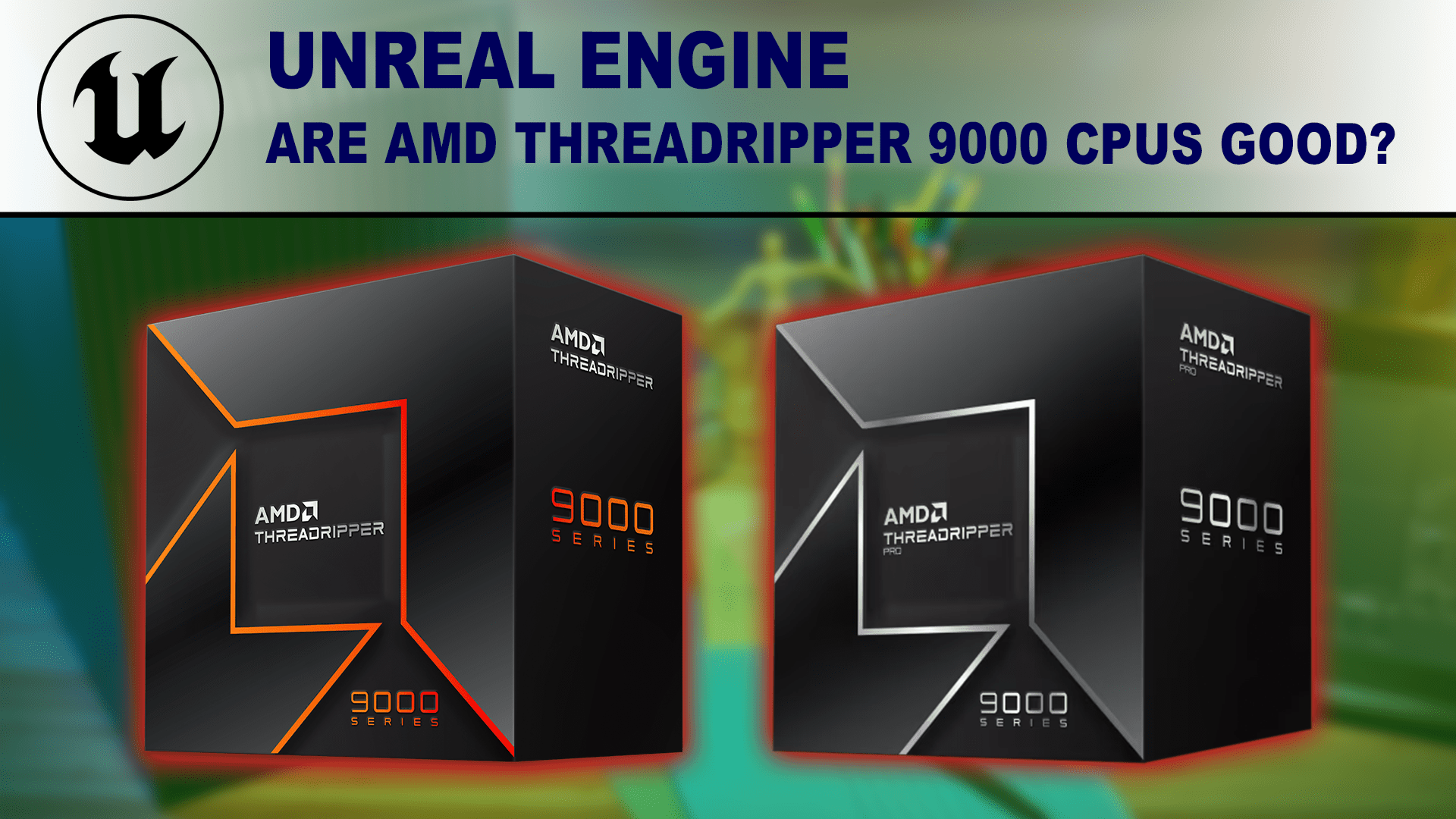
At Puget Systems, we aim to help make sense of evolving computer hardware by translating complex technological advancements into clear, actionable information. That’s especially important when it comes to demanding platforms like Unreal Engine, where hardware bottlenecks can significantly impact productivity and creative flexibility. While we always recommend having a conversation with one of our consultants to tailor a system to your workflow, this article focuses on AMD’s new Ryzen™ Threadripper™ 9000 and Ryzen™ Threadripper™ PRO 9000 WX processors. We’ll explore how these CPUs perform in Unreal Engine, and whether they are worth the investment for professionals seeking faster compile times, smoother editor performance, and better scalability in large or complex projects.
Image
These new processors have several improvements over the previous generation. If you want a full breakdown of what is new with these CPUs, as well as a detailed performance analysis for a range of applications (including Premiere Pro, DaVinci Resolve, and After Effects), we have in-depth articles available:
- AMD Ryzen Threadripper 9000 Content Creation Review
- AMD Ryzen Threadripper PRO 9000WX Content Creation Review
- AMD Threadripper 9000 vs Threadripper PRO 9000WX
AMD Threadripper and Threadripper PRO WX processors differ from consumer-class processors like Intel’s Core™ Ultra 200 series and AMD’s Ryzen™ 9000 series in their core count, maximum clock speed, platform, memory support, and PCIe lane availability. Those consumer-class CPUs typically offer up to 16-24 cores with a focus on higher per-core clock speeds, while Threadripper and Threadripper PRO processors offer higher core counts (up to 96 cores) for sustained performance and multi-threaded throughput, though with lower per-core clock speeds. Additionally, the Threadripper platform offers additional PCIe lanes and larger memory capacities than more mainstream options.
A Note on Performance
In Unreal Engine, CPU performance often scales very well with an increase in the number of cores. However, how much real-world difference that makes to an individual user will greatly depend on how frequently they use heavily-threaded features. Our Unreal Engine benchmark is still early in development, so many tasks are not yet represented in these numbers.


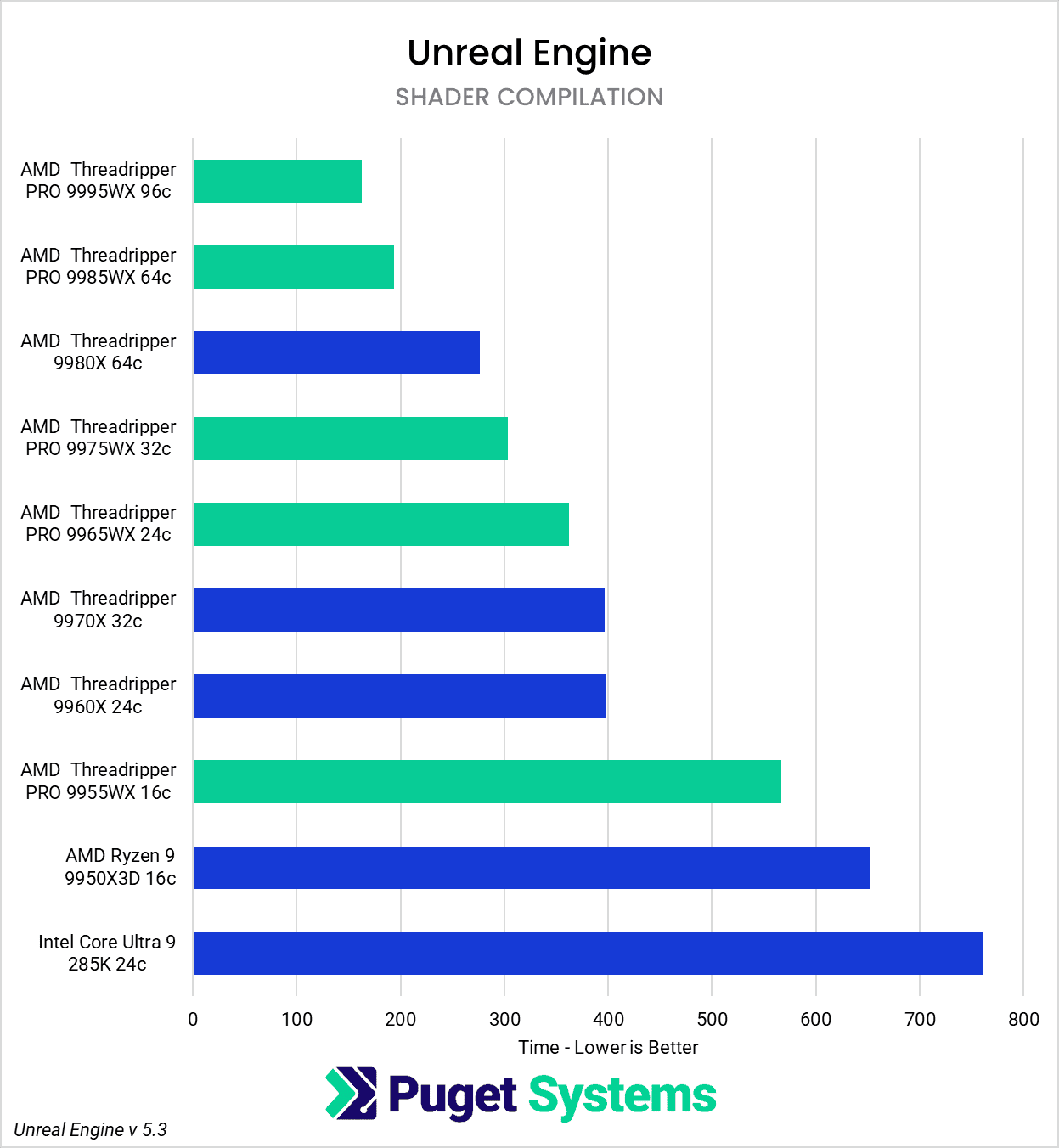
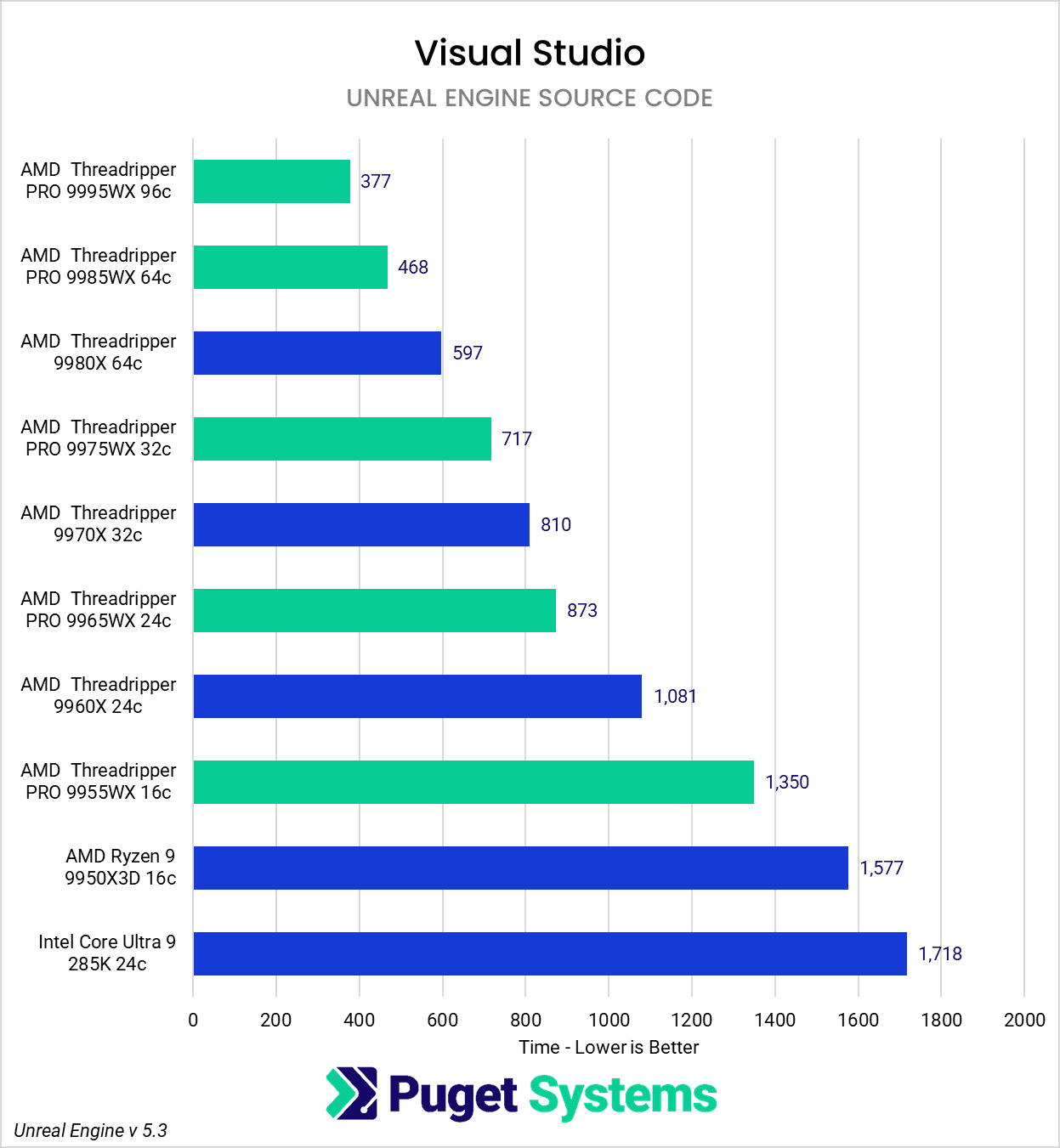
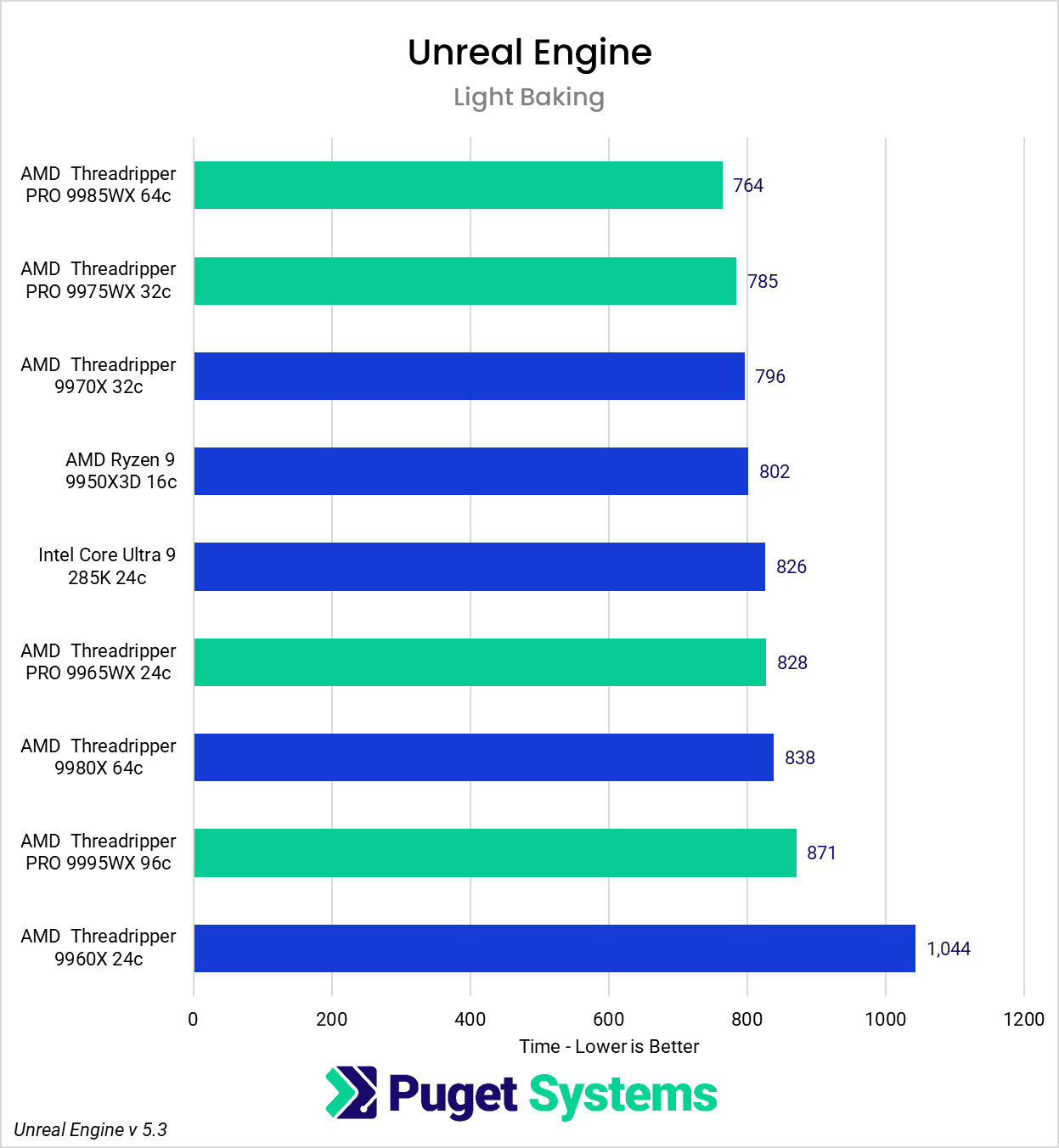
While the charts above show significant performance gains with an increase in the number of cores, they don’t tell the whole story. These three tasks will impact users in different ways. Some people may perform these tasks quite often, so an investment in a more expensive CPU could pay off. On the other hand, some may never compile code, and only rarely work with shaders. For these users, it might be better to go with a less expensive consumer CPU and know they will have to wait an extra few minutes each week.
In the following sections, we will walk through different workflows and discuss what to consider in making that decision.
AMD Threadripper 9000 for Game Development
In game development, there are a wide range of workflows in Unreal Engine that can place very different demands on your CPU. Some tasks, like shader compilation or code builds, may happen multiple times a day, or only once a week. Others, like lighting bakes, might be less frequent but still time-intensive when they do occur. Because of this variability, there’s no single “best” CPU for game development, just better fits for different use cases.
AMD’s Threadripper 9000 platform is ideal for build servers. Their high core counts make the nightly build very fast, leaving more time for automated testing, backups, and all the other tasks that need to be done before the team logs back on in the morning. The additional memory channels available in Threadripper PRO give even more performance than non-PRO. Additionally, the combination of lots of cores with high RAM capacity make for a fantastic platform to break into multiple virtual machines.
In a workstation format, they are also great for coding, especially for those who need to compile large batches of code locally. This might not be the case for every programmer, but in general, more cores and more RAM channels will help cut down on how much time someone is sitting idle. For programmers who are only doing smaller, iterative builds locally, pairing a smaller desktop or laptop with a Threadripper build server gives the best of both worlds.
Artists’ workstations are a mixed bag when it comes to the best hardware. Waiting for the dreaded Shard Compile before a project may be opened can be a real time-waster. Depending on how the studio is set up, each artist may need to pull a new build of the game each morning. It is not uncommon, especially for remote workers, to need to rebuild shaders locally before they can begin working. The other option is to download the Derived Data Cache (DDC), which can be hundreds of gigabytes. This also takes time and puts more demand on the studio’s network. If a Threadripper CPU can save 30 minutes a day in this one task alone, it will pay for itself fairly quickly. Some features in newer builds of Unreal, such as On-Demand Shaders and Cloud DDC, help alleviate this task. If shaders aren’t much of a problem due to the nature of the project, then artists might be better off using a consumer-grade AMD Ryzen or Intel Core Ultra and redirecting the funds to a higher-grade GPU. Most modeling and animation programs only use a few cores, so if they spend all their time in those apps and not much time in the engine, Threadripper doesn’t make as much sense.
AMD Threadripper 9000 for Virtual Production
Much like game development, virtual production is a broad umbrella with numerous different roles. It can involve anything from an artist making assets in the VAD to a cluster of nodes powering massive LED walls with real-time graphics and motion tracking.
Render nodes driving LED walls are almost always Threadripper PRO-based platforms, as they offer several advantages over other systems. First, they provide a large number of PCIe lanes needed for multiple add-in cards. These systems could have as many as two GPUs, an NVIDIA Sync card, a capture card, and a Bluefield or other network card. The large core counts also make occasional shader compiling very fast. Even saving a few minutes on a shoot day, with a full cast and crew waiting for an update, could pay for a CPU. The Threadripper PRO line is also very robust and ideal for a system that will be pushed hard without fear of crashing and halting production.
However, the non-PRO Threadripper or consumer CPUs are a good option for someone in the virtual art department or a greenscreen shoot. Often in these cases, shaders aren’t compiled frequently, compiling source code is not something they do, and light baking can be done on the GPU if needed. As such, cutting back on the CPU and opting for a higher-end GPU will be a better investment.

Looking for an Unreal Engine Workstation?
We build computers tailor-made for your workflow.

Don’t know where to start?
We can help!
Get in touch with our technical consultants today.
Who is the AMD Threadripper 9000 for?
AMD’s Threadripper 9000 and Threadripper PRO 9000 WX are highly performant CPUs for creative professionals. These processors excel in scenarios where high core counts, large memory capacity, and ample PCIe bandwidth make a measurable impact on day-to-day productivity. Threadripper CPUs are not the right fit for everyone, but they can be an exceptional investment for the right workflows.
For development teams, Threadripper shines in build servers and local compile stations where speed and throughput matter. Faster shader compilation and code builds mean shorter feedback loops and more time spent creating. Artists who frequently have to recompile shaders locally, particularly in remote or distributed teams, also stand to benefit. Even saving 20–30 minutes daily waiting for a project to become usable can increase productivity.
In virtual production, Threadripper is a necessity for LED volume render nodes, where multiple GPUs, capture cards, sync hardware, and robust networking must coexist in a stable, high-performance system. The Threadripper PRO line, in particular, offers workstation-class reliability and expandability that are ideal for these mission-critical setups. It’s the kind of hardware you want when delays cost thousands of dollars per hour and the crew can’t afford to wait.
That said, not every Unreal Engine user needs this level of power. Artists who spend most of their time in modeling, rigging, or texturing applications may be better served by a consumer CPU and a stronger GPU, especially if they’re not regularly building the project or compiling shaders. Similarly, for small indie teams or hobbyists, Threadripper may be more power (and expense) than their workflows demand.
Ultimately, Threadripper is built for professionals who need more out of their machines than consumer-grade hardware can provide. Yes, these CPUs have a premium price tag, but the return on investment can be surprisingly fast. In environments where every minute of compile time, shader build, or data processing adds up, the time saved daily translates directly into productivity gains. Whether a developer shaves hours off a weekly build process or a virtual production team avoids costly delays on set, the long-term value of a faster, more scalable workstation can easily outweigh the upfront cost. For teams pushing the boundaries of Unreal Engine in collaborative, high-demand environments, Threadripper isn’t just a performance upgrade: it’s an investment in productivity.
Finding the perfect workstation doesn’t have to be complicated. Explore our solutions page for a curated selection of recommended systems for a multitude of applications and workflows, or visit our custom configuration page if you already know the ideal hardware for your needs. If you need assistance with tailoring a system to a unique workflow or have any other questions, we encourage you to reach out to our dedicated technology consultants.
Looking for an Unreal Engine workstation?
We build computers tailor-made for your workflow.
Don’t know where to start?
We can help!
Get in touch with one of our technical consultants today.