Skip to content
Main Navigation Puget Systems Logo
  • Solutions
    • Media & Entertainment
      • Photo Editing
        • Recommended Systems For:
        • Adobe Lightroom Classic
        • Adobe Photoshop
        • Stable Diffusion
      • Video Editing & Motion Graphics
        • Recommended Systems For:
        • Adobe After Effects
        • Adobe Premiere Pro
        • DaVinci Resolve
        • Foundry Nuke
      • 3D Design & Animation
        • Recommended Systems For:
        • Autodesk 3ds Max
        • Autodesk Maya
        • Blender
        • Cinema 4D
        • Houdini
        • ZBrush
      • Live Video Production
        • Recommended Systems For:
        • vMix
        • Live Streaming
      • Real-Time Engines
        • Recommended Systems For:
        • Game Development
        • Unity
        • Unreal Engine
        • Virtual Production
      • Rendering
        • Recommended Systems For:
        • Keyshot
        • OctaneRender
        • Redshift
        • V-Ray
      • Digital Audio
        • Recommended Systems For:
        • Ableton Live
        • FL Studio
        • Pro Tools
    • Engineering
      • Architecture & CAD
        • Recommended Systems For:
        • Autodesk AutoCAD
        • Autodesk Inventor
        • Autodesk Revit
        • SOLIDWORKS
      • Visualization
        • Recommended Systems For:
        • Enscape
        • Keyshot
        • Lumion
        • Twinmotion
      • Photogrammetry & GIS
        • Recommended Systems For:
        • ArcGIS Pro
        • Agisoft Metashape
        • Pix4D
        • RealityScan
    • AI & HPC
      • Recommended Systems For:
      • Data Science
      • Generative AI
      • Large Language Models
      • Machine Learning / AI Dev
      • Scientific Computing
    • More
      • Recommended Systems For:
      • Compact Size
      • NVIDIA RTX Studio
      • Quiet Operation
      • Virtual Reality
    • Business & Enterprise
      We can empower your company
    • Government & Education
      Services tailored for your organization
  • Products
    • Puget Mobile
      Powerful laptop workstations
      • Puget Mobile 16″
        Intel Core Ultra + NVIDIA GeForce
    • Puget Workstations
      High-performance Desktop PCs
      • AMD Ryzen
        Powerful CPUs with up to 16 cores
      • AMD Threadripper
        High core counts and lots of PCIe lanes
      • AMD EPYC
        Server-class CPUs in a workstation
      • Intel Core Ultra
        Balanced single- and multi-core performance
      • Intel Xeon
        Workstation CPUs with AVX512
      • Configure a Custom PC Workstation
        Configure a PC for your workflow
    • Puget Rackstations
      Workstations in rackmount chassis
      • AMD
        Ryzen, Threadripper, and EPYC CPUs
      • Intel
        Core Ultra and Xeon Processors
      • Configure a Custom Rackmount Workstation
        Tailored 4U, 5U, and 6U rack systems
    • Puget Servers
      Enterprise-class rackmount servers
      • 1U Rackmount
        Dense CPU compute servers
      • 2U Rackmount
        Mixed CPU and GPU solutions
      • 4U Rackmount
        High-density GPU computing
      • Comino Grando GPU Servers
        Liquid-cooled GPU rackmount systems
      • Custom Servers
        Engineered to meet your unique needs
    • Puget Storage
      Solutions from desktop to datacenter
      • Network-Attached Storage
        Synology desktop and rackmount NAS
      • Software-Defined Storage
        Datacenter solutions with QuantaStor
    • Recommended Third Party Peripherals
      Curated list of accessories for your workstation
    • Puget Bench for Creators
      Professional benchmarking tools
  • Publications
    • Articles
    • Blog Posts
    • Case Studies
    • HPC Blog
    • Podcasts
    • Press
  • Support
    • Contact Support
    • Onsite Services
    • Support Articles
    • Unboxing
    • Warranty Details
  • About Us
    • About Us
    • Careers
    • Contact Us
    • Enterprise
    • Gov & Edu
    • Our Customers
    • Press Kit
    • Puget Gear
    • Testimonials
  • Talk to an Expert
  • My Account
  1. Home
  2. /
  3. Hardware Articles
  4. /
  5. Cinebench 2024: Redefining Rendering Performance Evaluation

Cinebench 2024: Redefining Rendering Performance Evaluation

Posted on September 13, 2023 (September 13, 2023) by Kelly Shipman | Last updated: September 13, 2023
LinkedIn Twitter
Always look at the date when you read an article. Some of the content in this article is most likely out of date, as it was written on September 13, 2023. For newer information, see our more recent articles.

Table of Contents

  • Introduction
  • What is new
  • Things to look out for
  • What about the Redshift Benchmark
  • Conclusion

Introduction

Maxon’s Cinebench has been an industry-standard benchmark for many years. It is probably one of the most used and cited benchmarks for professional and enthusiast users. However, it hasn’t kept up with real-world workflows, even among Maxon’s product line.

Cinema 4D uses Redshift as its default renderer, which is CPU based if you don’t have a Maxon One subscription, and GPU if you do. However, Cinebench R23 and older are all based on an older physically based rendering system that is no longer in use. It also does not offer GPU support, which is the direction much of the rendering industry is moving. Redshift does have a built-in benchmark; however, it requires a full Maxon One license, meaning if you are not already a customer, you can’t use it to evaluate how well your hardware will work with their software. Maxon’s recently released Cinebench 2024 aims to fix these problems.
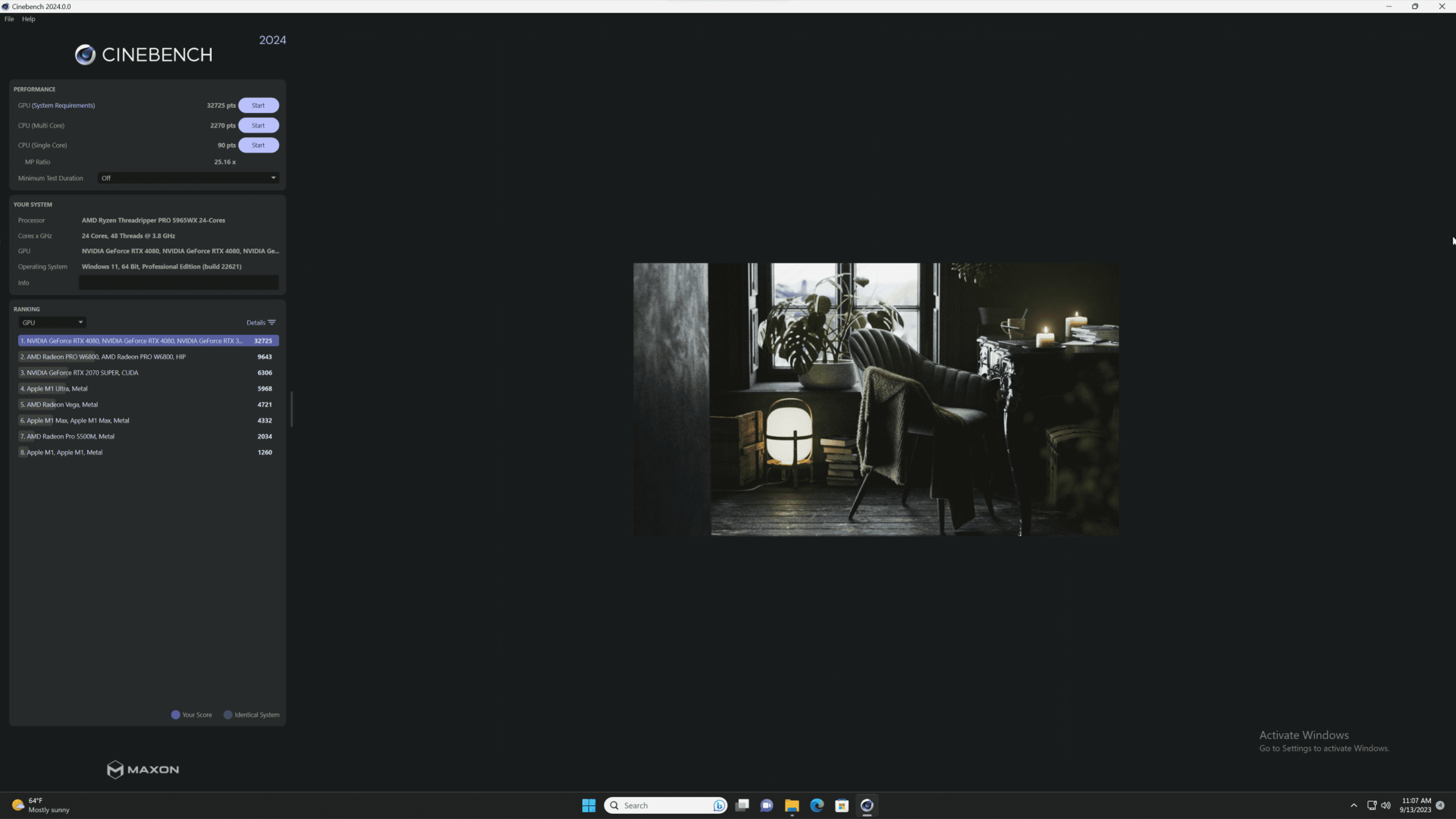
Screenshot of Cinebench 2024
Image
Open Full Resolution

What is new

Cinebench now supports CPU and GPU rendering in one application. Users are no longer tied to using Cinebench to evaluate CPU rendering and the Redshift benchmark to evaluate their GPU. This update also expands platform compatibility beyond Intel or AMD based Windows systems to Apple silicon on macOS and Arm64 on Windows. NVIDIA, AMD, and Apple graphics are supported on the GPU side, though there is no word yet on Intel GPUs. 

All of these use the same underlying code and Redshift scene. This update allows for more detailed and expansive comparisons with a broader range of supported hardware. With a rapidly changing landscape for 3D content creation and rendering, Cinebench 2024 will provide a better view of various hardware’s behavior.

Things to look out for

With such a drastic change to how Cinebench works, one temporary side effect is that scores from Cinebench 2024 cannot be directly compared to Cinebench R23. For example, in Cinebench R23, an AMD Threadripper Pro 5965WX receives a multi-core CPU score of around 40,000, while the same CPU scores around 33,000 in 2024. It will take us, and other reviewers, quite some time to build up a large enough database of results to compare older hardware to. Fortunately, Cinebench is free to download, so you can compare your system to newer hardware as results come in. 

Cinebench 2024 is still a rendering only benchmark. There are no tests that reflect modeling or simulation workflows in Cinema 4D. For the most part, the results provided can be used to infer performance in those situations. Modeling and animation are mostly single-core, while simulations are multi-core or GPU, depending on your settings. 

What about the Redshift Benchmark

Redshift’s built-in benchmark isn’t going anywhere. There is an essential difference between the existing Redshift benchmark and Cinebench 2024. Redshift’s benchmark evaluated the specific instance installed on the user machine. This means it can determine performance differences between specific versions of Redshift like 3.5.16 and 3.5.17. Redshift will also produce a log file that can be submitted to the developers for further analysis if someone’s renders are not behaving as expected. Meanwhile, Cinebench is based on one specific build of Redshift and (presumably) will not receive incremental updates. Maxon does this to keep the codebase static to eliminate variables in benchmark scores. Essentially, Cinebench is focused on evaluating hardware, while the Redshift benchmark is for evaluating Redshift. 

Conclusion

Maxon has been making many impressive improvements to their software lately, from adding GPU physics to Cinema 4D, HIP support to Redshift, and much more. Cinebench 2024 represents a substantial improvement in performance evaluation for creatives by adapting to the evolving needs of the industry. With its support for CPU and GPU rendering, expanded platform compatibility, and the ability to provide a more comprehensive hardware assessment, Cinebench 2024 is poised to become an invaluable tool for optimizing hardware configurations in the dynamic 3D content creation and rendering world. Visit Maxon’s website to try Cinebench 2024 for yourself.

Tower Computer Icon in Puget Systems Colors

Looking for a Rendering workstation?

We build computers tailor-made for your workflow. 

Configure a System
Talking Head Icon in Puget Systems Colors

Don’t know where to start?
We can help!

Get in touch with one of our technical consultants today.

Talk to an Expert

Related Content

  • Render at Scale: High-Density CPU and GPU Servers
  • Impact of RAM Speed on AMD Threadripper PRO Content Creation Performance
  • Are AMD Threadripper 9000 CPUs Good for 3D Artists?
  • AMD Threadripper 9000 vs Threadripper PRO 9000WX
View All Related Content

Latest Content

  • Empowering Productivity at Mob Entertainment
  • Effects of Parsec Remote Desktop on Workstation Performance
  • Puget Bench for Lightroom Classic 1.0 Released!
  • Our Approach to Dual GeForce RTX 5090 Workstations
View All
Tags: AMD, Cinebench, Cinema4D, CPU, GPU, GPU Acceleration, Maxon, NVIDIA, Redshift, Rendering

Who is Puget Systems?

Puget Systems builds custom workstations, servers and storage solutions tailored for your work.

We provide:

Extensive performance testing
making you more productive and giving better value for your money

Reliable computers
with fewer crashes means more time working & less time waiting

Support that understands
your complex workflows and can get you back up & running ASAP

A proven track record
as shown by our case studies and customer testimonials

Get Started

Browse Systems

Puget Systems Mobile Laptop Workstation Icon

Mobile

Puget Systems Tower Workstation Icon

Workstations

Puget Systems Rackmount Workstation Icon

Rackstations

Puget Systems Rackmount Server Icon

Servers

Puget Systems Rackmount Storage Icon

Storage

Latest Articles

  • Empowering Productivity at Mob Entertainment
  • Effects of Parsec Remote Desktop on Workstation Performance
  • Puget Bench for Lightroom Classic 1.0 Released!
  • Our Approach to Dual GeForce RTX 5090 Workstations
  • DaVinci Resolve Studio v20 GPU Scaling Analysis
View All

Post navigation

 Intel Arc A770 and A750 Content Creation Review (Sept. 2023 Update)Blender 3.6: AMD Ray Tracing Performance 
Puget Systems Logo
Build Your Own PC Site Map FAQ
facebook instagram linkedin rss twitter youtube

Optimized Solutions

  • Adobe Premiere
  • Adobe Photoshop
  • Solidworks
  • Autodesk AutoCAD
  • Machine Learning

Workstations

  • Media & Entertainment
  • Engineering
  • Scientific PCs
  • More

Support

  • Online Guides
  • Request Support
  • Remote Help

Publications

  • All News
  • Puget Blog
  • HPC Blog
  • Hardware Articles
  • Case Studies

Policies

  • Warranty & Return
  • Terms and Conditions
  • Privacy Policy
  • Delivery Times
  • Accessibility

About Us

  • Testimonials
  • Careers
  • About Us
  • Contact Us
  • Newsletter

© Copyright 2025 - Puget Systems, All Rights Reserved.