Does Puget Systems build and sell computers with dual NVIDIA GeForce RTX™ 5090 and RTX PRO™ 6000 Blackwell Workstation video cards? The short answer is: yes, yes we do! The longer answer is, well, longer.
A frequent request we get from customers of our high-performance workstations is the inclusion of dual video cards. This has been a popular feature for a long time, since back when NVIDIA first introduced SLI – though at that time, it was hailed as an extreme gaming feature. Since then, the video card (or GPU) has transformed from a component for accelerating 3D graphics in games into a general-purpose computing device, capable of benefitting a whole host of workflows. Modern video cards have media engines for encoding and decoding compressed video, ray tracing for ultra-realistic 3D rendering, specialized cores for dramatically speeding up AI inference, and much more!
Not every application can utilize more than one video card, and in fact its origin in gaming is now just a legacy: SLI has disappeared from desktops, and a single high-end video card is enough for even the highest resolution screens now. For those working with tools that can scale well across more than one GPU, though, adding a second can potentially double performance for far less than a whole second computer would cost.
However, ever-increasing power draw in recent generations of GPUs has made running multiple video cards more difficult. That higher power usage leads directly to additional heat output. Here is a chart of the initial top-end NVIDIA GeForce cards across the last several launches, showing the steady increase in thermal design power (TDP):
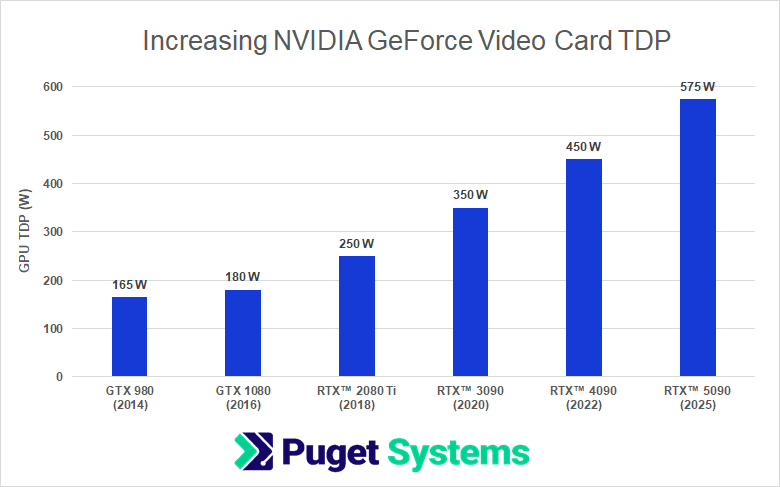
Some of those generations had higher-wattage models introduced later on in their production runs, but these were the flagships at launch – and they more than tripled in power draw (and thus heat output) over the course of a decade.
To deal with this increase in heat, without making the cards unbearably noisy, the design of GPU coolers also changed dramatically over those years. For a long time, video cards had a single fan that simply circulated air around the heatsink. Back then, for higher-end cards especially, the heatsink shrouds were designed to channel the waste heat out the back of the card (and thus out of the computer). Blower-style fans work well for that directional airflow, but also get noisy at higher speeds. As TDP continued to rise, we started to see dual- and triple-fan coolers that could keep the card itself from overheating… but at the cost of venting almost all of the waste heat back into the computer, making it a problem for the rest of the system to deal with. That isn’t usually a big deal with one video card, but when you have two (or sometimes more) cards, it really adds up!
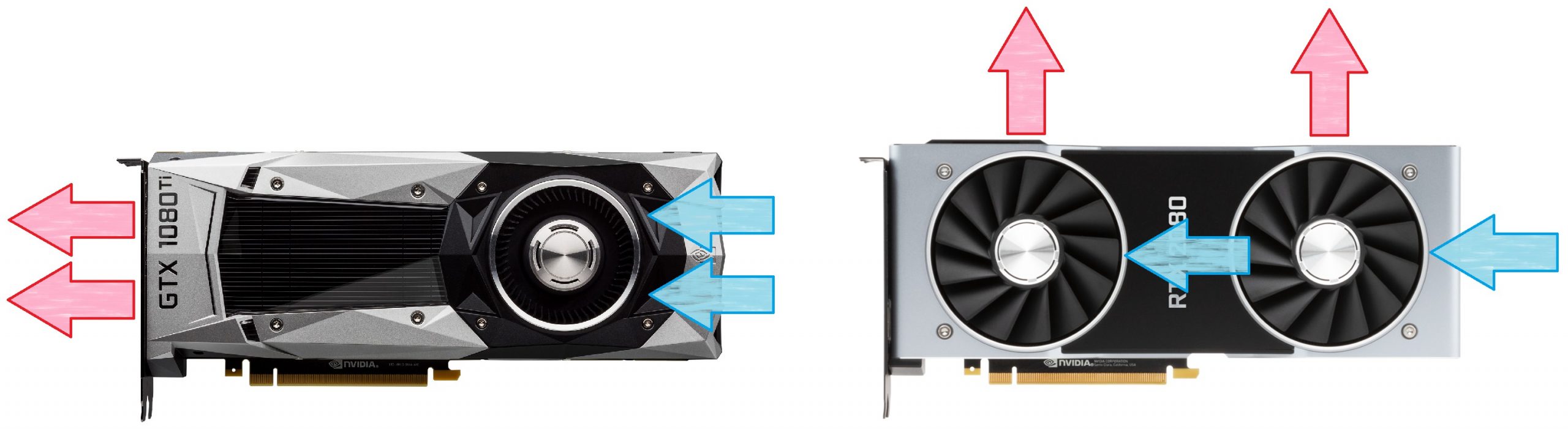
Graphic showing the airflow patterns of single-fan blowers versus multi-fan GPU coolers
Video cards aren’t the only components that have been increasing in power draw, either. Processors have been on a similar trend, and many users with workflows that can utilize multiple GPUs would also benefit from a powerful CPU. A high-end, dual-GPU system from ten years ago might have drawn a total of 600W of power, while today such a system can easily require 1500W for just the CPU and two video cards, without even factoring in the rest of the hardware!
When you do factor in the rest of the components – the motherboard, RAM, drives, fans, and more – the total power draw often exceeds what our largest 1600W 120V power supplies are capable of providing… and indeed, what a standard 15 amp circuit is rated for, at least in terms of continuous load.
Not only is there a need to safely provide enough power, but it is also critical to get the waste heat that electricity consumption generates out of the computer to keep it from overheating. A system with this level of hardware is effectively a high-wattage space heater, and with modern video card design, little of that heat is being vented by the cards themselves. In order to keep things cool, then, chassis fans have to be upgraded to high-flow designs – akin to those used in servers, which have had to deal with higher wattage levels for a long time. Unfortunately, such fans run at very high RPMs, and thus generate a lot of noise, which is not what most people want sitting next to their desk.
Because of this, the approach we’ve taken at Puget Systems has been to focus our high-end, dual-GPU efforts on our rackmount workstation lineup. These systems are designed to be installed in server rooms, where the power requirements and noise output are less of a problem, and then be accessed remotely for users elsewhere in a building (or potentially even off-site).
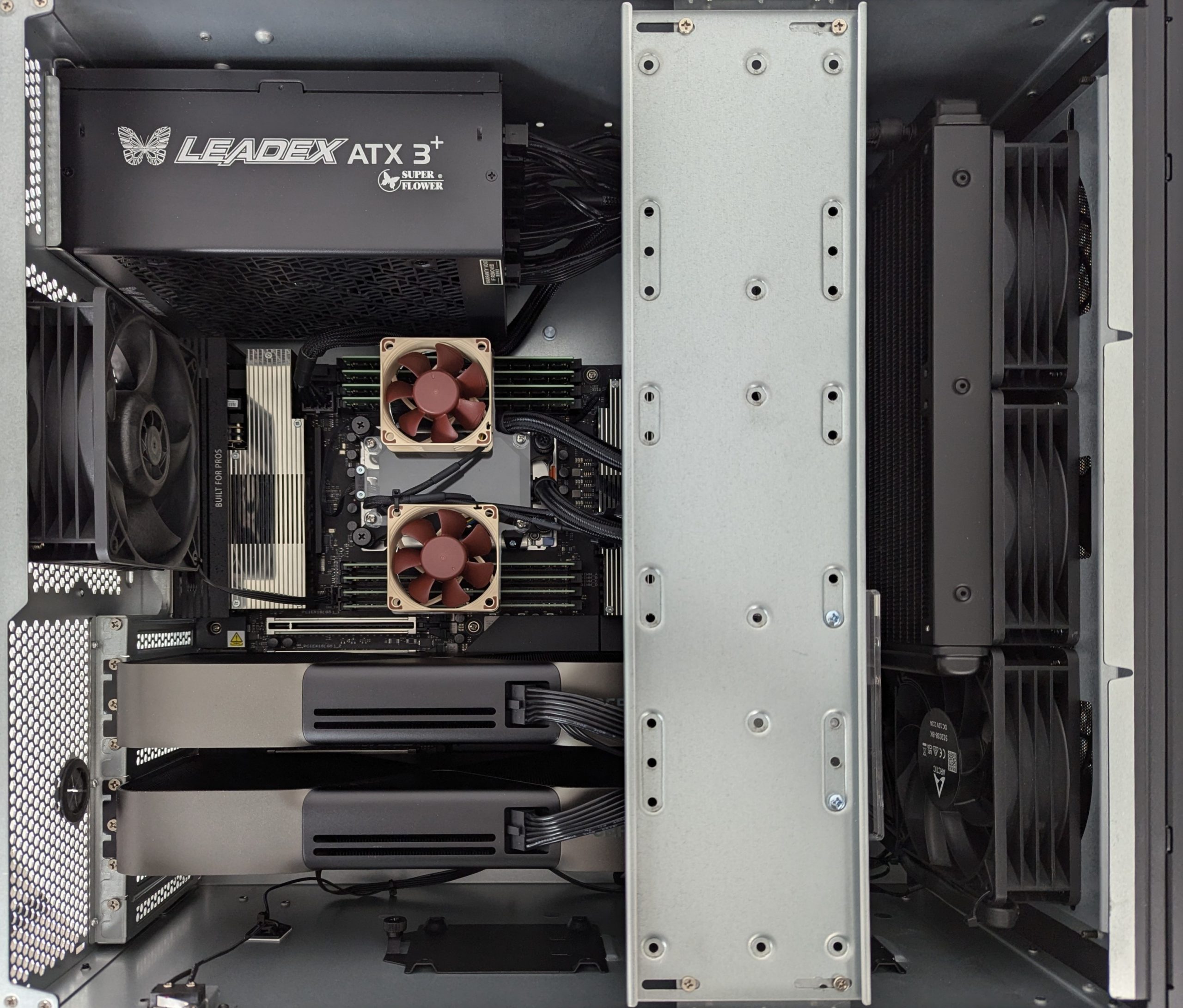
Right now, we offer workstations with dual GeForce RTX™ 5090 video cards – or even the professional RTX PRO™ 6000 Blackwell Workstation models! – in a 5U rackmount system, accompanied by an AMD Threadripper™ PRO processor. We will be rolling out a version with the normal Threadripper (non-PRO) soon as well. Both of these utilize 2800W power supplies, which require 200-240V power circuits. They can also convert to a standing tower form factor, but between the specialized power needs and noisy fans, we don’t recommend trying to use them at your desk.
This image shows the interior of a recent dual RTX 5090 build in our 5U chassis, and you can see the thicker-than-normal, server-grade chassis fans that provide the airflow needed to keep it all cool.
We are also working on qualifying a higher-wattage 120V power supply: a 1700W model, which we hope will allow us to offer dual 5090s with a consumer-class CPU (like Intel’s Core™ Ultra or AMD’s Ryzen™) without the exotic power requirement. Such a system will still generate a lot of heat, though, and thus needs powerful, loud fans. If that interests you, fill out this contact form and we will notify you once these systems are available!
There is also the path of liquid-cooling all of the hot components in a system. We often use closed-loop liquid-cooling for CPUs these days, and such coolers also exist for GPUs – but there isn’t usually room for three large radiators inside a chassis. That means such systems would need customized cooling loops, and we have partnered with Comino to offer liquid-cooled workstations and servers to those who want them. Unfortunately, the complexity of this type of cooling means that it adds a lot to the overall cost of a system, making for a trade-off between price and noise when dealing with high-end hardware. Using this style of cooling also doesn’t remove the need for high-capacity power circuits, which still limits where such systems can be deployed. This provides an option for quieter dual-GPU systems, though, if noise level is a big concern. It also allows for scaling to even higher numbers of graphics cards, but the more you add, the noisier it will get.
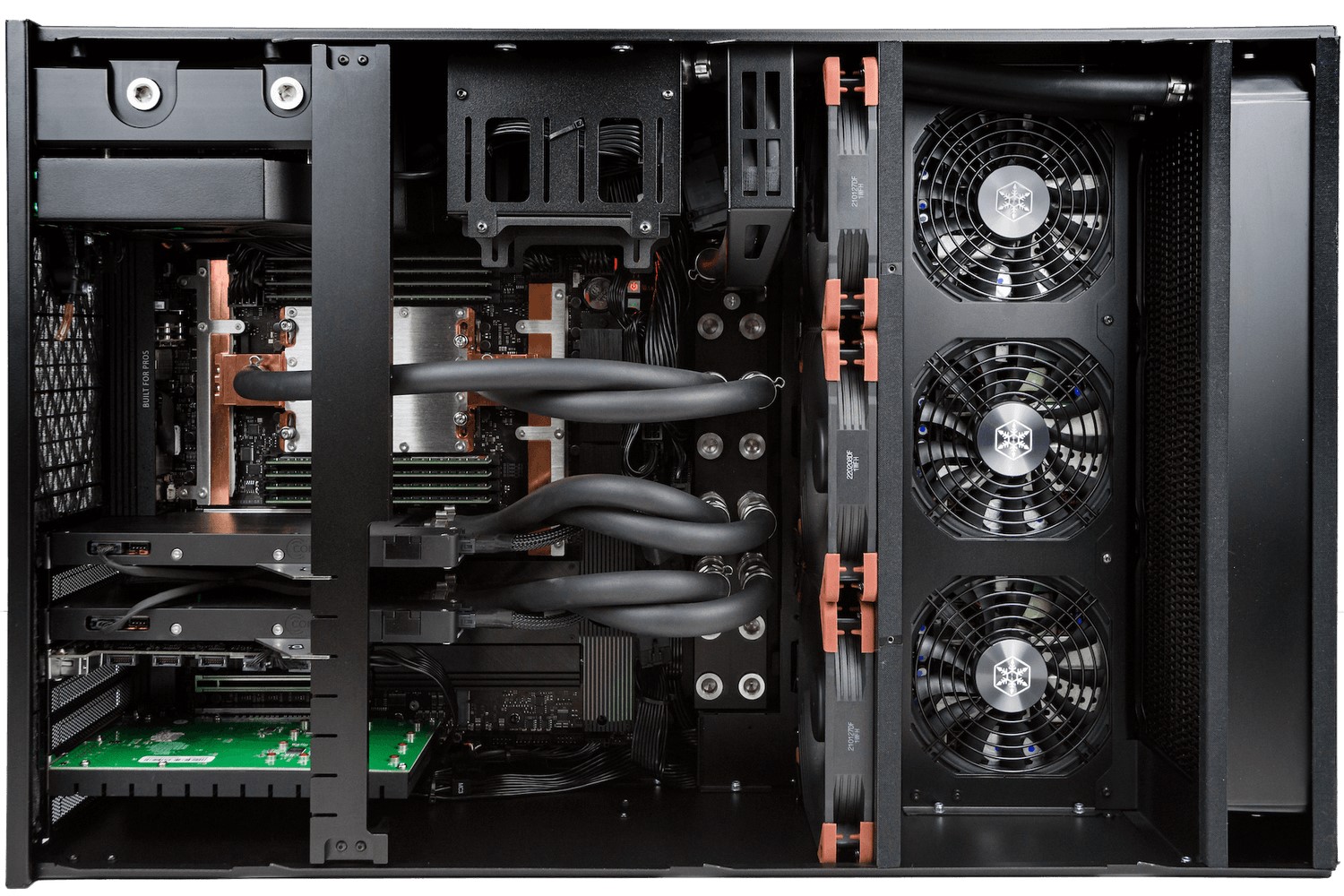
Interior of a Comino liquid-cooled workstation with dual GPUs
As mentioned earlier, this is the approach we have taken here at Puget Systems. Our customers value reliability, so we are very conservative about what hardware combinations we allow in our workstations and servers, doing our best to err on the side of caution when it comes to power draw and cooling. This has served us and our customers well, limiting the number of times that people have needed to contact us for technical support on these topics, but not all system integrators work from the same standards. If you are shopping around for a system with dual GeForce RTX™ 5090 or RTX PRO™ 6000 Blackwell Workstation video cards – or the similarly challenging quad RTX PRO™ 6000 Blackwell WS Max-Q configuration! – make sure to verify that each company you get a quote from has actually tested the design they offer under full load. They should be able to guarantee that it will handle both the power delivery these cards need as well as the cooling challenges they present. Also, double-check the type of power circuit you will need in order to properly run the system – and then make sure the location you plan to put the system is ready for it.
If you are interested in any of the configurations described above, you can use our configure pages to check out pricing and save a quote – or work with our expert consultants, who can help put together a design tailored to your specific needs and budget.

Looking for a dual RTX 5090 workstation?
We build computers tailor-made for your workflow.

Don’t know where to start?
We can help!
Get in touch with one of our technical consultants today.