Table of Contents
Introduction
One of the key factors for AI-focused GPUs is memory capacity. In order to run models well — if at all — they must be stored in memory local to the GPU compute die. And given that GPUs are far more performant for most AI workloads than are CPUs, that means it must be stored in VRAM. To that end, we have seen increasingly large memory buffers on midrange professional GPUs targeted towards AI use cases. For example, last year AMD released the AMD Radeon™ AI PRO R9700, which repurposed the 9070 XT into an AI card by doubling the VRAM to 32 GB. At the higher end, NVIDIA released a 72 GB version of its NVIDIA RTX PRO™ 5000 Blackwell.
Now, Intel has thrown its hat into the ring with the launch of the Intel® Arc™ Pro B70. However, unlike AMD and NVIDIA, Intel is not merely retrofitting an existing GPU with additional VRAM. Instead, the B70 is a whole new entry into the product stack, featuring twice the Xe cores and VRAM of the Intel Arc Pro B50, bringing it to 32 GB of memory.
In our previous testing of the Arc Pro B50, we found substantial improvements over their last-gen Alchemist cards, such as the A50. Intel’s second-generation Xe2 architecture brought along a wide variety of enhancements, from SIMD16 execution to next-gen XMX engines, which dramatically improved both raw performance and efficiency. Additionally, over the last few years, Intel has worked hard to improve support, compatibility, and optimizations within its driver stack — with the latter often substantially improving the performance of already-released hardware.
Just like the currently-existing B50, the B70 has dual media engines. Each has an encoder and decoder for up to two 8K 10-bit workloads. In terms of codec support, Intel’s media engine has acceleration for HEVC 8-, 10-, and 12-bit (decode only) 4:2:0, 4:2:2, and 4:2:0, as well as AV1, among other codecs.
As this is a professional GPU, the Arc Pro B70 offers a number of features not typically seen on consumer parts. This includes ECC memory as well as certified drivers that are tested to offer stability and reliability of performance and results across a variety of products from professional independent software vendors such as Adobe, Autodesk, and Dassault Systèmes.
As mentioned earlier, the Intel Arc Pro B70 boasts a much larger GPU die than the B50, alongside a variety of other changes to the graphics card’s specifications. In the table below, we have listed the most relevant specs for comparable Intel, AMD, and NVIDIA GPUs:
On paper, the B70 is basically just two B50s stapled together: It offers twice the Xe-cores and twice the VRAM… at 2.7x the cost. It seems there is an additional cost for putting that much VRAM on a single card, but it is not large enough to be a deal breaker. There are some other differences as well: Intel doubled the memory bus width to 256-bit and more than doubled the total memory bandwidth from 224 to 608 GB/s. Clock speeds also increased, with the “graphics” clock improving from 1700 MHz to 2280 MHz (the graphics clock is a “typical” frequency achieved in workloads), and the boost clock increased from 2600 MHz to 2800 MHz. As would be expected, these increases all come with commensurate power needs, so the TDP more than tripled, from 70 W to 230 W. As a result of all these changes, Intel claims that the expected FP32 performance is 22.94 TFLOPS and the peak INT8 is 367 TOPS.
There aren’t any great direct competitors for the B70. Intel seems to have purposefully undercut the most likely, AMD’s R9700, by about 30%. Both the R9700 and B70 feature 32 GB of VRAM and similar memory bandwidths, but on paper, the R9700 seems much more competent, with twice the FP32 performance and 5 times the matrix performance — though there is no real consensus on how the latter is calculated. When comparing it to NVIDIA, the B70 is $200 more expensive than the 2000 Blackwell, while offering twice the VRAM and similar FP32 performance. The 4000 Blackwell is the next step up, but costs $550 more than the B70 — and, to match the B70’s 32 GB of VRAM with an NVIDIA GPU, we have to go all the way up to the 2.5x more expensive 4500 Blackwell.
For this review, we will primarily be focusing on a comparison with the R9700, followed by the 2000 Blackwell. We will also note comparisons to the B50 when we want to show how the architecture scales.
Test Setup (Expandable)
Test Platform
| CPUs: AMD Ryzen™ 9 9950X3D |
| CPU Cooler: Noctua NH-U12A |
| Motherboard: ASUS ProArt X670E-Creator WiFi BIOS Version: 3513 |
| RAM: 2x DDR5-5600 32GB (64 GB total) |
| EVGA SuperNOVA 850W P2 |
| Storage: Samsung 980 Pro 2TB |
| OS: Windows 11 Pro 64-bit (26200) |
Intel GPUs
| Intel Arc Pro B70 Intel Arc Pro B50 Driver: 101.8515 |
NVIDIA GPU
AMD GPU
| AMD Radeon AI PRO R9700 Driver: 26.3.1 |
Benchmark Software
| Adobe Lightroom Classic 15.2 — Puget Bench for Lightroom Classic 1.0.0 |
| Adobe Premiere 26.0 — Puget Bench for Premiere Pro 2.0.1 |
| Adobe After Effects 26.0 — Puget Bench for After Effects 1.1.0 |
| DaVinci Resolve 20.3 — Puget Bench for DaVinci Resolve 2.0.0 |
| Blender 5.0.0 |
| Unreal Engine 5.7 |
| Unigine Superposition 1.0 |
| MLPerf Client v1.0 |
| Autodesk Revit 25.3 — RFO Benchmark 3.4 |
| Autodesk Inventor 29.0 — InvMark 2025.0.15 |
| SOLIDWORKS 2024 5.0— SPECapc for SOLIDWORKS 2024.1.13 |
As is typical with our GPU reviews, we used an AMD Ryzen™ 9 9950X3D and ASUS ProArt X670E-Creator-based test bed. We have found that, in most workflows we test with, the 9950X3D offers the best all-around performance, and so should minimize potential CPU-side bottlenecks. We used the latest available GPU drivers for this testing, and Windows settings like VBS were kept enabled. We tested using a standard set of professional productivity benchmarks for this review: most of the Puget Bench suite, some offline and real-time renderers like Unreal Engine, Blender, and Unigine, an AI GPU benchmark in MLPerf, and most of our standard Engineering test suite.
Lightroom Classic

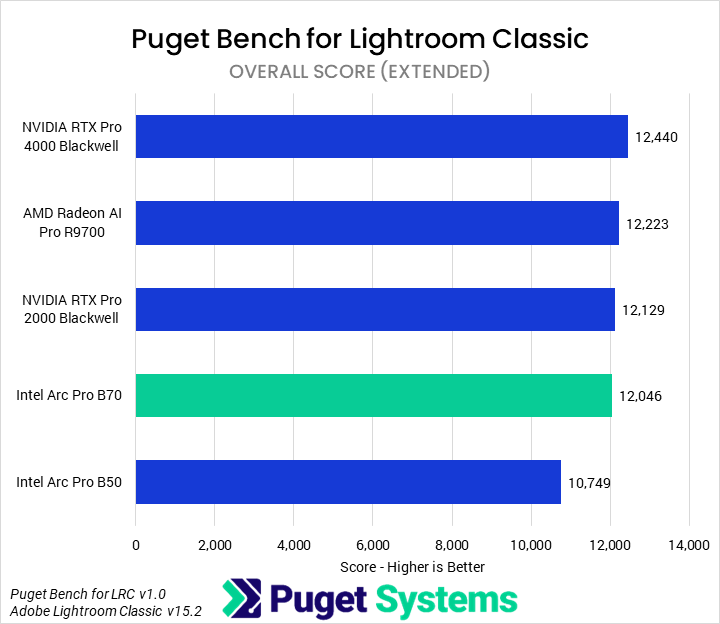
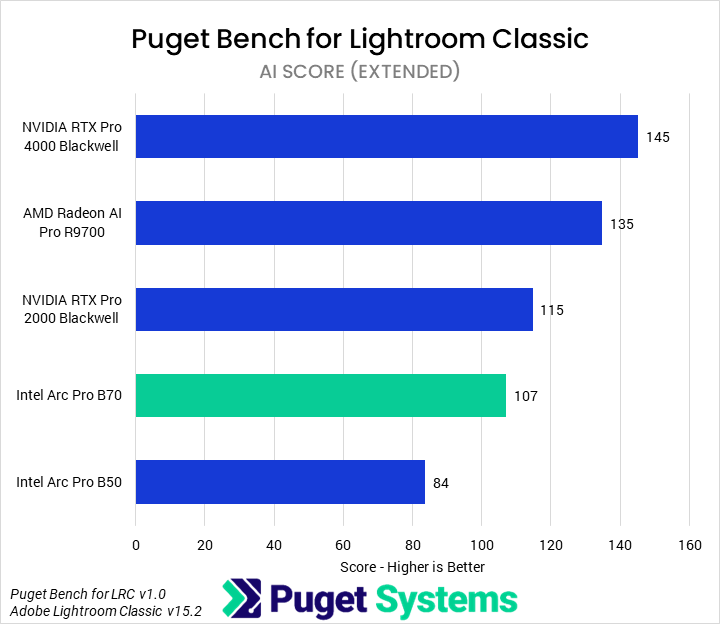
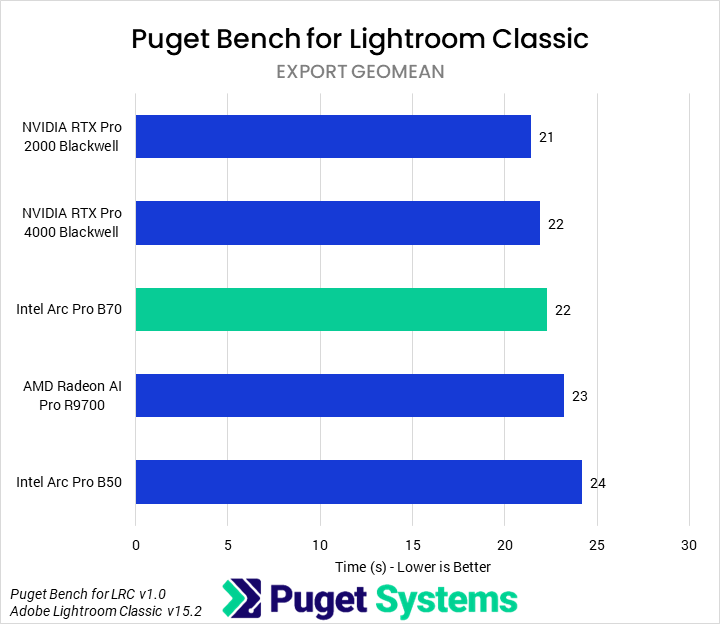
The first benchmark we tested with was Lightroom Classic. Overall (Chart #1), we found that the B70 showed 12% uplifts over the B50, though it still ended up slower than any of the other GPUs by a small margin (3% or less). Most of Lightroom is not GPU-accelerated, however, so we didn’t expect to see a huge impact from the GPU on overall performance. AI effects (Chart #2) are often GPU-accelerated, though, so we saw more differentiation there. The B70 maintained its spot second from the bottom, though in those tests it was 27% faster than the B50. The 2000 Blackwell was 7% faster than it, while the R9700 was 26%. We also examined Export times (Chart #3) as those tend to be partially GPU-accelerated. While there was some impact on performance, and the B70 outperformed the R9700, the differences were, overall, small enough not to make a huge impact.
While we wouldn’t recommend a B70 for Lightroom Classic — a 2000 Blackwell is probably the best of those tested, unless using a large amount of AI effects — we wouldn’t normally recommend a professional-class GPU for Lightroom Classic at all.
Premiere
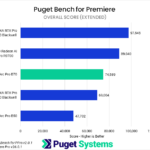

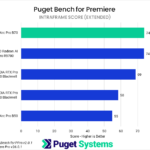
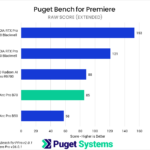
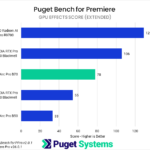
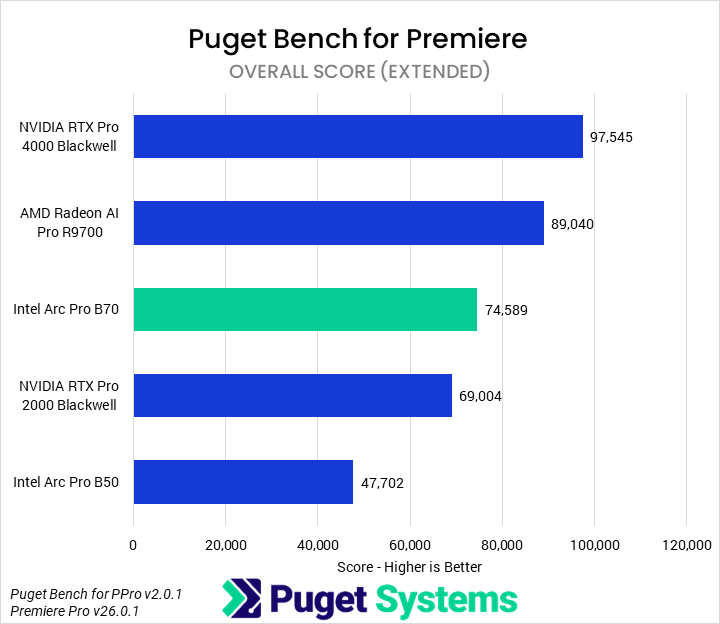
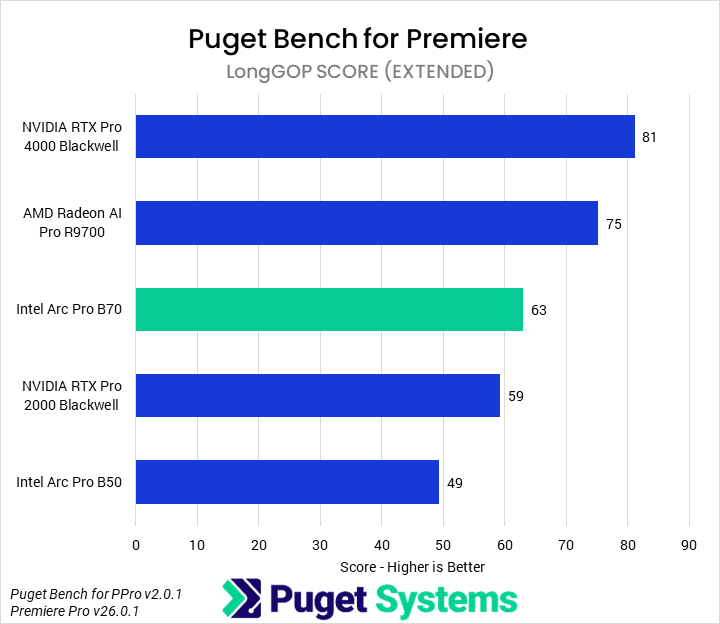
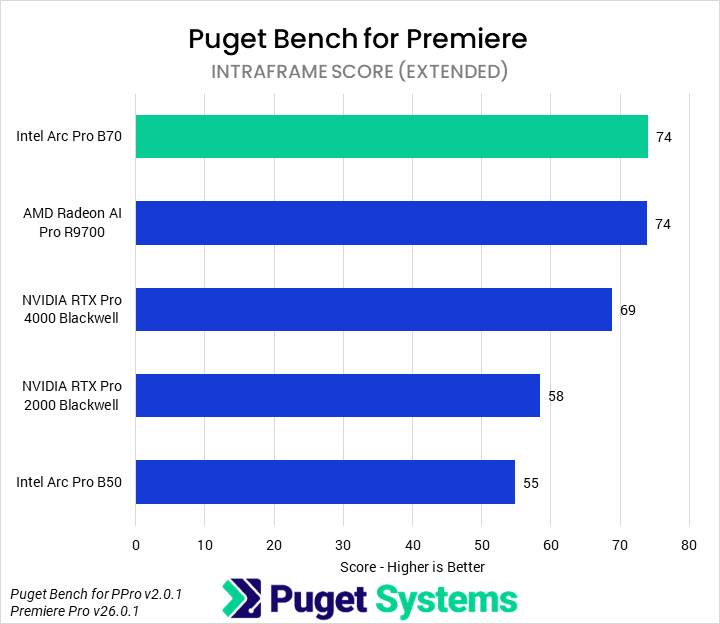
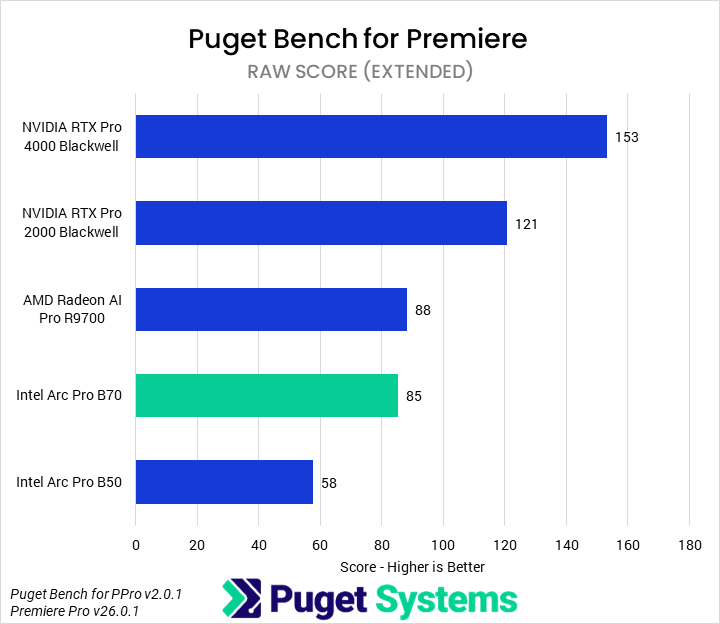
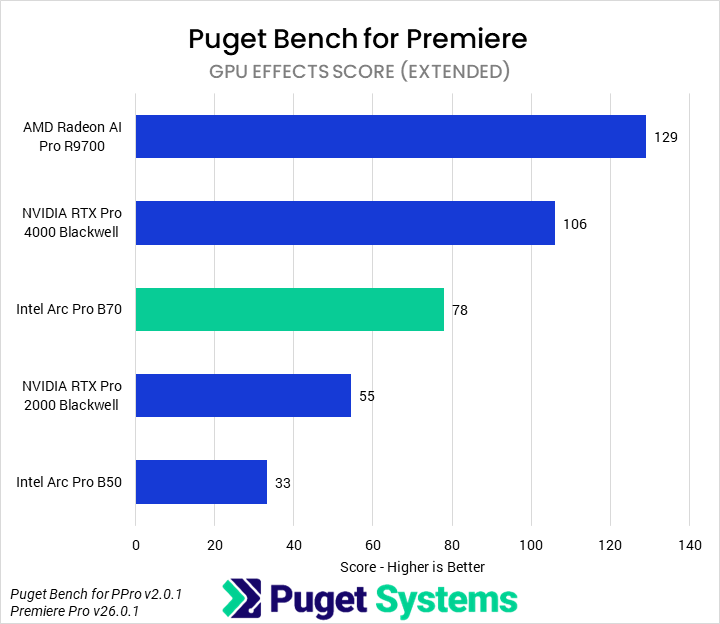
The next benchmark we tested with was Puget Bench for Premiere. Professional GPUs, while offering advantages in some workflows, typically offer less value for most media and entertainment applications than consumer cards do. Starting with the Overall score (Chart #1), we found that the B70 was 56% faster than the B50 and 8% faster than the 2000 Blackwell. In turn, it was 16% slower than the R9700 and 24% slower than the 4000 Blackwell. Although it had nominally superior media engines for accelerating most LongGOP work, the overall LongGOP score (Chart #2) was dragged down by subpar performance (compared to the R9700 and 4000 Blackwell) in the “real world” tests, placing it solidly in the middle of the pack. The B70 struggled in the RAW media tests (Chart #4), matching only the R9700 but falling well behind NVIDIA’s cards. In GPU Effects (Chart #5), the B70 was similarly middle of the pack, showing more than twice the performance of the B50 but trailing behind the 4000 Blackwell and R9700. Overall, the B70 offers a fine value relative to other professional GPUs for Premiere, but not anything outstanding.
After Effects
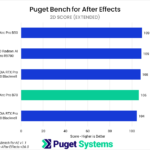
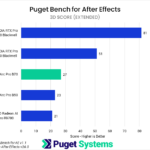
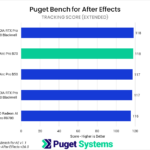
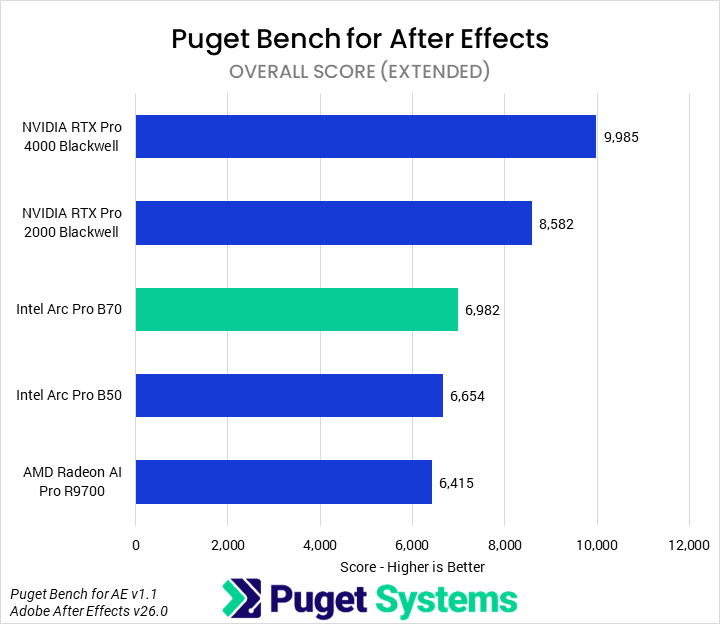
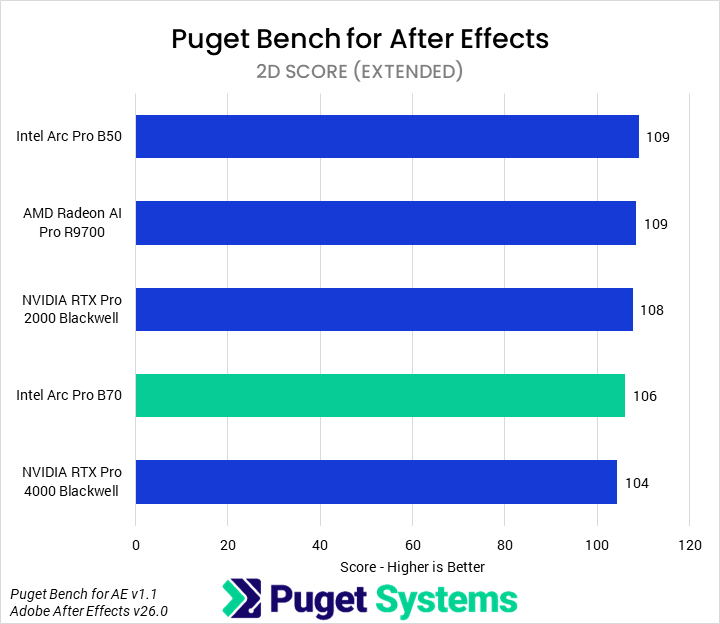
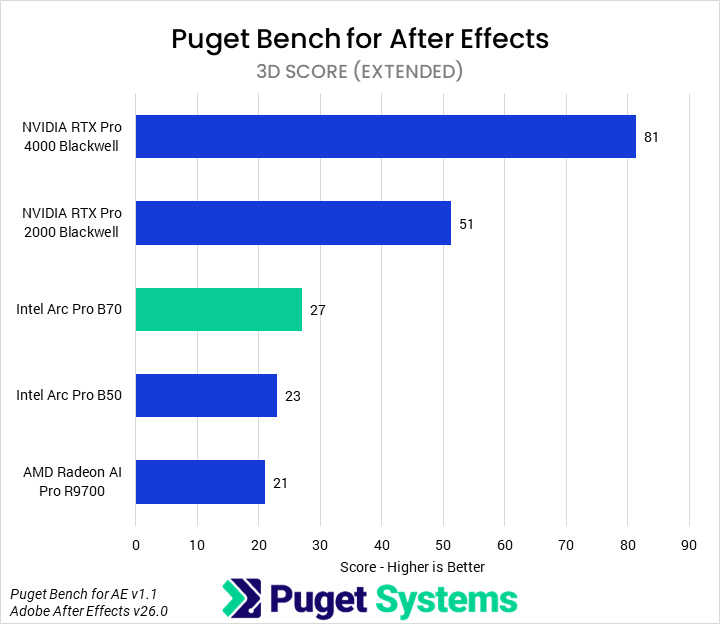
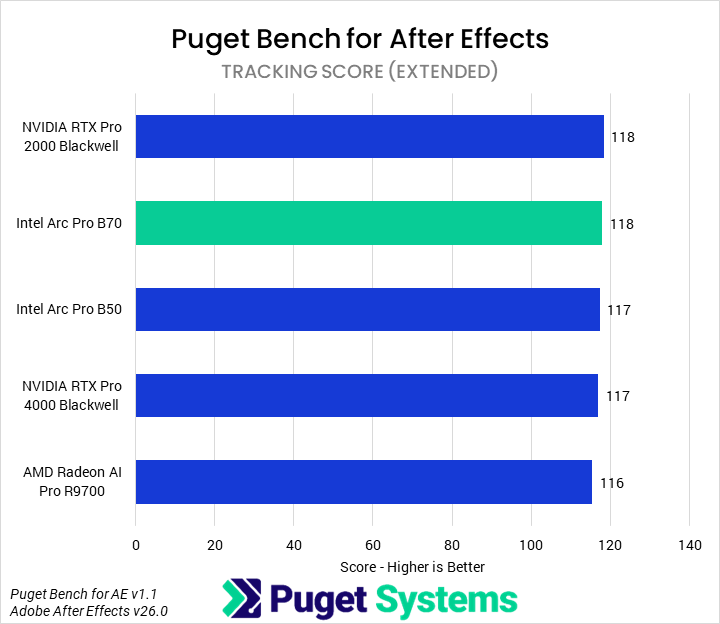
In Adobe After Effects, only one area is properly GPU-accelerated: 3D. Other workflows are almost wholly CPU-based, and so do not scale with GPU. Due to this, we will only examine the 3D score (Chart #3). Our testing found that 3D workflows in After Effects are still highly optimized for NVIDIA GPUs: the B70, though 17% faster than the B50 and 29% faster than the R9700, was 47% slower than the 2000 Blackwell and offered one-third the performance of the 4000 Blackwell. We would recommend end users stick to consumer NVIDIA GPUs for After Effects.
DaVinci Resolve
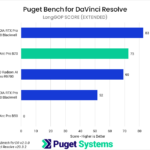
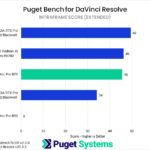
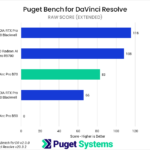
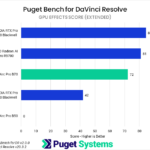
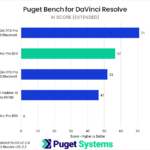
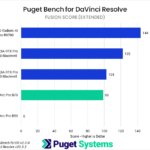
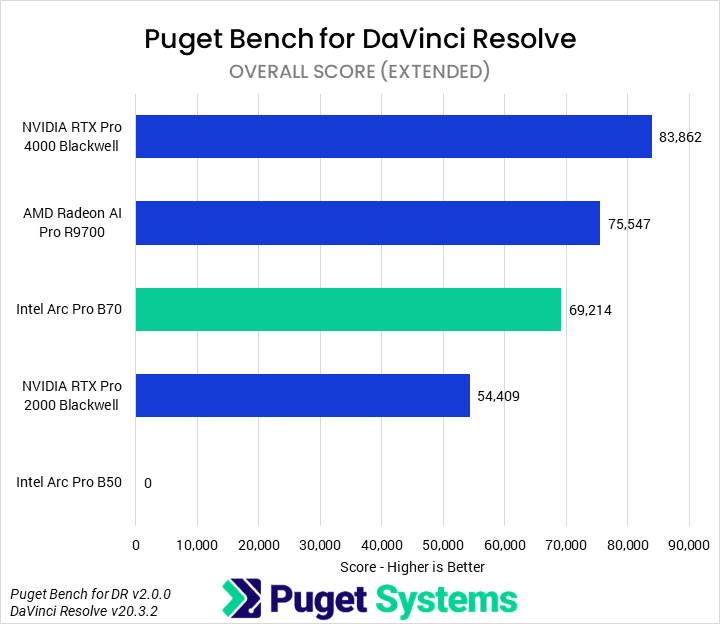
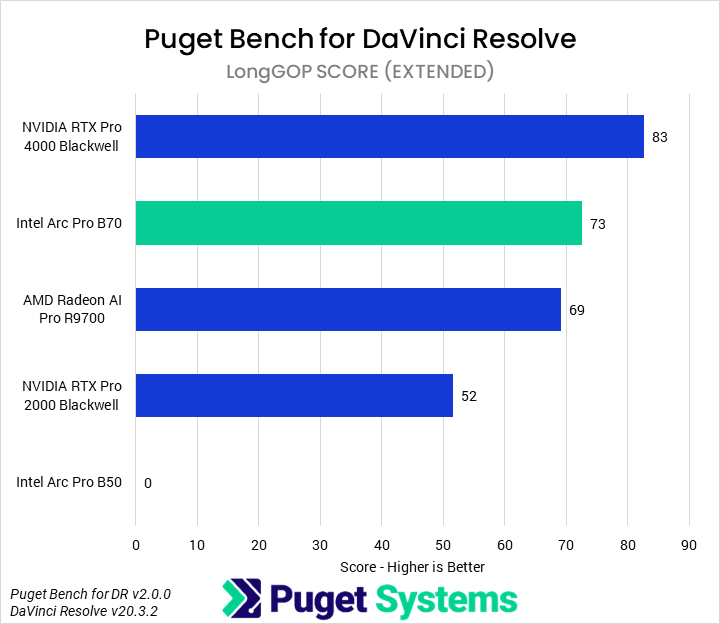
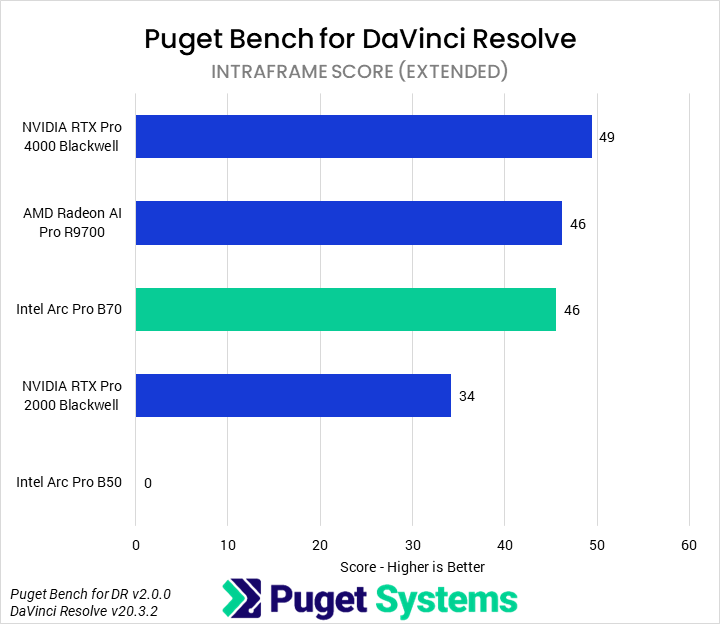
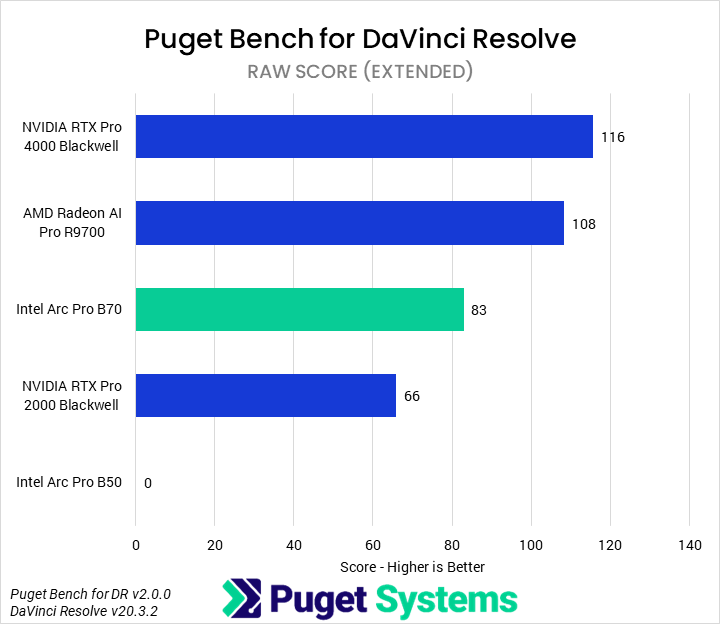
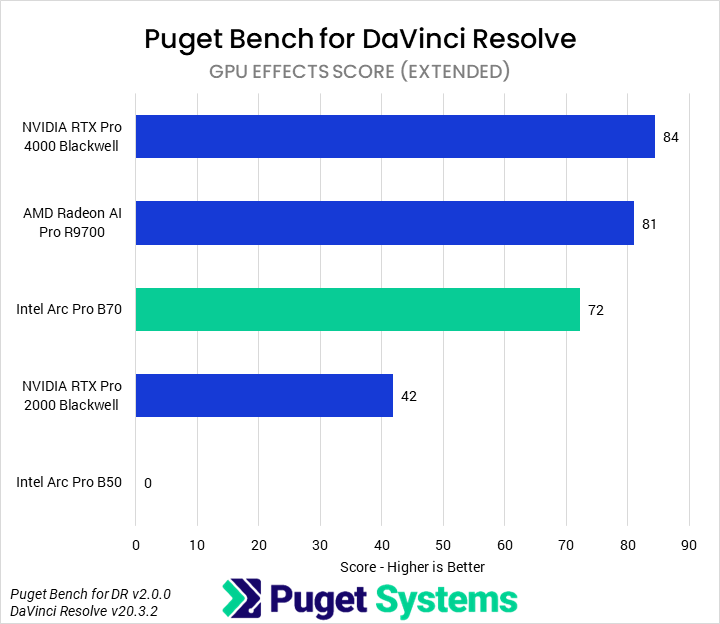
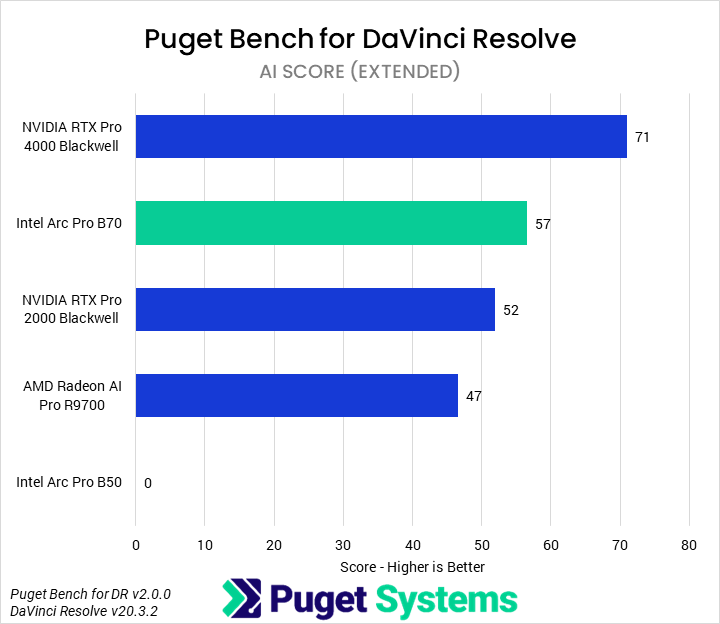
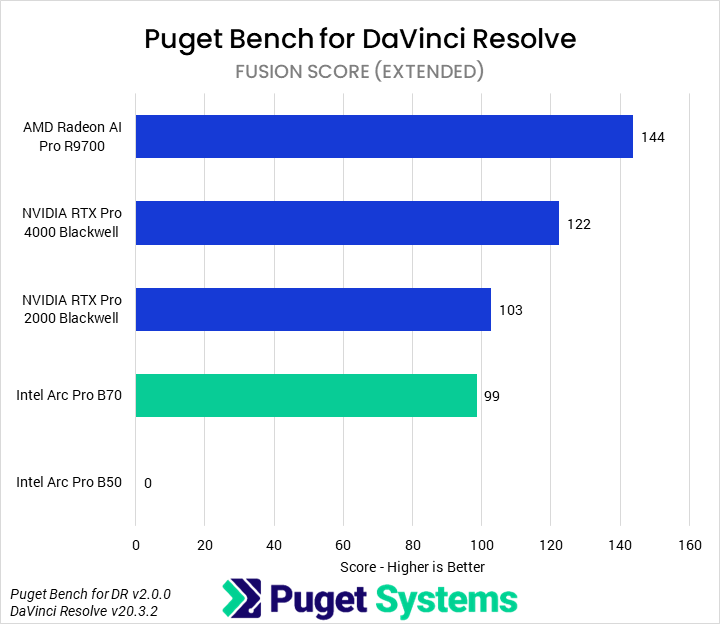
We won’t be diving into all the details of every subtest for DaVinci Resolve, either. Our comparison also omits the B50, as we experienced an ongoing issue where it repeatedly failed to successfully complete an extended run of our DaVinci Resolve benchmark. Overall (Chart #1), the B70 performed acceptably, with a 27% performance advantage over the 2000 Blackwell but 8% slower than the R9700 and 17% slower than the 4000 Blackwell. This positions it as a solid performer at its price point, but not the best. Although always slower than the 4000 Blackwell, the B70 performed well in the LongGOP and AI tests (Charts #2 and #6), outperforming the R9700 by 5-10%. However, it struggled somewhat in the RAW and GPU Effects tests (Charts #4 and #5), performing up to 24% slower than the R9700. It also performed fairly poorly in the Fusion tests (Chart #7), scoring even lower than the 2000 Blackwell.
Blender
Image
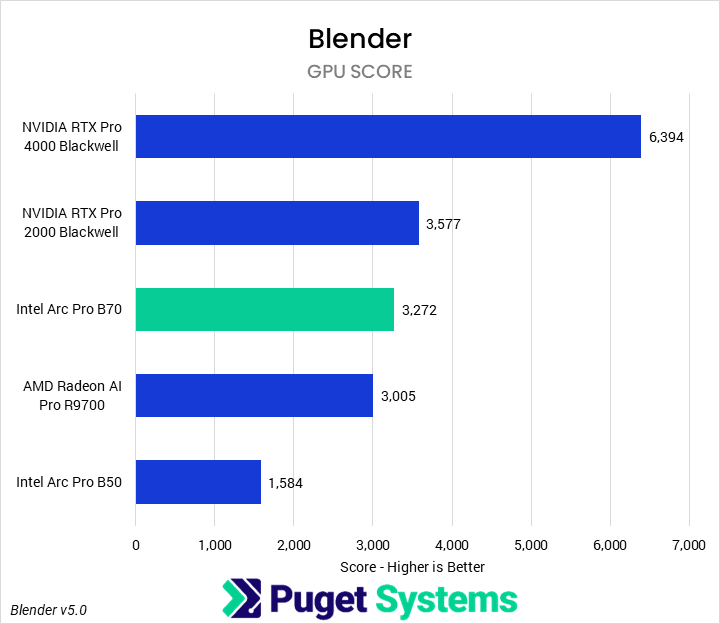
Over the last year or two, Intel has worked to deliver serious optimizations for and compatibility with Blender GPU rendering on its Arc GPUs. Although NVIDIA has long held an advantage in the application, our last time looking at Intel’s cards indicated ongoing improvements. This round of testing is no different. We found that the Arc Pro B70 provided more than twice the performance of the B50, also beating the R9700 by 9%. This still made it slower than the 2000 Blackwell by 8%, but for complex VRAM-heavy scenes on a budget, it offers an acceptable value. We hope that, in the future, there will be real options other than NVIDIA for GPU-based rendering, as it is an area where competition is nearly non-existent.
Unreal Engine
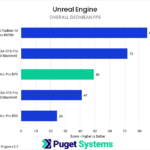
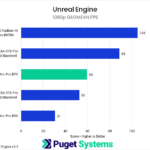
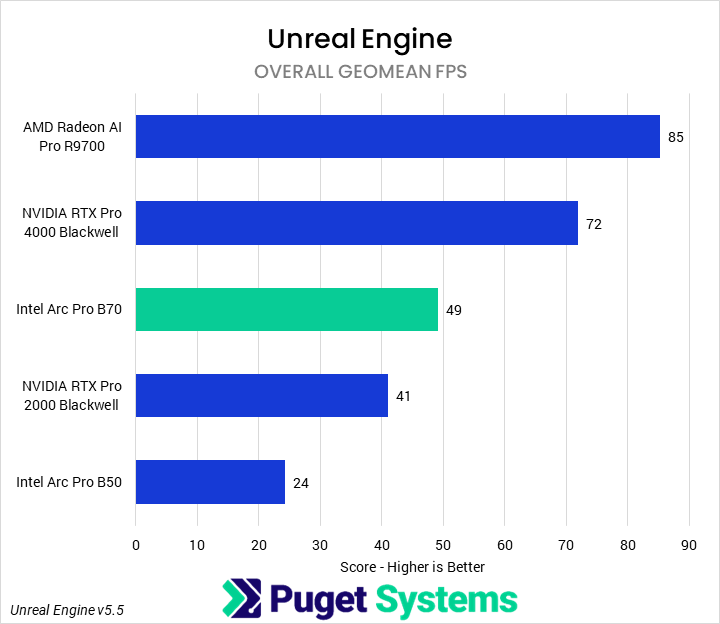
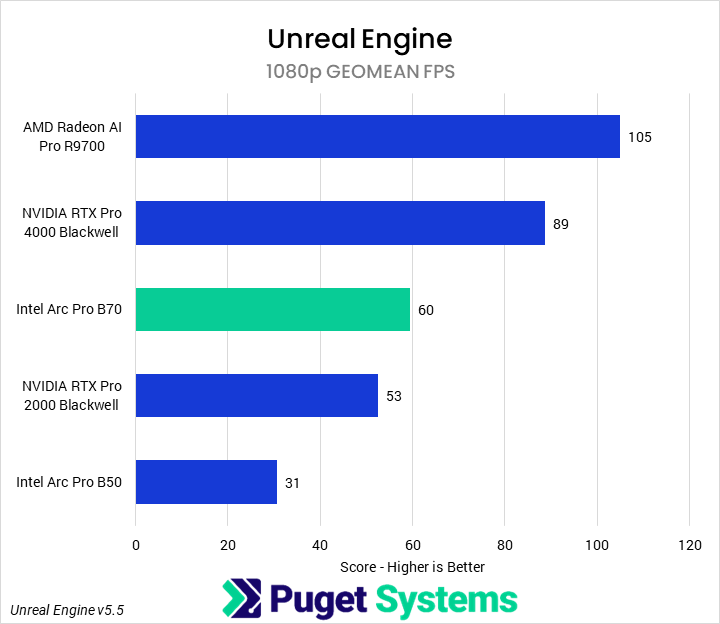
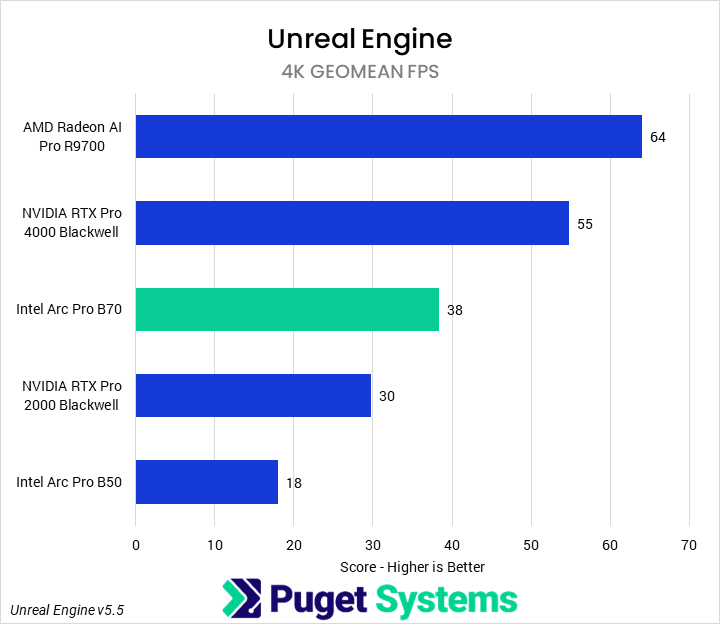
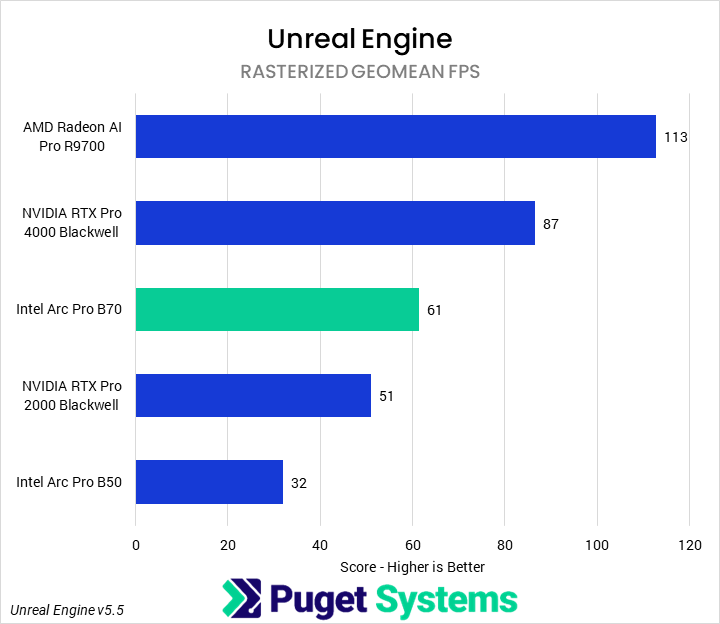
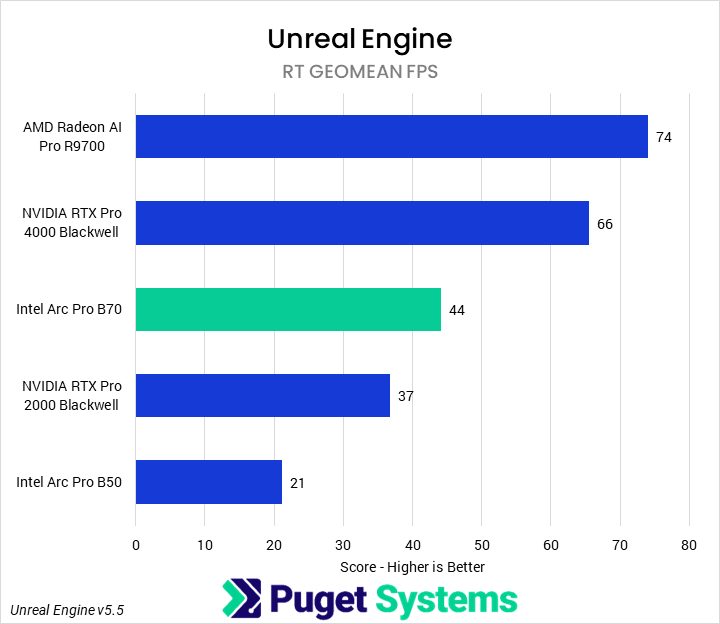
For our in-engine Unreal Engine benchmark, we run three different scenes each at three different resolutions; they represent some possible different workflows within Unreal Engine, from game development to architecture visualization, and each uses different features such as hardware RT or Nanite. This allows us to combine the individual scene results into feature-specific scores; here, we have created an overall score, as well as combined 1080p and 4K scores, as well as rasterized and RT scores. Sometimes this can show interesting differences in prioritization or scaling across hardware.
In this case, we didn’t see too much variation across the combination scores, showing that, at this tier of hardware, all of the architectures are fairly similarly balanced — though we did still see AMD perform relatively less well at RT than Intel or NVIDIA. The B70 performed solidly, middle of the pack here (in line with its price), though its overall price-to-performance ratio leaves something to be desired compared to nearly every other GPU. Overall (Chart #1), it was 90% faster than the B50 and 20% faster than the 2000 Blackwell. However, it was also 30% slower than a 4000 Blackwell and, more importantly, 47% slower than the R9700.
Unigine
Image
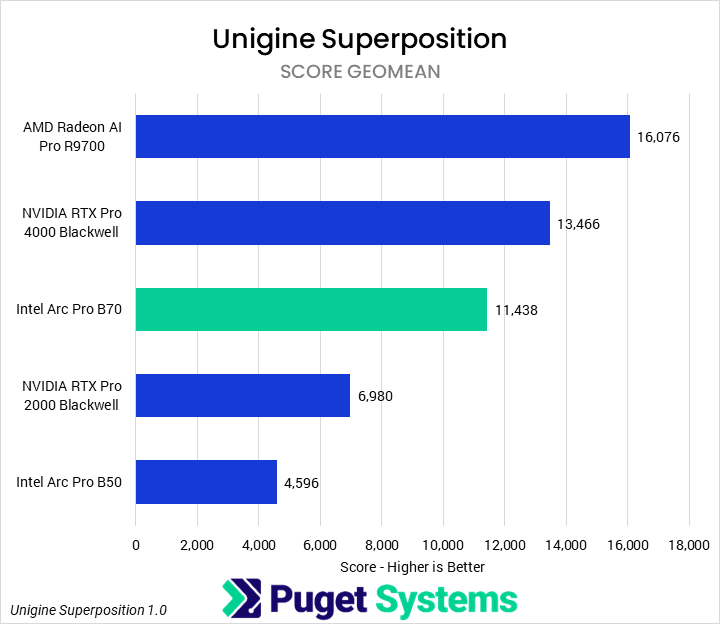
Unigine Superposition is an industry-standard in-engine rendering benchmark. For this score, we computed a geomean of the score from runs at 1080p extreme, 1080p high, 4K optimized, and 8K optimized (we didn’t observe too much CPU bottlenecking at any of these settings). Our testing showed that the B70 was 1.5 times faster than the B50, and 64% faster than the 2000 Blackwell. Although it could not match the more expensive GPUs, it came somewhat close, falling 17% behind the 4000 Blackwell. However, the R9700 was the clear leader, a full 40% faster than the B70. This does make us wonder how a consumer-oriented GPU with the B70’s die would stack up in games, though.
MLPerf

System Image
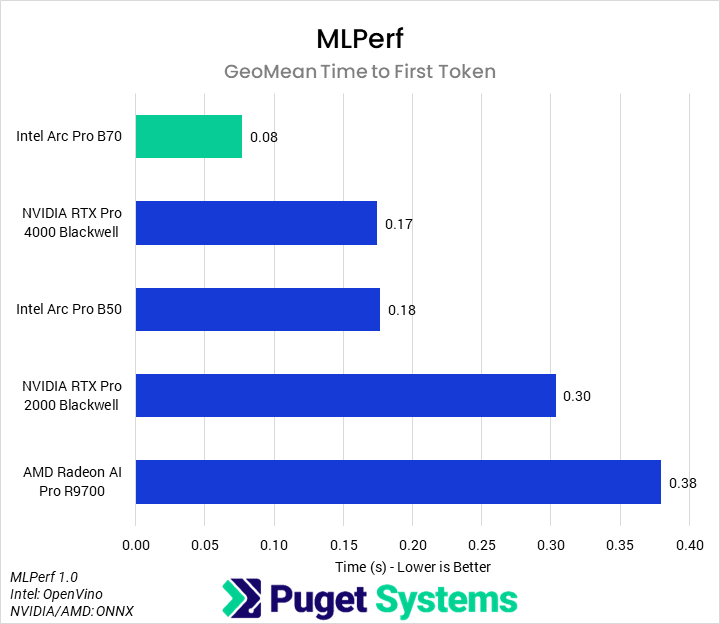
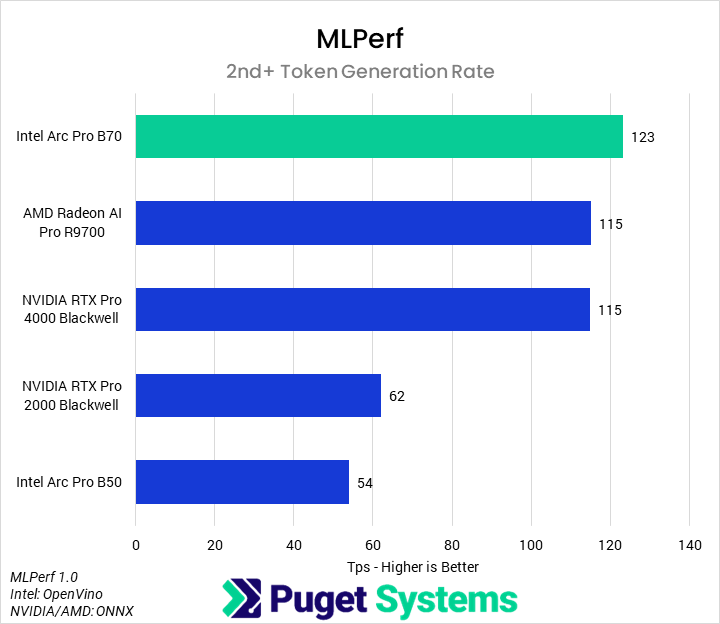
MLPerf Client is probably the most relevant benchmark we tested with for this review; with 32 GB of VRAM at $950, the B70 is really positioned as an AI-inference card rather than a general professional workstation card. Although AI inference performance can depend heavily on the specific optimizations and model used, MLPerf is a standardized benchmark that we think gives a good indication of potential. And with it, we found that the B70 performs incredibly well. In the time to first token measurements (Chart #1), the B70 was incredibly fast, returning the first token, on average, in half the time as the 4000 Blackwell and the B50, and in less than one-third the time of the 2000 Blackwell or R9700. More importantly, in the overall token generation rate (Chart #2), we found that the B70 was the most performant tested GPU. It beat the R9700 and 4000 Blackwell by 7%, the 2000 Blackwell by 98%, and the B50 by 128%.
Revit
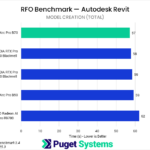
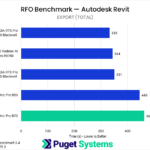
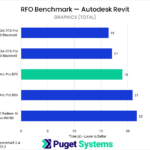
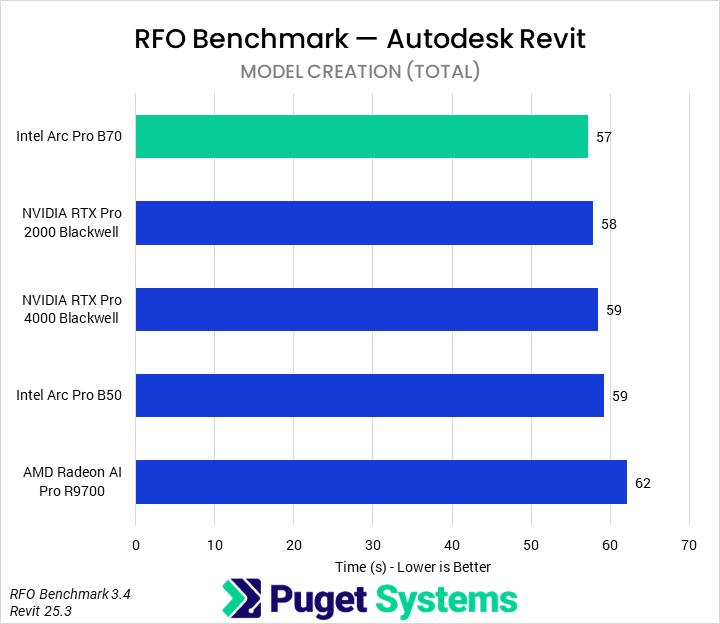
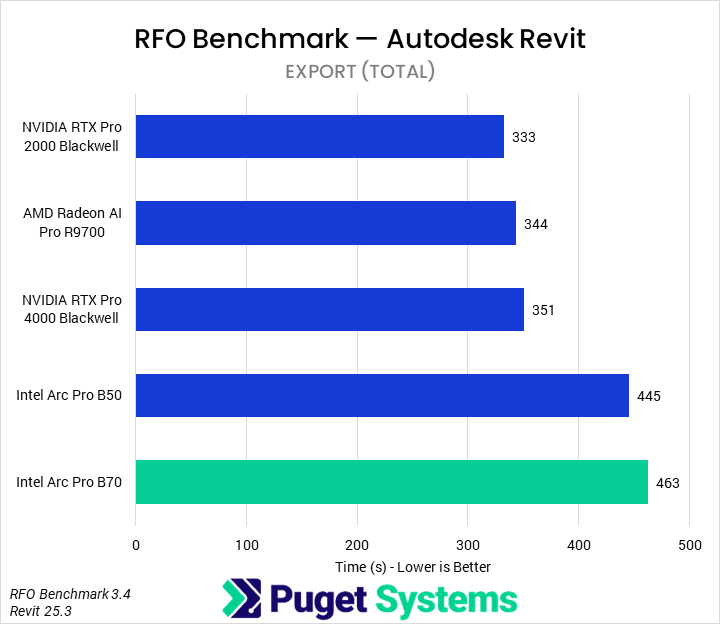
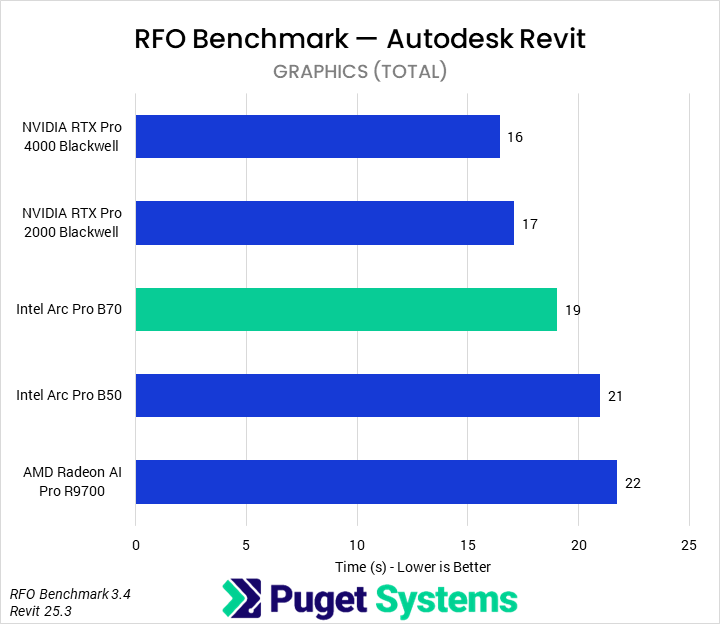
For our Revit testing, we benchmarked each GPU using the Full_Standard preset. In terms of model creation time (Chart #1), we saw a small impact from the GPU. There may be some differences based on manufacturer, but most of the results are within the margin of error. Interestingly, we saw a larger difference in export time (Chart #2), where the Intel GPUs underperformed relative to AMD or NVIDIA. We’re not sure if this is caused by an architectural difference, pipeline difference, or bug in either the driver or software, but it appears that exports are noticeably slower when an Intel GPU is installed. Finally, in graphics time (Chart #3), the B70 was exactly in the middle of the pack, 14% and 10% faster than the R9700 and B50, respectively. However, given that it was slower than the 2000 Blackwell, we would recommend users stick to NVIDIA professional GPUs for Revit.
Inventor
Image
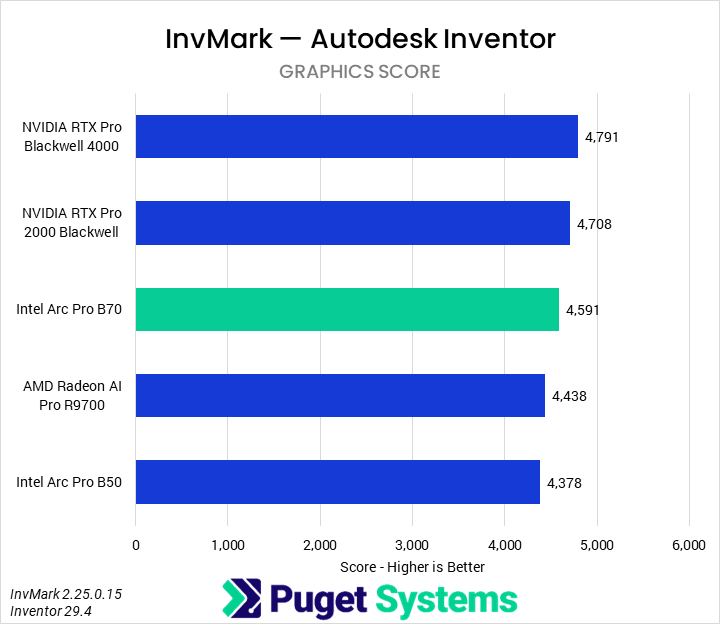
As most of Inventor is not substantially GPU accelerated, we only pulled out the graphics score; this is about the only subscore that scales with GPUs anyway. We found that the Intel Arc Pro B70 was 5% faster than the B50 and R9700, and about 5% slower than the 2000 Blackwell and 4000 Blackwell. Given these small performance deltas, we would recommend the 2000 Blackwell or, on a budget, the B50.
SOLIDWORKS
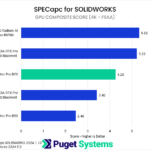
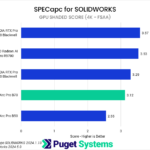
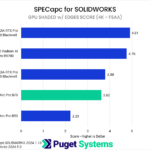
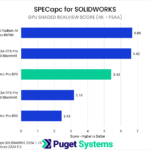
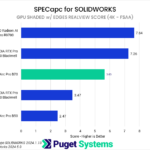
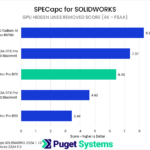
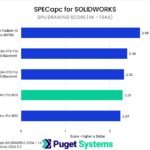
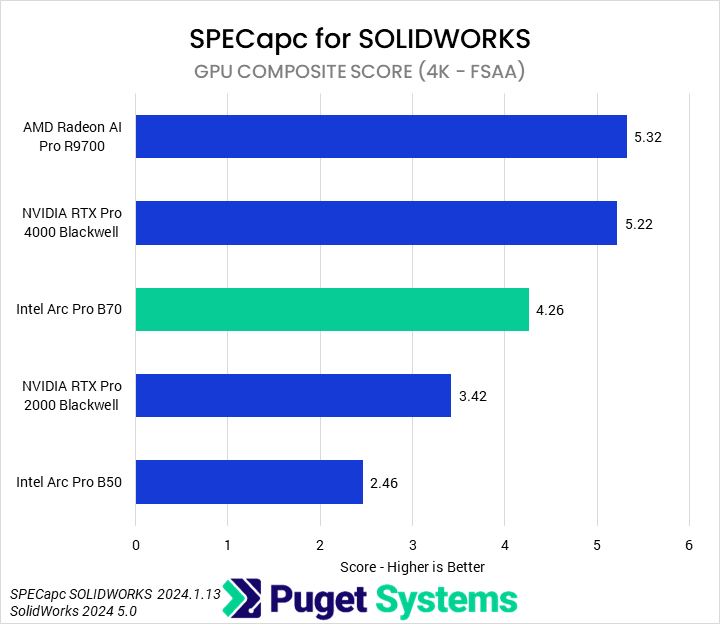
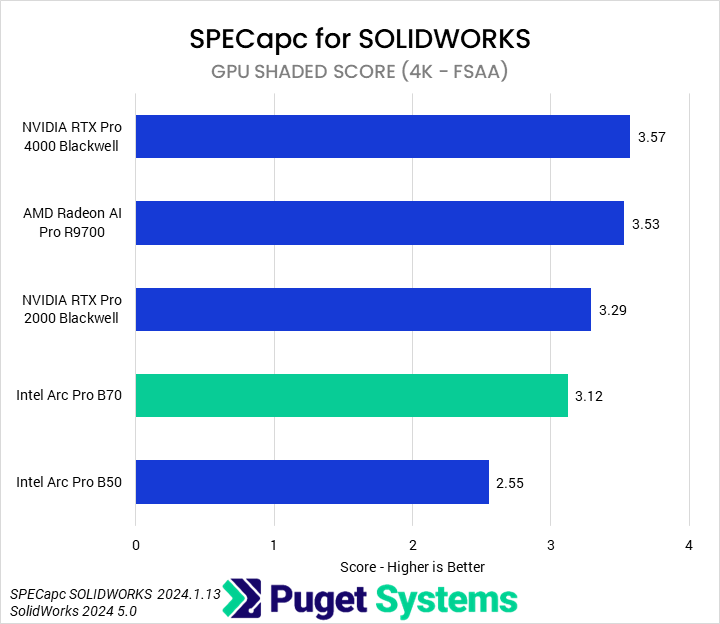
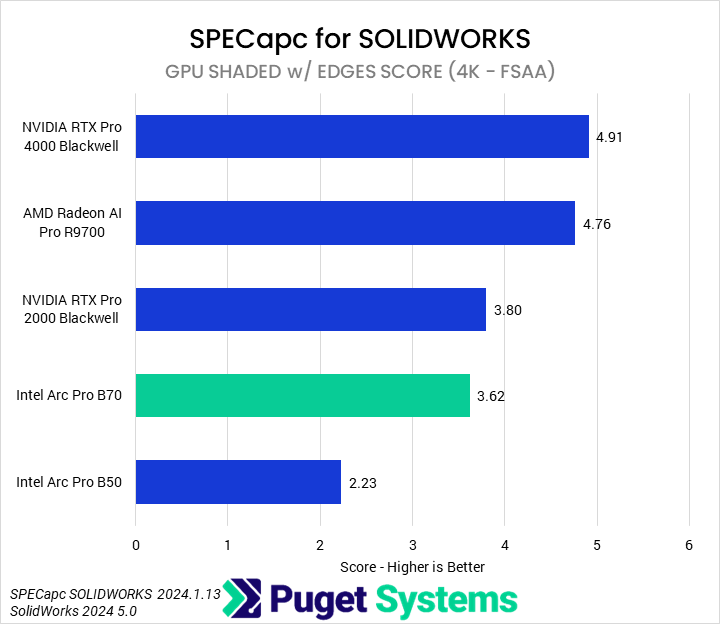
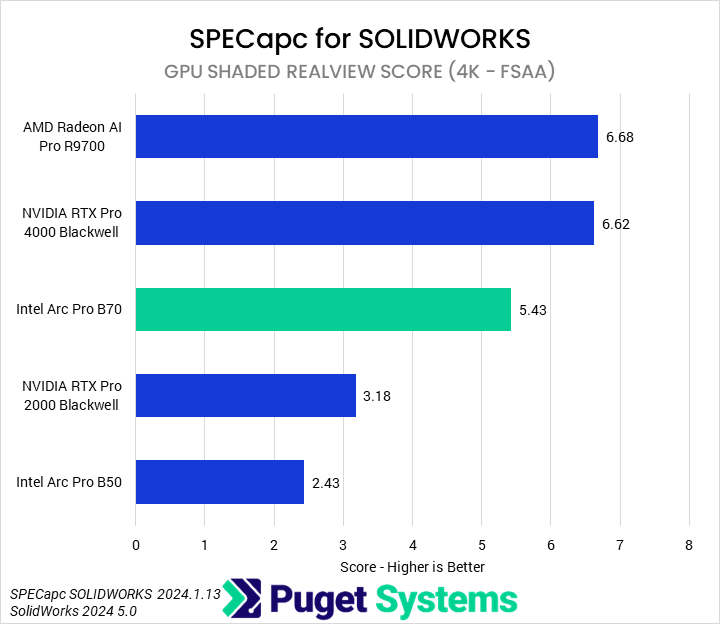
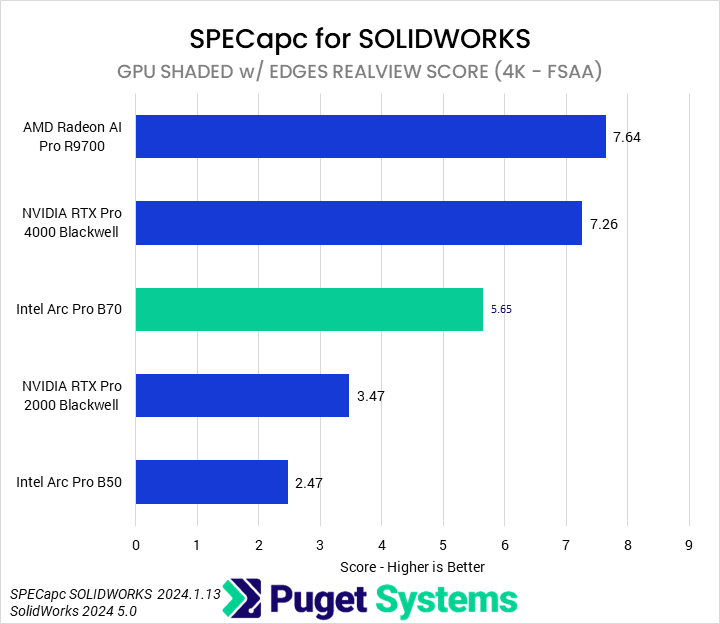
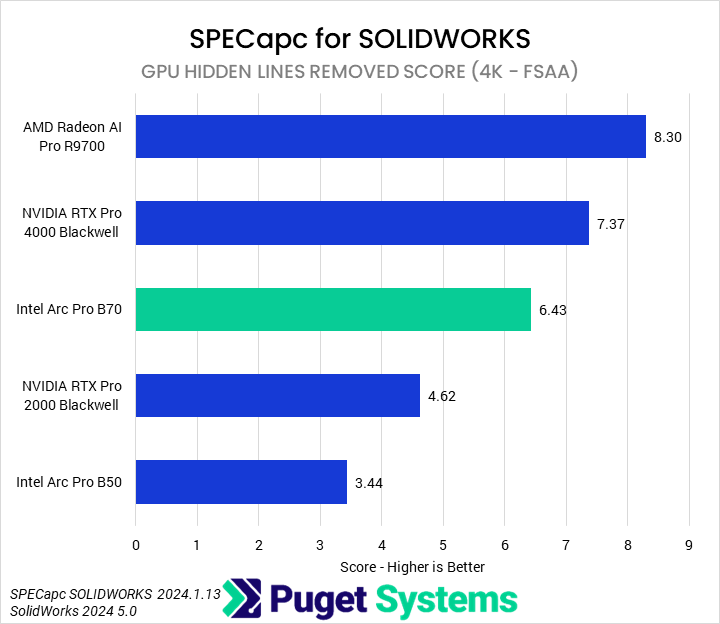
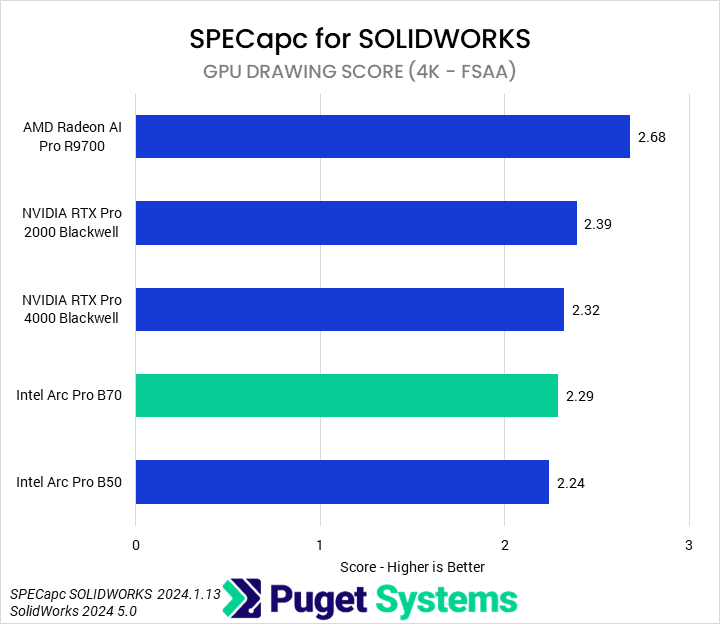
The final benchmark we tested with was SPECapc for SOLIDWORKS 2024. As is typical in these reviews, we will only be focusing on the composite score (Chart #1), although all of the GPU-related subtests are reported. We found that the B70 performed competently, with a 24% performance advantage over the 2000 Blackwell and a 73% advantage over the B50; it was about 20% slower than both the 4000 Blackwell and the R9700. This makes the B70 overall a solid option for SOLIDWORKS, though a marginally worse value than the likes of the 2000 Blackwell.
How Does the Intel Arc Pro B70 Perform in Professional Applications?
The Intel Arc Pro B70 is an interesting GPU that is, in many ways, unbalanced for traditional professional application usage. It features 32 GB of VRAM, but, for many workloads, it lacks the raw GPU horsepower to back that up. And though Intel has largely priced the B70 to account for its lower performance, VRAM is expensive, necessarily increasing the price of the GPU. We wonder if, for general productivity applications, the B70 would not have been better off with 16 or 24 GB (if possible) of VRAM and a somewhat lower price, comparable to, say, a 2000 Blackwell. We are similarly interested in seeing this larger Battlemage GPU in a consumer context.
In most of the tested workflows, the B70 outperforms a 2000 Blackwell, but is less performant than an R9700 — about where we would expect, given the price point. There are some exceptions: in Lightroom Classic, the B70 was slower than the 2000 Blackwell, as it was in After Effects and Inventor, though in those latter two, it did outperform the R9700. Similarly, it was marginally behind the 2000 Blackwell in Blender, though Intel is evidently making great strides at improving rendering performance in Blender. In Revit and MLPerf, the B70 was the fastest GPU we tested, outperforming even the 4000 Blackwell.
However, it is very clear that Intel views the B70 not primarily as a general-purpose professional GPU, but primarily as an AI-first GPU, at which point the configuration begins to make more sense. At 230 W and 32 GB of VRAM, the B70 is aggressively priced for multi-GPU inference workstations. Performance, at least according to MLPerf, can be at least equal if not superior to the R9700 in Inference workloads, and the 32 GB of VRAM means that they can affordably be used to achieve 96 or 128 GB of system VRAM for 70B+ parameter models. The B70, therefore, seems very promising for multi-GPU workstations — though it is an area that we need to investigate further.

Looking for a professional workstation?
We build computers tailor-made for your workflow.

Don’t know where to start?
We can help!
Get in touch with one of our technical consultants today.