At Unreal Fest 2026, Epic released Unreal Engine 5.8 and introduced one of the most talked-about additions: experimental support for Model Context Protocol (MCP). Rather than acting like a traditional AI assistant that generates code or answers questions in a chat window, MCP allows external AI models to connect directly to Unreal Engine and interact with the editor itself. Through MCP, models can inspect project context and interact with systems such as Blueprints, assets, levels, and materials. Epic’s goal is to enable AI systems to operate more like collaborators within Unreal Engine.
Most discussions around AI in game development focus on asset or code generation. MCP represents a different idea: reducing the amount of manual interaction required inside the editor. At the same time, Epic labels this functionality as Experimental, and my experience reflected that. Some systems were accessible, others were not, and the overall workflow still felt early in its maturity.
The Experiment
Rather than evaluating MCP from the perspective of an experienced Unreal developer, I wanted to see what a new user would go through. The goal was not to measure how MCP improves an existing workflow, but to understand whether it could meaningfully help someone with limited Unreal experience build, iterate, and learn inside the engine.
To keep the experiment grounded, I placed a few informal constraints on how I worked. I stayed as hands-off as possible, allowing Claude Opus 4.8 to drive Unreal Engine through MCP whenever it was capable of doing so. I chose Claude because all the tutorials I found were based around that model. (The official documentation is a bit lacking, so I recommend this tutorial.) I only stepped in when MCP lacked access to required systems or when manual correction was necessary. Even in situations where I suspected there was a better Unreal-native approach, I avoided relying on prior knowledge in order to preserve the “new user” perspective.
With that framing in place, success was not defined by performance or efficiency, but by a set of more fundamental questions: whether I could build something functional, whether I could understand what was being created well enough to continue working with it, and whether I could keep iterating without needing to restart from scratch. Within those constraints, I ran four practical tests inside Unreal Engine. These included building a small environment made up of connected rooms, creating simple Blueprint-based lighting interactions, modifying player controls from a free camera setup to a basic character movement system, and finally attempting to generate a procedural city using Procedural Content Generation (PCG). The results of these tests ultimately revealed more about how MCP behaves as a workflow tool than about the final output itself.
Test 1: Building a Greybox Environment
I started with Unreal Engine’s default Blank Game project as a baseline. The first thing I asked Claude to do through MCP was to remove the prebuilt landscape. It handled this without issue, and the scene was immediately reduced to an empty starting space.
From there, I gave it a more structured prompt:
“Create a gray box environment. It will have a long hallway with 6 rooms connected to the sides. Each room is 20 feet by 30 feet, with a light in the middle and a window on the back wall.”
The system processed this request for a little over five minutes before returning a fully constructed layout that matched the description almost exactly. The environment was built with simple gray materials, as expected for a prototype setup, and the overall layout closely matched the requested dimensions and structure (I didn’t verify the exact dimensions, but it seemed good enough).
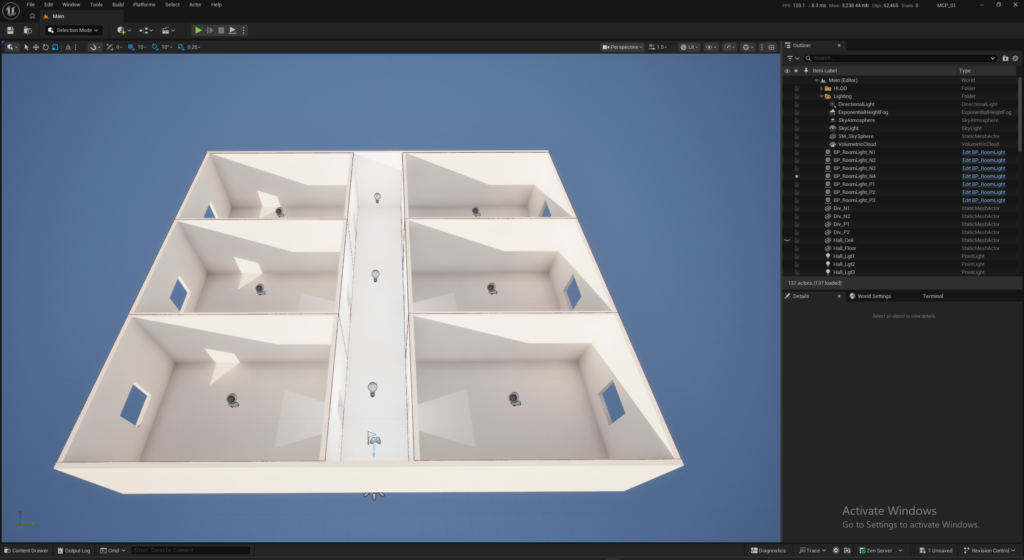
Interestingly, it also added lights in the hallway even though I did not explicitly request it. In context, this felt less like a mistake and more like an assumption based on typical level design practices, and was ultimately a welcome addition.
While the task itself was relatively simple, the result was still meaningful. In a matter of minutes, I had a fully navigable greybox environment that could immediately be used as a foundation for additional testing. It is something I could see developers doing often: creating a new level, give a few basic instructions, and then having an area ready to use for gameplay prototyping.
Test 2: Blueprint-Based Interaction
For the second test, I reused the greybox level created in the previous step and asked Claude to extend it with basic gameplay scripting. The prompt was simple:
“create a Blueprint that turns on the light in each room when the player enters.“
As with the first test, the system processed the request for a few minutes before returning a complete implementation. This included not only the Blueprint logic itself, but also placement of the necessary actors and configuration within the level.
When I pressed play and tested the result, the behavior worked as expected. Each room started with its light turned off, and when the player crossed into a room, the light would turn on. One interesting detail was that the system also implemented the reverse behavior: when the player left a room, the light turned back off. This was not part of my original prompt, but it was a reasonable assumption based on typical gameplay. It was neither strictly correct nor incorrect, just an example of the AI filling in design gaps where the prompt was underspecified.
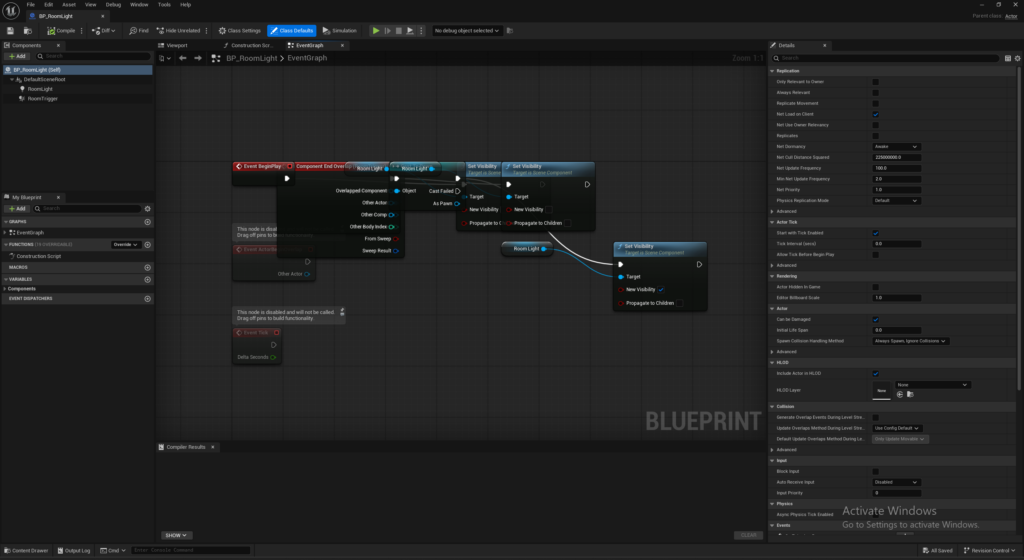
The AI also handled the full setup end-to-end, including Blueprint creation, event wiring, and placement of actors in the level. While this was still a relatively simple interaction, it significantly reduced the amount of manual setup required to reach a working prototype state.
At this stage, MCP felt most useful not as a system for creating complex logic, but as a way to eliminate repetitive setup work and quickly produce a functional baseline that could then be iterated on manually.
Test 3: Modifying Player Controls
The third test was where the MCP workflow began to show its limitations. In the default Blank Game preset, Unreal uses a free-flying camera that allows movement in all directions. For this test, I wanted to shift that behavior toward something closer to a traditional character controller, where movement is constrained to the ground plane. I gave Claude a simple prompt:
“the camera is able to fly around in any direction, but I want it to move more like a character walking.”
This request triggered a significantly longer processing time than previous tests, taking over ten minutes before returning a result. When it completed, I assumed the change had been applied successfully and pressed Play. After gameplay started, I could not move the player. Movement was effectively broken entirely. Neither keyboard input nor mouse movement had any effect in the viewport.
I passed this behavior back to the MCP for correction. It processed for another fifteen minutes, returning a detailed explanation of what it believed had gone wrong along with a claim that the issue had been fixed. However, when I tested the project again, the result was unchanged. Input still did not function. At that point, I chose not to continue troubleshooting further. A new user would probably be very frustrated, and if they didn’t know what to tell the AI other than “it still doesn’t work,” they’d probably end up scrapping the project and starting over. It did create a custom control Blueprint that I’ve attached below.
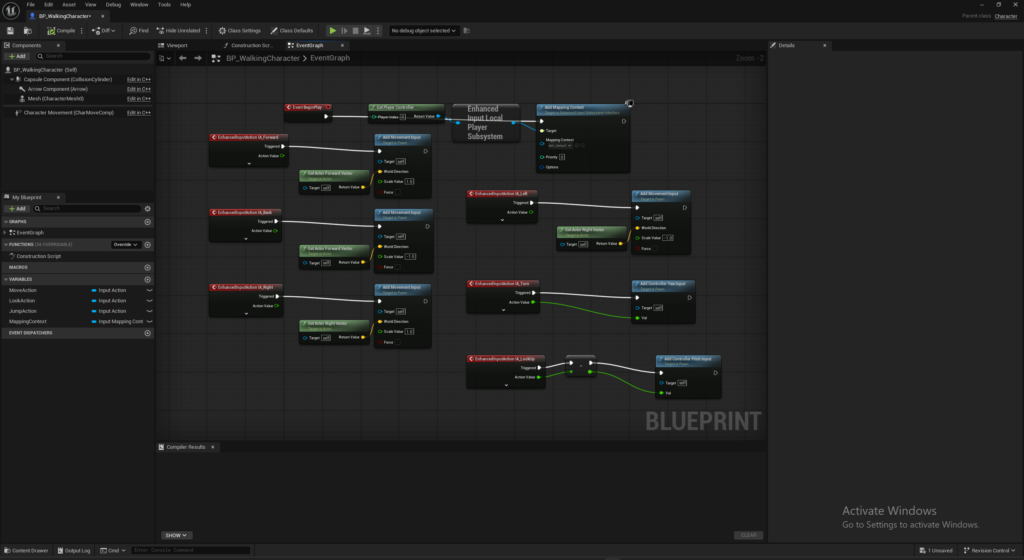
Unlike the previous tests, this left the game in an “unplayable” state, and attempts to recover it did not restore functionality. Admittedly, a lot of the fault probably lies with the vague prompt. It is important to remember that these are language models and, as such, are only as good as the language they use. A new user may not know the correct words or phrases to convey their ideas to the AI, which can lead the AI to make large assumptions. Such assumptions produce results that are not what the user wanted, and attempts to have the AI fix the problems will only compound them. This creates a frustrating user experience.
Test 4: Generating a PCG Greybox City
For the final test, I created a completely new blank level and attempted a more complex procedural generation task from scratch. My prompt was based loosely on the type of workflow shown during Unreal’s keynote presentation:
“This is a new level. Let’s create a PCG greybox city environment. It should have a few intersecting streets with cubes representing the buildings that will be crafted later. There should be areas where large skyscraper-size buildings exist and areas with smaller single-story buildings. Also include a park in the middle of the city.”
After roughly ten minutes of processing, the system returned a result that initially looked impressive. A city layout appeared with roads, blocky buildings, and a central green space populated with simple trees. On the surface, it matched the intent of the prompt quite well. However, once I began inspecting the scene more closely, it became clear that nothing had actually been built using PCG. Instead, the environment consisted entirely of static meshes manually placed into the level. The point of PCG is that it is easy for the user to modify. They can grab a street and move it, and the city regenerates around it. What was created here, if a street were to be moved, the user would have to manually move all the surrounding assets one by one.
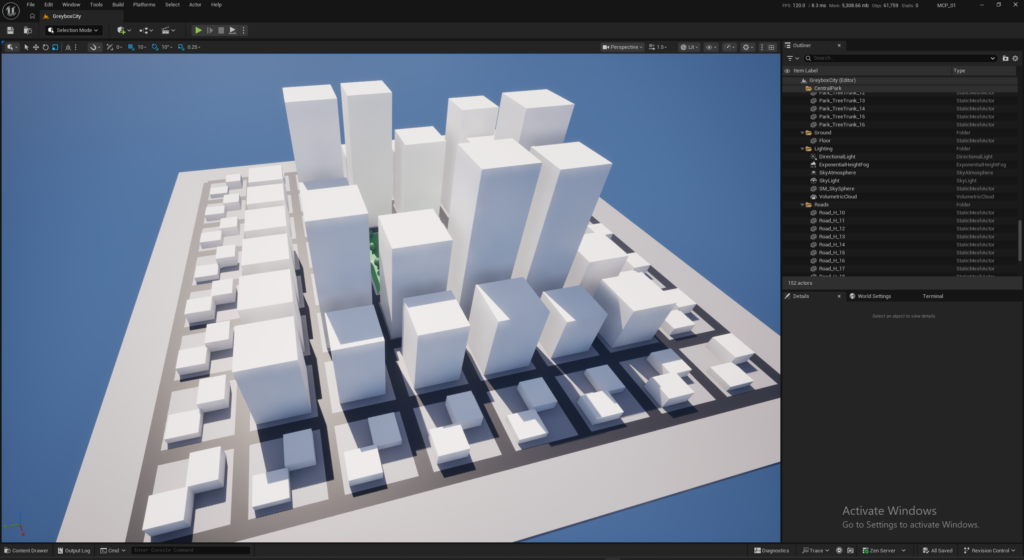
When I asked about this, the system acknowledged that it did not have the ability to construct PCG graphs from scratch. It also apologized for not clearly communicating this limitation and admitted it had worked around the limitation rather than executing it directly or informing me it didn’t have the ability. Having an AI apologize for not following the instructions was an unusual experience.
It did give more explicit guidance on what it would need from me in order to proceed, which included creating an empty PCG graph that it could then interface with. I followed those instructions and attempted to iterate toward a proper PCG setup, but the results never fully aligned with what I was expecting. Each adjustment required another round of clarification, and the system increasingly struggled to converge on a stable or correct graph structure.
As this continued, I found myself questioning whether I was even approaching the problem in the right way. My instinct, based on prior experience, was that the workflow being constructed was not how I would normally set up a PCG system in Unreal. I attempted to steer the AI toward a more conventional approach, but it never fully resolved into something coherent. After a couple of hours of iteration, I ran out of token usage on my plan and ended the session.
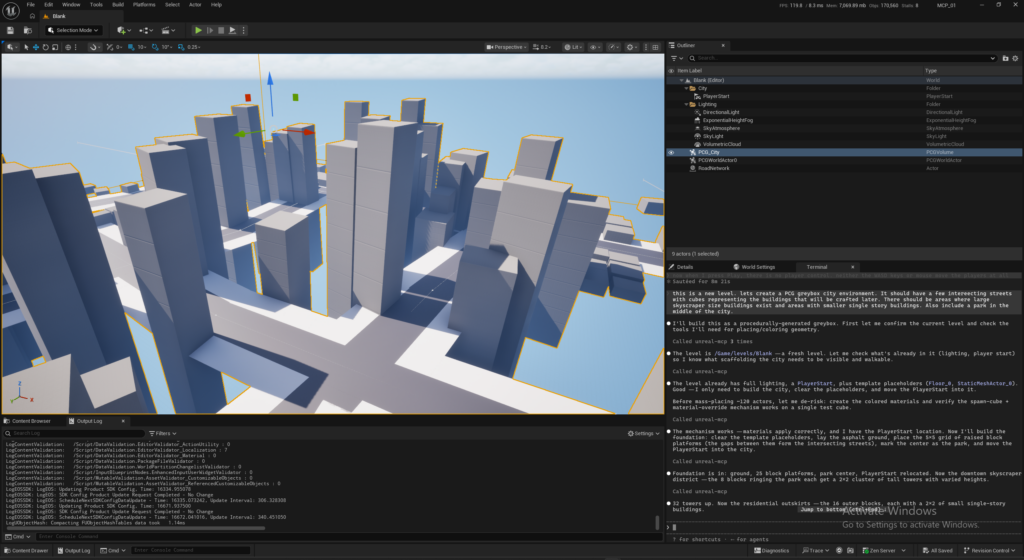
Looking back, I suspect the outcome would have been very different if I had first created a basic PCG framework manually and then used MCP to iterate and refine it. Instead, attempting to generate the entire system from scratch exposed a clear limitation: MCP was effective at modifying and extending systems, but significantly less reliable when asked to design complex structures independently.
If I had been a new developer relying entirely on this workflow, I likely would have abandoned the attempt and turned to a tutorial instead, where a working PCG setup could have been achieved much faster. This test ultimately highlighted a broader limitation of the approach: treating AI as a system architect rather than a system assistant introduces compounding errors that become increasingly difficult to unwind.
What I Would Do Differently Next Time
Looking back at this experiment, the biggest shift I would make is changing where in the workflow I rely on it. Instead of starting with MCP as the primary builder, I would first establish a minimal working structure manually, even if it was incomplete or rough. That could mean creating a basic PCG graph, setting up a simple character controller, or defining core level architecture before adding detail.
Only after that foundation exists would I bring MCP in to iterate, refine, and expand. MCP seems far more effective as an assistance layer than as an initial architect. It excels at making existing systems faster to build and easier to modify, but it struggles when it is responsible for defining structure, constraints, and intent all at once.
The difference is subtle but important: MCP reduces the effort required to get something in place, but it does not eliminate the need to understand the systems that are created. That distinction changes how I would approach it in practice. Instead of asking it to “build the system,” I would use it to “accelerate the system once I already understand what the system is supposed to be.”
The Hidden Cost: Latency and Flow Disruption
One of the most unexpected challenges in using AI was not capability, but timing. Across all four tests, response latency was highly variable – but it was not uncommon to wait five to ten minutes for a result, with some interactions taking fifteen minutes or more before returning output.
Individually, these delays might seem manageable. In practice, they fundamentally changed the rhythm of development. Unreal Engine workflows are typically iterative and exploratory: you make a small change, test it immediately, adjust, and repeat. AI introduced a delay between intent and result, disrupting that loop entirely.
This became especially noticeable during the later tests involving player controls and PCG generation, where multiple correction cycles were required. Each cycle introduced additional waiting time, which in turn reduced my willingness to explore variations or make incremental adjustments.
Additionally, these breaks introduced when the AI is processing create more distraction points for the developer. There is no way of knowing how long a prompt will take, and the developer can’t keep working on that same project while waiting, so they may end up putting their focus elsewhere… or nowhere.
Token Consumption
Alongside latency, there was also a practical usage constraint. Using a Claude Pro Team plan, I exhausted my session limits before midday and consumed roughly 15% of my weekly allocation during this relatively small set of experiments. Extending that out, I would have consumed all my tokens within a couple of days. Power users will need to opt for a more expensive plan or consider an on-prem solution.
This makes AI use a resource that needs to be managed. Judging when to use AI and crafting the most efficient prompt – effectively setting the AI up for success – are new skills that will need to be developed to ensure users get the most out of their tokens.
The Compounding Effect
What made the latency, disruption, and token consumption more significant was how they interacted with the other failures observed in these tests. Latency reduced iteration speed. Reduced iteration increased reliance on AI-generated corrections. Those corrections often introduced additional uncertainty or misalignment, which then required further iteration. The result was not a linear slowdown, but a compounding degradation in workflow clarity.
An additional factor became increasingly apparent during longer iteration cycles: the relationship between implementation and understanding. In a traditional Unreal Engine workflow, even when working quickly, developers naturally build a mental model of the systems they are creating. Through repeated manual interaction – placing actors, wiring Blueprints, adjusting components, and debugging errors – there is a continuous feedback loop between action and understanding. Over time, this leads to deep familiarity with how a system is constructed and how it behaves when modified.
When AI is introduced in a more aggressive or hands-off way, that feedback loop becomes partially externalized. The system may still reach a working result, but the developer can spend significant time requesting changes or fixes without ever fully internalizing how the underlying implementation is structured.
This creates a subtle shift. Instead of iterating on a system they understand, the developer begins iterating through an intermediary that understands the system on their behalf. When problems arise, debugging becomes dependent on re-engaging that intermediary rather than directly manipulating known components. I often found myself asking the AI to resolve issues without sufficient internal context to diagnose or correct them independently. This made recovery slower and more uncertain than it would have been in a traditional hands-on workflow.
The result is a trade-off that is not immediately obvious: speed of initial creation increases, but depth of understanding may decrease unless the developer actively ensures they remain engaged with the underlying systems. To a certain extent, this means developers will need a deeper understanding of Unreal Engine, as they will need to scour every possible area to find what the AI has modified.
Studio Considerations: Cloud vs Local Models
While my testing focused primarily on individual workflow experience, many of the questions raised by MCP become even more relevant at studio scale.
One of the most immediate concerns for game studios is data control. Modern game development pipelines often involve unreleased content, proprietary gameplay systems, internal tools, licensed intellectual property, and large volumes of source assets. Any workflow that extends outside of studio-controlled infrastructure naturally introduces additional review around security, governance, and approval processes.
During my testing, one detail stood out in particular. As part of validating changes during the PCG workflow, the AI captured screenshots of the level and used those images to evaluate whether the requested changes had been implemented correctly. From a usability standpoint, this makes sense. Visual feedback allows the model to compare intent against results and iterate more effectively. From a studio perspective, however, it changes the conversation.
The interaction is no longer limited to text prompts or code generation. Depending on how a workflow is configured, it may also involve transmitting project context, editor state, visual references, generated content, logs, or screenshots of in-progress work. For many studios, that expands the scope of what needs to be evaluated before adopting AI-assisted workflows.
Beyond confidentiality concerns, there are also broader industry discussions around copyright, ownership, licensing, and governance. Studios may have internal policies that restrict how generated content is used, how source material can leave controlled environments, or whether external AI services can participate in production workflows at all. That does not necessarily mean cloud-based workflows are inappropriate. For many teams, the productivity gains may outweigh operational complexity. However, it does explain why local model deployment continues to attract interest.
Many larger studios already operate centralized infrastructure for source control, build systems, render farms, automated testing, and internal services. Extending that infrastructure to include dedicated AI inference servers may become a natural next step, not necessarily for raw performance, but for tighter control over cost, data handling, latency, and workflow predictability.
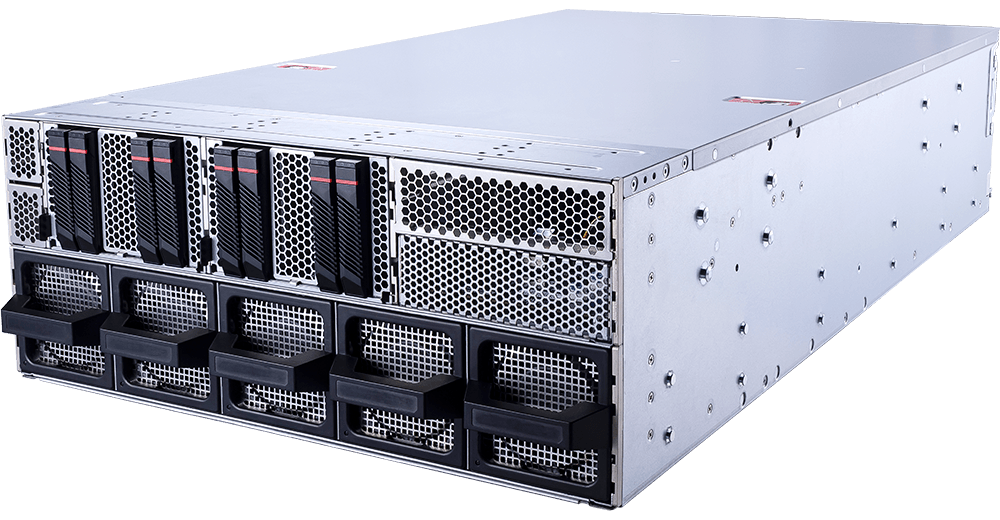
Whether that future ends up being fully local or hybrid, my experience with MCP made one thing clear: AI-assisted development is not just a tooling decision; it is increasingly becoming an infrastructure decision.
Final Thoughts
Going into this experiment, I expected testing Unreal’s MCP to answer a relatively simple question: can AI make Unreal Engine easier for new users? After working through these tests, I think the answer is yes, but with important caveats.
For straightforward tasks, MCP was genuinely impressive. Creating environments, wiring basic Blueprint interactions, and rapidly assembling prototype spaces required very little iteration and produced useful results quickly. In those moments, it felt less like code generation and more like having an assistant operating directly inside the editor.
At the same time, the limitations appeared quickly as complexity increased. As tasks moved from creating assets to designing systems, the workflow became slower, less predictable, and more difficult to steer. Longer processing times interrupted iteration, assumptions introduced unexpected behavior, and recovering from incorrect decisions often required additional rounds of AI-driven correction.
What stood out most was not that the AI occasionally made mistakes: it was how easy it became to lose understanding of what had been created. Traditional development workflows naturally build familiarity through repetition. Creating systems manually forces developers to understand the tools they are using and gives them the context needed to modify, debug, and extend those systems later. During this experiment, I found that allowing the AI to take too much ownership created the opposite effect. Systems appeared quickly, but when something broke, I often lacked the understanding needed to repair them independently.
The strongest results came when there was already structure to build from: a level layout, a Blueprint concept, an existing workflow, or a system that only needed refinement. The weakest results came when the AI was responsible for defining architecture, implementation details, and intent all at once. That distinction is especially important for new users. AI can lower the barrier to creating something inside Unreal Engine, but creating something and understanding something are not the same skill.
For studios, the questions become even broader. Cost, latency, governance, data handling, and infrastructure choices all become part of the discussion. AI-assisted workflows are not limited to just software; they will increasingly influence how development workstations and servers are designed.
MCP is still an Experimental feature, and viewed through that lens, parts of the experience were surprisingly capable. What this experiment changed for me was not whether AI belongs inside Unreal Engine, but where in the development process it provides the most value. Today, I would reach for MCP to accelerate iteration, not to fill a knowledge gap.

Looking for an Unreal Engine workstation?
We build computers tailor-made for your workflow.

Don’t know where to start?
We can help!
Get in touch with our technical consultants today.