Table of Contents
Introduction
Engineering applications like SOLIDWORKS, Revit, and Inventor are complex pieces of software with a lot of moving parts. Much like Media and Entertainment applications, such as Premiere Pro, they can support a variety of workflows—each of which utilizes computer hardware differently. This makes configuring a workstation to maximize performance or optimize price difficult; traditional proxies, such as a Cinebench score, are less useful. It also means that developing benchmarks for these programs is complex, requiring familiarity with the myriad ways of interacting with the software.
In our recent Intel Arc Pro B50 review, we tested video card performance across a number of engineering applications. Now, we have used those same applications to benchmark most of the current-gen consumer processors—Intel’s Core™ Ultra 2 and AMD’s Ryzen™ 9000 Series—to see how they compare in common CAD and BIM workflows.
Image
When it comes to CAD and BIM tools, we think the most important metrics are those that directly affect the real-time usability of the software. In most cases, these are things like raw modeling performance, followed by simulation performance. Other workflows in the applications may be relevant for specific use-cases, but are probably less of a daily time-sink than those. To that end, we have focused on those numbers in this article, while still reporting all the data we collected.
Test Setup
AMD Ryzen Test Platform
| CPUs: AMD Ryzen™ 9 9950X3D AMD Ryzen™ 9 9900X3D AMD Ryzen™ 7 9800X3D AMD Ryzen™ 9 9950X AMD Ryzen™ 9 9900X AMD Ryzen™ 7 9700X |
| CPU Cooler: Noctua NH-U12A |
| Motherboard: ASUS ProArt X870E-Creator WiFi BIOS Version: 1605 |
| RAM: 2x DDR5-5600 32GB (64 GB total) |
| GPU: NVIDIA RTX PRO™ 6000 Blackwell Workstation Edition Driver Version: 580.97 |
| PSU: Super Flower LEADEX Platinum 1600W |
| Storage: Samsung 980 Pro 2TB |
| OS: Windows 11 Pro 64-bit (26100) Power Profile: Balanced |
Intel Core Ultra Test Platform
| CPUs: Intel Core™ Ultra 9 285K Intel Core™ Ultra 7 265K Intel Core™ Ultra 5 245K |
| CPU Cooler: Noctua NH-U12A |
| Motherboard: ASUS ProArt Z890-Creator WiFi BIOS version: 2006 |
| RAM: 2x DDR5-6400 CUDIMM 32GB (64 GB total) |
| GPU: NVIDIA RTX PRO™ 6000 Blackwell Workstation Edition Driver Version: 580.97 |
| PSU: Super Flower LEADEX Platinum 1600W |
| Storage: Samsung 980 Pro 2TB |
| OS: Windows 11 Pro 64-bit (26100) Power Profile: Balanced |
Benchmark Software
| Autodesk Inventor 2025.3.2 – InvMark 2025.0.15 |
| Autodesk Revit 25.3 – RFO Benchmark 3.4 |
| SOLIDWORKS 2024 5.0 – SPECapc for SOLIDWORKS 2024.1.13 |
For this review, we tested on two standardized test beds—one each for AMD and Intel—and paired the processors with an NVIDIA RTX PRO™ 6000 Blackwell Workstation edition. While this GPU is certainly overkill for most engineering workflows, we wanted to minimize the chance for bottlenecks and focus on CPU performance. All the drivers were up-to-date as of when we started testing, per our standard practices, as were the BIOS and OS versions. Some of our applications were slightly older versions, but we did spot checking and saw no noticeable difference. Additionally, we left Windows security settings like VBS in their default (enabled) state.
In line with our previous CPU testing, we kept the processors running “stock”. This means overclocking features like MCE and PBO were disabled, RAM was set to the maximum-supported JEDEC speeds and timings, and the Intel processors were run on the default “standard” Intel power plan as configurable in the BIOS.
It has been several years since we last looked into engineering applications in-depth, so we decided to investigate a wider range of CPU options than we typically would have. This means we tested with the mainstream desktop processors from AMD and Intel, as well as the X3D variants from AMD. Additionally, we tested a representative selection of AMD’s Ryzen CPUs with SMT disabled and the Intel Core Ultra 9 285K with E-cores disabled. Sometimes, poor thread scheduling or a lack of optimization for these features can reduce performance, so we wanted to see if that was the case with any of these applications.
As alluded to in the intro, for this article, we focused on SOLIDWORKS, Revit, and Inventor using a mix of free and paid benchmarks. For SOLIDWORKS, we went with the industry-standard SPECapc for SOLIDWORKS benchmark, though we chose to deviate from their default settings by testing at 4K resolution with 150% screen scaling. Because of that, our numbers aren’t directly comparable with officially submitted results. Inventor was tested with InvMark by Neil Cross and CADAC group, while Revit was tested with the RFO Benchmark, currently developed by Gordon Price on revitforum.org. Inventor was tested at 4K, but there were no deviations from the suggested methodology. Similarly, Revit was tested at 4K using the “Standard” preset. Links to all of these tests can be found in the expandable Test Setup section above.
Raw Results Tables
We selected which parts of each benchmark to focus our analysis on with the goal of covering many common engineering tasks, providing a balanced look at each application and its hardware interactions. However, many users have more specialized workflows. Recognizing this, we wanted to provide complete, detailed results for each benchmark as well. If a specific area in an application comprises most of your work, examining those results will give a more accurate understanding of the performance disparities between CPUs. Otherwise, we recommend skipping over this table and focusing on our more in-depth analysis in the following sections.
Inventor
We experienced some issues with testing Inventor due to oddities with the Drawing tests. Although we are still investigating that, we decided to publish the results that we know are running as expected. Unfortunately, that means no overall InvMark score, but we still have some of the more important subscores.
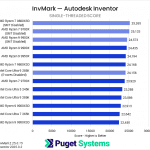
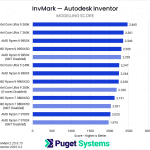
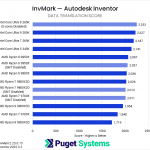
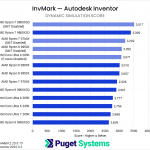
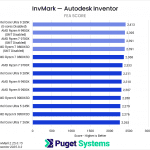
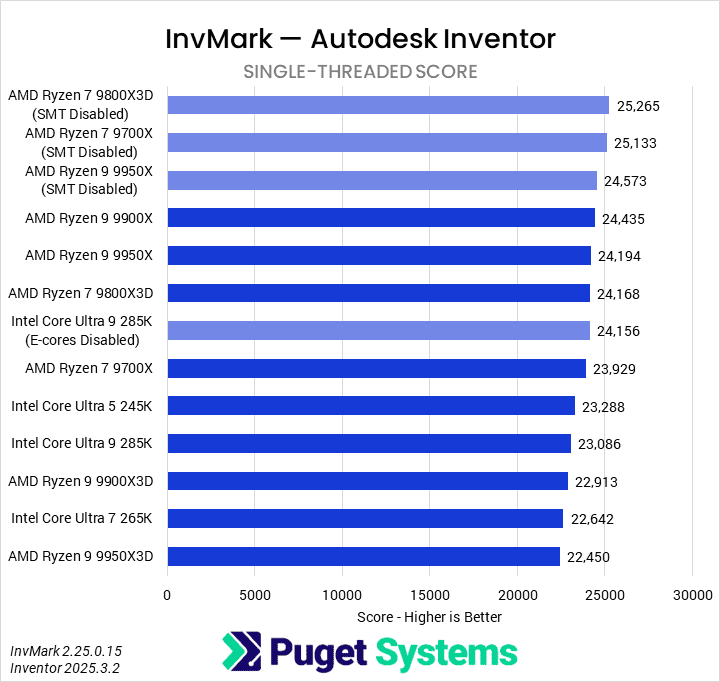
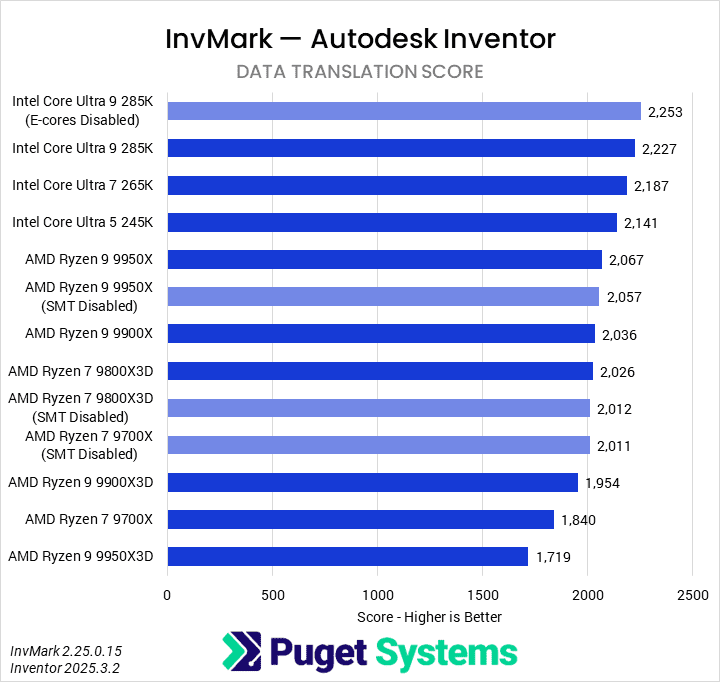
Starting with the single-threaded score, we found that AMD is decidedly faster than Intel. We believe there is some poor scheduling going on in some of the tasks with Intel, as disabling E-cores improved results. Similarly, these tests preferred SMT disabled on Ryzen. We’re not convinced that disabling SMT is the sure way to go for an Inventor workstation, looking at the overall results. But here, AMD’s Ryzen 9 9900X, 9950X, and 9800X3D were the best CPUs and benefited slightly from changing that BIOS setting.
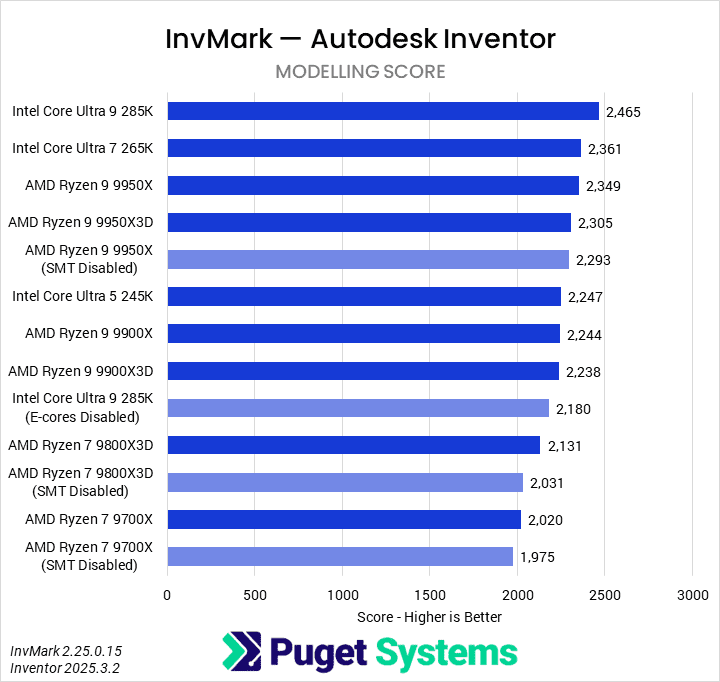
Moving on to Modeling tests, we found that Intel offered the best performance. Their Core Ultra 9 285K and 7 265K took the top spots, with AMD’s 9950X and 9950X3D following behind. This test is partially multi-threaded, so having more cores (efficient, virtual, or otherwise) was better. We would recommend any of the Intel processors over AMD for pure modeling work, as even the Core Ultra 5 245K beat the Ryzen 9 9900X.
The Data Translation test converts a STEP file into a native Inventor file. This is loosely multi-threaded, so while we do see better performance with more cores, per-core performance is still very relevant. This operation also seems RAM-based, as the Intel processors (with faster memory) outperform AMD entirely.
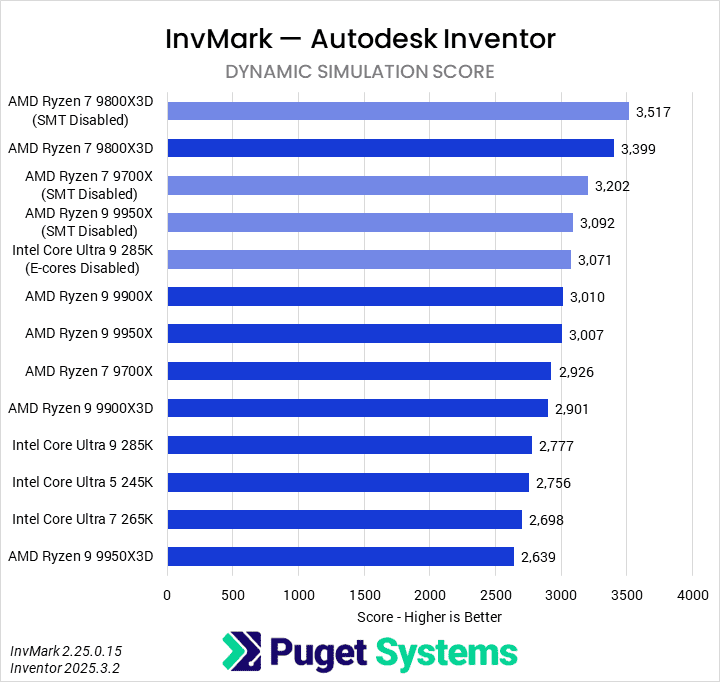
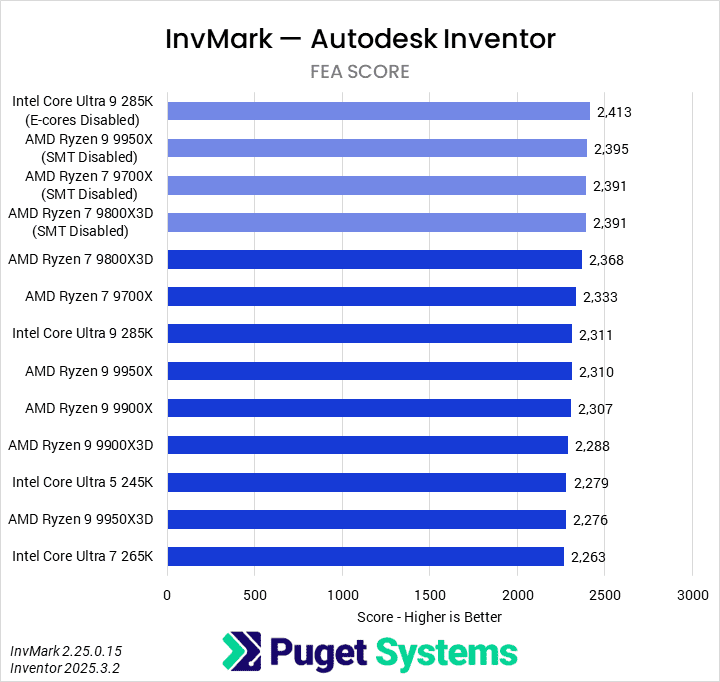
The final two tests are Dynamic Simulation and FEA. Both tend to favor AMD, especially the 9800X3D, but there was otherwise no clear pattern across them. These are relevant for some users, but the dynamic simulation, in particular, tends to be fairly niche.
Overall, we would tentatively recommend the Intel Core Ultra 9 285K as the best CPU for most Inventor users. AMD has competitive options depending on the price point and workflow, though. On the lower end, the Core Ultra 5 245K offers good performance across the board. However, we are hesitant to declare any CPU the best for Inventor until we can run the benchmark in its entirety.
Revit
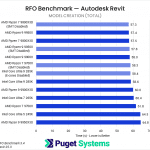
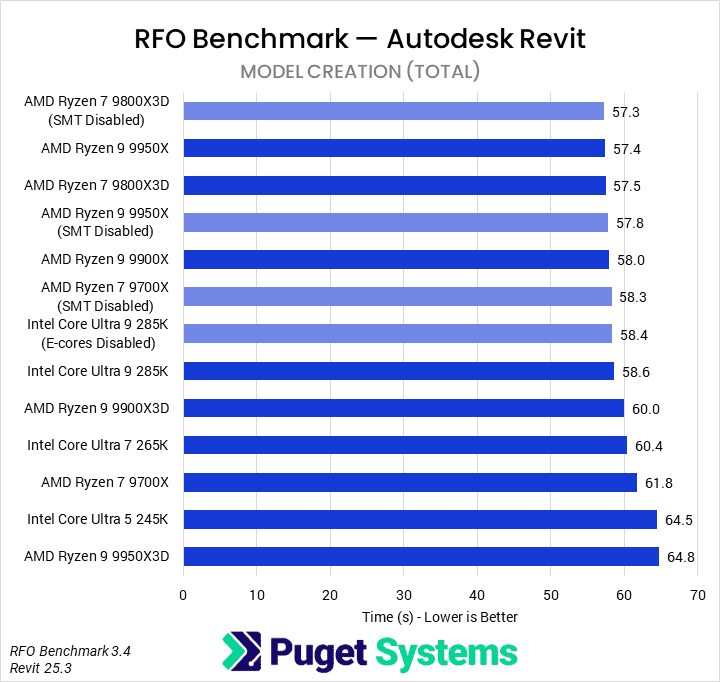
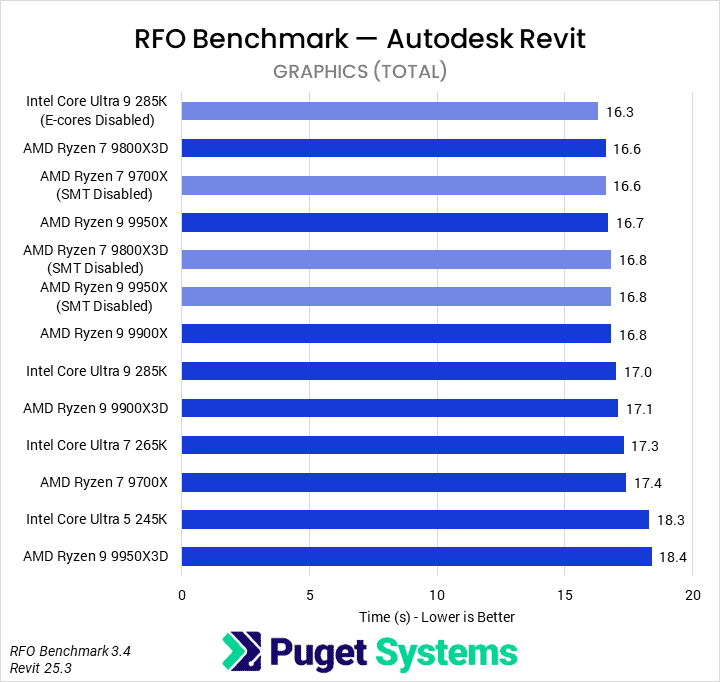
Although there are a variety of scores you can look at from the RFO benchmark, the two top-level ones are Model Creation time and Graphics time. We’ve produced charts with both here, but if you are interested, you can see the full test results in the tables above. For our purposes, the most important metric is Model Creation time, as we believe it best represents the day-to-day experience of someone using Revit.
System Image
In model creation tasks, we see little differentiation between these CPUs. The worst result, AMD’s Ryzen 9 9950X3D, was only 13% slower than the best, which was the Ryzen 7 9800X3D with SMT disabled. In fact, a lot of the results were within the margin of error – but there are a few conclusions we can draw.
First, for Intel CPUs, the Core Ultra 9 285K was faster than the others, albeit by a small amount. Also, disabling E-cores did not seem to affect anything, indicating that Windows’ scheduling worked properly.
For AMD, it’s a bit more complicated. This testing showed that X3D variants were slower than their non-X3D counterparts, save for the 9800X3D. The 9800X3D has better boost clocks than the 9700X, though, so this makes sense. It is also unclear whether SMT does anything for this workflow, positive or negative. The results were identical for all of the processors except the 9700X, where disabling SMT appears to have improved performance by 6%.
Based on this testing, our recommendation for Revit would be an AMD Ryzen 9 9950X or 7 9800X3D, though the 285K is nearly as good. We would generally avoid other X3D processors or lower-end AMD models. Disabling SMT may improve performance somewhat, but probably not a significant amount, and it will negatively impact multi-threaded workflows. In terms of value, given the small overall difference, the 245K offered the best performance per dollar, followed by the 9700X.
SOLIDWORKS
SPECapc for SOLIDWORKS splits its results into two broad categories: CPU and GPU. For this round of testing, we have highlighted the CPU scores. All of this testing was performed at 4K with 150% scaling. This means our numbers aren’t directly comparable to the submissions you will see on SPEC’s website, but we intend to continue using these settings in the future so that our results will be comparable across articles.
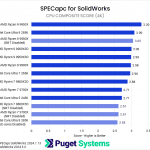
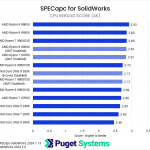
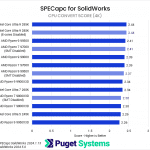

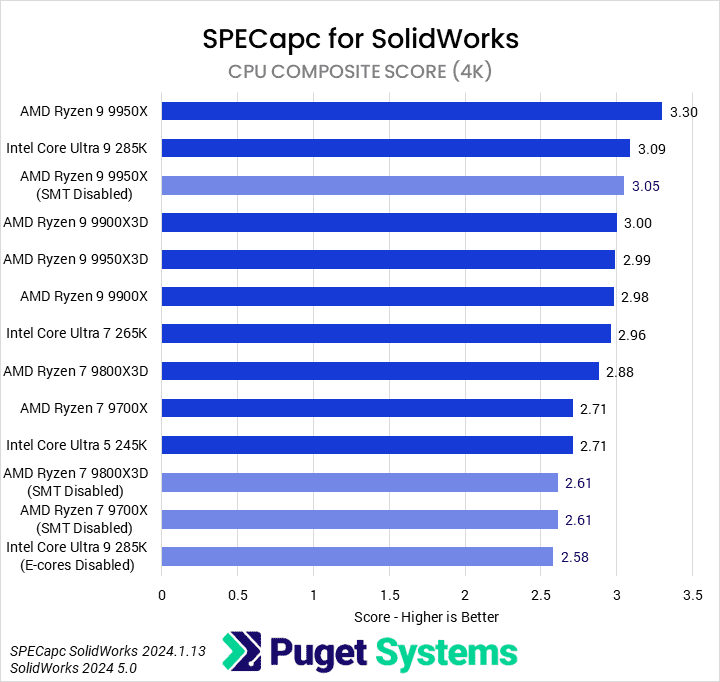

Starting with the CPU Composite score—which is an average across all CPU results—we found that AMD’s Ryzen 9 9950X was fastest, followed by the Intel Core Ultra 9 285K. After that, interestingly, was the 9950X with SMT disabled. Overall, it looks like this application doesn’t benefit from the additional cache of 3D V-Cache processors, and that disabling E-cores or SMT negatively impacts performance. The benchmark does a mixture of single and multi-threaded work, though, so we will see if that holds true in subtests.
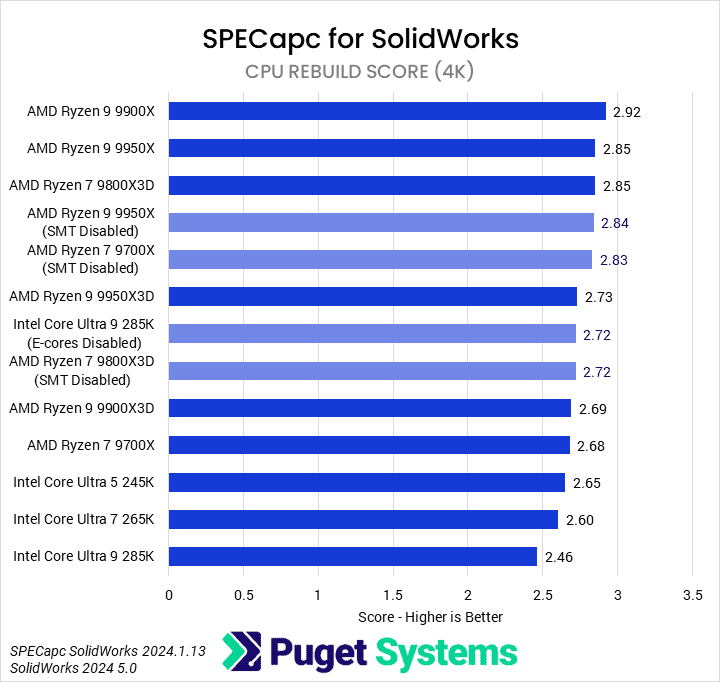
From internal discussions with team members who use SOLIDWORKS, we believe the most important score for most users is the CPU Rebuild score, which measures the time necessary to rebuild a variety of projects. AMD was generally faster than Intel here, with the Ryzen 9 9900X, 9950X, and 9800X3D being the standouts. The rest of the Ryzen CPUs were a bit slower, with Intel’s Core Ultra models trailing behind them all.
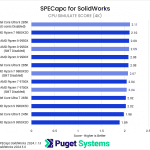
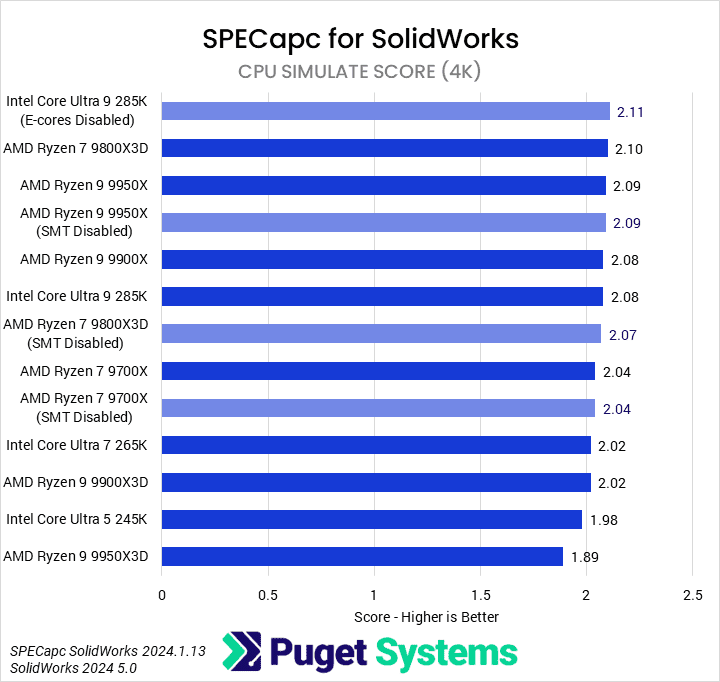
Although SPECapc for SOLIDWORKS only looks at relatively simple simulations, that is still an area that can take up a lot of an engineer’s time. The CPU Simulate Score results appear to scale with single-core performance, with the 285K, 9800X3D, and 9950X being the fastest processors. We did see some improvement when disabling E-cores on Intel, which is interesting. Otherwise, scores are fairly similar until you get down to a 265K, 9900X3D, 245K, or 9950X3D.
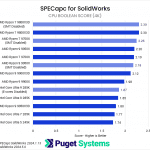
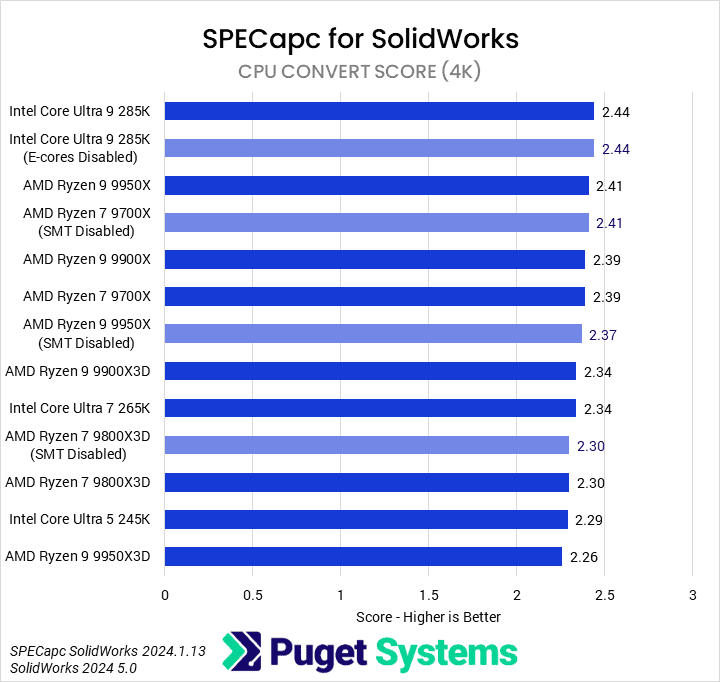
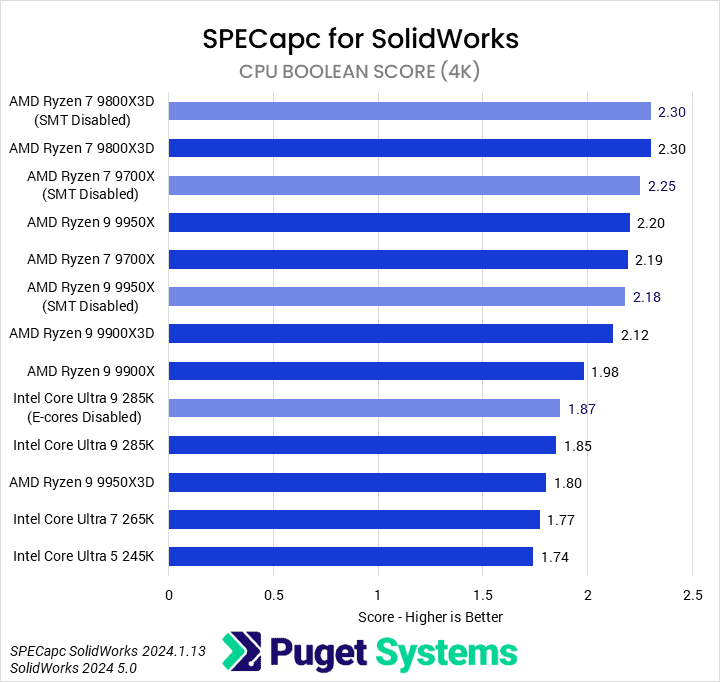
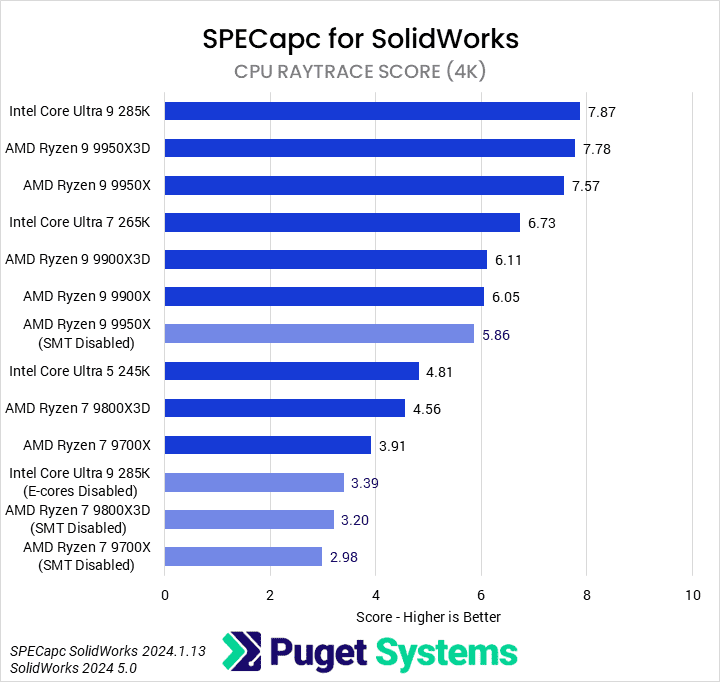
We’re not going into detail on all the other results here, but based on them and those already covered, we think the best CPUs for SOLIDWORKS are the Ryzen 9 9950X and Ryzen 7 9800X3D, with honorable mention to the Core Ultra 9 285K. Whether something like the 9800X3D makes sense will depend on how many multithreaded workflows (such as CPU Raytrace) are being used in SOLIDWORKS. On the budget side, we would generally recommend lower-end AMD parts over similarly-priced Intel options.
What is the best CPU for engineering?
Which CPU is best for an engineering workstation will depend on the specific software being used and the workflow within that application. In general, we found that most modeling tasks were lightly multithreaded, with per-core performance often being as relevant as the number of cores. For simulation-related tasks, multi-core performance was usually more impactful. It didn’t seem as though the additional cache from an X3D processor typically made much of a difference.
In Inventor, we found that Intel’s Core Ultra 9 285K offered the best all-around performance in the tests we could run reliably. However, as noted in that section, we are hesitant to draw any firm conclusions until we have sorted out the performance issues plaguing a few of the subtests. AMD’s Ryzen 7 9800X3D performed very well in the simulation/FEA tests. For budget systems, the Core Ultra 5 245K offered great performance for its price.
Revit seemed to favor AMD fairly strongly, though the overall performance difference in the benchmark is small. We suspect the benchmark will soon need an overhaul to add more discrimination between modern, high-end CPUs. Nonetheless, our recommendations would be the Ryzen 9 9950X or 9800X3D. For budget systems, the 245K once again offered the best blend of price and performance.
SOLIDWORKS, much like Revit, was AMD’s area to shine. The Ryzen 9 9950X and 9800X3D offer great performance. The 285K is still competitive, but AMD offers better all-around performance. On the low end, we would still recommend AMD, possibly including the 9600X, though we were not able test it.
Both Inventor and Revit seemed to benefit from disabling SMT on the Ryzen CPUs. This can hurt performance in other workflows, including niche ones in those applications, but it may be a setting worth investigating for users of those applications.
If you need a powerful workstation to tackle the applications we’ve tested, the Puget Systems workstations on our solutions page are tailored to excel in various software packages. If you prefer a more hands-on approach, our custom configuration page helps you configure a workstation that matches your needs. Otherwise, if you would like more guidance in configuring a workstation that aligns with your unique workflow, our knowledgeable technology consultants are here to lend their expertise.

Looking for an engineering workstation?
We build computers tailor-made for your workflow.

Don’t know where to start?
We can help!
Get in touch with one of our technical consultants today.