Table of Contents
Introduction
2025 has seen seen the launch of more than twenty new desktop GPUs. While we reviewed many of them individually, one line that we have been missing is NVIDIA’s new RTX PRO™ Blackwell series—aside from our initial 6000 Blackwell Workstation Edition review. Because of high demand, we have had difficulty obtaining enough of the lineup to justify a whole roundup. We now have nearly every model of RTX PRO Blackwell, though, and we feel the best approach is to test as many professional GPUs as possible across a wider range of workflows.
Image
For this article, we tested every RTX PRO Blackwell GPU we had, as well as nearly the entire stack of Ada Generation cards. We also included some older or non-NVIDIA cards like the NVIDIA RTX™ A6000, the AMD Radeon™ AI PRO R9700, most of the Radeon™ PRO W7000 series, and even the Intel® Arc™ Pro B50. Our primary focus is on comparing NVIDIA’s current and last-gen cards, but we’re also interested in seeing where other brands can compete.
This article will only cover our traditional content creation workflows. This includes media and entertainment applications like DaVinci Resolve, rendering engines such as Blender, and some AI benchmarks like MLPerf. We also have a companion article looking at the performance of the same GPUs in engineering workflows, now including PIX4Dmatic. Unfortunately, we won’t be looking at multi-GPU setups in this article, but we have previously looked at that for the 6000 Blackwell Max-Q card in another article. We have also done a similar roundup with this year’s consumer GPUs, back in September.
There aren’t many other reviews available for professional GPUs, especially the more recently released NVIDIA models. However, we do recommend StorageReview’s coverage of the 6000 Blackwell Workstation, especially if you are interested in more in-depth AI performance data. igor’sLAB also released an AMD Radeon AI R9700 review, which includes data for some previous-gen NVIDIA cards.
Below, we have listed specifications for several current and recent professional GPUs, including a few that we were not able to include in this round of testing. For more information, visit the workstation pages for NVIDIA, AMD, or Intel.
Test Setup
Test Platform
| CPUs: AMD Ryzen™ 9 9950X3D |
| CPU Cooler: Noctua NH-U12A |
| Motherboard: ASUS ProArt X870E-Creator WiFi BIOS Version: 1804 |
| RAM: 2x DDR5-5600 32GB (64 GB total) |
| PSU: Super Flower LEADEX VII Gold 850W |
| Storage: Samsung 980 Pro 2TB |
| OS: Windows 11 Pro 64-bit (26200) Power Plan/Mode: Balanced/Best Performance |
Intel GPUs
| Intel Arc Pro B50 Driver: 101.6979 |
NVIDIA GPUs
AMD GPUs
| AMD Radeon AI PRO R9700 AMD Radeon PRO W7900 AMD Radeon PRO W7800 AMD Radeon PRO W7600 Driver: Adrenalin 25.11.1 / PRO 25.Q3.1 |
Matching our other recent GPU-focused articles, all the testing for this review was performed on an AMD Ryzen™ 9 9950X3D-based platform. The 9950X3D is one of the fastest all-around CPUs available, helping us eliminate processor bottlenecks insofar as possible. However, we do have a slightly different methodology than most other reviewers. Because our approach focuses on professional workflows, we remove as many of the stability-affecting system tweaks as possible. This means PBO and ASUS’s MCE were disabled in the BIOS, the RAM was run at the maximum officially supported JEDEC speeds, and settings like VBS were enabled in Windows.
As far as possible, all the apps, drivers, BIOSs, and benchmarks were on their latest versions. We didn’t reuse past results, and we updated our testing platform prior to this round of tests. The programs we tested include most of our PugetBench suite, our in-development Unreal Engine benchmark, and a variety of industry-standard third-party benchmarks such as Octanebench and Topaz Video AI. We were not able to include Premiere Pro in this round of results due to a number of bugs we found during testing, such as AMD GPUs crashing during ARIRAW playback in version 25.6 of Premiere Pro.
After Effects
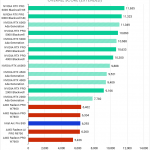
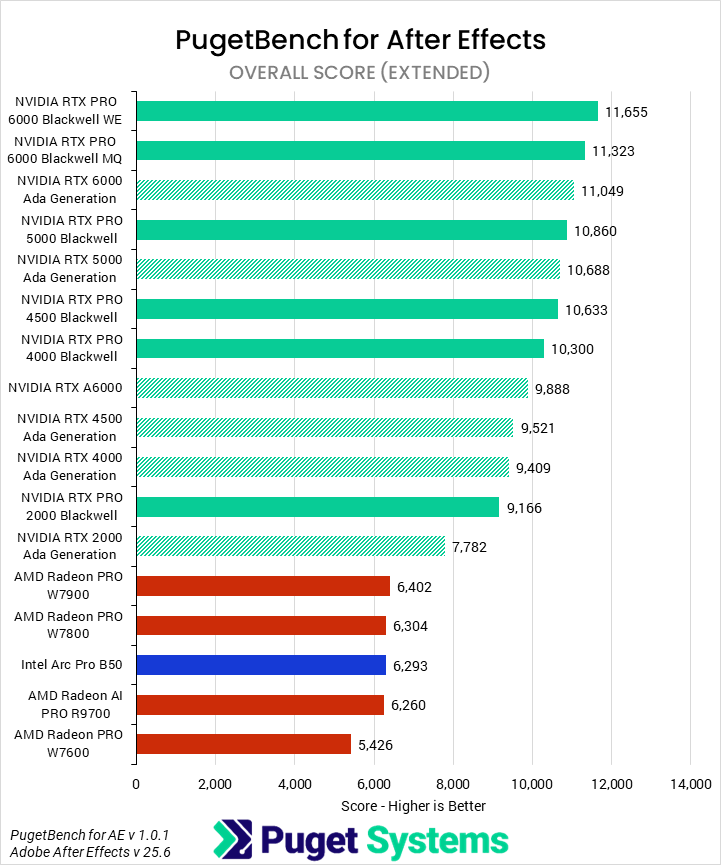
As After Effects has become increasingly GPU-accelerated, we have found that the optimal hardware for it has shifted. The Overall score (Chart #1) shows a broad overview of performance, as the name indicates. NVIDIA is well ahead of AMD here, and their newer Blackwell cards demonstrate slight performance advantages over the last generation. Moving on to subscores should provide more granular and interesting information.
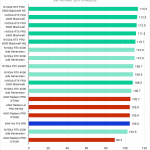
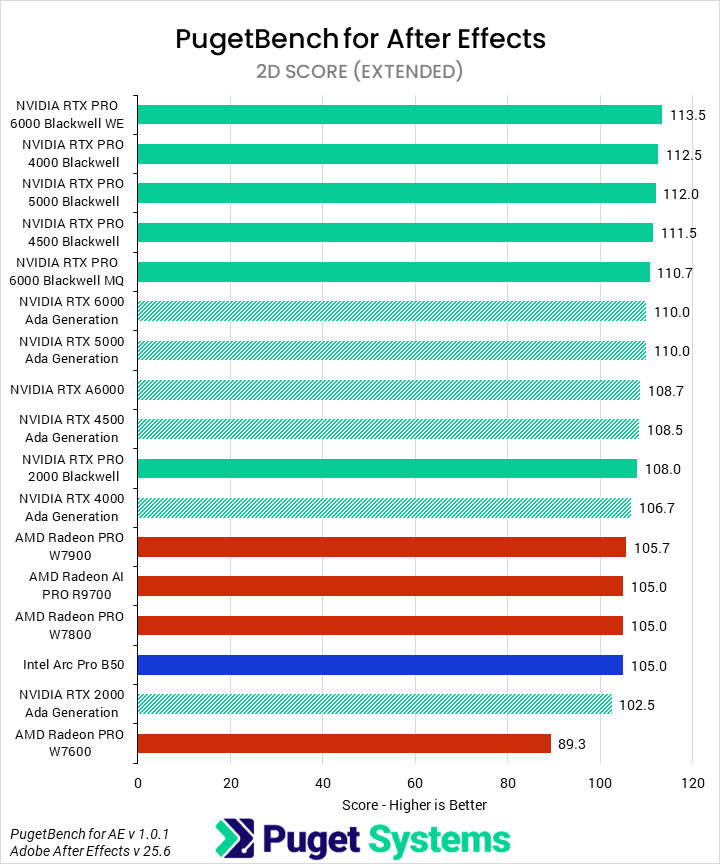
2D workflows (Chart #2) represent the traditional usage of After Effects and are, at best, only very lightly GPU-accelerated. We found that, as a group, the new Blackwell PRO cards were the fastest, with marginal performance gains over the Ada generation. After this, Intel and AMD’s cards scored identically, just a bit behind the Ada models. Overall, any modern GPU should be totally sufficient for 2D work in AE, and investing in a high-end card it is not worth the money here.
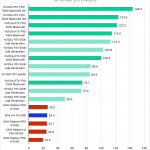
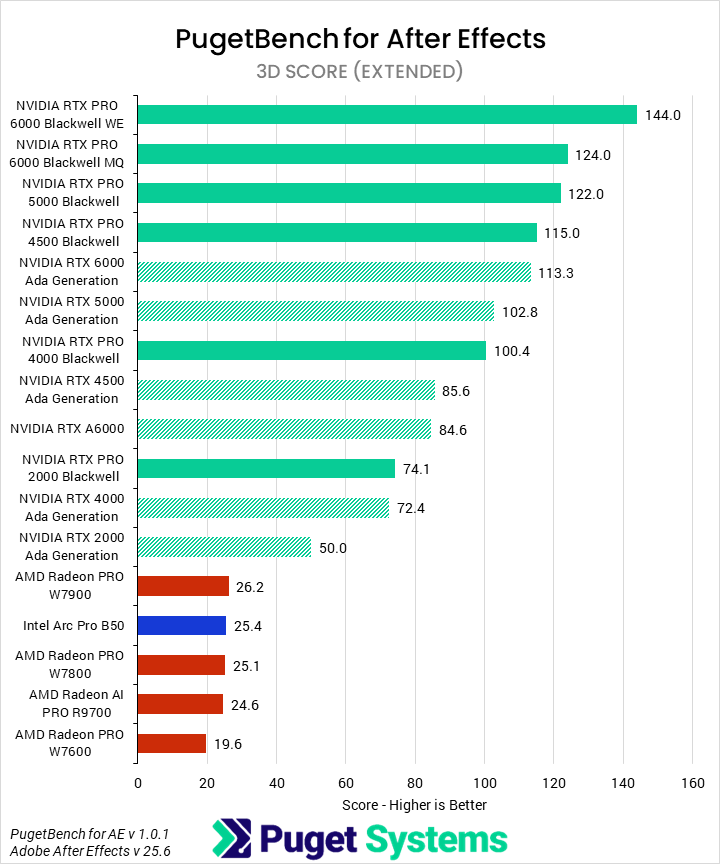
That is not the case in 3D work (Chart #3), though! Here we see that the NVIDIA cards are in the lead by a huge margin. The slowest NVIDIA card was the 2000 Ada, which still had twice the performance of any of the AMD cards. Those AMD cards all clustered at nearly identical scores alongside the B50—cementing that they are a bad value for 3D work in After Effects. For NVIDIA, not only was there good performance, but they also saw generation improvements. Surprisingly, these were less pronounced at the top end, with the 6000 Blackwell scoring 27% higher than the 6000 Ada, and the 5000 Blackwell scoring 20% higher than its Ada counterpart. The rest of the stack had increasing improvements: 35% for the 4500, 39% for the 4000, and 48% for the 2000 Blackwells, gen-on-gen, respectively.
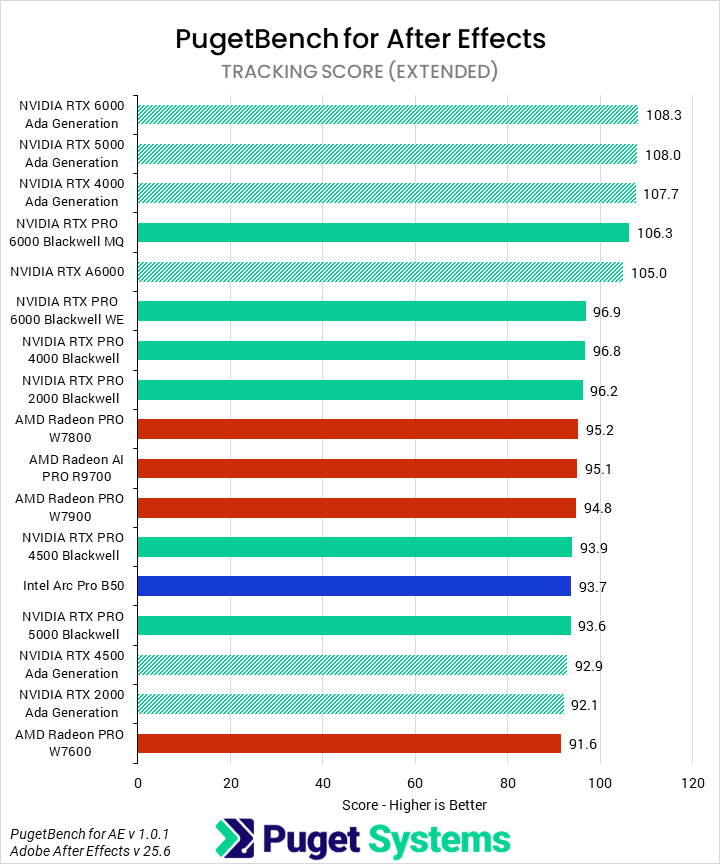
Tracking (Chart #4) is another area that is typically CPU-bound. The results mostly reflect this, with no great discernible patterns among GPUs nor any large performance differences, but we did find it interesting that the Ada cards tended to cluster towards the top. Much like 2D, any GPU will be totally fine for this workflow.
Overall, After Effects gives us something of a mixed bag. On the one hand, NVIDIA, and especially Blackwell, can offer industry-leading 3D performance—several times higher than the competition. On the other hand, most After Effects users are still on traditional (2D and Tracking) workflows, where investing in a high-end GPU is mostly a waste of money. We encourage end users to examine which parts of After Effects they currently use, or plan to use in the future, and purchase accordingly.
DaVinci Resolve Studio
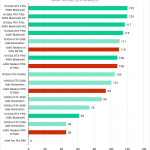
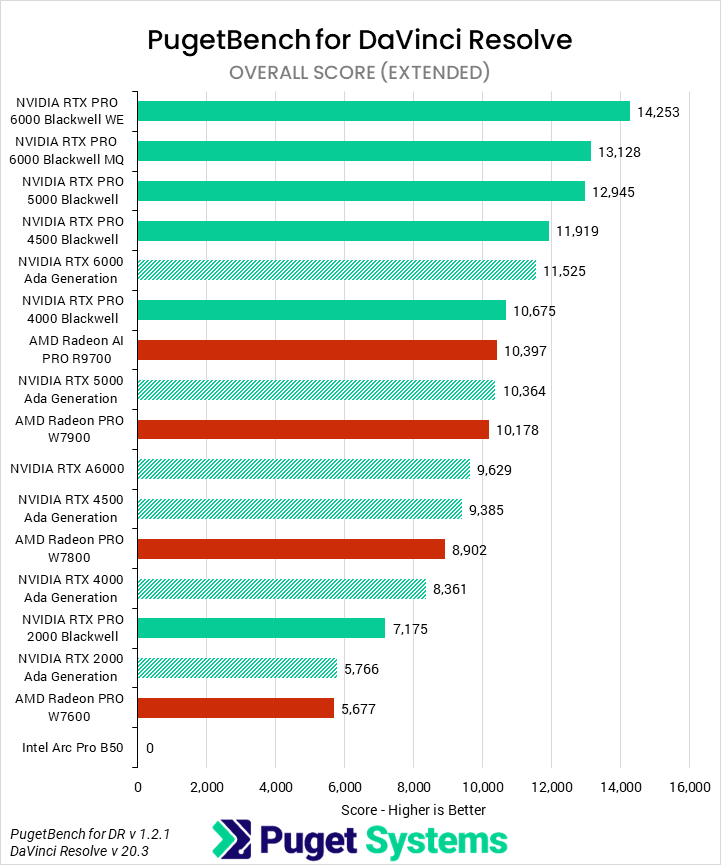
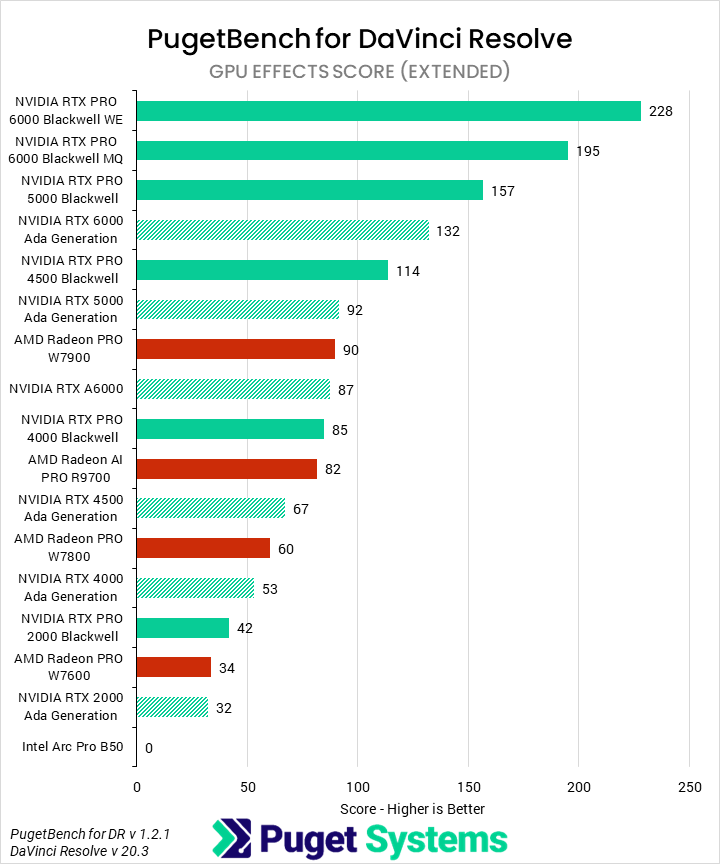
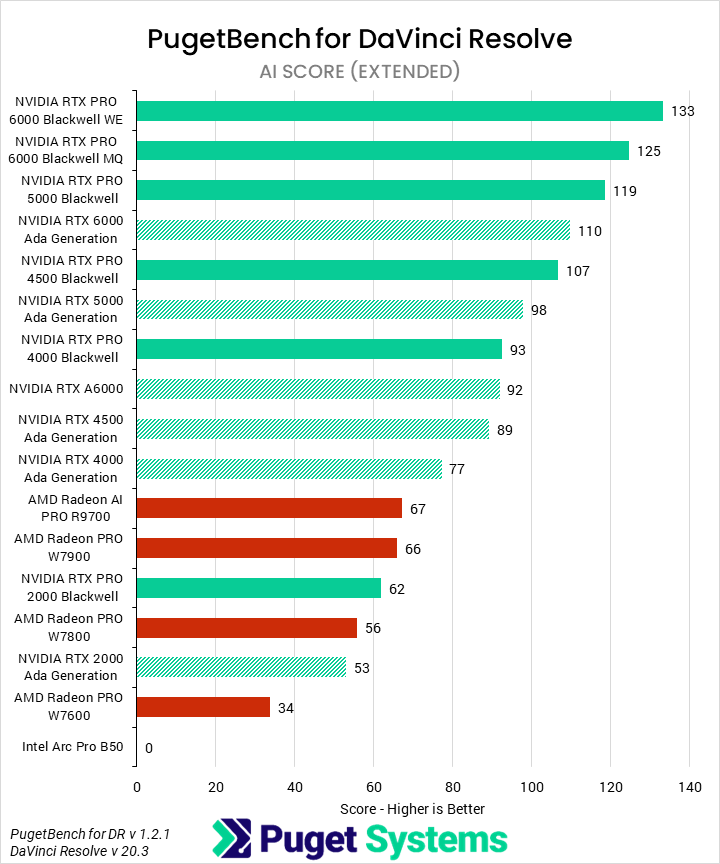
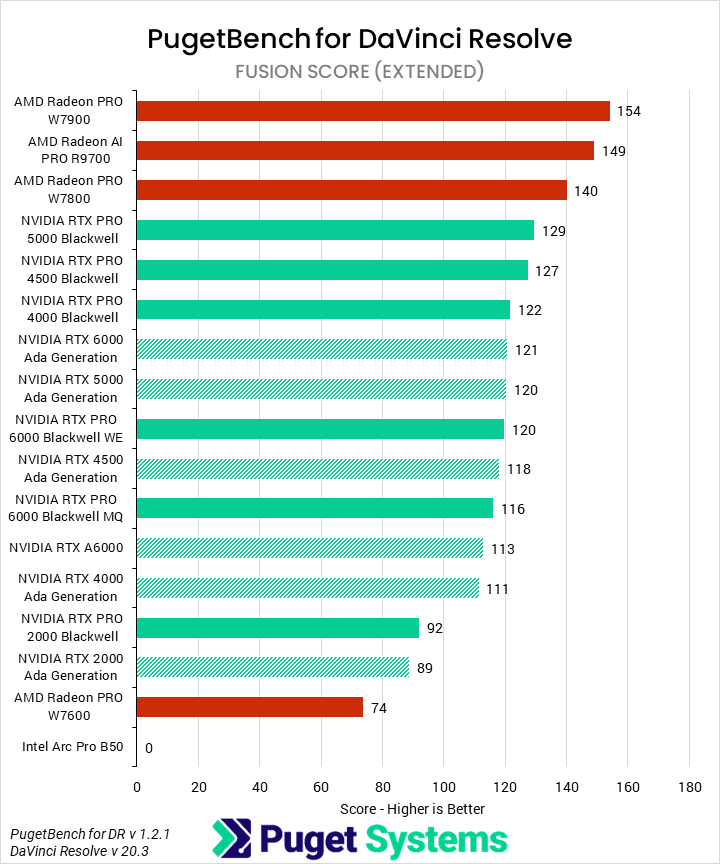
As we were not able to include Premiere Pro this time, DaVinci Resolve was the only non-linear editor we tested for this article. Starting with the Overall score (Chart #1), we found that the new NVIDIA Blackwell GPUs performed very well. All of them, save the low-end 2000, beat every other GPU we tested— except for the 6000 Ada, which only outperformed the 4000 Blackwell. Somewhat unusually, the generation improvements were very consistent at around 25%. AMD’s R9700 is fairly competitive as well, placing just behind the 4000 Blackwell, but the rest of AMD’s cards couldn’t keep up when factoring in price. Due to a known driver bug, Intel was unable to complete this benchmark.
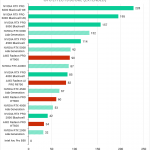
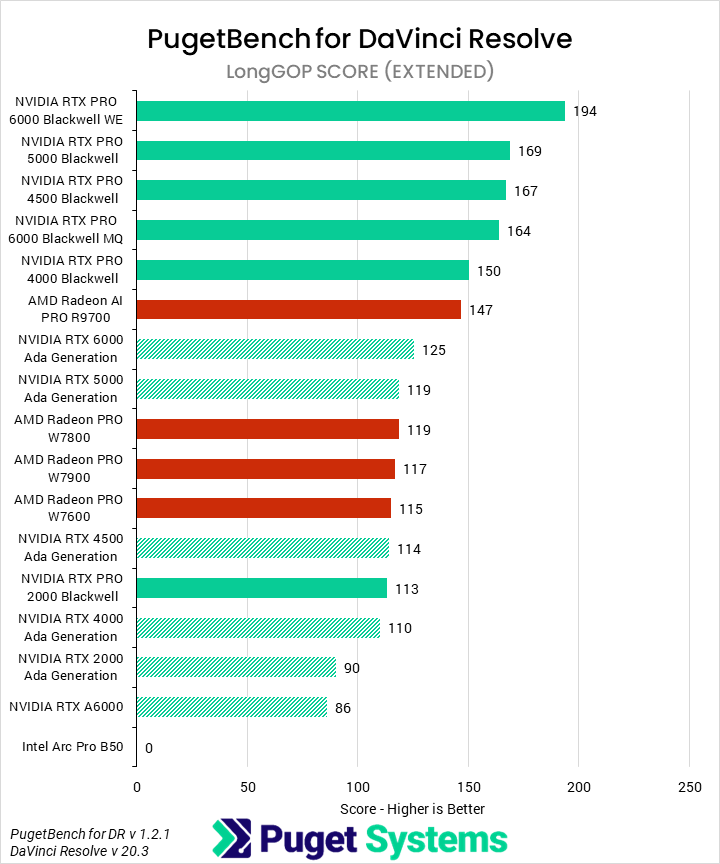
Moving on to LongGOP/Interframe tests (Chart #2), we saw the effects of NVIDIA’s new media encoders. The 6000 Blackwell topped the chart, followed by the 5000, 4500, and 4000. Only at this point did another family appear, the R9700 from AMD. The improvements for the Blackwell cards from their last-generation counterparts were about 50% on average, except on the very low end, as the 2000 Blackwell was only 25% faster than the 2000 Ada.
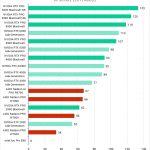
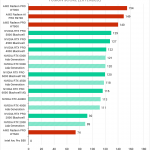
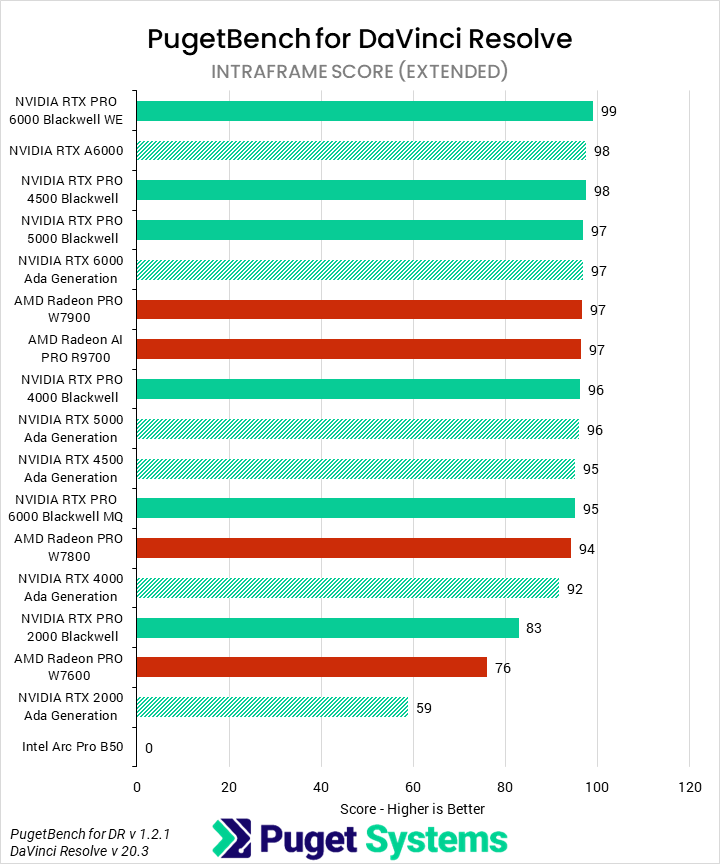
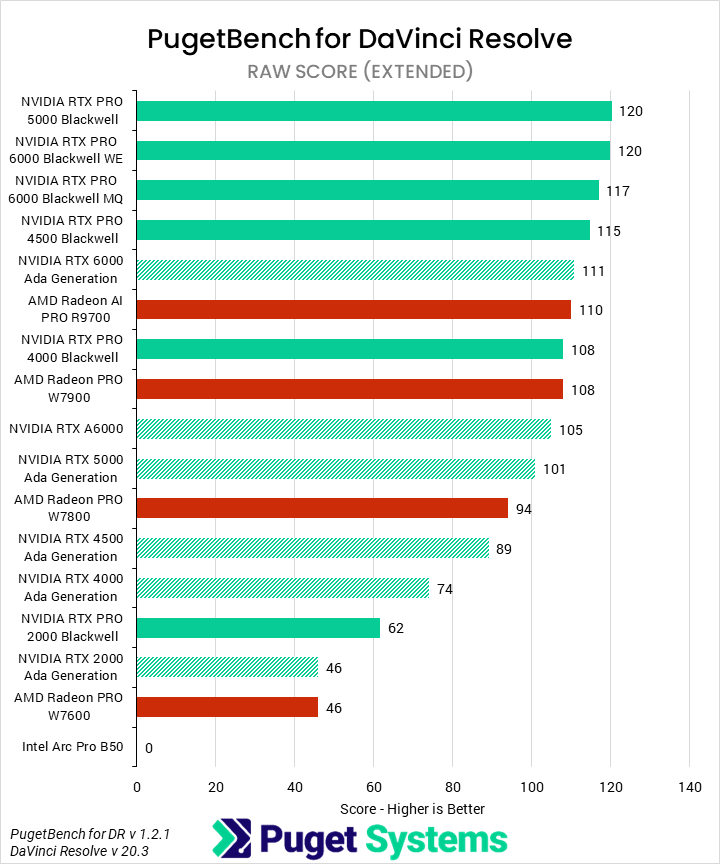
Intraframe codecs (Chart #3) are CPU-bound and relatively light. Due to this, virtually all the GPUs had identical scores until we got to the lower-end 2000 NVIDIA cards and the AMD W7600. RAW media (Chart #4) uses a mix of CPU and GPU, and so while we can see some scaling with faster GPUs, it is much weaker than other areas of DaVinci Resolve. Generational improvements for Blackwell were about 10-20%, which is solid but uninspiring given their increased prices.
Both GPU Effects and AI Effects (Charts #5 and #6) are far more sensitive to pure GPU compute than the rest of the application. In GPU Effects, NVIDIA was the fastest by a large amount. The Blackwell cards saw 70% generational improvements in this workflow, and even without them the Ada 6000 and 5000 still outperformed most of AMD’s lineup. AI results were very similar, but with smaller gen-on-gen margins of around 20%.
Fusion (Chart #7) is often the odd one out in our DaVinci Resolve testing. We found that AMD cards offered the best performance in this portion of Resolve, with the AI PRO R9700 20% faster than the closest NVIDIA GPU. However, besides some general groupings, most of the AMD cards performed fairly similarly, as did most of the NVIDIA cards. The overall difference between those two groups was also not huge, so we would not put too much stock in these results when choosing a GPU for Resolve.
Although DaVinci Resolve and Premiere Pro are not identical – they do not perform the same, even on the same workload with the same hardware – many of their trends are shared, as they utilize underlying hardware capabilities in similar ways. Thus, this can give us some insight into how these GPUs should perform in Premiere Pro. We generally expect that NVIDIA will be superior in GPU Effects, some portions of LongGOP media workflows (specifically 4:2:2 10-bit, which is hardware-accelerated on NVIDIA), and while working with RAW media.
Topaz Video AI
Image
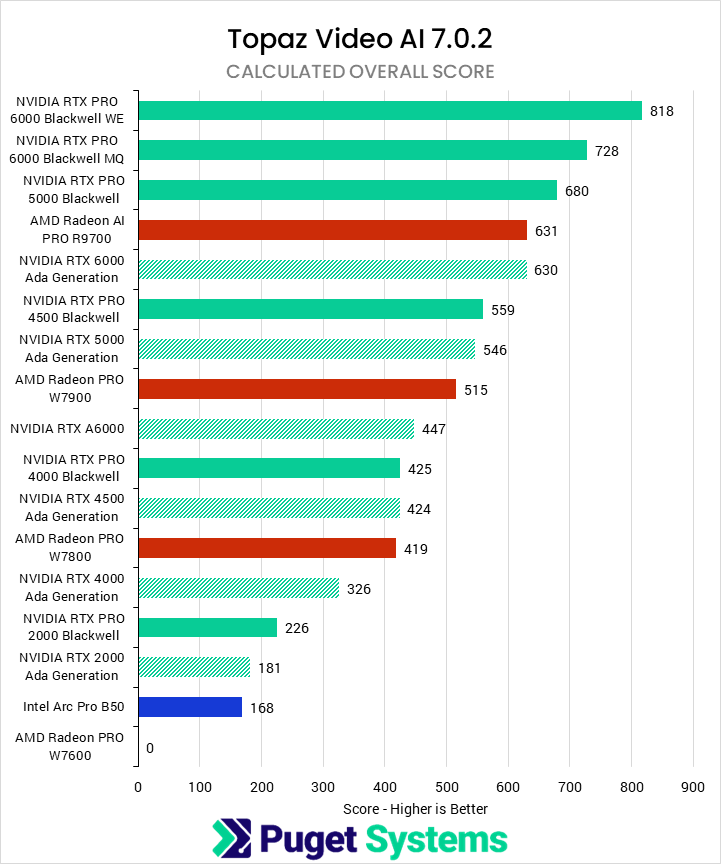
We tested Topaz Video AI using the built-in benchmark at 1080P and 4K, and then averaged those results together to produce an overall score. With this approach, we found that NVIDIA had solid generational gains, with the 6000 Blackwell scoring 30% higher than the 6000 Ada. The 5000 Blackwell was 25% faster than the 5000 Ada and 8% ahead of the R9700 and 6000 Ada. Moving down the stack, the Blackwell 4500 outperformed the Ada 4500 by 32%, putting it ahead of the W7900 and 5000 Ada. The 4000 and 2000 Blackwell round out the results with 39% and 25% improvements, respectively.
At the low end, Intel has a somewhat price-competitive offering, though it is still outclassed by a 2000 Blackwell. AMD is also competitive in the midrange with the R9700, but the rest of their cards no longer offer a good balance of price to performance compared to NVIDIA.
Overall, NVIDIA’s generational improvements are good, though most relevant at the low end. NVIDIA does not publish an official MSRP for its professional GPUs, but our sense is that much of the performance advantage of the 5000 and 6000 Blackwell cards is effectively accounted for by their respective higher prices.
Unreal Engine & Unigine
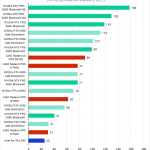
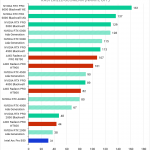
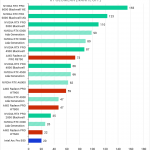
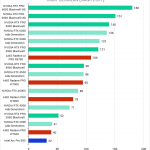
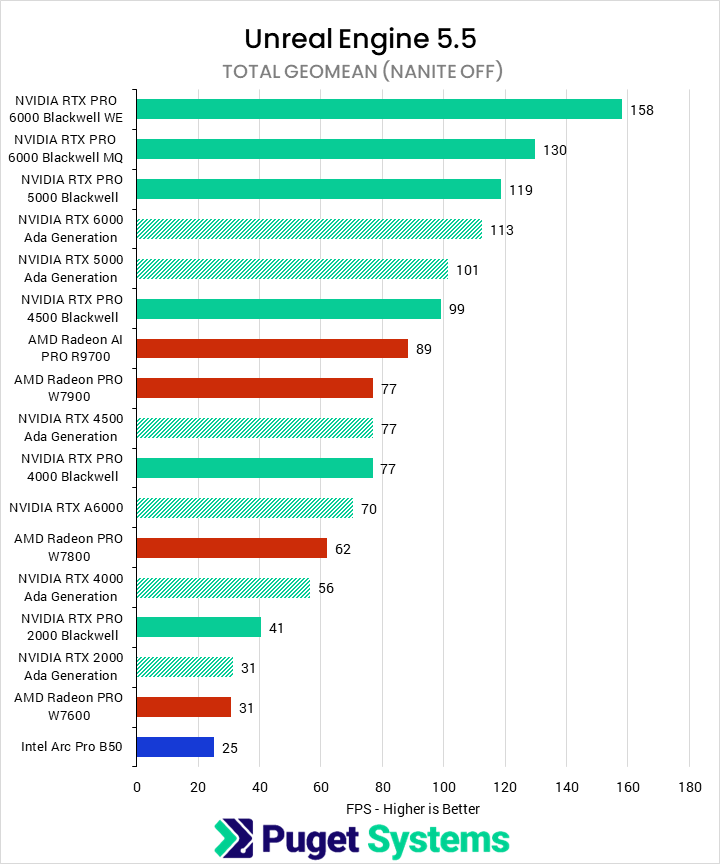
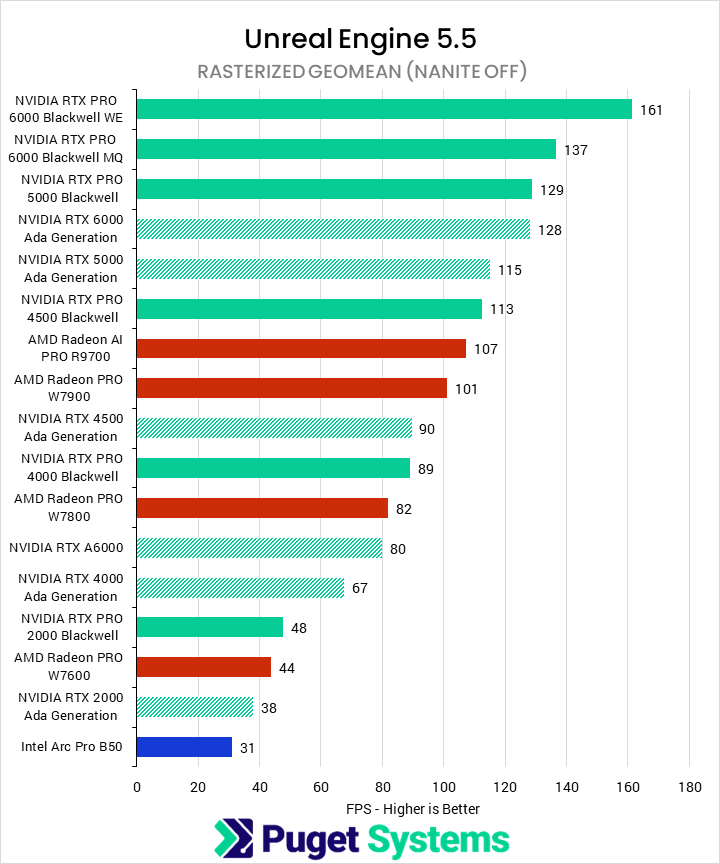
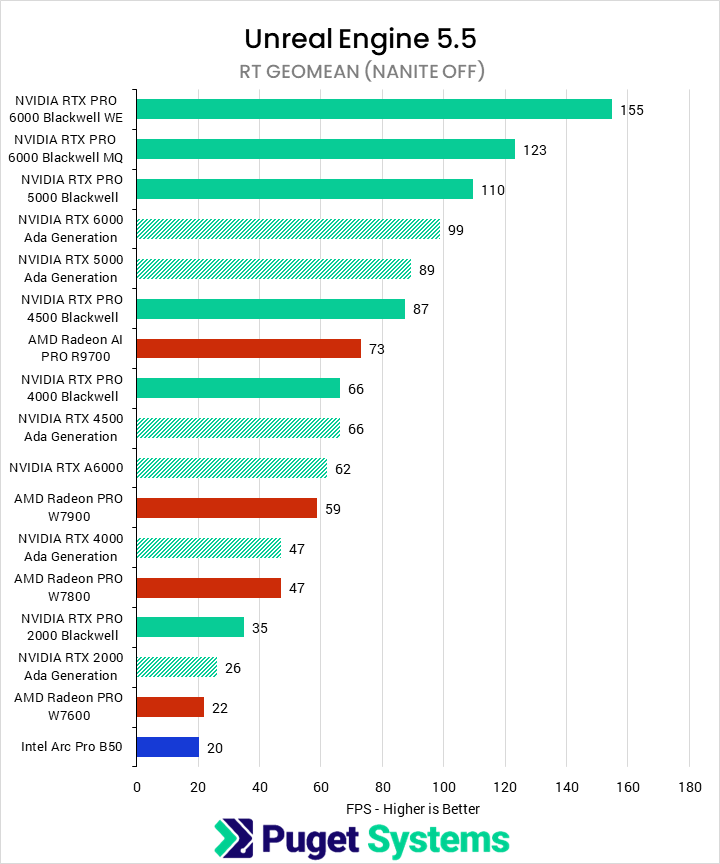
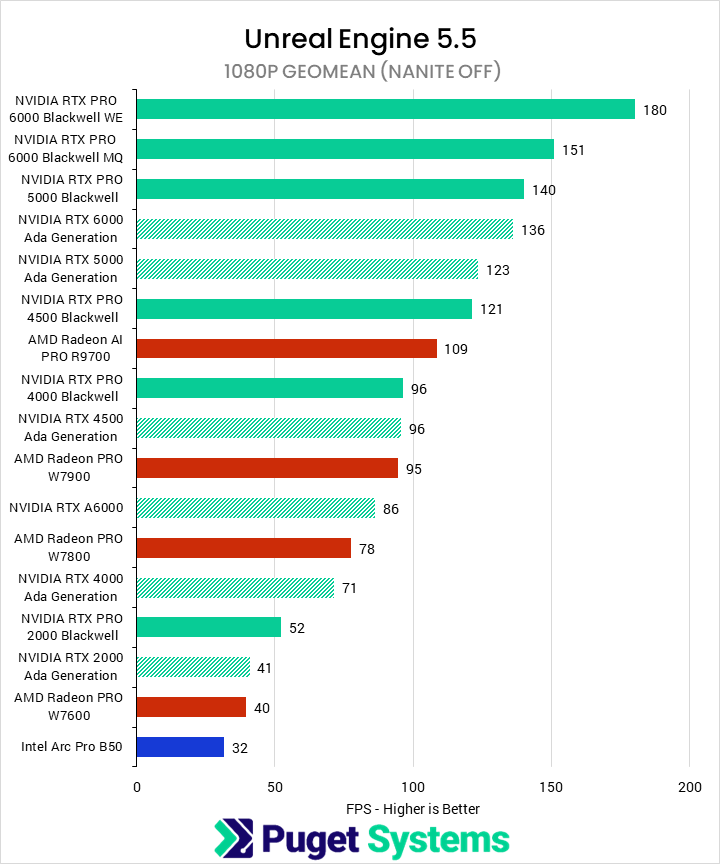
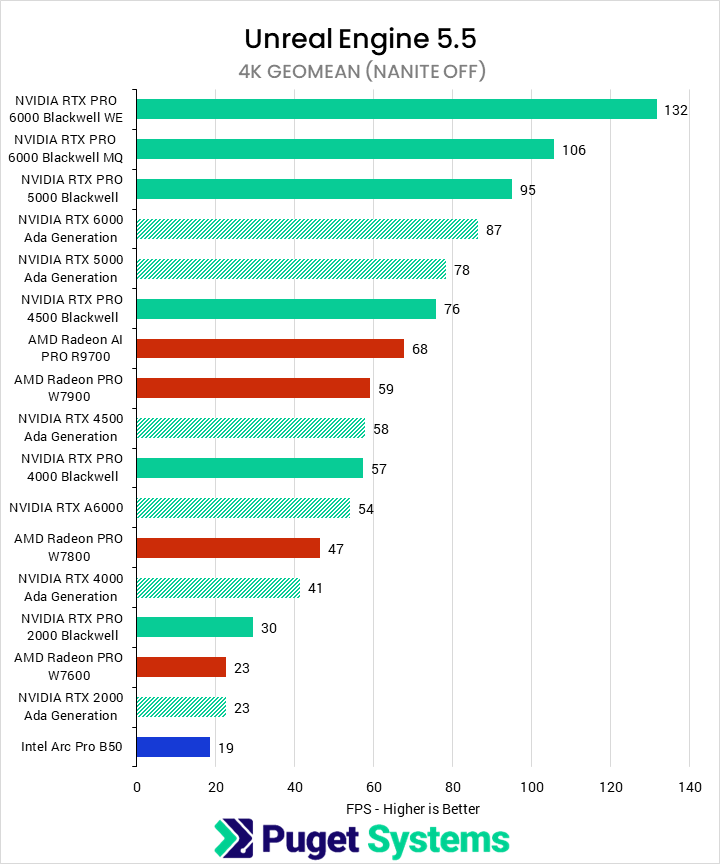
Our Unreal Engine benchmark consists of a variety of scenes, each run at three resolutions. We then computed a variety of results depending on what we wanted to investigate. In this case, we have compiled an overall score, scores with hardware RT enabled and disabled, and scores at 1080P and 4K.
The first chart shows the overall geomean FPS. We found that the new NVIDIA Blackwell cards outperformed the older Ada cards, as well as price-comparable AMD Radeon PRO W7000-series cards, by about 30%. Specifically, the 6000 Blackwell had a 40% performance improvement over the 6000 Ada, the 5000 an 18%, 4500 a 28%, 4000 a 38%, and 2000 a 32% gain over their equivalent Ada cards, respectively. The W7900, from AMD, only managed to match the 4500 Ada / 4000 Blackwell, which is a poor value. However, AMD’s R9700 did beat the 4000 Blackwell while costing slightly less.
We’re not going to deep-dive into all of the subscores we included, but do want to point out some trends. We found that AMD tended to offer the best relative performance in our rasterized tests, while falling behind NVIDIA in ray tracing. This was especially true for the W7000 cards, while the R9700 managed to preserve more of its performance in such workloads. We still wouldn’t recommend AMD’s cards for RT-heavy workflows, though. There wasn’t much we found interesting when breaking down by resolution. It seems as if AMD’s cards scale better with resolution than the lower-end NVIDIA cards, but at 4K, NVIDIA’s lead with the 6000 Blackwell is larger than at 1080P.
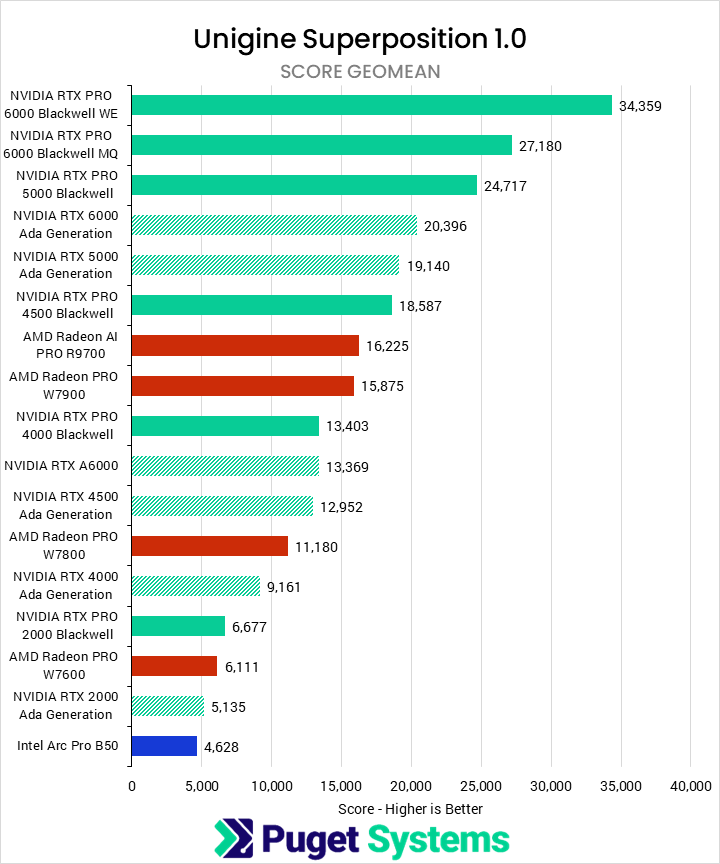
We don’t view Unigine as a great benchmark for content creation, as it doesn’t directly represent any real-world workflows. Nonetheless, it supports all of the GPUs we were testing with, and offers another real-time engine with which to examine performance. For our results, we took a geometric mean of the scores from a selection of runs at a variety of resolutions and quality settings. We found that NVIDIA saw generational uplifts of about 40% in this tool, while – aside from the R9700 – AMD and Intel struggled to have competitive cards.
Blender, V-Ray, Redshift, & Octane
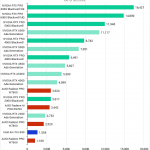
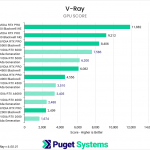
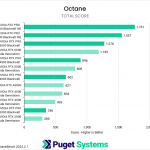
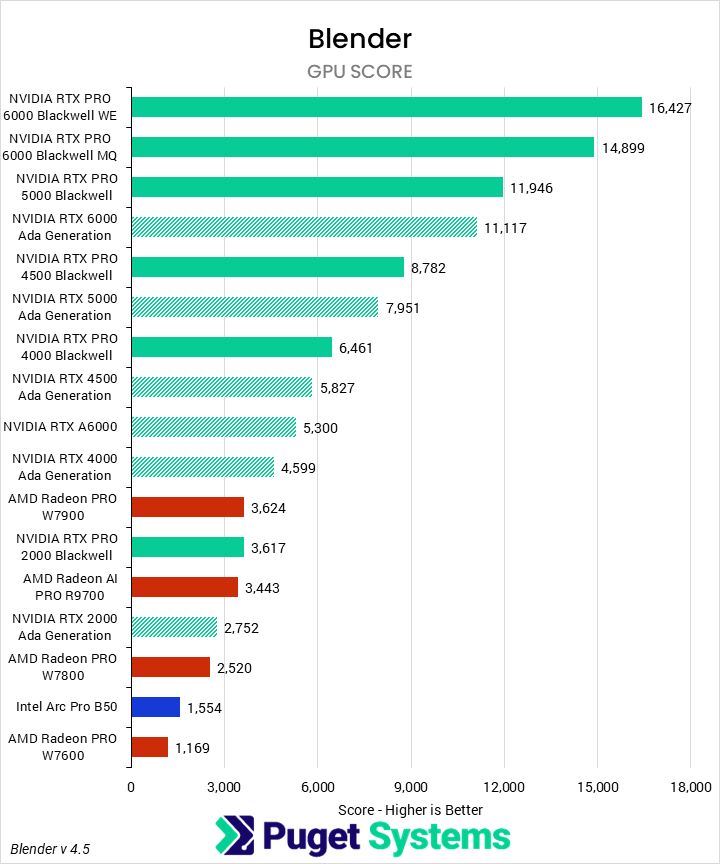
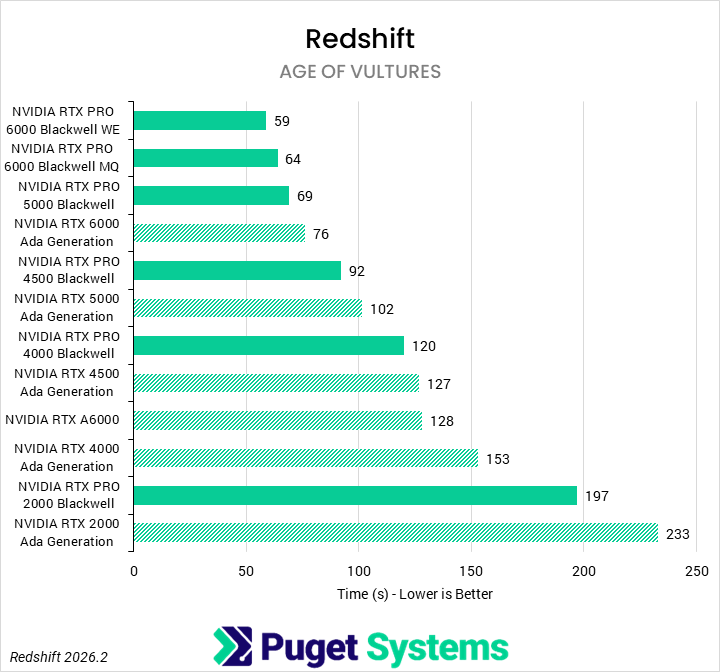
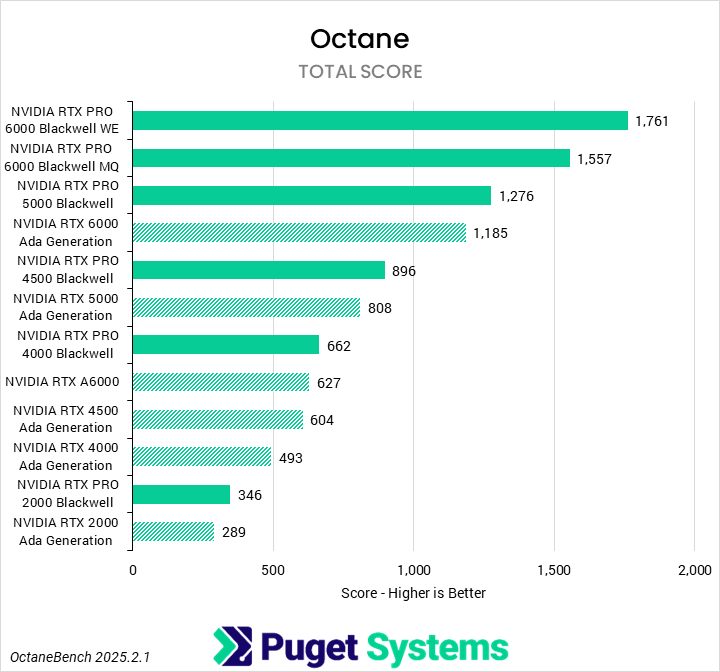
Next up are our offline rendering tests. Many of these applications only support NVIDIA GPUs, so most of our results will not have Intel or AMD represented. That being said, our first test was the Blender cycles benchmark (Chart #1), which does support all three manufacturers. However, we found that the new Blackwell GPUs offered substantial generational improvements over NVIDIA’s Ada cards, and absolutely smashed anything that AMD or Intel had to offer. At the top end, the 6000 Blackwell was 48% faster than the 6000 Ada, and those margins continue: 50% for the 5000 and 4500, 40% for the 4000, and 31% for the 2000, which even managed to match the Radeon PRO W7900. Blender may support all these GPU architectures, but NVIDIA is the only game in town.
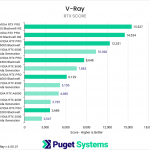
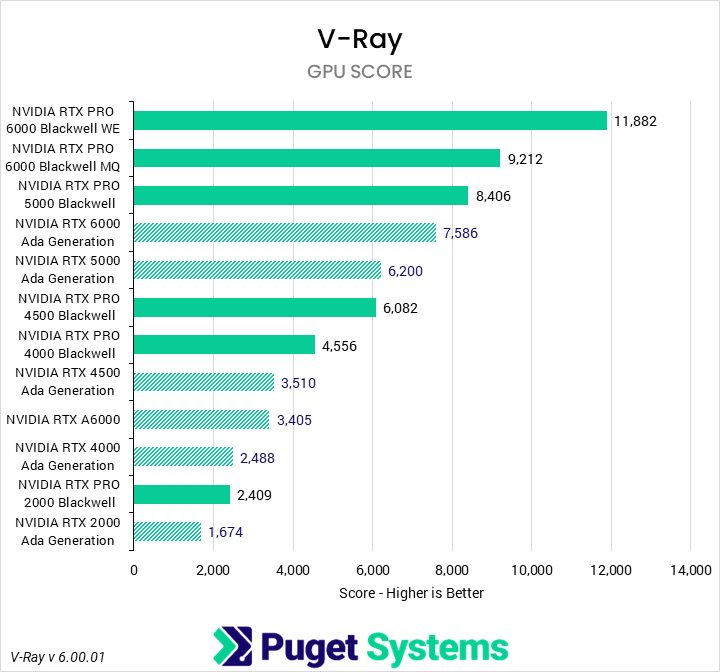
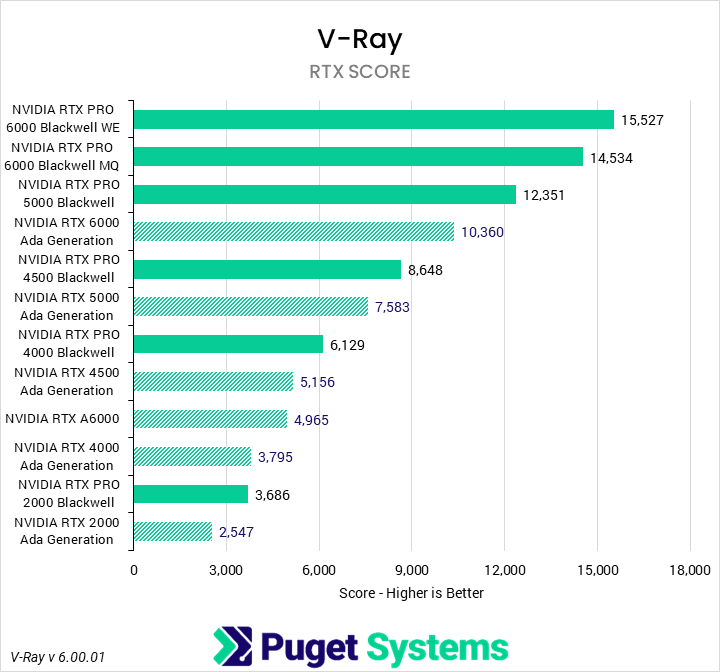
Moving on to the NVIDIA-exclusive benchmarks, we can see that the Blackwell PRO cards are similarly impressive in V-Ray GPU rendering (Chart #2). The 5000 Blackwell was 35% faster than the 5000 Ada and even beat the 6000 Ada by 11%. NVIDIA’s RTX PRO 4500 Blackwell saw even larger gains, with 73% gen-on-gen improvements over the 4500 Ada. Not to be outdone, the 4000 Blackwell is 83% faster than the 4000 Ada (or 30% faster than the 4500 Ada), and even the low-end 2000 beats the last-gen counterpart by 44%. V-Ray RTX (Chart #3) also favors the Blackwell cards, with most seeing 60% improvements over Ada.
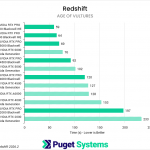
In Redshift, instead of looking at a somewhat abstract score, we just measure the raw time to render one scene. Except for the 2000, each of the new Blackwell cards manages to outperform the previous Ada card one step up the product stack. This results in fairly predictable time reductions of about 23%, except for the 2000 at 15%. These are solid improvements, though less impressive than we saw in Blender or V-Ray. However, even multi-GPU setups tend to plateau around the 60-second mark with this scene, so this could also just be due to a limitation in the rendering engine with the complexity of this workload.
Octane is the last of the four offline renderers we test, and is also NVIDIA exclusive. Much like Blender and V-Ray, the generational gains were huge: 49% for the 6000, 58% for the 5000, 43% for the 4500, 34% for the 4000, and 20% for the 2000. We did find it interesting that the performance advantage declined as we went down the stack, unlike in some of the other benchmarks, but the Blackwell cards are still far more performant than the Ada cards.
MLPerf Client
System Image
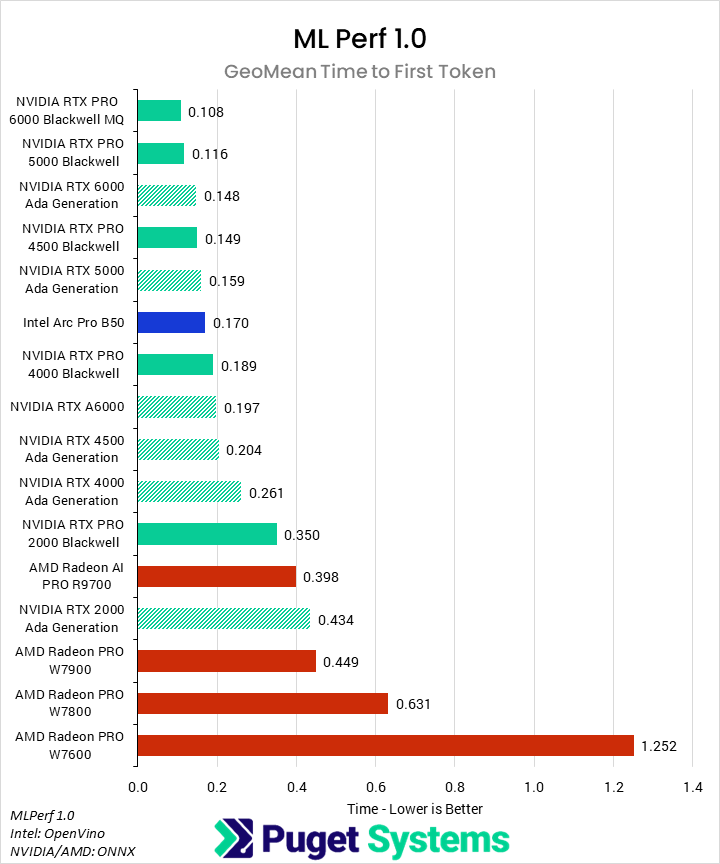
The final benchmark we looked at was MLPerf by MLCommons. Starting with the time to first token (Chart #1), we found that the Blackwell 6000s and 5000 lead the chart, barely beating out the 6000 Ada. The improvements here aren’t huge and also, in many cases, not all that relevant. Most users won’t likely notice an additional one or two tenths of a second delay in a response. Still, there is a point where it may become an inhibitor, and we saw that start to take place with the W7000 Radeon cards, with TTFTs in the half-second range. Surprisingly, Intel does very well in this metric, with a mean time to first token on par with a 4000 Blackwell.
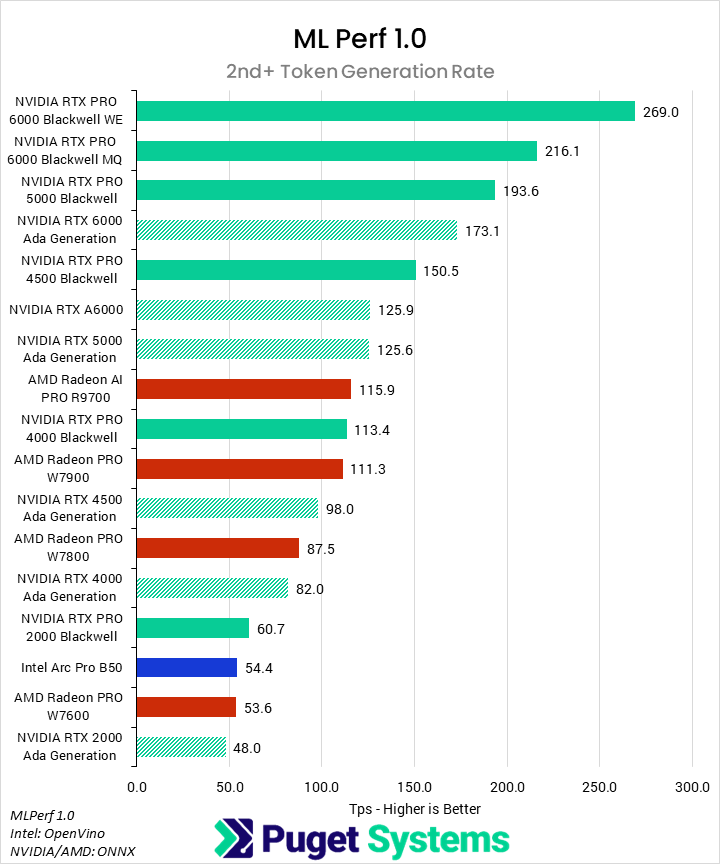
Unfortunately for Intel, the B50 is a much lower class of GPU, and so couldn’t keep up with the midrange cards in the second portion of the test. For 2nd+ token generation rate (Chart #2), Intel’s offering sits alongside the 2000 Blackwell and W7600, where it does offer a compelling value. This benchmark also showed the weakness of AMD’s RDNA3-based W7000 GPUs, which offered far worse performance per dollar than NVIDIA. This wasn’t the case for the AI PRO R9700, though, which features both better performance and more VRAM than the 4000 Blackwell, for less money. As for NVIDIA’s generational gains, the new Blackwell GPUs showed an average performance improvement of 50% over their Ada counterparts, except for the 2000 at 25%.
Conclusion
NVIDIA’s Blackwell series of professional workstation GPUs offers outstanding performance, improving on their last-generation Ada counterparts across the board and reinforcing NVIDIA as the go-to for professional content creation. We have been fascinated to see where Intel and AMD, especially their AI PRO R9700, were able to stay competitive—but right now, most of the support and optimization for these applications is focused on NVIDIA.
In traditional media and entertainment applications such as After Effects and DaVinci Resolve, we saw solid generational uplifts. After Effects slightly favored the Blackwell generation over Ada, and NVIDIA offered the best performance, but that application is largely GPU-agnostic unless using 3D workflows. Resolve is far more sensitive to GPU performance, and NVIDIA saw gen-on-gen improvements of about 25%, with larger or smaller margins depending on the specific workflow. AMD did have a competitive GPU in DaVinci Resolve, the R9700, which kept pace with the comparably-priced 4000 Blackwell in most areas.
NVIDIA continued to flex its superior support and optimizations in our rendering tests, with the other brands struggling to keep up, if they could even compete at all. Our real-time rendering benchmarks found that the Blackwell cards performed about 30% better on average than the Ada cards, and that the Radeon and Intel cards were notably behind at most price points. The R9700 was once again an exception to this, being relatively competitive with the 4000 Blackwell. Offline renderers virtually only support NVIDIA, which saw performance improvements ranging from 20% to 60%, depending on the specific engine and scenes being used.
Finally, in AI workloads, we found that NVIDIA was generally superior, with their Blackwell generation seeing 50% performance improvements in MLPerf and 30% in Topaz Video AI over Ada. In MLPerf, this meant that there was no real competition. However, Topaz has always had good support for AMD GPUs, and so the R9700 was able to keep up with comparably priced NVIDIA options.

Looking for a content creation workstation?
We build computers tailor-made for your workflow.

Don’t know where to start?
We can help!
Get in touch with one of our technical consultants today.