

Hardware Recommendations for AI Development
Our hardware recommendations for AI development workstations are based on research and hands-on testing our Puget Labs team has conducted over the years.
Machine Learning & AI System Requirements
Quickly Jump To: Processor (CPU) • Video Card (GPU) • Memory (RAM) • Storage (Drives)
There are many types of Machine Learning and Artificial Intelligence applications — from traditional regression models, non-neural network classifiers, and statistical models that are represented by capabilities in Python SciKitLearn and the R language, up to Deep Learning models using frameworks like PyTorch and TensorFlow. Within these different types of ML/AI models there can be significant variety as well. The “best” hardware will follow some standard patterns, but your specific application may have unique optimal requirements.
Our recommendations below are based on generalities from typical workflows, but our consultants can also provide more specific guidance, tailored to your circumstances. Please note that this is focused on ML/DL workstation hardware for programming model “training” rather than “inference”. The Q&A discussion below, with answers provided by Dr. Donald Kinghorn, will hopefully prove useful. We also recommend that you visit our HPC blog for more info.
Processor (CPU)
In the ML/AI domain, GPU acceleration dominates performance in most cases. However, the processor and motherboard define the platform to support that. There is also the reality of having to spend a significant amount of effort with data analysis and clean up to prepare for training on GPUs, and this is often done on the CPU. The CPU can also be the main compute engine when GPU limitations such as onboard memory (VRAM) availability require it.
What CPU is best for machine learning & AI?
The two recommended CPU platforms are Intel® Xeon® 600 and AMD Threadripper™ PRO. This is because both of these offer excellent reliability, can supply the needed PCI-Express lanes for multiple video cards (GPUs), and offer excellent memory performance in CPU space. We generally recommend single-socket CPU workstations to avoid issues with multi-CPU interconnects which can cause problems mapping memory to GPUs.
Do more CPU cores make machine learning & AI faster?
The number of cores chosen will depend on the expected load for non-GPU tasks. As a rule of thumb, at least 4 cores for each GPU accelerator is recommended. However, if your workload has a significant CPU compute component, then 32 or even 64 cores could be ideal. In any case, a 16-core processor would generally be considered minimal for this type of workstation.
Does machine learning & AI work better with Intel or AMD CPUs?
Brand choice in this space is mostly a matter of preference, at least if your workload is dominated by GPU acceleration. However, the Intel platform would be preferable if your workflow can benefit from some of the tools in the Intel oneAPI AI Analytics Toolkit.
Why are Xeon or Threadripper PRO recommended rather than more “consumer” level CPUs?
The most important reason for this recommendation with ML & AI workloads is the number of PCI-Express (PCIe) lanes that these CPUs support, which will dictate how many GPUs can be utilized. Intel Xeon W, Xeon 600, and AMD Threadripper PRO 7000/9000 Series all support enough PCIe lanes for three or four GPUs (depending on motherboard layout, chassis space, and power draw). This class of processors also supports 8 memory channels, which can have a significant impact on performance for CPU-bound workloads. Another consideration is that these processors are enterprise-grade and the overall platform is likely to be robust under heavy sustained compute load.

Looking for an AI development workstation?
We build computers that are tailor-made for your workflow and budget.

Need a server for large language models?
We design on-prem rackmount systems with up to eight NVIDIA GPUs.
Video Card (GPU)
Since the mid 2010s, GPU acceleration has been the driving force enabling rapid advancements in machine learning and AI research. For those interested in the history of that evolution, Dr. Don Kinghorn wrote a blog post which discussed the massive impact NVIDIA had in this field. The short story, though, is that graphics processors offer significant performance improvements over CPUs for deep learning and training AI models.
What type of GPU (video card) is best for machine learning and AI?
NVIDIA dominates for GPU compute acceleration, and is unquestionably the standard. Their GPUs will be the most supported and easiest to work with. There are other accelerators such as a few of the high-end AMD GPUs, some entry-level options from Intel, FPGAs from various manufacturers, and other emerging ML acceleration processors that have potential — but the availability and usability of some of those may preclude our recommending them.
What video cards are recommended for machine learning and AI?
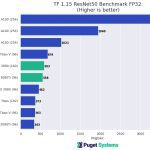
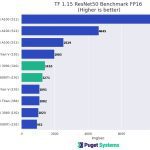
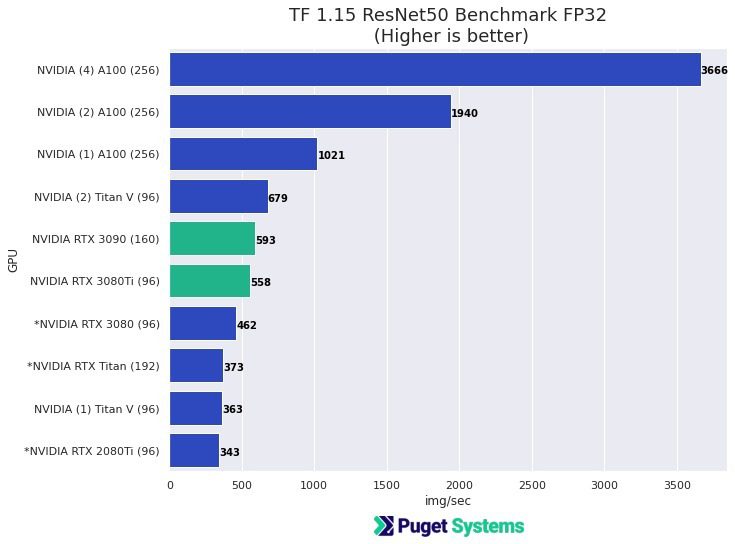
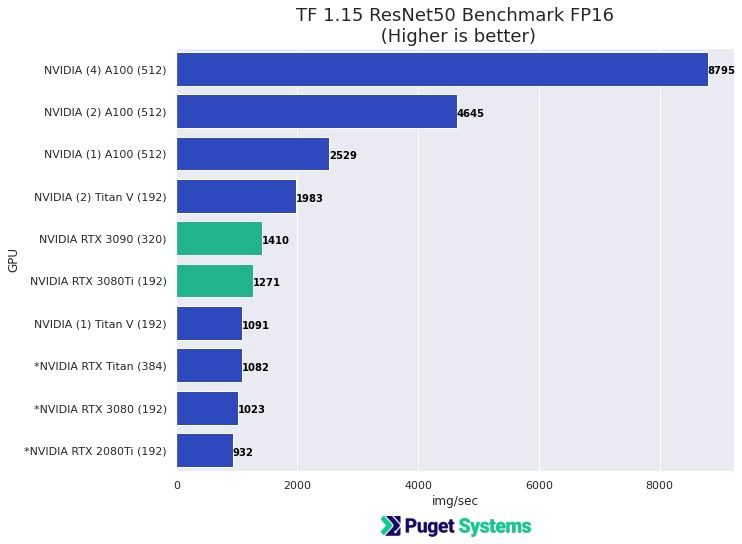
Almost any NVIDIA graphics card will work, with newer and higher-end models generally offering better performance. Fortunately, most ML / AI applications that have GPU acceleration work well with single precision (FP32). In many cases, using Tensor cores (FP16) with mixed precision provides sufficient accuracy for deep learning model training and offers significant performance gains over the “standard” FP32. Most recent NVIDIA GPUs have this capability, except for the lower-end cards.
Consumer graphics cards like NVIDIA’s GeForce RTX™ 5080 and 5090 give very good performance, but may be difficult to configure in a system with more than two GPUs because of their cooling design and physical size. “Professional” NVIDIA GPUs like the RTX PRO™ 5000 and 6000 are high quality, tend to have more onboard memory, and work well in multi-GPU configurations. The RTX PRO 6000 Blackwell in particular, with its 96GB VRAM, is recommended for work with data that has “large feature size” such as higher resolution images, 3D images, etc.
How much VRAM (video memory) does machine learning and AI need?
This is dependent on the “feature space” of the model training. Memory capacity on GPUs has been limited and ML models and frameworks have been constrained by available VRAM. This is why it’s common to do “data and feature reduction” prior to training. For example, images for training data are usually of low resolution since the number of pixels becomes a limiting critical feature dimension.
8GB of memory per GPU is considered minimal and could definitely be a limitation for lots of applications. 12 to 32GB is fairly common, and readily available on high-end video cards. For larger data problems, the 96GB available on the NVIDIA RTX PRO 6000 may be necessary — or potentially even multiple such cards, though that will be more necessary when deploying AI solutions or scaling them up.
Will multiple GPUs improve performance in machine learning and AI?
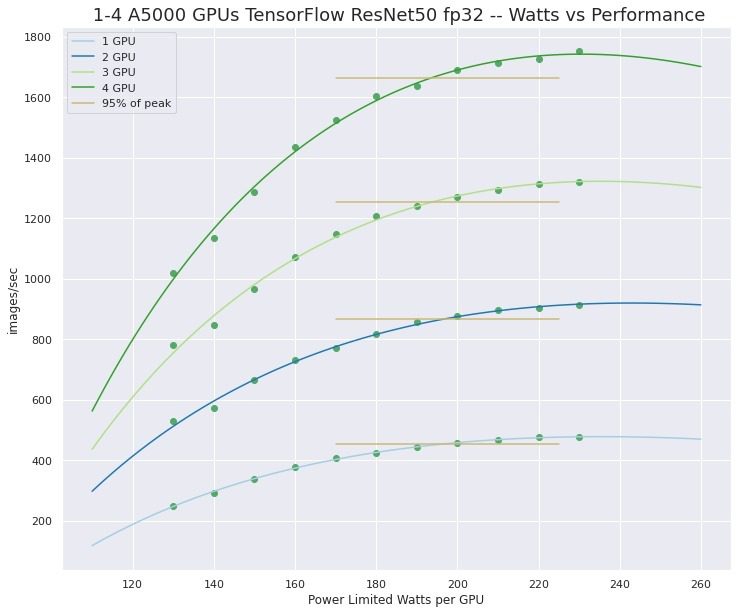
Generally yes. We default to multiple video cards in some of our recommended configurations, but the benefit this offers may be limited by the development work you are doing. Multi-GPU acceleration must be supported in the framework or program being used. Fortunately, multi-GPU support is now common in ML and AI applications — but if you are doing development work without the benefit of a modern framework, then you may have to cope with implementing it yourself.
Also keep in mind that a single GPU like the NVIDIA GeForce RTX 5090 or RTX PRO 6000 Blackwell can provide significant performance and may be enough for your application. Having 2, 3, or even 4 GPUs in a workstation can provide a surprising amount of compute capability and may be sufficient for even many large problems. It is also recommended to have at least two GPUs when doing development work to enable local testing of multi-GPU functionality and scaling — even if the “production” jobs will be off-loaded to separate GPU compute clusters.
Do machine learning and AI run better on NVIDIA or AMD?
A lot of work has been done recently to make AMD GPUs usable in this domain, and Intel has entered the field as well, but realistically NVIDIA dominates with more than a decade of successful, intense research and development work behind their GPUs for compute.
Do machine learning and AI need a “professional” video card?
No. NVIDIA GeForce RTX 5080 and 5090 are excellent GPUs for this type of workload. However, due to cooling and size limitations, the RTX PRO models are best for configurations with three or four GPUs. Historically, modern ML/AI was developed on NVIDIA gaming GPUs and they are still very common for development workstations.
Do I need NVLink when using multiple GPUs for machine learning and AI?
NVIDIA’s NVLink provides a direct, high-performance communication bridge between a pair of GPUs. Whether this is beneficial or not is problem-type dependent. For many types of models it is no longer needed, and in fact few NVIDIA GPUs even support it anymore.
Looking for an AI development workstation?
We build computers that are tailor-made for your workflow.

Don’t know where to start? We can help!
Get in touch with one of our technical consultants today.
Memory (RAM)
Memory capacity and performance on the CPU side of an ML/AI system is, of course, dependent on the jobs being run, but can be a very important consideration — and there are some minimal recommendations.
How much RAM does machine learning and AI need?
The first rule of thumb is to have at least double the amount of CPU memory as there is total GPU memory in the system. For example, a system with 2x GeForce RTX 5080 GPUs would have 32GB of total VRAM — so the system should be configured with at least 64GB.
The second consideration is how much data analysis will be needed. It is often necessary (or at least desirable) to be able to pull a full data set into memory for processing and statistical work. That could mean BIG memory requirements, as much as 1TB of system memory (on rare occasions even more). This is one of the reasons we advise using workstation and server-grade processors: they support substantially more system memory than consumer chips.
Storage (Hard Drives)
Storage is one of those areas where going with “more than you think you need” is probably a good idea. Minimum requirements here are similar to CPU memory requirements. After all, your data and projects have to be available!
What storage configuration works best for machine learning and AI?
It’s recommended to use fast NVMe storage whenever possible, since data streaming speeds can become a bottleneck when data is too large to fit in system memory. Staging job runs from NVMe can reduce job run slowdowns. NVMe drives are commonly available up to 8TB capacity.
Together with the fast NVMe storage for staging jobs, more traditional SATA-based SSDs offer larger capacities which can be used for data that exceeds the capacity of typical NVMe drives. 8TB is commonly available for SATA SSDs.
Platter drives can be used for archival storage and for very large data sets. 20TB+ capacities are now available.
Additionally, all of the above drive types can be configured in RAID arrays. This does add complexity to the system configuration and may use up slots on the motherboard which would otherwise support additional GPUs — but can allow for storage space in the 10 to 100s of terabytes.
Should I use network attached storage for machine learning and AI?
Network-attached storage is another consideration. It’s become more common for workstation motherboards to have 10Gb Ethernet ports, allowing for network storage connections with reasonably good performance without the need for more specialized networking add-ons.
Looking for an AI development workstation?
We build computers that are tailor-made for your workflow.
Don’t know where to start? We can help!
Get in touch with one of our technical consultants today.